Upgrading Joomla 5 to 6
|
This content was generated with the assistance of AI and should be verified against the official Joomla documentation before being relied on in production. This sub-section’s Joomla bibliography lists the reference material consulted while preparing these pages. |
Moving a site from Joomla 5 to Joomla 6 is the first major upgrade for which the project ships a dedicated
compatibility plugin, a documented rescue path and an automated check in the command line updater. It is also the
upgrade where requirements rise (PHP 8.3 or later) and where deprecated code from the 4.x and 5.x series is finally
removed. This page, checked on 2026-10-30 and written against Joomla 6.2.x on PHP 8.3 or later, walks through
the whole operation for the fictitious Tallpine Hiking Club site (package pkg_tallpine, component com_tallpine,
child template cassiopeia_tallpine): planning, requirements, the extension compatibility test, the plugin swap,
the update itself, the checks afterwards, what to do when the site does not come back, and the list of everything that
6.0 removed.
Joomla 6.2 is the current release; the 5.x series is in its security-only period (5.4.10 was the last bugfix release, and security fixes continue until 2027-10-12), so a 5.4 site has about a year of support left and no reason to wait for the last month. A site that is still on 4.x or 3.x must first reach 5.4.x; see Upgrading Joomla 4 to 5 and Migrating from Joomla 3. The mechanics of the Joomla Update component, update channels, TUF-signed metadata and Automated Core Updates are covered in Updating Joomla and Automated Core Updates and are not repeated here; the error-handling and legacy-class details behind the removals are in Error Handling and Legacy APIs.
The upgrade path in one picture
Joomla ships a major version every two years, each major having four minors, and the fourth minor (x.4) is a bridge release: it adds no features and exists so that the next major can be applied on top of it. The next major appears on the same day as the bridge, which is why 5.4.0 and 6.0.0 were both published in October 2025. The rule that follows is that a major upgrade starts only from the latest bridge patch release.
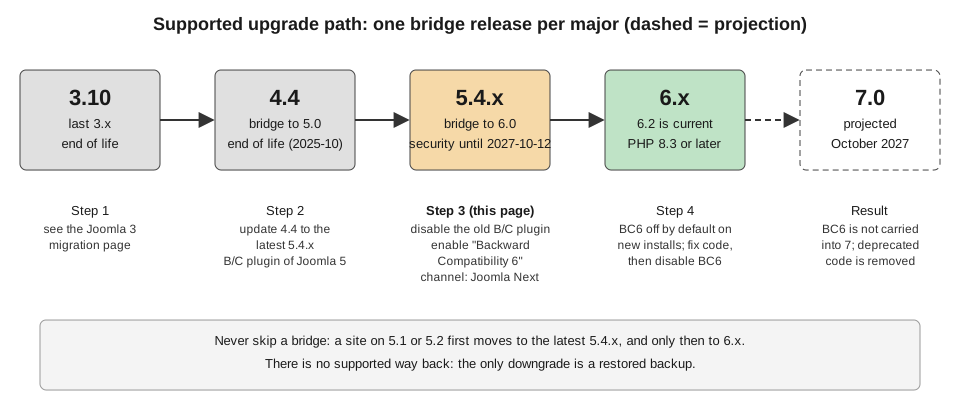
The supported chain is therefore 3.10, then 4.4, then 5.4, then 6.x. Skipping a bridge is not supported: a site on 5.1 updates to the latest 5.4.x first, and only that release offers 6.x. Downgrading is not supported at all; the only way back is a backup. The release policy, dates and support windows are in Versions, Release Cycle and Support.
What changes between 5.4 and 6.0
| Area | Change |
|---|---|
Platform |
PHP 8.3.0 is the minimum (Joomla 5 allowed PHP 8.1), and PHP 8.4 is recommended. The database minimums are given in the next section. |
Compatibility |
The plugin Behaviour - Backward Compatibility 6 (BC6) is installed in 5.4 and in 6.x. It is mandatory for the upgrade. The older Behaviour - Backward Compatibility plugin, introduced in 5.0 to ease the move from 4.x, has to be disabled before the upgrade starts. |
Removed code |
The CMS |
Update service |
Core updates have been TUF-verified since 5.1. Automated Core Updates exist since 5.4 and 6.0 but handle minor, patch
and security releases only; the major step is always started by an administrator or by |
Default template |
Cassiopeia remains the frontend template, and 6.0 adds |
Extensions |
Extensions need a Joomla 6 compatible release, or must work with BC6 enabled. The core |
Older books and tutorials describe earlier jumps. Developing Extensions for Joomla! 5 (Packt, 2023) was written for 5.0 and PHP 8.2 and knows nothing about BC6, the 6.0 removals or the bridge procedure; Joomla! 4 Masterclass (Packt, 2023) targets 4.x, which reached end of life in October 2025. For this upgrade only the User Guide and the Developer Manual migration notes are authoritative.
Requirements
PHP and the database
Joomla 6 needs PHP 8.3.0 or later and recommends PHP 8.4. A site on Joomla 5 that runs PHP 8.1 or 8.2 is simply not offered the upgrade: the User Guide states that when the server does not qualify, the Joomla 6 option does not appear in Joomla Update. Check System → System Information before anything else. The full table is in Requirements and Hosting; the values relevant to this upgrade follow.
| Software | Recommended | Supported | Enforced minimum (Developer Manual) |
|---|---|---|---|
PHP |
8.4 |
8.3.0 |
8.3.0 |
MySQL |
8.4 |
8.0.13 |
8.0.13 |
MariaDB |
12.0 |
10.6 |
10.4 |
PostgreSQL |
17.6 |
14.0 |
12.0 |
The two official sources disagree about the MariaDB and PostgreSQL floors. The technical requirements page of the Developer Manual lists 10.4 and 12.0 as the minimums the installer enforces and 10.6 and 14.0 as supported, while the User Guide upgrade page names MariaDB 10.6.x and PostgreSQL 14.0 as the requirements. The safe reading is to plan for the higher numbers: a database between the two sets of values runs at your own risk, and neither MariaDB 10.4 nor PostgreSQL 12 receives upstream fixes any longer. Moving a site between MySQL-family and PostgreSQL databases is not a supported operation in any Joomla version, so the database engine chosen for 5.x stays.
PHP extensions and memory
The PHP modules are the same as for Joomla 5 (json, simplexml, dom, zlib, gd and one database driver:
mysqlnd, pdo_mysql or pdo_pgsql), with mbstring recommended and a memory limit of 256 MB or more. The
package download and extraction during a major update are the most memory-hungry moment in the life of a site, so a low
memory_limit is the commonest reason for an update that stops halfway.
Planning
The User Guide upgrade page insists on planning before touching production, and the preparation stage is where most upgrades are won or lost.
-
Update the core to the latest 5.4.x on the Default channel. Every earlier 5.x release must reach 5.4 first.
-
Inventory the extensions. Open System → Manage → Extensions and list every component, module, plugin, library, template and package that is not part of the core. For the Tallpine site that is
pkg_tallpine(withcom_tallpine,mod_tallpine_nexthikes, and theplg_content_tallpine_conditions,plg_webservices_tallpine,plg_task_tallpine_trailsyncandplg_console_tallpineplugins), the templatecassiopeia_tallpine, a backup tool and a handful of third-party extensions. -
Ask each developer. Check the vendor website and the compatibility badges on the Joomla Extensions Directory for Joomla 6 support. The outcome is one of four: compatible without BC6, compatible only with BC6, appears to work but is subtly broken, or breaks the whole site.
-
Test on a copy. Restore a backup to a subdomain or a local environment and run the real upgrade there (below).
-
Plan the rollback. Decide in advance who has database access, because the recovery described later in this page depends on it.
The pre-update check is a rough guide only
When the Joomla 6 package is offered, Joomla Update shows a pre-update check with three groups of results: required settings, recommended settings and extensions. The extension group sorts installed extensions into those that need an update, those that publish no update information and those reporting that no update is needed. The User Guide calls the result "not a reliable source of truth": the lists come from the update servers each extension declares, so an extension whose vendor never published version information appears in the wrong group, and an extension that shows no green check may nevertheless work. Treat the screen as a prompt for questions, never as proof of compatibility. The sources of truth are System → Manage → Extensions (versions, enabled state), the developer documentation and your own test on the copy.
Testing on a copy
The User Guide describes two practical trials:
-
Restore the production backup to a subdomain, turn on Debug System, run the upgrade, and disable any extension that throws errors. This tests the real data.
-
Install a clean Joomla 6 on a subdomain with BC6 enabled, install the extensions and exercise them. This separates problems caused by the extension from problems caused by the data.
For the Tallpine club the second trial runs in the Docker Compose stack described in Local Development with Docker; the first needs a restore of a backup, which doubles as a restore drill (see Backups and Recovery).
Step-by-step procedure
The numbered procedure below follows the User Guide, with the underlying mechanics added. Run it first on the copy and then, unchanged, on production.
1. Back up
Take a full backup of the files and the database and keep it outside the web root. The guide asks for two backups: one before any change, and one after the debug setting is on and the extension set is final. Restoring the second backup on a spare host is part of the procedure, not an optional extra, because an untested backup is not a backup.
2. Update, disable or remove extensions
Update every extension that has a Joomla 6 compatible release. Uninstall or disable what is incompatible or abandoned.
For pkg_tallpine the 6.x line is published through the update server described in
Update Servers and the JED; the update entry declares the target
platform and the PHP minimum:
<updates>
    <update>
        <name>Tallpine Hiking Club package</name>
        <description>Trails, events and member pages for the Tallpine Hiking Club</description>
        <element>pkg_tallpine</element>
        <type>package</type>
        <version>3.0.0</version>
        <client>0</client>
        <downloads>
            <downloadurl type="full" format="zip">https://updates.example.org/tallpine/pkg_tallpine-3.0.0.zip</downloadurl>
        </downloads>
        <targetplatform name="joomla" version="6\.[0-9]" />
        <php_minimum>8.3</php_minimum>
    </update>
    <update>
        <name>Tallpine Hiking Club package</name>
        <description>Trails, events and member pages for the Tallpine Hiking Club</description>
        <element>pkg_tallpine</element>
        <type>package</type>
        <version>2.1.0</version>
        <client>0</client>
        <downloads>
            <downloadurl type="full" format="zip">https://updates.example.org/tallpine/pkg_tallpine-2.1.0.zip</downloadurl>
        </downloads>
        <targetplatform name="joomla" version="5\.[0-9]" />
        <php_minimum>8.1</php_minimum>
    </update>
</updates>
Source: Joomla Manual: Update server
Two update entries, one per core series, let a 5.4 site stay on the 2.x line of the package until it is itself on Joomla 6, at which moment the same update server offers 3.0.0. That is the usual way for an extension vendor to publish a 5.4 and a 6.x line.
3. Turn on debugging
Set Debug System to Yes in System → Global Configuration → System, so that a failure produces a message with a class name instead of a blank page. The User Guide later says to turn debug off under the Server tab; the setting itself lives on the System tab of Global Configuration, so check there. Debug mode is for the upgrade window only; leaving it on in production prints internals to visitors and is also a security problem (see Debugging).
4. Second backup and restore test
Repeat the backup now that the extension set is final, and restore it on a spare host. If the restore fails, stop here.
5. Choose the Joomla Next channel
Open System → Update → Joomla and click Options in the toolbar. Set Update Channel to Joomla Next and use Save & Close. If the server qualifies, the update is now listed with the pre-update check, whose sidebar has the entries Required Settings, Recommended Settings and Extensions. The channel stays Joomla Next only until the update succeeds: the core resets it to Default by itself afterwards. Automated Core Updates require the Default channel, so a site left on Joomla Next by mistake does not receive them.
6. Swap the compatibility plugins
This is the step that is easiest to forget and the one that causes most failed upgrades. Two plugins in the Behaviour group are involved:
| Plugin | State required before the update | Purpose |
|---|---|---|
Behaviour - Backward Compatibility (element |
Disabled |
Serves Joomla 5 extensions that still use code from Joomla 4. Introduced in 5.0. It is not part of Joomla 6. |
Behaviour - Backward Compatibility 6 (element |
Enabled |
Serves Joomla 6 extensions that still use code from Joomla 5. Installed and enabled by Joomla 5.4 (where it does nothing), installed but disabled on a fresh Joomla 6 installation. |
Open System → Manage → Plugins, filter by the Behaviour type, disable Behaviour - Backward Compatibility and check that Behaviour - Backward Compatibility 6 is enabled. The two cannot both be on during the upgrade. If the site breaks as soon as the old plugin is disabled, enable it again and fix the cause while still on 5.4: failing on 5.4 costs nothing, while failing in the middle of a major update can leave a partial upgrade.
The command line updater enforces this: core:update checks that the old plugin is disabled and the new one enabled
for a major upgrade and prints an error for each violation, exiting with code 1 (see
Upgrading from the command line).
7. Run the update
Tick the acknowledgement checkbox for potentially incompatible extensions, confirm the dialog, confirm once more that a tested backup exists, and click Update. Wait for the success screen. Do not close the tab, do not reload and do not run the update from a connection that may drop; on a large site the CLI route is safer.
8. Check the result
-
The administrator shows "Joomla 6" at the top right of the page.
-
Test the frontend: the home page, an article with custom fields, a menu item of the Tallpine trail list, a search and the login form.
-
Test the backend: open every component, edit and save items, run the installer for a throwaway extension, open System → Maintenance → Database and apply Update Structure if a problem is reported.
-
Turn Debug System off.
-
Rebuild or repair the Smart Search index when searches return nothing (the 6.0 notes list Smart Search changes), see Smart Search.
-
Re-check each extension, read the PHP error log and read the Joomla action log.
Upgrading from the command line
A site with a long-running update is better served by the console. The Tallpine staging host runs the following script inside the Compose project, after the database dump:
#!/usr/bin/env bash
# upgrade-tallpine-to-6.sh: run on the staging host in the project directory, after a database dump
set -euo pipefail

JOOMLA="docker compose exec -T joomla php cli/joomla.php"

# 1. we must be on the latest 5.4.x
$JOOMLA core:update:check

# 2. the plugin swap is done beforehand in System > Plugins (old plugin off, BC6 on);
#    core:update checks it again and stops with exit code 1 if it is wrong

# 3. move to the Joomla Next channel and run the update
$JOOMLA core:update:channel next
$JOOMLA core:update

# 4. database structure, obsolete files, caches
$JOOMLA maintenance:database --fix
$JOOMLA update:joomla:remove-old-files
$JOOMLA cache:clean
Source: Joomla User Guide: Using the CLI
core:update does not take a
backup, does not ask for confirmation and does not run the pre-update extension check, so those remain the operator’s
tasks. Exit code 0 means success, 1 means a precondition failed (no update, schema errors or the plugin state) and 2
means the update itself failed. The command resets the channel from next to default after a successful update. Verify
the command names with php cli/joomla.php list on the installed version; the full table is in
Updating Joomla and Automated Core Updates.
What BC6 provides
The plugin Behaviour - Backward Compatibility 6 (folder behaviour, element compat6, directory
plugins/behaviour/compat6) keeps code written for Joomla 5 running on Joomla 6. As a Behaviour plugin it loads before
all other plugins, which is what lets it register classes and constants early enough. It is a final class that extends
CMSPlugin and implements SubscriberInterface. It is a transition aid, not a platform: it is not carried into
Joomla 7, which gives extension developers a window of about two years (the 6.x series) to finish their work.
| Parameter | Default | Effect |
|---|---|---|
Classes Aliases ( |
No |
Loads the class map that registers the roughly 450 legacy |
Include Deprecated Classes ( |
Yes |
Makes the classes that left the core available again: the CMS |
Removed Assets ( |
Yes |
Registers empty stubs for Web Asset Manager assets that existed in Joomla 5 and are gone, so code that asks for them does not throw an exception. |
The plugin also defines JPATH_PLATFORM so that old class files starting with a guard on it still load. A subtle
consequence is that code which checks defined('JPATH_PLATFORM') appears to work while BC6 is on and fails with a blank
page once it is off.
Testing with BC6 off
BC6 is installed but disabled on a new Joomla 6 site, so a clean installation is the best compatibility test: if
pkg_tallpine works there, it does not depend on BC6. The procedure for isolating the dependency is in
Error Handling and Legacy APIs. An extension that does need BC6
should detect that and say so; a small check shows the state to an administrator:
<?php

namespace Tallpine\Plugin\System\Tallpine\Extension;

use Joomla\CMS\Language\Text;
use Joomla\CMS\Plugin\CMSPlugin;
use Joomla\CMS\Plugin\PluginHelper;
use Joomla\Event\SubscriberInterface;
use Joomla\CMS\Event\Application\AfterDispatchEvent;

\defined('_JEXEC') or die;

final class Tallpine extends CMSPlugin implements SubscriberInterface
{
    public static function getSubscribedEvents(): array
    {
        return ['onAfterDispatch' => 'warnAboutBc6'];
    }

    public function warnAboutBc6(AfterDispatchEvent $event): void
    {
        $app = $this->getApplication();

        if (!$app->isClient('administrator') || !$app->getIdentity()->authorise('core.admin')) {
            return;
        }

        if (PluginHelper::isEnabled('behaviour', 'compat6')) {
            $app->enqueueMessage(Text::_('PLG_SYSTEM_TALLPINE_BC6_ON'), 'warning');
        }
    }
}
Source: Joomla Manual: How plugins work
The class lives in the system group, not in behaviour: see the next section.
Why not to put your own plugin in the behaviour group
Authors are tempted to install their plugin in the Behaviour group because it loads first, so that their code runs
before everything else. The Developer Manual explicitly asks not to: the group may be removed in a future release, in
which case a plugin of that type disappears from the installer and from the plugin manager. The earlier plugin of
Joomla 5 and BC6 occupy it by design, and two plugins fighting over the first load slot make a debugging session
miserable. Use the system group, set the plugin ordering in System → Plugins, and subscribe to an early event such as
onAfterInitialise. Older tutorials that recommend the behaviour group for "run before everything else" are out of date
on this point.
Recovering a site by re-enabling a plugin row
If the site does not load after the update, or the administrator is a white page, the extension table lets you repair it
without a working administrator. Every extension, including every plugin, is a row of the #__extensions table (with
your table prefix instead of #__), and the enabled column is a plain switch. The User Guide uses the plugin element
name plg_behaviour_compat6; in the database the row has type = 'plugin', folder = 'behaviour' and
element = 'compat6'.
-- 1. find the rows (jos_ is a placeholder: read the real table prefix from configuration.php)
SELECT extension_id, name, element, folder, enabled
FROM jos_extensions
WHERE type = 'plugin' AND folder = 'behaviour';

-- 2. re-enable Backward Compatibility 6
UPDATE jos_extensions
SET enabled = 1
WHERE type = 'plugin' AND folder = 'behaviour' AND element = 'compat6';

-- 3. or switch off one extension that breaks the site
UPDATE jos_extensions SET enabled = 0 WHERE extension_id = 1234;Clear the cache after the change (delete the contents of administrator/cache and cache, or run
php cli/joomla.php cache:clean), because plugin lists are cached. A single extension can consist of several rows (the
component, a plugin and a module), so set enabled to 0 on each of them, not just one. Once the administrator works
again, uninstall the offending extension through System → Manage → Extensions and contact its developer. Take a
database dump before editing rows by hand; the technique is also described in
Backups and Recovery.
Two other recoveries belong in the rollback strategy. If the failure is a structure problem, open System → Maintenance → Database, tick the problems and use Update Structure. If the damage is wider, restore the backup and rebuild in the test environment. Whichever is used, record what failed so that the production run does not repeat it.
Common errors and pitfalls
-
Both compatibility plugins on. The upgrade expects the old plugin off and BC6 on; the two cannot both be enabled during the upgrade.
-
BC6 off in 5.4. The Developer Manual calls BC6 mandatory for the 5.4 to 6.x upgrade: it has to be installed and enabled before the update starts.
-
Trusting the pre-update check. An extension reported as fine may use removed API and the check may flag one that works.
-
PHP 8.1 or 8.2 on the host. The upgrade is not offered. Change the PHP version for the site first, test on 5.4 with it, then upgrade.
-
Skipping the second backup or never restoring it.
-
Forgetting to reset Debug System. The success screen is followed by a debug page of every query on production.
-
Leaving BC6 on forever. Turning on Classes Aliases permanently postpones the work to 7.0.
-
Editing core files for a quick fix. The update overwrites them; use a plugin or an override.
-
Third-party templates and frameworks. Page builders and template frameworks often depend on removed classes; check the vendor’s Joomla 6 statement (see Template Frameworks and Page Builders).
-
A custom plugin in the
behaviourgroup as discussed above. -
An update server that excludes 6.x. An extension whose
targetplatformstops at 5.x is hidden from every 6.x site.
Security notes
The upgrade is also a security event. Take it on a secured connection, from a host that is reachable only to administrators, and do not leave the temporary subdomain with a restored production database open to the internet: a restored copy has every user, password hash and private article. After the upgrade, keep the administrator on MFA, delete the copy, and review the plugin list in System → Plugins for anything you did not enable. On a fresh 6.2 installation the API token plugin is enabled and the Basic Auth API plugin is disabled; an upgraded site keeps its own settings, so check that the web services plugins are what you expect (see Security Hardening, MFA and Passkeys).
After the upgrade
-
Keep BC6 on until the extension audit is over, then remove its dependencies one at a time: switch off Classes Aliases, test, then Include Deprecated Classes, test, then Removed Assets, test. Do this on staging, with database access available. Only disable BC6 on production after a trial on a copy.
-
Move the site to PHP 8.4 once the extensions allow it.
-
Keep Automated Core Updates in mind: on a site upgraded from 5.x they are off, and the automated-update service is switched on by the administrator in the Joomla Update options (see Updating Joomla and Automated Core Updates).
-
Read Deprecations and Preparing for Joomla 7; the next major is projected for October 2027 and BC6 will not be part of it.
What 6.0 removed
The Developer Manual page Removed and Backward Incompatibility is the authoritative list. The items below are grouped as on that page. Where the page says that an item stays reachable only with BC6, it is marked.
CMSObject
AdminModel::getItem() returns a stdClass instead of a CMSObject, so $item->get('title') becomes $item->title.
The same change applies to the models of update sites, languages, templates, menus, menu types, messages
configuration, modules, plugins, tasks, template styles, user groups, workflow transitions, the contact and content form
models and the tags model. The Smart Search plugins keep their state in stdClass, Rules::getAllowed() and
UserHelper::getProfile() return stdClass, the media save and delete events carry stdClass, and the
ApiController keeps model state in a Registry.
<?php
// Joomla 5 and BC style
$title = $item->get('title');

// Joomla 6
$title = $item->title ?? '';Input, dates and time
-
The
\Joomla\CMS\Inputnamespace is gone; it remains only while BC6 is enabled. Use\Joomla\Input, which is nearly a drop-in replacement. -
The string "GMT" is replaced by "UTC"; remove checks against it.
Date::$gmtandDate::$stzare removed, so subclasses must not rely on them.
MVC and views
-
Views no longer hold a database reference: replace
$this->db->getNullDate()with a null check. -
The
tfaproperty of the loginHtmlViewis gone. -
$clientIdwas removed fromcleanCache()of the form models. -
The
$appproperty of plugins is gone; use$this->getApplication().
Application classes
-
isCli()is removed. Replace$app->isCli()with$app instanceof \Joomla\CMS\Application\ConsoleApplication. -
\Joomla\CMS\Application\BaseApplicationandCliApplication, with the CLI input classes, are removed (BC6 can load them). Move to the\Joomla\Applicationnamespace or, better, write a console plugin; see Console Command Plugins. -
WebApplication::$item_associationswas unused and is removed. -
JPATH_PLATFORMis no longer defined; only BC6 defines it. Guards become\defined('_JEXEC') or die;.
Table
Table::getInstance() is replaced by direct instantiation, for example new \Joomla\CMS\Table\Content($db), and
Table::addIncludePath() can no longer be used to substitute a core table class.
Filesystem and utilities
-
\Joomla\CMS\Filesystemmoved to BC6. Use\Joomla\Filesystem.File::exists()andFolder::exists()have no equivalent, so useis_file()andis_dir(). -
Image::createThumbs()is removed; usecreateThumbnails(). -
BufferStreamHandlerno longer registers its stream automatically; callBufferStreamHandler::stream_register(). -
The
JCOMPAT_UNICODE_PROPERTIESconstant ofFormRuleis removed. -
CategoryNodeandChangelogno longer useLegacyErrorHandlingTrait.
Smart Search, modules and content
-
The non-namespaced files in
administrator/components/com_finder/helpers/indexerare removed; remove theirrequire_oncecalls.FinderIndexerHelper::getFinderPluginId()becomesJoomla\Component\Finder\Administrator\Helper\FinderHelper::getFinderPluginId(). -
BreadcrumbsHelper::setSeparator()ofmod_breadcrumbshas no replacement. -
QueryHelper::buildVotingQuery()ofcom_contentis removed; copy it from the 5.3 branch if you need it. -
ActionlogsHelper::getLogContentTypeParams()is replaced by theActionlogConfigmodel obtained from the actionlogs component.
Update, installer and adapters
-
UpdateController::fetchExtensionCompatibility()is removed; usebatchextensioncompatibility(). -
\Joomla\CMS\Adapter\AdapterandAdapterInstanceare removed without a replacement. Custom installers must drop references to them.
Static assets and libraries
-
The file
tabs-state.es5.jsis removed, and the jQuery no-conflict script moved frommedia/legacy/jstomedia/vendor/jquery/js. -
The libraries
voku/portable-utf8(usejoomla/string) andTYPO3/phar-stream-wrapper(only needed for PHP 7) are removed.
Versioning
The #__ucm_history table now stores related data, and restoring a version restores the linked metadata as well.
Extensions that read the table directly may need updates.
Legacy class aliases
The J* aliases are not registered by the core any more. With BC6 and Classes Aliases on they exist; without them
code that uses JFactory, JText or JHtml stops with Class not found. The replacement is the namespaced class and
a use statement. Find the leftovers in your own code with a search before testing:
# run from the root of the Tallpine repository
grep -rnE "\bJ(Factory|Text|Html|Route|Uri|Table|Plugin|Loader|Log|Input)::|new J[A-Z]|extends J[A-Z]" \
  --include='*.php' pkg_tallpine/
grep -rn "defined('JPATH_PLATFORM')" --include='*.php' pkg_tallpine/
grep -rn "Joomla.CMS.Filesystem\|Joomla.CMS.Input" --include='*.php' pkg_tallpine/New deprecations to act on now
Joomla 6.0 also introduces deprecations, which stay available in 6.x but will go. The Joomla\CMS\Http package is
deprecated in favour of the Joomla Framework Joomla\Http package (read responses with PSR-7 methods), with removal in
8.0. TagsHelper::postStoreProcess() is replaced by postStore() and AdminModel::batchTag() by batchTags(), both
for removal in 7.0. The input property of the CMS application classes is replaced by getInput(), and the featured
articles model, controller and view are replaced by the articles model with the filter.featured filter. The complete
list is on the Manual page, and
Deprecations and Preparing for Joomla 7 turns it into a
plan.
Source: Joomla Manual: New deprecations
Quick reference
| Question | Answer |
|---|---|
Where do I start from? |
The latest 5.4.x with PHP 8.3 or later. |
Which plugins must be in which state? |
Behaviour - Backward Compatibility off, Behaviour - Backward Compatibility 6 on. |
Which channel? |
Joomla Next, set under System → Update → Joomla → Options; the core resets it to Default afterwards. |
Can I trust the pre-update check? |
No; test on a copy. |
The site is blank after the update. |
Set |
Where are the 6.0 changes? |
The Manual pages Removed and Backward Incompatibility, New deprecations, Compatibility Plugins and Known Issues under the 5.4 to 6.0 notes. |