RAG Fundamentals
|
This content was generated with the assistance of AI and should be verified against the official documentation of each tool and framework before being relied on in production. This section’s bibliography lists the reference material consulted while preparing these pages. |
Examples on this page target Python 3.12, Ollama 0.34 with llama3.1:8b and nomic-embed-text, psycopg 3,
langchain / langchain-core 1.4 / 1.6 with langchain-ollama, PostgreSQL 17 with pgvector 0.8.6, and Spring
Boot 4.1 with Spring AI 2.0.1. Retrieval-Augmented Generation (RAG) is the pattern behind every page in this
section: retrieve relevant material from an external store at query time, then hand it to a large language
model as part of its prompt, so the model answers from that material instead of from what it memorized during
training.
Why LLMs need retrieval
A large language model’s knowledge is frozen at the point its training data was collected. Ask it about an internal API added last month, or about a company’s own runbooks, and it has never seen either — it either says so or, worse, hallucinates a plausible-sounding but fabricated answer, because nothing in how it generates text distinguishes "confident because trained on this" from "confident because language models sound confident by default." Retrieval addresses both problems at once: it gives the model access to private or fast-changing data the training run never included, and it gives the model’s answer a citable source — the chunk of text the answer was grounded in — so a claim can be checked against the document it came from instead of trusted on the model’s word alone.
Two other techniques address the frozen-knowledge problem too, and it is worth being explicit about where each one fits:
-
Fine-tuning retrains (or adapts, e.g. with LoRA) the model’s weights on new examples. It is well suited to teaching a model a style, a format, or a narrow skill it did not have, but it is a poor fit for keeping facts current: every update to the underlying data means another training run, the model still cannot cite which document a fact came from, and the cost of retraining scales with how often the data changes. RAG instead treats the knowledge as external and swappable — updating a document is an
UPDATEand a re-embedding, not a training job. -
Long context windows let a model accept the whole corpus (or a large slice of it) directly in the prompt instead of retrieving a subset first. This works for genuinely small corpora, but it does not scale: token costs grow with every request instead of once at ingestion time, latency grows with prompt length, and the lost-in-the-middle effect below means that stuffing more context in does not guarantee the model actually uses the relevant part of it. RAG’s retrieval step is precisely the mechanism that keeps the prompt small and relevant regardless of how large the underlying corpus grows.
In practice these three are complementary rather than exclusive: a production system commonly fine-tunes a model for tone or tool-calling behavior, uses RAG for facts and private data, and relies on long context only for the retrieved slice itself, not the whole corpus.
The canonical architecture
Every RAG system splits into two paths that run at different times and touch the vector database in different ways:
-
The ingestion path runs offline, whenever the corpus changes: documents are loaded, split into chunks, embedded, and written to the vector store alongside their metadata. Document Ingestion & Chunking covers this path in depth.
-
The query path runs online, once per user question: the question itself is embedded with the same model, the vector store is searched for the nearest chunks, those chunks are formatted into a prompt alongside the question, and the LLM generates an answer from that prompt. Retrieval Strategies and Prompt Augmentation & Generation cover the retrieval and prompting halves of this path respectively.
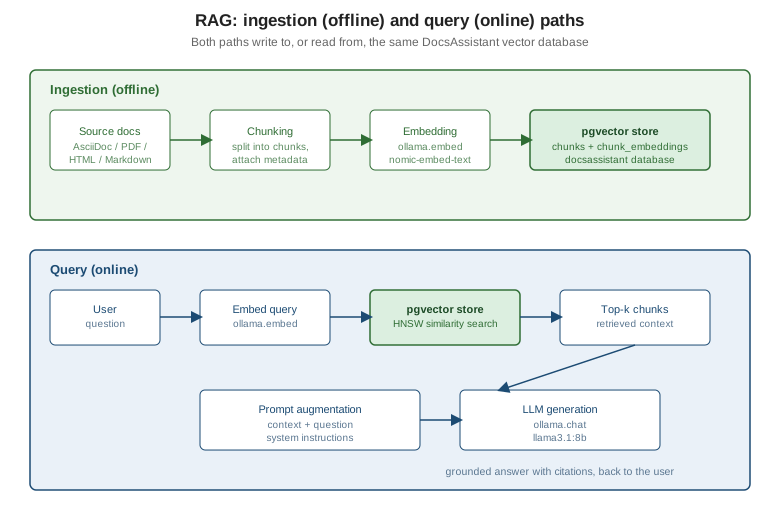
Both paths read or write the same DocsAssistant store: the ingestion path writes chunks and their embeddings,
and the query path reads them back. In the hand-rolled pipeline below that store is the documents / chunks
/ chunk_embeddings schema from PostgreSQL & pgvector; the framework pipelines
live in the same docsassistant database but read and write tables they create and own themselves.
One question flowing through both paths, from the moment it is asked to the moment an answer comes back:
The minimal DocsAssistant pipeline, three ways
The same minimal pipeline — embed the question, search the vector store, format a prompt, generate an
answer — is shown below hand-rolled in Python, then in LangChain, then in Spring AI. All three connect to the
same docsassistant PostgreSQL database, but only the hand-rolled version reads the chunk_embeddings table
from PostgreSQL & pgvector that ingest.py populates. LangChain’s PGVector
reads its own langchain_pg_collection / langchain_pg_embedding tables (collection docsassistant), and
Spring AI’s PgVectorStore reads its own docs_vector_store table, so each framework’s store has to be
populated through that framework’s own ingestion call — add_documents in LangChain, VectorStore.add in
Spring AI (see Framework
ETL pipelines) — before its pipeline retrieves anything; running ingest.py alone leaves both of them
empty.
Hand-rolled Python
import ollama
import psycopg
from pgvector.psycopg import register_vector

conn = psycopg.connect(
    "host=localhost dbname=docsassistant user=docs password=docs",
    autocommit=True,
)
register_vector(conn)


def answer(question: str, k: int = 5) -> str:
    embedded = ollama.embed(model="nomic-embed-text", input=f"search_query: {question}")
    query_embedding = embedded["embeddings"][0]

    rows = conn.execute(
        "SELECT c.section_path, c.content"
        " FROM chunks c JOIN chunk_embeddings ce ON ce.chunk_id = c.id"
        " ORDER BY ce.embedding <=> %s LIMIT %s",
        (query_embedding, k),
    ).fetchall()

    context = "\n\n".join(f"SOURCE {i + 1}: {section}\n{content}" for i, (section, content) in enumerate(rows))
    prompt = (
        "Answer the question using only the sources below. Cite sources by number.\n\n"
        f"{context}\n\nQUESTION: {question}"
    )

    response = ollama.chat(
        model="llama3.1:8b",
        messages=[{"role": "user", "content": prompt}],
        options={"temperature": 0.1, "num_ctx": 8192},
    )
    return response["message"]["content"]
This is the pipeline with nothing hidden: three calls (embed, search, chat) and one prompt string. See
Ollama API: /api/embed and
Ollama API: /api/chat for both endpoints this function calls.
LangChain
from langchain_ollama import ChatOllama, OllamaEmbeddings
from langchain_postgres import PGVector
from langchain_core.prompts import ChatPromptTemplate

vector_store = PGVector(
    embeddings=OllamaEmbeddings(model="nomic-embed-text"),
    collection_name="docsassistant",
    connection="postgresql+psycopg://docs:docs@localhost:5432/docsassistant",
)
retriever = vector_store.as_retriever(search_kwargs={"k": 5})

prompt = ChatPromptTemplate.from_template(
    "Answer the question using only the context below. Cite sources by number.\n\n"
    "{context}\n\nQUESTION: {question}"
)
llm = ChatOllama(model="llama3.1:8b", temperature=0.1, num_ctx=8192)


def answer(question: str) -> str:
    docs = retriever.invoke(question)
    context = "\n\n".join(f"SOURCE {i + 1}: {d.page_content}" for i, d in enumerate(docs))
    chain = prompt | llm
    return chain.invoke({"context": context, "question": question}).content
The retriever, prompt template and chat model compose with the | operator instead of the hand-written loop
above, but the underlying work — embed, search, format, generate — is the same. The docsassistant
collection this retriever searches is the one filled by vector_store.add_documents(…) in
LangChain’s vector stores,
not by ingest.py. See
LangChain’s RAG-chain pattern and
LangChain: Retrieval for the retriever and prompt
composition used here.
Spring AI
package com.example.docsassistant;

import org.springframework.ai.chat.client.ChatClient;
import org.springframework.ai.chat.client.advisor.vectorstore.QuestionAnswerAdvisor;
import org.springframework.ai.vectorstore.SearchRequest;
import org.springframework.ai.vectorstore.VectorStore;

public class DocsAssistantRag {

    private final ChatClient chatClient;

    public DocsAssistantRag(ChatClient.Builder chatClientBuilder, VectorStore vectorStore) {
        this.chatClient = chatClientBuilder
                .defaultAdvisors(QuestionAnswerAdvisor.builder(vectorStore)
                        .searchRequest(SearchRequest.builder()
                                .topK(5)
                                .build())
                        .build())
                .build();
    }

    public String answer(String question) {
        return this.chatClient.prompt()
                .user(question)
                .call()
                .content();
    }
}
QuestionAnswerAdvisor performs the embed-search-augment steps as an Advisor wrapped around the
ChatClient call, so the application code is left with just the question and the answer. It ships in the
spring-ai-vector-store-advisor module, and the injected VectorStore is the PgVectorStore backed by the
docs_vector_store table, populated with VectorStore.add (see
Spring AI’s vector store
API). See
Spring AI’s RAG advisors and
Spring AI: Retrieval
Augmented Generation for QuestionAnswerAdvisor and its searchRequest/promptTemplate options.
Context window and token budgeting
Every LLM call is bounded by a context window: a fixed maximum number of tokens shared between the system
prompt, the retrieved context, the conversation history and the model’s own response. Retrieving five chunks
of a few hundred tokens each is cheap against an 8192-token window, but a naive implementation that keeps
raising k to "retrieve more, just in case" eventually pushes the prompt over budget, and the failure mode is
not always a clean error — it can be silent truncation, degraded generation, or (with some clients) a
rejected request, depending on how the budget is enforced.
Lost in the middle
Even well within budget, where a fact sits in the prompt affects whether the model actually uses it. Research on long-context prompting found that models answer best when the relevant information sits near the beginning or the end of the context, and answer measurably worse when the same information is buried in the middle of a long context — a U-shaped accuracy curve rather than the flat "more context is always better" assumption a naive implementation might make. This is a practical reason to keep retrieved context short and ordered by relevance (most relevant chunk first, as Prompt Augmentation & Generation covers) rather than simply concatenating every retrieved chunk in whatever order the vector search happened to return it.
Temperature for grounded answers
temperature controls how much randomness the model injects when sampling the next token. A RAG answer is
meant to summarize what the retrieved sources say, not to improvise, so a low temperature (0.1 throughout
this section’s DocsAssistant examples) keeps the model close to the most likely continuation given the
context, reducing the chance it drifts into a plausible-sounding but unsupported claim. A higher temperature
is occasionally useful for open-ended, creative tasks, but it works against groundedness in a RAG answer,
where the goal is faithfulness to the retrieved text rather than variety.
The Ollama num_ctx pitfall
Ollama’s num_ctx option sets the context window size the model instance is loaded with, and it defaults to
a value that can be smaller than what a heavy RAG prompt actually needs. The pitfall is that exceeding this
limit does not necessarily raise an error: depending on the model and how the request is issued, tokens beyond
num_ctx can be silently dropped from the beginning of the context, so a prompt built from "system
instructions, then five retrieved chunks, then the question" can have its earliest chunks quietly discarded
without any message telling the caller they never reached the model. The fix is to set num_ctx explicitly
(the 8192 used throughout this section’s examples) to a value comfortably larger than the largest prompt the
pipeline actually builds, and to budget retrieved-chunk tokens against that same number rather than assuming
the client-side token count and the model’s own window always agree.
A naive, advanced, modular and agentic RAG taxonomy
The minimal pipeline above is naive RAG: embed once, search once, generate once, with no correction or adaptation along the way. The rest of this section builds outward from it in three directions:
| Stage | What it adds over the previous stage | Covered on |
|---|---|---|
Naive RAG |
The pipeline above: one embed, one search, one generation pass. |
this page |
Advanced RAG |
Better chunking and metadata at ingestion time; better retrieval at query time — context expansion, query transformation, hybrid search and re-ranking, multilevel retrieval. |
|
Modular RAG |
Retrieval and generation broken into composable, independently swappable stages — query transformers, document retrievers, joiners, post-processors — wired together rather than hard-coded as one function. |
|
Agentic RAG |
The LLM itself decides whether, what and how many times to retrieve, calling retrieval as a tool, routing between sources, and correcting its own retrieval when the first pass comes up short. |
In LangChain and Spring AI
LangChain
The pipeline above already shows LangChain’s shape for naive RAG: a VectorStore-backed retriever, a prompt
template and a chat model composed into a chain.
LangChain’s RAG chain shows the
same pipeline composed into a single LCEL Runnable, and the rest of
Integrating with LangChain covers the full retriever,
splitter and agent surface those same building blocks extend to.
Spring AI
QuestionAnswerAdvisor is Spring AI’s naive-RAG advisor: it wraps retrieval and prompt augmentation around a
ChatClient call in one Advisor. Spring
AI’s RAG advisors cover RetrievalAugmentationAdvisor, the modular alternative to QuestionAnswerAdvisor, in
depth.
Related pages
-
PostgreSQL & pgvector — the pgvector schema every pipeline above queries.
-
Document Ingestion & Chunking — the ingestion path in depth.
-
Retrieval Strategies — the query path’s retrieval half in depth.
-
Prompt Augmentation & Generation — the query path’s prompting half in depth.
-
Agentic RAG — where the LLM decides when and what to retrieve.
-
RAG Integration Patterns — the same ingestion/retrieval shape built on Qdrant.
-
Spring Boot: Redis as a Vector Database — a Spring AI
VectorStorebacked by Redis instead of pgvector.
References
-
Lewis et al., "Retrieval-Augmented Generation for Knowledge-Intensive NLP Tasks" (2020) — the paper that introduced RAG.
-
Liu et al., "Lost in the Middle: How Language Models Use Long Contexts" (2023)
-
Ollama API:
/api/chatand Ollama API:/api/embed— the two endpoints the pipeline calls, including theoptionsobject that carriesnum_ctxandtemperature.