Hydration
|
This content was generated with the assistance of AI and should be verified against the official documentation before being relied on in production. The reference material consulted while preparing these pages is listed in the section bibliography. |
This page is written against Next.js 16.3.8 (the latest release on 2026-10-03, when the facts and examples below were
checked; the official documentation reports @doc-version 16.3.8), React 19.3.0 and Node.js 20.9.0 or later. It
covers the App Router in depth and the Pages Router side by side, because both routers hydrate but with very
different machinery. Caching matters in one place (hydration under Partial Prerendering), so that section says which
model it uses: the previous model (the default, in which nothing is cached unless you ask) or the opt-in Cache
Components model (cacheComponents: true). Every example was built with next build and served with next start
(Node.js 24.16 on macOS) in a scratch copy of the Bookshelf that this section grows, or run with next dev when the
point is the development overlay. The browser behaviour quoted below, such as console messages, timings and which DOM
nodes survived, was measured by driving headless Chrome with Playwright, with the server started as
TZ=UTC LANG=ja_JP.UTF-8 and the browser set to en-US and America/New_York, so that every locale and time zone
bug in this page could actually happen.
Hydration is the step that turns server-rendered HTML into a running React application: the page is already on the
screen, React renders the same components again in the browser, checks that the result matches what is in the DOM,
and attaches the event handlers and state. It is the reason a server-rendered page can look finished and still ignore
a click, and the reason a harmless-looking new Date().toLocaleDateString() can throw away the server’s work. This is
the most detailed page of the rendering chapters. It explains the mechanism first (what is in the response, what the
browser does with it, why only the first load hydrates), then the order in which parts of the page hydrate, then what
hydration costs and how to make it cheaper, then the long list of ways it fails with a reproduction and a fix for
each, and finally the surrounding topics: Partial Prerendering, data-cache hydration, the Pages Router, and how
Angular and Vue handle the same problem.
It builds on Rendering Fundamentals (the rendering spectrum), Server and Client Components (which components exist in the browser at all), Server-Side Rendering (how the HTML and the payload are produced) and Streaming and Suspense (how the response is cut into chunks). The sibling pages on client-side rendering, static site generation, incremental static regeneration and Partial Prerendering with Cache Components are written alongside this one; where they own a topic this page only names it. For the React primitives underneath, see Server Rendering, SSG and React Server Components and Code Splitting and Suspense.
What Hydration Is and Why Server HTML Needs It
Server-rendered HTML is a snapshot. The browser can paint it, search engines can read it, and links in it work as ordinary links, but nothing in it reacts to the user in the way a React component does: there are no event handlers attached to the buttons, no state behind the inputs, no effects have run. Making the snapshot live has two possible strategies:
-
Throw the HTML away and render everything again in the browser from scratch (what client-side rendering does). The user sees a blank or loading state until the JavaScript has run, and the server’s work was wasted.
-
Keep the HTML, render the same tree again in the browser without creating DOM nodes, walk the existing nodes in step with it, and adopt them: connect each React element to the node that is already there, then attach the event handlers. This is hydration, and it is what
hydrateRootdoes.
Hydration is therefore not a second rendering of the page for the user’s benefit. It is a reconciliation of two trees, the one React would build now and the one the server already built, with the DOM as the thing in between. That is why it has a hard requirement: the first render in the browser must produce the same output as the server render. If it does not, React cannot adopt the DOM, and it has to throw part of it away (see What React Does with a Mismatch).
| Term | Meaning |
|---|---|
Prerender, SSR, SSG |
Producing HTML on the server, at request time (SSR) or at build time (SSG). Both produce the HTML that gets hydrated. |
RSC payload |
The serialized result of the Server Components, sent next to the HTML. It tells the browser what the tree is, where the Client Components go and which props they receive. |
Hydration |
React in the browser adopting the server-rendered DOM and attaching event handlers ( |
Selective hydration |
Hydrating each |
Mismatch (hydration error) |
The browser’s first render differs from the server HTML. React reports it and regenerates part of the tree on the client. |
Recoverable error |
React’s name for an error that it handled by falling back to client rendering; reported through |
Interactivity gap |
The time between the first paint of the server HTML and the moment the page reacts to input: JavaScript download, parse and hydration. |
Dehydrated boundary |
A Suspense boundary whose HTML is in the page but which React has not hydrated yet. |
How Next.js Hydrates
The Next.js documentation describes the first load of an App Router page in three inputs and one job each: the HTML is used to show a fast non-interactive preview, the RSC payload is used to reconcile the Server and Client Component trees, and the JavaScript is used to hydrate the Client Components and make the application interactive. This section opens each of the three, using the scratch Bookshelf.
The three inputs, in one response
A route app/about/page.tsx renders a Server Component heading and one Client Component, a button with a counter:
// app/about/page.tsx (Server Component)
import { ShelfWidgetStatic } from "@/components/sel/static-widget";

export default function About() {
  return (
    <main>
      <h1>About</h1>
      <ShelfWidgetStatic />
    </main>
  );
}
// components/sel/static-widget.tsx
"use client";
import { useState } from "react";
export function ShelfWidgetStatic() {
const [n, setN] = useState(0);
return <button data-testid="about-btn" onClick={() => setN(n + 1)}>Clicked {n}</button>;
}After next build and next start, curl returns one HTML document that carries all three inputs. The part of the
body that matters, trimmed:
<body>
  <nav>...</nav>
  <main><h1>About</h1><button data-testid="about-btn">Clicked <!-- -->0</button></main>
  <script src="/_next/static/chunks/310vm2bl3xxpt.js" id="_R_" async=""></script>
  <script>(self.__next_f=self.__next_f||[]).push([0])</script>
  <script>self.__next_f.push([1,"1:\"$Sreact.fragment\"\n
    2:I[39756,[\"/_next/static/chunks/3fntmmi971322.js\"],\"default\"]\n
    4:I[77090,[\"/_next/static/chunks/3fntmmi971322.js\",\"/_next/static/chunks/01wm4pral8kc8.js\"],\"ShelfWidgetStatic\"]\n
    ...
    0:{\"P\":null,\"c\":[\"\",\"about\"], ... [\"$\",\"main\",null,{\"children\":[[\"$\",\"h1\",null,{\"children\":\"About\"}],[\"$\",\"$L4\",null,{}]]}] ...
  "])</script>
</body>
Three things in it are worth reading slowly.
-
The HTML preview is
<main><h1>About</h1><button>Clicked <!-- -→0</button></main>. The comment<!-- -→is React’s separator between two adjacent text nodes (`Clicked ` and the number). It is a real node in the DOM, and it will matter in the catalogue below, because tools that remove comments break hydration. -
The RSC payload travels inside the same document as
self.__next_f.push(…)script tags, so that the browser does not need a second request. The line4:I[77090, [chunks], "ShelfWidgetStatic"]is a client reference: a module id, the JavaScript chunks that contain it and the export name. The line that describes the tree contains["$","$L4",null,{}], a placeholder that says "render the Client Component with reference 4 here, with these props". The Server Component output (main,h1) is already plain data: the browser never needs the code of the page component. -
The scripts are the JavaScript chunks: the React and Next.js runtime, the router, and the chunks of the Client Components that this route uses.
What the browser does with them
When the scripts have loaded, Next.js starts React on the document with hydrateRoot. In this order:
-
The browser has already painted the HTML. That is the first paint; the page is not interactive.
-
The runtime reads the payload from
self.__next_fand rebuilds the React element tree from it. For Server Components this is pure data: nothing runs. For each client reference, it loads the module and renders the Client Component in the browser with the props from the payload. -
React compares the output of that render with the existing DOM node by node. Where they agree, React adopts the node (it records that this fiber owns this DOM element) and attaches handlers. Where they disagree, you have a hydration error.
-
Effects run (
useEffect), the router takes over link clicks, and the page is interactive.
The consequence that surprises most people the first time is in step 2: a Server Component is not re-rendered during
hydration, only compared. A new Date() in a Server Component evaluates once, on the server, and the browser reads
the result from the payload, so it can never disagree with itself. A new Date() in a Client Component evaluates
twice, once for the server HTML and once in the browser, and the two answers will rarely be equal. This is why almost
every hydration bug in an App Router application lives in a Client Component, and why the cheapest fix is often to
move the volatile code to a Server Component.
| Component kind | On the server | In the browser during hydration |
|---|---|---|
Server Component |
Runs once. Its output goes into the HTML and into the RSC payload. |
Never runs. The browser reads the output from the payload and compares it with the DOM. |
Client Component |
Runs to produce HTML for the first paint (it is prerendered). |
Runs again with the same props. Its output must equal the server’s output. Then its effects run. |
Client Component loaded with |
Does not run (the fallback is rendered, or nothing). |
Runs for the first time; there is nothing to compare, so no mismatch is possible. |
Source: Server and Client Components, hydrateRoot.
hydrateRoot and its options
Next.js calls hydrateRoot for you and does not expose its options. Knowing them is still useful, because every
message you will see in the console comes from the same machinery, and because the same API is what you use in a plain
React application or in a micro-frontend. The signature is hydrateRoot(domNode, reactNode, options?), and the
documented options are:
| Option | Purpose |
|---|---|
|
Called when React recovers by itself, most importantly from a hydration mismatch, with the error and an |
|
Called with errors caught by an Error Boundary. |
|
Called with errors that no Error Boundary caught. |
|
A prefix for the ids made by |
|
The form state of a submission handled by a Server Function, so that |
A runnable demonstration outside Next.js, with the mismatch of this page’s running example: the server rendered the
date in a Japanese locale (2026/6/15) and the client renders it in a US locale (6/15/2026). The server half uses
renderToString, the client half bundles the same component with esbuild:
onRecoverableError (client entry)// client.jsx
import { hydrateRoot } from "react-dom/client";
import { App } from "./App.jsx";
window.__recoverable = [];
hydrateRoot(document.getElementById("root"), <App clientDate="6/15/2026" />, {
onRecoverableError(error, errorInfo) {
window.__recoverable.push({
message: String(error.message).split("\n")[0],
componentStack: errorInfo.componentStack?.trim().split("\n")[0],
});
},
});Loading the server HTML (<main><p id="added">Added on <!-- -→2026/6/15</p>…) in Chrome, the callback received:
onRecoverableError received (development build of React 19.3.0)[{"message":"Hydration failed because the server rendered text didn't match the client. As a result this tree will be regenerated on the client. This can happen if a SSR-ed Client Component used:",
"componentStack":"at p (<anonymous>)"}]Two practical notes. First, React’s default handler reports a recoverable error with reportError(), which fires a
window error event; that is how the production message reaches the console and how the next section hooks in
without owning hydrateRoot. Second, in Next.js the way to observe these errors is instrumentation-client.ts, a file
that runs before the application becomes interactive; see Testing for Hydration Errors and Monitoring Them.
Document-level hydration
In the App Router the root layout renders <html> and <body>, so React hydrates the whole document, not a
div#root. Two consequences are worth knowing before the catalogue. Attributes that something else adds to <html>
or <body> (a theme script, a browser extension) are compared like any other attribute, so they produce a warning in
development unless the element has suppressHydrationWarning (the catalogue below shows that the warning
disappears with it). Extra elements are treated differently, and less uniformly than the React 19 announcement suggests.
The announcement says that unexpected tags in <head> and <body> are skipped. In the scratch app (production build),
an injected <style>, <link> or <script> placed in <head> or directly in <body> caused no error, but an
injected <div> placed directly in <body>, or any element inside <main>, produced Minified React error 418. Count
on the tolerance for stylesheets and scripts, not for visible elements.
The Timeline of a Page Load
Putting the pieces in time order shows where the problems come from. The figure shows one streamed page with two Suspense boundaries. The server renders the shell quickly and the data for the second boundary slowly; the browser paints the shell, downloads the JavaScript in parallel, hydrates what it has, and hydrates the rest as the streamed HTML arrives.
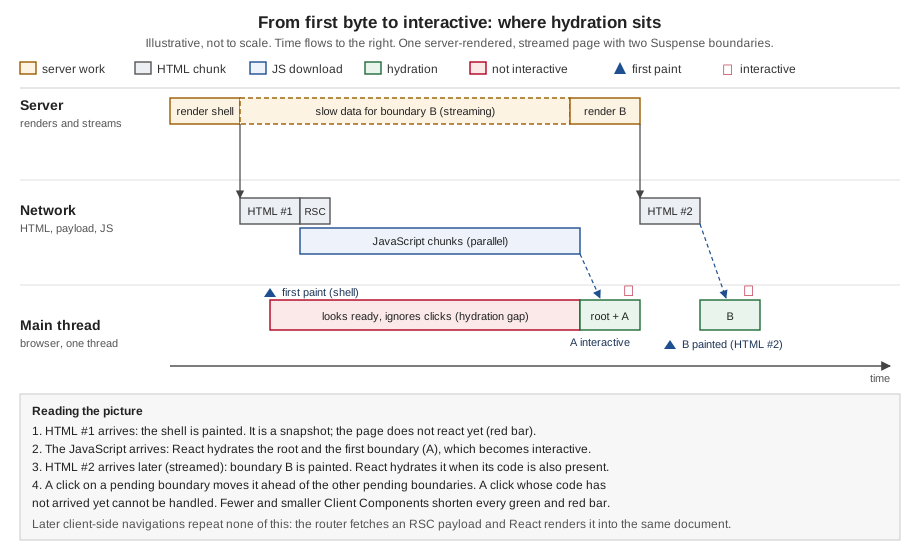
Four durations hide in that picture, and each has its own remedy.
| Duration | What it depends on | What shortens it |
|---|---|---|
Time to first byte and first paint of the shell |
Server work before the first chunk (layouts, fallbacks, everything not behind Suspense), or a CDN hit for prerendered HTML. |
Prerendering, |
JavaScript download |
Bytes of the Client Components and their imports, the number of chunks, the network. |
Fewer and smaller Client Components, lazy loading, no heavy dependencies in |
The hydration gap: first paint to interactive |
JavaScript download plus the render cost of every Client Component on the page, plus the work of their effects. |
Everything above, plus Suspense boundaries so that parts finish independently. |
Streamed parts |
When the slow data resolves on the server, and when the code of the component inside the boundary has arrived. |
Faster data, code that is loaded before the HTML arrives (route-level splitting does this for you). |
The red bar is the one that users notice and that tools such as Lighthouse measure as Total Blocking Time and Interaction to Next Paint: the page looks ready and does not respond. The measurements in The Cost of Hydration put numbers on it.
Why Later Navigations Do Not Hydrate
Hydration happens once per document: when the browser loads the HTML of a page (a first visit, a reload, a link to
another site and back, a plain <a> to a route of the app). It does not happen when you move between routes with
<Link>, router.push or the back button. The Next.js router already owns the document at that point, and it
navigates by fetching an RSC payload for the new route and asking React to render it into the existing tree. There is
no server HTML for the new page, so there is nothing to compare and no hydration; the Client Components of the new
page are rendered in the browser, for the first time, from the payload.
This was measured on the scratch app (production build) with a home page that links to /about, a prerendered route
with the Client Component from above:
<Link href="/about"> after the page has loaded and prefetchedrequests during the click: [] (the RSC payload had been prefetched)
document survived the click: window.__marker === "same-document"
navigation timing entries: 1 (one document load, no second one)
widget mounted: [["about widget mounted", 606]] (rendered in the browser, once)
button after a click: "Clicked 1" (interactive at once)The same fetch appears as a network request when the route was not prefetched (a dynamic route without
loading.js, for example): the request carries the RSC: 1 request header and returns text/x-component, never an
HTML document.
| Situation | App Router | Pages Router |
|---|---|---|
First load, reload, |
HTML plus inline RSC payload; hydration. |
HTML plus |
|
RSC payload only (prefetched or fetched on click); no hydration. |
JSON data file under |
|
New RSC payload for the current route, merged into the tree; no hydration. |
|
Two practical rules follow. Anything you measure on the first load (a hydration error, a mismatch, a flash) is a first-load problem. If a component only misbehaves after a reload, it is a hydration bug; if it only misbehaves after a client navigation, it is not, and the cause is somewhere else (state, caching, a Server Component that is not re-rendered). And the cost of hydration is paid once, which is why bundle size matters most for the landing pages of an application and much less for pages that are usually reached from inside it.
Selective and Progressive Hydration
React 18 changed hydration from "all or nothing" to "boundary by boundary". Before it, hydrate() had to render and
hydrate the whole tree in one block, and it could start only when all the JavaScript of the page had loaded. A slow
part, such as a heavy widget, delayed everything. With hydrateRoot and <Suspense>, each Suspense boundary is a unit
that React can hydrate separately, later, or first. The React working group describes three consequences:
-
Streaming HTML: the server can send the shell now and a boundary’s HTML later.
-
Selective hydration: React does not have to wait for the slow part’s code to hydrate the rest of the page.
-
Interaction priority: React hydrates first the boundary the user is interacting with.
Hydration starts as early as possible and is done in time slices, so that the main thread can still respond; the boundaries are hydrated in tree order unless the user’s input changes the order.
Experiment 1: a boundary whose code has not arrived
The first experiment shows that a boundary does not have to wait for another one. The page has two Suspense boundaries,
each with a Client Component loaded with next/dynamic so that each lives in its own JavaScript chunk (with ssr
left at its default, both are server-rendered):
// components/sel/lazy.tsx
"use client";

import dynamic from "next/dynamic";

// Separate chunks, still server-rendered (ssr defaults to true).
export const ShelfLazy = dynamic(() => import("./shelf-widget"));
export const ReviewsLazy = dynamic(() => import("./reviews-widget"));
// app/selective/page.tsx (Server Component)
import { Suspense } from "react";
import { connection } from "next/server";
import { ShelfLazy, ReviewsLazy } from "@/components/sel/lazy";
async function Slow({ ms, children }: { ms: number; children: React.ReactNode }) {
await connection();
await new Promise((r) => setTimeout(r, ms));
return children;
}
export default function Page() {
return (
<main>
<h1>Selective hydration</h1>
<Suspense fallback={<p>loading shelf</p>}>
<Slow ms={0}>
<ShelfLazy />
</Slow>
</Suspense>
<Suspense fallback={<p>loading reviews</p>}>
<Slow ms={300}>
<ReviewsLazy />
</Slow>
</Suspense>
</main>
);
}Each widget is a Client Component with a counter button that records performance.now() in a useEffect (so the
moment of hydration is observable) and again inside its click handler. A Playwright script holds the reviews chunk back
for three seconds, as a slow network would, and clicks both buttons:
await page.route("**/_next/static/**/*.js", async (route) => {
  const response = await route.fetch();
  const body = await response.text();
  if (body.includes("REVIEWS_MARKER")) await new Promise((r) => setTimeout(r, 3000));
  const headers = { ...response.headers() };
  delete headers["content-length"];
  delete headers["content-encoding"];
  await route.fulfill({ status: response.status(), headers, body });
});
await page.goto("http://localhost:3504/selective", { waitUntil: "commit" }); 79 ms shelf chunk delivered
354 ms reviews chunk requested (held back)
389 ms HTML for both boundaries painted
1192 ms state: shelf hydrated@376
1215 ms clicked shelf button
1247 ms clicked reviews button (its chunk is still held back)
1249 ms labels: Add to shelf: 1 | Helpful: 0
3354 ms reviews chunk delivered
3662 ms state: shelf hydrated@376, shelf click handled@1212, reviews hydrated@3353
3663 ms labels: Add to shelf: 1 | Helpful: 0Read it from the top. Both boundaries were painted at about 390 ms. The shelf boundary hydrated at 376 ms and its button worked while the reviews boundary was still plain HTML waiting for its chunk. That is selective hydration: one slow chunk did not hold the rest of the page back. The reviews boundary hydrated at 3353 ms, the moment its code arrived.
The second lesson is the last line. The click on the reviews button at 1247 ms, while its chunk was still on the way,
was lost: after hydration the label still read Helpful: 0 and the click handler never ran. A click can only be
handled by code that is in the page. The same happened in a second run in which all the JavaScript was held back, the
button was clicked twice, and the scripts were then released: Helpful: 0 afterwards. React does not queue a click on a
boundary whose code has not arrived and play it back later (its priority mechanism, described next, works when the code
is present); Angular’s withEventReplay() exists precisely to close this gap, see The Same Problem in Other Stacks.
Experiment 2: interaction priority
The second experiment shows the order. The page has 200 sibling Suspense boundaries, each containing a Client Component whose render takes about 8 ms (a busy loop standing in for a big list, a chart or an expensive formatter), so hydrating all of them takes more than a second and a half. The test waits until hydration has started, then clicks the button of boundary number 150:
// components/sel/busy-item.tsx
"use client";

import { useEffect, useState } from "react";
import { mark } from "./log"; // pushes [name, performance.now()] to window.__h in the browser

function busy(ms: number) {
  const end = performance.now() + ms;
  while (performance.now() < end) {}
}

export function BusyItem({ i }: { i: number }) {
  mark(`item ${i} render`);
  busy(8); // stands in for an expensive render
  const [n, setN] = useState(0);
  useEffect(() => mark(`item ${i} hydrated`), [i]);
  return (
    <li>
      <button data-testid={`b${i}`} onClick={() => { setN(n + 1); mark(`item ${i} click handled`); }}>
        Item {i}: {n}
      </button>
    </li>
  );
}
// app/priority/page.tsx (Server Component)
import { Suspense } from "react";
import { BusyItem } from "@/components/sel/busy-item";
export default function Page() {
return (
<main>
<h1>Interaction priority</h1>
<ul>
{Array.from({ length: 200 }, (_, i) => (
<Suspense key={i} fallback={<li>loading</li>}>
<BusyItem i={i} />
</Suspense>
))}
</ul>
</main>
);
}Source: React: Suspense, Lazy Loading.
The sequence of marks in the browser, from the two runs:
first marks:   item 0 render, item 1 render, item 2 render, item 3 render, item 4 render,
               item 150 render, item 150 hydrated, item 150 click handled,
               item 0 render, item 1 render, ...
click sent at 80 ms and 91 ms; item 150 hydrated and handled at 88 ms and 100 ms
item 150 was the 7th boundary to hydrate out of 200
hydration of all 200 boundaries lasted until about 1690 ms
total renders: 206 (the extra 6 are boundaries React had started and had to redo)
The button of boundary 150 was hydrated and handled the click within about 10 ms, while the page needed about 1.6 seconds to hydrate completely. React had started with boundaries 0 to 4 in order, saw the interaction, hydrated the target, and then went back to the front of the list; the six extra renders are the work it threw away when it interrupted boundaries it had started. Without Suspense boundaries the same page would be one block of work and the click would wait for all of it.
What to take from the two experiments:
-
Wrap independent, expensive or late-arriving parts in
<Suspense>. A boundary is the unit of selective hydration, of streaming, and of mismatch recovery (see What React Does with a Mismatch).loading.jscreates one around a whole segment, so a route with one is already split from its layout. -
Selective hydration helps with CPU time and with arrival order. It does not remove the need for the code. A boundary that is waiting for a chunk is dead until the chunk arrives.
-
Granularity matters. A boundary around everything gives all-or-nothing hydration again; a boundary around every button is overhead. Put boundaries where the content is independent: a review list, a recommendation strip, a chart.
-
Interaction priority applies to discrete user input. Do not design around it for correctness; design the page so that the order does not matter.
Streamed boundaries hydrate when they arrive
Everything above applied to boundaries whose HTML was in the first chunk. A boundary that suspends on the server is sent later in the same response: first as a fallback, then as a hidden element plus a tiny inline script that swaps it in place (the streaming page shows the bytes). React treats the swapped-in HTML as a new dehydrated boundary and hydrates it when its code is loaded and the main thread is free, so late content hydrates later than early content by design. The PPR measurement in Hydration under Partial Prerendering shows this with timestamps.
Source: Streaming.
<Link> Prefetching Waits for Hydration
<Link> is a Client Component. Its prefetching logic (watch the viewport, call the router’s prefetch) runs in the
browser, so it cannot start before <Link> itself has been hydrated. On the first visit, that means a link in the
server HTML works as a plain <a> (a click is a full page load) until hydration has reached it, and the router’s
prefetch does not begin before then. The Next.js documentation lists this under "Hydration not completed" and
recommends reducing the bundle size and moving logic from the client to the server.
The effect was measured on the scratch app (production build): a home page with two `<Link>`s, with the JavaScript held back by the test harness for 1.5 seconds:
JS held back for 1.5 s  ->  RSC prefetch requests: 0
after hydration         ->  RSC prefetch requests: 4
  /about?_rsc=...      next-router-prefetch: 1
  /books/1?_rsc=...    next-router-prefetch: 1
  /about?_rsc=...      next-router-prefetch: 1
  /books/1?_rsc=...    next-router-prefetch: 1
For two links the router sent four prefetch requests (it prefetches in more than one request per route in this version; the number is not the point, the zero before hydration is). The practical consequence is a delay on the first click: a user who clicks a link right after the first paint either does a full page load (hydration has not reached the link) or gets a navigation that has to fetch its payload on demand (no prefetch has happened yet). The remedies are the same as for every hydration cost: less JavaScript on the landing page and a route that hydrates early. The Linking and Navigation page covers the prefetch behaviour itself.
The Cost of Hydration
Hydration has no network cost of its own, and that is exactly why it is easy to overlook. The data is already in the HTML; what the user pays is JavaScript: the bytes to download, the time to parse and compile them, and the time to render every Client Component again in the browser. The page looks finished and is unresponsive for that long. The three metrics that expose it are:
-
Total Blocking Time (TBT), the lab metric that sums the long tasks between first paint and the moment the main thread is idle. web.dev calls it a lab proxy for INP.
-
Interaction to Next Paint (INP), the field metric: the delay between a user’s input and the next paint. A good INP is 200 ms or less. A click during the hydration gap is the worst case.
-
Time to Interactive (TTI), the older lab metric that the books use for the same idea: when the page reliably responds.
| Cost | Driven by | Visible as |
|---|---|---|
Download and parse |
Bytes of JavaScript on the route: React and the Next.js runtime (the floor), the Client Components, every library they import. |
Long hydration gap on slow networks and slow phones. |
Render during hydration |
The number of Client Components and their render cost: big lists, formatting, charts, derived data, validation. |
A long task right after the scripts arrive; INP of the first interactions. |
Effects after hydration |
|
Jank after the page is already interactive. |
Measuring the cost: the floor, a client-heavy page and a server-heavy page
Next.js sends React and its router to every page, so there is a floor. The experiment below renders the same
60-book catalogue three ways and sums the JavaScript that the browser downloads (production build, Playwright, all
script responses of the page counted once, gzip size computed with Node’s zlib). The catalogue is validated with
zod and formatted by one function in a shared module, standing in for any logic that does not need the browser:
// lib/catalogue.ts
import { z } from "zod";

const Book = z.object({
  id: z.string(),
  title: z.string().min(1),
  author: z.string(),
  priceCents: z.number().int().positive(),
});
export type Book = z.infer<typeof Book>;

const raw = Array.from({ length: 60 }, (_, i) => ({
  id: String(i + 1),
  title: `Book number ${i + 1}`,
  author: `Author ${(i % 9) + 1}`,
  priceCents: 500 + i * 13,
}));

// Validation + formatting: a stand-in for any logic that does not need the browser.
export function loadCatalogue(): Book[] {
  return z.array(Book).parse(raw);
}
export const price = (b: Book) => (b.priceCents / 100).toFixed(2);// components/size/client-catalogue.tsx
"use client";
import { useState } from "react";
import { loadCatalogue, price } from "@/lib/catalogue"; // pulls zod into the browser bundle
export function ClientCatalogue() {
const [q, setQ] = useState("");
const books = loadCatalogue().filter((b) => b.title.toLowerCase().includes(q.toLowerCase()));
return (
<div>
<input value={q} onChange={(e) => setQ(e.target.value)} placeholder="Filter" />
<ul>{books.map((b) => (<li key={b.id}>{b.title} by {b.author}: {price(b)}</li>))}</ul>
</div>
);
}// app/size/server/page.tsx (Server Component)
import { FilterBox } from "@/components/size/filter-box";
import { loadCatalogue, price } from "@/lib/catalogue"; // stays on the server
export default function Page() {
const books = loadCatalogue();
return (
<main>
<h1>Server rendered</h1>
<FilterBox />
<ul>{books.map((b) => (<li key={b.id}>{b.title} by {b.author}: {price(b)}</li>))}</ul>
</main>
);
}// components/size/filter-box.tsx
"use client";
import { useState } from "react";
export function FilterBox() {
const [q, setQ] = useState("");
return <input value={q} onChange={(e) => setQ(e.target.value)} placeholder="Filter (the only client code)" />;
}children// components/size/collapsible.tsx
"use client";
import { useState } from "react";
// A Client Component that only owns the open/closed state. The content is a prop.
export function Collapsible({ title, children }: { title: string; children: React.ReactNode }) {
const [open, setOpen] = useState(true);
return (
<section>
<button onClick={() => setOpen(!open)}>{open ? "Hide" : "Show"} {title}</button>
{open ? children : null}
</section>
);
}// app/size/composed/page.tsx (Server Component)
import { Collapsible } from "@/components/size/collapsible";
import { loadCatalogue, price } from "@/lib/catalogue"; // stays on the server
export default function Page() {
const books = loadCatalogue();
return (
<main>
<h1>Composed</h1>
<Collapsible title="the catalogue">
{/* rendered on the server, passed as already-rendered output */}
<ul>{books.map((b) => (<li key={b.id}>{b.title} by {b.author}: {price(b)}</li>))}</ul>
</Collapsible>
</main>
);
}Source: Server and Client Components: Reducing JS bundle size, Interleaving Server and Client Components.
| Page | Scripts | JavaScript, raw | JavaScript, gzip | HTML |
|---|---|---|---|---|
|
7 |
about 444 KiB |
about 131 KiB |
6.3 KiB |
|
7 |
about 826 KiB |
about 220 KiB |
11.0 KiB |
|
7 |
about 444 KiB |
about 131 KiB |
17.2 KiB |
|
7 |
about 444 KiB |
about 131 KiB |
17.2 KiB |
The all-client page ships about 380 KiB more JavaScript (about 90 KiB gzipped) than the floor, nearly all of it zod
and the shared module, and the browser then runs the validation again just to rebuild HTML the server had already
produced. The two server-first variants cost nothing over the floor: the validation and the 60 rows live only on
the server, the browser receives the result (a larger HTML document, 17.2 KiB instead of 11.0 KiB) and hydrates only
the input or the button. The HTML grows a little, the JavaScript does not grow at all, and that is the right side of the
trade because HTML is cheap to parse and JavaScript is expensive to run.
The render cost during hydration
Bytes are only half. The second experiment of Selective and Progressive Hydration measured render cost directly: 200 Client Components that
each take 8 ms to render cost about 1.6 seconds of main-thread time during hydration, split into slices, but a
total all the same. A real component does not busy-wait, but a formatter, a large map, a derived list or a chart
library can easily reach a few milliseconds each. The same page rendered as Server Components would cost the browser
no render time at all, because the work was done on the server and the browser compared the output with the payload.
How to reduce hydration cost
The levers, in the order in which they usually pay off:
-
Make it a Server Component. Everything that does not need state, effects, event handlers or browser APIs should stay on the server. This is the default of the App Router, so the work is in not adding
"use client"out of habit. -
Push
"use client"to the leaves. Put the directive on the search box, not on the layout that contains it. The documentation’s example is a layout with static markup and one interactive search bar: only the search bar is a Client Component. -
Compose instead of converting. A Client Component can receive Server Components as
childrenor other props (variant 3 above). The state lives in the client wrapper; the content stays on the server and costs nothing to hydrate. The reverse (importing a Server Component into a Client file) is not possible, because the import would pull it into the browser bundle. -
Keep heavy libraries out of the client graph. Validation, markdown rendering, date and number formatting, syntax highlighting and syncing a database client belong on the server. A
server-onlyimport marks modules that must never reach the browser. -
Load late what is not needed at first paint.
next/dynamicorReact.lazywith<Suspense>split a Client Component into its own chunk, loaded only when it renders;ssr: falseskips its server HTML (see The Fix Toolbox for the trade-offs of skipping it). A modal, an editor or a chart that opens on click should not be in the first bundle. -
Use Suspense boundaries around independent parts so that they hydrate on their own schedule (see Selective and Progressive Hydration).
-
Measure the bundle. Next.js 16.1 added
next experimental-analyzefor Turbopack (still labelled experimental), and@next/bundle-analyzerremains for webpack builds only. TheuseReportWebVitalshook (fromnext/web-vitals) reports LCP, INP, CLS and the others from real users. -
Be careful with third parties. Analytics and tag-manager scripts run on the main thread too; the Google Tag Manager and Google Analytics components of
@next/third-partiesfetch their scripts after hydration by default, so the page’s own hydration is not delayed. -
Consider the React Compiler (
reactCompiler, stable and off by default in Next.js 16) for Client Components that re-render more than they need to. It reduces update cost; it does not remove the first hydration render.
Source: Reducing JS bundle size, Lazy Loading, Package Bundling, useReportWebVitals, Third-Party Libraries, web.dev: Web Vitals.
| Pattern | Effect on hydration |
|---|---|
|
Everything the file imports and renders directly is shipped and hydrated. Server Components passed as |
A Client Component importing a large utility module "for one function" |
The module is in the bundle. Move the function to the server or import a smaller one. |
A context provider that wraps the whole app |
The provider itself is a small Client Component; its |
A page-sized |
Hydrates, runs the effect, fetches, renders again. Fetch on the server and pass props instead (see the client-side rendering page for when the client fetch is right). |
Hydration Errors
A hydration error is React reporting that the first render in the browser disagrees with the server HTML. It is the most common first-week problem with any server-rendered React application, and one of the least understood, because the message names a symptom (text did not match) and not the cause. This section explains how the report looks in development and in production, what React does with the tree afterwards, and how to read the diff. The next section is the catalogue of causes, each with a reproduction that was run and a fix that was run.
How a mismatch is reported
The same event looks very different in the two modes, and in three different places.
| Where | What you see |
|---|---|
Development, Next.js error overlay |
A "Recoverable Error" dialog (a "Console Error" for attribute mismatches, a "Runtime Error" when rendering threw) with the message "Hydration failed because the server rendered text didn’t match the client. As a result this tree will be regenerated on the client.", a link to |
Development, browser console |
The same message through |
Production, browser console |
|
Production, your users |
A flash (the server HTML is replaced), lost input, a slower page. No error page, because the error is recoverable. |
The diff indicator (Next.js 16.2)
Since Next.js 16.2 (2026-03-18) the overlay labels what came from where: a legend + Client and - Server, so the
two sides of the disagreement are explicit instead of left for you to infer. This is the real overlay content of the
running example in Next.js 16.3.8, copied from the text of the overlay:
next dev, text copied from the overlay)Recoverable Error
Hydration failed because the server rendered text didn't match the client. As a result this tree
will be regenerated on the client. This can happen if a SSR-ed Client Component used:
- A server/client branch `if (typeof window !== 'undefined')`.
- Variable input such as `Date.now()` or `Math.random()` which changes each time it's called.
- Date formatting in a user's locale which doesn't match the server.
- External changing data without sending a snapshot of it along with the HTML.
- Invalid HTML tag nesting.
It can also happen if the client has a browser extension installed which messes with the HTML before
React loaded.
See more info here: https://nextjs.org/docs/messages/react-hydration-error
+ Client
- Server
...
<ErrorBoundary ...>
...
<Page>
<main>
<h1>
<AddedOn iso="2026-06-15...">
<p data-testid="added">
+ 6/15/2026
- 2026/6/15How to read it. The line starting with ` is what the *browser* rendered, the line starting with `-` is what the
*server* sent, and the elements above them are the path from the root to the node that disagrees. A line marked with
`>` instead of ` and - means the element itself is unexpected (as in the nesting errors below). The overlay also
shows the source line of the component that rendered the node, so the cause is usually one click away. The overlay is
a development tool only; Next.js does not ship it in production builds, which is why the production message in the
table above has no diff at all.
The React 19 release made the same change at the library level (a single error with a diff instead of several warnings without information), and the diff indicator is how Next.js 16.2 presents it. Both are part of What Changed Since Next.js 13 and 14.
The production error codes
In production the message is replaced by a code. These are the ones that concern hydration (taken from React’s
published error-code list, which the visit https://react.dev/errors/NNN link in the message points to):
| Code | Meaning (React’s text, shortened) | What it tells you |
|---|---|---|
418 |
Hydration failed because the server rendered text or HTML (the argument says which: |
The classic mismatch. |
422 |
There was an error while hydrating, but React recovered by client rendering from the nearest Suspense boundary. |
The same family, reported for a boundary: the damage is contained. |
423 |
There was an error while hydrating, but React recovered by client rendering the entire root. |
No boundary contained the problem; the whole document was rendered again. |
425 |
Text content does not match server-rendered HTML. |
A text mismatch variant (older message, you may still see it from libraries). |
419 |
The server could not finish this Suspense boundary, likely due to an error during server rendering. Switched to client rendering. |
Not a mismatch: the server render itself failed for that boundary, so there is no server HTML to hydrate. |
The date of the running example, in a production build, gave Minified React error #418; visit
https://react.dev/errors/418?args=text&args[]=…, and the nesting example args[]=HTML. Attribute mismatches
gave no production message at all (see 5. Values that change on every call: Date.now(), Math.random(), generated ids).
What React Does with a Mismatch
When the first client render disagrees with the HTML, React cannot adopt the server DOM below the point of difference: the DOM nodes it would attach to are not the nodes the component describes. The Next.js preventing-flash guide describes the recovery: React falls back to client rendering from the nearest error or Suspense boundary. It discards the server DOM of that boundary (or of the whole root if there is none), renders the tree again in the browser and reports the error as recoverable.
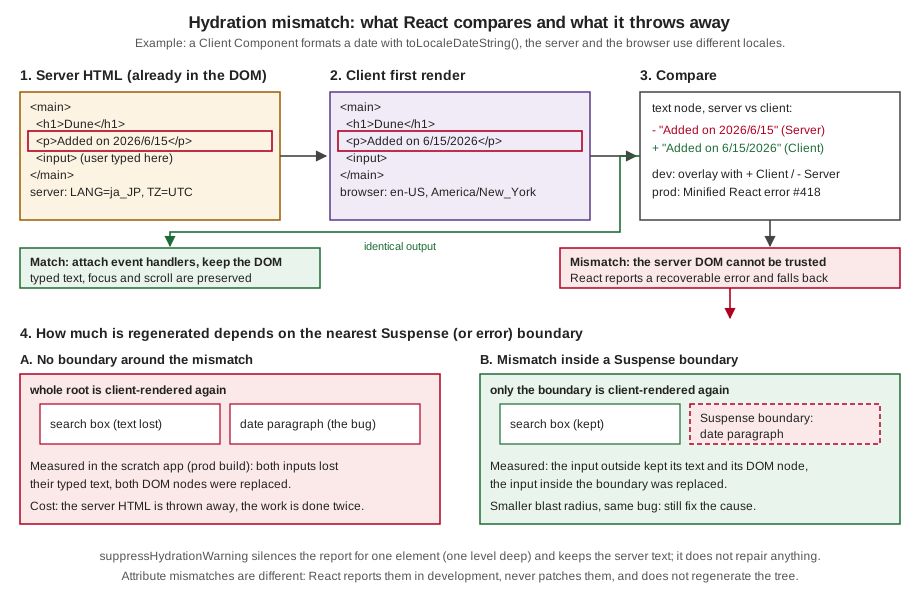
The effect is measurable, and it is not cosmetic. The experiment uses a page with two inputs, one outside and one inside
a section, and a Client Component that renders Date.now() (a guaranteed mismatch). The test script holds the
JavaScript back, types into both inputs while the page is still plain HTML, marks the input nodes, then lets the
JavaScript load and hydrate. Three variants: no mismatch, a mismatch with no Suspense boundary, and a mismatch inside a
Suspense boundary.
// app/scope/[mode]/page.tsx (Server Component, rendered per request)
import { Suspense } from "react";
import { connection } from "next/server";
import { Clock } from "@/components/bad/clock"; // "use client", renders Date.now()

function Search({ id }: { id: string }) {
  return <input data-testid={id} placeholder={id} />;
}

export default async function Page({ params }: PageProps<"/scope/[mode]">) {
  await connection();
  const { mode } = await params;
  return (
    <main>
      <h1>scope: {mode}</h1>
      <Search id="outside" />
      {mode === "boundary" ? (
        <Suspense fallback={<p>loading</p>}>
          <section>
            <Search id="inside" />
            <Clock />
          </section>
        </Suspense>
      ) : (
        <section>
          <Search id="inside" />
          {mode === "ok" ? null : <Clock />}
        </section>
      )}
    </main>
  );
}
// components/bad/clock.tsx
"use client";
export function Clock() {
return <p data-testid="clock">Rendered at {Date.now()}</p>;
}let release;
const gate = new Promise((r) => (release = r));
await page.route("**/_next/static/**/*.js", async (route) => { await gate; await route.continue(); });
await page.goto(`http://localhost:3504/scope/${mode}`, { waitUntil: "commit" });
await page.waitForSelector("[data-testid=outside]");
await page.fill("[data-testid=outside]", "typed-outside");
await page.fill("[data-testid=inside]", "typed-inside");
await page.evaluate(() => document.querySelectorAll("input").forEach((i) => (i.dataset.orig = "1")));
release();
await page.waitForTimeout(2500);
// then read value and dataset.orig of both inputsok -> outside: value="typed-outside" sameNode=true | inside: value="typed-inside" sameNode=true | errors: 0
none -> outside: value="" sameNode=false | inside: value="" sameNode=false | errors: 1 (Minified React error #418)
boundary -> outside: value="typed-outside" sameNode=true | inside: value="" sameNode=false | errors: 1 (Minified React error #418)The first line is the baseline: when nothing mismatches, the text the user typed before hydration is preserved, and
the DOM nodes are the very same ones (hydration adopts them). The second line is the disaster: one volatile
Date.now() anywhere in the page, outside any Suspense boundary, made React regenerate the whole document, and both
inputs lost their text and their DOM nodes. The third is the mitigation: with a Suspense boundary around the section, the
input outside kept both, and only the boundary was redone. The consequences in practice:
-
Lost input and focus. Whatever the user did before hydration inside the regenerated region is gone: typed text, focus, selection, scroll position of inner containers, an open
<details>. -
Wasted work and a flash. The HTML the server produced, and the user already saw, is replaced; images may reload and layout may shift.
-
Slower hydration. Rendering twice is the opposite of what server rendering was for.
-
Wrong handlers in the worst case. The React documentation warns that in the worst case event handlers can get attached to the wrong elements, because attribute differences are not patched.
-
A Suspense or error boundary limits the blast radius, but it is a damage limiter, not a fix. Fix the cause.
Text and structure mismatches versus attribute mismatches
React treats the two families differently, and that explains most of the confusing behaviour:
| Text content or element structure | Attribute (a className, an id, a style, a data-*) |
|
|---|---|---|
Dev message |
"Hydration failed because the server rendered text/HTML didn’t match the client" (the overlay says "Recoverable Error"). |
"A tree hydrated but some attributes of the server rendered HTML didn’t match the client properties. This won’t be patched up." (the overlay says "Console Error"). |
Regenerates the tree? |
Yes, from the nearest boundary. |
No. The tree is kept, and the server’s attribute value stays in the DOM. |
In production |
Error 418 (or 422 or 423) in the console. |
Nothing at all: no message, the DOM silently keeps the server value. |
Consequence |
Flash, lost state, double work. |
An inconsistent DOM: the attribute React thinks it set is not the one in the page. A |
React’s documentation states the reason in its caveats: it only warns about mismatches in development, it gives no guarantee that attribute differences are patched, and the trade-off is deliberate, because mismatches are rare in most apps and checking all the markup in production would be too expensive.
Source: hydrateRoot: Caveats.
The Catalogue of Hydration Error Causes
The causes below are the ones that the Next.js documentation lists on its react-hydration-error page (incorrect
nesting, typeof window checks, browser-only APIs, time-dependent APIs, browser extensions, CSS-in-JS, edge or CDN
changes, iOS data detection) plus the ones that the React documentation and the experiments added (random values and
external stores). Each subsection follows the same pattern: a reproduction that was built and run, the real message
(Next.js 16.3.8, next dev, server started with TZ=UTC LANG=ja_JP.UTF-8, browser en-US and America/New_York),
what happens in production, and a fix that was verified in the same way. All of the reproductions are Client Components
or plain elements, except where noted, because a Server Component that is not re-rendered in the browser cannot
disagree with itself.
| # | Cause | Symptom (dev) | Fix |
|---|---|---|---|
1 |
Invalid HTML nesting |
"In HTML, … cannot be a descendant of …" plus a structure mismatch |
Valid nesting |
2 |
|
Text mismatch, |
|
3 |
|
|
Same as 2 |
4 |
Date, time zone and locale in render |
Text mismatch with both formats in the diff |
Server Component, inline script, effect, a fixed locale and zone |
5 |
|
Text or attribute mismatch |
|
6 |
Viewport, |
Text mismatch, or "Missing getServerSnapshot" |
CSS, |
7 |
Browser extensions and third-party scripts |
Structure mismatch (an element you did not write), or attribute warning |
|
8 |
CSS-in-JS not configured for the App Router |
Attribute mismatch on |
The library’s official registry, no module-level counters |
9 |
A CDN, proxy or minifier that rewrites the HTML |
Text mismatch whose text is "the same" |
Turn the rewriting off for HTML |
10 |
iOS format detection |
Structure mismatch around a phone number or date |
|
11 |
External changing data without a snapshot |
"Missing getServerSnapshot", or stale data |
Send the snapshot with the HTML (props, |
1. Invalid HTML nesting
Reproduction. HTML has rules about what can contain what: a <p> cannot contain a <div>, an <a> cannot contain
another <a>, a <table> cannot have <tr> as a direct child. React does not enforce them when it renders to a
string, so the server happily writes the invalid markup. The browser’s HTML parser then repairs it while building the
DOM, and the DOM that results is not the tree React expects.
// components/bad/nesting.tsx
export function Nested() {
return (
<p data-testid="nest">
Book details
<div>Dune, by Frank Herbert</div>
</p>
);
}
// components/bad/nesting-a.tsx
export function NestedLinks() {
return (
<a href="/books/1" data-testid="outer">
Dune <a href="/authors/1">Frank Herbert</a>
</a>
);
}
// components/bad/table.tsx
export function Prices() {
return (
<table data-testid="prices">
<tr>
<td>Dune</td>
<td>9.99</td>
</tr>
</table>
);
}The server sent exactly what the components describe, for example <p …>Book details<div>Dune, by Frank
Herbert</div></p>. The browser built a different DOM from it (parsed with DOMParser in Chrome):
nesting => <p data-testid="nest">Book details</p><div>Dune, by Frank Herbert</div><p></p>
table => <table data-testid="prices"><tbody><tr><td>Dune</td><td>9.99</td></tr></tbody></table>
nesting-a => <a href="/books/1" data-testid="outer">Dune </a><a href="/authors/1">Frank Herbert</a>The <p> was closed early and an empty <p> appeared; a <tbody> was inserted; the outer link was closed before the
inner one started. React hydrates against that repaired DOM and finds a different structure than it expected.
Real messages (development). React detects the invalid nesting before it hydrates and says so explicitly:
In HTML, <div> cannot be a descendant of <p>.
This will cause a hydration error.
In HTML, <a> cannot be a descendant of <a>.
This will cause a hydration error.
In HTML, <tr> cannot be a child of <table>. Add a <tbody>, <thead> or <tfoot> to your code to match
the DOM tree generated by the browser.
This will cause a hydration error.and then the structural mismatch (Hydration failed because the server rendered HTML didn’t match the client; the
overlay marks the offending elements with >). In production: Minified React error #418 with args[]=HTML.
Fix. Write valid HTML. The usual sources are a <div> inside a <p> (a component that renders a block element used
inside a paragraph: an image wrapper, a card, a Markdown renderer), a link or button inside a link or button, a <form>
inside a <form>, a list item outside a list, and tables without <tbody> produced by hand. The fixed versions:
// components/fixed/nesting.tsx
export function Nested() {
return (
<div data-testid="nest">
<p>Book details</p>
<div>Dune, by Frank Herbert</div>
</div>
);
}
// components/fixed/table.tsx
export function Prices() {
return (
<table data-testid="prices">
<tbody>
<tr>
<td>Dune</td>
<td>9.99</td>
</tr>
</tbody>
</table>
);
}Verified: the nesting and table pages loaded with no overlay and no console message. The nested link has no
single-element fix; make the whole card a link and the author a plain <span>, or make the two links siblings.
Because this error is detected by React itself, the development message appears even without a mismatch happening, so
treat it as a bug to fix at once.
2. typeof window in render
Reproduction. A component branches on whether it is running in the browser. The branch is the mismatch: on the server the condition is one thing, in the browser it is the other, so the two renders differ by construction.
// components/bad/typeof-window.tsx
"use client";
export function Environment() {
return <p data-testid="env">Rendered on the {typeof window === "undefined" ? "server" : "client"}</p>;
}Real message (development).
Hydration failed because the server rendered text didn't match the client. As a result this tree
will be regenerated on the client. ...
<Environment>
<p data-testid="env">
+ client
- serverThe page ends up reading "Rendered on the client" (the browser’s version wins after the regeneration), and the production build reports error #418. The React documentation lists this exact pattern among the common causes.
Fix. The point is that the component wants different output in the browser. There are four honest ways to say so,
and they are the subject of The Fix Toolbox: render the same thing first and change it after hydration (two-pass), do not
server-render it (next/dynamic with ssr: false, or use(browser())), or read the browser value through
useSyncExternalStore with a server snapshot. Do not branch on typeof window in render.
Source: react-hydration-error, hydrateRoot: Pitfall.
3. window, localStorage or navigator read during render
Reproduction. Reading a browser-only global in the body of a component fails earlier than a mismatch: on the server it does not exist.
localStorage while rendering// components/bad/shelf-from-storage.tsx
"use client";
export function ShelfCount() {
const ids: string[] = JSON.parse(localStorage.getItem("shelf") ?? "[]");
return <p data-testid="count">{ids.length} books on your shelf</p>;
}Real behaviour. In next dev the request returns HTTP 500 and the overlay shows Runtime Error: localStorage is not
defined at the line of the component. In a production build (next start) the same route answers HTTP 500 too, the
server log has the error, the response carries no HTML for the page, and the browser renders the page from the RSC
payload on the client, so a user sees a working page after the JavaScript runs while a crawler that does not run
JavaScript gets an error. For a prerendered route, next build fails instead: in the run, a read of window in a Client Component of a static
route stopped the build with ReferenceError: window is not defined and a link to the prerender-error page. The common "fix", typeof window !== "undefined" && localStorage…, turns the crash into
case 2: the server renders the empty value, the browser the real one, and you get a text mismatch.
Fix. The component needs a value that only exists in the browser, so tell React that: use(browser()) inside a
<Suspense>, next/dynamic with ssr: false, useSyncExternalStore for a store, or an effect that reads the value
after hydration. All four were run on this component, and none of them produced a message:
next/dynamic and ssr: false (in a Client Component)// components/fixed/shelf-count-no-ssr.tsx
"use client";
import dynamic from "next/dynamic";
const ShelfCount = dynamic(() => import("./shelf-count"), {
ssr: false,
loading: () => <p data-testid="count">Loading your shelf...</p>,
});
export function ShelfCountNoSsr() {
return <ShelfCount />;
}use(browser()) (React 19.3)// components/fixed/shelf-count-browser.tsx
"use client";
import { Suspense, use } from "react";
import { browser } from "react-dom";
function Count() {
use(browser("The shelf lives in localStorage."));
const ids: string[] = JSON.parse(localStorage.getItem("shelf") ?? "[]");
return <p data-testid="count">{ids.length} books on your shelf</p>;
}
export function ShelfCountBrowser() {
return (
<Suspense fallback={<p data-testid="count">Loading your shelf...</p>}>
<Count />
</Suspense>
);
}Both are explained, with their trade-offs, in The Fix Toolbox. Source: Lazy Loading: Skipping SSR, React: browser.
4. Date, time zone and locale in render
Reproduction. This is the case that the Next.js guide on preventing a flash before hydration is built around, and the one
that is easiest to miss locally, because on a developer’s machine the server and the browser share a locale and a time zone.
A server in a data centre usually runs in UTC with an en-US or C locale, and the user’s browser does not.
// components/bad/added-on.tsx
"use client";
export function AddedOn({ iso }: { iso: string }) {
return (
<p data-testid="added">
Added on {new Date(iso).toLocaleDateString()} at {new Date(iso).toLocaleTimeString()}
</p>
);
}Rendered with iso="2026-06-15T23:30:00Z". Node.js takes its default locale from the environment (LANG) and its time
zone from TZ, so starting the server as TZ=UTC LANG=ja_JP.UTF-8 makes the simulation exact. The two sides, from the
runs:
LANG=ja_JP.UTF-8 TZ=UTC node -e 'const d = new Date("2026-06-15T23:30:00Z"); console.log(d.toLocaleDateString(), d.toLocaleTimeString())'
# 2026/6/15 23:30:00 <- the server's text
# the browser (en-US, America/New_York): 6/15/2026 7:30:00 PMReal message (development).
Hydration failed because the server rendered text didn't match the client. ...
<AddedOn iso="2026-06-15...">
<p data-testid="added">
+ 6/15/2026
- 2026/6/15Note that the date and the time are two different bugs in one line: the locale changes the order and separators, the
time zone changes the hour (and, here, would change the day for a user in Madrid, where the same instant is already
June 16). In production the result was error #418 with args[]=text, and the page after regeneration read Added on
6/15/2026 at 7:30:00 PM.
Fixes, from the cheapest:
-
Render it on the server and send the result (a Server Component, or a prop formatted on the server). The browser does not re-render a Server Component, so it cannot disagree. The cost: the date is in the server’s locale and time zone for everyone. Acceptable for a fixed format (an ISO date, a date in the event’s own time zone, an explicit
timeZoneandlocalepassed totoLocaleDateString). -
Format with an explicit locale and time zone, the same on both sides:
toLocaleDateString("en-US", { timeZone: "UTC" }). Deterministic, and again not the user’s own. -
Show the server value and correct it after hydration with the two-pass pattern (flash of the server value).
-
Do not server-render it (
ssr: falseoruse(browser())), accepting a fallback in the HTML. -
Correct it before the first paint with an inline script, the pattern that the Next.js guide documents. It is the only one that gives the user’s own format with neither a mismatch nor a flash, and it is covered in Preventing a Flash Before Hydration: the Inline-Script Pattern. It was built and verified with the server in
ja_JP/UTCand two different browsers (en-USin New York,es-ESin Madrid), where the same instant rendered as "June 15, 2026" and "16 de junio de 2026".
Source: Preventing flash before hydration, hydrateRoot.
5. Values that change on every call: Date.now(), Math.random(), generated ids
Reproduction. Anything that returns a different value each time it is called gives the server one answer and the browser another. Two flavours were run:
// components/bad/clock.tsx
"use client";

export function Clock() {
  return <p data-testid="clock">Rendered at {Date.now()}</p>;
}
// components/bad/random-id.tsx
"use client";
export function RandomBadge() {
const id = Math.random().toString(36).slice(2, 8);
return (
<p>
<label htmlFor={id}>Coupon</label> <input id={id} data-testid="coupon" />
</p>
);
}Real messages (development). The timestamp is a text mismatch, where the diff shows two numbers that differ by the milliseconds between the two renders:
Recoverable Error: Hydration failed because the server rendered text didn't match the client. ...
<Clock>
<p data-testid="clock">
+ 1791037179635
- 1791037179498The random id is an attribute mismatch, so it is a "Console Error" and the tree is not regenerated:
Console Error: A tree hydrated but some attributes of the server rendered HTML didn't match the
client properties. This won't be patched up. ...
<RandomBadge>
<p>
<label
+ htmlFor="045chr"
- htmlFor="kxs3xm"
>
+ Coupon
<input
+ id="045chr"
- id="kxs3xm"
data-testid="coupon"
>In the production build there was no message at all, and the DOM kept the server’s id (for="b7zpfw" and id="b7zpfw"
in the run), so the page worked by luck because both attributes came from the same server render. A mismatch that
is silent in production is a trap: it passes every test and breaks the day something compares the two sides. In the
development ESLint run, the React hooks rules (the react-hooks/purity rule of eslint-config-next 16.3.8) flagged
both files: Cannot call impure function during render. Keep that rule on.
Fixes.
-
Ids: use
useId. It generates an id that is the same on the server and in the browser and is stable across renders. This is the exact purpose of the hook, and the right replacement forMath.random()and for counters. -
Timestamps and counters that must be "now": compute them on the server and pass them as props (a Server Component evaluates once), or compute them after hydration in an effect, or wrap the single element in
suppressHydrationWarningwhen a one-element difference is acceptable (a live clock). A value that is visible in the HTML but changes every second, such as a clock, is the one case in whichsuppressHydrationWarningplus an effect is the standard answer.
// components/fixed/random-id.tsx
"use client";
import { useId } from "react";
export function Coupon() {
const id = useId();
return (
<p>
<label htmlFor={id}>Coupon</label> <input id={id} data-testid="coupon" />
</p>
);
}Verified: the page loaded with no overlay and no console message (for and id both R_aatpesnelb, an id that React
generated and that is identical on both sides).
Source: React: useId, react-hydration-error.
6. The viewport, the user agent and other "environment" values
Reproduction. A component adapts to the screen size, the colour scheme, the user agent, the connection state or the
language, and it reads that from the browser during render, usually behind a typeof window guard to survive the
server.
matchMedia while rendering// components/bad/media.tsx
"use client";
export function Layout() {
const narrow = typeof window !== "undefined" && window.matchMedia("(max-width: 600px)").matches;
return <p data-testid="layout">{narrow ? "compact" : "wide"} layout</p>;
}With a 500 px wide viewport the overlay read + compact and - wide: the server cannot know the viewport, so it renders
the default, and every phone gets a mismatch. On a wide desktop browser the same code worked, which is exactly why
this bug is found late: it appears only on the devices that you did not test.
Fixes.
-
Use CSS. Anything that is only about layout belongs in a media query, a container query or
prefers-color-scheme, not in JavaScript. The server sends one DOM and the stylesheet adapts it. This is the best fix by far, because it needs no JavaScript to hydrate. -
If the component really needs the value in JavaScript, read it as an external store, with
useSyncExternalStore, which takes agetServerSnapshotthat is used on the server and during hydration, then re-renders at once with the real value:
useSyncExternalStore and a server snapshot// components/fixed/layout-store.tsx
"use client";
import { useSyncExternalStore } from "react";
const query = "(max-width: 600px)";
function subscribe(cb: () => void) {
const mql = window.matchMedia(query);
mql.addEventListener("change", cb);
return () => mql.removeEventListener("change", cb);
}
export function Layout() {
const narrow = useSyncExternalStore(
subscribe,
() => window.matchMedia(query).matches, // in the browser, after hydration
() => false, // on the server and while hydrating
);
return <p data-testid="layout">{narrow ? "compact" : "wide"} layout</p>;
}Verified with the 500 px viewport: no overlay, and the paragraph read compact layout after hydration. Without the third
argument React cannot render the component on the server at all, and says so:
useSyncExternalStore without getServerSnapshot// components/bad/online.tsx
"use client";
import { useSyncExternalStore } from "react";
function subscribe(cb: () => void) {
window.addEventListener("online", cb);
window.addEventListener("offline", cb);
return () => {
window.removeEventListener("online", cb);
window.removeEventListener("offline", cb);
};
}
// No third argument: React cannot produce a server snapshot.
export function OnlineStatus() {
const online = useSyncExternalStore(subscribe, () => navigator.onLine);
return <p data-testid="online">{online ? "online" : "offline"}</p>;
}Runtime Error: Missing getServerSnapshot, which is required for server-rendered content. Will revert to
client rendering.In next dev the request returned HTTP 500 and the overlay showed that text. In the production build the server logged
the same error, the response was again HTTP 500 without HTML for the page, and the browser rendered the page on the
client: it works for users and is invisible to crawlers. Adding () ⇒ true as the server snapshot (see
components/fixed/online-store.tsx in the scratch app) fixed both. For the user agent, do not branch on it in render:
read it on the server with headers() in a Server Component (which makes the route dynamic) or use a responsive layout.
7. Browser extensions and third-party scripts
Reproduction. Extensions (translators, grammar checkers, password managers, dark-mode tools) and third-party scripts modify the DOM after the HTML is parsed and before React hydrates. React then finds nodes it did not render, or attributes that it did not set. You cannot reproduce this reliably with a real extension, so the experiment rewrites the server response in transit (a Playwright route that edits the HTML), which produces the same DOM a real injector would:
await page.route("**/errors/plain-ext-element", async (route) => {
const response = await route.fetch();
let html = await response.text();
html = html.replace("<main>", '<main><div id="ext-banner" style="color:red">Grammar assistant is active</div>');
const headers = { ...response.headers() };
delete headers["content-length"]; // the body is longer now
delete headers["content-encoding"];
await route.fulfill({ status: response.status(), headers, body: html });
});Three injections were tried against a page that renders <main><h1>…</h1><p>Hello, Ada!…</p></main> from Server
Components (production build for the error counts, next dev for the messages):
| Injection | Result | Message |
|---|---|---|
A |
Mismatch, the tree is regenerated. |
Dev: "Hydration failed because the server rendered HTML didn’t match the client", with |
|
Attribute mismatch, nothing regenerated. |
Dev: "A tree hydrated but some attributes of the server rendered HTML didn’t match the client properties". Prod: nothing. |
A |
Skipped by React 19, no error. |
None. |
Fix. For attributes on <html> or <body>, which is what most extensions and many theme libraries add, put
suppressHydrationWarning on the element. It is the documented use: the attribute is not React’s, and the warning is noise.
Verified: with <body suppressHydrationWarning> the data-gr-ext-installed injection produced no console message.
// app/layout.tsx
export default function RootLayout({ children }: LayoutProps<"/">) {
return (
<html lang="en" suppressHydrationWarning>
<body suppressHydrationWarning>{children}</body>
</html>
);
}There is no code fix for an element that an extension inserts inside your content, because it is not your bug. What helps
is diagnosis and containment: reproduce in a private window with extensions disabled (if the error vanishes, it is an
extension); keep dynamic regions inside Suspense boundaries so that a regeneration is local (see What React Does with a Mismatch);
avoid a <div> as the very first or last child of <body>; and count these errors separately in monitoring (see
Testing for Hydration Errors and Monitoring Them) so that they do not hide real ones. The React issue that the Next.js documentation links for
this cause is react/react#24430.
8. CSS-in-JS libraries that are not configured for the App Router
What the documentation says. CSS-in-JS in the App Router needs three things: a style registry that collects the
rules of a render, the useServerInsertedHTML hook (from next/navigation) to inject those rules into the stream before
the content that uses them, and a Client Component that wraps the application in the registry. The CSS-in-JS guide lists
the libraries that are supported in Client Components (among them styled-jsx, styled-components, @mui/material,
chakra-ui, ant-design, pandacss, stylex, tss-react and vanilla-extract) and, on 2026-10-03, still lists
emotion under "currently working on support". The Next.js error page for hydration says the same in one line: ensure that
your code follows the official examples.
Reproduction. A library that is misconfigured fails in one of two ways, and both were reproduced.
First failure: class names that differ. A library that generates class names from a counter or a random seed produces different names on the server and in the browser. This hand-rolled stand-in has the same mechanism: the server module keeps counting across requests, the browser starts at zero.
// components/bad/css-counter.tsx
"use client";
// Class names come from a module-level counter. The server module keeps counting across requests;
// the browser restarts at 0.
let counter = 0;
function css(): string {
counter += 1;
return `css-${counter}`;
}
export function StyledButton() {
return <button data-testid="styled" className={css()}>Add to shelf</button>;
}Console Error: A tree hydrated but some attributes of the server rendered HTML didn't match the client
properties. This won't be patched up. ...
<StyledButton>
<button
data-testid="styled"
+ className="css-2"
- className="css-1"
>It is an attribute mismatch, so nothing is regenerated and the server’s class stays in the DOM: the button keeps css-1
while React believes it is css-2, and the stylesheet that the library injects in the browser targets css-2.
In production the failure is silent and looks like a styling bug.
Second failure: no registry. With styled-jsx and the registry omitted, there is no mismatch (its class names are
content hashes, the same on both sides), but the server HTML contains no style rules, so the user sees unstyled content until
hydration inserts them.
styled-jsx registry, wrapped around the root layout// app/registry.tsx
"use client";
import React, { useState } from "react";
import { useServerInsertedHTML } from "next/navigation";
import { StyleRegistry, createStyleRegistry } from "styled-jsx";
export default function StyledJsxRegistry({ children }: { children: React.ReactNode }) {
// Only create stylesheet once with lazy initial state
const [jsxStyleRegistry] = useState(() => createStyleRegistry());
useServerInsertedHTML(() => {
const styles = jsxStyleRegistry.styles();
jsxStyleRegistry.flush();
return <>{styles}</>;
});
return <StyleRegistry registry={jsxStyleRegistry}>{children}</StyleRegistry>;
}// app/layout.tsx
import StyledJsxRegistry from "./registry";
export default function RootLayout({ children }: { children: React.ReactNode }) {
return (
<html lang="en">
<body>
<StyledJsxRegistry>{children}</StyledJsxRegistry>
</body>
</html>
);
}style jsx block (production build)with the registry: server HTML contains the <style> rules, button has class "jsx-b9a62c8e0f600054 add", no errors
without the registry: server HTML contains no <style> rules (same class names), styles arrive after hydrationFix. Use the library’s official App Router setup, never generate class names or ids in render with counters or random
numbers (derive them from props, or use useId), and prefer zero-runtime solutions (CSS Modules, Tailwind CSS,
vanilla-extract) when the choice is free: they have nothing to hydrate. The
Layouts, Templates and Special Files page covers the root layout
where the registry goes.
Source: CSS-in-JS, react-hydration-error.
9. A CDN, proxy or minifier that rewrites the HTML
Reproduction. Something between your server and the browser edits the HTML. The Next.js error page names the edge or
CDN configurations that try to modify the HTML response, with Cloudflare’s Auto Minify as the example. HTML minifiers
remove whitespace and comments. React’s server output uses an empty comment (<!-- -→) to separate two adjacent text
nodes, as in Hello, <!-- -→Ada<!-- -→! You have <!-- -→3<!-- -→ books.. If the comments disappear, the browser
parses Hello, Ada! You have 3 books. as one text node, and React expects four.
The experiment rewrote the response the same way (html.replace(/<!-- -→/g, "")) for a page with that paragraph:
Recoverable Error: Hydration failed because the server rendered text didn't match the client. ...
<Greeting>
<p data-testid="greeting">
+ {"Hello, "}
- Hello, Ada! You have 3 books.In production: error #418 with args[]=text. The text is "the same" to a human, which is what makes this cause
disorienting: the diff shows a single node on one side and a fragment on the other.
Fix. Turn off HTML minification and rewriting at the edge for the HTML responses of the app (the Next.js error page links Cloudflare’s instructions for Auto Minify). Let Next.js and its build pipeline optimize the HTML; an edge optimizer cannot know that comments are structural. The same goes for any proxy that injects scripts or banners into HTML (a corporate proxy, an ad-injecting ISP), and for tools that obfuscate e-mail addresses in markup. If you must use a CDN transformation, restrict it to static assets.
10. iOS data detection
Reproduction. Safari on iOS scans text for phone numbers, e-mail addresses, dates and addresses and turns them into links
in the DOM, after parsing and before hydration. A server-rendered phone number then arrives in React’s hands inside an
<a> that React did not render. A component with several text children (the interpolation creates separate text nodes) is
what makes the mismatch visible:
// components/bad/phone.tsx
const phone = "+1 415 555 0100";
export function Contact() {
return (
<p data-testid="phone">
Call the shop on {phone} or <strong>write to us</strong>
</p>
);
}The simulation rewrites the server HTML the way iOS does (+1 415 555 0100 wrapped in an <a href="tel:…">):
Recoverable Error: Hydration failed because the server rendered HTML didn't match the client. ...
<Contact>
<p data-testid="phone">
+ +1 415 555 0100
- <a href="tel:+14155550100" x-apple-data-detectors="true">A subtlety measured on the way: when the paragraph’s only child is a single string
(<p>Call the shop on +1 415 555 0100</p>), the same injection produced no error, because React compares the text of an element
with a single text child by its textContent, which is unchanged by a wrapping link. The mismatch needs the text split in several nodes, which
interpolations and mixed content do.
Fix. Tell Safari not to do it. The Next.js documentation shows the meta tag; in the App Router the metadata API generates it:
// app/layout.tsx
import type { Metadata } from "next";
export const metadata: Metadata = {
title: "Bookshelf",
formatDetection: { telephone: false, date: false, email: false, address: false },
};The page’s head then contained <meta name="format-detection" content="telephone=no, date=no, address=no, email=no"/>,
which is what the documented tag says (telephone=no, date=no, email=no, address=no). If you want the phone number to
be a link, render the <a href="tel:…"> yourself, so that React and the browser agree.
11. External changing data without a snapshot
Reproduction. The last bullet of the message ("External changing data without sending a snapshot of it along with the
HTML") covers everything that is not props or state: a global store, a cache, a router state read from window, a data-fetching
hook that has its data on the client but not on the server. If a Client Component reads such a source during render and
the server and the browser do not hold the same value, they render different output. Two shapes of it:
-
A module-level variable (a singleton store, an in-memory cache). On the server it is shared by every request, which is also a data leak between users; in the browser it starts empty. Both are bugs. Create per-request instances (a
QueryClient, an Apollo Client, a store created inside the component withuseState) and seed them from the server. -
A store that has real data only in the browser (
localStorage,navigator.onLine, aBroadcastChannel): case 6, withuseSyncExternalStoreand a server snapshot.
Fix. Send the snapshot with the HTML, so that the browser starts with what the server had: pass the data as props from
a Server Component, or dehydrate a client cache on the server and rehydrate it in the browser (the HydrationBoundary of
TanStack Query, the Apollo integration, SWR’s fallback). That is the subject of Hydrating Data Caches: TanStack Query and Apollo, with a measured
example in which the client made zero requests for the data that the server had already fetched.
The Fix Toolbox
The catalogue repeats a handful of tools. This section explains each once, with what it does to the HTML, what it costs,
and when to use it. The decision order that works in practice is: make the output deterministic (props, useId,
explicit formats), then move it to the server if it can live there, then use CSS if it is about layout, and only then choose how the
browser-only part is rendered.
props, useId, explicit locale and zone"} B -- "yes" --> B1["Make it deterministic: no hydration problem"] B -- "no" --> C{"Only layout or colour scheme?"} C -- "yes" --> C1["CSS: media queries, container queries"] C -- "no" --> D{"A browser store
localStorage, matchMedia, onLine?"} D -- "yes" --> D1["useSyncExternalStore with getServerSnapshot"] D -- "no" --> E{"Should the server send
something useful?"} E -- "a placeholder" --> E1["use(browser()) in Suspense, or ssr:false"] E -- "the server value, fixed up later" --> E2["two-pass: effect sets state"] E -- "the user's own format, no flash" --> E3["inline script plus suppressHydrationWarning"] E -- "only a live value, one element" --> E4["suppressHydrationWarning plus effect"]
Two-pass rendering
The oldest technique and the one in the Next.js error page ("Using useEffect to run on the client only"). The first render
returns exactly what the server rendered, and an effect, which runs only in the browser after hydration, flips a flag and
triggers a second render with the real value. The two renders are different but the first matches the server, and
that is all hydration compares.
// components/fixed/added-on-two-pass.tsx
"use client";
import { useEffect, useState } from "react";
export function AddedOn({ iso }: { iso: string }) {
const [mounted, setMounted] = useState(false);
useEffect(() => setMounted(true), []);
const d = new Date(iso);
return (
<p data-testid="added">
Added on {mounted ? d.toLocaleDateString() : d.toISOString().slice(0, 10)}
</p>
);
}Verified: no overlay, no message. The costs are explicit in the React documentation: the component renders twice,
hydration is slower, and on a slow connection the JavaScript can arrive much later than the HTML, so the user sees the
server value (here the ISO date) for a while and then it changes, which can feel jarring. Setting state in an effect
is also something the React Compiler’s lint rule dislikes: in the scratch app react-hooks/set-state-in-effect flagged
this file. Use the technique when the extra render is cheap and a visible change is acceptable. For a browser-only
component, use(browser()) states the intent more directly.
next/dynamic with ssr: false
next/dynamic is a composite of React.lazy and Suspense, and works the same in app and pages. With ssr: false the server
does not render the component; it renders the loading component (or nothing) and the browser loads the chunk and renders
the component after hydration. There is nothing to compare, so there is no mismatch.
| Fact | Detail |
|---|---|
Where it is allowed |
Only in a Client Component. In a Server Component the build fails with: "`ssr: false` is not allowed with |
What the server sends |
The |
Code splitting |
The component gets its own chunk, loaded when it renders. Good for modals, editors and charts. |
SEO and first paint |
The component’s content is not in the HTML. Do not use it for content that must be indexed or that is the LCP element. |
Hydration |
No mismatch, no double render of the component’s content, one extra chunk request. |
Verified with the ShelfCount component of case 3: no overlay and no console message, with the loading text in the HTML and the real
count after hydration.
use(browser()) (React 19.3)
React 19.3.0 (2026-09-09) added a first-class API for "this component only renders in the browser": the browser function from
react-dom, passed to use. During server rendering the component suspends, so the nearest <Suspense> boundary’s fallback goes
into the HTML. In the browser use(browser()) returns undefined and the component renders normally. The React announcement
presents it as the replacement for the two older techniques (a mounted flag set in an effect, and a typeof window check).
The rules that the reference page states:
-
It must be inside a
<Suspense>boundary during server rendering; without one the server render fails. -
It must be called from a Client Component, not a Server Component.
-
browser()alone does nothing; pass its result touse. Do not throw it. -
The optional argument is a reason (a string or a function that returns one); it becomes the
causeof the error passed to the server renderer’sonBrowserBailout. A reason function is called on the server only. -
Like other uses of
use, it can be called conditionally, so a hook can opt out of server rendering depending on an argument. -
React does not call the server renderer’s
onErrororhydrateRoot’s `onRecoverableErrorfor it, so it is not a "hydration error" in your monitoring.
That is the component of case 3, shown above (components/fixed/shelf-count-browser.tsx). What the server sent, in the production build
of the Bookshelf’s book page, where a LastOpened component uses it (see Worked Example: the Bookshelf Book Page):
<!--$!--><template data-dgst=""></template><p data-testid="last-opened"> </p><!--/$-->The <!--$!-→ marker means "this boundary is to be rendered by the client"; the <p> is the fallback. In development the template
carries data-msg="Switched to client rendering because a component requested it.", which is a more readable explanation than any
documentation. Verified in a browser: no overlay, no console message, and the component’s content after hydration.
| Two-pass (effect) | next/dynamic, ssr: false |
use(browser()) |
|
|---|---|---|---|
What the server sends |
The same thing the first client render returns (the server value). |
The |
The Suspense fallback. |
Extra requests |
None. |
One chunk. |
None, unless combined with a lazy import. |
Renders in the browser |
Twice. |
Once (after the chunk loads). |
Once. |
Granularity |
Any value inside a component. |
A whole component, in its own file. |
A whole component, or a conditional hook ( |
Needs a Suspense boundary |
No. |
No (it has its own). |
Yes, mandatory. |
Version |
Any. |
Any (Server Components: not allowed). |
React 19.3.0 and later (Next.js 16.3 bundles it in the App Router; verified). |
useSyncExternalStore with a server snapshot
For any value that lives outside React (a Web API, a global store), useSyncExternalStore(subscribe, getSnapshot,
getServerSnapshot) is the type-correct answer. getServerSnapshot is used on the server and during hydration, so the first
client render equals the server render by construction, and React then re-renders at once with getSnapshot if it differs. It
also handles updates after hydration and avoids tearing. The case-6 example (matchMedia) and the Bookshelf shelf store of
Worked Example: the Bookshelf Book Page are both of this kind. The snapshot functions must return stable, comparable values (a string or a number,
not a fresh array).
Source: React: useSyncExternalStore.
suppressHydrationWarning, one level deep
suppressHydrationWarning on an element tells React to not report a text or attribute difference on that element and to keep
what is in the DOM. It is an escape hatch for unavoidable differences (a timestamp, an attribute that an inline script or an
extension sets). Three rules decide whether it is the right tool:
-
It applies to one level. It covers the element’s own attributes and its direct text; it does not apply to descendants.
-
It silences, it does not repair. React does not try to patch the mismatched text, so the server’s text stays.
-
It is not a fix for structure. If the elements differ it is not enough.
The first rule was verified. The same mismatching text rendered in a <time> inside a <p>, with the prop on the <time> and then on the
<p>:
// components/fixed/clock-suppressed.tsx: right, the prop is on the element that holds the text
"use client";
export function Clock() {
return (
<p data-testid="clock">
Rendered at <time suppressHydrationWarning>{Date.now()}</time>
</p>
);
}
// components/fixed/clock-suppressed-wrong.tsx: wrong, the mismatching text is one level deeper
"use client";
export function Clock() {
return (
<p data-testid="clock" suppressHydrationWarning>
Rendered at <time>{Date.now()}</time>
</p>
);
}The first produced no message. The second produced "Hydration failed because the server rendered text didn’t match the client" and the
whole-page regeneration, exactly as if the prop were not there. (ESLint’s react-hooks/purity rule flags Date.now() in both
files; the rule is right in general, and this example is the narrow exception that the documentation describes.)
Use it for: a live clock, an attribute set by an inline script, <html> and <body> attributes set by theme libraries and extensions.
Do not use it for: values that you can make deterministic, structure differences, and anything that spreads over several elements (it
hides real errors).
Other tools
-
useIdfor every id,for,aria-describedbyandnamethat must match between server and browser (case 5). -
Explicit formats.
toLocaleDateString("en-US", { timeZone: "UTC" })is deterministic;toLocaleDateString()is not. The same holds forIntl.NumberFormatcurrency and unit formatting. -
Read the request on the server.
await headers()(forAccept-Language) orawait cookies()(for a stored theme or locale) in a Server Component gives the server the information it lacked. The price is dynamic rendering for the route, which the guide spells out: reading the cookie in the root layout opts the whole app out of static prerendering, and under Cache Components blocks every segment under the layout. A cookie read in an inline script (see the next section) keeps the page static. -
Move it to a Server Component. The most robust fix: the browser does not re-render a Server Component, so it cannot disagree.
-
keyto force a remount is not a hydration fix; a mismatch is detected before any remount.
Preventing a Flash Before Hydration: the Inline-Script Pattern
Some information exists only in the browser and matters at first paint: the user’s locale and time zone, a theme saved in
localStorage, a persisted UI state such as which accordion section is open. Every technique above gives the user either a mismatch
or a flash: the server’s default is visible until hydration (or later) corrects it. The pattern in the Next.js guide
"How to prevent flash before hydration" removes the flash by running a tiny script synchronously while the browser parses the HTML, so the DOM
is corrected before the first paint and before React exists on the page. The guide summarises the alternatives:
-
A Client Component that re-renders with client values: a hydration error.
-
Deferring to
useEffect: no error, but a visible flash. -
Rendering only on the server: no client-specific formatting at all.
| Approach | Hydration error | Flash | Needs JS bundle loaded |
|---|---|---|---|
Client Component formats directly |
Yes |
Yes (regeneration) |
Yes |
|
No |
Yes (until hydration and effect) |
Yes |
|
No |
Between hydration and paint only; not before hydration |
Yes |
Inline script |
No (with |
No |
No (runs while parsing) |
Dates and formatting
The guide’s recipe, built here in a reusable form. The server renders the date with its own locale into an element, an inline script placed
right after the element rewrites the text with the browser’s locale before the first paint, and suppressHydrationWarning tells React to accept the DOM
as it is, because the script changed the text before React compared it. In a Client Component the markup is wrapped in <time> with a dateTime
attribute, and a helper makes the script type text/javascript on the server and text/plain on the client, so that soft navigations (where scripts inserted by
React do not run) fall back to the Client Component’s own render and React does not warn about script tags.
< is escaped, so a value can break out of neither the string nor the script tag)// components/fixed/inline-script.tsx
export function InlineScript({ html }: { html: string }) {
return (
<script
type={typeof window === "undefined" ? "text/javascript" : "text/plain"}
suppressHydrationWarning
dangerouslySetInnerHTML={{ __html: html }}
/>
);
}
// components/fixed/local-date.tsx
"use client";
// JSON.stringify alone does not escape "<", so a value containing </script> could close
// the inline script; escaping "<" as \u003c keeps the literal valid and the tag closed.
const js = (value: unknown) => JSON.stringify(value).replace(/</g, "\\u003c");
import { useId } from "react";
import { InlineScript } from "./inline-script";
export function LocalDate({ date, options }: { date: string; options?: Intl.DateTimeFormatOptions }) {
const id = useId();
return (
<>
<time id={id} dateTime={date} suppressHydrationWarning data-testid="local-date">
{new Date(date).toLocaleDateString(undefined, options)}
</time>
<InlineScript
html={`{var n=document.getElementById(${js(id)});if(n)n.textContent=new Date(${js(date)}).toLocaleDateString(undefined,${js(options ?? {})})}`}
/>
</>
);
}Used from a Server Component (the book page of the worked example is statically generated, with the date formatted at build time in the build machine’s locale):
<LocalDate date="2026-06-15T23:30:00Z" options={{ year: "numeric", month: "long", day: "numeric" }} />server HTML: <time ...>2026年6月15日</time><script type="text/javascript">...</script>
browser en-US, New York: June 15, 2026 (after the script, before hydration; no errors)
browser es-ES, Madrid: 16 de junio de 2026 (the same instant is June 16 in Madrid; no errors)Hard versus soft navigation: on a hard navigation (first load, reload) the script runs while the page is parsed and corrects the
date; on a client-side navigation with <Link> the page is rendered from the payload, the script has type text/plain and is ignored, and
toLocaleDateString() runs in the browser as part of the Client Component render, which is why LocalDate is a Client Component and not a
Server Component. Use the <time> element so that search engines and screen readers can read the ISO value whatever the visible text.
Themes
A page is server-rendered with a default theme and the user has a saved preference. The same technique: read the value and set a data-theme
attribute on <html> before the first paint. <html> gets suppressHydrationWarning because the script changes an attribute React rendered.
localStorage.theme = "dark")// app/layout.tsx
const themeScript = `(function(){try{var t=localStorage.getItem("theme");if(t)document.documentElement.setAttribute("data-theme",t)}catch(e){}})()`;
export default function RootLayout({ children }: LayoutProps<"/">) {
return (
<html lang="en" data-theme="light" suppressHydrationWarning>
<head>
<script dangerouslySetInnerHTML={{ __html: themeScript }} />
</head>
<body>{children}</body>
</html>
);
}Measured (production build, with the JavaScript bundles held back so that only the inline script could have acted): the attribute read dark
before hydration, and dark after. The try/catch handles an unavailable localStorage. To keep the page static, read a theme cookie in the script
(document.cookie.match(/(?:^|; )theme=([^;]*)/)) instead of with cookies() in the layout; the guide shows the pattern and the toggle code
that persists the choice (document.cookie = "theme=…; path=/; max-age=31536000; SameSite=Lax").
Persisted UI state
For a Client Component whose React state must match what the script put in the DOM, use a lazy state initializer that reads from the same
source as the script, with a server default, so that React’s first state equals the DOM the script produced. The guide’s accordion example does this
with localStorage and the <details> element. The one-liner to remember: the script and the initializer must read the same key and agree.
For a value that only has to be right after hydration, useSyncExternalStore does the same job without a script (see Worked Example: the Bookshelf Book Page); the script is for the cases where the correct value must be on screen before React is there.
A content security policy needs a nonce
Inline scripts with dangerouslySetInnerHTML are blocked by a strict Content Security Policy that does not allow 'unsafe-inline'. With a nonce-based policy set in
proxy.ts, Next.js adds the nonce to its own scripts automatically, but not to yours: read it from the x-nonce request header that the proxy sets and put it on
the script. Because the nonce is made per request, the page must be dynamically rendered. An experiment with the policy from the CSP guide
(script-src 'self' 'nonce-…' 'strict-dynamic') and the theme script:
// app/layout.tsx (dynamic, because of headers())
import { headers } from "next/headers";

const themeScript = `(function(){try{var t=localStorage.getItem("theme");if(t)document.documentElement.setAttribute("data-theme",t)}catch(e){}})()`;

export default async function RootLayout({ children }: LayoutProps<"/">) {
  const nonce = (await headers()).get("x-nonce") ?? undefined;
  return (
    <html lang="en" data-theme="light" suppressHydrationWarning>
      <head>
        <script nonce={nonce} dangerouslySetInnerHTML={{ __html: themeScript }} />
      </head>
      <body>{children}</body>
    </html>
  );
}nonce on the script: theme before hydration: dark | after hydration: dark | console: []
no nonce: theme before hydration: light | after hydration: dark
console: Executing inline script violates the following Content Security Policy directive
'script-src 'self' 'nonce-...' 'strict-dynamic''. Either the 'unsafe-inline' keyword, a hash
('sha256-...'), or a nonce ('nonce-...') is required to enable inline execution.Without the nonce the script is blocked, the page is painted in the light theme, and only a client-side safety net (a useLayoutEffect that
re-applies the stored theme after hydration, as in the guide’s toggle) corrects it, with the flash you were trying to avoid. The nonce
works through strict-dynamic, so the policy stays strict. The React 19.3 changelog also lists a fix for a false-positive hydration mismatch on nonce attributes, which is relevant to
this setup.
Strict Mode in development
The guide warns that in development, React’s Strict Mode remounts components once and, on that remount, resets <html>, <head> and <body> to only the
attributes that JSX manages, clearing the attribute that the script set. The proposed fix is to re-apply the stored value in the component that owns the theme, in a
useLayoutEffect (which runs before paint):
"use client";

import { useLayoutEffect } from "react";

export function ThemeToggle() {
  // Re-apply after React clears it on the dev remount. This is a no-op in production.
  useLayoutEffect(() => {
    const theme = localStorage.getItem("theme");
    if (theme) document.documentElement.setAttribute("data-theme", theme);
  }, []);

  function toggle() {
    const next = (localStorage.getItem("theme") ?? "light") === "dark" ? "light" : "dark";
    localStorage.setItem("theme", next);
    document.documentElement.setAttribute("data-theme", next);
  }
  return <button onClick={toggle}>Toggle theme</button>;
}
A caveat from the experiment: with Next.js 16.3.8 and React 19.3.0 the attribute was still there after hydration in next dev, both with and without this
useLayoutEffect, so the remount-clears-the-attribute behaviour could not be reproduced in this setup (<html> had suppressHydrationWarning). The React 19.3
changelog says Strict Mode now double-invokes effects during hydration, matching client-rendered roots, and the Next.js guide still documents the problem, so keep
the effect as a cheap safety net, but do not count it as proven for your own setup: test your theme in development with a reload.
Testing for Hydration Errors and Monitoring Them
Hydration errors have a nasty property: they depend on the difference between the server and the browser, so a developer whose machine has one locale, one time zone and a wide window never sees them. The remedies are to make the difference deliberate, to test in a way that fails on the console, and to count the errors in production.
Make server and browser differ on purpose: TZ and LANG
The Next.js guide on flash prevention says it plainly: run the dev server with TZ and LANG set differently from your
browser, for example TZ=UTC LANG=ja_JP.UTF-8 next dev, because most servers run in UTC. Node.js takes the default locale of
toLocaleDateString() and Intl from LANG and the time zone from TZ; that is what the experiments of this page used:
TZ=UTC LANG=ja_JP.UTF-8 npx next dev -p 3504
TZ=UTC LANG=ja_JP.UTF-8 npx next build && TZ=UTC LANG=ja_JP.UTF-8 npx next start -p 3504   # build-time dates use the build's TZ and LANG
For prerendered pages the build is the server, so set the variables on next build as well: a date formatted at build time in
the build machine’s locale ships in the static HTML for every user. In the browser, change the same two things: Chrome DevTools has
a "Sensors" panel that overrides the locale and the location (and so the time zone), and Playwright’s locale and timezoneId
context options do it in tests. A third difference worth adding is a narrow viewport (a phone), for the cases of 6. The viewport, the user agent and other "environment" values.
A test that fails on any React error
A hydration error is a console error (and, in production, an uncaught error event). A smoke test that loads each important route in a
browser with a different locale and zone and fails on any error catches nearly every case of the catalogue. This is the script that
produced the results below, using only Playwright’s library API (@playwright/test would be the same with expect):
// check-hydration.cjs
const { chromium } = require("playwright-core");

const routes = process.argv.slice(2);
(async () => {
  const browser = await chromium.launch();
  // Different from the server on purpose: the server runs with TZ=UTC LANG=ja_JP.UTF-8.
  const context = await browser.newContext({ locale: "en-US", timezoneId: "America/New_York" });
  let failed = false;
  for (const route of routes) {
    const page = await context.newPage();
    const problems = [];
    page.on("pageerror", (e) => problems.push(e.message.split("\n")[0]));
    page.on("console", (m) => {
      if (m.type() === "error") problems.push(m.text().split("\n")[0]);
    });
    await page.goto(`http://localhost:3504${route}`, { waitUntil: "networkidle" });
    console.log(`${problems.length ? "FAIL" : "ok  "} ${route}${problems.length ? "  " + problems[0].slice(0, 90) : ""}`);
    if (problems.length) failed = true;
    await page.close();
  }
  await browser.close();
  process.exit(failed ? 1 : 0);
})();$ node check-hydration.cjs /about /books/1 /errors/plain /fixes/local-date /errors/date-locale /errors/nesting
ok /about
ok /books/1
ok /errors/plain
ok /fixes/local-date
FAIL /errors/date-locale Minified React error #418; visit https://react.dev/errors/418?args[]=text&args[]= for the
FAIL /errors/nesting Minified React error #418; visit https://react.dev/errors/418?args[]=HTML&args[]= for theRun it against next dev for the full messages and against next build && next start for what users get, in CI after the build. Two notes:
failing only on console.error also catches unrelated errors (a 404 for a favicon, for example), so filter if needed; and run the same routes
with a narrow viewport and with a prefilled localStorage, because those are the other two inputs that servers never have.
Other checks
-
Lint.
eslint-config-next16.3.8 with its React hooks rules flaggedDate.now()andMath.random()in render (react-hooks/purity),setStatecalled synchronously in an effect (react-hooks/set-state-in-effect, the two-pass pattern), and plain<a>links to internal routes (@next/next/no-html-link-for-pages). Keep them on; they find the cause of mismatches before a browser does. -
Look at the HTML before hydration.
curlthe page (or disable JavaScript in the browser) and read what users and crawlers see before React runs. If a Client Component’s output is missing from it, it is not server-rendered (ssr: false,use(browser()), or a server error as in cases 3 and 6). -
Slow it down. CPU throttling and a slow network in DevTools make the hydration gap visible; Lighthouse reports Total Blocking Time.
-
Clean profile. To rule out extensions (case 7), reload in a private window with extensions disabled.
Monitoring in production
In production a hydration error is invisible to users and quiet in the console. Because React reports recoverable errors through
reportError(), they arrive as window error events. Next.js lets you hook them without owning hydrateRoot:
instrumentation-client.ts is a file in the project root (or in src) that runs before the application becomes interactive, and the documentation’s own
example is an error listener. This one forwards hydration errors to an endpoint with navigator.sendBeacon:
// instrumentation-client.ts
// Runs before the application becomes interactive (Next.js 16).
// React reports recoverable errors (including hydration mismatches) with reportError(),
// which fires a window "error" event.
window.addEventListener("error", (event) => {
  const message = String(event.error?.message ?? event.message);
  // Production builds minify the text: "Minified React error #418" (text mismatch),
  // #422, #423, #425 and friends. Development builds say "Hydration failed ...".
  if (!/Minified React error #(418|419|422|423|425)|Hydration failed|hydrat/i.test(message)) return;
  navigator.sendBeacon(
    "/api/hydration-errors",
    JSON.stringify({ path: location.pathname, message: message.slice(0, 200) }),
  );
});
// app/api/hydration-errors/route.ts
export async function POST(request: Request) {
const report = await request.json();
console.log("hydration-error", JSON.stringify(report)); // replace with your error tracker
return new Response(null, { status: 204 });
}Loading the date mismatch page in the production build produced the beacon below and the matching line in the server log:
beacons: ["{\"path\":\"/errors/date-locale\",\"message\":\"Minified React error #418; visit https://react.dev/errors/418?args[]=text&args[]= for the full message or use the non-minified dev environment for full errors and additional helpful warnings.\"}"]
hydration-error {"path":"/errors/date-locale","message":"Minified React error #418; ..."}
Send the route, the error code and the args, the user agent (the extension and iOS causes cluster by browser), the locale and the
time zone, and the release id; do not send page content, which can hold personal data. Group by route and code: a single noisy extension
produces a stream of #418 from one browser family that you cannot fix, while a rise in #418 on one route right after a deploy is a code bug.
The dedicated error-tracking SDKs hook the same events.
A debugging checklist
-
Reproduce in development with
TZ,LANGand a narrow viewport that differ from the server’s. Read the overlay: is it a "Recoverable Error" (text or structure) or a "Console Error" (attribute)? -
Read the
+ Clientand- Serverlines. Two different formats of one value are a locale or zone bug; two different numbers a volatile call; an element on one side only is nesting or an injector; one text node against a split one is a minifier. -
Open the component named below the diff and the source line the overlay shows. Is it a Client Component? If it is a Server Component the cause is nesting or something outside React.
-
Check HTML validity of what it renders (a
<div>in a<p>, a table without<tbody>). -
Search the component and what it calls for
window,document,localStorage,navigator,Date,Math.random,Intl,toLocale…and a module-level variable. -
If the error disappears in a private window, it is an extension; if it only happens through the CDN or a corporate proxy, it is a rewriting layer; if only on an iPhone, it is data detection.
-
Apply the fix of the catalogue, then confirm with the smoke test and a production build: attribute mismatches are silent there.
Hydration under Partial Prerendering
Partial Prerendering (PPR, part of the Cache Components model: cacheComponents: true) renders a static shell at build time and
fills dynamic holes at request time. Hydration was designed for streaming, and PPR is streaming where the first chunk is ready in
advance. The experiment uses Cache Components (a separate scratch copy of the app with cacheComponents: true; the previous model
does not prerender a shell for a dynamic route). The route has a Client Component in the shell and another one inside a dynamic hole:
// app/shelf/page.tsx
import { Suspense } from "react";
import { connection } from "next/server";
import { Counter } from "@/components/counter";

async function Recommendations() {
  await connection(); // request-time data: this is the dynamic hole
  await new Promise((r) => setTimeout(r, 1500)); // a slow query
  return (
    <section>
      <h2>Recommended for you</h2>
      <Counter name="hole" />
    </section>
  );
}

export default function Page() {
  return (
    <main>
      <h1>Your shelf</h1>
      <Counter name="shell" />
      <Suspense fallback={<p>Loading recommendations...</p>}>
        <Recommendations />
      </Suspense>
    </main>
  );
}
// components/counter.tsx
"use client";
import { useEffect, useState } from "react";
import { mark } from "./mark"; // records [name, performance.now()] in window.__h
export function Counter({ name }: { name: string }) {
const [n, setN] = useState(0);
useEffect(() => mark(`${name} hydrated`), [name]);
return (
<button data-testid={name} onClick={() => { setN(n + 1); mark(`${name} click handled`); }}>
{name}: {n}
</button>
);
}Source: Caching and Cache Components, cacheComponents.
next build printed the route as ◐ /shelf ("Partial Prerender: prerendered as static HTML with dynamic server-streamed
content") and wrote shelf.html, shelf.meta and shelf.segments under .next/server/app. A raw fetch of the page showed the
chunks, with their arrival times:
status 200  x-nextjs-prerender: 1  x-nextjs-postponed: 1
--- chunk 1 at 34 ms: the static shell (1089 bytes), from the prerender
    ...<body>... <main><h1>Your shelf</h1><button data-testid="shell">shell<!-- -->: <!-- -->0</button>
    <!--$?--><template id="B:0"></template><p>Loading recommendations...</p><!--/$--></main>...
--- chunk 2 at 49 ms: the RSC payload of the shell (4462 bytes), the self.__next_f.push script tags
--- chunk 3 at 1545 ms: the payload of the hole
    <script>self.__next_f.push([1,"6:[\"$\",\"section\",null,{\"children\":[[\"$\",\"h2\",null,{\"children\":\"Recommended for you\"}], ...
--- chunk 5 at 1546 ms: the HTML of the hole and the swap script
    <div hidden id="S:0"><section><h2>Recommended for you</h2><button data-testid="hole">hole<!-- -->: <!-- -->0</button></section></div>
    <script>$RB=[];$RV=function(a){...}  $RC("B:0","S:0")</script>
--- chunk 6 at 1546 ms: </body></html>
The shell arrived after 34 ms and contains the fallback inside a <!--$?-→ marker (a pending boundary) with a <template id="B:0">
placeholder; at 1545 ms the server resumed the render, sent the hole’s HTML as a hidden <div id="S:0"> plus a small inline script that moves it into
place, and the payload line that describes it. No framework code is needed for the swap, which is why the first paint is fast even before any
JavaScript has loaded. Then hydration, measured in the browser:
performance.now() of the page) 123 ms shell HTML painted: "Your shelf shell: 0 Loading recommendations..."
124 ms shell button hydrated (mark: shell hydrated@79)
157 ms clicked the shell button -> "shell: 1" (mark: shell click handled@153)
1949 ms hole HTML arrived (streamed after the resume)
1950 ms hole button hydrated (mark: hole hydrated@1514)What this shows about hydration under PPR:
-
The shell hydrates as soon as the JavaScript is there, long before the dynamic data exists. The button in the shell worked at 157 ms, 1.8 seconds before the hole’s content arrived. This is selective hydration with the slow part being the server.
-
The hole hydrates when it arrives, as a new dehydrated boundary, like any streamed boundary (Selective and Progressive Hydration). The shell is never blocked by it.
-
The shell is prerendered at build time, so it is shared by all users. Anything in the shell that differs per user, per locale or per moment is a build-time value. In the Cache Components model Next.js enforces the rule for request data: reading it outside a Suspense boundary fails the build (the "blocking route" error; the PPR page covers it, together with
connection()for time and randomness). Hydration mismatches in the shell are therefore mostly about locale and zone formatting of build-time values, which the inline-script pattern also fixes. -
A mismatch inside a hole is contained to that boundary (What React Does with a Mismatch); the shell stays hydrated. That makes a Suspense boundary around anything volatile a standard precaution.
-
Platform requirement. PPR needs a hosting platform that supports streaming HTTP responses. The PPR platform guide describes the same two-step flow: send the static shell immediately, resume rendering with the stored
postponedState, and stream the rest, so that React can hydrate the deferred Suspense boundaries. The page on Partial Prerendering and Cache Components in this section coversprerender,resume, the enabling flag and the migration.
Hydrating Data Caches: TanStack Query and Apollo
Everything above is about the DOM. A client data library has the same problem with its cache: if a component calls useQuery on the client and the data
was already fetched on the server, the browser should start with the data, not fetch it again and render a loading state that the server HTML did not have
(a mismatch for the first render, and a waterfall). The solution is dehydrate on the server, hydrate in the browser: serialize the cache into the page, and seed the
browser’s cache from it before the first render.
TanStack Query: HydrationBoundary
The documented App Router pattern: a Server Component creates a QueryClient per request, prefetches, and wraps the Client Components in HydrationBoundary
with the dehydrated state. HydrationBoundary is a Client Component, so the state travels in the RSC payload as props and the browser’s QueryClient is
seeded when it renders. This was built and run with @tanstack/react-query 5.104.1:
QueryClient per request on the server, one per tab in the browser// lib/get-query-client.ts
import { QueryClient, defaultShouldDehydrateQuery, environmentManager } from "@tanstack/react-query";
function makeQueryClient() {
return new QueryClient({
defaultOptions: {
// With SSR, a staleTime above 0 avoids refetching immediately on the client.
queries: { staleTime: 60 * 1000 },
dehydrate: {
// Also send queries that are still pending, so the stream carries the promise.
shouldDehydrateQuery: (query) => defaultShouldDehydrateQuery(query) || query.state.status === "pending",
},
},
});
}
let browserQueryClient: QueryClient | undefined;
export function getQueryClient() {
if (environmentManager.isServer()) return makeQueryClient(); // one per request
return (browserQueryClient ??= makeQueryClient()); // one per tab
}// app/query/providers.tsx
"use client";
import { QueryClientProvider } from "@tanstack/react-query";
import { getQueryClient } from "@/lib/get-query-client";
export function Providers({ children }: { children: React.ReactNode }) {
const queryClient = getQueryClient();
return <QueryClientProvider client={queryClient}>{children}</QueryClientProvider>;
}
// app/query/layout.tsx
import { Providers } from "./providers";
export default function Layout({ children }: { children: React.ReactNode }) {
return <Providers>{children}</Providers>;
}
// app/query/page.tsx (Server Component)
import { dehydrate, HydrationBoundary } from "@tanstack/react-query";
import { getQueryClient } from "@/lib/get-query-client";
import { listBooks } from "@/lib/books";
import { BookList } from "./book-list";
export default async function Page() {
const queryClient = getQueryClient();
await queryClient.prefetchQuery({ queryKey: ["books"], queryFn: () => listBooks() });
return (
<main>
<h1>TanStack Query hydration</h1>
<HydrationBoundary state={dehydrate(queryClient)}>
<BookList />
</HydrationBoundary>
</main>
);
}
// app/query/book-list.tsx
"use client";
import { useQuery } from "@tanstack/react-query";
type Book = { id: string; title: string };
export function BookList() {
const { data, isFetching } = useQuery<Book[]>({
queryKey: ["books"],
queryFn: () => fetch("/api/books").then((r) => r.json()),
});
return (
<ul data-fetching={String(isFetching)}>
{data?.map((b) => <li key={b.id}>{b.title}</li>)}
</ul>
);
}curl: <main><h1>TanStack Query hydration</h1><ul data-fetching="false"><li>Dune</li><li>Neuromancer</li><li>Solaris</li></ul></main>
payload: ...{"state":{"mutations":[],"queries":[{"dehydratedAt":1791037863588,"state":{"data":[{"id":"1","title":"Dune",...
browser: list: DuneNeuromancerSolaris | client fetches of /api/books: 0 | errors: 0Things to know:
-
The dehydrated state is public. It is inside the HTML and the payload, so whatever you prefetch reaches every visitor’s browser. Do not put secrets or data the user may not see in a prefetched query; authorize on the server before you prefetch (the data-security page of this section covers it).
-
staleTimeabove zero. With the default of zero the client treats the hydrated data as stale and refetches at once, which defeats the point. The guide recommends a value above 0, such as a minute. -
One client per request on the server. A module-level
QueryClientshared by every request leaks one user’s cache into another’s response; the factory above creates a new one on the server and reuses one in the browser (it must not be re-created when React suspends during the first render). -
Pending queries. With
shouldDehydrateQueryincluding pending queries (TanStack Query 5.40.0 and later) you can start a prefetch withoutawait, so it does not block the Suspense boundary, and let the promise stream; useuseSuspenseQueryin the client component to "use" it. The client-side rendering page of this section shows that variant in detail; the docs of 5.104.1 now call the underlying methodqueryClient.query(…), whileprefetchQuery, used above, still exists. -
Non-JSON data (dates, maps) needs
serializeDataanddeserializeDataon the two sides. -
Server Actions are for mutations, not for
queryFn. The guide warns that Server Actions called from the client run serially.
Apollo Client
GraphQL clients have the same two-step flow. The existing Apollo configuration page of this documentation describes the classic mechanism
(client.extract() on the server, new InMemoryCache().restore(window.APOLLO_STATE) in the browser) in
Apollo Client Configuration (the section "SSR hydration"). For the App Router the maintained
package is @apollo/client-integration-nextjs (0.14.5 on 2026-10-03, with @apollo/client 4): its README describes registerApolloClient, which returns
getClient, query and a PreloadQuery component for Server Components, and an ApolloNextAppProvider with a makeClient function for Client Components, so that data
queried on the server is transported to the browser cache with the streamed response and useSuspenseQuery in a Client Component waits for the server’s request
instead of making its own. The rules are the same as for TanStack Query: a client per request on the server, no secrets in preloaded data, and the same query and
variables on both sides.
Worked Example: the Bookshelf Book Page
All the techniques above come together in one page of the running Bookshelf. The book page is statically generated (generateStaticParams) and shows, next to
the server-rendered title and price: when the book was added to the catalogue in the reader’s locale and zone, an "Add to shelf" button and a shelf counter that read
localStorage, and a "last opened" line that is browser-only. Each of the three needs a different tool, and the page produces no hydration error with the server in
ja_JP and UTC and the browser in en-US or es-ES.
// app/books/[id]/page.tsx
import { notFound } from "next/navigation";
import { getBook } from "@/lib/books";
import { LocalDate } from "@/components/fixed/local-date";
import { ShelfButton } from "@/components/bookshelf/shelf-button";
import { LastOpened } from "@/components/bookshelf/last-opened";

export function generateStaticParams() {
  return [{ id: "1" }, { id: "2" }, { id: "3" }];
}

export default async function BookPage({ params }: PageProps<"/books/[id]">) {
  const { id } = await params;
  const book = await getBook(id);
  if (!book) notFound();
  return (
    <main>
      <h1>{book.title}</h1>
      <p>by {book.author}, ${(book.priceCents / 100).toFixed(2)}</p>
      <p>
        Added to the catalogue on{" "}
        <LocalDate date="2026-06-15T23:30:00Z" options={{ year: "numeric", month: "long", day: "numeric" }} />
      </p>
      <ShelfButton bookId={book.id} />
      <LastOpened bookId={book.id} />
    </main>
  );
}LocalDate of Preventing a Flash Before Hydration: the Inline-Script PatternThe title, author and price are Server Components: they are not re-rendered in the browser and cannot mismatch. The date is the pattern of the guide.
useSyncExternalStore// components/bookshelf/shelf-store.ts
const KEY = "shelf";
const listeners = new Set<() => void>();
export function subscribe(listener: () => void) {
listeners.add(listener);
window.addEventListener("storage", listener); // other tabs
return () => {
listeners.delete(listener);
window.removeEventListener("storage", listener);
};
}
// getSnapshot must return a stable, comparable value: a string, not a new array.
export const getSnapshot = () => localStorage.getItem(KEY) ?? "[]";
// Rendered on the server and during hydration.
export const getServerSnapshot = () => "[]";
export function addToShelf(id: string) {
const ids: string[] = JSON.parse(getSnapshot());
if (!ids.includes(id)) localStorage.setItem(KEY, JSON.stringify([...ids, id]));
listeners.forEach((l) => l());
}// components/bookshelf/shelf-button.tsx
"use client";
import { useSyncExternalStore } from "react";
import { addToShelf, getServerSnapshot, getSnapshot, subscribe } from "./shelf-store";
export function ShelfButton({ bookId }: { bookId: string }) {
const raw = useSyncExternalStore(subscribe, getSnapshot, getServerSnapshot);
const ids: string[] = JSON.parse(raw);
const onShelf = ids.includes(bookId);
return (
<p>
<button data-testid="shelf-btn" disabled={onShelf} onClick={() => addToShelf(bookId)}>
{onShelf ? "On your shelf" : "Add to shelf"}
</button>{" "}
<span data-testid="shelf-count">{ids.length} on your shelf</span>
</p>
);
}The server snapshot is the empty shelf, so the server HTML and the first client render agree on "Add to shelf" and "0 on your shelf"; React then re-renders at once with the
real shelf. The page works across tabs (the storage event) and the same module can be shared by other components that show the shelf.
use(browser())// components/bookshelf/last-opened.tsx
"use client";
import { Suspense, use, useEffect, useState } from "react";
import { browser } from "react-dom";
function Inner({ bookId }: { bookId: string }) {
use(browser("Last-opened time lives in localStorage."));
const key = `opened:${bookId}`;
const [previous] = useState(() => localStorage.getItem(key));
useEffect(() => localStorage.setItem(key, new Date().toISOString()), [key]);
return (
<p data-testid="last-opened">
{previous ? `You last opened this book on ${new Date(previous).toLocaleString()}` : "First visit"}
</p>
);
}
export function LastOpened({ bookId }: { bookId: string }) {
return (
<Suspense fallback={<p data-testid="last-opened"> </p>}>
<Inner bookId={bookId} />
</Suspense>
);
}Nothing about this line can exist on the server, and the server does not pretend: its HTML contains the fallback (a non-breaking space that reserves the line’s height, which avoids a layout shift) inside a boundary marked for client rendering.
TZ=UTC LANG=ja_JP.UTF-8 (production build, a pre-filled shelf of books 1 and 3)SERVER HTML main: <main><h1>Dune</h1><p>by Frank Herbert, $9.99</p>
<p>Added to the catalogue on <time id="..." dateTime="2026-06-15T23:30:00Z" data-testid="local-date">2026年6月15日</time><script type="text/javascript">...</script></p>
<p><button data-testid="shelf-btn">Add to shelf</button> <span data-testid="shelf-count">0 on your shelf</span></p>
<!--$!--><template data-dgst=""></template><p data-testid="last-opened"> </p><!--/$--></main>
browser en-US, America/New_York, after hydration:
{"date":"June 15, 2026","shelf":"On your shelf","count":"2 on your shelf","last":"You last opened this book on 9/1/2026, 6:00:00 AM"}
browser es-ES, Europe/Madrid, after hydration:
{"date":"16 de junio de 2026","shelf":"On your shelf","count":"2 on your shelf","last":"You last opened this book on 1/9/2026, 12:00:00"}
book 2 after clicking "Add to shelf": On your shelf | 3 on your shelf
console errors in all three runs: []The three runs show the three guarantees at once: the static HTML is the same for everybody (in the build machine’s Japanese locale), every reader sees their own
date and time before hydration, and the two browser-dependent parts hydrate without a mismatch. Replace any one of the three tools with the naive version
(new Date(…).toLocaleDateString() in a Client Component, localStorage.getItem in render, typeof window around the shelf) and the page reproduces the errors of the catalogue.
The Pages Router Compared
The Pages Router hydrates too, with the same React primitive and the same errors, but it has no Server Components, so the unit of hydration is the whole page, and the data travels as JSON instead of as an RSC payload. The same date bug, the same server and browser settings, as a Pages Router page:
getServerSideProps (the date bug of case 4)// pages/legacy/[slug].tsx
import type { GetServerSideProps } from "next";
import Link from "next/link";
type Props = { slug: string; addedIso: string };
export const getServerSideProps: GetServerSideProps<Props> = async ({ params }) => {
return { props: { slug: String(params?.slug), addedIso: "2026-06-15T23:30:00Z" } };
};
export default function LegacyBook({ slug, addedIso }: Props) {
return (
<main>
<h1>Pages Router: {slug}</h1>
<p data-testid="added">Added on {new Date(addedIso).toLocaleDateString()}</p>
<Link href="/legacy/other">other</Link>
</main>
);
}Source: getServerSideProps, react-hydration-error.
Here every component is rendered on the server and again in the browser, so the new Date(…).toLocaleDateString() in the page is a mismatch even though this
is not a Client Component in any App Router sense. The response:
curl showed (server in ja_JP), and what the browser did (production build)<main><h1>Pages Router: <!-- -->dune</h1><p data-testid="added">Added on <!-- -->2026/6/15</p><a href="/legacy/other">other</a></main>
...<script id="__NEXT_DATA__" type="application/json">{"props":{"pageProps":{"slug":"dune","addedIso":"2026-06-15T23:30:00Z"},"__N_SSP":true},"page":"/legacy/[slug]","query":{"slug":"dune"},"buildId":"...","isFallback":false,"gssp":true,"scriptLoader":[]}</script>
browser (en-US, New York): DOM: Added on 6/15/2026 | errors: ["Minified React error #418; ..."]
click on the Link: data requests: ["/_next/data/<buildId>/legacy/other.json?slug=other"] | errors: 1 (the same one, no new one)The NEXT_DATA script is the Pages Router’s counterpart of the RSC payload: the props that the page was rendered with, so the browser can render the same tree without
asking again. The mismatch is the same error 418 (React is the same), and the client-side navigation fetched a JSON file under /_next/data and rendered the
new page in the browser, without hydrating again.
| App Router | Pages Router | |
|---|---|---|
What is hydrated |
Client Components only; Server Components are compared against the RSC payload and never re-run. |
Every component of the page (and of |
How the browser learns the tree and the props |
The RSC payload inline ( |
|
Selective hydration |
Per |
Hydration is per page. |
Cost lever |
Move components to the server so that they are not hydrated at all. |
Cannot remove a component from hydration: reduce what the page renders, lazy-load with |
|
Allowed in Client Components only (build error in Server Components since Next.js 15). |
Allowed anywhere (everything is a Client Component in the App Router sense). |
Navigation |
RSC payload fetch, no hydration. |
JSON data file, no hydration. |
Error reporting and fixes |
Same React errors, same fixes; plus Server Component versions of each fix (format on the server). |
Same React errors, same fixes; no server-side escape: the fix has to be in the component or in the data. |
Where the root is |
|
|
The practical migration advice for hydration is short. A Pages Router application hydrates everything and has no Server Components to lean on, so its hydration cost is roughly its bundle size; moving to the App Router and converting leaf components first is the biggest lever. The fixes of the catalogue apply unchanged.
The Same Problem in Other Stacks
Every server-rendered framework has to reconcile server HTML with a browser tree, and they differ in how much they hydrate and in what happens on a mismatch. The documentation already has pages for two of them.
| Next.js (React) | Angular | Vue and Nuxt | |
|---|---|---|---|
API |
|
|
|
What is hydrated |
Client Components only; Server Components never. |
The whole app by default; with incremental hydration, |
The whole app by default; since Vue 3.5, async components can choose a hydration strategy. |
When parts hydrate |
Automatically per Suspense boundary, in tree order; user input reorders. There are no triggers. |
Per |
|
Events before hydration |
Lost for the cases measured on this page (a click before any script ran; a click on a boundary whose code had not arrived). React hydrates a boundary just in time for input when its code is present. |
|
|
On a mismatch |
Reports a recoverable error and regenerates from the nearest Suspense boundary or root. |
A structure mismatch breaks hydration of that part; direct DOM manipulation is the common culprit. |
Warns and patches that subtree on the client (as described on the Vue page of this documentation). |
Escape hatch |
|
The |
|
Some of those cells are summarised from the existing pages and are worth reading in full. The Angular page,
Angular: Production and Performance, explains provideClientHydration(), event replay and the incremental hydration
triggers; the Vue page, Vue: Server-Side Rendering, covers createSSRApp, hydration mismatches and data-allow-mismatch, and Nuxt.
Vue’s lazy-hydration strategies are in the official guide on
async components; they are not covered on that Vue page.
What is worth taking from the comparison:
-
React’s closest analogue of "hydrate never" is the Server Component. Angular’s
hydrate neverstill ships the component’s code to the browser (the content is just not activated); a Server Component’s code is never in the bundle. And the reverse: Angular and Vue 3.5 let you choose when each part hydrates (viewport, idle, interaction) with triggers or strategies, whereas React’s selective hydration is automatic and driven by arrival order and input; you influence it with Suspense boundaries and lazy imports, not with triggers. -
Event replay is a real difference. In Angular,
withEventReplay()closes the gap between first paint and hydration by replaying recorded events, and Vue replays the event that triggers a lazy hydration. In the Next.js experiments of this page, a click on a boundary whose code was not yet in the page was lost, and a click before any script ran was lost. Design the landing page so that the essential interaction does not depend on JavaScript (a link, a form), or make it hydrate first. -
The mismatch policy differs. Vue patches the mismatched subtree in place; React discards and re-renders the boundary. Both ask you to treat a mismatch as a bug; React’s recovery is more expensive, which is why a Suspense boundary and an exact fix both matter.
-
Server Components change the question. In the React model the first question is not "how do I hydrate this cheaply" but "does this need to be in the browser at all".
What Changed Since Next.js 13 and 14
Hydration looks the same from the outside as it did in 2022 (HTML, then JavaScript, then interactivity), but the machinery, the errors and the fixes have changed a lot. The versions below are from the release posts and the changelogs, checked on 2026-10-03.
| Version | Date | Change |
|---|---|---|
React 18 |
2022-03-29 |
|
Next.js 13 (App Router, beta) |
2022-10-25 |
Layouts, React Server Components and streaming in the |
Next.js 13.4 |
2023-05-04 |
The App Router becomes stable. The release post contrasts it with |
Next.js 13.5.1 |
2023 |
React Strict Mode is |
Next.js 14.1 |
2024-01-18 |
Improved error messages and hydration errors, the first step of the overlay evolution. |
Next.js 15 |
2024-10-21 |
An improved hydration error view that shows the source code of the error with suggestions. |
React 19 |
2024-12-05 |
A single hydration error with a diff ( |
Next.js 16.0 |
2025-10-21 |
|
Next.js 16.2 |
2026-03-18 |
The hydration diff indicator in the error overlay: a |
Next.js 16.3 |
2026-08-03 |
Instant Navigations with |
React 19.3 |
2026-09-09 |
|
| In the Next.js 12 and 13 era | Now | Why |
|---|---|---|
Everything on a page hydrates; hydration cost equals the page’s bundle. |
Server Components do not hydrate; only Client Components do. |
The RSC payload replaces re-rendering the tree in the browser. |
|
|
First-class API with an honest server output and no extra render. |
|
Allowed only in Client Components. |
Next.js 15 breaking change. |
A |
Do not branch; use the tools above. |
It was never correct, and React 19’s diffs make the bug obvious. |
Reading the error as three separate warnings. |
One error with a diff; the overlay shows |
React 19 and Next.js 15, 16.2. |
|
Suspense boundaries, streaming and PPR; each boundary hydrates on its own. |
Selective hydration. |
Flash of the wrong theme or date, fixed with a |
An inline script that runs while the HTML is parsed, plus |
The documented "preventing flash before hydration" guide. |
Apollo |
|
Data libraries integrate with RSC and Suspense streaming. |
Source: React 18, Next.js 13, Next.js 13.4, Next.js 14.1, Next.js 15, React 19, Next.js 16.2, React 19.3, reactStrictMode.
Pitfalls
| Symptom | Cause | Fix |
|---|---|---|
Console: "Hydration failed because the server rendered text didn’t match the client", only for some users |
A date, number or currency formatted with the user’s locale or time zone in a Client Component. |
Format on the server, use explicit locale and zone, or the inline-script pattern (4. Date, time zone and locale in render, Preventing a Flash Before Hydration: the Inline-Script Pattern). |
It works on my laptop and fails on phones |
A |
CSS media queries; |
"In HTML, … cannot be a descendant of …" plus a mismatch |
A |
Valid nesting (1. Invalid HTML nesting). |
An error only in production, "Minified React error #418", only on some pages |
Text or structure mismatch; the diff exists only in development. |
Reproduce in |
A class or an id differs between server and client and nobody notices |
Attribute mismatches are silent in production and never patched. |
Never generate ids or class names in render: |
The whole page loses typed text and focus after load |
A mismatch outside any Suspense boundary regenerates the whole root. |
Fix the cause; add boundaries around volatile parts (What React Does with a Mismatch). |
The warning is gone but the content is wrong |
|
Use it on one element for a difference that is truly unavoidable; do not use it to silence a bug. |
|
It is one level deep. |
Put it on the element that holds the text or attribute (The Fix Toolbox). |
Dev is clean, production has |
A browser global is read during server rendering. |
|
|
There is no |
Wrap it in |
|
It is used in a Server Component. |
Move the |
"Missing getServerSnapshot", an HTTP 500 page that still works in the browser |
|
Pass |
A theme flashes, or a CSP error appears in the console |
The inline script has no |
Read |
Clicks right after the first paint do nothing |
The JavaScript has not arrived or the boundary has not hydrated yet; React does not replay these clicks. |
Smaller bundles, Suspense boundaries, links and forms that work without JavaScript (The Cost of Hydration). |
Links are not prefetched at first |
|
The same as for any hydration cost ( |
An error that disappears in a private window |
A browser extension modified the DOM. |
|
A text mismatch where the text looks identical |
A CDN or proxy removed the |
Disable HTML minification and rewriting at the edge (9. A CDN, proxy or minifier that rewrites the HTML). |
Hydration succeeds but the server HTML has a fallback instead of content |
The content is browser-only ( |
Do not use it for content that must be indexed or is the main content (The Fix Toolbox). |
A module-level cache or store shows one user’s data to another |
A singleton on the server is shared by all requests. |
One instance per request, seeded from the server (Hydrating Data Caches: TanStack Query and Apollo). |
Data fetched on the server is fetched again in the browser |
A client cache is not hydrated, or |
|
The dehydrated query state contains data the user must not see |
Everything prefetched is sent to the browser in the HTML. |
Authorize and filter on the server before prefetching. |
Where the Books Are Outdated
The two reference books were consulted for the concepts they cover, and their treatment of hydration is, in short, correct for their time and incomplete for today. Nothing is reproduced from them; this is a summary of the differences.
-
Real-World Next.js (Packt, 2022, Pages Router) introduces hydration as the step that makes server-rendered pages dynamic, shows client-side rendering with
useEffect(the server’s text is replaced after hydration, with a visible flash) andnext/dynamicwithssr: false, and sets up Apollo Client and Redux withtypeof window === "undefined"branches. Today: the App Router hydrates only Client Components; browser-only content hasuse(browser())(React 19.3); atypeof windowbranch in render is itself a hydration bug; a module-level client on the server is shared by every request, so it has to be created per request and seeded from the server (HydrationBoundary,@apollo/client-integration-nextjs);ssr: falseis allowed only in Client Components. -
Practical Next.js for E-Commerce (Apress, 2023) meets hydration as a console warning to fix (a third-party tabs component, solved by loading it with
ssr: false; a translation key whose case differed between server and client) and shows the message of React 17 and 18, which printed the two texts in one warning. Today the message is a single error with a+ Clientand- Serverdiff (React 19, and the overlay indicator from Next.js 16.2), the cause catalogue above generalises the two cases, and the third-party-component fix has a sharper tool inuse(browser())or a Suspense boundary. -
Neither book covers selective hydration with Suspense, the RSC payload, the cost of hydration as a metric (INP replaced FID in 2024), the inline-script pattern,
useSyncExternalStorewith a server snapshot,useId,onRecoverableErrormonitoring or hydration under Partial Prerendering. They also predate React 19’s third-party-script tolerance and the Strict-Mode-on-by-default App Router.
Summary
-
Hydration reconciles the server HTML with the browser’s first render and attaches handlers. In Next.js the HTML gives the preview, the RSC payload gives the tree, and the JavaScript hydrates the Client Components. It happens once per document; client navigations render the RSC payload without hydrating.
-
The first client render must equal the server render. Server Components cannot disagree with themselves, so almost every mismatch lives in a Client Component.
-
Suspense boundaries are the unit of selective hydration, of streaming and of mismatch recovery. A mismatch regenerates from the nearest boundary (or the whole root), losing typed input; attribute mismatches are not patched and are silent in production.
-
The cost of hydration is JavaScript: download, parse, render. Server Components, composition, lazy loading and smaller dependencies reduce it; the measured example saved about 380 KiB.
-
The catalogue (nesting,
typeof window, browser globals, locale and time zone, volatile values, viewport, extensions, CSS-in-JS, CDN rewriting, iOS detection, external data) has a verified fix for each. The tools are: make it deterministic, move it to the server, use CSS,useSyncExternalStore,use(browser()),ssr: false, two-pass, an inline script, andsuppressHydrationWarningas a last, one-level escape hatch. -
Test with a server whose
TZandLANGdiffer from the browser’s, fail the build on console errors, and count the production errors withinstrumentation-client.ts. -
Under PPR the shell hydrates early and each hole hydrates when it arrives. A client data cache needs
dehydrateandHydrationBoundary(or the library’s equivalent) so that the browser starts with the server’s data.
See Also
-
Rendering Fundamentals: the rendering spectrum that hydration fits into.
-
Server and Client Components: which components exist in the browser, and the composition patterns that keep code on the server.
-
Server-Side Rendering: how the HTML and the RSC payload are produced and sent.
-
Streaming and Suspense: the chunked response whose boundaries hydrate selectively.
-
Linking and Navigation: prefetching, which waits for hydration.
-
Layouts, Templates and Special Files: the root layout where
suppressHydrationWarning, the theme script and CSS-in-JS registries live. -
Configuration, TypeScript and Environment Variables: why a non-public variable read in a Client Component is a hydration bug.
-
React: Server Rendering, SSG and Server Components and React: Code Splitting and Suspense: the React primitives underneath.
-
Angular: Production and Performance and Vue: Server-Side Rendering: the same problem in other stacks.
-
Apollo Client Configuration: the classic cache extraction and restore.
The pages of this section on client-side rendering, static site generation, incremental static regeneration, Partial Prerendering and Cache Components, data fetching and caching, metadata and SEO, and Route Handlers continue from here.