Introduction & Architecture
|
This content was generated with the assistance of AI and should be verified against the official documentation before being relied on in production. The reference material consulted while preparing these pages is listed in the section bibliography. |
This page is written against Django 6.1 (6.1.1 was the latest release on 2026-10-03, when the facts and examples below were checked), Python 3.12 to 3.14, and PostgreSQL 15 or later as the reference database. Where the 5.2 LTS series behaves differently, the text says so. The examples were executed on Django 6.1.1 and Python 3.13 in a scratch project with SQLite; each one is followed by the official page it derives from. It explains what Django is made of and where it fits, before the rest of the section builds the Bookshelf — a catalogue of books, authors and reviews with server-rendered pages, an admin, an API and background work — one concept at a time.
What Django Is
Django is a high-level Python web framework that ships with nearly everything a database-backed website needs: an object-relational mapper (ORM) with migrations, URL routing, a template language, form handling and validation, an automatically generated admin, authentication and permissions, sessions, caching, internationalization, security protections and a test framework. Its motto, "the web framework for perfectionists with deadlines", describes its origin.
The official FAQ: General gives the history. Django grew inside World Online, the web department of a newspaper in Lawrence, Kansas, where developers had to take complicated applications from concept to launch in hours. In fall 2003 Adrian Holovaty and Simon Willison moved from PHP to Python, extracted a generic framework from the sites they built over the next two years, and open-sourced it in summer 2005. It is named after the jazz guitarist Django Reinhardt, is pronounced "JANG-oh", is licensed under the 3-clause BSD license, and is today run by an international team of volunteers backed by the Django Software Foundation.
Two clarifications from the same FAQ save time. Django is a framework, not a content-management system: you use it to build things like a CMS, and the admin is one module among many. And Django scales through a "shared-nothing" architecture, in which web servers, database servers and cache servers are added independently.
Source: FAQ: General
The section is for Python developers who want to build server-rendered sites, back offices and APIs with one coherent toolkit. If you are choosing between stacks, the comparison table later on this page compares Django with the alternatives that this site documents.
Design Philosophies
The official Design philosophies page explains the decisions behind the framework. Knowing them predicts most of Django’s behaviour: when an API surprises you, a philosophy usually explains it.
| Philosophy | What it says | Where you see it |
|---|---|---|
Loose coupling, tight cohesion |
The layers of the stack should not know about each other unless necessary: the template system knows nothing about requests, the database layer knows nothing about display, the view layer does not care which template system you use. |
You can replace the template engine (Django Template Language or Jinja2), the database backend, the session store or the cache backend through settings alone. |
Less code, no boilerplate |
Django takes advantage of Python’s dynamic features such as introspection. |
A model class is the single description of a table, its validation, its admin screen and its form. |
Don’t repeat yourself (DRY) |
Every distinct concept lives in one place; the framework deduces as much as it can from as little as possible. |
|
Explicit is better than implicit |
A principle from PEP 20: no "magic" unless it buys a large convenience that cannot be had otherwise. |
You call |
Models include all domain logic |
Models follow the Active Record pattern: data and information about it (verbose names, default ordering) live in the model class. |
|
SQL efficiency and an escape hatch |
The database API runs as few statements as possible, and makes dropping to raw SQL easy. |
|
URL design |
URLs are decoupled from Python names, infinitely flexible, free of file extensions, and normalized so that
|
|
Templates separate logic from presentation |
The template language offers just enough branching and looping for presentation, is not tied to HTML, treats whitespace literally and forbids arbitrary Python. |
the |
Views are simple |
A view is a function that receives a request object, never reads a global, and distinguishes GET from POST. |
|
Source: Design philosophies
MTV Versus MVC
Django looks like a Model-View-Controller framework but renames the parts, and the FAQ explains why. In Django’s interpretation the "view" describes which data is presented to the user, not how it looks. That is the job of a Python callback for a particular URL, so Django calls it a view. How the data is presented belongs to the template. The classic "controller" — the machinery that sends a request to the right handler — is the framework itself, driven by the URL configuration. Hence MTV: Model, Template, View.
| MVC role | Django name | Where it lives in a project |
|---|---|---|
Model |
Model |
|
View (presentation) |
Template |
|
Controller (request handling) |
View |
|
Controller (routing) |
URL dispatcher |
|
Do not over-read the naming: a Django view is closer to a Spring @Controller or an ASP.NET Core controller
action than to a Rails view. What matters in practice is the separation of concerns. The smallest complete MTV
slice of the Bookshelf is a model, a view, a template and a URL; the example below is the whole of it.
# books/models.py
from django.db import models


class Book(models.Model):
    title = models.CharField(max_length=200)
    year = models.PositiveSmallIntegerField()

    class Meta:
        ordering = ["title"]

    def __str__(self):
        return self.title
# books/views.py
from django.shortcuts import render
from .models import Book
def book_list(request):
books = Book.objects.all()
return render(request, "books/book_list.html", {"books": books}){# books/templates/books/book_list.html #}
<h1>Bookshelf</h1>
<ul>
{% for book in books %}
<li>{{ book.title }} ({{ book.year }})</li>
{% empty %}
<li>No books yet.</li>
{% endfor %}
</ul># books/urls.py (included from config/urls.py with path("books/", include("books.urls")))
from django.urls import path
from . import views
urlpatterns = [
path("", views.book_list, name="book-list"),
]A test written with Django’s own test framework walks the whole slice — URL, view, ORM, template — through the test client:
# books/tests.py
from django.test import TestCase
from django.urls import reverse

from .models import Book


class BookListTests(TestCase):
    def test_lists_books_through_the_mtv_slice(self):
        Book.objects.create(title="Dune", year=1965)
        response = self.client.get(reverse("book-list"))
        self.assertEqual(response.status_code, 200)
        self.assertContains(response, "Dune (1965)")
        self.assertTemplateUsed(response, "books/book_list.html")

    def test_empty_state(self):
        self.assertContains(self.client.get("/books/"), "No books yet.")
$ python manage.py makemigrations books
Migrations for 'books':
books/migrations/0001_initial.py
+ Create model Book
$ python manage.py check
System check identified no issues (0 silenced).
$ python manage.py test books
Found 2 test(s).
...
Ran 2 tests in 0.011s
OKSource: Writing your first Django app, part 3 and FAQ: General
The later pages treat each part in depth: Models & Fields, URLs & Routing, Function-Based Views & Shortcuts and Templates.
Batteries Included
Django follows Python’s "batteries included" philosophy. Everything in django.contrib is optional, lives in the
Django distribution, and is switched on by listing it in INSTALLED_APPS. Apps that ship models (for example
auth, sessions or sites) additionally need manage.py migrate; apps that ship template tags need the app
installed so the tags can be loaded. The official
contrib packages page lists them:
| Package | What it provides |
|---|---|
|
The automatic administrative interface, built from your models. Requires |
|
Users, groups, permissions, password hashing, login and logout views. |
|
A registry of the installed models, used by generic relations and by permissions. |
|
Per-visitor data, stored in the database, the cache, files, signed cookies or a custom backend. |
|
One-shot messages stored in cookies or the session (the "flash message" pattern). |
|
Collecting and serving CSS, JavaScript and images. |
|
Multiple sites on one database, XML sitemaps and RSS or Atom feeds. |
|
HTML pages stored in the database, managed redirects and "human touch" template filters. |
|
GeoDjango (geospatial data) and PostgreSQL-specific fields, indexes and aggregates. |
Beyond django.contrib, the framework core also includes the cache framework, the signals dispatcher, the
django.core.mail package, the validation and serialization tools, the system check framework, internationalization
and, since 6.0, the built-in django.tasks framework and Content Security Policy support. "Batteries included" does
not mean "no ecosystem": REST APIs, WebSockets and distributed task queues are provided by well-known packages
(see the component map and
Reusable Apps & Third-Party Packages).
Source: contrib packages
The Component Map
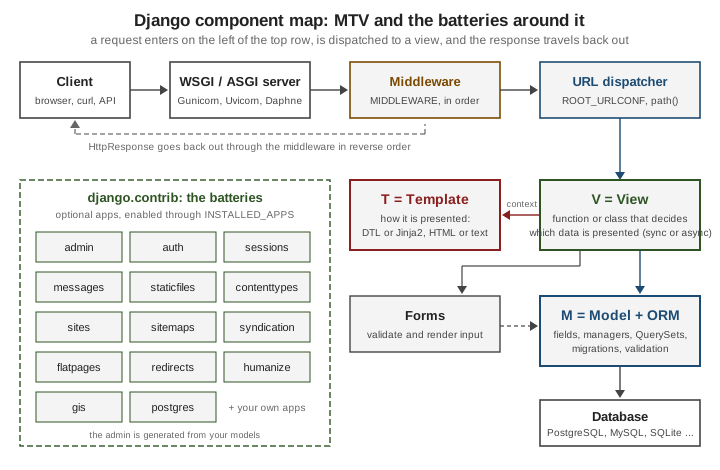
The figure shows how the pieces relate. The top row is the journey of a request: a client sends an HTTP request, the
WSGI or ASGI server hands it to Django, the middleware stack processes it in the order of the MIDDLEWARE setting,
and the URL dispatcher picks a view. The view is the hub: it talks to the model layer (ORM and database) for data,
to forms to validate input, and to a template to render the answer. The response travels back out through the
middleware in reverse order.
The table maps each component to its configuration, its package and the page of this section that covers it:
| Component | Configured by | Lives in | Covered in |
|---|---|---|---|
ORM and migrations |
|
|
|
URL dispatcher |
|
|
|
Views and the request/response objects |
|
|
|
Templates |
|
|
|
Forms |
|
|
|
Admin |
|
|
|
Authentication and authorization |
|
|
|
Middleware |
|
|
|
Settings |
|
|
|
Application registry |
|
|
You do not have to take the map on trust: the application registry, the settings and the URL resolver can be asked
which components are active in a running project. The script below prints them; run it with
python manage.py shell < inspect_components.py.
# inspect_components.py -- run with: python manage.py shell < inspect_components.py
from django.apps import apps
from django.conf import settings
from django.template import engines
from django.urls import resolve

print("apps      :", [c.label for c in apps.get_app_configs()])
print("middleware:", [m.rsplit(".", 1)[-1] for m in settings.MIDDLEWARE])
print("templates :", [e.name for e in engines.all()])
match = resolve("/books/")
print("url ->    :", match.view_name, "->", match.func.__module__ + "." + match.func.__name__)
print("models    :", [m.__name__ for m in apps.get_app_config("books").get_models()])
On a fresh django-admin startproject project with the books app added to INSTALLED_APPS and routed at
/books/, it prints:
apps      : ['admin', 'auth', 'contenttypes', 'sessions', 'messages', 'staticfiles', 'books']
middleware: ['SecurityMiddleware', 'SessionMiddleware', 'CommonMiddleware', 'CsrfViewMiddleware', 'AuthenticationMiddleware', 'MessageMiddleware', 'XFrameOptionsMiddleware']
templates : ['django']
url ->    : book-list -> books.views.book_list
models    : ['Book']
Source: Applications and URL dispatcher
The Pieces Are Modular
Loose coupling is real, not a slogan. Django does not require the startproject layout, and a complete application
fits in one file: settings.configure() replaces a settings module, the module itself can be the URLconf, and
get_wsgi_application() returns a WSGI callable.
# mini.py -- a whole Django "project" in one file
import django
from django.conf import settings
from django.core.wsgi import get_wsgi_application
from django.http import JsonResponse
from django.urls import path

settings.configure(
    DEBUG=False,
    SECRET_KEY="not-a-real-key-for-a-one-file-demo",
    ROOT_URLCONF=__name__,
    ALLOWED_HOSTS=["testserver", "localhost"],
    MIDDLEWARE=["django.middleware.common.CommonMiddleware"],
)


def ping(request):
    return JsonResponse({"django": django.get_version(), "path": request.path})


urlpatterns = [path("ping/", ping)]

application = get_wsgi_application()  # a WSGI callable, no project layout needed

if __name__ == "__main__":
    from django.test import Client

    response = Client().get("/ping/")
    print(response.status_code, response.json())
$ python mini.py
200 {'django': '6.1.1', 'path': '/ping/'}The literal secret in this demo is for a throw-away script only; the real configuration pages show how to read it from the environment. Single-file Django is a teaching tool and the way to embed Django in a script or a test, not a recommended application layout; the standard layout is described in Project Structure & Apps.
WSGI Versus ASGI
Django applications are served through one of two Python server interfaces:
| WSGI | ASGI | |
|---|---|---|
Specification |
PEP 3333; a synchronous callable |
ASGI; an asynchronous callable |
Protocols |
HTTP request/response only. |
HTTP, WebSockets and other long-lived protocols. |
Django entry point |
|
|
Servers documented by Django |
Gunicorn, uWSGI, Apache with |
Daphne, Granian, Hypercorn, Uvicorn. |
Sync views |
Run directly in the worker’s thread. |
Run in a thread pool so they do not block the event loop. |
Async views |
Run in their own one-off event loop per request, at a small adaptation cost; no efficient long-running requests. |
Run natively on the server’s event loop; hundreds of slow connections without hundreds of threads. |
startproject generates both files. They are only a few lines each:
# config/wsgi.py
import os

from django.core.wsgi import get_wsgi_application

os.environ.setdefault("DJANGO_SETTINGS_MODULE", "config.settings")
application = get_wsgi_application()
# config/asgi.py
import os
from django.core.asgi import get_asgi_application
os.environ.setdefault("DJANGO_SETTINGS_MODULE", "config.settings")
application = get_asgi_application()Servers take the dotted path to that object: gunicorn config.wsgi:application or
uvicorn config.asgi:application. The development server runserver does not use either file.
The same Django code runs under both. A view is asynchronous when the callable returns a coroutine, which in
practice means async def; a class-based view declares its get() and post() handlers as async def. Django
inspects the callable and picks the right path:
# async_views.py
import asyncio
import time

from django.http import JsonResponse


def sync_view(request):
    time.sleep(0.2)  # blocking: occupies a worker thread
    return JsonResponse({"style": "sync"})


async def async_view(request):
    await asyncio.sleep(0.2)  # cooperative: the event loop is free meanwhile
    return JsonResponse({"style": "async"})
After routing both views (path("sync/", async_views.sync_view) and path("async/", async_views.async_view)) and
running uvicorn config.asgi:application --port 8101, then gunicorn config.wsgi:application --workers 1 --threads 8
for the WSGI check, the results were:
$ python manage.py check
System check identified no issues (0 silenced).
$ curl -s localhost:8101/async/   # Uvicorn, ASGI
{"style": "async"}
$ curl -s localhost:8101/sync/    # Uvicorn, ASGI: sync view served from a thread
{"style": "sync"}
$ curl -s localhost:8102/async/   # Gunicorn, WSGI: async view still works
{"style": "async"}
Ten concurrent requests to each view against Uvicorn took 0.24 seconds for /sync/ and 0.22 seconds for /async/.
That is not a mistake in the benchmark but the point of the table: under ASGI a sync view runs in a thread pool, so
for a handful of concurrent requests the two styles are indistinguishable. Async pays off when a request spends its
time waiting — calling external APIs, streaming, long polling, WebSockets — and you need many of them open at
once; it does not make CPU-bound code faster.
Pitfalls and rules worth knowing early:
-
Do not block the event loop. Never call a blocking library from an
async defview. Wrap legacy synchronous code withasgiref.sync.sync_to_async(). If you call a synchronous-only part of Django from async code, Django’s async-safety protection raises an error instead of risking data corruption. -
Async needs async middleware end to end to be fully efficient. Django adapts synchronous middleware by running it in its own thread; the bundled middleware supports both modes, third-party middleware may not.
-
The ORM has async methods: every
QuerySetmethod that runs SQL has ana-prefixed variant (aget(),acreate(),afirst()), andasync forworks on anyQuerySet. Transactions do not yet work in async mode; write that part as one synchronous function and call it throughsync_to_async(), and keepCONN_MAX_AGEat its default in async code. -
Choose one deployment model per process. WSGI plus
async defworks but gives none of the async benefits; WebSockets need ASGI (see Channels & WebSockets).
Async Support covers async views, the async ORM, sync_to_async() and the
performance trade-offs in depth, and Deployment covers production servers.
When Each Piece Arrived
| Version | Change |
|---|---|
3.0 |
ASGI support ( |
3.1 |
Async views and middleware. |
4.1 |
Asynchronous ORM interface ( |
4.2 |
|
5.0 |
Async authentication ( |
6.0 |
|
Release Cadence, LTS and Deprecation Policy
Django’s release process is documented in Django’s release process, and the practical consequences are simple enough to remember.
-
Feature releases are numbered
A.Band, under the policy that applies up to 6.2, arrive roughly every eight months (6.0 shipped on 2025-12-03 and 6.1 on 2026-08-05). They are mostly backwards compatible; exceptions are listed in the release notes. Each cycle has alpha, beta and release-candidate stages. -
Patch releases (
A.B.C) fix bugs and security issues and are 100% compatible with the feature release except when a security or data-loss fix cannot be made otherwise. "Should I upgrade to the latest patch release?" is always "yes". As of 2026-10-03 the latest is 6.1.1, and 6.1.2 is scheduled for 2026-10-06 with security fixes. -
Long-term support (LTS) releases are designated feature releases that receive security and data-loss fixes for a guaranteed period, typically three years. Since Django 2.0 the version numbers follow a loose form of semantic versioning: each release after an LTS bumps to the next ".0" (2.0, 2.1, 2.2 LTS, 3.0, 3.1, 3.2 LTS, and so on).
-
Support levels: the current download page distinguishes mainstream support (security fixes, data-loss bugs, crashing bugs, major bugs in new features, regressions) from extended support (security and data-loss fixes only).
As read from the download page on 2026-10-03:
| Series | Latest | End of mainstream support | End of extended support |
|---|---|---|---|
5.2 LTS |
5.2.17 |
December 3, 2025 |
April 2028 |
6.0 |
6.0.8 |
August 4, 2026 |
April 2027 |
6.1 |
6.1.1 |
April 2027 |
December 2027 |
The roadmap on the same page lists Django 6.2 LTS for April 2027 (mainstream support until December 2027, extended until April 2030), then Django 2028 in January 2028 and Django 2029 in January 2029. In practice: use the newest release for new projects (it is supported longest and has the best documentation); use 5.2 LTS if you must stay on Python 3.10 or 3.11, which 5.2 supports and 6.0 and later do not; and plan LTS-to-LTS upgrades by going through the intermediate releases' deprecation warnings.
Calendar Versioning From Django 2028
Django 6.2 is the last release under the previous versioning and support policy. As the 6.1 release notes say under "Adopting calendar versioning", following DEP 20 the releases that had been planned as Django 7.0 and 7.1 are now Django 2028 and Django 2029. From Django 2028 on:
-
feature releases use the version format
YYYYand are released every January; -
every feature release receives the same three-year support period (the LTS distinction goes away);
-
patch releases keep the pattern of the year followed by a counter (the download page gives 2028.3 as an example);
-
the deprecation warning classes are renamed after the calendar version in which a feature is removed. The notes state that
RemovedInDjango70WarningbecomesRemovedInDjango2028Warning. In the 6.1.1 package used for this page,django.utils.deprecationstill definesRemovedInDjango70Warning(aPendingDeprecationWarning) andRemovedInNextVersionWarning(aDeprecationWarning), and the deprecation timeline lists the removals planned for the first calendar release under the heading "2028".
Code that only catches DeprecationWarning and PendingDeprecationWarning, as the examples below do, is unaffected by
the renaming; only code that imports the Django-specific classes by name needs to change.
The Deprecation Policy in Practice
The official policy guarantees that a deprecated feature keeps working, with a warning, for at least two feature
releases. A feature deprecated in A.x continues to work in all A.x versions and is removed in B.0, or in B.1
when it was deprecated in the last A.x release (the LTS), so that deprecations always span at least two releases.
The worked example in the docs: a function deprecated in 4.2 (an LTS) still exists in 5.0 and is removed in 5.1.
Third-party apps that support LTS-to-LTS upgrades therefore need compatibility back to the earlier LTS.
The warnings are silent by default. Turn them on in the three places they matter:
# 1. Run the development server or any command with deprecation warnings visible
$ python -Wd manage.py runserver

# 2. Turn them into errors for the system check and for the test suite
$ python -W error::DeprecationWarning -W error::PendingDeprecationWarning manage.py check
System check identified no issues (0 silenced).
$ python -W error::DeprecationWarning -W error::PendingDeprecationWarning manage.py test books
Found 2 test(s).
...
OK
With pytest and pytest-django, the equivalent is a filterwarnings entry that makes new deprecations fail the build
instead of scrolling past:
# pytest.ini
[pytest]
DJANGO_SETTINGS_MODULE = config.settings
python_files = tests.py test_*.py
filterwarnings =
    error::DeprecationWarning
    error::PendingDeprecationWarning
$ python -m pytest books -q
.. [100%]
2 passed in 0.25sA good upgrade routine is: move to the latest patch of your current series, run the tests with warnings as errors,
fix what is flagged, then move to the next feature release and repeat. The tool django-upgrade automates many of
the mechanical rewrites; What’s Changed & Upgrading walks through
the process release by release.
How Django Compares
A comparison is only useful when it states what each framework is for, so the table below is a short orientation drawn from each project’s own documentation, not a ranking. The other Python web frameworks have their own sections under Backend Development: Python Flask, Python Tornado and Python Pyramid.
| Framework | Language and model | Where it overlaps with Django | When it is the better fit |
|---|---|---|---|
Flask (see Python Flask) |
Python micro-framework on WSGI, with a large extension ecosystem; async views are supported but the framework is not async-first. |
Routing, templating (Jinja2), a development server, a test client. |
Small services and teams that want to choose every component (ORM, forms, admin) themselves. |
Python, ASGI, type-hint driven; Pydantic validation, generated OpenAPI, dependency injection. |
Python web back ends; both run on ASGI servers such as Uvicorn. |
API-first services where typed declarations should drive validation and documentation, with no server-rendered UI or admin. |
|
An API layer for Django in the FastAPI style: type hints, Pydantic schemas, OpenAPI. |
It is Django: same ORM, auth, settings, admin and migrations. |
You want FastAPI-style endpoints inside a Django project (see also Django REST Framework). |
|
Ruby, MVC, "convention over configuration"; Active Record ORM, Action View templates, generators. |
The closest philosophical sibling: full-stack, batteries included, ORM with migrations, server-rendered pages. |
A Ruby team, or when its conventions and generators match your workflow better than Django’s explicit settings. |
|
PHP, MVC; Eloquent ORM, Blade templates, Artisan command-line tool. |
Full-stack with ORM, migrations, templating, queues and a command line. |
A PHP team or a PHP hosting environment. |
|
C#, MVC, Razor Pages, Minimal APIs and Blazor on the .NET runtime; Entity Framework Core for data (see Data Access with EF Core). |
Routing, middleware pipeline, model binding, authentication and dependency injection. |
A .NET organization, strongly typed compile-time checking, or Windows-centric infrastructure. |
|
Java or Kotlin on the JVM; Spring MVC or WebFlux, Spring Data JPA and auto-configuration (see Spring Data JPA). |
Controllers or views, ORM, security, a rich ecosystem; production-grade defaults. |
A JVM organization, long-lived enterprise services, or workloads that need the JVM’s concurrency and tooling. |
For readers moving between stacks, the concept mapping is more useful than the feature list. Django names on the left, the closest counterparts on the right (approximate: the frameworks differ in detail):
| Django | Rails | Laravel | ASP.NET Core | Spring Boot |
|---|---|---|---|---|
Model and QuerySet |
Active Record model |
Eloquent model |
EF Core entity and |
JPA entity and Spring Data repository |
Migrations ( |
Active Record migrations |
Laravel migrations |
EF Core migrations |
Flyway or Liquibase (external) |
URLconf ( |
|
|
Routing and endpoints |
|
View (function or class) |
Controller action |
Controller method |
Controller action or Minimal API handler |
|
Template (Django Template Language) |
ERB view |
Blade view |
Razor view |
Thymeleaf or other template engine |
Middleware |
Rack middleware |
HTTP middleware |
Middleware pipeline |
Servlet filters and interceptors |
Forms and validators |
Strong parameters and validations |
Form requests |
Model binding and data annotations |
Bean Validation |
Admin site |
none built in (gems) |
none built in (packages) |
none built in |
none built in |
The comparison mixes first-party and third-party pieces on purpose (migrations in Spring Boot come from Flyway or Liquibase rather than from Spring itself). The principle behind each choice is the same across the table: pick the framework your team can run and hire for, then use the idioms of that framework rather than porting another’s.
The sections of this site on FastAPI, Spring Boot and ASP.NET Core give the other half of each comparison, and PHP and Laravel covers Laravel; there is no page for Rails on this site, so that entry links to the official documentation only.
Source: FAQ: General and each framework’s official site linked in the table
Where the Books Are Outdated
Books written for Django 1.11 to 3.x (the books listed in the section’s bibliography are of that age) describe a correct architecture but several details that no longer match Django 6.1. For this page’s topics:
-
Python and compatibility layers. Django 1.11 supported Python 2.7. The
sixhelpers andpython_2_unicode_compatiblewere removed in 3.0, andugettextandforce_textin 4.0. Django 6.1 needs Python 3.12 to 3.14; 5.2 LTS needs 3.10 to 3.14. -
Settings names.
MIDDLEWARE_CLASSESwas replaced byMIDDLEWARE(the old setting was removed in 2.0), andurl()andis_ajax()were removed in 4.0 (usepath()orre_path(), and inspect theX-Requested-Withrequest header yourself if you still need it). -
Versioning and support. Numbering changed to loose semantic versioning at 2.0, and from 2028 it becomes calendar versioning with uniform three-year support, so any "an LTS every third release" rule of thumb is dated.
-
Server model. Django was WSGI-only until 3.0. ASGI (3.0), async views (3.1) and the async ORM (4.1) mean the 2018 advice that real-time features always require a separate process or only Channels is out of date: Channels remains the right tool for WebSockets and background consumers, but plain async views cover many long-polling and streaming needs.
-
Defaults.
USE_TZdefaults toTruesince 5.0 andpytzwas dropped in 5.0 in favour ofzoneinfo(the default since 4.0);DEFAULT_AUTO_FIELDwas introduced in 3.2 and the default isBigAutoFieldsince 6.0;USE_L10Nwas removed in 5.0. -
Naming. Everything said about MTV versus MVC in the books still holds; what is older is the vocabulary around "function-based views are the only way", because class-based and async views are both first-class today.
What Changed Recently
| Release | Relevant changes |
|---|---|
5.2 LTS (April 2025) |
Composite primary keys, automatic model imports in |
6.0 (December 2025) |
Python 3.12 to 3.14 only; built-in Content Security Policy support; template partials ( |
6.1 (August 2026) |
Model field fetch modes ( |
6.2 LTS (April 2027, planned) |
The last release under the old versioning and support policy. |
2028 (January 2028, planned) |
The first calendar-versioned release, then one release every January. |
Where to Go Next
Start with Getting Started to install Django and build a first page, then read Project Structure & Apps and Settings & Configuration. The Python language is not re-taught here; see Python Reference for the language and Virtual Environments & Packaging for environments.