Functions
|
This section documents the current Python release line as published at the official Python documentation, which is the reference these pages are written and verified against. No specific patch version is pinned. This content was generated with the assistance of AI and should be verified against the official documentation before being relied on in production. This section’s bibliography lists the reference material consulted while preparing these pages. |
A function is defined with def, called by name, and may return a value with return — everything
else on this page (parameter styles, scope, lambda) builds on that one construct.
Defining Functions: def, Parameters, Return Values
A def statement binds a name to a function object; the body executes only when the function is
called. Without an explicit return, a function returns None. Full coverage is in the tutorial’s
Defining Functions section:
def greet(name):
    return f"Hello, {name}!"

def log(message):
    print(f"[LOG] {message}")   # no 'return' -> implicitly returns None

print(greet("Ada"))       # Hello, Ada!
result = log("started")   # prints "[LOG] started"
print(result)              # None
Docstrings
A string literal as the first statement in a function body is its docstring, retrievable at runtime
via .doc or help(). Convention and formatting are documented under
Documentation Strings:
def area(radius):
    """Return the area of a circle with the given radius."""
    return 3.14159 * radius ** 2

print(area.__doc__)   # Return the area of a circle with the given radius.
help(area)             # prints the same docstring, formatted
See Docstrings for multi-line docstrings, style conventions (Google, NumPy, reST, Epytext), and tools that generate documentation sites from docstrings.
Function Annotations
An annotation attaches an expression — typically a type — to a parameter or return value, using :
after the parameter name and → before the return type. Python does not enforce annotations at
runtime; they exist for readers and for tools such as type checkers. Details, including the
annotations dict they populate, are under
Function Annotations:
def multiply(x: int, y: int) -> int:
    return x * y

print(multiply(3, 4))          # 12
print(multiply.__annotations__)   # {'x': <class 'int'>, 'y': <class 'int'>, 'return': <class 'int'>}
Parameter Styles and Argument Passing
Python’s parameter model covers several ways to pass and unpack arguments; all are laid out together in More on Defining Functions.
Positional, keyword, and default arguments
A caller may pass arguments by position or, using name=value, by keyword; a parameter with = in its
definition becomes optional and reuses that value when the caller omits it. See
Keyword Arguments and
Default Argument Values:
def connect(host, port=5432, timeout=30):
    return f"{host}:{port} (timeout={timeout}s)"

print(connect("db.example.com"))                     # db.example.com:5432 (timeout=30s)
print(connect("db.example.com", 5433))                # positional
print(connect("db.example.com", timeout=60))          # keyword, skips 'port'
print(connect(host="db.example.com", port=5433))      # both by keyword
args and *kwargs
A parameter prefixed with collects any extra positional arguments into a tuple; one prefixed with
* collects extra keyword arguments into a dict. Documented under
Arbitrary Argument Lists:
def total(*args, **kwargs):
    print(args)     # tuple of positional extras
    print(kwargs)   # dict of keyword extras
    return sum(args) + sum(kwargs.values())

print(total(1, 2, 3, bonus=10, tax=5))
# (1, 2, 3)
# {'bonus': 10, 'tax': 5}
# 21
Positional-only (/) and keyword-only (*) markers
A bare / in the parameter list marks every parameter before it as positional-only; a bare marks
every parameter after it as *keyword-only. Both are covered in
Special Parameters, with the
individual sections
Positional-Only
Parameters and
Keyword-Only Arguments:
def resize(image, /, width, *, height):
    return f"resizing {image} to {width}x{height}"

print(resize("photo.png", 800, height=600))         # image and width may be positional
# print(resize(image="photo.png", width=800, height=600))  # TypeError: 'image' is positional-only
# print(resize("photo.png", 800, 600))                       # TypeError: 'height' is keyword-only
Unpacking arguments at the call site
The mirror operation: unpacks an iterable into positional arguments, and * unpacks a dict into
keyword arguments, at the point of a call. See
Unpacking Argument Lists:
def connect(host, port=5432, timeout=30):
    return f"{host}:{port} (timeout={timeout}s)"

args = ("db.example.com", 5433)
kwargs = {"timeout": 60}
print(connect(*args, **kwargs))   # db.example.com:5433 (timeout=60s)
Scope and the LEGB Rule
Every name lookup follows the LEGB order — *L*ocal, *E*nclosing, *G*lobal, *B*uilt-in — stopping at the first scope that defines the name. The tutorial’s Python Scopes and Namespaces section is the canonical reference:
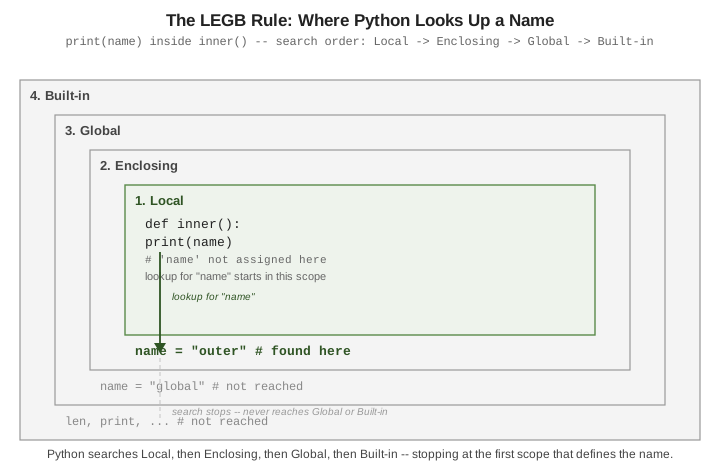
name = "global"          # Global scope

def outer():
    name = "outer"        # Enclosing scope (relative to inner)

    def inner():
        print(name)        # Local has no 'name' -> found in Enclosing
    inner()

outer()   # prints: outer
global and nonlocal
By default, assigning to a name inside a function creates a new local name — it does not modify an
outer one. The global statement (reference:
The global statement)
targets the module’s global scope; nonlocal (reference:
The nonlocal statement)
targets the nearest enclosing function scope:
counter = 0

def increment_global():
    global counter
    counter += 1   # rebinds the module-level 'counter'

def make_counter():
    count = 0
    def increment():
        nonlocal count
        count += 1   # rebinds 'count' in make_counter's scope
        return count
    return increment

increment_global()
print(counter)          # 1

tick = make_counter()
print(tick(), tick())   # 1 2
Without nonlocal, count = 1` inside `increment` would raise `UnboundLocalError`: the assignment
marks `count` as local to `increment`, and that local has no value yet at the point of `=.
lambda Expressions
A lambda is a single-expression, unnamed function — useful as a short throwaway callback, but a def
with a name is clearer for anything reused or requiring a docstring. See
Lambda Expressions:
pairs = [(1, "b"), (2, "a"), (3, "c")]
pairs.sort(key=lambda pair: pair[1])
print(pairs)   # [(2, 'a'), (1, 'b'), (3, 'c')]

square = lambda x: x ** 2   # works, but prefer 'def square(x): return x ** 2'
print(square(5))             # 25
The mutable-default-argument pitfall
A default argument value is evaluated once, when the def statement runs — not on every call. A
mutable default (a list, dict, or set) is therefore shared across all calls that rely on it, and
accumulates state silently:
def append_bad(x, items=[]):
    items.append(x)
    return items

print(append_bad(1))   # [1]
print(append_bad(2))   # [1, 2]  -- the SAME list, reused from the first call!
The fix is to default to None and create the mutable object fresh inside the body:
def append_good(x, items=None):
    items = items if items is not None else []
    items.append(x)
    return items

print(append_good(1))   # [1]
print(append_good(2))   # [2]  -- a fresh list each time
See Also
-
Iterators, Generators, and Comprehensions — generator functions, which reuse
defbut suspend and resume execution instead of returning once. -
Decorators and Metaclasses — functions that wrap other functions, built directly on the parameter-passing rules covered here.
-
Docstrings — multi-line docstrings, style conventions (Google, NumPy, reST, Epytext), and tools that generate documentation sites from docstrings.