E-commerce
|
This content was generated with the assistance of AI and should be verified against the official documentation of each platform before being relied on in production. This section’s bibliography lists the reference material consulted while preparing these pages. |
Three ways to run an online store
An e-commerce platform has to do the same jobs whichever one you pick: keep a catalogue, price it, take a cart through a checkout, collect payment, calculate tax and shipping, record orders, and expose all of it to other systems. What differs is who runs the software, and that decides how much of the platform you can change.
-
Hosted SaaS. The vendor runs the servers, applies security fixes and upgrades the platform for every merchant at the same time. You configure a store and extend it only through the surfaces the vendor exposes: themes, apps, APIs and extensions that run on its infrastructure. Shopify is the example in this section. You never see the platform’s source code, you never patch it, and you do not choose the PHP or database version, but you also do not carry any of that operational work.
-
Self-hosted open source. You download the software, install it on a server you control (or rent from a hosting company) and run it yourself. You can read and change everything, install any extension and choose the stack, and you are responsible for hosting, backups, updates, performance and security patches. PrestaShop (a standalone PHP and Symfony application) and WooCommerce (a plugin for WordPress) are the examples, and so is Magento Open Source.
-
Enterprise PaaS or SaaS. Adobe Commerce is the licensed edition of the Magento code base. It can be installed on your own servers, run on Adobe Commerce on Cloud infrastructure (a platform as a service where Adobe manages the hosting environment and you deploy your code), or consumed as Adobe Commerce as a Cloud Service, a SaaS product. The extension model moves between these options: modules written in PHP run inside the application, while App Builder extensions run outside it and talk to it through APIs and events.
Every platform in this section offers four kinds of customization surface, drawn side by side in the figure below. A theme controls how the storefront looks. An extension (an app, a module or a plugin) adds behaviour. An API lets other systems read and write the store’s data. A headless build replaces the platform’s storefront with your own front end and uses the platform only as a commerce back end. The platforms differ in how much each surface lets you do, and the subsection landing pages explain the details for each one.
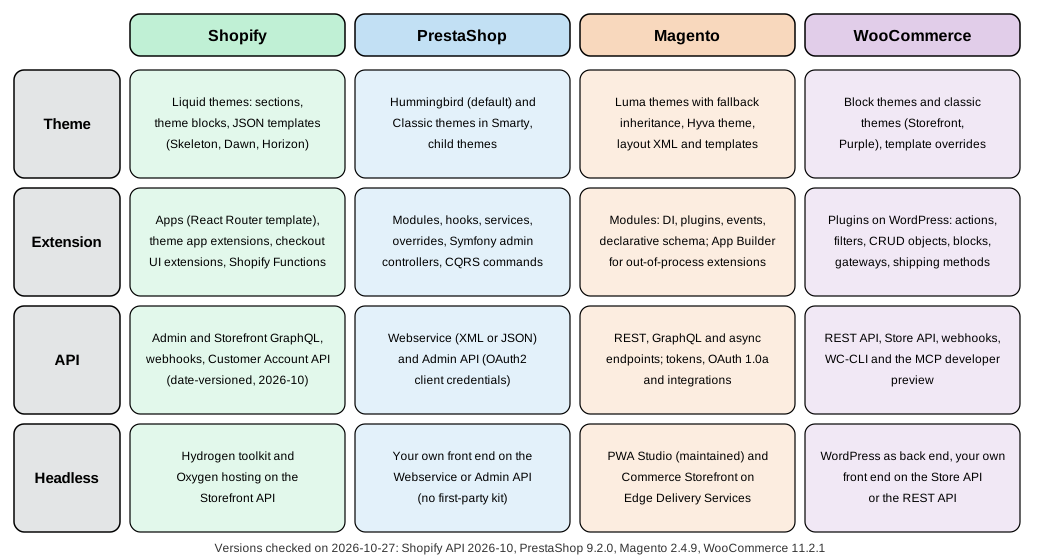
The four platforms
All baselines below were checked on 2026-10-27. Shopify is a service whose behaviour changes without a download, so its pages are tied to dated API versions; the three other platforms are software, so their pages are tied to the release you run.
Shopify is a hosted platform sold as a subscription, with plans from entry level to Shopify Plus. The section is written against the Admin, Storefront, Customer Account and Functions API version 2026-10, Shopify CLI 5.0.0, Hydrogen 2026-10, the React Router app template and Polaris web components 2.0. You build on it with Liquid themes, apps, checkout extensions, Shopify Functions and the GraphQL APIs, or you go headless with Hydrogen. Account-bound parts, for which this section needed a store, are documented from the official sources and are said to be not executed on the pages concerned.
PrestaShop is an open source PHP application on Symfony. The section is written against PrestaShop 9.2.0 (released 2026-09-30) with the Hummingbird 2.1.2 theme; the 8.2 line (8.2.8) is in security-only extended support and is mentioned where it behaves differently. You build on it with modules and hooks, Smarty themes, the legacy Webservice and the new Admin API, and the console commands of the Symfony application.
Magento is the PHP platform that exists as the free Magento Open Source and as the licensed Adobe Commerce editions. The section is written against Magento 2.4.9 (generally available 2026-05-12) and the community distribution Mage-OS 3.6.0 (2026-10-14, based on 2.4.9) on which the examples were run; the 2.4.10 line is in alpha. You build on it with modules (dependency injection, plugins, events, declarative schema), Luma or Hyvä themes, REST and GraphQL, and out-of-process extensions with App Builder.
WooCommerce is the e-commerce plugin for WordPress. The section is written against WooCommerce 11.2.1 (2026-10-09) on WordPress 7.1.3, with the 11.3 line in beta. You build on it with WordPress plugins and the hooks, CRUD objects and blocks of WooCommerce, block or classic themes, the REST API and the Store API, and WC-CLI.
All four subsections use one running example, Pocket Coffee, an invented specialty-coffee shop with a configurable product (origin, grind and size), a Coffee Club customer group, shipping zones for Spain and the rest of the European Union, two languages and a small custom extension, so the same shop can be compared as it is built four ways.
Which subsection should I read?
| If you need … | Read |
|---|---|
A store running quickly, with the vendor handling servers, security and upgrades |
Shopify, starting with Plans and Shopify Plus |
Full control of the code and the server, in a mid-sized PHP application with a modern back office and a module system |
PrestaShop, starting with Versions and Support |
A large catalogue, B2B features, multiple stores and a mature enterprise ecosystem, with a choice of open source, licensed or cloud editions |
Magento, starting with Editions and Ecosystem |
An online shop added to a WordPress site, with content and commerce in one system and a very large extension market |
WooCommerce, starting with Versions, Requirements and Release Cadence |
To change the look of a storefront |
The theme pages of each subsection, for example Shopify Theme Architecture, PrestaShop Themes, Magento Luma Themes and WooCommerce Themes |
To add behaviour with code |
Shopify Apps, PrestaShop Module Basics, Magento Module Anatomy and WooCommerce Extension Development |
To connect another system through an API |
Shopify Admin GraphQL API, PrestaShop Admin API, Magento REST and GraphQL APIs and WooCommerce REST API and Webhooks |
A headless storefront |
Shopify Storefront API and Hydrogen, Magento Hyvä, PWA Studio and Edge Delivery and WooCommerce Store API |
To run a self-hosted store on several Kubernetes nodes with a managed database |
The cloud-deployment pages of each subsection, starting with WooCommerce, PrestaShop and Magento |
A decision between the four, with dated numbers |
|
A one-page printable summary of one platform |
Shopify, PrestaShop, Magento and WooCommerce cheat sheets |
Each subsection landing page ends with a learning path that orders its pages for a newcomer and lists what could not be run while writing it.
What’s covered
Shopify
-
Shopify — overview of the platform and a map of its pages.
PrestaShop
-
PrestaShop — overview of the platform and a map of its pages.
Magento
-
Magento — overview of the platform and a map of its pages.
WooCommerce
-
WooCommerce — overview of the platform and a map of its pages.
Comparison
-
Comparison — feature matrix, dated metrics for popularity, performance, security and cost, charts, scores and recommendations by purpose.
Related material on this site
The section reuses the existing guides instead of repeating them; each of the pages below is linked from the e-commerce pages that need it.
| Existing page | How the e-commerce section uses it |
|---|---|
Composer, PSR standards, PHPUnit, static analysis, OPcache and cryptography, linked from the PrestaShop, Magento and WooCommerce pages for PHP basics. |
|
The build-it-yourself PHP alternative when none of the four platforms fits, referred to by the comparison. |
|
Liquid, the Shopify template language, originates in Ruby. |
|
Rust, JavaScript and TypeScript |
The languages of Shopify Functions (Rust, or JavaScript compiled to WebAssembly) and of the app and extension code. |
Shopify app interfaces (React Router, Polaris), Hydrogen storefronts, and the block and admin interfaces of WooCommerce. |
|
GraphQL basics for the Shopify Admin and Storefront APIs and the Magento GraphQL API. |
|
The OAuth flows behind Shopify authentication, the PrestaShop Admin API (client credentials), Magento API authentication and WooCommerce REST API (OAuth 1.0a). |
|
The local environments: the PrestaShop Docker image, Magento Cloud Docker and wp-env. |
|
Playwright, used by the PrestaShop UI tests and the WooCommerce end-to-end utilities. |
|
The WooCommerce MCP developer preview and the Shopify Dev MCP server. |
|
Theme performance, search engine optimization and accessibility pages. |
|
Documentation tools comparison, Cloud providers comparison and Programming languages comparison |
The comparison pages whose structure, figures and data layout the e-commerce comparison follows. |
The WordPress platform that WooCommerce runs on: plugins, hooks, block themes, WP-CLI, WP-Cron, the REST API, performance and security. |
The WooCommerce pages explain the WordPress concepts they need (plugins, hooks, blocks, block themes and WP-CLI) briefly and link to the matching pages of the WordPress section for depth.
Bibliography
Every source below is the official site, repository or documentation page of the platform, tool, standard or service it
supports, except for a few secondary sources (third-party articles, Wikipedia and a book distributor page), which are
marked as such; each entry links to its source. Each group starts with the main entry points, followed by every page
that the subsection and comparison pages cite under their own == References headings, so a claim on any page can be
traced to the page it came from. Links were opened on 2026-10-27 from the authoring environment. Entries marked
(unverified) could not be opened from it (the site refused automated requests, answered with a bot challenge or returned
an error status), so open them and confirm the content, version and status before you rely on them. Where a page of the
official documentation is only reachable with or without a trailing slash, the form that works is the one listed.
Shopify
Main entry points
-
Shopify developer documentation — API versioning and limits, Admin GraphQL, Admin REST (legacy), bulk operations, Storefront API, Customer Account API, Functions, checkout UI extensions, POS UI extensions, Polaris, Liquid, Shopify CLI, app scaffolding, authentication, privacy compliance, discounts, custom data, markets, B2B, Flow, pixels, script-tag deprecation, development stores, billing, App Store requirements, CI/CD deployment, theme architecture, theme blocks,
checkout.liquid, the GitHub integration and Hydrogen. -
Shopify developer changelog — deprecations and releases such as the Scripts and script-tag retirements, expiring offline tokens, legacy customer accounts, Hydrogen 2026-10 and the Polaris web components.
-
Shopify Help Center (user documentation, including the checkout upgrade guides), pricing and Shopify Editions.
-
Repositories: Shopify CLI, Hydrogen, Horizon, Dawn, Skeleton theme, Theme Tools (Theme Check), React Router app template and Functions examples.
Pages cited from shopify.dev (519 pages)
-
Changelog: Build Shopify apps in PHP and Python with new official packages
-
Built for Shopify grace period for uninstall and app embed requirements
-
Shopify changelog: Checkout UI extensions now default to non-blocking behavior
-
Shopify changelog: webhookSubscriptionCreate supports all URI types (2025-08-08)
-
Shopify changelog: deprecation of Product, Order and Shipping Discount Function APIs
-
Shopify changelog: Liquid block and partial tags developer preview (2026-07-21)
-
Shopify changelog: Discounts Allocator developer preview has ended
-
Shopify changelog: Events query complexity limit (2026-09-22)
-
Changelog: Expiring offline tokens required for all public apps
-
Changelog: Expiring offline tokens required for new public apps
-
shopify.app.extensions() supports Admin and Theme app extensions
-
Shopify changelog: stricter Liquid parsing for themes and theme app extensions (2026-01-13)
-
Shopify developer changelog: channelId argument for @inContext in 2026-10
-
Shopify changelog: Next Gen Events are generally available (2026-10-01)
-
Changelog: Offline access tokens now support expiry and refresh
-
Shopify changelog: Script tags are deprecated and will stop running on March 1, 2027
-
Changelog: Protected customer data scopes required for web pixels
-
Shopify changelog: Shopify Scripts will be deprecated on June 30, 2026
-
Shopify changelog: Skeleton theme is now available (2025-05-21)
-
Changelog: The Polaris CDN is adopting semantic versioning (2026-08-31)
-
Shopify changelog: shopify-account component requirement (2026-07-30)
-
_tracking_consent, _landing_page, _orig_referrer cookies will no longer be set
-
Shopify changelog: Updates to Events payloads and subscription configuration (2026-09-16)
-
Changelog: Use the Admin API and bulk operations in Shopify CLI
-
Web Pixels now run on Customer Accounts and Order Status Page
-
Shopify: Function APIs (anatomy, execution order, configuration, limits)
-
Shopify docs: Liquid reference (tags, filters, objects, basics)
-
Shopify docs: Liquid basics (types, truthy and falsy, operators, whitespace control)
-
Webhooks reference, including the bulk_operations/finish payload
-
Shopify developer docs: About delivery and shipping functions
-
Shopify: About Thank you and Order status page customization
-
Shopify: Privacy law compliance (mandatory compliance webhooks)
-
Shopify developer docs: Create a catalog for a specific market
-
Shopify developer docs: Manage translations of merchant-provided content
-
Shopify developer docs: Target buyers by country instead of market ID
-
Shopify developer docs: Feature preview for market-driven shipping
-
Store storefront settings where only your app can write them
-
Shopify developer docs: Building localized experiences with the Storefront API
-
Shopify developer docs: Support international pricing on storefronts
-
Shopify developer docs: Support multiple languages on storefronts
-
Shopify docs: Accessibility best practices for Shopify themes
-
Shopify docs: Load first-paint resources before content_for_header
-
Shopify docs: Render essential content in Liquid and HTML, not JavaScript
-
Shopify developer docs: Country and language selector UX guidelines
-
Shopify developer docs: Detect and set a visitor’s optimal localization
-
Shopify developer docs: Support multiple currencies and languages
Pages cited from help.shopify.com (56 pages)
-
Shopify Help Center: Customizing and editing your checkout and accounts pages
-
Shopify Help Center: Upgrading and replacing your Thank you and Order status pages
-
Shopify Help Center: Customizing and editing your checkout and accounts pages
-
Shopify Help Center: Shopify Scripts and the Script Editor app
-
Shopify Help Center: Transitioning from Shopify Scripts to Shopify Functions
-
Shopify Help Center: Setting up shipping and order fulfillment
-
Shopify Help Center: Upgrading from shipping profiles to shipping options by market
-
Shopify Help Center: Preparing your Shopify store for launch
-
Shopify Help Center: Overview of markets features and concepts
-
Shopify Help Center: Supported countries for Shopify Payments
-
Shopify Help Center: Creating collections and adding products
-
Shopify Help Center: Using CSV files to import and export products
PrestaShop
Main entry points
-
PrestaShop developer documentation, version 9 — system requirements, installation, command-line and Docker installs, architecture, CQRS, components (grid, database, console, cache), modules (tutorial, good practices, hooks, overrides, services, controllers, tabs, payment, carrier, translations, testing), core updates for 9.0, 9.1 and 9.2, themes and Hummingbird, child themes, the Webservice, the Admin API, UI tests, optimization and the command-line update.
-
PrestaShop user documentation, the PrestaShop Open Source Project (release cycle and release pages) and the project blog (9.2.0, the 8.2 extended support, the 8.2.8 security release and PHP security updates).
-
Repositories: PrestaShop (releases, security advisories and policy) and Hummingbird. The Addons validator and PrestaShop Addons marketplace (unverified) are the submission and distribution channels for modules and themes.
-
Friends-of-Presta security advisories, the community’s vulnerability feed.
Pages cited from devdocs.prestashop-project.org (189 pages)
-
PrestaShop devdocs 1.7: Addons technical validation checklist
-
PrestaShop devdocs: Introduction to PrestaShop’s architecture
-
PrestaShop devdocs: Backward compatible configuration storage
-
PrestaShop devdocs: Manage extra properties from the Back Office
-
PrestaShop devdocs: Extend a Grid with JavaScript extensions
-
PrestaShop devdocs: Adding module links in the back-office side menu
-
PrestaShop devdocs: list of hooks (actionCustomerAccountAdd, addWebserviceResources)
-
PrestaShop devdocs: Specifics of multistore module development
-
PrestaShop devdocs: Extend Webservice with a custom resource
-
PrestaShop devdocs: Adding a configuration page (legacy architecture)
-
PrestaShop devdocs: Grid and identifiable object form hooks usage example
-
PrestaShop devdocs: Optimize your Apache httpd configuration
Pages cited from github.com (35 pages)
Magento and Adobe Commerce
Main entry points
-
Adobe Commerce developer documentation — the PHP development guide (architecture, modules, dependency injection, plugins, events, service contracts, declarative schema, routing, message queues, indexing, the web API, CLI commands, payments, content security policy, backward-incompatible changes, ACL, custom checkout, coding standards), the frontend guide (themes, inheritance, CSS, RequireJS, layouts, UI components), the web APIs (REST, GraphQL, authentication, asynchronous endpoints), extensibility (App Builder, events, webhooks, Admin UI SDK, checkout starter kit), PWA Studio, testing and MFTF, Cloud Docker and the Marketplace extension quality program.
-
Released versions and the rest of the Adobe Experience League Commerce documentation — lifecycle policy, release schedule, security enforcement policy, 2.4.9 release notes, security patches, system requirements, installation, application modes, cache types, Varnish, Valkey, indexers, message queues, cron, multi-site, performance best practices, the upgrade guide and the Upgrade Compatibility Tool — plus Adobe Commerce as a Cloud Service and Commerce Storefront.
-
Security: Adobe security bulletins for Commerce and Magento (unverified; the site answers 403 to automated requests), the APSB26-153 bulletin on the Adobe Trust Center (unverified), CVE-2024-34102 and CVE-2025-54236.
-
Repositories: magento2, magento-coding-standard and PWA Studio.
-
Ecosystem: Mage-OS, its releases, Hyvä documentation and the announcement Hyvä is free and open source.
Pages cited from developer.adobe.com (230 pages)
-
Adobe Commerce docs: Extension compatibility (PaaS and SaaS)
-
Adobe Commerce developer documentation: Layered architecture
-
Adobe Commerce developer docs: Admin panel placement and design
-
Adobe Commerce developer docs: Security, performance and data handling
-
Adobe Commerce developer docs: Backward-incompatible changes
-
Adobe Commerce developer documentation: Module file structure
-
Adobe Commerce developer documentation: Register your component
-
Adobe Commerce developer documentation: Composer integration
-
Adobe Commerce developer documentation: XML schema validation
-
Adobe Commerce developer docs: Add extension attributes to entities
-
Adobe Commerce developer documentation: Dependency injection
-
Adobe Commerce developer docs: Sensitive and environment-specific settings
-
Adobe Commerce developer docs: Backward-incompatible changes, Open Source 2.4.8 to 2.4.9
-
Adobe Commerce developer docs: Application isolation attribute
-
Adobe Commerce developer docs: Configuration fixture attribute
-
Adobe Commerce developer docs: Unit tests on the command line
-
Adobe Commerce developer docs: customAttributeMetadataV2 query
Pages cited from experienceleague.adobe.com (137 pages)
-
Adobe Commerce documentation: Enable or disable developer and production modes
-
Adobe Commerce docs: Configure custom cron jobs and cron groups
-
Adobe Commerce docs: crontab.xml and cron_groups.xml reference
-
Adobe Experience League: Secure your Commerce site and infrastructure
-
Adobe Commerce documentation: Enable or disable maintenance mode
-
Adobe Experience League: Magento Open Source 2.4.0 release notes
-
Adobe Experience League: APSB25-88 security bulletin knowledge base article
Pages cited from github.com (17 pages)
Pages cited from www.adobe.com (2 pages)
-
Adobe Security Bulletins and Advisories (unverified)
-
Adobe: Security bulletin APSB26-146 (unverified)
WooCommerce and WordPress
Main entry points
-
WooCommerce developer documentation — development environment, scaffolding, release schedule, security and version support policies, HPOS and its recipe book, MCP, the payment gateway and shipping method APIs, extension compatibility, building a first extension, Cart and Checkout blocks, additional checkout fields, payment method integration, the Store API and
ExtendSchema, REST API authentication, outdated templates, caching, security best practices and Marketplace submission; the machine-readable index is llms.txt. -
Developer blog — release notes (11.0, 11.2.0), the 11.3 pre-release and MCP posts, the PHP 8.1 requirement, the product editor retirement, the Interactivity API mini-cart, the Store API vulnerability patch, cart fragments, blocks as the default checkout, the removal of the Legacy REST API and the security advisories of 2021, 2023 and 2024; and the release calendar.
-
Merchant documentation (server requirements, the Purple theme, template structure, Subscriptions) and WooPayments fees.
-
REST API reference, Quality Insights Toolkit and Action Scheduler.
-
Repositories and listings: woocommerce (releases,
SECURITY.md,readme.txt,docs/), Storefront, the WordPress.org plugin page and the Automattic bug bounty program. -
WordPress: plugin handbook, block editor handbook (including
@wordpress/env), theme handbook, security APIs, WP-CLI, WordPress releases, MCP Adapter and Playground CLI.
Pages cited from developer.woocommerce.com (129 pages)
-
WooCommerce developer blog: The plan for the WooCommerce custom order table
-
WooCommerce developer blog: HPOS backward compatibility and synchronization
-
WooCommerce developer blog: the Legacy REST API moves to a dedicated extension in 9.0
-
WooCommerce developer blog: Purple development moves to the WooCommerce monorepo
-
WooCommerce developer blog: Call for testing, extensible abilities
-
WooCommerce docs: Store API product collection data (used by the older filter blocks)
-
WooCommerce docs: Payment method integration (Checkout block)
-
WooCommerce docs: DOM events sent from the Product Collection block
-
WooCommerce docs: Registering custom collections in the Product Collection block
-
WooCommerce docs: Handling scripts, styles, and data (IntegrationInterface)
-
WooCommerce docs: Overview of data flow between client and server
-
WooCommerce docs: Prevent PO Box addresses in the Checkout block
-
WooCommerce docs: Guidelines for choosing PHP versions in tests
-
WooCommerce developer docs: Compatibility and interoperability
-
WooCommerce developer docs: Extension development best practices
-
WooCommerce developer docs: How to add a section to a settings tab
-
WooCommerce developer docs: Registering settings UI components
-
WooCommerce developer docs: Working with WooCommerce Admin pages
-
WooCommerce docs: How to enable High Performance Order Storage
-
WooCommerce developer docs: How to add a custom field to simple and variable products
-
WooCommerce developer docs: Scaffolding and sample store data
-
WooCommerce: Template structure and overriding templates via a theme
-
WooCommerce docs: WooCommerce CLI frequently asked questions
Pages cited from developer.wordpress.org (60 pages)
Pages cited from woocommerce.com (46 pages)
Pages cited from github.com (39 pages)
Pages cited from wptavern.com (1 page)
-
WP Tavern: WooCommerce patches critical vulnerability with a forced update (secondary source)
Books
The books below were consulted for the topics they cover and rewritten for the current platform versions; where a book describes an older release, the pages say so. Publisher pages from Packt and Springer (Apress) refused automated requests or served a bot challenge, so every entry that links to them is marked (unverified); the ISBN, title, author and year of each were cross-checked against Open Library and Crossref instead.
-
Ivan Djordjevic, Shopify Theme Customization with Liquid, Packt, 2021, ISBN 978-1-80181-396-9: publisher page (unverified).
-
Michael Larkin, Shopify Application Development, Packt, 2014, ISBN 978-1-78328-105-3: publisher page (unverified).
-
Paul Waddy, Shopify For Dummies, Wiley, 2021 (the catalogue lists the print edition as 2021-11), ISBN 978-0-730-39445-7: publisher page.
-
Gavin Ballard, The Definitive Guide to Shopify Themes, Apress, 2017, ISBN 978-1-4842-2640-7: publisher page (unverified; Springer serves a bot challenge).
-
Jason R. Rich, Ultimate Guide to Shopify, Entrepreneur Press, 2022, ISBN 978-1-64201-149-4: distributor page at Simon & Schuster (secondary source, unverified; the publisher’s own site, Entrepreneur Press, has no product page for the title that could be opened).
-
Arnaldo Pérez Castaño, PrestaShop Recipes, Apress, 2017, ISBN 978-1-4842-2573-8: publisher page (unverified).
-
Hayati Hashim, PrestaShop 1.3 Theming Beginner’s Guide, Packt, 2010, ISBN 978-1-84951-172-8: publisher page (unverified).
-
Jose A. Tizon and John Horton, PrestaShop 1.5 Beginner’s Guide, Packt, 2013, ISBN 978-1-78216-106-6: publisher page (unverified).
-
Fernando J. Miguel and Richard Carter, Magento 2 Theme Design, 2nd edition, Packt, 2016, ISBN 978-1-78588-822-9: publisher page (unverified).
-
Fernando J. Miguel, Magento 2 Development Essentials, Packt, 2016, ISBN 978-1-78528-989-7: publisher page (unverified).
-
Ray Bogman and Vladimir Kerkhoff, Magento 2 Cookbook, Packt, 2016, ISBN 978-1-78588-706-2: publisher page (unverified).
-
Viktor Khliupko, Magento 2 DIY, Apress, 2016 (first published December 2016; Springer lists 2017), ISBN 978-1-4842-2459-5: publisher page (unverified).
-
Lisa Sims, Building Your Online Store With WordPress and WooCommerce, Apress, 2018, ISBN 978-1-4842-3845-5: publisher page (unverified).
-
Patrick Rauland, WooCommerce Cookbook, Packt, 2015, ISBN 978-1-78439-405-9: Packt subscription catalogue page (unverified; no product page on www.packtpub.com could be found, so the subscription catalogue entry is the one listed).
-
Robbert Ravensbergen, Building E-Commerce Solutions with WooCommerce, 2nd edition, Packt, 2015, ISBN 978-1-78588-156-5: publisher page (unverified).
Comparison data sources and security research
Main entry points
-
Market share and technology usage: W3Techs content management systems, W3Techs comparison of Magento, PrestaShop and Shopify and W3Techs WooCommerce usage.
-
Live store counts: Store Leads Shopify, PrestaShop, Magento and WooCommerce reports (the reports answer a plain HEAD request with 404 but open in a browser).
-
Performance: the HTTP Archive Tech Report and its API endpoints cwv, adoption and lighthouse; the Web Almanac 2025 e-commerce chapter; and the Chrome UX Report.
-
Repository and package statistics: the GitHub REST API, npm download counts API, Packagist, the WordPress.org API (unverified; the site answers 403 to automated requests), the Stack Exchange API and Google Trends.
-
Vulnerabilities: the NVD API, the CISA Known Exploited Vulnerabilities catalog and the GitHub Advisory Database.
-
Security research: Sansec on Magecart, CosmicSting and SessionReaper exploitation; the Patchstack report State of WordPress Security in 2026; and the Wordfence blog (unverified; it answers with a bot challenge), source of the CVE-2023-28121 exploitation analysis.
-
User reviews, which are self-selected and therefore labelled as such wherever they are used: G2 (unverified) and Capterra (unverified).
Pages cited from www.npmjs.com (8 pages)
-
@shopify/app-bridge-react (unverified)
-
@shopify/app-bridge-types (unverified)
-
@shopify/dev-mcp on npm (unverified)
-
npm: @shopify/hydrogen (unverified)
-
@shopify/polaris (deprecated) (unverified)
-
@shopify/polaris-types (unverified)
-
@shopify/shopify-app-react-router (unverified)
-
npm: @woocommerce/create-woo-extension (unverified)
Pages cited from ecommerce-platforms.com (1 page)
-
ecommerce-platforms.com: Shopify pricing (secondary source)
Pages cited from tech.co (1 page)
-
tech.co: Shopify pricing (secondary source)
Standards and general tooling
Languages, frameworks, standards and tools that the platform pages rely on, such as PHP, Symfony, Smarty, Doctrine, PSR standards, OAuth and the test tools.
Pages cited from dev.mysql.com (1 page)
-
MySQL 8.4 reference: InnoDB buffer pool (unverified)