Collections & Points
|
This section documents the current Qdrant 1.x line (latest 1.19.1), written and verified against the official Qdrant documentation. No specific patch version is pinned. Some capabilities (Qdrant Cloud-only features and the full breadth of client-library APIs beyond Python and Java) are linked, not documented in depth. This content was generated with the assistance of AI and should be verified against the official documentation before being relied on in production. This section’s bibliography lists the reference material consulted while preparing these pages. |
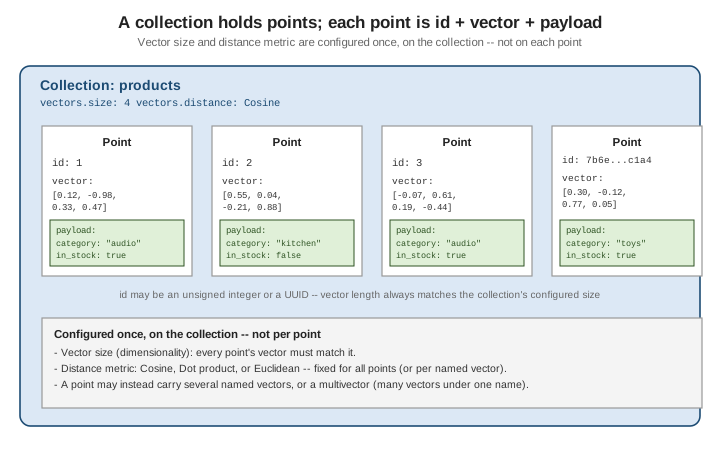
Qdrant organizes data into collections of points. A collection fixes the shape every point in it must share — vector dimensionality and distance metric — while each point’s payload stays free-form JSON.
Collections
A collection is the top-level container Qdrant searches against. Creating one requires declaring, up front, the size (dimensionality) of the vectors it will hold and the distance metric used to compare them — these are fixed for the collection and apply to every point stored in it (unless you use Named vectors, where each named vector gets its own size/distance). See Collections for the full reference.
PUT /collections/{collection_name}
{
  "vectors": {
    "size": 4,
    "distance": "Cosine"
  }
}
The equivalent with the Python client:
from qdrant_client import QdrantClient
from qdrant_client.models import Distance, VectorParams

client = QdrantClient(url="http://localhost:6333")

client.create_collection(
    collection_name="products",
    vectors_config=VectorParams(size=4, distance=Distance.COSINE),
)
size and distance cannot be changed after creation without recreating the collection (or migrating to a
new one) — picking them correctly up front matters more in Qdrant than in most relational schemas.
Points
A point is the unit Qdrant stores and returns from a search. It always has three parts:
-
id — either an unsigned integer or a UUID, unique within the collection.
-
vector — a dense float array matching the collection’s configured
size. -
payload — an arbitrary JSON object of key/value metadata (strings, numbers, booleans, arrays, nested objects) carried alongside the vector and returned with search hits.
See Points for the full reference.
Upserting a point (create-or-replace by id):
PUT /collections/products/points
{
  "points": [
    {
      "id": 1,
      "vector": [0.12, -0.98, 0.33, 0.47],
      "payload": { "category": "audio", "in_stock": true }
    }
  ]
}
from qdrant_client.models import PointStruct
client.upsert(
collection_name="products",
points=[
PointStruct(
id=1,
vector=[0.12, -0.98, 0.33, 0.47],
payload={"category": "audio", "in_stock": True},
)
],
)Named vectors
A single point can carry several distinct named vectors instead of one, each with its own size and distance metric — useful when the same record is embedded by more than one model (e.g. a text embedding model and an image embedding model) and both should be searchable independently.
PUT /collections/products
{
  "vectors": {
    "text": { "size": 384, "distance": "Cosine" },
    "image": { "size": 512, "distance": "Dot" }
  }
}
client.create_collection(
collection_name="products",
vectors_config={
"text": VectorParams(size=384, distance=Distance.COSINE),
"image": VectorParams(size=512, distance=Distance.DOT),
},
)
client.upsert(
collection_name="products",
points=[
PointStruct(
id=1,
vector={
"text": [0.01, 0.02, 0.03], # truncated for brevity, 384 dims
"image": [0.11, 0.22, 0.33], # truncated for brevity, 512 dims
},
payload={"category": "audio"},
)
],
)A search then names which vector to query against (using="text" in the Python client, or a using field
in the REST search body).
Multivectors
A multivector is different from named vectors: it is multiple vectors under one name on a single point — for example one embedding per image patch, or the per-token embeddings a late-interaction (ColBERT-style)
model produces. Instead of averaging or picking one vector, Qdrant scores a multivector field with a
multi-vector comparator, most commonly max-sim (each query token vector is matched against its best
matching stored vector, and the per-token scores are summed).
PUT /collections/documents
{
  "vectors": {
    "colbert": {
      "size": 128,
      "distance": "Cosine",
      "multivector_config": { "comparator": "max_sim" }
    }
  }
}
from qdrant_client.models import MultiVectorConfig, MultiVectorComparator
client.create_collection(
collection_name="documents",
vectors_config={
"colbert": VectorParams(
size=128,
distance=Distance.COSINE,
multivector_config=MultiVectorConfig(comparator=MultiVectorComparator.MAX_SIM),
),
},
)
client.upsert(
collection_name="documents",
points=[
PointStruct(
id=1,
vector={"colbert": [[0.01, 0.02, "..."], [0.03, 0.01, "..."]]}, # one vector per token
payload={"doc": "intro.pdf"},
)
],
)Distance metrics
The distance metric is set once per collection (or per named vector) and determines how similarity is scored for every point stored under it.
| Metric | Use when |
|---|---|
|
Embeddings where only direction matters, not magnitude — the common case for text/sentence embedding models. Qdrant normalizes vectors internally, so unnormalized input still compares correctly. |
|
Vectors are already normalized (unit length) and you want the cheapest comparison — mathematically equivalent to cosine on normalized vectors, without the normalization cost at query time. Also the right choice when magnitude is meaningful and larger magnitude should score higher (e.g. some recommendation embeddings), since dot product is not magnitude-invariant like cosine. |
|
Raw L2 distance in the original vector space, where absolute distance between points is meaningful — e.g. spatial/coordinate data or embeddings not trained with a cosine/dot objective. |
Pick Cosine or Dot for most normalized embedding-model output (matching whatever objective the model was
trained with — check the model card); reach for Euclidean when the raw magnitude and position of a vector
carries meaning rather than only its direction. The same three trade-offs apply, under different names, to
every other vector index on this site — see kNN / HNSW vector search's
VectorSimilarityFunction table for the equivalent comparison.
Where to go next
-
Getting Started with Qdrant — installing and running Qdrant, before creating collections.
-
Vector Indexing & HNSW — how the HNSW index built over a collection’s vectors makes search over these points fast.
-
Documents, BSON & data types — a contrasting baseline: MongoDB documents are flexible-schema JSON-like records with no fixed shape, while a Qdrant point is always the fixed triple of id, vector, and payload.