Spring Boot: Redis as a Cache
|
This content was generated with the assistance of AI and should be verified against the official Redis documentation before being relied on in production. This section’s bibliography lists the reference material consulted while preparing these pages. |
Examples on this page target Redis Open Source 8.10 (8.10.2) with Spring Boot 4.1, Spring Data Redis 4.1, and
the Jedis 8 and Lettuce 7.7 client libraries. This page builds on
Caching: the Spring Cache Abstraction, Caffeine, and Redis, which already covers @Cacheable/@CacheEvict, the basic
spring-boot-starter-data-redis + spring-boot-starter-cache setup, and a first RedisCacheManager bean — none of that is repeated here. Instead this page goes deeper on the pieces a production Redis cache actually
needs: connection configuration for standalone, Sentinel, and Cluster topologies; choosing and tuning a client
driver; per-cache TTLs and serializers; safe concurrent cache-miss handling; and the operational cost of a
full-cache eviction. Every example continues the Bookshop scenario used across this section: a
com.example.bookshop package, a books cache holding Book(String isbn, String title, String author,
List<String> genres, BigDecimal price, int year) records under keys shaped like
bookshop:cache:book:<isbn>, for ISBNs 9780000000001, 9780000000002, and 9780000000003.
Connection configuration
Everything under spring.data.redis. configures the underlying connection Spring Data Redis opens to the
server, independently of the spring.cache. properties covering the cache abstraction itself.
Standalone
spring:
  data:
    redis:
      host: localhost
      port: 6379
      database: 0
      username: bookshop-app
      password: ${REDIS_PASSWORD}
      timeout: 2s
connect-timeout: 2susername/password authenticate as a Redis ACL user (bookshop-app above, created with ACL SETUSER — see Security) rather than the legacy single-password requirepass scheme; omit
username to authenticate as the default user with password alone. timeout bounds a command’s round trip,
connect-timeout bounds only the initial connection handshake. This derives from
Spring Boot common application
properties (the spring.data.redis group).
Sentinel
spring:
  data:
    redis:
      sentinel:
        master: bookshop-master
        nodes: sentinel1:26379,sentinel2:26379,sentinel3:26379
      username: bookshop-app
      password: ${REDIS_PASSWORD}
spring.data.redis.sentinel.nodes lists the Sentinel processes' own addresses, not the Redis servers they
monitor — the client asks a Sentinel which node currently holds the bookshop-master name and connects
there, following it across a failover automatically. See
Replication, Sentinel & Cluster for how Sentinel elects a new primary, and
Spring Data Redis connection drivers
for the property group above.
Cluster
spring:
  data:
    redis:
      cluster:
        nodes: node1:6379,node2:6379,node3:6379
        max-redirects: 3
      username: bookshop-app
      password: ${REDIS_PASSWORD}
nodes needs only a few seed addresses — the client discovers the rest of the cluster’s topology (every
node and its hash-slot range, see Replication, Sentinel & Cluster) from the first
successful connection. max-redirects caps how many MOVED/ASK redirects a single command follows before
giving up, guarding against a command bouncing indefinitely during a slot migration. This derives from
Spring Data Redis connection drivers.
URL form, SSL, and other shortcuts
A single spring.data.redis.url folds host, port, username, password, and database into one connection
string, and is convenient for a value injected whole from a secret manager:
spring.data.redis.url=rediss://bookshop-app:${REDIS_PASSWORD}@redis.internal:6380/0The rediss:// scheme (double s) enables TLS; spring.data.redis.ssl.bundle instead points at a named
Spring Boot SSL bundle (spring.ssl.bundle.*) when the connection needs a specific trust store, client
certificate, or protocol version rather than the platform default:
spring:
  ssl:
    bundle:
      jks:
        redis:
          truststore:
            location: classpath:redis-truststore.p12
            password: ${TRUSTSTORE_PASSWORD}
  data:
    redis:
      host: redis.internal
      port: 6380
      ssl:
        enabled: true
        bundle: redis
This derives from Spring Boot SSL bundles and Spring Boot common application properties.
Lettuce vs. Jedis
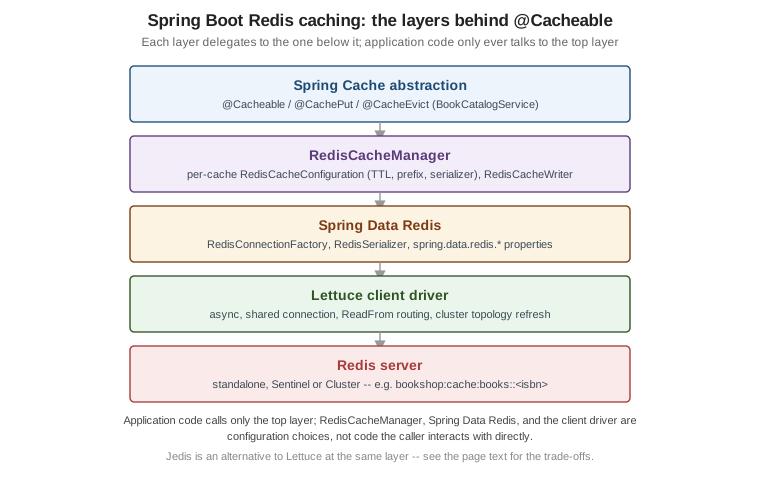
Spring Boot auto-configures whichever client is on the classpath — Lettuce by default when
spring-boot-starter-data-redis is used as-is, since it depends on Lettuce transitively; Jedis is pulled in
instead by excluding Lettuce and adding jedis explicitly.
-
Lettuce — asynchronous and thread-safe by design: a single
LettuceConnectionFactoryand its underlying connection can be shared across threads without an application-level pool, because Lettuce multiplexes commands over that connection itself. ALettuceClientConfigurationbean customizes timeouts,ReadFrom(routing reads to replicas, e.g.ReadFrom.REPLICA_PREFERRED, to spread load off the primary), and cluster topology-refresh behavior:package com.example.bookshop.config; import io.lettuce.core.ReadFrom; import io.lettuce.core.cluster.ClusterTopologyRefreshOptions; import io.lettuce.core.cluster.ClusterClientOptions; import org.springframework.context.annotation.Bean; import org.springframework.context.annotation.Configuration; import org.springframework.data.redis.connection.lettuce.LettuceClientConfiguration; import java.time.Duration; @Configuration public class RedisClientConfig { @Bean public LettuceClientConfiguration lettuceClientConfiguration() { ClusterTopologyRefreshOptions refreshOptions = ClusterTopologyRefreshOptions.builder() .enablePeriodicRefresh(Duration.ofSeconds(30)) .enableAllAdaptiveRefreshTriggers() .build(); return LettuceClientConfiguration.builder() .commandTimeout(Duration.ofSeconds(2)) .readFrom(ReadFrom.REPLICA_PREFERRED) .clientOptions(ClusterClientOptions.builder() .topologyRefreshOptions(refreshOptions) .build()) .build(); } }Periodic and adaptive topology refresh keeps Lettuce’s view of a Cluster’s slot map current after a failover or a slot migration, rather than relying solely on
MOVEDresponses to discover the change reactively. -
Jedis — traditionally a blocking, one-connection-per-thread client, so production use needs an explicit pool (
JedisPoolConfig, wired throughspring.data.redis.jedis.pool.*) sized to the application’s expected concurrency. Jedis 8’sRedisClient(used throughout this section’s command examples) is Jedis’s newer, connection-agnostic entry point, but Spring Boot’s own auto-configuration still centers on pooled connections.
spring:
  data:
    redis:
      jedis:
        pool:
          max-active: 16
          max-idle: 8
          min-idle: 2
          max-wait: 2s
Lettuce’s shared-connection, non-blocking design is the better default for most Spring Boot applications and is what the rest of this page assumes; Jedis remains a reasonable choice where its simpler blocking model or an existing dependency on Jedis-based code already fits. This derives from Spring Data Redis connection drivers and Redis’s Spring Framework cache integration guide.
Per-cache configuration
Spring Boot Caching: Serialization already builds the
RedisCacheManager bean this page relies on: it sets the baseline with
RedisCacheConfiguration.defaultCacheConfig(), serializes values as JSON with serializeValuesWith, and
overrides individual caches with
withInitialCacheConfigurations. That bean is not repeated here. For the Bookshop books cache, only the
per-cache RedisCacheConfiguration changes. It gets a 10-minute TTL, a namespaced key prefix, and the Jackson 3
JSON serializer that Spring Data Redis 4.x recommends (see Serializer choices):
RedisCacheConfiguration booksConfig = RedisCacheConfiguration.defaultCacheConfig()
        .entryTtl(Duration.ofMinutes(10))
        .disableCachingNullValues()
        .computePrefixWith(cacheName -> "bookshop:cache:" + cacheName + "::")
        .serializeValuesWith(RedisSerializationContext.SerializationPair
                .fromSerializer(RedisSerializer.json()));
Register it with withInitialCacheConfigurations(Map.of("books", booksConfig)) in the same builder call that
page shows.
computePrefixWith replaces the older, deprecated prefixKeysWith, taking a function from cache name to key
prefix instead of a fixed string — letting one RedisCacheConfiguration be reused as a template across
several caches whose prefixes should each embed their own name. With books configured as above, a
@Cacheable(cacheNames = "books", key = "#isbn") method call for ISBN 9780000000001 is stored under
bookshop:cache:books::9780000000001, matching this section’s own bookshop:cache:book:<isbn> key
convention. This derives from
Spring Data Redis’s Redis cache
documentation.
Key generation
A method’s own default key generator (SimpleKeyGenerator, applied when @Cacheable gives no explicit
key) concatenates the method’s arguments into a SimpleKey, which Spring Data Redis then serializes with
whatever RedisSerializer the cache’s serializeKeysWith uses — StringRedisSerializer for a
single-String-argument method such as findByIsbn(String isbn), or a custom KeyGenerator bean
(@Bean KeyGenerator bookKeyGenerator(), referenced from @Cacheable(keyGenerator = "bookKeyGenerator"))
when a composite key needs a specific, stable string shape instead of relying on SimpleKey#toString().
Serializer choices
The JDK-serialization default and the general case for JSON are covered in
Spring Boot Caching: Serialization. The Redis-specific
point is which JSON serializer to use. Spring Data Redis 4.0 moved to Jackson 3 and deprecated, for removal,
the Jackson 2 classes GenericJackson2JsonRedisSerializer and Jackson2JsonRedisSerializer<T>. On the Spring
Boot 4.1 / Spring Data Redis 4.1 baseline of this section, use their Jackson 3 replacements:
-
RedisSerializer.json()— aGenericJacksonJsonRedisSerializerconfigured for caching, with Spring Cache null-value support and default typing enabled. It embeds each value’s class name, so one cache can hold mixed types and still deserialize each entry back to its original Java type. Two consequences follow. The cached payload is coupled to the writing application’s package structure, so a renamed class breaks older entries. And default typing is unrestricted, so only use it for a cache that only your application writes. To limit which types it will instantiate, useGenericJacksonJsonRedisSerializer.builder()with.enableDefaultTyping(typeValidator)and your ownPolymorphicTypeValidator. -
new JacksonJsonRedisSerializer<>(Book.class)— JSON bound to one declared type per cache. The payload is smaller, it has no class-name coupling, and it has no polymorphic typing to secure. The cost is one serializer, and so in practice one cache, per value type. -
StringRedisSerializer— for a cache whose values are already plain strings (a pre-rendered fragment, an external ID), avoiding JSON’s structural overhead entirely.
RedisSerializer.json() is the reasonable default for a mixed-type application cache such as Bookshop’s.
Reach for JacksonJsonRedisSerializer<Book> when a cache holds exactly one value type. The example in
backend/springboot/caching.adoc still constructs GenericJackson2JsonRedisSerializer. On Spring Data Redis
4.x, replace it with RedisSerializer.json(): it still compiles today, but it is deprecated for removal. This
derives from
Spring Data Redis’s Redis cache
documentation and the
GenericJacksonJsonRedisSerializer
Javadoc.
Safe concurrent cache misses
Plain cache-aside (as shown in Use Cases & Patterns) lets every thread that misses at the same time fall through to the database concurrently — a cache stampede. Spring’s cache abstraction has two complementary answers to this at the Redis layer.
@Cacheable(sync = true) makes Spring itself serialize concurrent misses for the same key within one JVM:
the first caller through the miss computes the value while later callers block on the same local lock rather
than each calling the method body:
package com.example.bookshop.catalog;

import org.springframework.cache.annotation.Cacheable;
import org.springframework.stereotype.Service;

@Service
public class BookCatalogService {

    @Cacheable(cacheNames = "books", key = "#isbn", sync = true)
    public Book findByIsbn(String isbn) {
        return loadFromDatabase(isbn); // only one thread per JVM runs this per key at a time
    }

    private Book loadFromDatabase(String isbn) {
        // ...
    }
}
sync = true only coordinates threads inside one JVM instance, though — across a multi-instance deployment,
each instance’s first miss still hits the database independently. RedisCacheWriter.lockingRedisCacheWriter
closes that remaining gap by having RedisCacheManager itself take a short-lived Redis-backed lock around a
cache-miss write, so only one instance across the whole cluster recomputes a given key at a time while the
rest wait for the lock to clear and then read the now-populated value:
package com.example.bookshop.config;

import org.springframework.data.redis.cache.RedisCacheManager;
import org.springframework.data.redis.cache.RedisCacheWriter;
import org.springframework.data.redis.connection.RedisConnectionFactory;

@Bean
public RedisCacheManager cacheManager(RedisConnectionFactory connectionFactory) {
    RedisCacheWriter writer = RedisCacheWriter.lockingRedisCacheWriter(connectionFactory);
    return RedisCacheManager.builder(writer)
            .cacheDefaults(defaultCacheConfig())
            .build();
}
lockingRedisCacheWriter adds a small amount of latency to every miss (the lock round trip) in exchange for
that cross-instance guarantee, so it is worth the cost mainly for caches whose recompute is itself expensive
or hits a rate-limited upstream, rather than applying it to every cache by default.
TTL jitter
A batch of entries all written around the same time (a cache warm-up, a deploy that clears the cache) expire
in lockstep with a flat TTL, reproducing the same stampede at expiry instead of at startup. Adding a small
random jitter per entry spreads expirations out, the same idea shown in
Use Cases & Patterns at the command level, expressed here as a
RedisCacheConfiguration per call rather than a single shared bean:
import java.time.Duration;
import java.util.concurrent.ThreadLocalRandom;

RedisCacheConfiguration jitteredBooksConfig(RedisCacheConfiguration base) {
    int jitterSeconds = ThreadLocalRandom.current().nextInt(60);
    return base.entryTtl(Duration.ofMinutes(10).plusSeconds(jitterSeconds));
}
Since a RedisCacheConfiguration’s TTL is fixed at the point it’s registered with the `RedisCacheManager
rather than recomputed per write, jitter applied this way varies per cache-manager rebuild (e.g. across
rolling restarts) rather than per individual entry — spreading a per-entry jitter across every write instead
needs a custom RedisCacheWriter wrapping putIfAbsent/put with its own randomized TTL, which is more
involved than the flat per-cache TTL shown throughout the rest of this page.
Statistics and Actuator metrics
enableStatistics() on a RedisCacheConfiguration turns on hit/miss/eviction counters for that cache,
exposed as Micrometer meters (cache.gets, cache.puts, cache.evictions, tagged by cache and
cacheManager) once spring-boot-starter-actuator and a Micrometer registry are on the classpath — the
same CacheMetricsAutoConfiguration mechanism already used for Caffeine in
Caching: the Spring Cache Abstraction, Caffeine, and Redis, now backed by Redis-reported counters instead of an in-JVM cache’s
own:
RedisCacheConfiguration booksConfig = defaultConfig
        .entryTtl(Duration.ofMinutes(10))
        .enableStatistics();
GET /actuator/metrics/cache.gets?tag=cache:books then reports that cache’s hit/miss breakdown, and
GET /actuator/caches lists every registered cache and its manager. This derives from
Spring Boot Actuator metrics and
Spring Data Redis’s Redis cache
documentation.
The cost of @CacheEvict(allEntries = true)
@CacheEvict(cacheNames = "books", allEntries = true) clears an entire named cache in one call — convenient
after a bulk catalog import, but its Redis-side implementation matters at scale. RedisCacheWriter’s default
`BatchStrategy.KEYS clears a cache by running KEYS with the cache’s key-prefix pattern to enumerate every
matching key, then deleting them; KEYS is a single, unpaginated, O(n) command that blocks Redis’s one
command-processing thread for its full duration on a large keyspace, an availability risk on a busy shared
instance. BatchStrategy.SCAN instead walks the keyspace in small cursor-based batches via SCAN, so each
step is cheap and other commands are interleaved between batches, at the cost of the pattern match potentially
missing or double-counting a key that’s written concurrently with the scan (an acceptable trade for a bulk
eviction, since the goal is simply "no stale entry is guaranteed to survive," not a point-in-time snapshot):
RedisCacheWriter writer = RedisCacheWriter.nonLockingRedisCacheWriter(
        connectionFactory,
        BatchStrategy.scan(1_000)); // cursor batch size per SCAN call
Choosing SCAN over the KEYS-based default is a one-line change to the RedisCacheWriter construction and
is worth making for any cache running against a shared, latency-sensitive Redis deployment rather than a
throwaway local instance. This derives from
Spring Data Redis’s Redis cache
documentation and SCAN.
Testcontainers
@ServiceConnection on a Testcontainers Redis module wires a throwaway container straight into
spring.data.redis.* for an integration test, with no manual property overrides:
package com.example.bookshop;

import com.redis.testcontainers.RedisContainer;
import org.springframework.boot.testcontainers.service.connection.ServiceConnection;
import org.testcontainers.utility.DockerImageName;

class BookCatalogIntegrationTest {

    @ServiceConnection
    static RedisContainer redis =
            new RedisContainer(DockerImageName.parse("redis:8.10.2"));
}
The same container definition, expressed as compose.yaml for Spring Boot’s Docker Compose support
(spring-boot-docker-compose) to start automatically for local bootRun/tests without a separate
docker run:
services:
  redis:
    image: redis:8.10.2
    ports:
      - "6379:6379"
This derives from
Spring Boot Docker Compose support
and Testcontainers modules. The Quarkus equivalent of
this whole page — @CacheResult/@CacheInvalidate over the Redis cache backend, with its own Dev
Services-provisioned container — is The Quarkus Cache Extension.
Related pages
-
Caching: the Spring Cache Abstraction, Caffeine, and Redis —
@Cacheable/@CacheEvict, the basic starter setup, and the Caffeine-vs-Redis choice this page builds on. -
Use Cases & Patterns — cache-aside, TTL jitter, and per-key locking expressed as raw Redis commands rather than through Spring’s cache abstraction.
-
Security — ACL users, such as the
bookshop-appuser referenced above. -
Replication, Sentinel & Cluster — the Sentinel and Cluster topologies the connection properties above target.
-
Administration, Monitoring & Troubleshooting — operational monitoring beyond the Actuator cache metrics covered here.
-
The Quarkus Cache Extension — the Quarkus equivalent of this whole page.
References
-
Spring Data Redis connection drivers — Lettuce/Jedis configuration and standalone/Sentinel/Cluster connection properties.