JavaScript Interop and Migration
|
This section documents the current TypeScript release line as published at the official TypeScript documentation, which is the reference these pages are written and verified against. No specific patch version is pinned. This content was generated with the assistance of AI and should be verified against the official documentation before being relied on in production, since TypeScript iterates quickly. This section’s bibliography lists the reference material consulted while preparing these pages. |
TypeScript can read, type-check, and gradually replace an existing JavaScript codebase without a big-bang rewrite. The JS Projects Utilizing TypeScript and Migrating from JavaScript handbook pages are the companions to this page; what follows is the working summary.
allowJs, checkJs, and per-file directives
allowJs lets .js (and .jsx) files take part in the compilation — they can be imported by
.ts files, emitted, and bundled. checkJs goes further and reports type errors in every .js
file, exactly as if each one started with a // @ts-check comment.
{
  "compilerOptions": {
    "allowJs": true,
    "checkJs": true,
    "target": "es2022",
    "module": "nodenext",
    "outDir": "dist"
  },
  "include": ["src"]
}
When checkJs is off you can still opt individual files in and out, and you can annotate specific
lines:
// @ts-check
// Opts THIS file into type checking even when checkJs is false.

/**
 * @param {number} a
 * @param {number} b
 */
function add(a, b) {
  return a + b;
}

// @ts-expect-error -- the next line is deliberately wrong; TS must flag it.
add("1", "2");

// @ts-ignore -- silences any error on the next line, or nothing if there is none.
add("1", "2");
A file can also start with // @ts-nocheck to opt out when checkJs is on.
Prefer // @ts-expect-error over // @ts-ignore. @ts-expect-error is itself reported as an error
when the following line turns out to have no error, so a suppression that is no longer needed
surfaces the moment you fix the underlying code. @ts-ignore fails open and quietly rots. See
Type Checking
JavaScript Files for the full list of differences between checked .js and .ts.
JSDoc as types
With @ts-check or checkJs active, TypeScript reads JSDoc tags as type information — real
checking with no build step and no new syntax.
/**
 * @typedef {object} Point
 * @property {number} x
 * @property {number} y
 */

/** @type {Point} */
const origin = { x: 0, y: 0 };

/**
 * @param {readonly number[]} values
 * @returns {number}
 */
function total(values) {
  return values.reduce((a, b) => a + b, 0);
}

/**
 * @template T
 * @param {T[]} items
 * @returns {T | undefined}
 */
function first(items) {
  return items[0];
}

// Borrow a type from another module or a .d.ts without importing a value.
/** @type {import('./api').User} */
let currentUser;
JSDoc can express object shapes, unions, function types, generics via @template, @satisfies,
@overload, and — through import('…') — any type declared in another module or in a
declaration file. What it cannot do comfortably is the
heavier type-level machinery: conditional and mapped types, assertion signatures, and const type
parameters all get verbose fast. The rule of thumb: once the annotations are longer than the code
they describe, move the file to .ts. The
JSDoc Reference lists every
supported tag.
The migration ladder
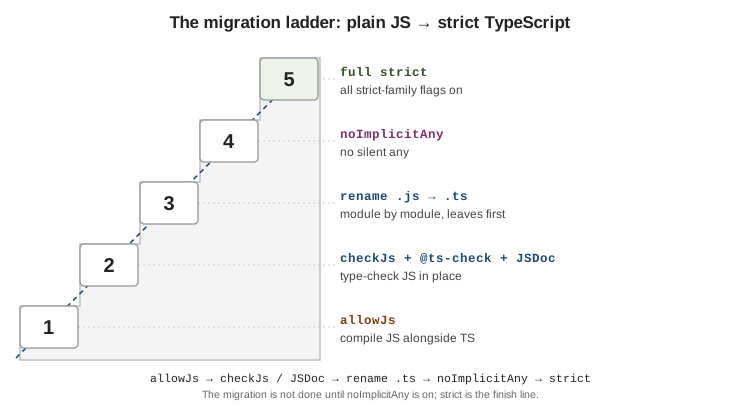
Migrate from the bottom up. Each rung is a state the whole project can sit in indefinitely; only climb when the current rung is green.
# Rung 1-2: add the compiler and turn on JS checking.
npm install --save-dev typescript
npx tsc --init

# Rung 3: rename leaf modules first -- files that import nothing else of yours --
# then walk UP the dependency graph to their importers.
git mv src/utils/math.js src/utils/math.ts
npx tsc --noEmit
// Rung 1-2: compile and check JS in place.
{ "compilerOptions": { "allowJs": true, "checkJs": true } }
// Rung 4: every implicit `any` becomes an error.
{ "compilerOptions": { "noImplicitAny": true } }
// Rung 5: the real finish line -- enables the whole strict family.
{ "compilerOptions": { "strict": true } }A .ts module may import a .js module, so the graph never has to be converted all at once, but
inference is much better when a file’s dependencies are already typed — hence leaves first. Do not
consider the migration done until noImplicitAny is on: before that, TypeScript is silently
filling the gaps with any and most of the safety is theatre. See
tsconfig and Compiler Options for what each
flag in the strict family does.
Prefer ECMAScript features to TypeScript features
Where a standard ECMAScript feature and a TypeScript-only feature overlap, choose the standard one.
It survives type stripping (Node’s --experimental-strip-types, ts-blank-space, esbuild, swc),
matches runtime semantics, and does not lock code to the compiler.
// ES modules, not namespaces.
export function parse(input: string): number {
  return Number(input);
}

// #private fields, not the `private` modifier -- #balance is unreachable at runtime.
class Account {
  #balance = 0;
  deposit(amount: number): void {
    this.#balance += amount;
  }
}

// Standard (TC39) decorators, not legacy experimentalDecorators.
function logged<T extends (...args: any[]) => any>(
  target: T,
  context: ClassMethodDecoratorContext,
): T {
  return function (this: unknown, ...args: any[]) {
    console.log(`call ${String(context.name)}`);
    return target.apply(this, args);
  } as T;
}

// Literal unions or `as const` object maps, not `enum`.
type Direction = "north" | "south" | "east" | "west";

const HttpStatus = { ok: 200, notFound: 404 } as const;
type HttpStatus = (typeof HttpStatus)[keyof typeof HttpStatus];
Namespaces and legacy decorators predate their standard equivalents; enum and private rely on
emit or assumptions that plain type-stripping tools cannot reproduce. For the trade-offs around
enum specifically, see
Enums and Literal Alternatives.
See also
-
Worked Example: Migrating a Module to TypeScript — a project built with these settings from the start.
-
Declaration Files — authoring and consuming
.d.tsfiles. -
tsconfig.json and Compiler Options — every flag named above.
-
Enums and Literal Alternatives — alternatives to
enum. -
JavaScript Development — the plain-JavaScript track these pages build on.