Saving UI State: Views vs. Compose
|
This content was generated with the assistance of AI and should be verified against the official documentation of Android before being relied on in production. See the section bibliography for the reference material consulted while preparing these pages. |
A screen’s UI state can disappear for three very different reasons, and the two Android UI toolkits give a
developer overlapping but not identical tools to answer each one. This page lays the three events side by side,
then works through every mechanism TrailMate uses to survive them — first in the legacy Views stack, then in
Jetpack Compose — and closes with the persistent-storage boundary neither toolkit’s in-memory tools can cross,
and how to actually test process death instead of assuming a fix works. It targets Android 17 (API level 37),
lifecycle 2.11.0, Compose BOM 2026.09.00 (Compose runtime/UI 1.12.1) and Navigation 3 1.2.0, and
builds directly on three pages that already introduced pieces of this story:
Activities and the Activity Lifecycle (rotation, back, process
death at the activity level), ViewModel, Lifecycle-Aware
Components, Coroutines and Flow (exactly what a ViewModel survives and what it does not), and
State, Recomposition and Side Effects in Compose
(remember, rememberSaveable, state hoisting). Those pages gave each mechanism a first mention; this page is
where each one gets explained in full and placed on the same map.
Two sibling pages continue directly from here:
Views, Fragments and Activities vs. Compose: Architecture
Comparison summarizes this page’s findings as one row of its side-by-side comparison, and
Migrating from Views to Compose covers replacing
onSaveInstanceState/fragment arguments with rememberSaveable/SavedStateHandle as one phase of an actual
migration. Kotlin’s Parcelable/@Parcelize support itself, and the Kotlin property-delegate syntax
(by savedStateHandle.saveable { }), are Kotlin-language features and not re-taught here; see
Kotlin for Android for the delegate mechanics behind
by.
Three Ways to Lose State
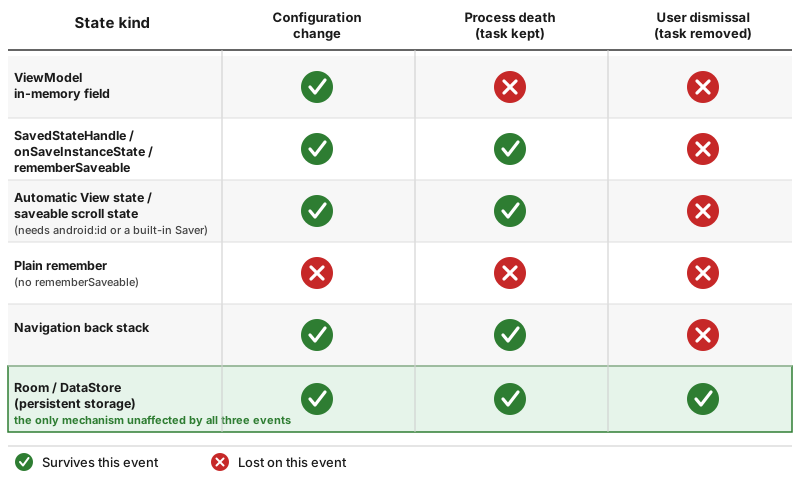
The phrase "state loss" covers three events with very different causes, very different frequencies, and — critically — very different amounts of the system’s own help in surviving them. Confusing one for another is the single most common cause of bugs in this area: a fix that only handles a configuration change silently does nothing for process death, and a fix aimed at process death is often far more machinery than a configuration change alone would need.
| Event | What actually happens | How often it happens |
|---|---|---|
Configuration change (rotation, dark/light mode toggle, font-scale change, locale change, fold/unfold, entering/leaving multi-window, a display added or removed) |
The system destroys and immediately recreates the current |
Frequent, and mostly avoidable to test manually: every rotation and every dark/light toggle triggers it. |
System-initiated process death (the OS kills the app’s process to reclaim memory while the app is in the background, or the user is far enough away in time/task-switching that the process was never kept alive) |
The entire process disappears — every static field, every singleton, every |
Common on real devices under memory pressure, especially on lower-RAM devices, but essentially invisible during ordinary development on an emulator with plenty of RAM — which is exactly why bugs here reach production. |
User dismissal (swiping the task away from Recents, "Force stop" from system settings, or the user explicitly finishing every screen back to the task’s root and beyond, i.e. the task itself is removed, not just backgrounded) |
The system does not save a restoration |
Deliberate, user-initiated, and the one case a "restore what the user was doing" feature should usually not try to fight — see Persistent Storage: What Must Outlive the Task below for the boundary between what a task should restore automatically and what belongs in the user’s own history/favorites instead. |
| What survives | Configuration change | Process death (task kept) | User dismissal (task removed) |
|---|---|---|---|
A |
✅ Yes — the same instance, the same running coroutines |
❌ No — a brand-new instance is created |
❌ No — a brand-new instance is created |
A |
✅ Yes (trivially — the instance itself survives) |
✅ Yes, if the value was written to the handle before death |
❌ No — there is no |
|
✅ Yes |
✅ Yes, if written before the process was killed |
❌ No |
Plain |
❌ No — the whole Activity and Composition are recreated |
❌ No |
❌ No |
Data persisted to Room/DataStore/files |
✅ Yes |
✅ Yes |
✅ Yes — persistent storage is the only mechanism unaffected by any of the three events |
See Android Developers — Handle configuration changes, Android Developers — Processes and the Application Life Cycle and Android Developers — Saving UI States for the platform’s own framing of these three events.
Views: ViewModel (Configuration Changes Only)
ViewModel, Lifecycle-Aware Components, Coroutines and
Flow already covers ViewModel scoping and creation in full; the one fact that matters most for this page is
the boundary of what it survives, repeated here because so much of the rest of this page exists to patch the gap
on its other side: a ViewModel’s `ViewModelStore is retained by the framework across a configuration change
(the same instance, with every in-flight viewModelScope coroutine still running), but it is destroyed along
with the rest of the process’s heap on system-initiated process death. TrailListViewModel’s in-memory
`selectedRegion field, if it were a plain var with no further mechanism, would survive a rotation perfectly
and vanish completely the moment the process is killed — which is exactly the gap SavedStateHandle, later on
this page, exists to close.
Views: onSaveInstanceState in the Activity and the Fragment
Before a configuration change destroys an Activity, and before the system kills a backgrounded process it
might later need to restore, the framework calls onSaveInstanceState(Bundle) on the activity (and, separately,
on each fragment through Fragment.onSaveInstanceState) to give it a chance to write small pieces of UI state
into a Bundle. That Bundle is handed back to onCreate(savedInstanceState: Bundle?) (and to
onRestoreInstanceState, which most code skips in favor of reading straight from `onCreate’s parameter) the
next time an activity instance for that same task is created — whether that is immediately, for a rotation, or
much later, for process death:
// app/src/main/kotlin/com/example/trailmate/MainActivity.kt
class MainActivity : AppCompatActivity(R.layout.activity_main) {
    private var selectedRegionFilter: String? = null

    override fun onCreate(savedInstanceState: Bundle?) {
        super.onCreate(savedInstanceState)
        selectedRegionFilter = savedInstanceState?.getString(KEY_REGION_FILTER)
        // ...
    }

    override fun onSaveInstanceState(outState: Bundle) {
        super.onSaveInstanceState(outState)
        outState.putString(KEY_REGION_FILTER, selectedRegionFilter)
    }

    private companion object {
        const val KEY_REGION_FILTER = "region_filter"
    }
}onSaveInstanceState runs after onStop on modern API levels (it used to run before onPause on very old
platform versions, a detail books written before that change still describe), which means it must never be
relied on to run before the process is actually killed for a reason other than the normal lifecycle — a crash,
or Process.killProcess(), skips it entirely. It is meant for small amounts of UI-only state (a filter
selection, a scroll position, the exact contents of a text field the user was editing) — see [Bundle Size
Limits and TransactionTooLargeException] below for why "small" is a hard requirement, not just good practice. A
Fragment’s own `onSaveInstanceState(Bundle) works identically, scoped to that fragment’s own state rather than
the whole activity’s. See
Android Developers — Save
and restore activity state and Android Developers — Fragment lifecycle.
Views: Automatic View State Saving (Requires android:id)
Beneath the activity/fragment-level onSaveInstanceState above, every individual View in the hierarchy gets an
independent chance to save its own state through View.onSaveInstanceState()/onRestoreInstanceState(), which
the framework calls automatically as part of the activity’s own save/restore cycle — no code in MainActivity
or TrailListFragment has to call this by hand. EditText saves its text and selection this way, ScrollView
and RecyclerView save their scroll offset, and CheckBox/RadioButton/Switch save their checked state, all
without a single line of app code.
There is exactly one requirement for this to work: the view must have an android:id in its layout XML.
Android keys each view’s saved state by its id inside a SparseArray, so a view with no id (or, worse, two
sibling views that accidentally share the same id, common when the same layout is `<include>`d twice) either
loses its state silently or has it overwritten by another view’s:
<!-- feature/trails/src/main/res/layout/fragment_trail_list.xml -->
<androidx.recyclerview.widget.RecyclerView
    android:id="@+id/trail_list"
    android:layout_width="match_parent"
    android:layout_height="match_parent" />
<!-- Without android:id, trail_list's scroll position resets to the top on every rotation. -->freezesText, an attribute on TextView and its subclasses (EditText), controls exactly one thing: whether
that view’s text content itself is included in its automatically saved state. It defaults to false for a
plain, non-editable TextView (there is usually nothing to restore — the text comes from a resource or from
code that will set it again) and to effectively true for an EditText’s user-entered text, but setting
`android:freezesText="true" explicitly is worth doing on a TextView whose text is computed at runtime and not
trivially recomputable on recreation, so it survives the same automatic save/restore path an EditText gets by
default:
<TextView
    android:id="@+id/elevation_summary"
    android:freezesText="true"
    android:layout_width="wrap_content"
android:layout_height="wrap_content" />Views: a Custom View’s BaseSavedState
Automatic view state saving above only knows how to save the specific built-in state a stock widget defines
(EditText’s text, `CheckBox’s checked flag). A custom `View — TrailMate’s ElevationProfileView, introduced
on Custom Views, Touch, Drawing and View Animation — that holds its own state the framework knows nothing about (a zoom level, a selected point along the elevation
profile) must override onSaveInstanceState()/onRestoreInstanceState() itself, and must be careful to also
preserve the superclass’s own state rather than discarding it, since View itself has base state (like
visibility) to save too. BaseSavedState (or AbsSavedState) is the framework’s helper class for exactly this
chaining:
// feature/trails/src/main/kotlin/com/example/trailmate/feature/trails/ElevationProfileView.kt
class ElevationProfileView(context: Context, attrs: AttributeSet?) : View(context, attrs) {
    var selectedPointIndex: Int = -1

    override fun onSaveInstanceState(): Parcelable {
        val superState = super.onSaveInstanceState()
        return SavedState(superState).also { it.selectedPointIndex = selectedPointIndex }
    }

    override fun onRestoreInstanceState(state: Parcelable?) {
        if (state !is SavedState) {
            super.onRestoreInstanceState(state)
            return
        }
        super.onRestoreInstanceState(state.superState)
        selectedPointIndex = state.selectedPointIndex
    }

    @Parcelize
    private class SavedState(
        val superStateParcelable: Parcelable?,
        var selectedPointIndex: Int = -1,
    ) : BaseSavedState(superStateParcelable) {
        // A hand-written Parcelable.Creator is normally required here; @Parcelize
        // (see below) generates it, replacing the CREATOR boilerplate older code hand-writes.
    }
}This works automatically alongside the rest of the view tree precisely because ElevationProfileView also has
an android:id in its layout — the same requirement as [Views: Automatic View State Saving (Requires
android:id)] above applies to a custom view’s own onSaveInstanceState() override just as much as it does to a
stock widget’s built-in one. See
Android Developers — AbsSavedState and
Android Developers — Create a
custom view.
Bundle Size Limits and TransactionTooLargeException
Every Bundle written by onSaveInstanceState (activity, fragment, or a custom view’s BaseSavedState) is
ultimately serialized and passed to the system process over Binder IPC, and Binder enforces a transaction buffer
limit shared across the whole process — commonly cited as roughly 1 MB, though the exact figure is an
implementation detail Android does not guarantee, not a documented per-call budget. Exceeding it throws
android.os.TransactionTooLargeException, and because the limit is shared across every in-flight transaction in
the process, a Bundle that is comfortably under it in isolation can still tip a concurrent transaction over
the edge. In practice, the failure this produces is a crash on rotation or on returning from the background that
never happens in casual testing (a small Bundle) and reliably happens for one specific user (a Bundle that
happens to include, say, an entire in-memory photo bitmap or a large list serialized item-by-item).
The fix is never "put slightly less in the Bundle`" — it is to keep `onSaveInstanceState/SavedStateHandle
strictly to small, purely-UI-scoped values (an id, a filter string, a scroll offset, a boolean) and to route
anything that resembles actual data — a list of trails, a photo, a whole domain object — through
ViewModel state backed by a repository, or through persistent storage as covered in [Persistent Storage: What
Must Outlive the Task] below, and re-fetch or re-derive it after recreation instead of ever trying to serialize
it into a Bundle in the first place. See
Android Developers — TransactionTooLargeException and
Android Developers — Saving UI States — restore UI state.
@Parcelize
Any custom type placed into a Bundle — a SavedState inner class as above, or a value handed through
SavedStateHandle — must implement android.os.Parcelable, whose hand-written form (a writeToParcel
override plus a CREATOR companion object implementing Parcelable.Creator) is mechanical, easy to get subtly
wrong (a field written in one order and read back in another), and tedious to keep in sync as a class’s fields
change. The Kotlin compiler plugin kotlin-parcelize (bundled with Kotlin itself, applied as
id("kotlin-parcelize") — one of the plugins built into AGP 9’s Kotlin-by-default toolchain, needing no separate
version) generates all of that from a single annotation:
// core/model/src/main/kotlin/com/example/trailmate/core/model/TrailSelection.kt
@Parcelize
data class TrailSelection(
    val trailId: String,
    val scrollOffsetPx: Int,
) : ParcelableEvery property in the primary constructor is written to and read from the Parcel in declaration order
automatically; a property that should not be persisted this way is excluded with @IgnoredOnParcel. This is the
mechanism TrailSelection.SavedState above, and any SavedStateHandle-stored custom type later on this page,
relies on. See Android Developers — Parcelable implementation
generator and Kotlin Documentation for the plugin’s release
history.
Fragment Arguments
A Fragment’s arguments `Bundle (set once, before the fragment is attached, via Fragment(args),
fragment.arguments = bundleOf(…), or — in TrailMate’s case — generated Safe Args classes) is a distinct
mechanism from onSaveInstanceState, even though both are backed by a Bundle: arguments are immutable input
the fragment was created with, not mutable state the fragment saves about itself over time. Critically,
arguments survive every one of the three events in Three Ways to Lose State above for as long as the fragment
itself (or its containing back-stack entry) exists, because the FragmentManager re-supplies the same arguments
Bundle to a newly-recreated fragment instance automatically — there is nothing to opt into:
// feature/trails/src/main/kotlin/com/example/trailmate/feature/trails/TrailDetailFragment.kt
class TrailDetailFragment : Fragment(R.layout.fragment_trail_detail) {
    private val args: TrailDetailFragmentArgs by navArgs()

    override fun onViewCreated(view: View, savedInstanceState: Bundle?) {
        super.onViewCreated(view, savedInstanceState)
        viewModel.loadTrail(args.trailId) // args.trailId is available even after process death
    }
}This is why a value that a screen was navigated to with (a trailId, not a value the user later typed or
scrolled to) rarely needs its own explicit save/restore handling at all — Safe Args already round-trips it
through the fragment’s arguments Bundle for free. See
Android Developers — Supply
arguments to a fragment and Navigation with Fragments.
SavedStateHandle: get/set, getStateFlow, the saveable Delegate
SavedStateHandle is the piece that closes the exact gap [Views: ViewModel (Configuration Changes Only)]
described: a key-value map, backed by the same platform Bundle-saving machinery as onSaveInstanceState, that
is handed to a ViewModel at creation time and is available for the ViewModel’s entire lifetime — meaning it
survives everything a plain `ViewModel field survives (configuration changes), plus system-initiated process
death, because the framework restores its backing Bundle from the very same restoration data that repopulates
onCreate’s `savedInstanceState parameter. A ViewModel requests one simply by adding it as a constructor
parameter (creation and injection is covered in full on
ViewModel, Lifecycle-Aware Components, Coroutines and
Flow):
// feature/trails/src/main/kotlin/com/example/trailmate/feature/trails/TrailListViewModel.kt
@HiltViewModel
class TrailListViewModel @Inject constructor(
    private val repository: TrailRepository,
    private val savedStateHandle: SavedStateHandle,
) : ViewModel() {

    // Plain get()/set(): read once, write on every change.
    var searchQuery: String
        get() = savedStateHandle.get<String>(KEY_SEARCH_QUERY) ?: ""
        set(value) = savedStateHandle.set(KEY_SEARCH_QUERY, value)

    // getStateFlow(): a reactive view of one key, for driving UI state directly.
    val difficultyFilter: StateFlow<Difficulty?> =
        savedStateHandle.getStateFlow(KEY_DIFFICULTY_FILTER, initialValue = null)

    fun onDifficultyFilterChanged(difficulty: Difficulty?) {
        savedStateHandle[KEY_DIFFICULTY_FILTER] = difficulty
    }

    private companion object {
        const val KEY_SEARCH_QUERY = "search_query"
        const val KEY_DIFFICULTY_FILTER = "difficulty_filter"
    }
}get(key)/set(key, value) (and the [] operator, which is set under the hood) are the imperative form,
suited to a value read once at the point it is needed; getStateFlow(key, initialValue) returns a StateFlow
that emits every time the key’s value changes, whether the change came from this ViewModel’s own `set call or — less commonly — from the handle being restored with a new value after process death, making it the natural
choice for a value that should drive TrailListUiState reactively rather than be polled.
For a value read and written frequently enough that the raw key-string API becomes noise, the saveable
delegate wraps the same handle behind ordinary Kotlin property syntax. It is the bridge between
SavedStateHandle and Compose’s Saver API, so it lives in androidx.lifecycle:lifecycle-viewmodel-compose
(not in lifecycle-viewmodel-savedstate), is marked @SavedStateHandleSaveableApi (an opt-in), and its var
form requires the initializer to return a Compose MutableState — the delegate saves and restores that state
object, and the property reads and writes its value:
// feature/trails/src/main/kotlin/com/example/trailmate/feature/trails/TrailListViewModel.kt
@OptIn(SavedStateHandleSaveableApi::class)
var onlyFavorites: Boolean by savedStateHandle.saveable { mutableStateOf(false) }saveable { false }, with a plain value instead of a MutableState, does not compile as a var delegate: the
overload that returns a plain value produces a read-only delegate, for a val holding a saveable state object
such as a LazyListState. Because the property is backed by a snapshot MutableState, a composable that reads
viewModel.onlyFavorites recomposes when it changes, with no StateFlow in between. The trade-off is a Compose
runtime dependency in the ViewModel’s module; a `ViewModel shared with a Views-only UI that should not depend
on Compose sticks to get/set and getStateFlow above. See
Android
Developers — androidx.lifecycle.viewmodel.compose (SavedStateHandle.saveable).
Navigation arguments populate SavedStateHandle automatically — in Safe Args and Navigation Compose. Just
as a fragment’s arguments Bundle is supplied by the FragmentManager, a NavController-based destination’s
arguments (Safe Args in the legacy Views stack, or a @Serializable route’s fields in Navigation Compose) are
written into the SavedStateHandle of a ViewModel scoped to that back-stack entry before the ViewModel is
constructed. In Navigation Compose, TrailDetailViewModel reads its trailId with no separate wiring at all:
// feature/trails/src/main/kotlin/com/example/trailmate/feature/trails/TrailDetailViewModel.kt (Navigation Compose)
@HiltViewModel
class TrailDetailViewModel @Inject constructor(
    savedStateHandle: SavedStateHandle,
    private val repository: TrailRepository,
) : ViewModel() {
    private val trailId: String = savedStateHandle.toRoute<TrailDetail>().trailId
    // trailId survives process death exactly like any other SavedStateHandle-backed value --
    // it is re-populated from the restored NavBackStackEntry, not re-navigated to.
}Navigation 3 does not do this. SavedStateHandle.toRoute<T>() is a Navigation Compose API, and Navigation 3’s
rememberViewModelStoreNavEntryDecorator() gives each entry its own ViewModelStore but does not copy the
NavKey’s fields into the `ViewModel’s `SavedStateHandle, so savedStateHandle.toRoute<TrailDetail>() in a
Navigation 3 app fails at runtime because the arguments are simply not there. In Navigation 3 the key is already
in hand inside entry<TrailDetail> { key → … }, so it is passed into the ViewModel explicitly — with Hilt,
through an assisted factory and hiltViewModel(creationCallback = …):
// feature/trails/src/main/kotlin/com/example/trailmate/feature/trails/TrailDetailViewModel.kt (Navigation 3)
@HiltViewModel(assistedFactory = TrailDetailViewModel.Factory::class)
class TrailDetailViewModel @AssistedInject constructor(
    @Assisted private val trailId: String,
    private val repository: TrailRepository,
) : ViewModel() {
    @AssistedFactory
    interface Factory {
        fun create(trailId: String): TrailDetailViewModel
    }
}

// In the NavDisplay entryProvider:
entry<TrailDetail> { key ->
    val viewModel = hiltViewModel<TrailDetailViewModel, TrailDetailViewModel.Factory>(
        creationCallback = { factory -> factory.create(key.trailId) },
    )
    TrailDetailScreen(viewModel = viewModel)
}trailId still survives process death here, by a different route: rememberNavBackStack saves the
@Serializable TrailDetail key itself, so after the process is recreated the restored entry hands the same
key to the entry<TrailDetail> block, which creates a new TrailDetailViewModel with it. Either way, there is
normally no need to also copy a navigation argument into a hand-written get/set key — reading it with
toRoute<T>() (Navigation Compose), the Safe Args-generated property (Views), or the Navigation 3 key passed in
at creation is enough. See
Android Developers — Saved State module for ViewModel,
Android Developers — Navigation 3 — Save
and restore state and Dependency Injection with Hilt,
Dagger and Koin for assisted injection in general.
Compose: remember vs. rememberSaveable
State, Recomposition and Side Effects in Compose already
introduced this distinction; restated here in the vocabulary of Three Ways to Lose State above:
remember { } keeps a value alive across recomposition only — it is discarded the moment the composable
leaves the Composition, which happens for every one of the three state-loss events, since all three destroy and
recreate the hosting Activity. rememberSaveable { } additionally writes its value into the same
Bundle-based restoration mechanism onSaveInstanceState uses, so it survives a configuration change and
system-initiated process death, exactly like the Views-side mechanisms above — and, exactly like them, does
not survive user dismissal, since there is no Bundle to restore from once the task itself is gone.
// feature/trails/src/main/kotlin/com/example/trailmate/feature/trails/TrailListScreen.kt
var searchQuery by rememberSaveable { mutableStateOf("") }
// Rotation and process death: searchQuery is restored.
// User swipes TrailMate away from Recents: searchQuery is gone, exactly like onSaveInstanceState would be.rememberSaveable works directly for the types Bundle already understands (primitives, String,
Parcelable/@Parcelize classes) and for mutableStateOf/the primitive mutableIntStateOf-style variants
wrapping one of those types, since Compose ships built-in Saver support for its own state holder types. See
Android Developers — Save UI State in Compose.
Saver, listSaver and mapSaver
A type rememberSaveable does not natively know how to save — one with no @Parcelize annotation, or a plain
class that is not Parcelable at all — needs a Saver<Original, Saveable>, an object with two functions: save
converts the real value into something Bundle-compatible (a primitive, a String, a List/Map of those, or
another already-saveable type), and restore converts it back. rememberSaveable’s `saver parameter accepts
one directly:
// feature/trails/src/main/kotlin/com/example/trailmate/feature/trails/PhotoCaptureScreen.kt
data class DraftPhoto(val caption: String, val uri: String)

val DraftPhotoSaver = Saver<DraftPhoto, List<String>>(
    save = { listOf(it.caption, it.uri) },
    restore = { DraftPhoto(caption = it[0], uri = it[1]) },
)

@Composable
fun PhotoCaptureScreen() {
    var draftPhoto by rememberSaveable(stateSaver = DraftPhotoSaver) {
        mutableStateOf(DraftPhoto(caption = "", uri = ""))
    }
    // draftPhoto.caption survives rotation and process death while the photo is still being captioned.
}listSaver and mapSaver are convenience builders for the two most common saveable shapes, avoiding a
hand-written Saver object for a simple case:
// feature/trails/src/main/kotlin/com/example/trailmate/feature/trails/PhotoCaptureState.kt
val DraftPhotoListSaver: Saver<DraftPhoto, *> = listSaver(
    save = { listOf(it.caption, it.uri) },
    restore = { DraftPhoto(caption = it[0], uri = it[1]) },
)

val DraftPhotoMapSaver: Saver<DraftPhoto, *> = mapSaver(
    save = { mapOf("caption" to it.caption, "uri" to it.uri) },
    restore = { DraftPhoto(caption = it["caption"] as String, uri = it["uri"] as String) },
)listSaver is positional and slightly smaller on the wire; mapSaver is self-documenting and more resilient to
a field being reordered later, at the cost of string keys that can drift out of sync if renamed carelessly. Both
still ultimately serialize into a Bundle, so the same size discipline from [Bundle Size Limits and
TransactionTooLargeException] applies just as much to a Saver-backed rememberSaveable value as it does to a
Views-side onSaveInstanceState Bundle. See
Android
Developers — Saver, listSaver, mapSaver reference.
Saveable Scroll States
LazyListState/LazyGridState (from rememberLazyListState(), used by TrailMate’s TrailListScreen) and
ScrollState (from rememberScrollState(), used for a single-column detail screen) are already saveable by
construction — both types ship their own built-in Saver, wired transparently into the remember…State()
factory functions themselves, so no explicit rememberSaveable call or custom Saver is needed to survive a
configuration change or process death:
// feature/trails/src/main/kotlin/com/example/trailmate/feature/trails/TrailListScreen.kt
@Composable
fun TrailListContent(trails: List<Trail>, modifier: Modifier = Modifier) {
    val listState = rememberLazyListState() // scroll position survives rotation and process death automatically
    LazyColumn(state = listState, modifier = modifier) {
        items(trails, key = { it.id }) { trail -> TrailListItem(trail) }
    }
}This is the Compose-side counterpart to [Views: Automatic View State Saving (Requires android:id)]'s
RecyclerView scroll position — both survive automatically, but through opposite mechanisms: the View side
needs a stable android:id on the RecyclerView itself, while rememberLazyListState() needs nothing beyond
being called through remember (transitively rememberSaveable) at all, since the state object it returns is
already Saver-aware. See
Android
Developers — rememberLazyListState().
SaveableStateHolder
rememberSaveable alone only ever remembers one value per call site in the Composition — it has no concept of
"this same composable, but shown for a different item," which matters the moment several equivalent screens
share one composable function, such as a LazyColumn row that is removed and later re-added when the user
scrolls away and back, or a tab layout that disposes an off-screen tab’s content entirely. SaveableStateHolder
(obtained via rememberSaveableStateHolder()) solves this by keying an entire subtree’s saved state to an
explicit id, so that state saved under one key is preserved even while that subtree’s composables are
temporarily removed from the Composition and later reintroduced:
// feature/trails/src/main/kotlin/com/example/trailmate/feature/trails/TrailTabsScreen.kt
@Composable
fun TrailTabsScreen(selectedTab: TrailTab) {
    val saveableStateHolder = rememberSaveableStateHolder()

    saveableStateHolder.SaveableStateProvider(key = selectedTab) {
        when (selectedTab) {
            TrailTab.List -> TrailListScreen(onTrailClick = {})
            TrailTab.Map -> TrailMapScreen()
        }
    }
    // Switching away from TrailTab.List and back later restores its rememberSaveable
    // state (scroll position, search query) even though its composables were disposed
    // in between, because SaveableStateProvider kept that key's saved values around.
}This is precisely the mechanism Navigation Compose and Navigation 3 build on internally to preserve each
back-stack entry’s rememberSaveable state while its composables are off-screen — covered next. See
Android
Developers — rememberSaveableStateHolder().
Navigation 3 Entry Decorators
Navigation in Compose (Navigation Compose and Navigation 3) already
introduced Navigation 3’s own back stack (NavKey, rememberNavBackStack) and NavDisplay; the piece relevant
here is entry decorators, the mechanism that wraps each NavDisplay entry with exactly the
SaveableStateHolder/ViewModelStore scoping described above, opted into per NavDisplay rather than baked in
implicitly:
// feature/trails/src/main/kotlin/com/example/trailmate/feature/trails/TrailNavHost.kt
@Composable
fun TrailNavHost(backStack: NavBackStack) {
    NavDisplay(
        backStack = backStack,
        entryDecorators = listOf(
            rememberSaveableStateHolderNavEntryDecorator(),
            rememberViewModelStoreNavEntryDecorator(),
        ),
        entryProvider = entryProvider {
            entry<TrailList> { TrailListScreen(onTrailClick = { /* ... */ }) }
            entry<TrailDetail> { key -> TrailDetailScreen(trailId = key.trailId) }
        },
    )
}

// The keys themselves: @Serializable NavKeys, so rememberNavBackStack can save them.
@Serializable data object TrailList : NavKey
@Serializable data class TrailDetail(val trailId: String) : NavKeyrememberSaveableStateHolderNavEntryDecorator() gives every entry the same per-key rememberSaveable
preservation SaveableStateHolder provides above, keyed by each entry’s content key (derived from its NavKey), so
TrailListScreen’s `rememberSaveable search query and scroll position survive navigating to TrailDetailScreen
and back, not just a configuration change while TrailListScreen itself stays on screen.
rememberViewModelStoreNavEntryDecorator() does the equivalent for ViewModel`s obtained via `hiltViewModel()
inside an entry, giving each back-stack entry its own ViewModelStore that survives exactly as long as that
entry remains on the stack (it comes from androidx.lifecycle:lifecycle-viewmodel-navigation3, and, as covered
above, it does not put the key’s fields into that ViewModel’s `SavedStateHandle). The back stack itself
survives configuration changes and process death because rememberNavBackStack saves it, which is why every
key must be a @Serializable NavKey — Parcelable is not what Navigation 3 uses. Both decorators are opt-in
per NavDisplay precisely because Navigation 3, unlike Navigation
Compose’s NavHost, does not assume a single fixed shape for every app’s back stack. See
Android Developers — Navigation 3 basics and
Android Developers — Navigation 3 — Save and restore state.
Persistent Storage: What Must Outlive the Task
Every mechanism above — onSaveInstanceState, SavedStateHandle, rememberSaveable — shares one boundary:
none of them survive user dismissal, and all of them are meant for small amounts of transient, screen-scoped UI
state, not for data the app considers the user’s own, which must remain available even after the task is
removed, the app is force-stopped, or the device reboots. TrailMate draws this line at the data layer already
introduced on Recommended App Architecture (UI, Domain and Data Layers):
a favorited trail, a downloaded trail’s cached details, or a user preference such as measurement units belongs in
Room or DataStore (covered fully on
Local Storage: DataStore, Files, Scoped Storage and
MediaStore and Room Database and Paging) rather than in any of
this page’s in-memory mechanisms, precisely because it must survive all three events in [Three Ways to Lose
State], including the one none of them cover.
Belongs in rememberSaveable/SavedStateHandle |
Belongs in Room/DataStore |
|---|---|
The current search query, not yet submitted anywhere |
A saved search the user explicitly bookmarked |
A scroll position or the currently selected tab |
The list of favorited trails itself |
A draft photo caption, mid-edit, before the photo is saved |
The photo and caption once the user taps "Save" |
Which filter chip is currently toggled on this screen |
The user’s persisted default filter preference ( |
The practical rule this table encodes: if losing the value when the user swipes the app away from Recents would
be surprising to the user (they would expect their favorite trails, or their saved settings, to still be there
next launch), it belongs in persistent storage; if losing it would be unsurprising, or even expected (an
in-progress search the user never submitted), rememberSaveable/SavedStateHandle is the right and sufficient
tool, and reaching for Room/DataStore for it only adds I/O and schema surface for no real durability gain.
Pitfalls of android:configChanges
The manifest attribute android:configChanges (declared per activity, e.g.
android:configChanges="orientation|screenSize") tells the system that this activity itself will handle the
listed configuration changes, which suppresses the destroy-and-recreate cycle entirely for those changes and
instead delivers them to Activity.onConfigurationChanged(Config) while the same activity instance keeps
running. It looks, at first glance, like a shortcut around everything on this page — if the activity is never
destroyed, there is nothing to save or restore.
In practice it trades one problem for a worse one: onConfigurationChanged only reports the configuration
change itself; it does not re-run resource resolution for anything already inflated, so any view, string, or
drawable that should change for the new configuration (a different layout for landscape, a differently-qualified
drawable, a locale-specific string) needs to be manually re-applied in code that duplicates what the framework’s
normal resource system already does for free. It also does not compose with several modern APIs cleanly — window size class recalculation and adaptive layout changes
(Adaptive Layouts, Edge-to-Edge and Large
Screens) generally assume the normal recreate cycle — and it does nothing whatsoever for system-initiated
process death, which happens regardless of what android:configChanges declares, so an app that reaches for it
as a state-persistence shortcut still needs SavedStateHandle/onSaveInstanceState for process death anyway, on
top of the resource-handling code android:configChanges now demands. The recommended approach, restated from
Resources, Configuration, Localization and Themes, remains:
let the activity recreate normally, and make that recreation cheap and correct through the mechanisms this page
covers, rather than suppressing it. See
Android Developers — Handle the configuration change yourself (the section explicitly framing this as the exception, not the
default).
Testing Process Death
Because system-initiated process death is invisible during ordinary development — an emulator with generous RAM
essentially never kills a foregrounded-then-backgrounded app the way a real, memory-constrained device does — a
SavedStateHandle/rememberSaveable gap is exactly the kind of bug that survives to production undetected
without deliberately forcing the condition.
adb shell am kill <package> kills the app’s process directly, as if the system had reclaimed it, without
removing the task from Recents — reopening TrailMate from Recents (not launching it fresh) afterward exercises
exactly the process-death-with-task-kept path from Three Ways to Lose State:
adb shell am kill com.example.trailmateThe command only kills the process when TrailMate is in the background (press Home first); am kill refuses to
kill a foreground app. Reopening from Recents then starts a new process in which every singleton, static field
and in-memory cache is empty — the real test of whether the screen rebuilds itself from SavedStateHandle,
rememberSaveable and persistent storage alone.
Developer options → Don’t keep activities is a narrower, complementary tool, and it does not kill the
process. With it enabled, the system destroys each activity as soon as the user leaves it, then recreates it
from its saved instance state on return. That exercises onSaveInstanceState, rememberSaveable and
SavedStateHandle restoration on every navigation (the ViewModel is cleared too, because the activity is
finishing rather than changing configuration), but the process and everything in it — singletons, static
state, an in-memory repository cache, a Hilt @Singleton — survives. A bug where a screen silently depends on
such a singleton still being populated passes this test and still fails after real process death, so Don’t
keep activities is a quick check for save/restore wiring, not a substitute for adb shell am kill. See
Android Developers — Test your app’s process death handling and Android Developers — Android
Debug Bridge (adb).
ActivityScenario.recreate(), from androidx.test:core (used inside a JUnit test with
ActivityScenarioRule/launchActivity<T>()), simulates a configuration change programmatically — it destroys
and recreates the activity under test in-process, exercising onSaveInstanceState/onCreate exactly as a real
rotation would, without needing a device rotation gesture or an actual configuration change at all:
// app/src/androidTest/kotlin/com/example/trailmate/MainActivityStateTest.kt
@Test
fun searchQuery_survivesRecreation() {
    ActivityScenario.launch(MainActivity::class.java).use { scenario ->
        scenario.onActivity { it.setSearchQuery("switchbacks") }
        scenario.recreate()
        scenario.onActivity { activity ->
            assertThat(activity.currentSearchQuery()).isEqualTo("switchbacks")
        }
    }
}Note that recreate() exercises the configuration-change path specifically (the same process, a fresh
activity instance) and does not by itself prove process-death survival, since SavedStateHandle’s value
would already be trivially present in a `ViewModel instance that was never destroyed in the first place; it is
the right tool for verifying onSaveInstanceState/rememberSaveable round-trip correctly, while adb shell am
kill above is what actually exercises process death (Don’t keep activities sits in between: saved state is
restored into fresh activities, but the process survives).
StateRestorationTester, from androidx.compose.ui:ui-test, is the Compose-specific equivalent for a
composeTestRule-based test: it simulates saving and restoring Compose state (everything rememberSaveable
covers) without tearing down and recreating a whole Activity, which makes it fast enough to use routinely in a
Compose UI test suite rather than reserved for a slower instrumented ActivityScenario test:
// feature/trails/src/androidTest/kotlin/com/example/trailmate/feature/trails/TrailSearchBarTest.kt
@get:Rule val composeTestRule = createComposeRule()

@Test
fun searchQuery_survivesStateRestoration() {
    val stateRestorationTester = StateRestorationTester(composeTestRule)
    stateRestorationTester.setContent { TrailSearchBar(onQueryChange = {}) }

    composeTestRule.onNodeWithText("Search trails").performTextInput("switchbacks")
    stateRestorationTester.emulateSavedInstanceStateRestore()

    composeTestRule.onNodeWithText("switchbacks").assertExists()
}
See Android
Developers — StateRestorationTester and
Instrumented and UI Testing (Espresso, Compose Testing, UI
Automator) for ActivityScenario/Compose test rules in general.
SavedStateHandle unit tests need none of the above at all: SavedStateHandle() (the no-argument
constructor) creates a plain in-memory instance suitable for a fast local JUnit test of a `ViewModel’s logic,
with no Android framework, emulator, or instrumentation involved:
// feature/trails/src/test/kotlin/com/example/trailmate/feature/trails/TrailListViewModelTest.kt
@Test
fun `difficulty filter change is written to SavedStateHandle`() {
    val savedStateHandle = SavedStateHandle()
    val viewModel = TrailListViewModel(FakeTrailRepository(), savedStateHandle)

    viewModel.onDifficultyFilterChanged(Difficulty.HARD)

    assertThat(savedStateHandle.get<Difficulty>("difficulty_filter")).isEqualTo(Difficulty.HARD)
}This is the cheapest and fastest of the four techniques, and the one to reach for first for any logic that
merely reads and writes a SavedStateHandle key correctly — ActivityScenario.recreate() and Don’t keep
activities remain necessary for confirming the activity destroy-and-recreate round-trip, and adb shell am
kill for the real process-death round-trip, neither of which a unit test, by design, ever exercises. See
Unit Testing with JUnit, Mockito, MockK and
Robolectric for FakeTrailRepository and this test’s surrounding conventions.
Comparison Table: Views vs. Compose, by State Kind
The table below is this page’s single most useful reference: for each kind of state a screen commonly holds, the mechanism each toolkit reaches for, and how the two compare.
| State kind | Legacy Views mechanism | Compose mechanism | Notes |
|---|---|---|---|
Scroll position |
Automatic |
|
Both survive a configuration change and process death; Compose’s version needs no manifest/layout attribute at
all, only that |
Text input |
Automatic |
|
Equivalent outcome from different plumbing: the View side is opt-out (works unless the id is missing), the
Compose side is opt-in ( |
Selection (a filter chip, a selected list item, a radio choice) |
|
|
Both need |
Whole-screen UI state (a full |
Not saved directly — reconstructed from |
Same approach: |
Identical strategy in both stacks — this is exactly why Persistent Storage: What Must Outlive the Task's advice ("small UI state in the handle, real data from the repository") applies equally to both |
Navigation back stack |
|
Navigation Compose’s |
Both frameworks handle this without app code in the common case; Navigation 3’s app-owned back stack (see
Navigation in Compose) makes the requirement ( |
Business/domain data (the trail list itself, favorited trails, user preferences) |
Room/DataStore, via |
Identical: the same Room/DataStore-backed repositories, consumed through the same |
No difference between the two UI stacks at all — this row lives entirely below the UI layer; see Recommended App Architecture |
TrailMate End to End: the Same Four Values, Both Stacks
To make the table concrete, here is exactly where TrailMate’s TrailListScreen/TrailListFragment puts its four
most common pieces of transient UI state, in both stacks, side by side.
// --- Shared by both stacks: TrailListViewModel.kt ---
@OptIn(SavedStateHandleSaveableApi::class)
@HiltViewModel
class TrailListViewModel @Inject constructor(
    private val repository: TrailRepository,
    private val savedStateHandle: SavedStateHandle,
) : ViewModel() {
    // 1. Search query -- small String, SavedStateHandle via the saveable delegate (backed by a MutableState).
    var searchQuery: String by savedStateHandle.saveable { mutableStateOf("") }

    // 2. Difficulty filter -- small enum, SavedStateHandle, reactive.
    val difficultyFilter: StateFlow<Difficulty?> =
        savedStateHandle.getStateFlow(KEY_DIFFICULTY, initialValue = null)

    fun onDifficultyFilterChanged(difficulty: Difficulty?) {
        savedStateHandle[KEY_DIFFICULTY] = difficulty
    }

    // 4. Draft photo caption -- small String, mid-edit, SavedStateHandle (used by the Views screen).
    var draftCaption: String by savedStateHandle.saveable { mutableStateOf("") }

    // Whole-screen state -- derived from the saved inputs plus the repository, never saved itself.
    val uiState: StateFlow<TrailListUiState> = combine(
        repository.trails,
        snapshotFlow { searchQuery },
        difficultyFilter,
    ) { trails, query, difficulty ->
        val visible = trails.filter { trail ->
            trail.name.contains(query, ignoreCase = true) && (difficulty == null || trail.difficulty == difficulty)
        }
        TrailListUiState.Success(trails = visible, onlyFavorites = false) as TrailListUiState
    }.stateIn(viewModelScope, SharingStarted.WhileSubscribed(5_000), TrailListUiState.Loading)

    private companion object { const val KEY_DIFFICULTY = "difficulty_filter" }
}<!-- 3. Scroll position -- automatic View state saving, requires android:id. -->
<!-- feature/trails/src/main/res/layout/fragment_trail_list.xml -->
<androidx.recyclerview.widget.RecyclerView
android:id="@+id/trail_list"
android:layout_width="match_parent"
android:layout_height="match_parent" />// --- Compose: TrailListScreen.kt ---
@Composable
fun TrailListScreen(
onTrailClick: (String) -> Unit,
viewModel: TrailListViewModel = hiltViewModel(), // same ViewModel class as above, unchanged
) {
val uiState by viewModel.uiState.collectAsStateWithLifecycle()
val difficultyFilter by viewModel.difficultyFilter.collectAsStateWithLifecycle() // 2.
// 3. Scroll position -- saveable automatically, no android:id equivalent needed.
val listState = rememberLazyListState()
Column {
// 1. Search query -- read and written straight through the ViewModel property. It is snapshot
// state, so typing recomposes, and no local copy exists that could drift out of sync.
OutlinedTextField(
value = viewModel.searchQuery,
onValueChange = { viewModel.searchQuery = it },
label = { Text("Search trails") },
)
DifficultyFilterChips(selected = difficultyFilter, onSelect = viewModel::onDifficultyFilterChanged)
val trails = (uiState as? TrailListUiState.Success)?.trails.orEmpty()
LazyColumn(state = listState) {
items(trails, key = { it.id }) { trail -> TrailListItem(trail, onClick = { onTrailClick(trail.id) }) }
}
}
}
// --- Compose: PhotoCaptureScreen.kt ---
@Composable
fun PhotoCaptureScreen() {
// 4. Draft photo caption -- rememberSaveable, purely UI-local until the photo is saved.
var draftCaption by rememberSaveable { mutableStateOf("") }
OutlinedTextField(value = draftCaption, onValueChange = { draftCaption = it }, label = { Text("Caption") })
}The search query and difficulty filter reuse the exact same TrailListViewModel/SavedStateHandle code in both
stacks (the Compose screen reads and writes viewModel.searchQuery directly rather than copying it into a local
remember { mutableStateOf(viewModel.searchQuery) }, which would be a one-time snapshot that is never written
back, so the query would revert on the next rotation) — this is one of the practical payoffs of TrailMate’s
Views and Compose UIs sharing a ViewModel layer,
covered further on Migrating from Views to Compose. Only
the scroll position and the draft caption differ in mechanism: the scroll position moves from an android:id`ed
`RecyclerView to a saveable-by-construction LazyListState, and the draft caption — deliberately kept as
purely local Compose UI state here rather than promoted to the ViewModel, per [Persistent Storage: What Must
Outlive the Task]'s guidance on state that is unsurprising to lose — moves from the Views screen’s
SavedStateHandle-backed draftCaption property to an explicit rememberSaveable in PhotoCaptureScreen.