Health, Motion and Accessories
|
This content was generated with the assistance of AI and should be verified against the official documentation before being relied on in production; see the section bibliography for the reference material consulted while preparing these pages. |
FieldNotes is an app for people who are outdoors, so the hardware around the user is part of the note: the
distance hiked to reach a spot, the number of steps, the temperature from a pocket sensor, or an NFC tag on a
trail post that opens the right note. This page covers the frameworks that reach that hardware: HealthKit, Core
Motion, HomeKit, Core Bluetooth with AccessorySetupKit, and Core NFC. Everything targets the 27 releases
(iOS 27, iPadOS 27, macOS 27, watchOS 27 and visionOS 27), built with Xcode 27 and Swift 6.4.
FieldNotes keeps a deployment minimum of 26, so APIs that exist only on the 27 releases are marked "new in
27" and guarded with if #available or @available.
These frameworks differ from most on this site in two ways. First, availability is uneven: HealthKit has no
data on the Mac, Core NFC works only on iPhone, and AccessorySetupKit exists only on iOS and iPadOS. Every
example below is wrapped in #if os(…) or #if canImport(…) so the multiplatform FieldNotes target still
compiles everywhere. Second, most of them need a physical device, an entitlement or both; each example says
so in a plain sentence right after it.
They also share one concurrency pattern: hardware callbacks arrive on a queue the framework chooses. The
examples either tell the framework to call back on the main queue, or mark the delegate methods nonisolated
and hop to the main actor with a Task, passing only Sendable values across. The background is on
Swift Concurrency in Apps and, for the language rules,
Actors, Isolation and Sendable.
This page adds four canonical types: FieldTripWorkoutSession (HealthKit), StepCounter (Core Motion),
FieldSensorScanner (Core Bluetooth) and NFCNoteTagReader (Core NFC). They use Note and NoteStore from
App Architecture the Apple Way.
The Frameworks at a Glance
| Framework | What it reaches | FieldNotes feature |
|---|---|---|
HealthKit |
The Health store: workouts, heart rate, distance, energy, steps; live workout sessions |
|
Core Motion |
Accelerometer, gyroscope, pedometer, altimeter, headphone motion |
|
HomeKit |
Home accessories the user set up in the Home app |
Not used; mentioned for completeness |
Core Bluetooth |
Bluetooth Low Energy peripherals |
|
AccessorySetupKit |
A system picker that pairs one accessory privately |
Pairing the field sensor without the Bluetooth permission prompt |
Core NFC |
NFC tags with NDEF messages |
|
Figure: Framework by Platform
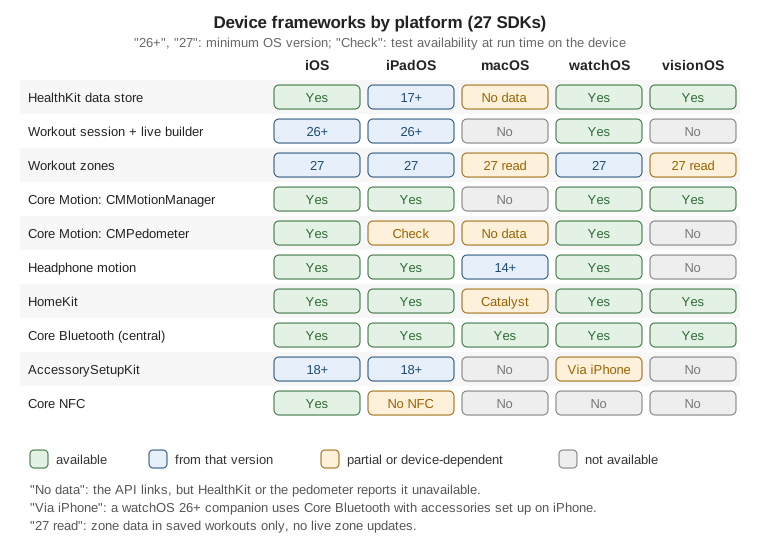
The detailed API-by-API table is in Platform availability at the end of the page.
HealthKit
HealthKit is the shared, encrypted store behind the Health app. Apps read and write samples (a heart-rate
reading, a distance, a workout), each of a specific type, and the user grants access type by type. The store
lives on iPhone, iPad (iPadOS 17 and later), Apple Watch and Apple Vision Pro. The framework also links on the
Mac, but HKHealthStore.isHealthDataAvailable() returns false there and every call fails, so always check it
first.
Enabling HealthKit
Three things are needed before any call works: the HealthKit capability (which adds the entitlement), and two usage descriptions, one for reading and one for writing. Xcode adds the entitlement when you add the capability in Signing & Capabilities:
<!-- FieldNotes/FieldNotes.entitlements (excerpt) -->
<key>com.apple.developer.healthkit</key>
<true/>
<key>com.apple.developer.healthkit.access</key>
<array/>

<!-- FieldNotes/Info.plist (excerpt) -->
<key>NSHealthShareUsageDescription</key>
<string>FieldNotes reads your distance and heart rate to summarize field trips in your notes.</string>
<key>NSHealthUpdateUsageDescription</key>
<string>FieldNotes saves the hikes you record as workouts in Health.</string>com.apple.developer.healthkit.access lists extra, specially reviewed data types (clinical records, for
example); FieldNotes needs none, so the array is empty.
Requesting Authorization
Ask only for the types a feature needs, and ask when the user starts that feature, not at launch.
requestAuthorization(toShare:read:) shows the Health permission sheet once per new type; later calls with the
same types return immediately. Two privacy rules shape the code:
-
Read access is invisible. The app can’t find out whether the user denied reading a type. A denied type behaves like an empty one: queries return only what the app itself wrote. The user can also grant access to a limited window of recent data only, which looks the same.
-
Share (write) access is visible through
authorizationStatus(for:), because the app needs to know whether saving will work.
FieldTripWorkoutSession, introduced below, declares its types and requests access like this:
// FieldNotes/Health/FieldTripWorkoutSession+Authorization.swift
#if os(iOS) || os(watchOS)
import HealthKit

extension FieldTripWorkoutSession {
    static let shareTypes: Set<HKSampleType> = [
        HKObjectType.workoutType(),
        HKQuantityType(.distanceWalkingRunning),
        HKQuantityType(.activeEnergyBurned),
    ]
    static let readTypes: Set<HKObjectType> = [
        HKQuantityType(.distanceWalkingRunning),
        HKQuantityType(.activeEnergyBurned),
        HKQuantityType(.heartRate),
        HKQuantityType(.stepCount),
    ]

    /// Returns false on devices without Health data (for example, an iPad with iPadOS 16 or a Mac).
    func requestAuthorization() async throws -> Bool {
        guard HKHealthStore.isHealthDataAvailable() else { return false }
        try await healthStore.requestAuthorization(toShare: Self.shareTypes, read: Self.readTypes)
        return healthStore.authorizationStatus(for: HKObjectType.workoutType()) == .sharingAuthorized
    }
}
#endifSwiftUI has a declarative alternative, healthDataAccessRequest(store:shareTypes:readTypes:trigger:completion:)
from HealthKitUI, which presents the sheet whenever trigger changes. It suits a settings toggle:
// FieldNotes/Health/HealthAccessRow.swift
#if os(iOS) || os(watchOS)
import SwiftUI
import HealthKit
import HealthKitUI

struct HealthAccessRow: View {
    let healthStore: HKHealthStore
    @State private var requestTrigger = false
    @State private var isRequested = false

    var body: some View {
        Button(isRequested ? "Health Access Requested" : "Connect to Health", systemImage: "heart.text.square") {
            requestTrigger.toggle()
        }
        .disabled(isRequested || !HKHealthStore.isHealthDataAvailable())
        .healthDataAccessRequest(store: healthStore,
                                 shareTypes: FieldTripWorkoutSession.shareTypes,
                                 readTypes: FieldTripWorkoutSession.readTypes,
                                 trigger: requestTrigger) { result in
            Task { @MainActor in isRequested = (try? result.get()) ?? false }
        }
    }
}
#endifThe completion is @Sendable and may run off the main actor, hence the hop before touching @State. The
Bool in the result says whether the sheet was shown and answered, not what the user chose.
Reading a Value: Steps Today
Most reads are one-shot queries. The Swift-native query descriptors make them async. A statistics query
sums samples over a date range, merging sources (iPhone and Watch) so steps aren’t counted twice:
// FieldNotes/Health/HealthSummaries.swift
#if os(iOS) || os(watchOS) || os(visionOS)
import HealthKit

enum HealthSummaries {
    static func stepsToday(in store: HKHealthStore) async throws -> Int {
        let startOfDay = Calendar.current.startOfDay(for: .now)
        let today = HKQuery.predicateForSamples(withStart: startOfDay, end: .now)
        let descriptor = HKStatisticsQueryDescriptor(
            predicate: .quantitySample(type: HKQuantityType(.stepCount), predicate: today),
            options: .cumulativeSum)
        let statistics = try await descriptor.result(for: store)
        return Int(statistics?.sumQuantity()?.doubleValue(for: .count()) ?? 0)
    }
}
#endifWorkouts on iPhone: FieldTripWorkoutSession
Until iOS 26, a live workout session (the kind that collects sensor data continuously and shows up as an active
workout) could run only on Apple Watch; iPhone apps could only save a finished workout afterwards. Since iOS and
iPadOS 26, HKWorkoutSession and HKLiveWorkoutBuilder work on iPhone and iPad too. The session manages the
workout’s state (prepared, running, paused, stopped, ended). Its builder collects samples from an
HKLiveWorkoutDataSource and turns them into an HKWorkout at the end.
FieldTripWorkoutSession records a hike while the user takes notes. It is @Observable and @MainActor so
views can read its live numbers; HealthKit calls its delegates on a background queue, so those methods are
nonisolated and send plain Double values back to the main actor:
// FieldNotes/Health/FieldTripWorkoutSession.swift
#if os(iOS) || os(watchOS)
import HealthKit
import Observation

@Observable
@MainActor
final class FieldTripWorkoutSession: NSObject {
    enum State: Equatable { case idle, running, paused, ended }

    private(set) var state: State = .idle
    private(set) var distanceMeters: Double = 0
    private(set) var activeKilocalories: Double = 0
    private(set) var heartRate: Double?
    private(set) var heartRateZone: Int?   // set on 27 and later

    @ObservationIgnored let healthStore = HKHealthStore()
    @ObservationIgnored private var session: HKWorkoutSession?
    @ObservationIgnored private var builder: HKLiveWorkoutBuilder?

    var startDate: Date? { builder?.startDate }

    func start() async throws {
        let configuration = HKWorkoutConfiguration()
        configuration.activityType = .hiking
        configuration.locationType = .outdoor

        let session = try HKWorkoutSession(healthStore: healthStore, configuration: configuration)
        let builder = session.associatedWorkoutBuilder()
        builder.dataSource = HKLiveWorkoutDataSource(healthStore: healthStore,
                                                     workoutConfiguration: configuration)
        session.delegate = self
        builder.delegate = self
        self.session = session
        self.builder = builder

        let startDate = Date.now
        session.startActivity(with: startDate)
        try await builder.beginCollection(at: startDate)
    }

    func pause() { session?.pause() }
    func resume() { session?.resume() }

    /// Stops collecting, saves the workout to Health and returns it.
    func finish() async throws -> HKWorkout? {
        guard let session, let builder else { return nil }
        let endDate = Date.now
        session.stopActivity(with: endDate)
        try await builder.endCollection(at: endDate)
        let workout = try await builder.finishWorkout()
        session.end()
        return workout
    }
}

extension FieldTripWorkoutSession: HKWorkoutSessionDelegate {
    nonisolated func workoutSession(_ workoutSession: HKWorkoutSession, didChangeTo toState: HKWorkoutSessionState,
                                    from fromState: HKWorkoutSessionState, date: Date) {
        let newState: State? = switch toState {
        case .running: .running
        case .paused: .paused
        case .ended: .ended
        default: nil
        }
        guard let newState else { return }
        Task { @MainActor in self.state = newState }
    }

    nonisolated func workoutSession(_ workoutSession: HKWorkoutSession, didFailWithError error: any Error) {
        Task { @MainActor in self.state = .idle }
    }
}

extension FieldTripWorkoutSession: HKLiveWorkoutBuilderDelegate {
    nonisolated func workoutBuilderDidCollectEvent(_ workoutBuilder: HKLiveWorkoutBuilder) {}

    // New in 27: called when the user moves into another zone (see Workout Zones below).
    @available(iOS 27, watchOS 27, *)
    nonisolated func workoutBuilder(_ workoutBuilder: HKLiveWorkoutBuilder,
                                    didUpdateWorkoutZone zoneUpdate: HKLiveWorkoutZoneUpdate) {
        let zoneIndex = zoneUpdate.currentZoneDuration?.zone.index
        Task { @MainActor in self.heartRateZone = zoneIndex }
    }

    nonisolated func workoutBuilder(_ workoutBuilder: HKLiveWorkoutBuilder,
                                    didCollectDataOf collectedTypes: Set<HKSampleType>) {
        // Read the statistics here, on HealthKit's queue, and send only Doubles to the main actor.
        let distance = workoutBuilder.statistics(for: HKQuantityType(.distanceWalkingRunning))?
            .sumQuantity()?.doubleValue(for: .meter())
        let energy = workoutBuilder.statistics(for: HKQuantityType(.activeEnergyBurned))?
            .sumQuantity()?.doubleValue(for: .kilocalorie())
        let bpm = workoutBuilder.statistics(for: HKQuantityType(.heartRate))?
            .mostRecentQuantity()?.doubleValue(for: .count().unitDivided(by: .minute()))
        Task { @MainActor in
            if let distance { self.distanceMeters = distance }
            if let energy { self.activeKilocalories = energy }
            self.heartRate = bpm
        }
    }
}
#endif
See Apple Developer Documentation — HKWorkoutSession, Apple Developer Documentation — HKLiveWorkoutBuilder and Apple Developer Documentation — Building a workout app for iPhone and iPad.
Running it needs the HealthKit capability and a physical iPhone, iPad or Apple Watch; the simulator can’t produce live distance or heart-rate data. Heart rate appears on iPhone only when a paired sensor (an Apple Watch or compatible headphones or chest strap) provides it.
The order of the calls matters. startActivity(with:) starts the session, and beginCollection(at:) starts the
builder with the same date. At the end, stopActivity(with:) and endCollection(at:) close the time range,
finishWorkout() saves the HKWorkout (with its samples and route) to Health, and end() releases the session.
HKWorkoutSession(healthStore:configuration:) is the initializer that exists on both iPhone and Apple Watch.
The view that runs a field trip reads the session and, when the user finishes, writes a note through the store:
// FieldNotes/Health/FieldTripView.swift
#if os(iOS) || os(watchOS)
import SwiftUI
import FieldNotesModel
import FieldNotesServices

struct FieldTripView: View {
    @Environment(NoteStore.self) private var store
    @State private var workout = FieldTripWorkoutSession()
    @State private var errorMessage: String?

    var body: some View {
        Form {
            LabeledContent("Distance",
                           value: Measurement(value: workout.distanceMeters, unit: UnitLength.meters),
                           format: .measurement(width: .abbreviated, usage: .road))
            LabeledContent("Energy", value: workout.activeKilocalories, format: .number.precision(.fractionLength(0)))
            if let heartRate = workout.heartRate {
                LabeledContent("Heart Rate", value: "\(Int(heartRate)) BPM")
            }
            if let zone = workout.heartRateZone {
                LabeledContent("Zone", value: zone + 1, format: .number)
            }
            switch workout.state {
            case .idle, .ended:
                Button("Start Field Trip", systemImage: "figure.hiking") { Task { await start() } }
            case .running:
                Button("Pause", systemImage: "pause.fill") { workout.pause() }
                Button("Finish", systemImage: "stop.fill", role: .destructive) { Task { await finish() } }
            case .paused:
                Button("Resume", systemImage: "play.fill") { workout.resume() }
            }
        }
        .alert("Health Unavailable", isPresented: Binding(get: { errorMessage != nil },
                                                          set: { if !$0 { errorMessage = nil } })) {
            Button("OK") {}
        } message: {
            Text(errorMessage ?? "")
        }
    }

    private func start() async {
        do {
            guard try await workout.requestAuthorization() else {
                errorMessage = "Allow FieldNotes to save workouts in Settings > Health."
                return
            }
            try await workout.start()
        } catch {
            errorMessage = error.localizedDescription
        }
    }

    private func finish() async {
        guard let hike = try? await workout.finish() else { return }
        let kilometers = (hike.totalDistance?.doubleValue(for: .meterUnit(with: .kilo)) ?? 0)
        store.add(Note(title: "Field trip",
                       body: "Hiked \(kilometers.formatted(.number.precision(.fractionLength(1)))) km " +
                             "in \(Duration.seconds(hike.duration).formatted(.time(pattern: .hourMinute))).",
                       tags: ["field-trip"]))
    }
}

#Preview {
    FieldTripView()
        .environment(NoteStore())
}
#endifOn iPhone, Apple’s sample also shows the running workout in a Live Activity and lets the user pause it from
the Lock Screen with App Intents. FieldNotes already has FieldTripLiveActivity for its field trips, see
Notifications, APNs and Live Activities, and its intents
are on App Intents and System Integration. The watch
side (mirroring a session between Apple Watch and iPhone, startMirroringToCompanionDevice, the Always On
display and complications) is on watchOS: App Structure, Connectivity, Workouts and the Smart Stack.
Workout Zones (New in 27)
Heart-rate and cycling-power zones divide effort into bands. In the 27 releases HealthKit exposes them: the
user’s preferred zones from Health settings with preferredWorkoutZoneConfiguration(for:), live zone changes
through a new HKLiveWorkoutBuilderDelegate method, and time-in-zone for finished workouts with
HKWorkout.zoneGroup(for:), which returns an HKWorkoutZoneGroup. An app can also override the zones for one
workout with setCustomZoneConfiguration(_:for:).
All of it is new in iOS, iPadOS, macOS, watchOS and visionOS 27; the live delegate method exists on iOS, iPadOS
and watchOS 27 only. With a deployment minimum of 26 the code is marked @available. The live callback was
already shown in the delegate extension above; the rest reads zones before and after the hike:
// FieldNotes/Health/FieldTripWorkoutSession+Zones.swift
#if os(iOS) || os(watchOS)
import HealthKit

// The live zone callback, workoutBuilder(_:didUpdateWorkoutZone:), is in the HKLiveWorkoutBuilderDelegate
// extension above, next to the other delegate methods, so the Objective-C optional requirement is matched.
extension FieldTripWorkoutSession {
    /// The user's heart-rate zones from Health settings, lowest first.
    @available(iOS 27, watchOS 27, *)
    func preferredHeartRateZones() async throws -> [HKWorkoutZone] {
        let configuration = try await healthStore.preferredWorkoutZoneConfiguration(for: HKQuantityType(.heartRate))
        return configuration?.zones ?? []
    }

    /// Minutes spent in each heart-rate zone of a finished hike, for the note's summary.
    @available(iOS 27, watchOS 27, *)
    static func minutesInZones(of workout: HKWorkout) -> [(zone: Int, minutes: Double)] {
        guard let group = workout.zoneGroup(for: HKQuantityType(.heartRate)) else { return [] }
        return group.zoneDurations.map { (zone: $0.zone.index + 1, minutes: $0.duration / 60) }
    }
}
#endif
See Apple Developer Documentation — HKWorkoutZoneGroup and Apple Developer Documentation — HKWorkoutZoneConfiguration.
finish() can then append a line such as "Zone 2: 34 min, Zone 3: 12 min" to the note when
#available(iOS 27, watchOS 27, *) is true. On 26 the view simply never shows a zone, because
heartRateZone stays nil.
Core Motion
Core Motion reads the motion sensors: accelerometer, gyroscope, magnetometer, barometer, and the motion
coprocessor that counts steps. Anything that reads motion or fitness activity needs NSMotionUsageDescription in
the Info properties, and the user can turn access off in Settings > Privacy & Security > Motion & Fitness.
StepCounter with CMPedometer
The pedometer counts steps, distance and floors in the motion coprocessor, even while the app isn’t running,
and keeps about a week of history. StepCounter shows the steps since the user opened a note. The update
handler runs on a private queue, so the closure is explicitly @Sendable and hands plain values to the main
actor. Without @Sendable, a closure written in a main-actor type would inherit main-actor isolation, and Swift
6 would stop the app with an isolation error when Core Motion calls it from its own queue:
// FieldNotes/Motion/StepCounter.swift
#if os(iOS) || os(watchOS)
import CoreMotion
import Observation

@Observable
@MainActor
final class StepCounter {
    private(set) var steps = 0
    private(set) var meters: Double?
    let isAvailable = CMPedometer.isStepCountingAvailable()
    @ObservationIgnored private let pedometer = CMPedometer()

    func start(from startDate: Date) {
        guard isAvailable, CMPedometer.authorizationStatus() != .denied else { return }
        pedometer.startUpdates(from: startDate) { @Sendable data, error in
            guard let data, error == nil else { return }
            let steps = data.numberOfSteps.intValue
            let meters = data.distance?.doubleValue
            Task { @MainActor in
                self.steps = steps
                self.meters = meters
            }
        }
    }

    func stop() {
        pedometer.stopUpdates()
    }

    /// Steps in a past range, from the coprocessor's history (about seven days).
    func steps(from start: Date, to end: Date) async throws -> Int {
        try await withCheckedThrowingContinuation { continuation in
            pedometer.queryPedometerData(from: start, to: end) { @Sendable data, error in
                if let error {
                    continuation.resume(throwing: error)
                } else {
                    continuation.resume(returning: data?.numberOfSteps.intValue ?? 0)
                }
            }
        }
    }
}
#endifisStepCountingAvailable() must be checked because not every device has the hardware; most iPads return
false. The class stays alive while the pedometer holds its handler, so stop() is called when the note
closes. In the note editor it looks like this:
// FieldNotes/Views/NoteEditor.swift (excerpt)
#if os(iOS) || os(watchOS)
@State private var stepCounter = StepCounter()

var stepsRow: some View {
    LabeledContent("Steps Since Opening", value: stepCounter.steps, format: .number)
        .opacity(stepCounter.isAvailable ? 1 : 0)
        .onAppear { stepCounter.start(from: .now) }
        .onDisappear { stepCounter.stop() }
}
#endifThe step count runs on a physical iPhone or Apple Watch only; the simulator has no pedometer. It needs
NSMotionUsageDescription and no capability.
Device Motion with CMMotionManager
CMMotionManager streams raw and fused sensor data. Device motion is the fused one: attitude (roll, pitch,
yaw), gravity, user acceleration and rotation rate, with the sensor bias already removed. FieldNotes uses it
for a small spirit level in the camera screen, so photos of a notebook page are taken flat. Create one
manager per app; several instances slow down updates.
// FieldNotes/Motion/DeviceLevel.swift
#if os(iOS) || os(watchOS) || os(visionOS)
import CoreMotion
import Observation

@Observable
@MainActor
final class DeviceLevel {
    static let shared = DeviceLevel()
    private(set) var pitchDegrees: Double = 0
    private(set) var rollDegrees: Double = 0
    @ObservationIgnored private let manager = CMMotionManager()

    var isLevel: Bool { abs(pitchDegrees) < 2 && abs(rollDegrees) < 2 }

    func start() {
        guard manager.isDeviceMotionAvailable, !manager.isDeviceMotionActive else { return }
        manager.deviceMotionUpdateInterval = 1.0 / 30.0
        // Deliver on the main queue, which is the main actor, so the handler can update state directly.
        manager.startDeviceMotionUpdates(to: .main) { motion, _ in
            guard let attitude = motion?.attitude else { return }
            self.pitchDegrees = attitude.pitch * 180 / .pi
            self.rollDegrees = attitude.roll * 180 / .pi
        }
    }

    func stop() {
        manager.stopDeviceMotionUpdates()
    }
}
#endifHere the opposite choice from StepCounter is right: the updates are delivered on OperationQueue.main, so the
closure’s inherited main-actor isolation is correct and no hop is needed. Stop updates as soon as the screen
closes; the sensors cost battery. CMMotionManager isn’t available on macOS.
Headphone Motion
AirPods and Beats headphones with spatial audio report the wearer’s head orientation through
CMHeadphoneMotionManager, on iOS, iPadOS, macOS (14 and later) and watchOS. FieldNotes uses it for a
hands-free gesture: while a voice memo plays, a nod bookmarks the current position. The same
NSMotionUsageDescription covers it:
// FieldNotes/Motion/HeadphoneNodDetector.swift
#if os(iOS) || os(macOS) || os(watchOS)
import CoreMotion
import Observation

@Observable
@MainActor
final class HeadphoneNodDetector {
    private(set) var nodCount = 0
    @ObservationIgnored private let manager = CMHeadphoneMotionManager()
    @ObservationIgnored private var wasLookingDown = false

    func start() {
        guard manager.isDeviceMotionAvailable else { return }
        manager.startDeviceMotionUpdates(to: .main) { motion, _ in
            guard let pitch = motion?.attitude.pitch else { return }
            let isLookingDown = pitch < -0.35          // about 20 degrees down
            if self.wasLookingDown && !isLookingDown { self.nodCount += 1 }
            self.wasLookingDown = isLookingDown
        }
    }

    func stop() {
        manager.stopDeviceMotionUpdates()
    }
}
#endifIt needs compatible headphones connected to a physical device. On watchOS, headphone motion is delivered to the watch only when the headphones are connected to it.
HomeKit, Briefly
HomeKit reads and controls the accessories a user set up in the Home app (lights, locks, thermostats, sensors),
organized into homes, rooms and scenes through HMHomeManager. It needs the HomeKit capability and
NSHomeKitUsageDescription, and it is available on iOS, iPadOS, watchOS, tvOS and visionOS, and on the Mac only
through Mac Catalyst. FieldNotes doesn’t use it; a note-taking app has no business in the user’s home. For
reference, reading the homes looks like this:
// Example only; not part of FieldNotes.
#if canImport(HomeKit) && !os(macOS)
import HomeKit

@MainActor
final class HomeNamesReader: NSObject {
    private let manager = HMHomeManager()
    private(set) var homeNames: [String] = []

    override init() {
        super.init()
        manager.delegate = self   // the first delegate call arrives once the homes have loaded
    }
}

// HomeKit calls its delegate on the main queue, so the conformance can be main-actor isolated.
extension HomeNamesReader: @MainActor HMHomeManagerDelegate {
    func homeManagerDidUpdateHomes(_ manager: HMHomeManager) {
        homeNames = manager.homes.map(\.name)
    }
}
#endifIt needs the HomeKit capability and NSHomeKitUsageDescription; the first access shows the Home data prompt.
Core Bluetooth: FieldSensorScanner
Core Bluetooth talks to Bluetooth Low Energy devices. The app usually plays the central role: a
CBCentralManager scans for peripherals that advertise services, connects to one, discovers its
characteristics and reads or subscribes to their values. Every identifier is a CBUUID. Standard services
have short 16-bit UUIDs; the Bluetooth SIG’s Environmental Sensing service is 181A and its Temperature
characteristic is 2A6E, a signed 16-bit value in hundredths of a degree Celsius.
The app must declare NSBluetoothAlwaysUsageDescription, and the first use of a CBCentralManager shows the
Bluetooth prompt. On macOS, sandboxed apps also need the Bluetooth App Sandbox entitlement.
FieldSensorScanner creates its manager with a nil queue, which means Core Bluetooth calls every delegate
method on the main queue. That lets the conformances be isolated conformances,
@MainActor CBCentralManagerDelegate: the delegate methods run on the main actor and can update observable
state directly, and the Swift runtime checks that they really are called there.
// FieldNotes/Accessories/FieldSensorScanner.swift
import CoreBluetooth
import Observation

struct DiscoveredSensor: Identifiable, Hashable {
    let id: UUID          // CBPeripheral.identifier: stable for this device on this phone
    var name: String
    var rssi: Int
}

@Observable
@MainActor
final class FieldSensorScanner: NSObject {
    static let environmentalSensing = CBUUID(string: "181A")
    static let temperature = CBUUID(string: "2A6E")

    private(set) var bluetoothState: CBManagerState = .unknown
    private(set) var sensors: [DiscoveredSensor] = []
    private(set) var temperature: Measurement<UnitTemperature>?

    @ObservationIgnored private var central: CBCentralManager!
    @ObservationIgnored private var peripherals: [UUID: CBPeripheral] = [:]

    override init() {
        super.init()
        central = CBCentralManager(delegate: self, queue: nil)   // nil: callbacks on the main queue
    }

    func startScanning() {
        guard bluetoothState == .poweredOn else { return }
        central.scanForPeripherals(withServices: [Self.environmentalSensing])
    }

    func stopScanning() {
        central.stopScan()
    }

    func connect(to sensorID: UUID) {
        let peripheral = peripherals[sensorID]
            ?? central.retrievePeripherals(withIdentifiers: [sensorID]).first   // a sensor paired earlier
        guard let peripheral else { return }
        peripherals[sensorID] = peripheral
        stopScanning()
        central.connect(peripheral)
    }
}

extension FieldSensorScanner: @MainActor CBCentralManagerDelegate {
    func centralManagerDidUpdateState(_ central: CBCentralManager) {
        bluetoothState = central.state
    }

    func centralManager(_ central: CBCentralManager, didDiscover peripheral: CBPeripheral,
                        advertisementData: [String: Any], rssi RSSI: NSNumber) {
        peripherals[peripheral.identifier] = peripheral
        let sensor = DiscoveredSensor(id: peripheral.identifier,
                                      name: peripheral.name ?? "Field Sensor",
                                      rssi: RSSI.intValue)
        if let index = sensors.firstIndex(where: { $0.id == sensor.id }) {
            sensors[index] = sensor
        } else {
            sensors.append(sensor)
        }
    }

    func centralManager(_ central: CBCentralManager, didConnect peripheral: CBPeripheral) {
        peripheral.delegate = self
        peripheral.discoverServices([Self.environmentalSensing])
    }
}

extension FieldSensorScanner: @MainActor CBPeripheralDelegate {
    func peripheral(_ peripheral: CBPeripheral, didDiscoverServices error: (any Error)?) {
        for service in peripheral.services ?? [] where service.uuid == Self.environmentalSensing {
            peripheral.discoverCharacteristics([Self.temperature], for: service)
        }
    }

    func peripheral(_ peripheral: CBPeripheral, didDiscoverCharacteristicsFor service: CBService,
                    error: (any Error)?) {
        for characteristic in service.characteristics ?? [] where characteristic.uuid == Self.temperature {
            peripheral.readValue(for: characteristic)
            peripheral.setNotifyValue(true, for: characteristic)   // keep receiving new readings
        }
    }

    func peripheral(_ peripheral: CBPeripheral, didUpdateValueFor characteristic: CBCharacteristic,
                    error: (any Error)?) {
        guard let data = characteristic.value, data.count >= 2 else { return }
        let raw = data.withUnsafeBytes { Int16(littleEndian: $0.loadUnaligned(as: Int16.self)) }
        temperature = Measurement(value: Double(raw) / 100, unit: .celsius)
    }
}
See Apple Developer Documentation — CBCentralManager and Apple Developer Documentation — Core Bluetooth.
The sensor list uses the peripheral identifier as its stable identity, and the chosen reading is written into the note through the store:
// FieldNotes/Accessories/FieldSensorView.swift
import SwiftUI
import FieldNotesModel
import FieldNotesServices

struct FieldSensorView: View {
    @Environment(NoteStore.self) private var store
    @State private var scanner = FieldSensorScanner()
    let noteID: Note.ID

    var body: some View {
        List {
            Section("Nearby Sensors") {
                ForEach(scanner.sensors) { sensor in
                    Button {
                        scanner.connect(to: sensor.id)
                    } label: {
                        LabeledContent(sensor.name, value: "\(sensor.rssi) dBm")
                    }
                }
            }
            if let temperature = scanner.temperature {
                Section("Reading") {
                    Text(temperature, format: .measurement(width: .abbreviated))
                    Button("Add to Note", systemImage: "text.badge.plus") { addReading(temperature) }
                }
            }
        }
        .onChange(of: scanner.bluetoothState) { _, state in
            if state == .poweredOn { scanner.startScanning() }
        }
        .onDisappear { scanner.stopScanning() }
    }

    private func addReading(_ temperature: Measurement<UnitTemperature>) {
        guard let index = store.notes.firstIndex(where: { $0.id == noteID }) else { return }
        store.notes[index].body += "\nTemperature: \(temperature.formatted(.measurement(width: .abbreviated)))"
    }
}

#Preview {
    let note = Note(title: "Ridge weather")
    FieldSensorView(noteID: note.id)
        .environment(NoteStore(notes: [note]))
}Scanning needs a physical device and a real Bluetooth LE peripheral; the simulator has no Bluetooth. Core Bluetooth is available on all five platforms, with limits: on watchOS and visionOS, scanning and connections are restricted in the background, and on iOS, background scanning requires the Uses Bluetooth LE accessories background mode and a service filter.
AccessorySetupKit: Private Pairing
The Bluetooth prompt is broad: it lets the app see every Bluetooth device around the user. AccessorySetupKit (iOS and iPadOS 18 and later) replaces it with a system accessory picker. The app describes the accessories it supports, the system finds matching ones and shows them with the app’s name and product image, and the user taps one. The app then gets access to that accessory only, with no Bluetooth permission prompt. Paired accessories appear in Settings > Privacy & Security > Accessories, where the user can remove them.
The app declares its accessories in the Info properties. The NSAccessorySetupKitSupports key lists the
transports; Bluetooth accessories also need the services (or names or company identifiers) the picker may match.
Using an identifier that isn’t declared here crashes the app:
<!-- FieldNotes/Info.plist (excerpt) -->
<key>NSAccessorySetupKitSupports</key>
<array>
    <string>Bluetooth</string>
</array>
<key>NSAccessorySetupBluetoothServices</key>
<array>
    <string>181A</string>
</array>FieldSensorPairing activates an ASAccessorySession, shows the picker for one display item, and hands the
chosen accessory’s Bluetooth identifier to FieldSensorScanner, which connects with
retrievePeripherals(withIdentifiers:) instead of scanning:
// FieldNotes/Accessories/FieldSensorPairing.swift
#if os(iOS) && canImport(AccessorySetupKit)
import AccessorySetupKit
import CoreBluetooth
import UIKit

@MainActor
final class FieldSensorPairing {
    private let session = ASAccessorySession()
    private let scanner: FieldSensorScanner

    init(scanner: FieldSensorScanner) {
        self.scanner = scanner
        session.activate(on: .main) { [weak self] event in
            guard let self else { return }
            switch event.eventType {
            case .activated:
                // Accessories the user already paired with FieldNotes.
                self.session.accessories.compactMap(\.bluetoothIdentifier).forEach(self.scanner.connect(to:))
            case .accessoryAdded:
                if let id = event.accessory?.bluetoothIdentifier { self.scanner.connect(to: id) }
            default:
                break
            }
        }
    }

    func showPicker() async throws {
        let descriptor = ASDiscoveryDescriptor()
        descriptor.bluetoothServiceUUID = FieldSensorScanner.environmentalSensing
        let image = UIImage(named: "FieldSensor") ?? UIImage(systemName: "sensor")!
        let item = ASPickerDisplayItem(name: "FieldNotes Sensor", productImage: image, descriptor: descriptor)
        try await session.showPicker(for: [item])
    }
}
#endif
See Apple Developer Documentation — ASAccessorySession and Apple Developer Documentation — AccessorySetupKit.
The session’s events arrive on the queue passed to activate(on:eventHandler:), here the main queue, which is
why the closure can use the main-actor scanner. AccessorySetupKit also pairs Wi-Fi accessories (by SSID) and Wi-Fi
Aware devices. Since watchOS 26, a companion watch app can use Core Bluetooth to talk to an accessory that the
iPhone app set up with AccessorySetupKit. It needs a physical iPhone or iPad with iOS or iPadOS 18 or later and a
real accessory.
Core NFC: NFCNoteTagReader
Core NFC reads NFC tags on iPhone (iPhone 7 and later); iPad, Mac, Apple Watch and Apple Vision Pro can’t read tags from apps. FieldNotes puts cheap NDEF stickers on trail posts or sample jars. Each holds a link to a note, and scanning it opens the note. The tag’s content is an NDEF message with one URI record:
// FieldNotes/NFC/NoteTagMessage.swift
#if os(iOS) && canImport(CoreNFC)
import CoreNFC
import FieldNotesModel

enum NoteTagMessage {
    /// The universal link a tag holds, so iPhone opens the note even without the app scanning.
    static func message(for noteID: Note.ID) -> NFCNDEFMessage? {
        let url = URL(string: "https://fieldnotes.example.com/note/\(noteID.uuidString)")!
        guard let record = NFCNDEFPayload.wellKnownTypeURIPayload(url: url) else { return nil }
        return NFCNDEFMessage(records: [record])
    }
}
#endifWriting the message to a sticker uses the same reader session with connect(to:) on a detected tag; Apple’s
Creating NFC Tags from Your iPhone sample shows the full flow.
Because the record is a universal link, iPhone can read the tag in the background, with the screen on and no
app running, and offers a notification that opens FieldNotes at that note through onOpenURL, as set up on
Navigation and Presentation. The associated domain is
configured on App Intents and System Integration.
Inside the app, NFCNoteTagReader starts an NFCNDEFReaderSession, which shows the system scanning sheet, and
returns the first FieldNotes link it reads. The delegate runs on a Core NFC queue, and the continuation can be
touched from both that queue and the caller, so it lives in a Mutex from the Synchronization module:
// FieldNotes/NFC/NFCNoteTagReader.swift
#if os(iOS) && canImport(CoreNFC)
import CoreNFC
import Synchronization

nonisolated final class NFCNoteTagReader: NSObject, NFCNDEFReaderSessionDelegate, Sendable {
    enum ReaderError: Error { case readingUnavailable, noNoteLink }

    private let pending = Mutex<CheckedContinuation<URL, any Error>?>(nil)
    private let activeSession = Mutex<NFCNDEFReaderSession?>(nil)

    /// Shows the scanning sheet and returns the note link on the first tag read.
    func scanNoteLink() async throws -> URL {
        guard NFCNDEFReaderSession.readingAvailable else { throw ReaderError.readingUnavailable }
        return try await withCheckedThrowingContinuation { continuation in
            pending.withLock { $0 = continuation }
            let session = NFCNDEFReaderSession(delegate: self, queue: nil, invalidateAfterFirstRead: true)
            session.alertMessage = "Hold your iPhone near a FieldNotes tag."
            session.begin()
            activeSession.withLock { $0 = session }   // keep the session alive while it scans
        }
    }

    private func finish(_ result: Result<URL, any Error>) {
        pending.withLock { $0.take() }?.resume(with: result)   // resumes at most once
        activeSession.withLock { $0 = nil }
    }

    func readerSession(_ session: NFCNDEFReaderSession, didDetectNDEFs messages: [NFCNDEFMessage]) {
        let link = messages.flatMap(\.records)
            .compactMap { $0.wellKnownTypeURIPayload() }
            .first { $0.scheme == "fieldnotes" || $0.host() == "fieldnotes.example.com" }
        finish(link.map { .success($0) } ?? .failure(ReaderError.noNoteLink))
    }

    func readerSession(_ session: NFCNDEFReaderSession, didInvalidateWithError error: any Error) {
        // Also called after a successful first read; finish(_:) ignores it then.
        finish(.failure(error))
    }
}
#endif
See Apple Developer Documentation — NFCNDEFReaderSession and Apple Developer Documentation — Building an NFC Tag-Reader App.
The note list offers a Scan Tag button that opens whatever note the tag names, reusing the app’s URL routing:
// FieldNotes/Views/NoteList.swift (excerpt)
#if os(iOS) && canImport(CoreNFC)
@Environment(\.openURL) private var openURL
@State private var tagReader = NFCNoteTagReader()

Button("Scan Tag", systemImage: "wave.3.right") {
    Task {
        if let link = try? await tagReader.scanNoteLink() {
            openURL(link)   // handled by onOpenURL, like any fieldnotes:// or universal link
        }
    }
}
#endifCore NFC needs the Near Field Communication Tag Reading capability, which Xcode adds as the
com.apple.developer.nfc.readersession.formats entitlement, an NFCReaderUsageDescription in the Info
properties, a paid Apple Developer Program membership (personal teams can’t use the capability) and a physical
iPhone:
<!-- FieldNotes/FieldNotes.entitlements (excerpt) -->
<key>com.apple.developer.nfc.readersession.formats</key>
<array>
    <string>TAG</string>
</array>

<!-- FieldNotes/Info.plist (excerpt) -->
<key>NFCReaderUsageDescription</key>
<string>FieldNotes reads NFC tags that link to your notes.</string>
See Apple Developer Documentation — Near Field Communication Tag Reader Session Formats Entitlement.
Tags that aren’t NDEF-formatted (ISO 7816, ISO 15693, FeliCa or MIFARE) need Core NFC’s lower-level tag reader session instead; FieldNotes only uses NDEF stickers.
Requirements and Platform Availability
Each feature on this page needs something beyond the SDK:
| Feature | Capability, entitlement and Info keys | Device |
|---|---|---|
|
HealthKit capability; |
Physical iPhone, iPad or Apple Watch |
|
HealthKit capability; the same two keys |
Simulator (with sample data) or device |
|
|
Physical device; headphones for head motion |
HomeKit |
HomeKit capability; |
Simulator with the HomeKit Accessory Simulator, or device |
|
|
Physical device and a Bluetooth LE sensor |
|
|
Physical iPhone or iPad with 18 or later |
|
NFC Tag Reading capability (paid membership); |
Physical iPhone |
Platform availability
| API or feature | iOS | iPadOS | macOS | watchOS | visionOS |
|---|---|---|---|---|---|
HealthKit store ( |
Yes |
Yes (17) |
Yes (links; no Health data) |
Yes |
Yes |
|
Yes |
Yes |
Not available |
Yes |
Yes |
|
Yes |
Yes |
Yes (links; no Health data) |
Yes |
Yes |
|
New in 26 |
New in 26 |
Not available |
Yes |
Not available |
|
New in 26 |
New in 26 |
Not available |
Yes |
Not available |
|
New in 27 |
New in 27 |
New in 27 |
New in 27 |
New in 27 |
|
New in 27 |
New in 27 |
Not available |
New in 27 |
Not available |
|
Yes |
Yes (device-dependent) |
Yes (links; no data) |
Yes |
Not available |
|
Yes |
Yes |
Not available |
Yes |
Yes |
|
Yes |
Yes |
Yes (14) |
Yes |
Not available |
HomeKit ( |
Yes |
Yes |
Yes (Mac Catalyst only) |
Yes |
Yes |
Core Bluetooth ( |
Yes |
Yes |
Yes |
Yes |
Yes |
AccessorySetupKit |
Yes (18) |
Yes (18) |
Not available |
Not available (companion uses Core Bluetooth, 26+) |
Not available |
Core NFC ( |
Yes (iPhone 7 and later) |
Not available (no reader) |
Not available |
Not available |
Not available |
Background NFC tag reading |
Yes (iPhone XS and later) |
Not available |
Not available |
Not available |
Not available |
References
-
Apple Developer Documentation — Authorizing access to health data
-
Apple Developer Documentation — requestAuthorization(toShare:read:)
-
Apple Developer Documentation — Building a workout app for iPhone and iPad
-
Apple Developer Documentation — Discovering and configuring accessories
-
Apple Developer Documentation — Building an NFC Tag-Reader App
-
Apple Developer Documentation — Near Field Communication Tag Reader Session Formats Entitlement
-
WWDC26 — Deliver workout insights with HealthKit workout zones
-
WWDC26 — Find your accessory with Bluetooth Channel Sounding