Quartz on PostgreSQL
|
This content was generated with the assistance of AI and should be verified against the official documentation before being relied on in production. The reference material consulted while preparing these pages is listed in the section bibliography. |
PostgreSQL is the reference database of this section: the Bookshelf jobs of every other database page are first run here. This page covers everything that is specific to PostgreSQL once the generic ideas of
Job Stores & Persistence are known: the one delegate you must choose and why, what tables_postgres.sql really contains, how to give Quartz its own schema and
role, how to create the tables with Flyway or Liquibase, how the SELECT … FOR UPDATE row locks behave (shown with the actual statements PostgreSQL logged), what the churn of the Quartz tables does to autovacuum, and a three-node cluster test
that starts three JVMs against one container and kills one of them. Clustering as a concept, with the other databases, is on Clustering.
It was written against Quartz 2.5.2, Spring Boot 4.1.1, Spring Framework 7.0.9 and Java 21 (bytecode level; the build ran on JDK 25.0.2 with Maven 3.9.16), PostgreSQL 17.11 and the pgJDBC driver 42.7.13, and verified on 5 October 2026.
The database was the image postgres:17, which reported PostgreSQL 17.11 (Debian 17.11-1.pgdg13+2) on aarch64-unknown-linux-gnu (native arm64 under Docker Desktop on Apple Silicon, no emulation). Connection pool: HikariCP 7.0.2. Migration tools:
Flyway 12.4.0 and Liquibase 5.0.3, the versions Boot 4.1.1 manages. Tests: Testcontainers 2.0.5 and JUnit 6.0.3. Every behaviour quoted below was run in a test project and every default, SQL statement and method was read from the Quartz 2.5.2
and Spring Framework 7.0.9 sources; results that come from one run say so. Spring Boot 3.5.16 manages the same Quartz 2.5.2 and the same pgJDBC 42.7.13, so everything about Quartz and PostgreSQL is identical; what differs is the package of the Boot
types (org.springframework.boot.autoconfigure.quartz instead of org.springframework.boot.quartz.autoconfigure, org.springframework.boot.autoconfigure.jdbc.DataSourceProperties instead of org.springframework.boot.jdbc.autoconfigure.DataSourceProperties),
Spring Framework 6.2.19, and the Flyway and Liquibase starters. The page was not re-run on Boot 3.5.
Status and dependencies
PostgreSQL is a supported, official target of Quartz’s JDBC job store: the delegate org.quartz.impl.jdbcjobstore.PostgreSQLDelegate and the script tables_postgres.sql are in the Quartz jar, and clustering works on it (measured below).
Nothing community-maintained is involved, in contrast to MongoDB and Redis.
<dependency>
    <groupId>org.springframework.boot</groupId>
    <artifactId>spring-boot-starter-quartz</artifactId>
</dependency>
<dependency>
    <groupId>org.springframework.boot</groupId>
    <artifactId>spring-boot-starter-jdbc</artifactId>
</dependency>
<dependency>
    <groupId>org.postgresql</groupId>
    <artifactId>postgresql</artifactId>
    <scope>runtime</scope>
</dependency>
<!-- the tables are created by a migration tool, here Flyway -->
<dependency>
    <groupId>org.springframework.boot</groupId>
    <artifactId>spring-boot-starter-flyway</artifactId>
</dependency>
<dependency>
    <groupId>org.flywaydb</groupId>
    <artifactId>flyway-database-postgresql</artifactId>
</dependency>No version number is needed: Boot 4.1.1 manages Quartz 2.5.2, postgresql 42.7.13, Flyway 12.4.0 and Liquibase 5.0.3. spring-boot-starter-jdbc brings HikariCP and Spring’s transaction support; with one DataSource in the context Boot gives it
to Quartz by itself. The Flyway and Liquibase starters are Boot 4 names (on Boot 3.5.16 depend on flyway-core or liquibase-core directly, which was not run here). Flyway has shipped each database in its own module since version 10, which is why
flyway-database-postgresql is listed.
| Component | Version | Where it comes from |
|---|---|---|
PostgreSQL server |
17.11 ( |
|
pgJDBC ( |
42.7.13 |
managed by Boot 4.1.1 and 3.5.16 |
HikariCP |
7.0.2 |
managed by Boot 4.1.1 |
Flyway and Liquibase |
12.4.0 and 5.0.3 |
managed by Boot 4.1.1 |
Testcontainers |
2.0.5 ( |
managed by Boot 4.1.1 |
The delegate: PostgreSQLDelegate, and why it is mandatory
A JDBC job store talks to the database through a driver delegate, the class that holds the SQL and the JDBC calls. Quartz chooses nothing for you: if org.quartz.jobStore.driverDelegateClass is not set, Quartz uses StdJDBCDelegate
(measured under Boot: the job store reported a null delegate class and used the standard one). StdJDBCDelegate is written for databases whose BLOB columns behave like JDBC BLOBs, and it reads every serialized column
(the JobDataMap of a job, the JobDataMap of a trigger, a calendar) with ResultSet.getBlob. PostgreSQL’s script declares those columns as BYTEA, a plain byte string, and pgJDBC maps getBlob only to PostgreSQL’s separate large object
facility (columns of type oid), so on a BYTEA column it fails.
// StdJDBCDelegate.getObjectFromBlob (line 3410)
Blob blobLocator = rs.getBlob(colName);
if (blobLocator != null && blobLocator.length() != 0) {
    InputStream binaryInput = blobLocator.getBinaryStream();
    // ... ObjectInputStream.readObject()
}

// PostgreSQLDelegate.getObjectFromBlob (overrides it; getJobDataFromBlob is overridden the same way)
byte[] bytes = rs.getBytes(colName);
if (bytes != null && bytes.length != 0) {
    try (ObjectInputStream in = new ObjectInputStream(new ByteArrayInputStream(bytes))) {
        obj = in.readObject();
    }
}The asymmetry is what makes the mistake easy to make: the write side of StdJDBCDelegate uses setBytes, which works on BYTEA, so the first symptom is not at the first insert but at the first read. On the Bookshelf service, with
initialize-schema: always and no delegate, the application context did not start. The chain of causes, measured on postgres:17 with pgJDBC 42.7.13:
org.postgresql.util.PSQLException: Bad value for type long : \xaced0005737200156f72672e71756172747a2e4a6f62446174614d6170...
  at org.quartz.impl.jdbcjobstore.StdJDBCDelegate.getObjectFromBlob(StdJDBCDelegate.java:3414)
  at org.quartz.impl.jdbcjobstore.StdJDBCDelegate.handleJobDetails(StdJDBCDelegate.java:1657)
  at org.quartz.impl.jdbcjobstore.StdJDBCDelegate.selectJobDetail(StdJDBCDelegate.java:844)
  at org.quartz.impl.jdbcjobstore.JobStoreSupport.retrieveJob(JobStoreSupport.java:1403)
org.quartz.JobPersistenceException: Couldn't retrieve job: Bad value for type long : \xaced0005...
org.quartz.JobPersistenceException: Couldn't store trigger 'bookshelf.cacheRefreshTrigger' for 'bookshelf.cacheRefresh' job:Couldn't retrieve job: Bad value for type long : \xaced0005...
BeanCreationException: Error creating bean with name 'quartzScheduler' ...The text after Bad value for type long is the stored value itself: the hexadecimal aced0005 is the header of Java serialization (ObjectOutputStream), the first four bytes of every job and trigger data column (measured with encode(substring(job_data from 1 for 4), 'hex')
on all four Bookshelf jobs). pgJDBC tried to read a BYTEA value as the numeric object id of a large object and complained that it is not a number.
The fix is one property, written under spring.quartz.properties because Boot passes that map straight to Quartz:
spring:
  quartz:
    job-store-type: jdbc
    properties:
org.quartz.jobStore.driverDelegateClass: org.quartz.impl.jdbcjobstore.PostgreSQLDelegateWith it, the same service started, stored and fired the Bookshelf jobs and restarted with the state intact (the persisted runs counter of the overdue-loan job kept growing across a restart). This is the opposite of MySQL and MariaDB, where the standard delegate
is the right one, and of Oracle and SQL Server, which need their own; the choice per database is in the support matrix of the generic page. A BYTEA column also means that a JobDataMap is stored as a Java-serialized blob, so every value must be
Serializable and a class rename or a field change can make old rows unreadable; Jobs & Job Data explains the consequences and the useProperties alternative, which was not run on PostgreSQL.
tables_postgres.sql
The script is inside the Quartz jar at org/quartz/impl/jdbcjobstore/tables_postgres.sql (7205 bytes in 2.5.2). It creates the eleven QRTZ_ tables, their foreign keys and twenty secondary indexes, and it starts by dropping every table
(DROP TABLE IF EXISTS, eleven statements, in dependency order) and ends with COMMIT;. Everything in the first statement list is what makes the script safe for a demo and dangerous for a database that holds a schedule:
Boot’s initialize-schema: always runs it on every start and therefore deletes every stored job and trigger on every restart (measured: a job scheduled at runtime survived a restart with never and was gone after a restart with always).
| Table | What it holds | Notes |
|---|---|---|
|
One row per |
|
|
One row per trigger: state, next and previous fire time, priority, misfire instruction, calendar name, |
Times are |
|
The type-specific part of a trigger |
Declared foreign keys to |
|
Serialized calendars ( |
|
|
One row per trigger that is acquired or executing, with the node that owns it |
The churn table. |
|
One row per live cluster node and its last check-in |
Written only when clustered. |
|
The row locks ( |
Two rows per scheduler name, created by Quartz on first use, not by the script (see Locking: SELECT … FOR UPDATE on QRTZ_LOCKS). |
Every primary key starts with SCHED_NAME (VARCHAR(120)), which is how several schedulers, or several clusters, share one set of tables: the scheduler name (spring.quartz.scheduler-name) is part of every key and every WHERE clause. The
entity-relationship picture is on the generic page. Three PostgreSQL details deserve a sentence each:
-
Case. The script uses unquoted upper-case identifiers, which PostgreSQL folds to lower case, so the tables are
qrtz_job_detailsand so on (the monitoring queries below use lower case). Quartz’s own SQL is also unquoted, so the two agree. A tool that creates the tables with quoted upper-case names produces tables Quartz cannot find. -
Indexes. There are twenty secondary indexes (two on
QRTZ_JOB_DETAILS, twelve onQRTZ_TRIGGERSand six onQRTZ_FIRED_TRIGGERS) besides the eleven primary keys. The acquisition query filters onSCHED_NAME,TRIGGER_STATEandNEXT_FIRE_TIME, for which the script hasIDX_QRTZ_T_NFT_STandIDX_QRTZ_T_NEXT_FIRE_TIME. Which one the planner picks depends on statistics: on the four-row Bookshelf table with sequential scans disabled it choseIDX_QRTZ_T_NEXT_FIRE_TIME(anEXPLAINon a table this small proves nothing about a table with a million triggers). Each index is also something that every trigger update must maintain, which matters for the vacuum section below. -
Booleans.
BOOLis PostgreSQL’sboolean; Quartz binds it withsetBoolean, so unlike Oracle with a 23.x driver there is no driver trap here.
A dedicated schema and role
Quartz’s tables do not have to live next to the business tables. A separate schema and a separate role give three things for free: the tables stay out of the application’s namespace (and of its migrations and its ORM), the privileges can be
narrower than the application’s, and role-level settings such as search_path or session timeouts apply to Quartz connections only. The SQL below was run on postgres:17 as an administrator; the role name quartz and the password
placeholder are examples (use a secret store; the placeholder is not a credential).
-- Run once as an administrator, connected to the application database (here: "bookshelf").
CREATE ROLE quartz LOGIN PASSWORD 'change-me-from-a-secret-store';

CREATE SCHEMA quartz AUTHORIZATION quartz;

-- Unqualified QRTZ_* names resolve through the search_path of the quartz role.
ALTER ROLE quartz IN DATABASE bookshelf SET search_path = quartz;

-- Nobody but the owner can see or touch the tables.
REVOKE ALL ON SCHEMA quartz FROM PUBLIC;
Source: PostgreSQL: CREATE ROLE, CREATE SCHEMA and Schemas
Connecting as quartz showed show search_path = quartz and current_schema() = quartz. There are three ways to make Quartz’s unqualified names land in that schema, all of which were run:
| Mechanism | How | Result |
|---|---|---|
The role’s |
Nothing in Quartz or Spring: the role setting applies to every session of |
Works. Needs the role to be the one the application uses. |
|
|
Works with any role. The Flyway and Liquibase connections that use the same URL create their tables and history table in that schema too. |
A schema-qualified |
|
Works: the job store read and wrote |
The page uses currentSchema in the URL (it is visible in the configuration, which search_path is not) together with the role setting as a safety net. A bare tablePrefix such as BKS_QRTZ_ is a different feature, for several applications in one schema;
it is described on the generic page.
Separating the migration role from the runtime role
The role that creates the tables does not need to be the role the service runs as. A runtime role that can only read and write rows cannot drop the schedule by mistake, and it cannot be used to change the table definitions. The second script was run
with Flyway connecting as quartz (the schema owner, through spring.flyway.user) and the application connecting as quartz_app:
CREATE ROLE quartz_app LOGIN PASSWORD 'change-me-as-well';

GRANT USAGE ON SCHEMA quartz TO quartz_app;

-- Tables created later by role quartz (Flyway) become usable by quartz_app automatically.
ALTER DEFAULT PRIVILEGES FOR ROLE quartz IN SCHEMA quartz
    GRANT SELECT, INSERT, UPDATE, DELETE ON TABLES TO quartz_app;

ALTER ROLE quartz_app IN DATABASE bookshelf SET search_path = quartz;spring:
datasource:
url: jdbc:postgresql://${DB_HOST:localhost}:5432/bookshelf?currentSchema=quartz
username: quartz_app
password: ${DB_PASSWORD}
flyway:
user: quartz
password: ${DB_MIGRATION_PASSWORD}Measured: with the schema recreated, the default privileges set and the service started like this, Flyway created eleven tables plus flyway_schema_history, all twelve owned by quartz, the service ran as quartz_app and the Bookshelf jobs fired. UPDATE is what
SELECT … FOR UPDATE needs, so the four DML privileges are enough. Order matters: ALTER DEFAULT PRIVILEGES … IN SCHEMA belongs to the schema, so it disappears with DROP SCHEMA and must be repeated after the schema is recreated (a first run
that forgot it failed with permission denied for table qrtz_job_details).
application.yml for production
The configuration below is the one run for the single-node check of this page: it was started as a separate JVM with the YAML as its only configuration file and the four DB_* environment variables set, against the container, with an empty schema.
It created the tables through Flyway (flyway_schema_history held version 1, quartz tables), registered one node in QRTZ_SCHEDULER_STATE with CHECKIN_INTERVAL 5000, fired the cache refresh, and
pg_stat_activity showed sixteen connections whose application_name was bookshelf-service.
spring:
  application:
    name: bookshelf-service
  datasource:
    url: jdbc:postgresql://${DB_HOST:localhost}:${DB_PORT:5432}/bookshelf?currentSchema=quartz&ApplicationName=bookshelf-service
    username: ${DB_USER}
    password: ${DB_PASSWORD}
    hikari:
      maximum-pool-size: 16            # Quartz threads + 3 (documented rule) plus the application's own needs
      connection-timeout: 10000
  flyway:
    enabled: true                      # V1__quartz_tables.sql lives in classpath:db/migration
  quartz:
    job-store-type: jdbc
    scheduler-name: BookshelfScheduler
    wait-for-jobs-to-complete-on-shutdown: true
    overwrite-existing-jobs: false
    jdbc:
      initialize-schema: never         # the migration tool owns the tables
    properties:
      org.quartz.scheduler.instanceId: AUTO
      org.quartz.jobStore.driverDelegateClass: org.quartz.impl.jdbcjobstore.PostgreSQLDelegate
      org.quartz.jobStore.isClustered: "true"
      org.quartz.jobStore.clusterCheckinInterval: "5000"   # default 7500; a dead node is noticed after interval + 7500 ms
      org.quartz.threadPool.threadCount: "10"
Source: Spring Boot: Quartz Scheduler and Quartz documentation: Configure Clustering with JDBC-JobStore
What each line is for, and where the page treats it:
-
ApplicationName=bookshelf-serviceis a pgJDBC parameter. Without it the driver reportsPostgreSQL JDBC Driverfor every session (the statementSET application_name = 'PostgreSQL JDBC Driver'shows in the server log), which makespg_stat_activityuseless for telling the service from a console. With it,select application_name, count(*) from pg_stat_activityshowed the sixteen Quartz-pool connections under the service’s name. -
maximum-pool-size: 16— Hikari opens the whole pool at start unlessminimum-idleis lowered: the measured count above was sixteen connections for one idle node. See Connections: the budget of a cluster for the budget of a cluster. -
scheduler-nameis part of every key in the tables; all nodes of one cluster must share it, and two different applications that share tables must not. -
initialize-schema: neverhands the tables to the migration tool; Flyway and Liquibase follow. -
wait-for-jobs-to-complete-on-shutdown: truelets a node finish what it is running on a graceful stop, so only a crash needs the recovery described in Testcontainers tests for the Bookshelf jobs. -
overwrite-existing-jobs: falsekeeps operator changes (a paused trigger) across a deployment, as on the generic page. -
instanceId: AUTOmakes Quartz build the id from the host name and the epoch milliseconds (so two nodes started in the same millisecond on one host could collide, an unlikely event that the generic clustering page discusses). -
The delegate and
isClusteredneed no further explanation; every otherspring.quartz.*property is on Spring Boot Configuration.
Flyway
A Flyway migration is the Quartz script without its DROP TABLE lines. The COMMIT; at the end of the script is also removed (Flyway runs each migration in a transaction of its own). The whole pipeline, run against the 2.5.2 jar, produces a file that is byte-for-byte
the migration used by every test on this page:
mkdir -p src/main/resources/db/migration
unzip -p quartz-2.5.2.jar org/quartz/impl/jdbcjobstore/tables_postgres.sql \
| sed -e '/^DROP TABLE/d' -e '/^COMMIT;/d' > src/main/resources/db/migration/V1__quartz_tables.sqlThe YAML of the previous section is the whole Boot configuration: spring.flyway.enabled defaults to true and the default location is classpath:db/migration. Boot starts the scheduler after Flyway (the scheduler bean depends on database initialization,
which includes Flyway and Liquibase): with an empty schema and initialize-schema: never the migration ran first and the jobs fired from the tables it had just created, with no @DependsOn. Measured with the dedicated quartz role and
currentSchema=quartz: eleven qrtz_* tables, flyway_schema_history in the same schema (one row, version 1, quartz tables, success true), and the Bookshelf jobs firing. Which tool to choose is on
Choosing a Migration Tool; Flyway has no page of its own in that section, see Schema Evolution for the concepts.
When a Quartz upgrade changes the DDL, you write V2__… yourself. Nothing in Quartz or Boot will ever alter the tables of a database it did not create: that is the reason to own the migration.
Liquibase
Liquibase offers two routes, both run on postgres:17 with Liquibase 5.0.3 and currentSchema=quartz. Boot looks for classpath:/db/changelog/db.changelog-master.yaml by default and needs spring.liquibase.change-log for any other file, and both Flyway and Liquibase
start automatically when on the classpath, so the measured runs switched the other one off with spring.flyway.enabled=false or spring.liquibase.enabled=false.
databaseChangeLog:
  - changeSet:
      id: quartz-tables
      author: bookshelf
      changes:
        - sqlFile:
            path: db/changelog/quartz-tables.sql      # the same file as V1__quartz_tables.sql
            splitStatements: true
            endDelimiter: ;
            stripComments: true
Source: Liquibase: SQL changelogs
<?xml version="1.0" encoding="UTF-8"?>
<databaseChangeLog
    xmlns="http://www.liquibase.org/xml/ns/dbchangelog"
    xmlns:xsi="http://www.w3.org/2001/XMLSchema-instance"
    xsi:schemaLocation="http://www.liquibase.org/xml/ns/dbchangelog https://www.liquibase.org/xml/ns/dbchangelog/dbchangelog-latest.xsd">

    <include file="org/quartz/impl/jdbcjobstore/liquibase.quartz.init.xml"/>
</databaseChangeLog>Route 2 needs spring.liquibase.change-log: classpath:db/changelog/db.changelog-master.xml in the YAML (the measured run kept that file under another directory, with the same property). The file org/quartz/impl/jdbcjobstore/liquibase.quartz.init.xml is in the Quartz jar (17219 bytes in 2.5.2), not in Spring Boot. It declares one change set (id="quartz-init", author="quartz"), maps the BLOB type to BYTEA for dbms="postgresql", and needs no DROP.
Both routes created the eleven tables, databasechangelog and databasechangeloglock, one row in databasechangelog (quartz-tables from the YAML, quartz-init from the XML) and the Bookshelf jobs fired with PostgreSQLDelegate. The results compared table by table:
| Compared | Result |
|---|---|
Columns (name, type, nullability, length) of the eleven tables |
Identical, 79 columns |
Primary keys and foreign keys |
Identical (eleven primary keys, one foreign key on |
Secondary indexes |
The SQL script creates 20. The bundled XML creates 19: |
That index is the one on the columns of the foreign key from a trigger to its job, which PostgreSQL does not create by itself. Without it, looking up the triggers of a job (getTriggersOfJob, removing a job) and the foreign-key check when a job row is deleted scan the trigger table.
With a handful of rows nobody notices; with a large schedule it can matter. If you choose the bundled changelog on PostgreSQL, add the index in a change set of your own:
CREATE INDEX IDX_QRTZ_T_J ON QRTZ_TRIGGERS (SCHED_NAME, JOB_NAME, JOB_GROUP);Source: tables_postgres.sql at v2.5.2
Choose the sqlFile route when you want exactly what Quartz’s PostgreSQL script defines, the bundled changelog when you want one file that follows the Quartz release (and accept the one index). The concepts are on
Liquibase: Getting Started and Liquibase: Tracking and Locking. Quartz’s main branch has an unreleased
change about primary keys and Liquibase (pull request #1489, not in 2.5.2); read its release notes before relying on the bundled changelog after the next Quartz upgrade.
A second data source: @QuartzDataSource and @QuartzTransactionManager
When the business data is elsewhere (another PostgreSQL database, or MongoDB as on Quartz with MongoDB), Quartz gets its own data source. Boot’s rule has two steps: job-store-type: jdbc is honoured only when there is exactly one candidate DataSource (a single bean, or one marked @Primary), and
then the job store uses the DataSource annotated @QuartzDataSource if there is one, else that candidate. The first listing configures an application database as the primary data source and a dedicated quartzdb database for Quartz; both were PostgreSQL 17 databases in
one container, with a quartz role that owns quartzdb.
import com.zaxxer.hikari.HikariDataSource;
import org.springframework.beans.factory.annotation.Qualifier;
import org.springframework.boot.context.properties.ConfigurationProperties;
import org.springframework.boot.jdbc.autoconfigure.DataSourceProperties;
import org.springframework.boot.quartz.autoconfigure.QuartzDataSource;
import org.springframework.context.annotation.Bean;
import org.springframework.context.annotation.Configuration;
import org.springframework.context.annotation.Primary;

@Configuration(proxyBeanMethods = false)
class DataSourcesConfiguration {

    @Bean @Primary @ConfigurationProperties("bookshelf.datasource")
    DataSourceProperties appDataSourceProperties() { return new DataSourceProperties(); }

    @Bean @Primary
    HikariDataSource appDataSource(@Qualifier("appDataSourceProperties") DataSourceProperties properties) {
        return properties.initializeDataSourceBuilder().type(HikariDataSource.class).build();
    }

    @Bean @ConfigurationProperties("bookshelf.quartz.datasource")
    DataSourceProperties quartzDataSourceProperties() { return new DataSourceProperties(); }

    @Bean @QuartzDataSource
    HikariDataSource quartzDataSource(@Qualifier("quartzDataSourceProperties") DataSourceProperties properties) {
        return properties.initializeDataSourceBuilder().type(HikariDataSource.class).build();
    }
}bookshelf:
datasource:
url: jdbc:postgresql://${DB_HOST:localhost}:5432/bookshelf
username: bookshelf_app
password: ${APP_DB_PASSWORD}
quartz:
datasource:
url: jdbc:postgresql://${DB_HOST:localhost}:5432/quartzdb
username: quartz
password: ${QUARTZ_DB_PASSWORD}
spring:
quartz:
job-store-type: jdbc
properties:
org.quartz.jobStore.driverDelegateClass: org.quartz.impl.jdbcjobstore.PostgreSQLDelegateSource: Spring Boot: Quartz Scheduler
Measured with these two beans and initialize-schema: always: the job store was LocalDataSourceJobStore, the Bookshelf jobs fired, quartzdb had eleven qrtz tables and the application database had none. The failure mode of the other configuration is on
the generic page and was reproduced there: with two DataSource beans and no @Primary, job-store-type: jdbc makes Boot fall back to the RAM store without an error, and marking one of them @QuartzDataSource does not change that (measured with two H2 beans, one of them @QuartzDataSource, none @Primary: RAMJobStore, supportsPersistence=false). The @QuartzDataSource bean must be accompanied by a @Primary application data source, as in the listing above.
The transaction the data source does not give you
A second data source changes what a Spring transaction covers. A @Transactional method of the application is bound to the primary transaction manager, which manages the application’s data source; Quartz’s connections come from another pool, so
the application’s transaction does not include them. Boot’s counterpart of @QuartzDataSource is @QuartzTransactionManager. The table shows what each setup sends to the database when a loan-A reminder is scheduled inside a TransactionTemplate (statements read from the
server log with log_statement = all):
| Setup | Statements Quartz sent |
|---|---|
|
No |
|
One transaction: |
import org.springframework.beans.factory.annotation.Qualifier;
import org.springframework.boot.quartz.autoconfigure.QuartzDataSource;
import org.springframework.boot.quartz.autoconfigure.QuartzTransactionManager;
import org.springframework.context.annotation.Bean;
import org.springframework.context.annotation.Configuration;
import org.springframework.context.annotation.Primary;
import org.springframework.jdbc.datasource.DataSourceTransactionManager;
import org.springframework.transaction.PlatformTransactionManager;

import javax.sql.DataSource;

// A separate class, not a subclass of DataSourcesConfiguration: it only consumes the two DataSource beans.
@Configuration(proxyBeanMethods = false)
class QuartzTransactionConfiguration {

    @Bean @Primary
    PlatformTransactionManager appTransactionManager(@Qualifier("appDataSource") DataSource appDataSource) {
        return new DataSourceTransactionManager(appDataSource);
    }

    @Bean @QuartzTransactionManager
    PlatformTransactionManager quartzTransactionManager(@QuartzDataSource DataSource quartzDataSource) {
        return new DataSourceTransactionManager(quartzDataSource);
    }
}
Source: Spring Boot: Quartz Scheduler
import org.quartz.JobDetail;
import org.quartz.Scheduler;
import org.quartz.Trigger;
import org.springframework.boot.quartz.autoconfigure.QuartzTransactionManager;
import org.springframework.stereotype.Service;
import org.springframework.transaction.PlatformTransactionManager;
import org.springframework.transaction.support.TransactionTemplate;

@Service
class ReminderScheduling {

    private final Scheduler scheduler;
    private final TransactionTemplate quartzTransaction;

    ReminderScheduling(Scheduler scheduler,
                       @QuartzTransactionManager PlatformTransactionManager quartzTransactionManager) {
        this.scheduler = scheduler;
        this.quartzTransaction = new TransactionTemplate(quartzTransactionManager);
    }

    void schedule(JobDetail job, Trigger trigger) {
        quartzTransaction.executeWithoutResult(status -> {
            try {
                scheduler.scheduleJob(job, trigger);    // one BEGIN ... COMMIT on the Quartz database
            } catch (org.quartz.SchedulerException e) {
                throw new IllegalStateException(e);     // rolls the Quartz transaction back
            }
        });
    }
}
Source: Spring Boot: Quartz Scheduler
Two consequences. First, the business write and the Quartz write are two transactions on two databases; if the service must never create a loan without its reminder, make the job idempotent and reconcile, as the MongoDB page describes, instead of expecting one atomic commit. Second, even with a single data source this matters, as the next section shows.
Locking: SELECT … FOR UPDATE on QRTZ_LOCKS
Quartz protects its tables with two named locks, implemented as rows of QRTZ_LOCKS that a transaction locks with SELECT … FOR UPDATE. The class is StdRowLockSemaphore; the statement is a constant in its source:
public static final String SELECT_FOR_LOCK = "SELECT * FROM "
        + TABLE_PREFIX_SUBST + TABLE_LOCKS + " WHERE " + COL_SCHEDULER_NAME + " = " + SCHED_NAME_SUBST
        + " AND " + COL_LOCK_NAME + " = ? FOR UPDATE";

public static final String INSERT_LOCK = "INSERT INTO "
    + TABLE_PREFIX_SUBST + TABLE_LOCKS + "(" + COL_SCHEDULER_NAME + ", " + COL_LOCK_NAME + ") VALUES ("
+ SCHED_NAME_SUBST + ", ?)";Three properties of this mechanism follow from the source and were all observed:
-
The rows are created on demand. If the
SELECTfinds no row,StdRowLockSemaphoreinserts it (the log showsINSERT INTO QRTZ_LOCKS(SCHED_NAME, LOCK_NAME) VALUES ('BookshelfCluster', $1)right after the firstFOR UPDATE). The script does not insert them, so a freshly migrated database has an emptyQRTZ_LOCKS, and after a Bookshelf run it held exactlyTRIGGER_ACCESSandSTATE_ACCESSfor the scheduler name (STATE_ACCESSonly when clustered). If two nodes race on the very first insert, the loser retries:maxRetryis 3 andretryPeriod1000 ms by default (three attempts in all, a second apart). -
The rows are never updated. After 975 firings on a busy single node,
QRTZ_LOCKShad one live tuple (TRIGGER_ACCESS; two in a clustered run), zero updates and zero dead tuples (pg_stat_user_tables). A row lock of this kind writes the locking transaction’s id into the existing row version instead of creating a new one, so the lock table does not bloat and needs no tuning (see Vacuuming and bloat of the churn tables). -
A failure to get the lock is retried, then thrown. On a
SQLExceptionthe semaphore rolls the connection back, sleepsretryPeriodand tries again, formaxRetryattempts in all, and finally throwsLockException: Failure obtaining db row lock.
Which operation takes which lock
The two lock names are the constants LOCK_TRIGGER_ACCESS (TRIGGER_ACCESS) and LOCK_STATE_ACCESS (STATE_ACCESS) in JobStoreSupport. TRIGGER_ACCESS protects the scheduling tables; STATE_ACCESS protects the cluster state.
| Operation | Lock | Detail |
|---|---|---|
|
none by default |
Locks |
|
|
Re-checks that the trigger is still |
|
|
Updates the job data when |
Storing jobs and triggers, |
|
For plain inserts only when |
Misfire handling ( |
|
It first counts misfired triggers without a lock and skips the lock when the count is zero. |
Cluster check-in, normal case |
none |
|
First check-in of a node, and recovery of a failed node |
|
Recovery needs both because it rewrites trigger and fired-trigger rows. |
The same source says why acquisition can do without a lock: the update that claims a trigger is conditional (it only succeeds while the state is still WAITING). The Javadoc of setAcquireTriggersWithinLock calls the lock the behaviour before Quartz 1.6.3, considers it superfluous for most databases because of that update,
and says that with batch acquisition it must be used for every database. With the defaults, the lock-free path is also what makes a cluster scale: only the short fire and complete transactions serialize.
What one firing looks like in PostgreSQL’s log
The sequence below is read from the PostgreSQL log of a real run (log_statement = all, Boot 4.1.1, one node, default settings, a one-second cacheRefresh trigger and a non-concurrent cron trigger), with the statements shortened. Statements from one connection are grouped.
-- connection 268: the scheduler thread acquires the trigger. No FOR UPDATE.
BEGIN
SELECT TRIGGER_NAME, TRIGGER_GROUP, NEXT_FIRE_TIME, PRIORITY FROM QRTZ_TRIGGERS WHERE SCHED_NAME = 'BookshelfCluster' AND TRIGGER_STATE = $1 AND NEXT_FIRE_TIME <= $2 AND (MISFIRE_INSTR = -1 OR (...)) ORDER BY NEXT_FIRE_TIME ASC, PRIORITY DESC
SELECT * FROM QRTZ_TRIGGERS WHERE SCHED_NAME = ... AND TRIGGER_NAME = $1 AND TRIGGER_GROUP = $2
SELECT * FROM QRTZ_SIMPLE_TRIGGERS WHERE ...
SELECT * FROM QRTZ_JOB_DETAILS WHERE ...
UPDATE QRTZ_TRIGGERS SET TRIGGER_STATE = $1 WHERE SCHED_NAME = ... AND TRIGGER_NAME = $2 AND TRIGGER_GROUP = $3 AND TRIGGER_STATE = $4
INSERT INTO QRTZ_FIRED_TRIGGERS (SCHED_NAME, ENTRY_ID, TRIGGER_NAME, TRIGGER_GROUP, INSTANCE_NAME, FIRED_TIME, SCHED_TIME, STATE, ...) VALUES (...)
COMMIT

-- connection 268 again, when the fire time is reached: the trigger is fired. Lock first.
BEGIN
SELECT * FROM QRTZ_LOCKS WHERE SCHED_NAME = 'BookshelfCluster' AND LOCK_NAME = $1 FOR UPDATE
SELECT TRIGGER_STATE FROM QRTZ_TRIGGERS WHERE ...
SELECT * FROM QRTZ_JOB_DETAILS WHERE ...
UPDATE QRTZ_FIRED_TRIGGERS SET INSTANCE_NAME = $1, FIRED_TIME = $2, SCHED_TIME = $3, STATE = $4, JOB_NAME = $5, ... WHERE ...
UPDATE QRTZ_TRIGGERS SET JOB_NAME = $1, JOB_GROUP = $2, DESCRIPTION = $3, NEXT_FIRE_TIME = $4, PREV_FIRE_TIME = $5, TRIGGER_STATE = $6, ... WHERE ...
UPDATE QRTZ_SIMPLE_TRIGGERS SET REPEAT_COUNT = $1, REPEAT_INTERVAL = $2, TIMES_TRIGGERED = $3 WHERE ...
COMMIT

-- connection 267: a worker thread, after the job returned. Lock again.
BEGIN
SELECT * FROM QRTZ_LOCKS WHERE SCHED_NAME = 'BookshelfCluster' AND LOCK_NAME = $1 FOR UPDATE
DELETE FROM QRTZ_FIRED_TRIGGERS WHERE SCHED_NAME = 'BookshelfCluster' AND ENTRY_ID = $1
COMMITFor the non-concurrent cron job (OverdueLoanRemindersJob) the fire transaction also ran three UPDATE QRTZ_TRIGGERS SET TRIGGER_STATE = … WHERE … JOB_NAME = $2 … statements that block the job’s other triggers, and its completion transaction ran the matching unblocking updates and
an UPDATE QRTZ_JOB_DETAILS SET JOB_DATA because of @PersistJobDataAfterExecution. With org.quartz.jobStore.acquireTriggersWithinLock: "true" the acquisition transaction began with the SELECT … FOR UPDATE on the lock row, followed by the same statements.
BEGIN and COMMIT appear because JobStoreCMT switches autocommit off for the connections of its scheduler threads. The transaction ids in the log (xid column of the log line, zero until the first write) confirm that each COMMIT ends a transaction that did all the writes above it.
Source: JobStoreSupport source at v2.5.2, checked against the statement log shown above.
The three settings that change the picture
-
acquireTriggersWithinLock(default false): described above. Leave it false unless you raiseorg.quartz.scheduler.batchTriggerAcquisitionMaxCountabove 1, in which case the source locks anyway. -
lockOnInsert(default true): measured with the samescheduleJobcall twice. With the default, the insert transaction began with theFOR UPDATEonTRIGGER_ACCESS; withorg.quartz.jobStore.lockOnInsert: "false"it began directly with theSELECT JOB_NAME FROM QRTZ_JOB_DETAILS. The Javadoc of the property calls true the safest value, says that some databases (SQL Server is named) need it to avoid deadlocks under load, and warns that with false the isolation between scheduling and trigger acquisition is left entirely to the database and may give unusual scheduling behaviour; the same Javadoc advertises a significant speed-up of adding jobs and triggers. Leave it true unless you have measured a problem with job insertion. -
selectWithLockSQL(default none): the statement above is used. Only SQL Server needs a replacement (WITH (UPDLOCK, ROWLOCK)), which the source sets forMSSQLDelegate; PostgreSQL does not.
Isolation level
Quartz does not set an isolation level by default, so a Quartz connection runs at the server’s default, which on PostgreSQL is READ COMMITTED (the log of the run above contains no SET SESSION CHARACTERISTICS statement). That is the level the row-lock design assumes:
a transaction that waits on FOR UPDATE re-reads the row after the lock is granted and proceeds. Two properties exist to change it, and both were run on the busy Bookshelf workload (twenty seconds each) to see what they do:
| Property | What the server log showed |
|---|---|
|
No |
|
Ten |
Leave both unset: PostgreSQL’s default is the level the lock design was written for. The wider treatment of isolation and locking in application code is on Transaction Isolation & Locking and SQL Transactions.
Scheduler calls outside a transaction
The lock only protects what happens while the transaction that took it is open. Spring’s LocalDataSourceJobStore sets dontSetAutoCommitFalse, and the connections it hands out for scheduler API calls come from Spring’s transaction handling: inside a Spring-managed transaction they take part in it, outside one
they are plain autocommit connections. The same scheduleJob call, measured twice in one JVM on a quiet scheduler:
-- called from a plain method: no BEGIN, no COMMIT, every statement autocommits
SELECT * FROM QRTZ_LOCKS WHERE SCHED_NAME = 'TxProbe' AND LOCK_NAME = $1 FOR UPDATE
SELECT JOB_NAME FROM QRTZ_JOB_DETAILS WHERE ...
INSERT INTO QRTZ_JOB_DETAILS (...) VALUES (...)
INSERT INTO QRTZ_TRIGGERS (...) VALUES (...)
INSERT INTO QRTZ_SIMPLE_TRIGGERS (...) VALUES (...)

-- called inside TransactionTemplate.executeWithoutResult: one transaction
BEGIN
SELECT * FROM QRTZ_LOCKS WHERE SCHED_NAME = 'TxProbe' AND LOCK_NAME = $1 FOR UPDATE
SELECT JOB_NAME FROM QRTZ_JOB_DETAILS WHERE ...
INSERT INTO QRTZ_JOB_DETAILS (...) VALUES (...)
INSERT INTO QRTZ_TRIGGERS (...) VALUES (...)
INSERT INTO QRTZ_SIMPLE_TRIGGERS (...) VALUES (...)
COMMITIn the first form the FOR UPDATE lock is released before the insert, and the job and its trigger are two commits: a crash between them leaves a job without a trigger. PostgreSQL does not complain. Spring’s own Javadoc says to perform all scheduler operations inside Spring-managed
transactions, and mentions Oracle as a database where the lock without a transaction fails outright. In the Bookshelf service, the method that creates the per-member reminder when a loan is made should therefore be @Transactional (with @QuartzTransactionManager named explicitly when Quartz has its own data
source, see the previous section), which also lets the reminder commit or roll back together with the loan row when both are in the same database. The scheduler API is covered on Dynamic Scheduling & Management.
What happens when the lock is held
Because triggersFired and triggeredJobComplete wait for TRIGGER_ACCESS, anything that holds that row lock stalls the whole cluster’s firing. In a test run the lock was held from a second session (BEGIN; SELECT … FOR UPDATE on the TRIGGER_ACCESS row of the scheduler, no commit) while a one-second trigger was running
on a single node, and recorded what PostgreSQL and the scheduler did:
| Observation | Result |
|---|---|
|
A Quartz backend was |
|
One row in state |
Executions during the hold |
None. The first execution came 6.2 seconds after the lock was taken, 0.1 s after its release. |
After the release |
A burst: the trigger fired once for every second it had missed, earliest scheduled time first, and had caught up 2.4 seconds after the release (thirteen executions, with scheduled times from four seconds before the lock to eight seconds after it). They are not misfires: a JDBC store’s |
SELECT pid, state, wait_event_type, wait_event, left(query, 70) AS query
FROM pg_stat_activity
WHERE datname = 'bookshelf' AND usename = 'quartz'
  AND wait_event_type IS NOT NULL AND state = 'active'
ORDER BY pid;Two role-level settings, both applied with ALTER ROLE quartz IN DATABASE bookshelf SET … (which is one more reason for a dedicated role), react to a stuck holder, and the measurements disagree with the intuition:
-
lock_timeout = '1500ms'made waiters give up. With a six-second hold nothing visible happened:StdRowLockSemaphoreretried (three attempts in all, one second apart, each cut short by the timeout) and the lock was granted after the release, with firing resuming 0.04 s after the release. With a sixteen-second hold the retries ran out, the scheduler thread loggedLockException: Failure obtaining db row lock: ERROR: canceling statement due to lock timeoutthroughorg.quartz.core.ErrorLogger, and firing resumed only 28.9 seconds after the lock was taken, 12.9 s after its release. The same sixteen-second hold withoutlock_timeoutproduced no error and resumed 0.02 s after the release. The delay is consistent with the job store’sdbRetryInterval(15000 ms), the period its retry loops sleep for after a failure (retryExecuteInNonManagedTXLockinJobStoreSupport). A shortlock_timeouttherefore turns a long stall into a longer one; if you set it, set it well above the longest stall you tolerate. -
idle_in_transaction_session_timeoutends the session of a client that opened a transaction and stopped (FATAL: terminating connection due to idle-in-transaction timeout, measured with a two-second value on a test session that held the lock row). It is the setting that frees a lock held by a forgotten transaction and the one that keeps a stuck transaction from pinning the vacuum horizon (next section). Because it applies per role it affects Quartz’s own sessions too, so choose a value above the longest transaction your application keeps open around scheduler calls.
Source for both: PostgreSQL: Client Connection Defaults and
StdRowLockSemaphore source at v2.5.2.
Vacuuming and bloat of the churn tables
PostgreSQL never updates a row in place: an UPDATE writes a new row version and leaves the old one for VACUUM to reclaim, and a DELETE leaves a dead version too. Quartz’s access pattern is a stream of tiny updates and deletes on a few tiny tables, so the interesting question is how many dead
versions it produces and whether autovacuum keeps up. It was measured with a deliberately busy scheduler: eight simple triggers firing every 250 ms each, on one node with ten worker threads and instantly finishing jobs, in a fresh schema, for sixty seconds, reading pg_stat_user_tables and the table sizes every twenty seconds.
The container ran autovacuum_naptime = 5s (the default is one minute) so that the effect of autovacuum shows within the run. The number of executions differed from run to run (between 962 and 1377 in sixty seconds, on a laptop doing other work), so compare dead tuples per execution, not absolute rates.
SELECT relname, n_live_tup, n_dead_tup, n_tup_ins, n_tup_upd, n_tup_hot_upd, n_tup_del,
       autovacuum_count, pg_total_relation_size(relid) AS total_bytes
FROM pg_stat_user_tables
WHERE schemaname = 'quartz'
ORDER BY relname;| Table | Inserts | Updates | HOT updates | Deletes | Dead tuples | Total size at start and at the end |
|---|---|---|---|---|---|---|
|
12 |
1957 |
0 |
0 |
1957 |
224 KiB to 464 KiB |
|
979 |
978 |
0 |
977 |
1955 |
128 KiB to 296 KiB |
|
9 |
978 |
978 |
0 |
41 |
32 KiB to 32 KiB |
|
1 |
0 |
0 |
0 |
0 |
24 KiB to 24 KiB |
The inserts into qrtz_triggers (12) and qrtz_simple_triggers (9) are the startup registration of the Bookshelf triggers and the eight benchmark triggers; everything after that is churn. What the numbers say, per table:
-
qrtz_triggersgets two updates per execution (the acquire and the fire) and none of them is a HOT update, because every update changes an indexed column (TRIGGER_STATE,NEXT_FIRE_TIME) and the table has twelve secondary indexes (and the primary key) that must each get a new entry. This is the table whose indexes bloat. -
qrtz_fired_triggersis the pure churn table: one insert, one update and one delete per execution, so two dead versions per execution. -
qrtz_simple_triggersis updated on every firing of a simple trigger but every update is HOT, so its dead versions are pruned inside the page (41 left of 978). -
qrtz_locksis untouched, as argued in Locking: SELECT … FOR UPDATE on QRTZ_LOCKS. A cluster’sqrtz_scheduler_stateshowed the same HOT pattern: in a twenty-second run with a 500 ms check-in, 40 updates, 40 of them HOT.
With autovacuum switched on, the same kind of load stayed small. The three configurations ran the same sixty seconds one after the other:
| Configuration | Executions | Dead tuples at the end (qrtz_triggers, qrtz_fired_triggers) |
Autovacuum runs on qrtz_triggers |
Total size at the end (qrtz_triggers, qrtz_fired_triggers) |
|---|---|---|---|---|
autovacuum off |
975 |
1957 and 1955 |
0 |
464 KiB and 296 KiB |
defaults (5 s naptime) |
962 |
126 and 109 |
11 |
432 KiB and 168 KiB |
per-table settings below |
1155 |
32 and 26 |
12 |
448 KiB and 200 KiB |
Source: PostgreSQL: Automatic Vacuuming
The per-table settings of the last row are ordinary storage parameters. They were applied with ALTER TABLE to the Quartz tables before the load started:
ALTER TABLE quartz.qrtz_triggers SET (
    autovacuum_vacuum_scale_factor = 0,
    autovacuum_vacuum_threshold = 50,
    autovacuum_analyze_scale_factor = 0,
    autovacuum_analyze_threshold = 200);
-- the same four settings were applied to qrtz_fired_triggers, qrtz_simple_triggers,
-- qrtz_scheduler_state, qrtz_locks and qrtz_job_details in the measured runThe honest reading of the table is that, for tables this small, the default autovacuum threshold (50 dead tuples plus 20 percent of the table) is already small enough: the defaults left about a hundred dead tuples where the per-table settings left about thirty, and both stayed within a few hundred KiB. Do not tune what you have
not measured. The per-table settings are worth having when the scheduler is much busier than this one or the trigger table is large, and as a statement of intent. What matters far more is whether VACUUM is able to remove the dead versions, and that depends on the oldest transaction in the database, not on Quartz.
The old transaction
A dead row version can only be removed when no open transaction could still need to see it. The run was repeated with one unrelated session that had opened a transaction, taken a transaction id and gone idle (BEGIN; select txid_current();), with default autovacuum settings:
| Moment | Dead tuples (qrtz_triggers, qrtz_fired_triggers) |
Autovacuum runs on qrtz_triggers |
Total size (qrtz_triggers, qrtz_fired_triggers) |
|---|---|---|---|
After 20 s |
1298 and 1300 |
3 |
824 KiB and 440 KiB |
After 60 s |
2730 and 2718 |
11 |
1528 KiB and 840 KiB |
12 s after the idle transaction ended |
690 and 88 |
13 (and 14 on |
1512 KiB and 640 KiB |
Source: PostgreSQL: Routine Vacuuming
Autovacuum ran (eleven times) and removed nothing, because the idle transaction held the horizon: the dead-tuple counts kept growing, almost as in the run with autovacuum switched off, and the tables reached about three times the largest size of any run without the old transaction (1528 KiB against 464 KiB for qrtz_triggers).
After the transaction ended the dead-tuple counts started to fall (they are cumulative statistics and lag a little) but the files did not shrink: VACUUM
makes the space reusable and only truncates empty pages at the end of a table. In a real database the transaction that holds the horizon is rarely idle by accident: a long report, a forgotten console session, a logical replication slot that nobody consumes, a standby with hot_standby_feedback. Quartz is the first to suffer, because it
rewrites the same few rows continuously. The defences, in order of strength:
-
Set
idle_in_transaction_session_timeoutfor application roles (see Locking: SELECT … FOR UPDATE on QRTZ_LOCKS for its interaction with Quartz) andstatement_timeoutor a read replica for reports. -
Monitor the age of the oldest transaction (
pg_stat_activity.xact_start) and the dead-tuple counts above; alert whenn_dead_tupofqrtz_fired_triggersorqrtz_triggerskeeps growing whileautovacuum_countkeeps increasing. -
Keep Quartz in its own database when other workloads run long transactions: the vacuum horizon is per database, so a separate schema is cosmetic here and a separate database (the
@QuartzDataSourcesection) is real isolation (replication slots and prepared transactions are the exceptions: they hold the horizon of the whole cluster). -
To return the space of an already bloated table:
VACUUM (VERBOSE)makes it reusable;VACUUM FULLorpg_repackshrink it butVACUUM FULLtakes anACCESS EXCLUSIVElock, which blocks the scheduler until it is done (stated by the PostgreSQL documentation; not run here). Stop the scheduler (standby()) or the nodes first.
Connections: the budget of a cluster
Each node holds a pool, and the pool of a node that is merely idle is already full: with Hikari’s default minimum-idle (equal to the maximum) the measured node held sixteen connections for maximum-pool-size: 16. A three-node cluster with that configuration holds 48 connections of PostgreSQL’s max_connections
(100 by default), before the application’s own traffic and before a rolling deployment starts new nodes while the old ones still run. The documented sizing rule, stated on the generic page, is the number of worker threads plus three at least. A test run also measured what a pool really needs when jobs finish instantly: the busy
workload of the vacuum section (ten worker threads, instant jobs) ran as many executions in forty seconds with a pool of four connections as with a pool of twelve (1287 and 1286), with no pool timeout, and the number of Quartz sessions seen in pg_stat_activity never exceeded the pool size (12 in the larger run). That shows that Quartz’s transactions are short, not that the rule can be ignored: with jobs that use the same
pool as Quartz, or that take a while, the sizing rule is the right default. The production consequences are on Production & Best Practices and the pool itself on
Job Stores & Persistence.
Clustering on PostgreSQL
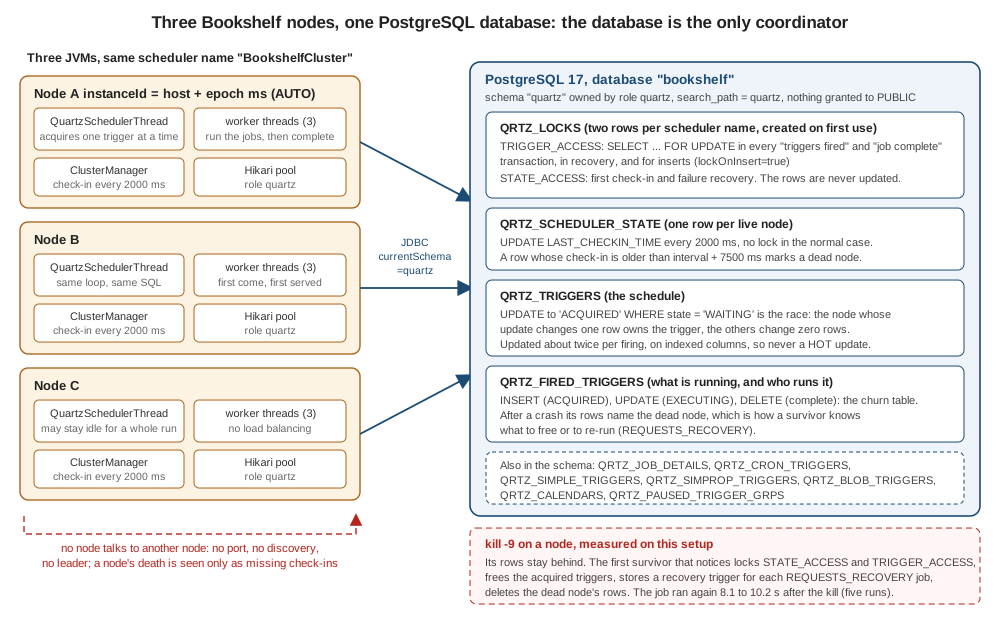
Clustering needs nothing from PostgreSQL beyond what is above: the same schema, the same scheduler name, org.quartz.jobStore.isClustered: "true" and a unique instance id (AUTO). Nodes never talk to each other; the database is the only coordinator, with the row locks of the previous section and the check-in rows of QRTZ_SCHEDULER_STATE.
Source: Quartz documentation: Configure Clustering with JDBC-JobStore and
JobStoreSupport source at v2.5.2 (doCheckin, findFailedInstances, calcFailedIfAfter, clusterRecover)
The failure detection rule is in calcFailedIfAfter: a node is declared failed when its LAST_CHECKIN_TIME plus the larger of its own check-in interval and the time since the observer’s last check-in, plus a fixed 7500 ms, has passed. With clusterCheckinInterval at the default 7500 ms the
worst case is therefore about fifteen seconds plus one check-in cycle, up to about 22.5 s; with the 2000 ms of the test below it is about ten. The check-in times are written with each node’s own clock, so the nodes' clocks must agree (the clustering documentation warns about unsynchronized clocks); run a time-sync service on every host.
The recovery has two halves, and they differ in what they promise. A trigger that the dead node had acquired but not started is freed and fires normally. A job that was executing is run again only if it was declared with requestRecovery(true); the recovery trigger carries the original scheduled time and the job sees
JobExecutionContext.isRecovering() as true. For everything else the fired-trigger row is cleaned up and the execution is lost. The job must therefore be written to be run twice, which is why the Bookshelf weekly report is the example below.
How a cluster shares work (it does not load-balance) and how to design for it is on Clustering.
Testcontainers tests for the Bookshelf jobs
Two tests, both run on 5 October 2026 against postgres:17: a single-node @SpringBootTest that proves the schedule is stored and fires (the PostgreSQL counterpart of the SQL Server test), and a cluster test that starts three JVMs against one container and kills one of them. The Testcontainers dependencies:
<dependency>
    <groupId>org.springframework.boot</groupId>
    <artifactId>spring-boot-starter-test</artifactId>
    <scope>test</scope>
</dependency>
<dependency>
    <groupId>org.springframework.boot</groupId>
    <artifactId>spring-boot-testcontainers</artifactId>
    <scope>test</scope>
</dependency>
<dependency>
    <groupId>org.testcontainers</groupId>
    <artifactId>testcontainers-postgresql</artifactId>
    <scope>test</scope>
</dependency>
<dependency>
    <groupId>org.testcontainers</groupId>
    <artifactId>testcontainers-junit-jupiter</artifactId>
    <scope>test</scope>
</dependency>
<dependency>
    <groupId>org.awaitility</groupId>
    <artifactId>awaitility</artifactId>
    <scope>test</scope>
</dependency>In Testcontainers 2.x the artifact is testcontainers-postgresql and the class org.testcontainers.postgresql.PostgreSQLContainer; the 1.x line used the artifact postgresql and the class org.testcontainers.containers.PostgreSQLContainer.
One node: the schedule is stored and fires
package bookshelf;

import static org.assertj.core.api.Assertions.assertThat;
import static org.awaitility.Awaitility.await;

import java.time.Duration;
import java.util.List;

import org.junit.jupiter.api.Test;
import org.quartz.Scheduler;
import org.springframework.beans.factory.annotation.Autowired;
import org.springframework.boot.test.context.SpringBootTest;
import org.springframework.boot.testcontainers.service.connection.ServiceConnection;
import org.springframework.jdbc.core.JdbcTemplate;
import org.testcontainers.junit.jupiter.Container;
import org.testcontainers.junit.jupiter.Testcontainers;
import org.testcontainers.postgresql.PostgreSQLContainer;

@SpringBootTest(properties = {
        "bookshelf.fast=true",
        "spring.quartz.job-store-type=jdbc",
        "spring.quartz.jdbc.initialize-schema=never",          // Flyway creates the tables from db/migration/V1__quartz_tables.sql
        "spring.quartz.scheduler-name=BookshelfScheduler",
        "spring.quartz.properties.org.quartz.jobStore.driverDelegateClass=org.quartz.impl.jdbcjobstore.PostgreSQLDelegate"
})
@Testcontainers
class BookshelfPostgresIT {

    @Container
    @ServiceConnection
    static final PostgreSQLContainer POSTGRES = new PostgreSQLContainer("postgres:17");

    @Autowired
    Scheduler scheduler;

    @Autowired
    JdbcTemplate jdbc;

    @Test
    void bookshelfJobsAreStoredInPostgresAndFire() throws Exception {
        assertThat(scheduler.getMetaData().getJobStoreClass().getSimpleName()).isEqualTo("LocalDataSourceJobStore");
        assertThat(scheduler.getMetaData().isJobStoreSupportsPersistence()).isTrue();

        // the four Bookshelf beans were stored on startup, in the bytea-backed tables created by Flyway
        assertThat(jdbc.queryForObject("SELECT COUNT(*) FROM QRTZ_JOB_DETAILS", Integer.class)).isEqualTo(4);
        assertThat(jdbc.queryForObject("SELECT COUNT(*) FROM QRTZ_TRIGGERS", Integer.class)).isEqualTo(4);

        // the one-second cache refresh fires and the store records it
        await().atMost(Duration.ofSeconds(30)).untilAsserted(() -> assertThat(jdbc.queryForObject(
                "SELECT COUNT(*) FROM QRTZ_TRIGGERS WHERE TRIGGER_NAME = 'cacheRefreshTrigger' AND PREV_FIRE_TIME > 0",
                Integer.class)).isEqualTo(1));

        // Quartz created its lock rows lazily the first time it needed them
        List<String> locks = jdbc.queryForList("SELECT LOCK_NAME FROM QRTZ_LOCKS", String.class);
        assertThat(locks).contains("TRIGGER_ACCESS");
    }
}The test passed (1 test, 0 failures, about eight seconds including the container). @ServiceConnection supplied the container’s URL, user and password to the Boot data source, so no @DynamicPropertySource is needed, and Flyway (on the classpath) created the tables from the migration of the Flyway section in the
container’s default schema, as the container’s own user. bookshelf.fast=true is a property of the Bookshelf schedule bean that makes the cache refresh fire every second. The wider Testcontainers setup is on
Testcontainers Fundamentals and Spring Boot Integration Tests with Testcontainers; testing Quartz jobs in general is on Testing.
Three nodes and a kill -9
A cluster of three schedulers inside one JVM is the easy test to write and the wrong one: Spring registers the data source of a scheduler with Quartz’s static connection manager under the scheduler name, so three schedulers of one name in one JVM overwrite each other’s data source. The test therefore runs each node as its own JVM
(bookshelf.BookshelfNode, a main class that starts the Bookshelf application without a web server), which is also what makes kill -9 possible. The container’s init script creates the role and schema of the earlier section:
-- Executed by the Testcontainers PostgreSQL container as its superuser, in the database "bookshelf".
CREATE ROLE quartz LOGIN PASSWORD 'change-me-from-a-secret-store';
CREATE SCHEMA quartz AUTHORIZATION quartz;
ALTER ROLE quartz IN DATABASE bookshelf SET search_path = quartz;
REVOKE ALL ON SCHEMA quartz FROM PUBLIC;package bookshelf;
import org.quartz.JobBuilder;
import org.quartz.Scheduler;
import org.quartz.TriggerBuilder;
import org.springframework.boot.WebApplicationType;
import org.springframework.boot.builder.SpringApplicationBuilder;
import org.springframework.context.ConfigurableApplicationContext;
import java.util.Arrays;
import java.util.Date;
/** One cluster node as its own JVM: {@code java -cp ... bookshelf.BookshelfNode --spring.datasource.url=...}. */
public class BookshelfNode {
public static void main(String[] args) throws Exception {
ConfigurableApplicationContext context = new SpringApplicationBuilder(BookshelfApplication.class)
.web(WebApplicationType.NONE)
.run(args);
Scheduler scheduler = context.getBean(Scheduler.class);
System.out.println("NODE-READY " + scheduler.getSchedulerInstanceId());
if (Arrays.asList(args).contains("--bookshelf.schedule-weekly-report-now=true")) {
// the weekly report: long, must not overlap, must be re-run if its node dies
scheduler.scheduleJob(
JobBuilder.newJob(SlowRecoverableJob.class).withIdentity("weeklyReport", "bookshelf")
.requestRecovery(true).build(),
TriggerBuilder.newTrigger().withIdentity("weeklyReportNow", "bookshelf").startAt(new Date()).build());
}
Thread.currentThread().join();
}
}Source: Spring Boot: Quartz Scheduler
The jobs record every execution on the standard output of their JVM, which is how the test sees who ran what:
public abstract class RecordingJob extends QuartzJobBean {
    @Override
    protected void executeInternal(JobExecutionContext ctx) throws JobExecutionException {
        String node = instanceId(ctx);
        long scheduled = ctx.getScheduledFireTime() == null ? 0 : ctx.getScheduledFireTime().getTime();
        System.out.println("FIRE " + ctx.getJobDetail().getKey().getName() + " node=" + node
                + " scheduled=" + scheduled + " recovering=" + ctx.isRecovering());
        work(ctx);
    }

    private static String instanceId(JobExecutionContext ctx) {
        try { return ctx.getScheduler().getSchedulerInstanceId(); } catch (Exception e) { return "?"; }
    }

    protected void work(JobExecutionContext ctx) throws JobExecutionException { }
}

/** Stand-in for the long weekly statistics report: slow, never overlapping, re-run after a node crash. */
@DisallowConcurrentExecution
public class SlowRecoverableJob extends RecordingJob {
    @Override
    protected void work(JobExecutionContext c) {
        try { Thread.sleep(c.isRecovering() ? 500 : 25_000); } catch (InterruptedException e) { Thread.currentThread().interrupt(); }
    }
}package bookshelf;
import org.junit.jupiter.api.Test;
import org.testcontainers.junit.jupiter.Container;
import org.testcontainers.junit.jupiter.Testcontainers;
import org.testcontainers.postgresql.PostgreSQLContainer;
import java.io.BufferedReader;
import java.io.InputStreamReader;
import java.sql.Connection;
import java.sql.DriverManager;
import java.sql.ResultSet;
import java.sql.Statement;
import java.util.ArrayList;
import java.util.List;
import java.util.Map;
import java.util.TreeMap;
import java.util.concurrent.CopyOnWriteArrayList;
import java.util.function.Predicate;
import java.util.stream.Collectors;
import static org.assertj.core.api.Assertions.assertThat;
@Testcontainers
class PostgresClusterTest {
static final String QUARTZ_PASSWORD = "change-me-from-a-secret-store"; // same placeholder as db/init-quartz-schema.sql
@Container
static final PostgreSQLContainer POSTGRES = new PostgreSQLContainer("postgres:17")
.withDatabaseName("bookshelf")
.withInitScript("db/init-quartz-schema.sql"); // CREATE ROLE quartz, CREATE SCHEMA quartz
/** A cluster node = a separate JVM running bookshelf.BookshelfNode, so that it can be killed with SIGKILL. */
static final class Node implements AutoCloseable {
final Process process;
final List<String> output = new CopyOnWriteArrayList<>();
Node(String schedulerName, String... extraArgs) throws Exception {
List<String> command = new ArrayList<>(List.of(
System.getProperty("java.home") + "/bin/java", "-cp", System.getProperty("java.class.path"),
"bookshelf.BookshelfNode",
"--spring.main.banner-mode=off", "--logging.level.root=WARN",
"--logging.level.org.springframework.scheduling.quartz=INFO", // the job store logs under its own class name: shows ClusterManager messages
"--bookshelf.fast=true",
"--spring.datasource.url=jdbc:postgresql://%s:%d/bookshelf?currentSchema=quartz"
.formatted(POSTGRES.getHost(), POSTGRES.getFirstMappedPort()),
"--spring.datasource.username=quartz",
"--spring.datasource.password=" + QUARTZ_PASSWORD,
"--spring.flyway.enabled=true", // V1__quartz_tables.sql creates the tables
"--spring.quartz.job-store-type=jdbc",
"--spring.quartz.jdbc.initialize-schema=never",
"--spring.quartz.scheduler-name=" + schedulerName, // the same name on every node of one cluster
"--spring.quartz.properties.org.quartz.scheduler.instanceId=AUTO",
"--spring.quartz.properties.org.quartz.jobStore.driverDelegateClass=org.quartz.impl.jdbcjobstore.PostgreSQLDelegate",
"--spring.quartz.properties.org.quartz.jobStore.isClustered=true",
"--spring.quartz.properties.org.quartz.jobStore.clusterCheckinInterval=2000",
"--spring.quartz.properties.org.quartz.threadPool.threadCount=3"));
command.addAll(List.of(extraArgs));
process = new ProcessBuilder(command).redirectErrorStream(true).start();
Thread reader = new Thread(() -> {
try (BufferedReader in = new BufferedReader(new InputStreamReader(process.getInputStream()))) {
String line;
while ((line = in.readLine()) != null) output.add(line);
} catch (Exception ignored) { }
});
reader.setDaemon(true);
reader.start();
awaitLine(60_000, l -> l.startsWith("NODE-READY"));
}
String awaitLine(long millis, Predicate<String> match) throws InterruptedException {
long end = System.currentTimeMillis() + millis;
while (System.currentTimeMillis() < end) {
for (String l : output) if (match.test(l)) return l;
Thread.sleep(100);
}
throw new AssertionError("no matching output within " + millis + " ms:\n" + String.join("\n", output));
}
List<String> fires(String job) {
return output.stream().filter(l -> l.startsWith("FIRE " + job + " ")).toList();
}
@Override public void close() { process.destroyForcibly(); }
}
static List<Map<String, Object>> query(String sql) throws Exception {
try (Connection c = DriverManager.getConnection(POSTGRES.getJdbcUrl(), POSTGRES.getUsername(), POSTGRES.getPassword());
Statement st = c.createStatement(); ResultSet rs = st.executeQuery(sql)) {
List<Map<String, Object>> rows = new ArrayList<>();
while (rs.next()) {
Map<String, Object> row = new TreeMap<>();
for (int i = 1; i <= rs.getMetaData().getColumnCount(); i++) row.put(rs.getMetaData().getColumnLabel(i), rs.getObject(i));
rows.add(row);
}
return rows;
}
}
@Test
void threeNodesShareTheWorkAndNeverRunTheSameFireTimeTwice() throws Exception {
try (Node a = new Node("share"); Node b = new Node("share"); Node c = new Node("share")) { // a runs Flyway, b and c find the tables
Thread.sleep(15_000);
assertThat(query("SELECT instance_name FROM quartz.qrtz_scheduler_state WHERE sched_name = 'share'")).hasSize(3);
List<String> fires = new ArrayList<>();
for (Node n : List.of(a, b, c)) { fires.addAll(n.fires("cacheRefresh")); fires.addAll(n.fires("overdueLoanReminders")); }
assertThat(fires).isNotEmpty();
// "FIRE <job> node=<id> scheduled=<epoch ms> recovering=<b>": the job plus its scheduled time must be unique
Map<String, Long> perFireTime = fires.stream().collect(Collectors.groupingBy(
l -> l.split(" ")[1] + " " + l.split(" ")[3], Collectors.counting()));
assertThat(perFireTime.values()).allMatch(count -> count == 1);
for (String job : List.of("cacheRefresh", "overdueLoanReminders"))
System.out.println(job + ": a=" + a.fires(job).size() + " b=" + b.fires(job).size() + " c=" + c.fires(job).size());
}
}
@Test
void aCrashedNodeIsDetectedAndItsRecoverableJobIsRunAgain() throws Exception {
try (Node x = new Node("crash", "--bookshelf.schedule-weekly-report-now=true")) {
x.awaitLine(40_000, l -> l.startsWith("FIRE weeklyReport ")); // x is now inside the 25 s report
try (Node y = new Node("crash")) { // y starts after x took the job
assertThat(query("SELECT state, requests_recovery FROM quartz.qrtz_fired_triggers WHERE sched_name = 'crash' AND job_name = 'weeklyReport'"))
.singleElement().satisfies(row -> {
assertThat(row.get("state")).isEqualTo("EXECUTING");
assertThat(row.get("requests_recovery")).isEqualTo(true);
});
long killedAt = System.currentTimeMillis();
x.process.destroyForcibly().waitFor(); // kill -9: no shutdown hook, no clean-up
String line = y.awaitLine(60_000, l -> l.startsWith("FIRE weeklyReport ") && l.endsWith("recovering=true"));
System.out.println("recovered after " + (System.currentTimeMillis() - killedAt) + " ms: " + line);
y.output.stream().filter(l -> l.contains("ClusterManager")).forEach(System.out::println);
assertThat(query("SELECT instance_name FROM quartz.qrtz_scheduler_state WHERE sched_name = 'crash'")).hasSize(1);
}
}
}
}Source: Testcontainers: PostgreSQL Module and Quartz documentation: Configure Clustering with JDBC-JobStore
Each node gets its own scheduler name per test (share and crash) so that rows left by a killed node of one test cannot disturb the other, whatever the order the tests run in. DriverManager in the helper uses the container’s own superuser to read the Quartz tables; the nodes use the quartz role.
Every JVM started by java.class.path of the test, which works because Surefire runs with a real classpath (useManifestOnlyJar false in the pom of the test project).
| Check | Result |
|---|---|
Both tests |
Passed in all five runs (the two runs whose time was recorded took 43 and 60 seconds including the container). |
Three nodes register |
|
No fire time runs twice |
In every run the pair job plus scheduled fire time was unique across the three JVMs. |
Work is shared, not balanced |
Last run: |
The crashed node’s job is run again |
|
What the survivor logged |
|
The dead node’s row |
Gone: |
Source: JobStoreSupport source at v2.5.2
The recovery time fits the rule: a check-in every two seconds plus 7.5 seconds is 9.5 seconds, minus the part of the cycle that had already elapsed at the kill, plus the survivor’s own check-in cycle. With the default 7500 ms interval the same arithmetic gives up to about 22.5 s (2 × 7.5 s + 7.5 s); the YAML above chose 5000. The quoted numbers are from one laptop and are a demonstration of the mechanism, not a benchmark. Failover of a node is designed about in detail on Clustering and the observation side (what to alert on) on Observability.
Pitfalls
| Symptom | Cause | Fix |
|---|---|---|
|
|
|
|
Nothing created the tables: Boot’s default |
Flyway or Liquibase with |
Every stored job and trigger disappears after a restart |
|
Never use |
The tables appear in |
No |
|
|
Default privileges were set before the schema was dropped and recreated, or never set for the migration role |
|
Jobs vanish after a restart with two data sources and no error |
Two |
Mark the application’s data source |
A job and its trigger are committed separately, or the lock does not protect an insert |
|
|
Nothing fires for a while although the scheduler is running, |
Another session holds the |
Find and end the holder; set |
Firing resumes 15 seconds late after a long stall |
A short |
Do not set |
|
It adds a |
Leave the isolation properties unset |
|
An old transaction (idle, a long report, a replication slot, |
Find it in |
Lookups of a job’s triggers are slow with the bundled Liquibase changelog |
|
Add the index in your own change set |
|
Normal: Quartz inserts the rows on first use |
Do nothing; do not insert them yourself |
Hikari exhausts |
Every idle node holds its whole pool ( |
Budget nodes times pool size, set |
Duplicate runs of a job after a crash |
The job was re-run on purpose: |
Make the job idempotent, or leave |
What changed
| Topic | Before | Now (Quartz 2.5.2, Boot 4.1.1, pgJDBC 42.7.13, PostgreSQL 17.11) |
|---|---|---|
Boot package of the Quartz and JDBC types |
|
|
Migration tool starters |
Add |
|
Testcontainers coordinates |
|
|
Terracotta clustering |
Documented on the Quartz website |
Removed in 2.4.0: PostgreSQL (or another JDBC database) is the clustering path |
|
Often described as the way to create the schema |
Present in the 2.5.2 jar and identical to |
Which delegate on PostgreSQL |
Older tutorials use |
|
Locking on acquisition |
"`FOR UPDATE` on every trigger acquisition", true before Quartz 1.6.3 |
Acquisition takes no lock by default; only fire and complete do. |
Commit validation |
n/a |
The 2.5.2 source retries a failed |
Spring Boot 3.5.16 |
same Quartz 2.5.2, same pgJDBC 42.7.13 |
only package names, the migration-tool starters and Spring Framework 6.2.19 differ; not run on 3.5 |
Source: Quartz releases and Spring Boot: Quartz Scheduler
The full list of version changes and documentation discrepancies of the section is on Migration & What’s Changed.
Where to go next
-
The generic job-store concepts, the tables as a picture,
initialize-schemaand the support matrix: Job Stores & Persistence. -
How a cluster shares work, what to do about clock skew and duplicate execution: Clustering.
-
Every
spring.quartz.*property: Spring Boot Configuration. -
Running this in production: Production & Best Practices.
-
The other engines: MySQL and MariaDB, Oracle, SQL Server and Embedded and Other SQL.
-
PostgreSQL itself: Diagnosing Slow Queries, SQL: Data Control Language (roles and privileges) and Spring Data JPA.
-
The no-Quartz alternative with a lock in the same database: Scheduling and ShedLock.