ViewState and Control State
|
This section documents ASP.NET Web Forms on .NET Framework 4.8.1, the last and permanent version of Web Forms — the page life cycle and postback model, ViewState and control state, server controls, validation controls, master pages and themes, data-bound controls, and the provider-based security model — as described by the official documentation at Microsoft Learn and the ASP.NET previous-versions archive, which are the reference these pages are written and verified against. Web Forms receives security fixes only and has no forward path onto modern .NET (.NET Framework 4.8.1 is Microsoft’s last version of .NET Framework; Web Forms itself never shipped on .NET Core/.NET 5+). It remains supported for existing applications running on Windows but is not recommended for new development — see Choosing an ASP.NET Framework and Migrating to Modern ASP.NET for what that means in practice. This content was generated with the assistance of AI and should be verified against the official documentation before being relied on in production. This section’s bibliography lists the reference material consulted while preparing these pages. |
ViewState is the mechanism that makes a Web Forms page feel stateful across the fundamentally stateless HTTP request/response cycle. Understanding exactly what it stores, when, and at what cost is essential to both using it correctly and to knowing when to turn it off.
What __VIEWSTATE actually is
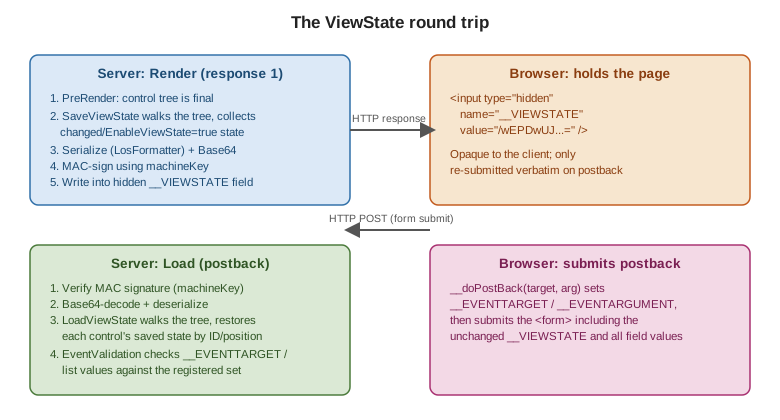
At the end of the rendering stage, every control in
the tree with EnableViewState = true contributes its changed properties to a single object graph. That graph
is serialized (via the internal LosFormatter/ObjectStateFormatter), Base64-encoded, optionally MAC-signed,
and written into a hidden form field:
<input type="hidden" name="__VIEWSTATE"
       value="/wEPDwUJODU2NDcxMzY5D2QWAgIDD2QWAgIBD2QWAgIBDw8WAh4EVGV4dAUFSGVsbG9kZGRc..." />
On the next postback, ASP.NET reads that field, verifies its signature, deserializes it, and walks the control tree applying each stored value back onto the matching control — matched by control ID and position in the tree, which is exactly why dynamically added controls must be re-created identically, with the same ID, on every postback.
The __doPostBack hidden-field mechanism
Alongside VIEWSTATE, every page with a server <form> gets an injected doPostBack JavaScript function
and two more hidden fields, EVENTTARGET and EVENTARGUMENT:
// Injected by ASP.NET into every page with a server-side <form runat="server">
function __doPostBack(eventTarget, eventArgument) {
    var theform = document.forms['form1'];
    theform.__EVENTTARGET.value = eventTarget;
    theform.__EVENTARGUMENT.value = eventArgument;
    theform.submit();
}
A native <asp:Button> submits the form directly; a LinkButton, a GridView sort link, or any control that
is not natively a submit element instead renders an onclick="javascript:__doPostBack('GridView1','Sort$Name')"
handler so the server can tell which control, and which logical action, triggered the postback.
ViewState vs. control state
Control state is a smaller, separate bucket, introduced because ViewState is user-disableable
(EnableViewState="false") but some state is required for a control simply to function correctly — for
example, which tab of a MultiView is active. Control state cannot be turned off and does not respect
EnableViewState; a custom control opts in by overriding SaveControlState/LoadControlState and calling
Page.RegisterRequiresControlState(this):
public class TabStrip : WebControl
{
    private int _activeIndex;

    protected override void OnInit(EventArgs e)
    {
        base.OnInit(e);
        Page.RegisterRequiresControlState(this);
    }

    protected override object SaveControlState() => _activeIndex;

    protected override void LoadControlState(object savedState)
    {
        _activeIndex = savedState is int i ? i : 0;
    }
}
Both control state and ViewState travel inside the same __VIEWSTATE field on the wire; the distinction is
purely about which server-side save/load path a value goes through and whether EnableViewState="false"
excludes it.
EnableViewState and ViewStateMode
EnableViewState (page- or control-level, bool) is the on/off switch; a page-level EnableViewState="false"
suppresses ViewState for the whole tree. ViewStateMode (ASP.NET 4+, Enabled/Disabled/Inherit) is finer:
it lets a page default to Disabled while re-enabling ViewState on just the controls that actually need it,
which is the recommended pattern for minimizing page weight without hunting down every control individually:
<%@ Page ViewStateMode="Disabled" ... %>
...
<asp:GridView ID="OrdersGrid" runat="server" ViewStateMode="Enabled" ... />
When values survive, and when they do not
-
Simple property values a control sets in markup (
Text="Hello") do not need ViewState to survive postback — they are re-applied from markup on every request regardless. -
Values changed in code after the control has been initialized (e.g.
Label1.Text = …set inPage_Loadin response to something other than markup) only survive subsequent postbacks if ViewState is enabled for that control, because there is nothing else that would re-apply them. -
Values read from a data source and bound via
DataBind()do not automatically persist through ViewState unless the control’s own state tracking captures them (most bound properties likeGridViewrow data are not stored in ViewState by default — rebinding on every postback, as covered separately, is the normal pattern).
Page-weight cost, and how to measure it
ViewState is pure HTML-response bloat: every enabled control’s state round-trips on every postback whether
or not it changed. A GridView with many rows and EnableViewState="true" can easily add tens or hundreds of
kilobytes to every request. To measure it:
-
View source and look at the
__VIEWSTATEfield’s length directly, or -
Set
<compilation debug="true">inweb.configand checkPage.Traceoutput (see Deployment and Diagnostics) which reports per-control ViewState size under Control Tree, or -
Use browser devtools' Network tab to compare response sizes with ViewState enabled vs. disabled on a given control.
The fix is almost always ViewStateMode="Disabled" at the page level plus explicit opt-in on the handful of
controls that genuinely need it, combined with rebinding data on every request rather than relying on
ViewState to remember it.
ViewStateUserKey, MAC validation, machineKey, and event validation
-
ViewStateUserKey— set inPage_Initto a per-user value (e.g.Session.SessionIDor the authenticated username) to bind a page’s ViewState to the user who generated it, mitigating one-click CSRF attacks that replay another user’s ViewState-carrying form:protected override void OnInit(EventArgs e) { base.OnInit(e); ViewStateUserKey = User.Identity.IsAuthenticated ? User.Identity.Name : Session.SessionID; } -
MAC validation — ViewState is signed (
EnableViewStateMac, on by default and not to be disabled) so tampering on the client is detected server-side and rejected before deserialization. -
machineKey— the actual signing/encryption key material, configured inweb.config. In a web farm every server must share the samemachineKey, or ViewState (and Forms authentication tickets) generated by one server will fail validation on another:<system.web> <machineKey validationKey="AUTOGENERATED_OR_EXPLICIT_HEX" decryptionKey="AUTOGENERATED_OR_EXPLICIT_HEX" validation="HMACSHA256" decryption="AES" /> </system.web> -
EnableEventValidation— a separate mechanism (__EVENTVALIDATIONhidden field) that records the set of controls and list values legitimately postable on a given render, and rejects a postback that references a value never actually offered (e.g. aDropDownListoption injected by a tampered client). It is on by default; disabling it (EnableEventValidation="false") removes a real protection and should only be done for controls whose items are added dynamically in a way that legitimately does not match what was rendered, understanding the trade-off.
See Understanding ASP.NET View
State and <machineKey>
Element for the authoritative reference, and
Security for `machineKey’s role beyond ViewState (Forms
authentication tickets, cookie protection).