BlurHash in the Browser
|
This content was generated with the assistance of AI and should be verified against the official documentation before being relied on in production. See the section bibliography for the reference material consulted while preparing these pages. |
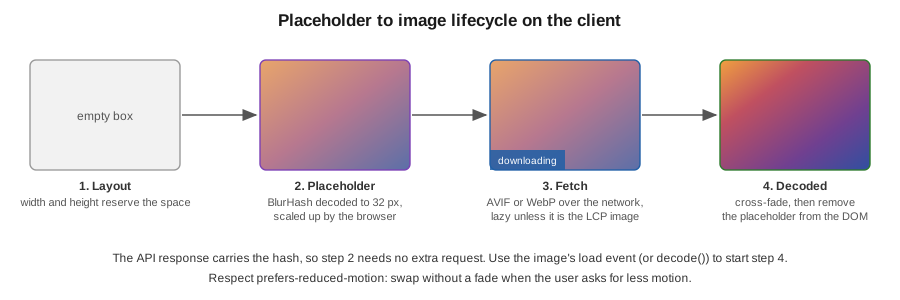
Baseline date: 2026-10-07. The backend returns a BlurHash with each image, see the BlurHash algorithm. The frontend decodes it into a few pixels, scales them up and shows them in the image’s box until the real file arrives.
Decode with the blurhash package
npm install blurhashThe blurhash package (2.0.5) decodes to a Uint8ClampedArray of RGBA pixels.
Decode to a small size, 32 pixels on the long side, and let the browser scale it.
import { decode, isBlurhashValid } from 'blurhash';

export function blurhashToCanvas(hash, canvas, width = 32, height = 32, punch = 1) {
  if (!isBlurhashValid(hash).result) return false;
  canvas.width = width;
  canvas.height = height;
  const pixels = decode(hash, width, height, punch);
  const context = canvas.getContext('2d');
  context.putImageData(new ImageData(pixels, width, height), 0, 0);
  return true;
}

export function blurhashToDataUrl(hash, width = 32, height = 32) {
  const canvas = document.createElement('canvas');
  return blurhashToCanvas(hash, canvas, width, height) ? canvas.toDataURL() : null;
}
Stretch the canvas to the box with CSS (width: 100%; height: 100%) and smooth interpolation. The blur comes for free from
the upscaling. Set aspect-ratio on the container from the image’s width and height, so the layout does not move when
the image replaces the canvas.
<div class="cover" style="aspect-ratio: 2 / 3; position: relative">
  <canvas id="ph" style="position:absolute; inset:0; width:100%; height:100%"></canvas>
  <img src="/covers/b81f/w640.avif" alt="Cover" loading="lazy" decoding="async"
       style="position:absolute; inset:0; width:100%; height:100%; opacity:0; transition:opacity .3s">
</div>
<script type="module">
  import { blurhashToCanvas } from './blurhash.js';
  const hash = 'LEHV6nWB2yk8pyo0adR*.7kCMdnj';        // from the API response
  blurhashToCanvas(hash, document.getElementById('ph'));
  const img = document.querySelector('.cover img');
  const show = () => { img.style.opacity = 1; };
  img.complete ? show() : img.addEventListener('load', show, { once: true });
</script>
Reference: MDN putImageData. Use
prefers-reduced-motion to disable the transition.
The punch parameter
punch multiplies the AC components of the hash: in the formula, values above 1 increase contrast and values below 1
soften it. The reference decoder in the blurhash package, however, computes punch | 1. That bitwise OR truncates the
value to an integer and then sets its lowest bit, so 0.5 and 1.5 become 1, 2 becomes 3 and 4 becomes 5.
Only odd integers (1, 3, 5, …) take effect as written, and nothing below 1 is possible. For other values, use a decoder
that does not apply the OR, or adjust the rendered placeholder with a CSS filter such as filter: contrast(1.2).
react-blurhash
react-blurhash (0.3.0) provides Blurhash and BlurhashCanvas components. It
is stable and receives few updates, which is acceptable for a small wrapper, but plan to replace it with the twenty lines
above if it ever breaks with a new React major version.
npm install blurhash react-blurhashimport { useState } from 'react';
import { Blurhash } from 'react-blurhash';
export function Cover({ hash, src, alt, width, height }) {
const [loaded, setLoaded] = useState(false);
return (
<div style={{ position: 'relative', aspectRatio: `${width} / ${height}` }}>
{!loaded && (
<Blurhash hash={hash} width="100%" height="100%" resolutionX={32} resolutionY={32} punch={1}
style={{ position: 'absolute', inset: 0 }} />
)}
<img src={src} alt={alt} width={width} height={height} loading="lazy" decoding="async"
onLoad={() => setLoaded(true)}
style={{ width: '100%', height: '100%', opacity: loaded ? 1 : 0, transition: 'opacity .3s' }} />
</div>
);
}An image that is already cached can fire load before React attaches the handler. Check img.complete in a ref callback
when that matters. See React image libraries for lazy-loading helpers.
unlazy for vanilla JavaScript, Vue and Nuxt
unlazy (2.0.1) combines native loading="lazy" with BlurHash and ThumbHash
placeholders, and ships integrations for Vue and Nuxt and for server-side rendering. The README’s quick start:
<img loading="lazy" src="data:image/svg+xml, ..."
     data-srcset="image-320w.jpg 320w, image-640w.jpg 640w" data-sizes="auto"
     alt="Descriptive text" width="640" height="360">
import { lazyLoad } from 'unlazy';
const cleanup = lazyLoad(); // processes img[loading="lazy"]For hash-based placeholders, follow the placeholders guide of the version you install, since the v2 API differs from v1 (see its migration guide). Unlazy’s server-side rendering helpers let you produce the placeholder as a data URL in the HTML, so the placeholder shows before any JavaScript runs.
ThumbHash
ThumbHash is an alternative that also stores transparency and the aspect ratio, see
the algorithm page. unlazy supports it too, and so does
expo-image on mobile. Pick one format for the whole product, so that backend and frontend agree.
Server-side placeholders
A canvas needs JavaScript. To get a placeholder in the first HTML, decode the BlurHash on the server and inline it as a
small image, either as a background-image style with a data URL or as the <img src> data URL. The Next.js version of this
is in the Next.js Image page. A 32 by 32 PNG data URL is a few
kilobytes, larger than the hash itself, so use 8 to 16 pixels, or encode as a tiny WebP or JPEG, when you inline many
placeholders in one page.