Getting Started with OAuth
|
This section documents OAuth 2.0 (RFC 6749) as amended by the OAuth 2.0 Security Best Current Practice (RFC 9700 / BCP 240), the OAuth 1.0 Protocol (RFC 5849) for historical context, and OpenID Connect Core 1.0, as published at the IETF Datatracker and the OpenID Foundation specifications — and, on the Spring pages, Spring Boot 4.1.x and Spring Security 7.1.x as published at the Spring Security reference documentation — which are the references these pages are written and verified against. OAuth 2.1 is still an Internet-Draft ( This content was generated with the assistance of AI and should be verified against those official specifications before being relied on in production. This section’s bibliography lists the reference material consulted while preparing these pages. |
OAuth is a delegated authorization framework: it lets a resource owner grant a third-party application limited, revocable access to a resource they control, without ever handing that application their password. This page introduces the problem OAuth solves, the four roles every OAuth deployment is built from, and one complete authorization-code-with-PKCE round-trip, wire-level, from the first browser redirect to the token response a client actually receives.
The problem: why not just send the password?
Picture a valet parking service. You hand the valet a valet key — a special key that starts the engine and opens the door, but cannot open the trunk or the glovebox, and cannot be used to duplicate the full key. The valet gets exactly the capability the job requires, for exactly as long as the job takes, and nothing more. If something goes wrong, you take the valet key back; your house key, which the valet never saw, is untouched.
Before OAuth, letting a third-party application act on a user’s behalf at some other service meant handing over the "full key": the user typed their username and password for the target service directly into the requesting application. A photo-printing site that wanted to fetch a user’s photos from a hosting service asked for the hosting service’s own password. That pattern — sometimes called password anti-pattern — carries a specific, enumerable set of costs, not just a vague sense of insecurity:
-
Misplaced trust. The user must trust the requesting application’s code, its operator, and every dependency in between with a credential that also unlocks everything else the password protects, not just the narrow capability the application actually needs.
-
Phishing desensitisation. Training users to type their real password into any site that asks for it teaches them, structurally, to fall for the next site that asks for it with bad intent.
-
Over-broad access. A password is all-or-nothing. There is no way to hand over "read my contact list" without also handing over "change my password" and "delete my account".
-
Breakage on password change. Every application the user has ever given the password to breaks the moment the user rotates that password for an unrelated reason, and every one of them has to be re-fed the new one.
-
Revocation is all-or-nothing too. The only way to cut off one misbehaving application is to change the password, which cuts off every other application at the same time.
-
Some users have no password to give. A user who signed up through a federated identity provider (Google, Microsoft, an enterprise IdP) may have no password at that service at all — there is nothing to "share".
-
No way to add protection behind the password field. If the actual login only ever happens on the target service’s own page, that service can put a CAPTCHA, a bot-detection check, or a second factor behind the password field and improve it over time. If a third-party application collects the password itself and replays it via an API call, none of that is possible — the application would have to reimplement CAPTCHA and MFA itself, which defeats the purpose of centralising authentication. This point is developed fully on Authentication methods: 2FA and passwordless and is also why native and mobile apps must authenticate in a real browser rather than an embedded WebView.
OAuth replaces "hand over the password" with "hand over a valet key" — a scoped, time-limited, independently revocable access token — issued by the service that owns the resource, after the resource owner has authenticated directly to that service and explicitly consented to the specific access requested.
|
OAuth is an authorization framework, not an authentication protocol. It answers "can this application read my photos?", not "who is this user?". Authentication — and the layer built on OAuth that does answer "who is this user?" — is OpenID Connect, covered separately. Conflating the two is the single most common OAuth mistake; see ID tokens vs. access tokens. |
The four roles
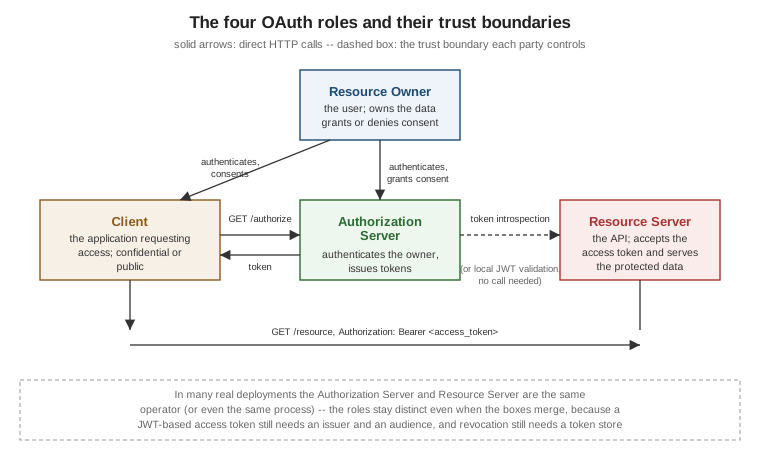
Every OAuth exchange, however it is wired up, is built from exactly four roles, defined in RFC 6749 §1.1:
| Role | Responsibility |
|---|---|
Resource owner |
The entity — almost always a person — capable of granting access to a protected resource. The "user" in everyday language. |
Client |
The application requesting access to the protected resource on behalf of the resource owner (or, for machine-to-machine access, on its own behalf). "Client" here is an OAuth role, not a synonym for "browser" or "frontend" — a server-side web application is a client too. |
Authorization server |
The server that authenticates the resource owner, obtains their consent, and issues access tokens (and,
where applicable, refresh tokens) to the client. Owns |
Resource server |
The server hosting the protected resources; accepts and validates access tokens to decide whether to serve a request. Usually an API. |
These are logical roles, not physical servers. In a very common real-world topology the authorization server and the resource server are operated by the same organisation, run in the same cluster, and sometimes even share a process — a Spring Boot service can be both at once (see Spring Boot OAuth integration overview). The roles still matter even when the boxes merge: a JWT-format access token still needs a well-defined issuer and audience, and revocation still needs a token store the resource server can consult, exactly as if the two were separate services. The figure below shows the four roles and the trust boundary each one owns.
Four related but distinct concepts
These four terms are used precisely throughout this reference and are worth fixing before going further:
-
Authentication — proving who you are, to the party you are proving it to. "I am alice@example.com, here is my password / passkey / OTP."
-
Authorization — deciding what an already-identified party is allowed to do. "alice@example.com may read her own photos."
-
Federated authentication — letting a different party vouch for authentication, so the relying party never collects the credential itself: "Google says this is alice@example.com." This is what OpenID Connect and social login provide.
-
Delegated authorization — what OAuth itself provides: the resource owner authorizes a client to act with a limited, revocable capability, without the client ever seeing the resource owner’s credential.
A single login button can trigger all four at once — "Sign in with Google" federates authentication and hands the client an access token for delegated, scoped access to (say) the user’s Google Drive files — which is precisely why the two halves are easy to blur and important to keep separate in your own mental model and your code.
Confidential vs. public clients
RFC 6749 §2.1 splits clients into two types by whether they can keep a secret:
-
A confidential client runs on a server the resource owner and attackers cannot access — a traditional server-side web application, a backend service. It can be issued a
client_secret(or a private key) and authenticate itself when it calls/token. -
A public client runs somewhere the resource owner (or anyone with access to that device or that browser tab) can extract any embedded secret — a single-page application running entirely in the browser, a native mobile or desktop app, a CLI tool. It cannot reliably keep a
client_secret, so it authenticates with nothing plus PKCE rather than a secret it cannot actually protect.
This distinction drives almost every difference between OAuth pages in this reference: which grant applies (Flows overview), how the client authenticates (Client credentials and client authentication), and how tokens must be stored and constrained (Native and mobile apps, Browser-based apps).
Client registration
Before any of this can happen, the client must be registered with the authorization server: given a
client_id (and, for confidential clients, a client_secret or another authentication mechanism), a set of
allowed redirect_uri values, and a set of scopes it may request. Registration exists so the authorization
server can show the resource owner who is asking ("Example Photo Printer wants to access your photos") and so
it can reject authorization responses aimed at a redirect URI the client never registered — a core defence
against authorization-code injection, covered in depth on
Security best practices. Registration can be a manual,
one-time administrative step, or fully automated via RFC 7591 Dynamic Client Registration — see
Discovery, metadata and client registration.
The endpoints
An OAuth authorization server exposes, at minimum, two HTTP endpoints, plus an optional but increasingly universal third one:
| Endpoint | Purpose |
|---|---|
|
A browser-facing endpoint (RFC 6749 §3.1). The client redirects the resource owner’s browser here; the authorization server authenticates the owner, shows a consent screen, and redirects back to the client with an authorization code (or an error). |
|
A back-channel, server-to-server endpoint (RFC 6749 §3.2). The client exchanges an authorization code (or another grant) for an access token, calling this endpoint directly over HTTPS — the resource owner’s browser is never involved in this step. |
|
The RFC 8414 metadata document: a single JSON file listing every endpoint URL, every supported grant, scope, and signing algorithm, so a client can be configured with just an issuer URL. Covered in full on Discovery, metadata and client registration. |
One complete round-trip: authorization code with PKCE
The rest of this page walks a single, complete exchange end to end: a confidential server-side web client signing a user in and obtaining an access token for an API, using the authorization code grant hardened with PKCE (Proof Key for Code Exchange, RFC 7636). This is the grant almost every interactive OAuth flow in this reference builds on; the full parameter-by-parameter reference lives on Authorization code and PKCE — this page shows one concrete instance of it so every later page can assume the reader has seen the whole shape once.
Step 1 — the client prepares PKCE and redirects the browser
Before redirecting anywhere, the client generates a random code_verifier and derives a code_challenge from
it. The relationship is fixed by RFC 7636 §4.2: code_challenge = BASE64URL(SHA256(code_verifier)). The values
below are illustrative — a real code_verifier is a cryptographically random 43-128 character string, and the
code_challenge shown is a genuine S256 derivation consistent with it.
GET /authorize?response_type=code
    &client_id=photo-printer-web
    &redirect_uri=https%3A%2F%2Fapp.example.com%2Fcallback
    &scope=photos.read
    &state=af0ifjsldkj
    &code_challenge=E9Melhoa2OwvFrEMTJguCHaoeK1t8URWbuGJSstw-cM
    &code_challenge_method=S256 HTTP/1.1
Host: authorization-server.example.com| Parameter | Meaning |
|---|---|
|
Requests the authorization-code grant (RFC 6749 §4.1.1). |
|
The client’s identifier from registration. |
|
Must exactly match one of the client’s registered redirect URIs — byte-for-byte, no partial matching. See Security best practices. |
|
The delegated capability being requested, space-separated if there is more than one value. |
|
An opaque value the client generates and later checks on the way back, to bind the response to the request that started it and defeat cross-site request forgery against the redirect endpoint. |
|
The PKCE challenge derived from the |
Step 2 — the authorization server authenticates and asks for consent
The resource owner’s browser lands on /authorize. The authorization server authenticates the resource owner
(however it chooses — password, passkey, federated login, with or without a second factor; see
Authentication methods), shows a consent
screen naming the client and the requested scope, and, on approval, issues a short-lived, single-use
authorization code bound to the code_challenge from Step 1.
Step 3 — the redirect back to the client
HTTP/1.1 302 Found
Location: https://app.example.com/callback?code=SplxlOBeZQQYbYS6WxSbIA
    &state=af0ifjsldkj
    &iss=https%3A%2F%2Fauthorization-server.example.com
code is the authorization code; state is echoed back unchanged so the client can verify it matches the
value it generated in Step 1. iss (RFC 9207) identifies which authorization server issued this response — its purpose is to defeat mix-up attacks where a client talks to multiple authorization servers and could
otherwise be tricked into sending a code meant for one issuer to another; see
Security best practices for the attack in full.
Step 4 — the client exchanges the code for tokens
This call happens server-to-server, over the back channel, never through the resource owner’s browser:
POST /token HTTP/1.1
Host: authorization-server.example.com
Content-Type: application/x-www-form-urlencoded
Authorization: Basic cGhvdG8tcHJpbnRlci13ZWI6c3VwZXItc2VjcmV0

grant_type=authorization_code
&code=SplxlOBeZQQYbYS6WxSbIA
&redirect_uri=https%3A%2F%2Fapp.example.com%2Fcallback
&client_id=photo-printer-web
&code_verifier=dBjftJeZ4CVP-mB92K27uhbUJU1p1r_wW1gFWFOEjXk
The Authorization: Basic header carries client_secret_basic authentication — base64 of
client_id:client_secret — one of several client-authentication methods compared on
Client credentials and client
authentication. The authorization server:
-
looks up the authorization code and confirms it has not already been used and has not expired;
-
confirms
redirect_urimatches the one used in Step 1; -
authenticates the client (here, via the
Authorizationheader); -
computes
BASE64URL(SHA256(code_verifier))from the presentedcode_verifierand confirms it equals thecode_challengestored against this code back in Step 1 — this is the whole of PKCE’s defence: even an attacker who intercepted the authorization code in Step 3 cannot redeem it without thecode_verifier, which never left the original client.
Step 5 — the token response
{
  "access_token": "2YotnFZFEjr1zCsicMWpAA",
  "token_type": "Bearer",
  "expires_in": 3600,
  "refresh_token": "tGzv3JOkF0XG5Qx2TlKWIA",
  "scope": "photos.read"
}
The client now holds an access token it can present to the resource server. Everything about the shape,
lifetime, storage and renewal of these two tokens is covered on
Access and refresh tokens; the full parameter set for this
grant, every error code, and the state/nonce/PKCE distinctions are on
Authorization code and PKCE.
Non-OAuth API authentication, briefly
Not every API needs OAuth. Three simpler mechanisms remain legitimate for service-to-service traffic that has
no resource owner and no browser in the loop: a static API key sent as a header or query parameter, which is
simple but bearer-like (anyone who has the key can use it, it typically does not expire, and it carries no
identity beyond "whoever holds this key"); HMAC request signing, which is conceptually OAuth 1.0’s approach
transplanted onto a bespoke API — a shared secret signs each request, so a leaked request is not directly
replayable but the signing logic must be reimplemented and kept correct on every client (the whole story of
OAuth 1.0, which is exactly why the industry stopped doing this by hand); and
mTLS-only authentication, where the client’s TLS certificate itself is the credential and no bearer token
exists at all, workable when every client already sits inside a PKI. None of the three offers OAuth’s actual
value proposition — delegated, scoped, user-consented, centrally revocable access issued by a party other than
the client — so they are the right choice only when there is no resource owner to delegate for in the first
place; a machine-to-machine call that does need OAuth’s token model without a user present is the
client_credentials grant, covered on
Client credentials and client
authentication.
Where to go next
-
How OAuth evolved — how the protocol reached this shape.
-
Flows overview — the decision tree for choosing a grant by client shape.
-
Authorization code and PKCE — every parameter and error code for the flow walked through above.
-
OpenID Connect — adding "who is this user?" on top of this.