Orchestration Patterns
|
This content was generated with the assistance of AI and should be verified against the official documentation of each tool and framework before being relied on in production. This section’s bibliography lists the reference material consulted while preparing these pages. |
This page is Claude-Code-specific: everything below is a property of Claude Code’s Skill and Agent tools
(Skill({skill: "<name>", args: "<…>"}) runs a named skill inline; Agent({description, subagent_type,
prompt, run_in_background}) spawns a subagent in its own context window and returns a result to the caller,
per Claude Code — Subagents and
Claude Code — Tools reference), re-verified as current as of
2026-09-28 against a version baseline of the Claude Code CLI 2.1.283, VS Code 1.139 with the GitHub Copilot
Chat extension, and the GitHub Copilot CLI 1.0.88. Copilot has a partial counterpart: a VS Code or Copilot CLI
custom agent can call other custom agents as subagents (its agents frontmatter) and can offer handoffs to
another agent from chat (see
Subagents & Custom Agents). The pipeline below
ships no Copilot files, though, so this page shows Claude Code only rather than inventing a Copilot version of
it. Every excerpt below is quoted verbatim from this account’s
ai-catalog repository, pinned to commit
58fb709
(58fb70954404f9d539031a02ac6d4413f03745be).
A single skill is a procedure. Orchestration is what happens when one skill’s job is composing other skills and
agents rather than doing the work itself — deciding what runs, in what order, in parallel or not, and how
progress survives an interrupted session. ai-catalog’s issue-to-PR pipeline is entirely built this way: seven
skills and two agents, each with a narrow job, chained by Skill(…) and Agent(…) calls.
The pipeline: skill → skill → agent
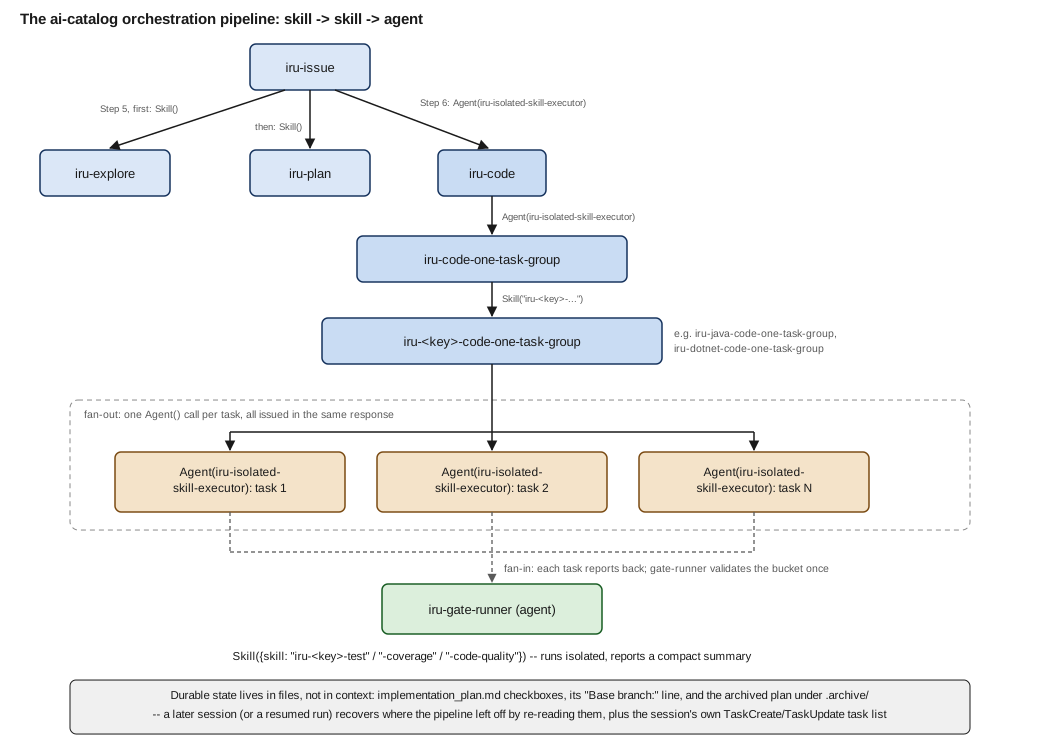
Read top to bottom, the pinned files show six links in the chain, each one a Skill(…) or Agent(…) call
made from inside the previous file’s own body:
iru-issue/SKILL.md — Step 5, "Explore and plan", and Step 6, "Choose how to proceed with implementation"iru-issue is the entry point: given a ticket ID, it runs exploration and planning in sequence, waiting for each
to finish before starting the next:
Run, in order, waiting for each to finish before starting the next:

1. `Skill({skill: "iru-explore", args: "<ticket-id>"})`
2. `Skill({skill: "iru-plan", args: "<ticket-id>"})`
This demonstrates the plainest form of composition: a Skill(…) call made from inside another skill’s own
steps, not by the user typing /iru-explore and /iru-plan themselves. Once implementation_plan.md exists,
the same file’s Step 6 hands off implementation — deliberately with a fresh context, so the
exploration/planning transcript above does not carry into it and bias the read of the finished plan:
Agent({
  description: "Implement ticket <ticket-id> via the code skill",
  subagent_type: "iru-isolated-skill-executor",
  prompt: "Invoke Skill({skill: \"iru-code\"}) to execute implementation_plan.md at the repository root end to
    end. Report back: which tasks completed, the files touched, the coverage and code-quality outcome, ...",
  run_in_background: false
})
This is skill → agent composition: rather than calling Skill({skill: "iru-code"}) directly and running it
inline, iru-issue spawns the custom iru-isolated-skill-executor agent and tells it to invoke the
skill, so `iru-code’s whole multi-step run happens in an isolated context window and reports back only a
summary. See Issue for the full page.
iru-code/SKILL.md — Step 4, "Implement task groups one at a time"iru-code reads the plan’s task groups and, for each one still pending, dispatches to
iru-code-one-task-group the same way — through an agent rather than a direct Skill(…) call, so each
group’s implementation work stays out of `iru-code’s own context:
Agent({
  description: "Implement task group <N>",
  subagent_type: "iru-isolated-skill-executor",
  prompt: "Invoke Skill({skill: \"iru-code-one-task-group\", args: \"<the full text of every task and sub-task
    in this group from the plan, each with its own language/framework tag if the plan sets one, the group's
    Parallelizable verdict, and any relevant \\\"Current code state\\\" context>\"}). Report back, per task in
    the group: the files touched, tests added/updated, coverage achieved, the code-quality outcome ...",
  run_in_background: false
})
See Code for the full page.
iru-code-one-task-group/SKILL.md — Step 2, "Dispatch each keyed bucket"iru-code-one-task-group is the dispatch-by-key layer covered below; once it has resolved a bucket’s
language/framework key, it calls the matching <key>-code-one-task-group skill directly, inline, through the
Skill tool rather than another Agent(…) hop — it already runs inside the isolated agent iru-code
spawned for the group:
Skill({skill: "iru-<key>-code-one-task-group", args: "<every task/sub-task in this bucket, each with its own
  text and sub-tasks, plus the group's overall Parallelizable verdict and any relevant Current code state
  context>"})
See Code One Task Group for the full page.
iru-java-code-one-task-group/SKILL.md — Step 1, "Capture one pre-change quality baseline"The language-specific group skill (an example iru-<key>-code-one-task-group) is where each group’s own work
reaches the iru-gate-runner agent (iru-code already used it once, in its Step 3, for project-wide baselines),
to run a quality check in an isolated context rather than dumping raw Checkstyle/PMD/SpotBugs output into the
caller:
Agent({description: "Capture pre-change quality baseline for task group", subagent_type: "iru-gate-runner",
  prompt: "Invoke Skill({skill: \"iru-java-code-quality\", args: \"<ClassName1,ClassName2,...>\"}), then report
    back only the list of issues found for these classes."})
Note the nested Skill(…) call inside the prompt string: iru-gate-runner is told which skill to run and
what to report, and invokes it itself, one layer further down. See the fan-out excerpt in the next section for
how this same file spawns the group’s actual implementation work in parallel, and
Gate Runner for the agent’s own page.
The full chain — iru-issue → iru-explore → iru-plan → iru-code → iru-code-one-task-group →
iru-<key>-code-one-task-group → iru-gate-runner — is therefore not one mechanism repeated six times
identically. Some hops are inline Skill(…) calls that share the caller’s context (iru-issue to
iru-explore and iru-plan, and iru-code-one-task-group to its <key> backend); the others go through
Agent(…) specifically where isolating the callee’s context matters (a whole implementation run, or a
quality-tool report a caller should never see the raw form of).
Dispatch by key
iru-code-one-task-group and iru-plan both need to find which language/framework-specific skill applies,
without ai-catalog itself hardcoding a list of every language it might ever support. Both do it the same way — a filesystem glob against the installed skill directories (-code-one-task-group here, -code-one-task in
iru-plan), then string manipulation on the matching names:
iru-code-one-task-group/SKILL.md — Step 1, "Resolve each task’s language/framework key"Find which `*-code-one-task-group` skills are actually installed in this repository:
`find .claude/skills -maxdepth 1 -type d -name "*-code-one-task-group"`. The directory name minus its `iru-`
prefix and its `-code-one-task-group` suffix is the key (e.g. `iru-java-code-one-task-group` → `java`,
`iru-typescript-code-one-task-group` → `typescript`, `iru-android-code-one-task-group` → `android`,
`iru-swift-code-one-task-group` → `swift`) — the
`iru-` prefix is only this catalog's marketplace-collision namespace, not part of the language/framework key
itself.Partitioning tasks into per-key buckets this way means adding support for a new language is installing a new
skill directory named to the same convention, not editing this orchestrator’s own logic — the generalised
version of the pattern is: find <skills-dir> -name "<prefix>-*-<suffix>", strip the fixed prefix/suffix, and
what remains is the key that selects the backend. See Code One Task Group for
the full page, and Claude Code — Skills for how a skill’s args reach
the callee.
This is the same discipline Writing Effective Skills covers under runtime detection over hardcoding, applied one layer up: instead of one orchestrator skill hardcoding "if java do X, if dotnet do Y", each backend ships its own skill named to a convention, and the orchestrator only needs to know the convention.
Fan-out / fan-in
A group marked Parallelizable: yes in implementation_plan.md is implemented by issuing every task’s
Agent(…) call in the same response, rather than one after another — this is what makes them run
concurrently instead of serially:
iru-java-code-one-task-group/SKILL.md — Step 2, "Implement each task via `iru-java-code-one-task`"- **Bucket marked `Parallelizable: yes`**: invoke `iru-java-code-one-task` for every task in the bucket concurrently
— issue all of the `Agent` calls below together, in the same response, so they run in parallel rather than one
after another:
Agent({
description: "Implement <task N> via java-code-one-task",
subagent_type: "iru-isolated-skill-executor",
prompt: "Invoke Skill({skill: \"iru-java-code-one-task\", args: \"<the task's full text, including its exact
implementation_plan.md checkbox line(s) for itself and its sub-tasks, its sub-tasks' own text, and any
relevant Current code state context>\"}). Report back: the files touched, the tests added/updated, and
whether the task stopped on a blocker instead of finishing.",
run_in_background: false
})See Java Code One Task Group for the full page. The fan-out happens only at
this bucket level: iru-code itself runs the plan’s groups one at a time, in plan order.
This is fan-out: several agents, each in its own isolated context, each returning only a compact report
(files touched, tests added, blocker or none). Fan-in is what the calling skill does with those reports — iru-java-code-one-task-group’s own next steps merge each parallel task’s result and then validate the whole
bucket once (license headers, Javadoc, scoped tests, coverage, the full suite, code quality — each through its
own `iru-gate-runner call), rather than re-running validation once per task.
Running validation once per group instead of once per task is the reason the plan is grouped at all in the
first place, and it is also why a group whose tasks genuinely depend on each other’s output is marked
Parallelizable: no and run one at a time instead: fan-out only pays off when the tasks in a bucket do not
read or write the same files. Claude Code documents the same two shapes generically — "Run parallel research"
and "Chain subagents" — at Claude Code — Subagents, with the
warning that every parallel result returns into the caller’s context, which is why each report here is kept
compact.
Because iru-isolated-skill-executor declares tools: "*", each spawned task can use anything the parent could,
but sees none of the parent’s own context — the isolation model
Subagents & Custom Agents covers for a
single subagent applies unchanged to every branch of a fan-out; what’s new here is only that several of them run
side by side and their results converge back into one caller.
Durable state in files, not in context
A context window does not survive a compaction, a crash, or the user closing the session — so the pipeline never treats it as the record of what has been done. Three files carry that instead:
-
implementation_plan.md’s checkboxes.Every task and sub-task is a Markdown checkbox (- [ ] Task 3. …` /- [x] Task 3. …); a group where every task is already[x]is treated as already done and skipped, which is what makes a re-run of/iru-codeafter an interruption resume rather than restart:ai-catalog:iru-code/SKILL.md— Step 2this makes the skill resumable across interrupted runs. A group where every task is already `[x]` is itself done; skip it entirely in Step 4. -
The
Base branch:line.iru-issuewrites it into the plan’s Task summary once it resolves the branch the work forks from, specifically so a later, separate session — one with no memory of this conversation — can recover the same target when it later runs/iru-codeand/iru-pr-descriptionby hand:ai-catalog:iru-issue/SKILL.md— Step 5Base branch: <base-branch>This is what lets a later, separate session recover the choice: in the "review manually" path below, the user runs `/iru-code` and `/iru-pr-description` themselves, with no memory of this conversation, and `iru-pr-description` reads this line (from `implementation_plan.md`, or from its archived copy under `.archive/`) to target the pull request at the same base branch instead of falling back to the repository default. -
.archive/. Once every task is done,iru-code’s own closing step moves the finished plan out of the way so a fresh `/iru-planrun does not collide with it, but keeps it discoverable as precedent for the next ticket:ai-catalog:iru-code/SKILL.md— Step 9Create the archive directory if it doesn't exist yet (`mkdir -p .archive`), then move the plan there, renamed to embed that identifier: `mv implementation_plan.md .archive/implementation_plan_<ticket_id>.md` ...`iru-explore’s own Step 4 reads this same directory back on the next ticket, looking for a prior plan whose task headings resemble the current request, so a related past change becomes visible context rather than something only a person would remember to go dig up.
Generalised, the rule is: anything a later session — or a later step in this session, after a compaction — needs to recover belongs in a file the pipeline already reads on its next pass, not only in a TaskUpdate call
or a sentence typed into chat.
Live task lists
Alongside the plan file, iru-code also mirrors the plan’s task groups into the session’s own live task list
with the TaskCreate tool, one entry per pending group, and marks each one TaskUpdate`d to completed in step
with checking off its boxes in `implementation_plan.md — confirmed as documented Claude Code tools at
the Claude Code Tools reference (TaskCreate, TaskUpdate,
TaskList, TaskGet). That page also notes that, as of 2026-09-28, the Task tools are provided by default only
on older models (Claude 3.x, Opus 4 through 4.7, Sonnet 4 through 4.6, Haiku 4.5); on newer models a session
gets them only when it opts in, for example with CLAUDE_CODE_ENABLE_TODO_TOOLS=1 or by naming one in
--allowedTools, so a pipeline that relies on the live list should opt in explicitly:
iru-code/SKILL.md — Step 3, "Track progress"Mirror the plan's task groups into the session's task list (`TaskCreate`), one per pending group, so the user
can see live progress at the group level. Mark each `TaskUpdate`d as completed as you finish it, in step with
the plan-file confirmation in Step 5. This is in addition to, not a replacement for, updating
`implementation_plan.md` -- the plan file is the durable record; the task list is the live view.The distinction the excerpt draws is the one to keep: the task list is a live view for whoever is watching the session right now, rebuilt fresh each run and gone once the session ends; `implementation_plan.md’s checkboxes are the durable record a different session, or the same session after an interruption, reads back to know what already happened. Keeping both current, but never treating the task list as a substitute for the file, is what lets a group finish cleanly whether or not anyone is watching the live list at the time.
Recovering across sessions
Put together, the pipeline’s recovery story does not depend on any one session staying alive:
-
A crash or a closed terminal mid-
iru-coderun leavesimplementation_plan.mdwith some tasks[x]and others[ ]— a fresh/iru-codeinvocation in a new session reads the same file, skips every group that is already fully done, and resumes at the first pending one. -
A plan reviewed manually rather than handed off automatically (
iru-issue’s Step 6 "review manually" path) can sit untouched indefinitely; whenever the user is ready, `/iru-codeand/iru-pr-descriptionpick it back up from the plan file alone, including theBase branch:line neither of those skills' this invocation ever saw written. -
Once the ticket is done and the plan archived, the next ticket’s
/iru-explorerun checks.archive/for a precedent before planning starts, so institutional memory about how a similar change was structured survives past the session that made it, without anyone copying context by hand.
None of this needs a database, a queue or a persistent process — the repository’s own working tree, read back on each new invocation, is the pipeline’s only shared state.