Test Plan Elements, Execution Order & Scoping
|
This content was generated with the assistance of AI and should be verified against the official documentation before being relied on in production. |
The reference material consulted while preparing these pages is listed in the section bibliography.
This page was written against Apache JMeter 5.6.3 (latest release on 2026-10-14; it runs on Java 8 and later, Java 17 or later is recommended) with the differences planned for JMeter 6.0 noted where they matter. JMeter 6.0 is not released: the planned changes come from the master branch, need Java 17 or later (Java 21 recommended) and are described as planned, not as shipped behaviour. The books on the market target JMeter 2.11 to 3.0 on Java 7 and 8; the structure of the test plan described here is the same since then, while some elements they use have since been removed (the WorkBench in 4.0, the SOAP/XML-RPC sampler and Monitor Results listener in 3.2) or deprecated (BSF in 3.1, still shipped but hidden from the menus). Every field name, property and rule in this page is taken from the official user manual and component reference.
The test plan is the single most important idea in JMeter. A test is not a script that runs from the first line to the
last; it is a tree of elements stored in a .jmx file, and the position of each element in that tree decides whether
it runs, how often, for which requests and in which order. Almost every confusing JMeter result (a header that is
missing from one request, a delay that is applied twice, an assertion that fails on the wrong sampler, a variable that
is empty) is a scoping or ordering mistake. This page explains the elements, the order in which they are processed
and the rules that bind them, and ends with the tools for reuse: Test Fragments with the Module and Include
controllers. The running example is the Bookshelf API (GET /api/books, GET /api/books/{id}, POST /api/loans)
used throughout the section. The page builds on Introduction & Architecture,
GUI & Test Plan Workflow and
Installation & Configuration.
The shape of a test plan
A .jmx file describes one tree. The root is the Test Plan element. Below it sit the Thread Groups (the virtual
users), the non-test helper elements that apply to the whole plan, and optionally Test Fragments. Below a Thread
Group sit controllers and samplers, and around them the elements that modify, time, check and record them.
Two rules from the user manual frame everything that follows:
-
Every controller and sampler must be under a Thread Group (or a setUp or tearDown Thread Group). Listeners may sit directly under the Test Plan, in which case they apply to every Thread Group.
-
A Test Fragment sits at the same level as a Thread Group but is never run by itself; it only runs when a Module Controller or an Include Controller references it.
The Test Plan element
The Test Plan is where the overall settings of a test are given. Double-click it in the tree to see its control panel.
| GUI field | Behaviour | .jmx property |
|---|---|---|
Name and Comments |
Free text shown in the tree. The name is also used as the first part of a Module Controller target name. |
|
User Defined Variables |
A table of name and value pairs. Static variables for values that repeat through the plan, such as the server name. If a name is defined more than once (also in User Defined Variables elements) the last definition in the plan, reading from top to bottom, wins. The Test Plan cannot refer to variables it defines itself; to build a variable from other plan variables, use a User Defined Variables element. |
|
Run Thread Groups consecutively (i.e. one at a time) |
Off by default. When on, JMeter runs the Thread Groups serially instead of in parallel. |
|
Run tearDown Thread Groups after shutdown of main threads |
When selected, the tearDown Thread Groups (if any) run after a graceful shutdown of the main threads. They do not run if the test is forcibly stopped, even when the box is checked. |
|
Functional Test Mode (i.e. save Response Data and Sampler Data) |
Off by default. When on, JMeter saves the additional sample information (response data and sampler data) to all result files. This increases the resources needed to run a test and may hurt JMeter performance. It does not affect CSV result files, which cannot store this information. |
|
Add directory or jar to classpath |
A list of jars or directories added to the classpath of the JMeter loader for this test plan. |
|
Source: Test Plan (Component Reference)
User-defined variables on the Test Plan
The variables of the Test Plan are the right place for values that change between runs but stay constant within a
run: the host name, the port, the number of threads. They are written ${SERVER} wherever they are used. Combined
with the __P function they can be given a default and overridden on the command line:
<?xml version="1.0" encoding="UTF-8"?>
<jmeterTestPlan version="1.2" properties="5.0" jmeter="5.6.3">
  <hashTree>
    <TestPlan guiclass="TestPlanGui" testclass="TestPlan" testname="Bookshelf load" enabled="true">
      <boolProp name="TestPlan.functional_mode">false</boolProp>
      <boolProp name="TestPlan.serialize_threadgroups">false</boolProp>
      <boolProp name="TestPlan.tearDown_on_shutdown">true</boolProp>
      <elementProp name="TestPlan.user_defined_variables" elementType="Arguments"
                   guiclass="ArgumentsPanel" testclass="Arguments" testname="User Defined Variables" enabled="true">
        <collectionProp name="Arguments.arguments">
          <elementProp name="HOST" elementType="Argument">
            <stringProp name="Argument.name">HOST</stringProp>
            <stringProp name="Argument.value">${__P(host,localhost)}</stringProp>
            <stringProp name="Argument.metadata">=</stringProp>
          </elementProp>
          <elementProp name="PORT" elementType="Argument">
            <stringProp name="Argument.name">PORT</stringProp>
            <stringProp name="Argument.value">${__P(port,8080)}</stringProp>
            <stringProp name="Argument.metadata">=</stringProp>
          </elementProp>
        </collectionProp>
      </elementProp>
      <stringProp name="TestPlan.user_define_classpath"></stringProp>
    </TestPlan>
    <hashTree/>
  </hashTree>
</jmeterTestPlan>
Run it against another host without editing the file: jmeter -n -t bookshelf-load.jmx -Jhost=staging.internal -Jport=9090.
Properties and the functions are covered in Properties, Variables & Functions.
Run Thread Groups consecutively
By default JMeter starts every Thread Group at the same moment and they run in parallel. Selecting Run Thread Groups consecutively changes that to one group at a time, in tree order, each finishing before the next starts. Use it when the groups are phases of one scenario (a smoke check, then a warm-up, then the measured load) and not concurrent populations (browsing users plus a few administrators). For a one-off preparation step or a clean-up step use a setUp or tearDown Thread Group instead; they have fixed positions in the lifecycle whatever the tree order and whatever this option says.
| Group type | When it runs | Typical Bookshelf use |
|---|---|---|
setUp Thread Group |
Before the regular Thread Groups. Behaves exactly like a normal Thread Group otherwise. |
Create the test books and the test user through the API. |
Thread Group |
In parallel with the other regular groups (or one at a time with the option above). |
The browsing and lending journeys. |
tearDown Thread Group |
After the regular Thread Groups have finished. |
Delete the loans and books created by the test. |
A tearDown group does not run after a graceful shutdown of the test unless Run tearDown Thread Groups after shutdown of main threads is checked. Even with the box checked it never runs when the test is stopped (as opposed to shut down). A plan whose clean-up matters (it leaves orders or loans in a shared database) therefore needs the option on and operators who use Shutdown, not Stop.
Functional Test Mode and its cost
Functional Test Mode makes every sample carry its response body and its sampler data into the saved result files, so that a listener can show exactly what was sent and received later. It is meant for small verification runs (a functional test of the plan, or a debugging session) and not for load. The cost is on the load generator:
-
Memory: every response body is retained in the sample result until the listener has handled it, and with a graphical listener or an XML result file it is also written out. At a few hundred requests a second, response bodies of tens of kilobytes translate to megabytes a second of extra heap and disk.
-
CPU and I/O: serialising and writing those bodies competes with the threads that generate load, and it distorts the measured response times in a way no server-side tuning can explain.
-
Result format: the option does not change CSV files, because CSV cannot store that information. Save results as XML if a post-mortem needs the bodies.
When the extra data is needed for one sampler only, the manual’s advice is to leave Functional Test Mode off and attach a listener to that sampler, configuring the fields it saves. Treat the checkbox as a switch that must be off in every load profile of the section.
Classpath
Add directory or jar to classpath provides an easy way to add a classpath entry specific to one test plan. The feature is additive: entries can be added while JMeter runs, but removing an entry requires a restart. It cannot be used for JMeter GUI plugins, because those are processed earlier, but it is handy for utility jars such as JDBC drivers. The jars are added to the search path of the JMeter loader, not to the system class loader.
The same job can be done for every plan at once in jmeter.properties with user.classpath or
plugin_dependency_paths, or by dropping the jar into lib/ (libraries) or lib/ext (plugins). The trade-off is
scope: a Test Plan entry travels with the .jmx (but the file path inside it is local to the machine, which is a
problem on remote servers in a distributed test), whereas a lib/ jar needs to be installed on every load
generator.
Source: Test Plan (Component Reference)
The element families
Every element of a test plan belongs to one family. The family decides where in the tree it may be placed, what it acts on and when it is processed.
| Family | Role | Members in the 5.6 component reference |
|---|---|---|
Thread Group (and the setUp and tearDown groups) |
Defines the pool of virtual users: how many, how fast they start, how long they run. Each thread runs its own copy of the tree below the group. |
Thread Group, setUp Thread Group, tearDown Thread Group, Open Model Thread Group (experimental, since 5.5) |
Samplers |
Send a request and produce a sample result. Every sampler except Flow Control Action generates one or more sample results. |
FTP Request, HTTP Request, JDBC Request, Java Request, LDAP Request, LDAP Extended Request, Access Log Sampler, BeanShell Sampler, JSR223 Sampler, TCP Sampler, JMS Publisher, JMS Subscriber, JMS Point-to-Point, JUnit Request, Mail Reader Sampler, Flow Control Action, SMTP Sampler, OS Process Sampler, MongoDB Script (deprecated), Bolt Request |
Logic controllers |
Decide the order in which samplers are processed, repeat them or choose between them. Ordered elements. |
Simple, Loop, Once Only, Interleave, Random, Random Order, Throughput, Runtime, If, While, Switch, ForEach, Module, Include, Transaction, Recording, Critical Section |
Configuration elements |
Set up defaults and variables for later use by samplers. They do not send requests (the HTTP(S) Test Script Recorder is the exception). Processed at the start of the scope in which they are found. |
CSV Data Set Config, FTP Request Defaults, DNS Cache Manager, HTTP Authorization Manager, HTTP Cache Manager, HTTP Cookie Manager, HTTP Request Defaults, HTTP Header Manager, Java Request Defaults, JDBC Connection Configuration, Keystore Configuration, Login Config Element, LDAP Request Defaults, LDAP Extended Request Defaults, TCP Sampler Config, User Defined Variables, Random Variable, Counter, Simple Config Element, MongoDB Source Config (deprecated), Bolt Connection Configuration |
Pre-processors |
Modify a sampler just before it runs, usually its settings or variables that do not come from a response. |
HTML Link Parser, HTTP URL Re-writing Modifier, User Parameters, BeanShell PreProcessor, JSR223 PreProcessor, JDBC PreProcessor, RegEx User Parameters, Sample Timeout |
Timers |
Delay each sampler in their scope; processed before each sampler. Only meaningful next to a sampler. |
Constant, Gaussian Random, Uniform Random, Constant Throughput, Precise Throughput, Synchronizing, BeanShell, JSR223, Poisson Random |
Post-processors |
Run just after a sampler, usually to extract values from the response. |
Regular Expression Extractor, CSS Selector Extractor, XPath2 Extractor, XPath Extractor, JSON JMESPath Extractor, Result Status Action Handler, BeanShell PostProcessor, JSR223 PostProcessor, JDBC PostProcessor, JSON Extractor, Boundary Extractor |
Assertions |
Check the sampler’s result after every sampler in the same scope. A failed assertion marks the sample as failed. |
Response, Duration, Size, XML, BeanShell, MD5Hex, HTML, XPath, XPath2, XML Schema, JSR223, Compare, SMIME, JSON, JSON JMESPath |
Listeners |
Show, save and read the results gathered during the run. They collect only from elements at or below their level in the tree. All listeners save the same data and differ in presentation. |
Graph Results, Assertion Results, View Results Tree, Aggregate Report, View Results in Table, Simple Data Writer, Aggregate Graph, Response Time Graph, Mailer Visualizer, BeanShell Listener, Summary Report, Save Responses to a file, JSR223 Listener, Generate Summary Results, Comparison Assertion Visualizer, Backend Listener |
Miscellaneous |
Special-purpose elements: the Test Plan itself, Test Fragment, the recorder and its SSL Manager, the mirror server and the debugging tools. |
Test Plan, Open Model Thread Group, Thread Group, WorkBench (still listed in the component reference, no longer used in current plans), SSL Manager, HTTP(S) Test Script Recorder, HTTP Mirror Server, Property Display, Debug Sampler, Debug PostProcessor, Test Fragment, setUp Thread Group, tearDown Thread Group |
Source: Component Reference
The families are why the Add menu of a node looks the way it does: Add > Config Element, Add > Timer, Add > Pre Processors, Add > Sampler, Add > Logic Controller, Add > Assertions, Add > Post Processors and Add > Listener each offer one family (the exact submenu names are those of the GUI; see GUI & Test Plan Workflow).
Execution order
Within the scope that applies to a sampler, JMeter processes the elements in a fixed order of types, not in the order they appear in the tree. The user manual’s order is:
-
Configuration elements
-
Pre-processors
-
Timers
-
Sampler
-
Post-processors (unless the sample result is null)
-
Assertions (unless the sample result is null)
-
Listeners (unless the sample result is null)
Three consequences matter in practice:
-
Timers run before the sampler, not after it. A Constant Timer of 500 ms delays the request it is in scope of by 500 ms before it runs. To apply a delay after a sampler, add the timer to the next sampler, or add it as a child of a Flow Control Action sampler.
-
Timers, assertions, pre- and post-processors only run when there is a sampler to apply to. A timer that is not in the scope of any sampler is never processed. This is why a Thread Group full of timers and no samplers produces no waiting.
-
Post-processors run before assertions. A post-processor therefore cannot see assertion results, and the sample status it sees does not reflect them. A script that must react to a failed assertion belongs in a listener (for example a JSR223 Listener), or in a later sampler that reads the variable the previous one set. The variable
JMeterThread.last_sample_okis set to true or false after the post-processors and assertions of the sampler have run.
Logic controllers and samplers run in tree order. All other elements run according to their scope and their type, and within one type in tree order.
Null results
The sample result of a sampler can be null (the Flow Control Action sampler, for example, generates no sample result). Post-processors, assertions and listeners are skipped for a null result, and the timers and pre-processors before it still ran. A listener therefore never sees a null result.
A worked ordering example
The plan below (Bookshelf, one Thread Group, one Transaction Controller with two samplers) mixes the elements so that the order of the types is visible. Each element writes a line to the JMeter log:
<hashTree>
  <ThreadGroup guiclass="ThreadGroupGui" testclass="ThreadGroup" testname="Bookshelf users" enabled="true">
    <intProp name="ThreadGroup.num_threads">1</intProp>
    <intProp name="ThreadGroup.ramp_time">1</intProp>
    <elementProp name="ThreadGroup.main_controller" elementType="LoopController"
                 guiclass="LoopControlPanel" testclass="LoopController" testname="Loop Controller" enabled="true">
      <boolProp name="LoopController.continue_forever">false</boolProp>
      <stringProp name="LoopController.loops">1</stringProp>
    </elementProp>
  </ThreadGroup>
  <hashTree>
    <ConfigTestElement guiclass="HttpDefaultsGui" testclass="ConfigTestElement" testname="HTTP Request Defaults" enabled="true">
      <stringProp name="HTTPSampler.domain">localhost</stringProp>
      <stringProp name="HTTPSampler.port">8080</stringProp>
    </ConfigTestElement>
    <hashTree/>
    <GenericController guiclass="LogicControllerGui" testclass="GenericController" testname="Browse" enabled="true"/>
    <hashTree>
      <JSR223PreProcessor guiclass="TestBeanGUI" testclass="JSR223PreProcessor" testname="Pre" enabled="true">
        <stringProp name="scriptLanguage">groovy</stringProp>
        <stringProp name="script">log.info('1 pre-processor before ' + sampler.getName())</stringProp>
      </JSR223PreProcessor>
      <hashTree/>
      <ConstantTimer guiclass="ConstantTimerGui" testclass="ConstantTimer" testname="Timer" enabled="true">
        <stringProp name="ConstantTimer.delay">300</stringProp>
      </ConstantTimer>
      <hashTree/>
      <HTTPSamplerProxy guiclass="HttpTestSampleGui" testclass="HTTPSamplerProxy" testname="Search books" enabled="true">
        <stringProp name="HTTPSampler.path">/api/books?query=java</stringProp>
        <stringProp name="HTTPSampler.method">GET</stringProp>
      </HTTPSamplerProxy>
      <hashTree>
        <JSR223PostProcessor guiclass="TestBeanGUI" testclass="JSR223PostProcessor" testname="Post" enabled="true">
          <stringProp name="scriptLanguage">groovy</stringProp>
          <stringProp name="script">log.info('2 post-processor after ' + prev.getSampleLabel())</stringProp>
        </JSR223PostProcessor>
        <hashTree/>
        <ResponseAssertion guiclass="AssertionGui" testclass="ResponseAssertion" testname="Status is 200" enabled="true">
          <collectionProp name="Asserion.test_strings">
            <stringProp name="49586">200</stringProp>
          </collectionProp>
          <stringProp name="Assertion.test_field">Assertion.response_code</stringProp>
          <intProp name="Assertion.test_type">8</intProp>
        </ResponseAssertion>
        <hashTree/>
      </hashTree>
    </hashTree>
  </hashTree>
</hashTree>The pre-processor, the timer and the assertion sit as siblings or children in an order that is deliberately "wrong" (timer after pre-processor, assertion after post-processor). The expected sequence for one iteration follows from the rules above: the HTTP Request Defaults (config element) are applied first, then the pre-processor log line, then the 300 ms timer delay, then the request, then the post-processor log line, then the assertion, and finally any listener. If the Browse controller had two samplers, the whole sequence would repeat for the second sampler, with the timer delaying it too, because the Browse-level timer is in scope of both.
The element file of a .jmx is a flat list of hashTree nodes; the nesting of those nodes is the tree. The example
above leaves out some attributes the GUI would write (for example the HTTP sampler’s "follow redirects"); JMeter
fills those in with defaults when it loads the file, and the GUI saves them again when you save.
Scoping rules
Elements fall into two groups.
| Group | Elements and how the order is decided |
|---|---|
Hierarchical elements |
Listeners, configuration elements, post-processors, pre-processors, assertions and timers. Their effect depends on where they sit in the tree, not on the order among their siblings. |
Ordered elements |
Controllers and samplers. Their order in the tree is the order of execution. |
Hierarchical elements work by passing each request up through its parents and collecting their configuration. A timer position among its siblings is irrelevant: only its place in the hierarchy counts. Concretely:
-
An assertion that is a child of a sampler applies to that sampler only.
-
An assertion that is a child of a controller applies to every sampler below that controller.
-
An assertion that is a child of the Thread Group applies to every sampler of the group.
-
A listener that is a child of the Test Plan applies to every sampler of every Thread Group; a listener under a sampler collects only that sampler. Listeners are processed at the end of the scope in which they are found.
-
Configuration elements are processed at the start of the scope in which they are found, before any sampler of that scope. A configuration element in a lower branch takes precedence over the same element in a parent branch.
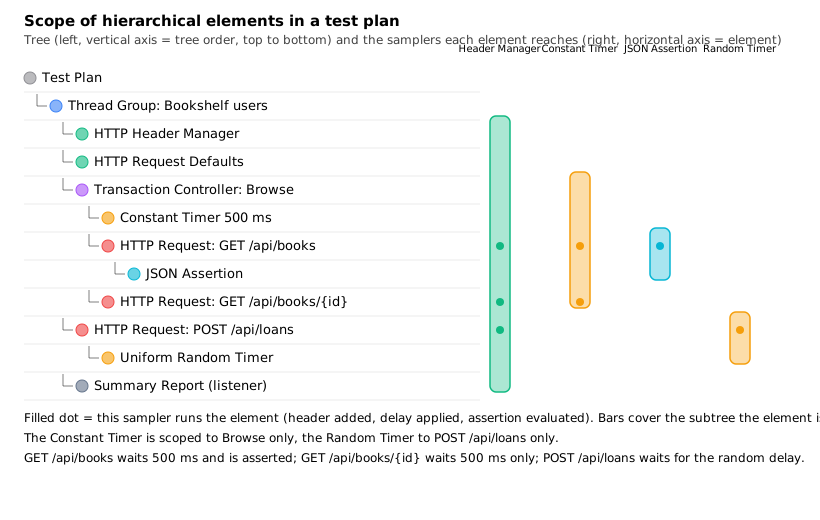
In the figure the tree runs top to bottom. The HTTP Header Manager (green bar) reaches all three samplers because it
is a child of the Thread Group. The Constant Timer (amber bar, left) is a child of the Browse transaction, so it
delays GET /api/books and GET /api/books/{id} but not POST /api/loans. The JSON Assertion belongs to the search
sampler alone. The Uniform Random Timer under POST /api/loans delays that sampler only.
Timers in scope add up
Timers are processed before each sampler in the scope in which they are found, and when several timers are in the scope of one sampler, all of them are processed before it and their delays add up. A thread group with a 1000 ms Constant Timer and a Uniform Random Timer (constant delay offset 500 ms, random delay maximum 200 ms) delays each sampler by 1500 ms to 1700 ms: the sum of the two, not the larger. The same holds when one timer sits at Thread Group level and another under a controller; a sampler in that controller gets both.
| Timers in scope of the sampler | Delay before the sampler | Notes |
|---|---|---|
Constant Timer 1000 ms at Thread Group level |
1000 ms |
Applies to all samplers of the group. |
Same, plus Constant Timer 500 ms under the Browse controller |
1500 ms for samplers in Browse; 1000 ms for others |
The delays add up, they do not override each other. |
Same, plus Uniform Random Timer (offset 200 ms, random up to 100 ms) as a child of |
1200 ms to 1300 ms for the loan request; 1500 ms for Browse samplers; 1000 ms for any other sampler |
A timer under a sampler restricts it to that sampler. |
Two practical consequences. First, a plan that "has a 1 second think time" can have a much higher one because a second timer was added earlier in the tree and forgotten; open the plan and check every level. Second, the number of requests a thread can issue is bounded by the sum of the delays plus the response time: a thread with 1500 ms of timers and 200 ms of response time can do at most 1 / 1.7 = 0.59 requests per second, so 50 such threads generate at most about 29 requests per second at full load. The think-time page of this section, timers-and-think-time, goes deeper into the timers themselves.
Source: Timers (Component Reference)
Defaults are merged, three managers are not
Configuration defaults (such as HTTP Request Defaults) are merged into one set of values that the sampler can use. A sampler leaves a field empty to inherit it. Several defaults in scope are combined field by field, and the one closest to the sampler wins where they disagree.
The user manual test-plan chapter states a different rule for three elements: the Header Manager, the Cookie Manager and the Authorization Manager are not merged; if more than one is in scope, only one is used, and there is no way to say which. Two details from the component reference refine this and are worth knowing before relying on it:
-
HTTP Header Manager. The component reference says JMeter supports multiple Header Managers and that their header entries are merged to form the list for the sampler; an entry with the same name replaces the earlier one, and an empty value does not remove a header, it only replaces its value. The two manual chapters therefore disagree; the 5.6.3 source code follows the component reference (
HTTPSamplerBase.setHeaderManagermerges the managers, and the one closest to the sampler wins on a duplicate name), so the test-plan chapter is out of date for headers. Verify the headers actually sent with a Debug Sampler or View Results Tree when a plan depends on this. -
HTTP Cookie Manager. If there is more than one Cookie Manager in the scope of a sampler, there is no way to specify which one is used, and a cookie stored in one manager is not available to any other manager, so use several with care. One Cookie Manager at Thread Group level is the standard arrangement, and it shares the cookies of all HTTP requests of the thread.
-
HTTP Authorization Manager. Likewise, with more than one in the scope of a sampler there is currently no way to specify which is used.
| Element | Several in scope | Recommendation |
|---|---|---|
HTTP Request Defaults (and the other defaults elements) |
Merged; a field set on the sampler beats the default; closer elements beat farther ones. |
Put one at Thread Group level for host and port; override only at the sampler. |
HTTP Header Manager |
Component reference: merged, same name replaces; test-plan chapter: not merged. |
One manager per scope; verify the sent headers; put per-sampler headers on the sampler’s own Header Manager and check the result. |
HTTP Cookie Manager |
One is used, no control over which; cookies are not shared between managers. |
One at Thread Group level. |
HTTP Authorization Manager |
One is used, no control over which. |
One per scope, with every base URL it covers listed in its table. |
A planned change for JMeter 6.0 (from changes.xml on the master branch, not released) is that the Cookie Manager
stops sending expired cookies. It does not change the scoping rule.
Source: Elements of a Test Plan (User Manual), HTTP Header Manager, HTTP Cookie Manager and HTTP Authorization Manager (Component Reference)
Scoping by example
Consider this Bookshelf plan, where the numbers are the order of the tree:
Test Plan
  Thread Group: Bookshelf users
    HTTP Header Manager            (Accept: application/json)
    HTTP Request Defaults          (localhost, 8080)
    Transaction Controller: Browse
      Constant Timer 500 ms
      HTTP Request: GET /api/books?query=java
        JSON Assertion
      HTTP Request: GET /api/books/1
    HTTP Request: POST /api/loans
      Uniform Random Timer
    Summary Report
For each sampler the rules give:
| Sampler | Header Manager | Defaults | Timers before it | Assertions after it |
|---|---|---|---|---|
|
yes |
yes |
Constant 500 ms |
JSON Assertion |
|
yes |
yes |
Constant 500 ms |
none |
|
yes |
yes |
Uniform Random |
none |
Moving the Constant Timer one level up, to the Thread Group, would add 500 ms to POST /api/loans too, on top of
its own random delay. Moving the JSON Assertion up to the Browse controller would assert both browse requests (and
make GET /api/books/1 fail if the assertion looks for the search result shape). Moving the Summary Report under
the Browse controller would report only the two browse requests and silently ignore the loan request.
User Defined Variables
The User Defined Variables configuration element defines an initial set of variables, like the table on the Test Plan. Its characteristics are easy to get wrong, because it is a configuration element that does not behave like the others in the order of processing.
| Rule | Detail |
|---|---|
Processed at the start |
All UDV elements in a test plan, no matter where they are placed, are processed at the start of the test. They cannot refer to variables that are defined during the run, for example by a post-processor. |
Top to bottom |
UDVs are processed in the order they appear in the plan. A UDV can refer to variables defined in earlier UDVs or on the Test Plan, but not to variables defined in the same element, because a variable is not available until the element has been processed. |
Shared between thread groups |
The result is shared by all Thread Groups; different values need different names. |
Copied to each thread |
Once the Test Plan and all UDVs are processed, the resulting set of variables is copied to each thread as its initial set. A User Parameters pre-processor or an extractor that defines a variable with the same name replaces the initial value, and every other element of that thread sees the new value. |
Not for volatile functions |
UDVs should not be used with functions that produce a different result each call. Only the result of the first
call is saved in the variable. |
Where to put them |
The manual suggests the start of a Thread Group, or the Test Plan itself. |
To create variables during the run (per-iteration values, values taken from a response), use User Parameters, a Counter or Random Variable config element, or a post-processor, not a UDV. The practical lesson is the one the manual draws: because UDVs are all processed at the start, putting a UDV deep in the tree to "reset" a variable between iterations does nothing; the element has already been processed once at the beginning and is not re-evaluated.
Properties and variables are different things. Properties are global to the JMeter instance, defined in
jmeter.properties, and can be read in a test plan, but they cannot hold thread-specific values. Variables are local
to each thread: a thread’s change affects only its own copy. Both are case-sensitive. The __setProperty function
sets global properties, which is the way to pass information between threads.
Test Fragments with the Module and Include controllers
A plan that grows quickly develops repeated blocks: the login sequence, the "search and view a book" step, the loan creation. Copy-pasting them multiplies the places that need a fix. JMeter offers two mechanisms for reuse, both built on the Test Fragment element.
The Test Fragment is used together with the Include Controller and the Module Controller. It sits at the same tree level as a Thread Group but is never executed on its own. Its only field is a name, and a Test Fragment is disabled by default since JMeter 2.13, which avoids running the fragment by itself. When using a fragment with a Module Controller, make sure the fragment stays disabled.
Module Controller
The Module Controller substitutes a test plan fragment (a controller and all the elements it contains) into the current plan at run time. The fragment can be located in any Thread Group; disable its controller so it only runs through the Module Controller, or store fragments in a dummy Thread Group and disable the whole group. Several fragments with different samplers can coexist, and the Module Controller switches between them by choosing a different controller in its drop-down list, which is a convenient way to run alternative scenarios.
| GUI field | Behaviour | Required |
|---|---|---|
Name |
Descriptive name shown in the tree. |
No |
Module to Run |
The list of all the controllers loaded into the GUI; select the one to substitute at run time. |
Yes |
A fragment name is made up of the controller’s own name and the names of all its parents, for example
Test Plan / Protocol: JDBC / Control / Interleave Controller (Module1). Fragments used by a Module Controller must
have unique names, because the name is how the target is found when the plan is reloaded; change the default
controller name, or a duplicate may appear when elements are added.
Include Controller
The Include Controller uses an external .jmx file. To prepare one, create a Test Fragment under the Test Plan,
add the samplers and controllers below it, and save the plan. The file can then be included by other plans. For
convenience a Thread Group may be added to the external file for debugging; it is ignored when the file is included.
| GUI field | Behaviour | Required |
|---|---|---|
Filename |
The file to include. The field does not support variables or functions. |
Yes |
-
If the property
includecontroller.prefixis defined, its contents are used to prefix the path name. -
If the file cannot be found at the location prefix plus filename, the controller tries the filename relative to the directory where the
.jmxwas launched. -
A Cookie Manager or User Defined Variables element must be placed in the top-level test plan, not in the included file, otherwise they are not guaranteed to work.
-
When including the same
.jmxfile more than once, name the Include Controllers differently, to avoid a known issue (Bug 50898 in the Apache bug tracker).
The Bookshelf plan can use it this way. login-fragment.jmx holds a Test Fragment with the login sampler and a JSON
Extractor for the token; bookshelf-load.jmx contains the Include Controller:
<IncludeController guiclass="IncludeControllerGui" testclass="IncludeController" testname="Login" enabled="true">
  <stringProp name="IncludeController.includepath">fragments/login-fragment.jmx</stringProp>
</IncludeController>
<hashTree/>
Run with a prefix so the same plan works from any directory:
jmeter -n -t bookshelf-load.jmx -Jincludecontroller.prefix=/opt/bookshelf/jmeter/ -l results.jtlChoosing between them
| Question | Module Controller | Include Controller |
|---|---|---|
Where does the fragment live? |
In the same plan. |
In an external |
What is selected? |
A controller chosen from a drop-down list. |
A file path (no variables or functions). |
Best for |
Switching between alternative scenarios in one plan. |
Sharing a block between plans and between people. |
Pitfalls |
Names must be unique; keep the fragment disabled. |
Cookie Manager and UDVs belong in the top-level plan; relative paths on remote servers. |
On a distributed test, an included file must exist on every remote server at the resolved path, which is another reason to use the prefix property. The remote-testing page of this section describes how plans reach the servers.
Pitfalls
-
A delay appears twice. Two timers are in scope; the delays add up. List the timers in scope of every sampler.
-
An assertion fails on the wrong request. It sits at controller or Thread Group level; move it under the sampler.
-
A header or cookie is missing from one request. Check the scope of the Header or Cookie Manager and remember the Cookie Manager is not shared across several managers.
-
A variable is empty. It is defined by a UDV after the point of use (a UDV cannot refer to a later one or to a runtime value), or it is defined at run time and the consumer ran earlier.
-
A timer never fires. It is not in the scope of a sampler (for example, it is under a controller that has no sampler).
-
A listener shows too much or too little. It sits at the wrong level; remember it only sees its own level and below.
-
Resource cost. Each thread works on its own copy of the elements below its Thread Group. A deep tree with many elements per request costs memory and CPU for each virtual user, and a script (JSR223) element costs more than a built-in one. Keep the number of elements per sampler small, and do not leave a View Results Tree enabled in a load run.
-
Functional Test Mode left on. The result files grow and the generator slows down.
From the books to 5.6 to 6.0
| Topic | Books (2.11 to 3.0) | 5.6.3 and planned 6.0 |
|---|---|---|
WorkBench |
Used as a holding area for the recorder and non-test elements (Pro ch. 4). |
No longer used: start recordings from the Recording template with the HTTP(S) Test Script Recorder. |
Test Fragment |
Run by accident unless disabled by hand. |
Disabled by default since 2.13 (before the 3.0 book). |
BeanShell / BSF scripting elements |
Common in pre- and post-processors (BSF PostProcessor in PTwJ ch. 3; BeanShell pre- and post-processors in Pro ch. 3). |
BSF has been deprecated since 3.1 (still shipped, hidden from the menus); BeanShell is discouraged; JSR223 with Groovy is the replacement. |
Execution order and scoping rules |
The same rules. |
The same rules in 5.6.3; no change to them is listed for 6.0. |
Cookie Manager |
Cookie rules as above. |
6.0 (planned, not released): stops sending expired cookies. |
Source: JMeter changes
References
-
Bayo Erinle, JMeter Cookbook, Packt, 2014 (JMeter 2.11): background on test plan structure, used for concepts only.
-
Bayo Erinle, Performance Testing with JMeter, 2nd ed., Packt, 2015 (JMeter 2.12): chapter 3 (BSF PostProcessor); also background on test plan structure, used for concepts only.
-
Sai Matam and Jagdeep Jain, Pro Apache JMeter, Apress, 2017 (JMeter 3.0): chapter 3 (BeanShell pre- and post-processors) and chapter 4 (the WorkBench); also background on test plan structure, used for concepts only.