Recommended App Architecture (UI, Domain and Data Layers)
|
This content was generated with the assistance of AI and should be verified against the official documentation of Android before being relied on in production. See the section bibliography for the reference material consulted while preparing these pages. |
This page is about where code goes in an Android app: which layer owns which responsibility, how data flows
from storage up to the screen and how events flow back down, and how that shape maps onto Gradle modules. It
follows the architecture that Android’s own documentation recommends since the Guide to app architecture
rewrite, not any one specific library. The running example is TrailMate, the hiking-trail companion used
throughout this section. Getting Started with Android introduces it and
Project Structure, Gradle and Build Variants shows its
single-module layout; this page introduces the multi-module layout TrailMate grows into as its Compose UI,
GetTrailsUseCase and OfflineFirstTrailRepository are added.
The Kotlin language features used below — coroutines, Flow, StateFlow and sealed interfaces — are explained
in the Kotlin reference and are not repeated here. See Coroutines Basics,
Flows, Sealed Classes and Enums
and Coroutine Context, Cancellation and Exceptions.
ViewModel lifecycle, scoping and viewModelScope are covered in full on
ViewModel, Lifecycle-Aware Components, Coroutines and Flow;
Room and Retrofit implementation detail lives on Room Database and Paging
and Networking with Retrofit, OkHttp and Ktor;
dependency injection is covered on Dependency Injection with Hilt, Dagger and Koin.
This page only covers how those pieces are arranged relative to each other.
Why an Architecture Is Needed
A small activity that reads a database and inflates a layout does not need much structure. TrailMate is small too, but the same shape scales because the app must keep working while requirements grow: the trail list has to survive rotation, refresh from the network without blocking the UI, work offline from a cached copy, and be testable without a device. Android’s guidance names two principles that address this directly, and a third that follows from them:
-
Separation of concerns. Code that draws the screen should not also decide what the screen shows, and code that decides what the screen shows should not know how a
RecyclerViewor a composable works. Splitting these responsibilities means each one can change, or be replaced, without touching the other. -
Drive UI from data models, preferably persistent ones. UI state should not be an accumulation of ad-hoc variables the framework happens to keep alive. It should come from a model that survives configuration changes and, where the data matters enough, survives process death and app restarts too — because relying on the operating system to keep an app in memory is not viable.
-
Single source of truth (SSOT). Every piece of data has exactly one owner that is the only place allowed to mutate it. Everyone else reads a copy or observes a stream from that owner. In TrailMate the
TrailEntityrows in Room are the single source of truth for a trail’s data; the network response that refreshes them is not.
These principles produce a unidirectional data flow (UDF): state flows one way, from the data layer up to the UI, and events flow the other way, from the UI down to the layer that can act on them. UDF and SSOT reinforce each other — because there is one owner per piece of data, and data only flows outward from that owner, a screen can never receive two conflicting versions of the same fact.
The Three Layers
Android’s recommended architecture organizes an app into three layers, each with a narrow responsibility:
| Layer | Responsibility | TrailMate example |
|---|---|---|
UI layer |
Displays application data on screen and forwards user input as events. Owns nothing durable itself. |
|
Domain layer (optional) |
Encapsulates a single piece of business logic that is reused by more than one ViewModel, or that is complex enough to deserve its own test suite. |
|
Data layer |
Owns application data and business logic that is not reuse-driven: it decides how data is fetched, cached and persisted, and exposes it as the single source of truth. |
|
Dependencies point in one direction only: the UI layer depends on the domain layer (or directly on the data
layer, when there is no use case for a given operation), the domain layer depends on the data layer, and the data
layer depends on nothing above it. The data layer never imports a ViewModel or a composable, and a use case never
imports a View or a Context. This is what makes each layer independently testable, and it is what modules
enforce mechanically, as shown later on this page.
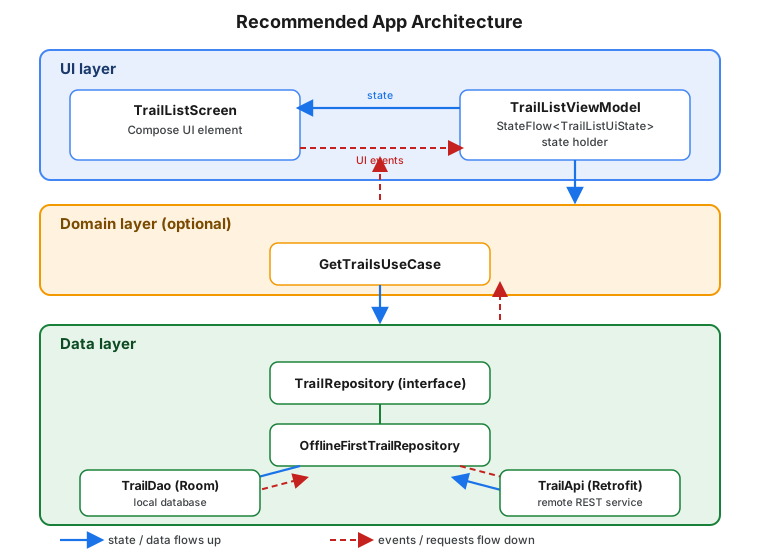
The UI Layer
The UI layer has two elements: UI elements that render whatever is on screen (a composable such as
TrailListScreen, or a Fragment/View hierarchy in the legacy approach covered on
Views, XML Layouts, View Binding and Material Components), and state
holders that hold the state the UI elements render and expose the logic to change it. A ViewModel is the state
holder used for state that must survive configuration changes; ViewModel, Lifecycle-Aware Components, Coroutines and Flow
covers other state holders (plain classes remembered in Compose, SavedStateHandle) for narrower cases.
Modelling UI state: TrailListUiState
The UI layer converts application data into UI state: a model shaped exactly like what the screen needs to
render, not like whatever the database or network returned. TrailMate’s trail list has three meaningfully
different situations to render, so TrailListUiState is a sealed interface rather than one class with nullable
fields — the pattern explained in full on Sealed Classes and Enums:
// feature/trails/src/main/kotlin/com/example/trailmate/feature/trails/TrailListUiState.kt
package com.example.trailmate.feature.trails

sealed interface TrailListUiState {
    data object Loading : TrailListUiState

    data class Success(
        val trails: List<Trail>,
        val onlyFavorites: Boolean,
        val isRefreshing: Boolean = false,
    ) : TrailListUiState

    data class Error(val message: String) : TrailListUiState
}A sealed interface rules out illegal states at compile time: a screen can never be simultaneously "loading" and
"showing an error message" because those are two different types, not two independent boolean flags on one
class. The when expression that renders this state in Compose must be exhaustive, so adding a fourth state
later is a compile error everywhere it is not yet handled, not a runtime surprise.
Producing state: TrailListViewModel
The ViewModel holds a TrailListUiState and produces it from the data layer. It never holds a View, a
Context, or any other reference the framework can outlive, which is what lets it survive configuration changes
independently of the UI elements observing it:
// feature/trails/src/main/kotlin/com/example/trailmate/feature/trails/TrailListViewModel.kt
package com.example.trailmate.feature.trails

import androidx.lifecycle.ViewModel
import androidx.lifecycle.viewModelScope
import com.example.trailmate.core.data.repository.TrailRepository
import com.example.trailmate.core.data.repository.UserPreferencesRepository
import com.example.trailmate.feature.trails.domain.GetTrailsUseCase
import com.example.trailmate.feature.trails.domain.RefreshTrailsUseCase
import dagger.hilt.android.lifecycle.HiltViewModel
import kotlinx.coroutines.channels.Channel
import kotlinx.coroutines.flow.Flow
import kotlinx.coroutines.flow.SharingStarted
import kotlinx.coroutines.flow.StateFlow
import kotlinx.coroutines.flow.catch
import kotlinx.coroutines.flow.combine
import kotlinx.coroutines.flow.receiveAsFlow
import kotlinx.coroutines.flow.stateIn
import kotlinx.coroutines.launch
import javax.inject.Inject

@HiltViewModel
class TrailListViewModel @Inject constructor(
    getTrailsUseCase: GetTrailsUseCase,
    userPreferencesRepository: UserPreferencesRepository,
    private val refreshTrailsUseCase: RefreshTrailsUseCase, // used by onRefresh(), shown below
    private val trailRepository: TrailRepository,           // used by onToggleFavorite(), shown below
) : ViewModel() {

    val uiState: StateFlow<TrailListUiState> = combine(
        getTrailsUseCase(),
        userPreferencesRepository.userPreferences,
    ) { trails, preferences ->
        val visible = if (preferences.onlyFavorites) trails.filter { it.isFavorite } else trails
        TrailListUiState.Success(trails = visible, onlyFavorites = preferences.onlyFavorites) as TrailListUiState
    }.catch { throwable ->
        emit(TrailListUiState.Error(message = throwable.message ?: "Unable to load trails"))
    }.stateIn(
        scope = viewModelScope,
        started = SharingStarted.WhileSubscribed(5_000),
        initialValue = TrailListUiState.Loading,
    )
}Two details in stateIn matter more than they look:
-
SharingStarted.WhileSubscribed(5_000)keeps the upstreamFlowactive only while at least one collector (a visible screen) is subscribed, and for5_000milliseconds after the last one unsubscribes. That grace period survives a configuration change — the old screen unsubscribes and the recreated one resubscribes within milliseconds — without keeping the flow, and whatever it holds open (a database cursor, a Retrofit call), running forever in the background for a screen nobody is looking at. -
initialValue = TrailListUiState.Loadingis whatstateInemits synchronously before the combined flow produces its first value, so aStateFlow— which always has a current value — never starts uninitialized.
combine and catch are ordinary Flow operators, explained in depth on
Flows; this page uses them only to show where they sit in the
architecture. Cancellation semantics for viewModelScope are covered on
Coroutine Context, Cancellation and Exceptions
and ViewModel, Lifecycle-Aware Components, Coroutines and Flow.
The screen collects that state and never computes it:
// feature/trails/src/main/kotlin/com/example/trailmate/feature/trails/TrailListScreen.kt
package com.example.trailmate.feature.trails

import androidx.compose.runtime.Composable
import androidx.compose.runtime.collectAsState
import androidx.hilt.navigation.compose.hiltViewModel

@Composable
fun TrailListRoute(viewModel: TrailListViewModel = hiltViewModel()) {
    val uiState by viewModel.uiState.collectAsState()
    TrailListScreen(uiState = uiState, onToggleFavorite = viewModel::onToggleFavorite)
}
See Android Developers — State holders and UI State.
(collectAsStateWithLifecycle, the lifecycle-aware variant used in production code, is introduced on
ViewModel, Lifecycle-Aware Components, Coroutines and Flow.)
UI events: state flows down, events flow up
Everything so far describes state flowing from the data layer up to the screen. The other half of UDF is UI events: user actions, such as tapping a favorite star, that need to flow back down to something that can act on them. Android’s guidance distinguishes two kinds:
-
UI logic events — showing a
Snackbar, navigating to another screen, scrolling a list — belong to the UI element itself and are handled there, with no need to reach the ViewModel at all. -
Business logic events — anything that changes application data — are forwarded to the state holder as a method call, never as a direct mutation of the ViewModel’s exposed state:
// feature/trails/src/main/kotlin/com/example/trailmate/feature/trails/TrailListViewModel.kt (continued)
fun onToggleFavorite(trailId: String) {
    val trail = (uiState.value as? TrailListUiState.Success)?.trails?.firstOrNull { it.id == trailId } ?: return
    viewModelScope.launch {
        trailRepository.setFavorite(trailId, isFavorite = !trail.isFavorite)
    }
}The uiState property above is read-only (StateFlow, not MutableStateFlow) as seen from outside the
ViewModel; only onToggleFavorite and similar methods can change what it eventually emits, and they change it
by writing to the data layer, not by assigning a new state object directly. onToggleFavorite reads the trail’s
current favorite flag from the state it is already showing and asks TrailRepository.setFavorite for the
opposite value; Room then re-emits the updated row through trails. This is the same SSOT principle
applied one level down: the ViewModel does not own trail data, the repository does, so the ViewModel’s job is
to ask the repository to change it and then re-derive uiState from what changed.
One-off events that must fire exactly once — a network error that should show a Snackbar once, not every time
the screen recomposes — need a different shape than StateFlow, because StateFlow always redelivers its
current value to new collectors. SharedFlow and Channel cover that case and are compared in depth on
ViewModel, Lifecycle-Aware Components, Coroutines and Flow.
The Domain Layer
The domain layer is optional, and TrailMate uses it sparingly: only for logic that is reused by more than one
ViewModel or complex enough to warrant its own tests, isolated from any ViewModel. A use case (also called an
interactor) is a class with one public operation, conventionally exposed through invoke so it can be called
like a function:
// feature/trails/src/main/kotlin/com/example/trailmate/feature/trails/domain/GetTrailsUseCase.kt
package com.example.trailmate.feature.trails.domain

import com.example.trailmate.core.data.repository.TrailRepository
import com.example.trailmate.core.model.Trail
import kotlinx.coroutines.flow.Flow
import javax.inject.Inject

class GetTrailsUseCase @Inject constructor(
    private val trailRepository: TrailRepository,
) {
    operator fun invoke(): Flow<List<Trail>> = trailRepository.trails
}GetTrailsUseCase above looks like it adds nothing over calling trailRepository.trails directly, and for a
single caller it would. Its purpose becomes visible once a second screen — a home-screen widget, or a "nearby
trails" search — also needs the same sorted-and-deduplicated list of trails: without a use case, that logic
would be copied into a second ViewModel, or the repository would grow a method that only exists for one screen’s
convenience. A more realistic use case composes repository calls that must always happen together:
// feature/trails/src/main/kotlin/com/example/trailmate/feature/trails/domain/RefreshTrailsUseCase.kt
package com.example.trailmate.feature.trails.domain

import com.example.trailmate.core.data.repository.TrailRepository
import javax.inject.Inject

class RefreshTrailsUseCase @Inject constructor(
    private val trailRepository: TrailRepository,
) {
    suspend operator fun invoke(region: String?) {
        trailRepository.refresh(region)
    }
}A use case should never appear in more layers than the two it sits between: it takes data-layer types as input and produces UI-consumable (or further-composable) types as output, and it must never import anything from the UI layer. When no shared or complex logic exists, a ViewModel calling a repository directly is not a shortcut that needs fixing later — it is the architecture working as intended, since the domain layer is described as optional for exactly this reason.
The Data Layer
The data layer owns TrailMate’s data and is the only layer allowed to decide how it is fetched, cached and persisted. It exposes that data through repositories, one per data type, each behind an interface the domain and UI layers depend on:
// core/data/src/main/kotlin/com/example/trailmate/core/data/repository/TrailRepository.kt
package com.example.trailmate.core.data.repository

import com.example.trailmate.core.model.Trail
import kotlinx.coroutines.flow.Flow

interface TrailRepository {
    val trails: Flow<List<Trail>>
    fun trail(trailId: String): Flow<Trail?>
    suspend fun refresh(region: String? = null)
    suspend fun setFavorite(trailId: String, isFavorite: Boolean)
}Offline-first: OfflineFirstTrailRepository
TrailMate’s implementation follows the offline-first pattern the architecture guide recommends: the local
Room database is the single source of truth, and the network is only ever used to refresh that database, never
read from directly by callers. A screen that observes trails keeps working, with whatever was last
synchronized, even with no connectivity:
// core/data/src/main/kotlin/com/example/trailmate/core/data/repository/OfflineFirstTrailRepository.kt
package com.example.trailmate.core.data.repository

import com.example.trailmate.core.database.TrailDao
import com.example.trailmate.core.database.model.asEntity
import com.example.trailmate.core.database.model.asExternalModel
import com.example.trailmate.core.model.Trail
import com.example.trailmate.core.network.TrailApi
import com.example.trailmate.core.network.model.asEntity as dtoAsEntity
import kotlinx.coroutines.CoroutineDispatcher
import kotlinx.coroutines.flow.Flow
import kotlinx.coroutines.flow.map
import kotlinx.coroutines.withContext
import javax.inject.Inject

class OfflineFirstTrailRepository @Inject constructor(
    private val trailDao: TrailDao,
    private val trailApi: TrailApi,
    private val ioDispatcher: CoroutineDispatcher,
) : TrailRepository {

    override val trails: Flow<List<Trail>> =
        trailDao.observeTrails().map { entities -> entities.map { it.asExternalModel() } }

    override fun trail(trailId: String): Flow<Trail?> =
        trailDao.observeTrail(trailId).map { it?.asExternalModel() }

    override suspend fun refresh(region: String?) = withContext(ioDispatcher) {
        val remoteTrails = trailApi.getTrails(region = region).map { it.dtoAsEntity() }
        trailDao.upsertAll(remoteTrails)
    }

    override suspend fun setFavorite(trailId: String, isFavorite: Boolean) = withContext(ioDispatcher) {
        trailDao.setFavorite(trailId, isFavorite)
    }
}Every method that touches Room or Retrofit is suspend, or returns a cold Flow that Room itself dispatches off
the main thread, and every blocking call is wrapped in withContext(ioDispatcher). ioDispatcher is injected
rather than hard-coded to Dispatchers.IO, which is what lets OfflineFirstTrailRepositoryTest substitute a test
dispatcher and run the same code synchronously, deterministically, and on a single thread. Room and Retrofit’s own
mapping types (TrailEntity, TrailDto) are shown in full on
Room Database and Paging and
Networking with Retrofit, OkHttp and Ktor; this page
only shows how the repository composes them.
Main-safety
A function is main-safe when it is safe to call from the main thread without blocking it, regardless of what
it does internally. Android’s guidance places the responsibility for main-safety in the data layer, not in every
caller: OfflineFirstTrailRepository.refresh moves its own work to ioDispatcher, so TrailListViewModel can
call it from viewModelScope, which runs on Dispatchers.Main.immediate by default, without adding a dispatcher
of its own. A ViewModel that had to remember to wrap every repository call in withContext(Dispatchers.IO) would
make that mistake exactly once, silently, the day a new call site forgets to.
Injecting the dispatcher, rather than referencing Dispatchers.IO inside OfflineFirstTrailRepository, serves
testing more than production: tests replace it with a single-threaded test dispatcher so coroutine execution
order is deterministic, while NetworkModule binds the real Dispatchers.IO at runtime.
Modelling errors
refresh above can throw — no connectivity, a 4xx/5xx response, a serialization failure. The data layer
should model those outcomes explicitly rather than letting an arbitrary exception cross into the UI layer
unannounced:
// core/data/src/main/kotlin/com/example/trailmate/core/data/repository/OfflineFirstTrailRepository.kt (continued)
override suspend fun refresh(region: String?) = withContext(ioDispatcher) {
    try {
        val remoteTrails = trailApi.getTrails(region = region).map { it.dtoAsEntity() }
        trailDao.upsertAll(remoteTrails)
    } catch (exception: java.io.IOException) {
        throw TrailSyncException("Unable to reach the trail service", exception)
    }
}

class TrailSyncException(message: String, cause: Throwable? = null) : Exception(message, cause)refresh() is a one-shot suspend call, not part of the uiState flow, so the catch operator on uiState
shown earlier never sees a TrailSyncException — that catch only handles failures of the flows it combines
(Room’s trails query and the DataStore preferences), and because a caught exception completes the flow, it
leaves the screen on TrailListUiState.Error until the flow is collected again. It is meant for those rare,
unrecoverable read failures only. A refresh failure is handled where refresh() is called, and reported as a
one-off event rather than as screen state:
// feature/trails/src/main/kotlin/com/example/trailmate/feature/trails/TrailListViewModel.kt (continued)
private val _syncErrors = Channel<String>(Channel.BUFFERED)
val syncErrors: Flow<String> = _syncErrors.receiveAsFlow()

fun onRefresh() {
    viewModelScope.launch {
        try {
            refreshTrailsUseCase(region = null)
        } catch (exception: TrailSyncException) {
            _syncErrors.send(exception.message ?: "Unable to refresh trails")
        }
    }
}The exception is translated into a UI-facing message exactly once, at the boundary between the data/domain
layers and the UI layer, and the screen shows it once (for example as a Snackbar). Because uiState keeps
serving the Room-backed trails flow regardless, a failed refresh leaves the screen on "stale but present"
data rather than replacing the cached list with an error — offline-first pays for itself here twice, at launch
and after a failed sync.
Modularization
The layers above map onto Gradle modules, and TrailMate is organized as one :app module, several :core:*
modules (one per data-layer concern, shared by every feature) and one :feature:* module per screen:
| Module | Contents |
|---|---|
|
The single |
|
|
|
|
|
|
|
|
|
|
|
|
Figure: the module dependency graph
:app depends on :feature:trails and :feature:settings as implementation: nothing outside :app needs to
see either feature module, and the two feature modules never depend on each other, so :feature:settings can be
built, tested or even removed without recompiling :feature:trails. :core:data depends on :core:database,
:core:network and :core:model as api, because a TrailEntity-shaped or Trail-shaped type from those
modules appears in TrailRepository’s own public signatures (`trails: Flow<List<Trail>>); marking that
dependency implementation instead would compile :core:data itself but fail to compile any module that then
tries to call trailRepository.trails.first() and use the result as a Trail, because the compiler would not
know that type exists downstream.
The Gradle api vs implementation distinction is exactly this: api re-exposes a dependency’s types to
everything that depends on the current module, while implementation keeps it private to the module that
declares it and only affects that module’s own compile classpath. Choosing implementation wherever possible is
what makes modularization pay off in build time — changing :core:network’s internals recompiles `:core:data,
but not :feature:trails, unless :core:network types leaked into :core:data’s own public API. The
`build-logic convention-plugin pattern that keeps this Kotlin/Compose/Hilt configuration consistent across seven
modules, rather than repeated in seven build.gradle.kts files, is introduced on
Project Structure, Gradle and Build Variants.
Architecture Recommendations Checklist
Android’s Recommendations for Android architecture page distills the guidance above into a short checklist. Applied to TrailMate:
| Recommendation | In TrailMate |
|---|---|
A clear separation of concerns between the UI and the rest of the app |
|
Drive UI from data models, and prefer persistent data |
|
Single source of truth |
Room owns trail data; the network is a refresh trigger, never a second read path |
Unidirectional data flow |
State: repository → use case → |
Expose asynchronous operations from data-layer classes so they are main-safe |
Every |
Use coroutines and flows for asynchrony, expose events with public methods |
Repository methods are |
Modularize where it makes sense |
|
MVC, MVP, MVVM and MVI Against Current Guidance
Teams coming from an older Android codebase, or from iOS or web frameworks, often ask how this architecture maps onto the pattern names they already know. The honest answer is that Android’s current guidance is not any one of these patterns by name — it is closer to a reactive MVVM shape without insisting on the name — and each older pattern maps onto part of it:
| Pattern | Original shape | Relationship to current guidance |
|---|---|---|
MVC |
A |
The |
MVP |
A passive |
The |
MVVM with LiveData and Data Binding |
A ViewModel exposes |
Structurally the same ViewModel/state-holder split used today. |
MVI |
A single immutable |
Closest in spirit to |
None of these names appears in Android’s own architecture documentation, and adopting one of these libraries wholesale is not required to follow the guidance on this page. What is required is the shape underneath all of them: a passive UI element, a state holder that survives configuration changes, and a single, observable, mostly immutable state object per screen.