Deployment & Self-Hosting
|
This content was generated with the assistance of AI and should be verified against the official documentation before being relied on in production. The reference material consulted while preparing these pages is listed in the section bibliography. |
This page is written against Next.js 16.3.8 (the latest release on 2026-10-03, when the facts and examples below were
checked; the official documentation reports @doc-version 16.3.8), React 19.3.0 and Node.js 20.9.0 or later. It covers
what is common to the App Router and the Pages Router — both are served by the same production server and
deployed in the same ways — and says so where they differ. Caching matters for self-hosting, so each example states
which model it uses: the previous model (the default) or Cache Components (the opt-in cacheComponents: true
model). The examples were run against a scratch copy of the Bookshelf (Next.js 16.3.8, Node.js 24.16, macOS) and use
the previous model. docker build and docker run could not be run for this page: the Docker CLI is installed on the
machine that was used, but its daemon was not running. The standalone output that the Dockerfile produces was built
and run with plain node in a clean directory laid out exactly as the image is, and every other example was built with
next build, started, and queried with curl. Two things were not executed at all and are labelled where they
appear: the NGINX configuration and the CI workflow files.
Deployment is where "it works on my machine" meets everything the framework did not decide for you: how many instances there are, where their caches live, which proxy sits in front, how a new release replaces an old one. The good news is that the minimum is small — a Node.js process — and the rest is a short list of knobs. This page walks through the deployment targets, the Adapters API, each self-hosting concern, multi-zones, custom servers, CI caching, and ends with a production checklist. For the build-time mechanics see Configuration, TypeScript and Environment Variables; for the cache layers themselves see Caching.
The Deployment Targets
The official "Deploying" page lists four options. Which features each supports is the first thing to decide on.
| Option | Feature support | Choose it when |
|---|---|---|
Node.js server ( |
All features. |
You have a VM, a PaaS that runs Node.js, or a process manager, and want the simplest thing that supports everything. |
Docker container (usually |
All features. |
You deploy to Kubernetes, ECS, Cloud Run, or any host that runs containers, and want one immutable image per release. |
Static export ( |
Limited: no server features at runtime. |
The site is fully known at build time and can be served from S3, NGINX, GitHub Pages or a CDN. |
Adapter (a platform integration) |
Varies. "Verified" adapters run the Next.js compatibility test suite. |
You deploy to a platform that has its own build and runtime model (Vercel, and others). |
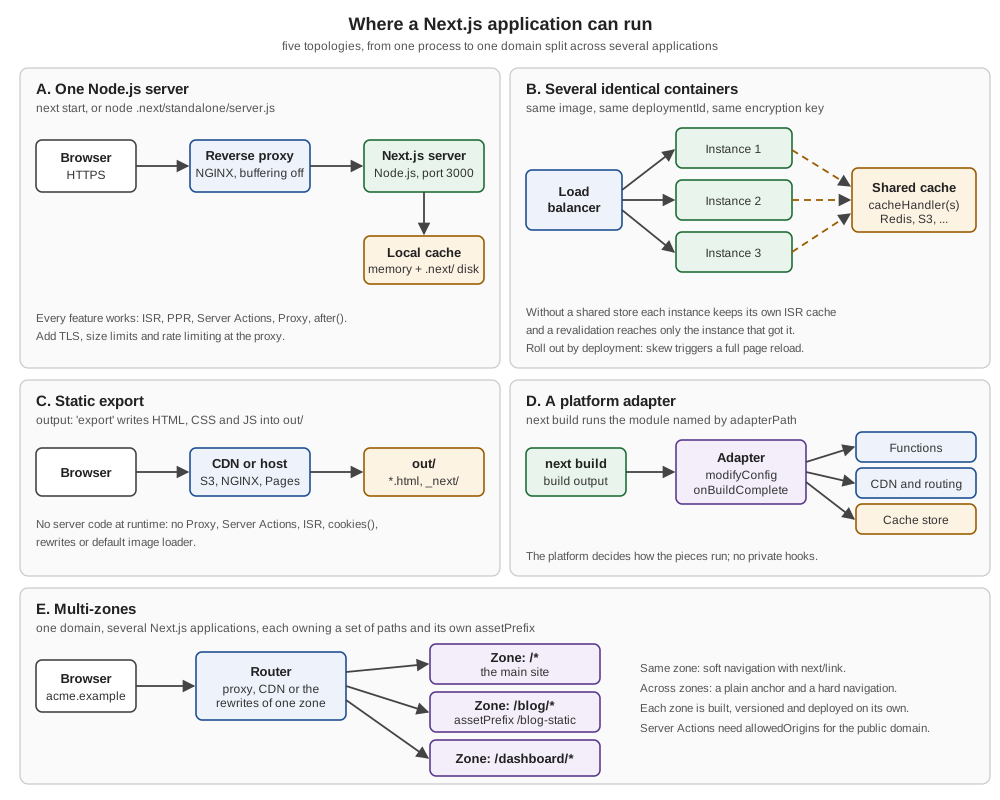
The platform requirement behind the first two rows is small. The "Deploying to Platforms" guide states that to run
Next.js a platform needs a Node.js server and nothing else: a single next start process handles Server Components,
ISR, PPR, Cache Components, Server Actions, Proxy and after(). The only extra dependency is the sharp package for
image optimization. Everything else — a CDN, edge compute, a shared cache — improves performance or multi-instance
consistency but is not needed for correctness. The guide separates functional fidelity (every feature works) from
performance fidelity (each feature at its best latency); a platform that reaches the first is a fully supported target.
A Node.js Server
The smallest deployment is the one the scaffold already has. Make sure package.json has the build and start
scripts, build once, and start.
{
  "scripts": {
    "dev": "next dev",
    "build": "next build",
    "start": "next start"
  }
}npm run build
PORT=3901 HOSTNAME=127.0.0.1 npx next startRun on the scratch Bookshelf, this printed Next.js 16.3.8, Local: http://127.0.0.1:3901 and Ready, and curl
returned the catalogue pages and the Route Handler JSON. next start takes -p/--port (the PORT variable is read
too) and -H/--hostname (default 0.0.0.0). When the server sits behind a load balancer such as an AWS ALB, pass
--keepAliveTimeout (milliseconds) with a value larger than the balancer’s idle timeout, otherwise Node.js may close
a connection the balancer is about to reuse and the balancer reports a proxy error.
Source: Deploying: Node.js server and the next CLI reference.
Two things to keep in mind. First, next build bakes in everything that is not read at request time (see the
build-versus-runtime discussion in the configuration page), so build in the same environment type you will run in.
Second, next start serves a build; it never rebuilds. A new release is a new build, a new process, and (with several
instances) a rollout plan, which is the version-skew section below.
Docker and output: 'standalone'
next start needs the project’s full node_modules, which is mostly build tooling. Setting output: 'standalone'
changes that: during next build, Next.js uses @vercel/nft to trace which files each route and the server itself
need, and copies only those, including the necessary part of node_modules, into .next/standalone. That folder
runs on its own, without npm install, with a minimal server.js that replaces next start.
import type { NextConfig } from "next";

const nextConfig: NextConfig = {
  // A self-contained server in .next/standalone (Docker, VMs, any Node.js host)
  output: "standalone",

  // One identifier per release; every instance of that release must share it
  deploymentId: process.env.DEPLOYMENT_VERSION,

  // Share the ISR / route cache between instances (see cache-handler.js) and
  // switch the per-instance in-memory copy off
  cacheHandler: require.resolve("./cache-handler.js"),
  cacheMaxMemorySize: 0,

  // Tell NGINX not to buffer streamed responses
  async headers() {
    return [
      {
        source: "/:path*{/}?",
        headers: [{ key: "X-Accel-Buffering", value: "no" }],
      },
    ];
  },
};

export default nextConfig;
This one file is the thread of the page: each key is explained in its own section below. Built with
DEPLOYMENT_VERSION=2026-10-03-a, it produced .next/standalone with server.js, package.json, a traced
node_modules and the cache handler file. On the scratch app that folder was 42 MB, against 469 MB for the project’s
full node_modules. The standalone folder does not contain public/ or .next/static; the docs say these should
ideally be served by a CDN, but if you want the minimal server to serve them, copy them in after the build.
DEPLOYMENT_VERSION=2026-10-03-a npx next build
cp -r public .next/standalone/
cp -r .next/static .next/standalone/.next/
PORT=3901 HOSTNAME=127.0.0.1 node .next/standalone/server.js
▲ Next.js 16.3.8
- Local: http://127.0.0.1:3901
- Network: http://127.0.0.1:3901
✓ Ready in 0msserver.js reads PORT and HOSTNAME (set HOSTNAME=0.0.0.0 inside a container, or the server is unreachable from
outside it). The generated file also reads a KEEP_ALIVE_TIMEOUT variable, which is visible in the file but not
documented on the output page, so treat it as an implementation detail. In a monorepo the tracing root is the project
folder by default; set outputFileTracingRoot to include files from outside it, and use outputFileTracingIncludes or
outputFileTracingExcludes (route glob keys, project-root-relative values) when the tracer misses or over-includes
files.
Source: output and Self-hosting.
A multi-stage, non-root Dockerfile
The Dockerfile below follows the official with-docker example: one stage installs dependencies, one builds, and the
final stage contains only the standalone output, running as the unprivileged node user that the official Node.js
images already provide.
# syntax=docker/dockerfile:1
ARG NODE_VERSION=24-slim

FROM node:${NODE_VERSION} AS dependencies
WORKDIR /app
COPY package.json package-lock.json ./
RUN npm ci --no-audit --no-fund

FROM node:${NODE_VERSION} AS builder
WORKDIR /app
COPY --from=dependencies /app/node_modules ./node_modules
COPY . .
ENV NODE_ENV=production
# The release identifier, baked in at build time (see "Version skew")
ARG DEPLOYMENT_VERSION
ENV DEPLOYMENT_VERSION=$DEPLOYMENT_VERSION
RUN npm run build

FROM node:${NODE_VERSION} AS runner
WORKDIR /app
ENV NODE_ENV=production PORT=3000 HOSTNAME=0.0.0.0

COPY --from=builder --chown=node:node /app/public ./public

# The prerender / ISR cache is written under .next at runtime
RUN mkdir .next && chown node:node .next

COPY --from=builder --chown=node:node /app/.next/standalone ./
COPY --from=builder --chown=node:node /app/.next/static ./.next/static

USER node
EXPOSE 3000
CMD ["node", "server.js"]node_modules
.next
.git
.env*
npm-debug.log*
Dockerfile
.dockerignore
README.mddocker build --build-arg DEPLOYMENT_VERSION=2026-10-03-a -t bookshelf:2026-10-03-a .
docker run --rm -p 3000:3000 \
-e AUTH_SECRET="$AUTH_SECRET" \
bookshelf:2026-10-03-aWhat was verified instead is the part that is specific to Next.js: the final stage’s layout. A clean directory was
populated with public/, the contents of .next/standalone and .next/static placed at .next/static, and started
with an empty environment apart from PORT, HOSTNAME and the app’s own variables. It served /en/books/1 with HTTP
200, a static chunk from /_next/static/ with HTTP 200, and the Route Handler JSON. The .dockerignore matters for
two reasons: node_modules and .next would otherwise be copied into the build context and overwrite the clean ones
the stages produce, and .env* keeps local secrets out of image layers (supply runtime variables with -e, --env-file
or the orchestrator instead).
Choices in that file worth understanding rather than copying:
-
Multi-stage. The dependencies stage is cached as long as
package.jsonand the lockfile do not change, so a code change rebuilds only the builder and runner stages. -
Non-root. The final stage drops to
node; themkdir .next && chownline gives that user a writable folder for the prerender cache, since the rest of/appis owned by root. -
A slim image. The official example uses a
-slimNode.js image. On glibc-based Linux the self-hosting guide notes that image optimization may need extra configuration to prevent excessive memory usage (a different memory allocator, see thesharpinstallation notes). -
Build-time versus runtime variables.
NEXT_PUBLIC_values are inlined into the client bundle duringnext build, so they must be available (as build arguments) at that stage. Server-side values read inside a request-time context (afterawait connection()or another Request-time API) are evaluated at runtime, so a single image can be promoted from staging to production with different values. -
Telemetry. Next.js collects anonymous telemetry; set
NEXT_TELEMETRY_DISABLED=1in the stage where you want it off. -
Development. The Deploying page recommends
npm run devlocally rather than Docker on macOS and Windows, for better performance.
This site already explains the Docker side in depth: images, layers and tags are in Dockerfile Fundamentals; the multi-stage mechanics and cache mounts in Build Cache and Multi-Stage Builds; scanning, non-root users and hardening in Image Best Practices and Security; a GitHub Actions pipeline that builds and pushes the image in CI/CD with GitHub Actions; and running the result in a cluster in ReplicaSets and Deployments, Health Probes and Lifecycle and Deployment Strategies. A Django-flavoured walk through the same Docker-to-Kubernetes path is Docker and Kubernetes in the Django section.
Static Export
If every page can be produced at build time, no server is needed at all. output: 'export' makes next build write
plain HTML, CSS and JavaScript into an out folder (a different distDir can be chosen), which any web server or CDN
can host. This is the replacement for the next export command, which was deprecated in 13.3 and removed in 14.0.
images.unoptimized instead of a custom loader)import type { NextConfig } from "next";
const nextConfig: NextConfig = {
output: "export",
// Optional: emit /books/1/index.html instead of /books/1.html
// trailingSlash: true,
images: { unoptimized: true },
};
export default nextConfig;// app/books/[id]/page.tsx
export const dynamicParams = false;
export function generateStaticParams() {
return [{ id: "1" }, { id: "2" }, { id: "3" }];
}
export default async function Page({ params }: PageProps<"/books/[id]">) {
const { id } = await params;
return <h1>Book {id}</h1>;
}// app/data.json/route.ts
export const dynamic = "force-static";
export async function GET() {
return Response.json({ books: 3 });
}Built in a throw-away app, next build listed /, /_not-found, /books/[id] with /books/1 to /books/3 as SSG,
and /data.json, and wrote out/index.html, out/404.html, out/books/1.html to 3.html (each with a matching
.txt payload for client navigation) and out/data.json. Served by a plain static file server, /data.json returned
{"books":3}, /books/2.html contained Book 2, and a missing page returned 404. Adding a page that calls
await cookies() made the build fail with an error saying the route "couldn’t be rendered statically because it used
`cookies()`", which is the behaviour to expect for every unsupported feature: you find out at build time.
Server Components run during the build, so their fetch calls happen once, at build time. Client Components can fetch
in the browser (SWR or TanStack Query), and Browser-only APIs belong in effects, because Client Components are also
prerendered to HTML. The documented unsupported list is the one to memorise: dynamic routes with dynamicParams: true
or without generateStaticParams(), Route Handlers that rely on the request, cookies, rewrites, redirects and headers in
next.config, Proxy, ISR, Image Optimization with the default loader (use a custom loader), Draft Mode, Server Actions
and intercepting routes. Hosting is a matter of mapping URLs to files; for NGINX the official configuration uses
try_files $uri $uri.html $uri/ =404 plus a rewrite for dynamic segments when trailingSlash is false. A GitHub Pages
template exists in the nextjs organisation.
Source: Static Exports and Deploying: Static export. This is also the rendering mode of a client-side single-page app; see Client-Side Rendering and Static Site Generation.
Platforms and Adapters
A platform that is not "a Node.js process" — serverless functions, an edge network, a managed build service — has to translate the build output into its own primitives. That translation is what an adapter does. The Deploying page distinguishes two groups, and the distinction is worth remembering because it tells you what has been tested.
| Group | Platforms |
|---|---|
Verified adapters: open source, built on the public Adapter API, run the compatibility test suite, hosted under the |
Vercel and Bun. |
Other platforms: their own Next.js integrations, not built on the public Adapter API, not verified by the Next.js team, so support may vary |
Appwrite Sites, AWS Amplify Hosting, Cloudflare, Deno Deploy, Firebase App Hosting, Netlify. |
Templates for Node.js or Docker hosts |
Flightcontrol, Railway, Replit and Hostinger for Node.js; DigitalOcean, Fly.io, Google Cloud Run, Render and SST for containers. |
The same page says Cloudflare and Netlify are working on verified adapters built on the Adapter API, and offer their own integrations in the meantime. Two other names in the Bookshelf’s ecosystem deserve a sentence each. OpenNext is an open-source project (opennext.js.org) with documentation sections for AWS and Cloudflare; Cloudflare’s framework guides list a Next.js "OpenNext adapter". AWS Amplify Hosting has its own Next.js quickstart. None of these is documented by the Next.js docs beyond the link, so read each provider’s page for the supported features, and use the feature matrix further down to ask the right questions. On this site, the AWS side of the picture is covered by Choosing a Compute Service, ECS and Fargate and CloudFront CDN, and the Google Cloud side by Cloud Run.
Source: Deploying: Adapters and Deploying to Platforms.
The Adapters API
Adapters give platforms a public, documented hook into the build. They were introduced as an alpha in Next.js 16.0
(configured under experimental.adapterPath) and declared stable in Next.js 16.2 (released 2026-03-18), where the
option moved to the top level as adapterPath. The documentation is explicit that there are no private framework hooks:
Vercel’s own adapter uses the same public API as everyone else.
An adapter is a module that exports an object implementing the NextAdapter interface, which can be imported as a type
from next. It has a name and two optional hooks: modifyConfig(config, context), called for any CLI command that
loads the configuration, and onBuildComplete(context), called after the build with the routing tables and every build
output. The configuration key takes the path to the module, and the NEXT_ADAPTER_PATH environment variable can be set
instead for zero-configuration use on a platform.
/** @type {import('next').NextAdapter} */
const adapter = {
  name: "bookshelf-report-adapter",

  async onBuildComplete({ outputs, routing, buildId, nextVersion }) {
    console.log(`[adapter] Next.js ${nextVersion}, build ${buildId}`);
    console.log(`[adapter] app pages: ${outputs.appPages.length}`);
    console.log(`[adapter] app routes: ${outputs.appRoutes.length}`);
    console.log(`[adapter] prerenders: ${outputs.prerenders.length}`);
    console.log(`[adapter] static files: ${outputs.staticFiles.length}`);
    console.log(`[adapter] dynamic routes: ${routing.dynamicRoutes.length}`);
    for (const route of outputs.appRoutes) {
      console.log(`[adapter] route ${route.pathname} -> ${route.type}`);
    }
  },
};

module.exports = adapter;import type { NextConfig } from "next";
const nextConfig: NextConfig = {
adapterPath: require.resolve("./my-adapter.js"),
};
export default nextConfig;On the Bookshelf, next build printed Running onBuildComplete from bookshelf-report-adapter followed by the report
(10 app pages, 4 app routes, 43 prerenders, 29 static files and 8 dynamic routes; the Route Handlers
/api/books and /api/auth/[…nextauth] each appear with the type APP_ROUTE), and the type check
passed with adapterPath in a NextConfig. A real adapter reads outputs (the appPages, appRoutes, pages,
pagesApi, prerenders and staticFiles lists, plus an optional middleware entry) and routing (the phases:
beforeMiddleware, middlewareMatchers, beforeFiles, afterFiles, dynamicRoutes, onMatch, fallback) and
produces the platform’s deployment format. The reference documentation has dedicated pages for the output types, the
routing information, invoking entrypoints, runtime integration with cache handlers, implementing PPR in an adapter, the
@next/routing package, and a compatibility test harness for testing adapters.
Source: adapterPath, Creating an Adapter and Adapters API reference.
The adapter and the runtime caching interfaces together form the complete integration surface: the adapter handles
build-time output, cacheHandler (singular) covers the server cache paths (ISR, Route Handlers, patched fetch,
unstable_cache, image optimization), and cacheHandlers (plural) backs 'use cache'. That is why the cache-handler
section below matters even if you never write an adapter.
Self-Hosting Concerns
The self-hosting guide is a list of things that are free on a platform and yours on a server. The matrix from the platforms guide is the best map of them.
| Feature | Streaming | Shared cache | Notes |
|---|---|---|---|
Server Components |
Required |
No |
Basic streaming support. |
ISR (time-based and on-demand) |
No |
Recommended |
Works per instance without a shared cache; on-demand tag propagation needs a shared cache across instances. |
Partial Prerendering |
Required |
Recommended |
Without streaming the static shell and the dynamic content arrive together. |
Cache Components ( |
Required |
Recommended |
A shared cache gives cross-instance consistency. |
Proxy |
No |
No |
Works with |
Server Actions |
Required |
No |
POST requests with a streamed response; a stable encryption key across instances. |
|
No |
No |
Needs graceful shutdown (SIGINT or SIGTERM and a drain period). |
A reverse proxy in front
The guide recommends putting a reverse proxy such as NGINX in front of the Next.js server rather than exposing it to the internet. The proxy handles malformed requests, slow-connection attacks, payload limits and rate limiting, so the Node.js process spends its time rendering. It is also where TLS, HTTP/2 and compression usually live.
Image optimization
next/image works with no configuration under next start, and it works from the standalone server too. On the scratch
app a generated 128 by 128 PNG (33,814 bytes) requested as /_next/image?url=%2Fprobe.png&w=64&q=75 came back with HTTP
200, Content-Type: image/png, Cache-Control: public, max-age=14400, must-revalidate (four hours, the default
minimumCacheTTL in 16), X-Nextjs-Cache: MISS, and a 64 by 64 PNG of 2,879 bytes; with Accept: image/webp it
returned image/webp. The sharp package performs the work, and it was present in the traced standalone
node_modules. You can instead configure an image loader to use a separate service, set unoptimized, or, for a static
export, define a custom loader. See Images, Fonts and Scripts for the
options themselves.
Source: Self-hosting: Image Optimization and Image.
Cache handlers for several instances
By default the Next.js server cache — the cache behind ISR, the Full Route Cache and the patched fetch — lives in
memory (50 MB by default) and on the local disk of each instance. One long-lived instance with a persistent disk needs
nothing more. With several pods, ephemeral compute, or a CDN in front, each copy diverges: a revalidation reaches only
the instance that received it. The fix has two parts: a shared store, and coordination of tags.
cacheHandler (singular, stable since 14.1) points to a module whose class implements get, set,
revalidateTag and resetRequestCache; cacheMaxMemorySize: 0 switches the per-instance memory copy off. The
handler in this page’s configuration stores entries in a Map, which is only a proof that Next.js calls it; in
production the entries belong in durable shared storage such as Redis or S3 (the Next.js repository has a Redis example).
const cache = new Map();

module.exports = class CacheHandler {
  constructor(options) {
    this.options = options;
  }

  async get(key) {
    const entry = cache.get(key);
    console.log(`[cache-handler] get ${key} -> ${entry ? "hit" : "miss"}`);
    return entry;
  }

  async set(key, data, ctx) {
    console.log(`[cache-handler] set ${key}`);
    cache.set(key, { value: data, lastModified: Date.now(), tags: ctx.tags });
  }

  async revalidateTag(tags) {
    const list = [tags].flat();
    for (const [key, entry] of cache) {
      if (entry.tags?.some((tag) => list.includes(tag))) cache.delete(key);
    }
  }

  resetRequestCache() {}
};
With this handler configured, the first request for the prerendered /en/books/2 logged
get /route-cache/APP_PAGE/…/en/books/2 → miss and then set with the same key, the response carried
x-nextjs-cache: MISS and Cache-Control: s-maxage=31536000, and the next two requests logged → hit. Two lessons: the
key space is Next.js’s own (/route-cache/APP_PAGE/…), and a handler replaces the default store, so a fresh
instance whose handler is empty regenerates the page on its first request, where a durable shared store keeps entries
across restarts and across instances.
Calling revalidateTag() on one instance invalidates only that instance’s cache unless the handler coordinates. For
App Router deployments with several instances, the guide asks you to implement refreshTags() in the handler (the
cacheHandlers interface), which Next.js calls before each request so that the instance syncs tag state from the shared
storage. revalidatePath is a convenience layer on top of tags. The two keys are not interchangeable:
| Key | Covers | Use for |
|---|---|---|
|
ISR, Route Handlers, patched |
The previous model’s server cache, and ISR in both models. |
|
|
Cache Components, with a shared backend so that remote entries are consistent across instances. |
The page Caching covers the handler interface, cacheHandlers and 'use cache: remote', and
Incremental Static Regeneration covers the on-demand calls; this
section only decides where the entries live.
Build ID, deploymentId and version skew
Every build gets an identifier, and "the same build should be used and boot up multiple containers". If you rebuild per
environment, make the ID reproducible with generateBuildId (for example the git hash); the self-hosting guide shows it
returning an environment variable. Setting deploymentId replaces this: Next.js then uses a constant build ID and
generateBuildId has no effect.
Version skew is what happens during a rolling deployment when a browser holding release A talks to a server running
release B: JavaScript or CSS files that no longer exist, a Server Function identifier from the old build that the new
server does not recognise, or prefetched navigation data in an incompatible shape. Configure deploymentId (or the
NEXT_DEPLOYMENT_ID environment variable; if both are set the config value wins) and Next.js detects the mismatch and
falls back to a full page reload instead of a broken client-side navigation.
Built with DEPLOYMENT_VERSION=2026-10-03-a, the Bookshelf’s HTML contained <html data-dpl-id="2026-10-03-a" …>, every
asset URL (scripts, stylesheet, fonts, the favicon) carried ?dpl=2026-10-03-a, and a request that sent the headers
RSC: 1 and x-deployment-id: 2026-10-03-a came back with x-nextjs-deployment-id: 2026-10-03-a. The documented
mechanism is: ?dpl= on static assets, an x-deployment-id request header on client navigations, an
x-nextjs-deployment-id response header, the data-dpl-id attribute, and the deployment ID as part of the 'use cache'
cache key, so a new deployment starts with clean 'use cache' entries.
Two honesty points from the reference page. Next.js does not read ?dpl= on incoming requests: the parameter busts
caches, it does not route. A per-deployment value only avoids skew if requests are also routed by deployment (by your
host or CDN); otherwise clients that reach an instance of another deployment during a rollout will reload rather than
navigate. And a reload loses component state, so URL state and local storage persist but useState does not.
A related variable concerns Server Actions. Next.js encrypts the closed-over variables of a Server Function before sending
them to the client, with a key generated per build. With several instances built separately, or an image built once but
started many times, every instance must decrypt what any other encrypted, otherwise users see "Failed to find Server
Action" errors. Set NEXT_SERVER_ACTIONS_ENCRYPTION_KEY at build time to a base64 value of 16, 24 or 32 bytes.
export NEXT_SERVER_ACTIONS_ENCRYPTION_KEY="$(openssl rand -base64 32)"
DEPLOYMENT_VERSION="$(git rev-parse --short HEAD)" npx next build
The build above succeeded. The key is embedded in the build output, so store the generated value in your secret manager and reuse it for every build of the same release line, rather than generating a fresh one per instance.
Source: deploymentId, Self-hosting: Version Skew, Server Functions encryption key and generateBuildId. The security side of Server Actions is in Data Security and CSP and Server Actions and Mutations.
Streaming behind NGINX
The App Router streams responses (Suspense boundaries, loading.js, PPR). A proxy that buffers the whole upstream
response before forwarding it defeats that: the user sees nothing until the slowest boundary resolves. NGINX honours the
X-Accel-Buffering response header, so the self-hosting guide has Next.js send X-Accel-Buffering: no, which the
headers() entry in the configuration above does. Querying the standalone server confirmed that the header is present
(X-Accel-Buffering: no in the response to /en/books/2).
upstream nextjs_upstream {
  server 127.0.0.1:3000;
  keepalive 32;
}

server {
  listen 80;
  server_name books.example;

  location / {
    proxy_pass http://nextjs_upstream;
    proxy_http_version 1.1;
    proxy_set_header Connection "";
    proxy_set_header Host $host;
    proxy_set_header X-Forwarded-For $proxy_add_x_forwarded_for;
    proxy_set_header X-Forwarded-Proto $scheme;
    # Streaming: Next.js sends X-Accel-Buffering: no; do not override it here
  }
}
The whole path must stream, not only NGINX: load balancers need chunked transfer encoding or HTTP/2 streaming (some cloud balancers, for example an AWS ALB in front of a Lambda integration, buffer by default), reverse proxies between the balancer and Next.js must not buffer, and with PPR streaming is required for the static shell to keep its time-to-first-byte advantage. See Streaming and Suspense for what is being streamed.
Source: Self-hosting: Streaming and Suspense.
ISR, PPR and the CDN
ISR and revalidation use the same server cache as everything above, so a single next start instance supports ISR
without more, and a multi-instance setup needs the shared handler and tag coordination. Cache Components (and with them
PPR) "work by default" with next start and Docker; they are not a CDN-only feature. Static assets with hashed file
names get Cache-Control: public, max-age=31536000, immutable, which cannot be overridden; ISR pages get
s-maxage=<revalidate>, stale-while-revalidate; dynamically rendered pages get
private, no-cache, no-store, max-age=0, must-revalidate. A CDN in front must respect these and the cache-key
variability, or it will serve stale or mismatched variants during client navigation. To serve assets from another host,
use assetPrefix. For the CDN details, Partial Prerendering support per platform, and revalidation internals, the
documentation has dedicated guides on CDN caching, the PPR platform guide and how revalidation works; the pages
Partial Prerendering and Cache Components and
Incremental Static Regeneration explain the features themselves.
Proxy, environment variables and shutdown
Proxy (proxy.ts) works with no configuration under next start; it needs the incoming request, so it is unavailable in a
static export. If you need all Node.js APIs it is documented as possible to move the logic into a layout or use redirects
and rewrites in the config; Redirects, Rewrites and Proxy has the
details. Environment variables are server-only by default; only NEXT_PUBLIC_ values reach the browser, inlined at build,
and a server value read after a Request-time API such as connection() is evaluated at runtime. Startup code can use
the register function of instrumentation.ts
(Debugging, Instrumentation and Observability).
after() is fully supported under next start. When the platform stops the server it must send SIGINT or SIGTERM
and wait: Next.js finishes in-flight requests and runs pending after() callbacks before exiting, and the guide recommends
a drain period of 10 to 30 seconds. In Kubernetes this means terminationGracePeriodSeconds at least that long (see
Health Probes and Lifecycle). On the scratch app, SIGTERM to
the custom server below made the process exit; the standalone server.js also stopped on the default kill.
Source: Self-hosting (Proxy, Environment Variables, after),
CDN Caching and
PPR Platform Guide.
Multi-Zones
Multi-Zones are the documented micro-frontend approach: one domain, several independent Next.js applications ("zones"),
each serving a set of paths and each built and deployed on its own. Use them when parts of a site are unrelated enough to
deserve separate build times and release cycles — /blog/, /dashboard/ and "everything else", for example. Navigation
inside a zone is a soft navigation; navigation across zones is a hard navigation that unloads the page, so pages that are
visited together belong in the same zone.
A zone is a normal Next.js app with an assetPrefix so that its /_next/… assets do not collide with another zone’s:
they are served under /<assetPrefix>/_next/…. In versions older than Next.js 15 an extra rewrite was needed for those
assets; since 15 it is not. Requests are then routed to the right zone by any HTTP proxy, or by the rewrites of one
Next.js application (recommended for latency), or by Proxy when the decision is dynamic (for example a feature flag during
a migration).
import type { NextConfig } from "next";

const nextConfig: NextConfig = {
  assetPrefix: "/books-static",
  async rewrites() {
    return [
      {
        source: "/api/blog",
        destination: `${process.env.BLOG_DOMAIN}/api/books`,
      },
    ];
  },
};

export default nextConfig;
The rewrite uses a stand-in path because only one port was available for the test: the second "zone" was the same
server. A real router rewrites the zone’s paths (/blog, /blog/:path+) and its asset prefix (/blog-static/:path+) to
the zone’s own domain. Built with BLOG_DOMAIN=http://127.0.0.1:3901 and started with next start, curl /api/blog
returned the JSON of the target route; the HTML of /en/books/1 referenced /books-static/_next/static/chunks/…js,
and one of those URLs returned HTTP 200. Three rules from the guide: URL paths must be unique to a zone (two zones
serving /blog conflict); links to another zone must be plain <a> tags, not <Link>, because <Link> prefetches and
soft-navigates; and Server Actions need serverActions.allowedOrigins set to the user-facing domain, because that domain
serves several applications.
Source: Multi-Zones and assetPrefix. For rewrites see Redirects, Rewrites and Proxy.
Custom Servers
next start is the default server. A custom server starts the Next.js request handler from your own code, which you
should do "only when the integrated router can’t meet your app requirements". Having an existing backend is not a reason
by itself: you can keep it and run it next to Next.js (the Backend-for-Frontend page,
Route Handlers and Backend for Frontend, shows how).
import { createServer } from "node:http";
import next from "next";

const port = Number.parseInt(process.env.PORT ?? "3000", 10);
const dev = process.env.NODE_ENV !== "production";
const app = next({ dev });
const handle = app.getRequestHandler();

await app.prepare();

const server = createServer((req, res) => {
  // Headers you own must be set BEFORE handing the request to Next.js
  res.setHeader("X-Served-By", "custom-server");
  handle(req, res);
});

server.listen(port, () => {
  console.log(`> Listening on http://localhost:${port} (${dev ? "development" : "production"})`);
});

// Next.js finishes in-flight requests and after() callbacks on these signals;
// close the HTTP server too so the process can exit.
for (const signal of ["SIGINT", "SIGTERM"]) {
  process.on(signal, () => server.close(() => process.exit(0)));
}{
"scripts": {
"dev": "node server.mjs",
"build": "next build",
"start": "NODE_ENV=production node server.mjs"
}
}After next build, NODE_ENV=production PORT=3901 node server.mjs printed > Listening on http://localhost:3901 (production);
curl -i /api/books?q=dune returned HTTP 200 with the X-Served-By: custom-server header and the JSON for Dune; a request
with accept-language: es to / got the Proxy redirect to /es/ (HTTP 307); and SIGTERM ended the process. The next()
function accepts conf, dev, dir, quiet, hostname, port, httpServer, turbopack (on by default) and webpack.
The caveats are the substance of this section:
-
Headers must be set before
handle. Next.js begins sending the response insidehandle(req, res), so by the time its promise resolvesres.headersSentis already true and a laterres.setHeader()is silently discarded. The docs say the same ordering applies when Next.js is wrapped in another framework:resin Express,reply.rawin Fastify. Express and Fastify were not installed in the scratch app; the example above uses onlynode:http, which is the form the official page shows, and the Express and Fastify points are the documentation’s. -
Not combinable with standalone. In standalone mode the build does not trace custom server files; it outputs its own minimal
server.jsinstead, and the two cannot be used together. A custom server therefore needs the fullnode_modulesin its image. -
Not compiled. The server file does not go through the Next.js Compiler or bundler, so its syntax must be valid for the Node.js version you run.
Source: Custom Server and the custom-server example.
CI Build Caching
next build writes a cache to .next/cache that later builds reuse. In CI the workspace is usually fresh, so the cache
is gone unless you persist it; without it you may see the "No Cache Detected" error. The guide lists configurations for
many providers (CircleCI, Travis CI, GitLab CI, Netlify, AWS CodeBuild, GitHub Actions, Bitbucket Pipelines, Heroku,
Azure Pipelines and Jenkins); on Vercel it is automatic.
To measure the effect, the scratch app was built twice in a row, the second time with only .next/cache kept from the
first. The Turbopack compile step dropped from 1975 ms to 160 ms, and the wall-clock time of next build from 5.06 s
to 3.00 s. On a small app that is seconds; on a large application it is the difference between minutes and tens of seconds.
name: build
on: [push]

jobs:
  build:
    runs-on: ubuntu-latest
    steps:
      - uses: actions/checkout@v5
      - uses: actions/setup-node@v4
        with:
          node-version: 24
          cache: npm

      - name: Cache the Next.js build cache
        uses: actions/cache@v4
        with:
          path: ${{ github.workspace }}/.next/cache
          # A new cache whenever packages or source files change.
          key: ${{ runner.os }}-nextjs-${{ hashFiles('**/package-lock.json') }}-${{ hashFiles('**/*.js', '**/*.jsx', '**/*.ts', '**/*.tsx') }}
          # If only the sources changed, start from the last cache for these packages.
          restore-keys: |
            ${{ runner.os }}-nextjs-${{ hashFiles('**/package-lock.json') }}-

      - run: npm ci
      - run: npm run build
For Docker builds, the official example notes that a BuildKit cache mount on /app/.next/cache speeds up rebuilds but
keeps .next/cache/fetch-cache out of the final image, so build-time fetch responses are not available at runtime; copy
the cache folder into the image if you want them. See
Build Cache and Multi-Stage Builds and
CI/CD with GitHub Actions.
Source: CI Build Caching and No Cache Detected.
The Production Checklist
Use the table as a pre-launch review. Each row names the setting and what it protects; none of it is Next.js magic, but all of it is easy to forget.
| Area | Check | Where on this page |
|---|---|---|
Runtime |
Node.js is 20.9 or later (24 LTS in the examples), |
Node.js server, Docker |
Build |
One build per release, reused by every instance; |
Docker, CI Build Caching |
Image |
Multi-stage, non-root user, writable |
Dockerfile |
Release identity |
|
Version skew |
Caches |
Several instances or ephemeral disks: a shared |
Cache handlers |
Edge |
A reverse proxy or load balancer terminates TLS and enforces limits; streaming not buffered end to end ( |
Streaming behind NGINX |
Images |
|
Image optimization |
Secrets and config |
Server secrets are never |
Dockerfile, environment variables |
Lifecycle |
Graceful shutdown on |
Proxy, environment variables and shutdown |
Observability |
|
Related pages |
Security |
Dependencies and Next.js patched (security releases ship often; see the support policy), CSP and security headers set, Server Actions authorise on the server. |
Data Security and CSP |
Treat the "Next.js patched" row as a standing task rather than a one-off. 16.x is in Active LTS and 15.x in Maintenance
LTS, and security fixes landed in several 16.x patch releases during 2026, so a pipeline that rebuilds nightly and pins
exact versions through the lockfile is the safe default; next upgrade (16.1) automates the version bump. The observability
and performance sides are covered by
Debugging, Instrumentation and Observability and
Performance and Web Vitals, and the project layout that the Dockerfile
assumes by Project Structure.
Source: Next.js support policy and Self-hosting.
The Pages Router
Everything above applies to a Pages Router application as well: the same next build, next start, standalone output,
static export (with getStaticProps), adapters and cache handler. The Pages Router has its own documentation index
(https://nextjs.org/docs/pages/llms.txt), and the custom server page is also available under it. The differences are
small: ISR is configured with revalidate in getStaticProps (the Cache-Control becomes
s-maxage=<revalidate>, stale-while-revalidate, and revalidate: false means one year), the on-demand call is
res.revalidate(), and since 16.2 the Pages Router detects version skew from the response header rather than the build ID.
The separate Pages Router page of this section, written for maintainers of existing applications, covers the rest.
Related Pages on This Site
-
Containers: Docker Getting Started, Registries and Docker Hub, Compose for Local Development and Orchestration: Swarm and Kubernetes.
-
Kubernetes: Ingress for the proxy in front of the pods, Secrets and ConfigMaps for runtime configuration, Autoscaling for instance counts and GitOps and CI/CD for releases.
-
Cloud: ECS and Fargate, CloudFront CDN, Cloud Run and Cloud CDN and Media CDN.
-
Within this section: Caching, Images, Fonts and Scripts, Configuration, TypeScript and Environment Variables, Turbopack and the Compiler and Testing.
What Changed Recently
| Version | Change |
|---|---|
12 |
Output file tracing (the |
13.3 / 14.0 |
|
13.4.10 / 14.1.4 |
|
14.1 |
|
15 |
Multi-zones no longer need an extra rewrite for the zone’s static assets; async request APIs; |
16.0 (2025-10-21) |
Build Adapters API in alpha ( |
16.1 (2025-12-18) |
|
16.2 (2026-03-18) |
Adapters stable, |
16.3 (2026-08-03) |
Immutable static assets can be reused across deployments (and the adapter docs have a page on supporting them); Instant Navigations; build file-system cache enabled by default. |
Source: Next.js 16.2, Next.js 16.3, Next.js 16 and the Version History tables of the deploymentId and Static Exports pages.
Where the Books Are Outdated
Both requester-provided books were consulted for concept coverage only; nothing is copied. Real-World Next.js (Packt, 2022) has chapters on writing a custom Express.js or Fastify server and on running Next.js in a Docker container; Practical Next.js for E-Commerce (Apress, 2023) deploys its site to Netlify from a Git repository. Both were written for the Pages Router era (Next.js 12 and 13.2).
| Book statement or practice | Current approach |
|---|---|
A short single-stage Dockerfile on a Node.js 14 or 16 Alpine base image, installs everything, runs |
Node.js 20.9 is the floor for Next.js 16 (Node 16 and 18 are unsupported). Use a multi-stage build with |
A custom Express.js or Fastify server as a normal way to add routes or middleware (Real-World Next.js). |
Route Handlers, Proxy and |
Deploy by pushing to a host’s Git integration with its default build settings (Practical Next.js for E-Commerce with Netlify). |
Still possible, but check which features the platform supports (the Deploying page treats Netlify as its own integration, not a verified adapter), pin the Node.js version, and mind |
SSR needs a server that re-renders on demand, while CSR and SSG can be deployed as static HTML to any provider, as the whole decision (Real-World Next.js). |
The rendering model is a spectrum per component: PPR and Cache Components need streaming and benefit from a shared cache, ISR works per instance, and a fully static route is only one option. |
Static output described as the SSG and CSR deployment story, with no mention of rolling deployments, version skew or shared caches (both books). |
|