Fragments and the Fragment Lifecycle
|
This content was generated with the assistance of AI and should be verified against the official documentation of Android before being relied on in production. See the section bibliography for the reference material consulted while preparing these pages. |
A Fragment is a reusable, self-contained piece of UI and behavior that a host — almost always an Activity,
but sometimes another fragment — hosts inside its own view hierarchy. Fragments predate multi-pane tablet
layouts and predate Jetpack Compose by many years, and both origins still shape the API: a fragment carries its
own lifecycle, its own saved-instance-state bundle and, unlike a plain View, it can be swapped in and out of
its host at runtime without the host itself being re-created. This page covers the classic Views-based fragment
model as of Fragment 1.9.1 and Android 17 (API level 37), building on
App Components, the Manifest and Intents and
Activities and the Activity Lifecycle. The running example is
TrailMate's legacy Views build: MainActivity hosts a NavHostFragment, which swaps between
TrailListFragment and TrailDetailFragment. Fragment-based navigation with the Navigation component, a
navigation drawer, bottom navigation and tabs are covered separately on
Navigation with Fragments; this page focuses on the fragment
lifecycle and the FragmentManager APIs that navigation is built on top of.
Jetpack Compose does not use fragments at all — a @Composable function fills the same "reusable piece of UI"
role without a parallel lifecycle to manage. If TrailMate’s Compose build is the only one a reader cares about,
this page is still worth skimming because a large share of production Android code, and every DialogFragment
based library, still uses it; Views, Fragments and
Activities vs. Compose: Architecture Comparison and
Migrating from Views to Compose cover the trade-off and
the migration path directly.
Why Fragments Exist
Before fragments, an app’s only unit of screen-level UI was the Activity itself, which made two things
awkward: reusing the same piece of UI (say, a trail list) inside more than one screen layout, and adapting a
single screen to very different amounts of space — a phone shows one trail at a time, but a tablet can show the
list and the detail side by side without either being a different activity. A Fragment solves both: it is a
unit of UI and behavior smaller than an activity, with its own lifecycle, that a host activity can lay out
however the available space allows — one fragment filling the whole screen on a phone, two fragments side by
side on a tablet, using the exact same fragment classes in both cases. TrailListFragment and
TrailDetailFragment are the same classes whether MainActivity shows them one at a time (phone) or together
in a dual-pane layout (large screen or foldable), covered in Dual-Pane Layouts below. See
Android Developers — Fragments.
A fragment is never created directly by app code the way an Activity is started with an Intent; it is always
attached to a FragmentManager, which the host activity (or a parent fragment) owns and which is responsible for
creating, laying out, saving and destroying every fragment inside it. That indirection is what lets the
FragmentManager restore an entire back stack of fragments correctly across a configuration change or process
death, the same job Activity handles for itself.
Fragment vs. Activity Lifecycle
A fragment’s lifecycle mirrors its host activity’s — onStart() is never called before the host’s own
onStart() returns, and the fragment is torn down before the host finishes tearing down — but a fragment has
extra states an activity does not, because a fragment can be attached to and detached from its host, and added
to and removed from the FragmentManager, independently of the host being created or destroyed at all:
| Callback | When it runs |
|---|---|
|
The fragment is now associated with its host |
|
The fragment itself is initialized — read |
|
Inflate and return the fragment’s view hierarchy, or |
|
The returned view now exists and is attached to |
|
Mirror the host activity’s own calls of the same name, in lockstep with it. |
|
Save small amounts of UI state the fragment needs to survive a configuration change or process death, the same
contract as an activity’s own |
|
The fragment’s view hierarchy is about to be destroyed, but the fragment instance itself is not — it may still be on the back stack and get a fresh view later. Release every reference to the view here (see [Fragment View Lifecycle] below). |
|
The fragment instance itself is being torn down; final cleanup of state that outlives the view. |
|
The fragment is no longer associated with its host |
onCreateView/onViewCreated/onDestroyView are the states an Activity has no equivalent for: an activity’s
window exists for exactly as long as the activity instance does, but a fragment’s view can be destroyed and
recreated (moving off-screen and back onto the back stack, or a parent ViewPager2 detaching an off-screen page)
while the fragment instance itself, and any state it holds outside the view, survives. The figure below lines the
two lifecycles up and marks where the extra fragment states sit relative to the activity’s own callbacks.
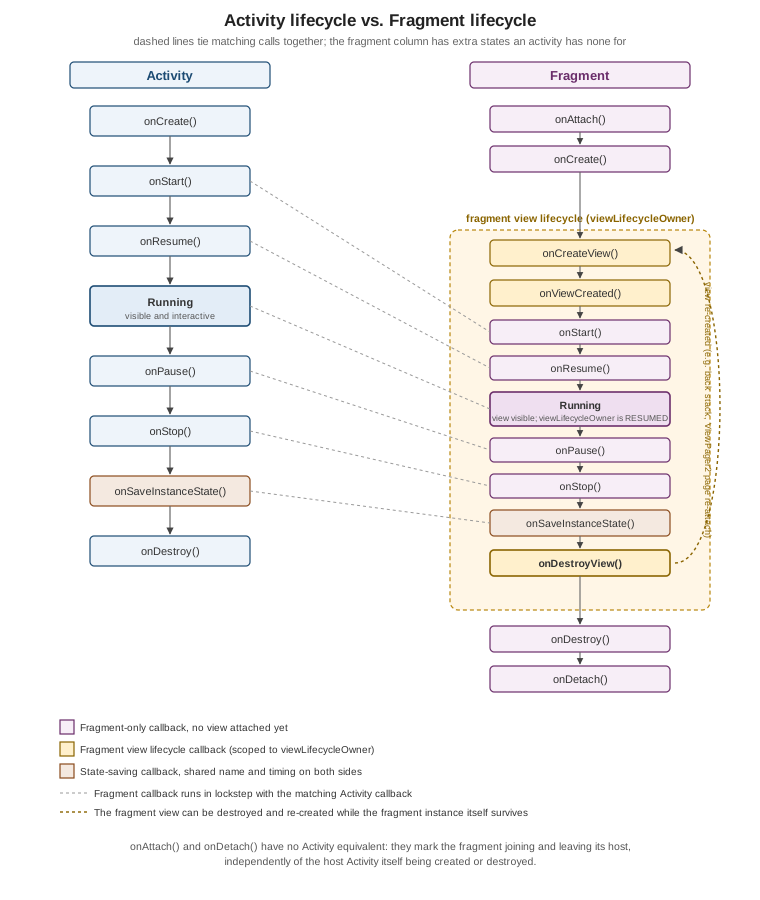
See Android Developers — Fragment Lifecycle and Activities and the Activity Lifecycle for the activity side in depth.
Fragment View Lifecycle: viewLifecycleOwner and Nulling the Binding
Because a fragment’s view can be destroyed (onDestroyView) while the fragment instance survives, a fragment
actually exposes two LifecycleOwner instances: the fragment’s own (this, spanning onAttach to
onDetach), and viewLifecycleOwner, a separate one that exists only between onCreateView/onViewCreated and
onDestroyView. Any observer that touches the view — a Flow collected with repeatOnLifecycle, a LiveData
observer that updates a TextView — must be scoped to viewLifecycleOwner, never to the fragment itself,
otherwise it keeps running (and holding a reference to a destroyed view) after onDestroyView:
// feature/trails/src/main/kotlin/com/example/trailmate/feature/trails/TrailListFragment.kt
class TrailListFragment : Fragment(R.layout.fragment_trail_list) {

    private var _binding: FragmentTrailListBinding? = null
    private val binding get() = _binding!!

    private val viewModel: TrailListViewModel by viewModels()
    private lateinit var adapter: TrailAdapter

    override fun onViewCreated(view: View, savedInstanceState: Bundle?) {
        super.onViewCreated(view, savedInstanceState)
        _binding = FragmentTrailListBinding.bind(view)

        adapter = TrailAdapter(
            onTrailClick = { trail -> openTrailDetail(trail.id) },
            onFavoriteClick = { trail -> viewModel.onToggleFavorite(trail.id) },
        )
        binding.trailRecyclerView.adapter = adapter

        viewLifecycleOwner.lifecycleScope.launch {
            viewLifecycleOwner.repeatOnLifecycle(Lifecycle.State.STARTED) {
                viewModel.uiState.collect { state ->
                    adapter.submitList(state.trails)
                }
            }
        }
    }

    override fun onDestroyView() {
        super.onDestroyView()
        _binding = null
    }

    private fun openTrailDetail(trailId: String) {
        val action = TrailListFragmentDirections.actionTrailListToTrailDetail(trailId)
        findNavController().navigate(action)
    }
}Two details make this pattern work correctly. First, viewModels() scopes TrailListViewModel to the
fragment, not the view — it is created once and survives onDestroyView/onCreateView cycles, which is
exactly what a ViewModel is for (see
ViewModel, Lifecycle-Aware Components, Coroutines and
Flow). Second, the nullable _binding backing property, cleared in onDestroyView, is the standard way to hold
a View Binding (Views, XML Layouts, View Binding and Material
Components) in a fragment: without it, the binding — and every view it wraps — would leak for as long as the
fragment instance itself survives, which on a back stack can be much longer than the view’s own lifetime. See
Common Pitfalls below for what goes wrong when either of these is skipped, and
Android Developers — Lifecycle-Aware
Components.
Adding Fragments: FragmentContainerView and commit {}
A fragment needs somewhere in the host’s layout to live. FragmentContainerView is the dedicated layout element
for that — a specialized FrameLayout that also correctly orders fragment transaction animations, which a
plain FrameLayout used to get wrong:
<!-- app/src/main/res/layout/activity_main.xml -->
<androidx.fragment.app.FragmentContainerView xmlns:android="http://schemas.android.com/apk/res/android"
    xmlns:app="http://schemas.android.com/apk/res-auto"
    android:id="@+id/nav_host_fragment"
    android:name="androidx.navigation.fragment.NavHostFragment"
    android:layout_width="match_parent"
    android:layout_height="match_parent"
    app:defaultNavHost="true"
app:navGraph="@navigation/nav_graph" />Declaring a fragment straight in XML with android:name (as above, for the navigation host) is the simplest
case: the FragmentManager inflates that fragment automatically the first time the layout is inflated. Adding a
fragment imperatively — the case that matters for anything conditional, or for swapping fragments later — goes
through the FragmentManager and a FragmentTransaction, built with the commit {} Kotlin DSL:
// feature/trails/src/main/kotlin/com/example/trailmate/feature/trails/TrailHostActivity.kt
if (savedInstanceState == null) {
    supportFragmentManager.commit {
        setReorderingAllowed(true)
        replace(R.id.fragment_container, TrailListFragment())
    }
}The if (savedInstanceState == null) guard is essential: without it, every configuration change would add
another TrailListFragment on top of the one the FragmentManager is already restoring on its own. add()
puts a fragment into the container without removing what is already there; replace() removes every fragment
currently in that container first. See
Android Developers — FragmentManager and
Android Developers — FragmentContainerView.
Fragment Transactions, the Back Stack and setReorderingAllowed
A FragmentTransaction is a set of operations (add, remove, replace, show, hide, attach, detach)
applied to a FragmentManager together, atomically. addToBackStack(name) additionally records the transaction
so the system Back gesture, or a manual popBackStack() call, can reverse it — this is what lets pressing Back
from TrailDetailFragment return to TrailListFragment without either fragment having to know about
navigation at all:
supportFragmentManager.commit {
    setReorderingAllowed(true)
    replace(R.id.fragment_container, TrailDetailFragment.newInstance(trailId))
    addToBackStack("trail_detail")
}setReorderingAllowed(true) should be on every transaction that touches the back stack. It lets the
FragmentManager optimize a sequence of transactions — for example, popping straight from screen C back to
screen A without briefly re-creating screen B’s view along the way — and it is required for fragment transition
animations to run in the correct order. Without it, some fragments the FragmentManager could otherwise skip
end up going through a spurious onCreateView/onDestroyView cycle. commit() schedules the transaction for
the next opportunity on the main thread; commitNow() runs it synchronously but cannot be combined with
addToBackStack. See
Android Developers — FragmentManager.
Child Fragments
A fragment can itself host other fragments through its own childFragmentManager, independent of the activity’s
supportFragmentManager. TrailMate uses this for TrailDetailFragment, which embeds a small
TrailPhotoGalleryFragment for the trail’s photos as a child rather than a sibling, so the gallery’s own
transactions (paging between photos) never interact with the outer navigation back stack:
// feature/trails/src/main/kotlin/com/example/trailmate/feature/trails/TrailDetailFragment.kt
override fun onViewCreated(view: View, savedInstanceState: Bundle?) {
    super.onViewCreated(view, savedInstanceState)
    if (savedInstanceState == null) {
        childFragmentManager.commit {
            replace(R.id.photo_gallery_container, TrailPhotoGalleryFragment())
        }
    }
}A child fragment’s lifecycle is bounded by its parent’s — it can never outlive its parent fragment’s own view,
and it is torn down whenever the parent’s view is. This is also the mechanism ViewPager2 and
FragmentStateAdapter use internally to manage one fragment per page. See
Android Developers — FragmentManager.
Arguments
A fragment is often re-created by the FragmentManager (process death, a configuration change while it is on
the back stack but not currently visible) without the code that originally added it running again, so passing
data through a constructor does not work reliably — fragments must have a public no-argument constructor, and
any custom constructor is not guaranteed to be called on restoration. arguments, a Bundle attached to the
fragment before it is added and survives that restoration, is the correct place instead:
// feature/trails/src/main/kotlin/com/example/trailmate/feature/trails/TrailDetailFragment.kt
class TrailDetailFragment : Fragment(R.layout.fragment_trail_detail) {

    private val trailId: String
        get() = requireArguments().getString(ARG_TRAIL_ID)
            ?: error("TrailDetailFragment requires ARG_TRAIL_ID")

    companion object {
        private const val ARG_TRAIL_ID = "trail_id"

        fun newInstance(trailId: String): TrailDetailFragment = TrailDetailFragment().apply {
            arguments = bundleOf(ARG_TRAIL_ID to trailId)
        }
    }
}A newInstance() companion factory function that builds the arguments bundle, as above, is the conventional
pattern; it keeps every caller from having to know the argument keys directly. When the Navigation component
manages the fragment instead (as nav_graph.xml does for TrailDetailFragment via Safe Args, see
Navigation with Fragments), Safe Args generates this same
arguments bundle and a type-safe accessor automatically, and newInstance() is not needed. See
Android
Developers — Fragment.setArguments().
The Fragment Result API
Two fragments that are siblings under the same FragmentManager — or a child and the fragment that hosted it — often need to pass a small result back, the way TrailDetailFragment returns the state of a "mark as
favorite" action to TrailListFragment after the user backs out. The Fragment Result API does this without
either fragment holding a direct reference to the other, which would defeat the point of the back stack
recreating fragments independently:
// feature/trails/src/main/kotlin/com/example/trailmate/feature/trails/TrailDetailFragment.kt
private fun setFavorite(trailId: String, isFavorite: Boolean) {
    setFragmentResult(
        REQUEST_FAVORITE_CHANGED,
        bundleOf(RESULT_TRAIL_ID to trailId, RESULT_IS_FAVORITE to isFavorite),
    )
}

private companion object {
    const val REQUEST_FAVORITE_CHANGED = "favorite_changed"
    const val RESULT_TRAIL_ID = "trail_id"
    const val RESULT_IS_FAVORITE = "is_favorite"
}// feature/trails/src/main/kotlin/com/example/trailmate/feature/trails/TrailListFragment.kt
override fun onViewCreated(view: View, savedInstanceState: Bundle?) {
super.onViewCreated(view, savedInstanceState)
parentFragmentManager.setFragmentResultListener(
"favorite_changed",
viewLifecycleOwner,
) { _, bundle ->
val trailId = bundle.getString("trail_id") ?: return@setFragmentResultListener
val isFavorite = bundle.getBoolean("is_favorite")
viewModel.onFavoriteChanged(trailId, isFavorite)
}
}setFragmentResultListener is registered against a LifecycleOwner — viewLifecycleOwner above — and the
listener only fires while that owner is at least STARTED; a result delivered while the listener is stopped is
held and delivered as soon as it resumes. FragmentManager clears a result once it has been delivered, so it is
safe to call setFragmentResult before the listening fragment even exists yet. This API replaced the older,
error-prone convention of a listener interface the child fragment cast its parent activity or fragment to in
onAttach. See Android Developers — Communicate
Between Fragments.
Sharing State with activityViewModels()
The Fragment Result API is the right tool for a one-off event, but TrailListFragment and
TrailDetailFragment also need to share continuous state — the currently selected trail on a dual-pane
layout, for instance. activityViewModels() scopes a ViewModel to the host activity instead of to the
fragment, so every fragment hosted by the same activity that requests the same ViewModel class gets the exact
same instance:
// feature/trails/src/main/kotlin/com/example/trailmate/feature/trails/TrailListFragment.kt
class TrailListFragment : Fragment(R.layout.fragment_trail_list) {
    private val sharedViewModel: TrailSelectionViewModel by activityViewModels()

    private fun onTrailSelected(trailId: String) {
        sharedViewModel.select(trailId)
    }
}// feature/trails/src/main/kotlin/com/example/trailmate/feature/trails/TrailDetailFragment.kt
class TrailDetailFragment : Fragment(R.layout.fragment_trail_detail) {
private val sharedViewModel: TrailSelectionViewModel by activityViewModels()
// collects sharedViewModel.selectedTrailId in onViewCreated
}Because activityViewModels() resolves against the host Activity's ViewModelStore, the shared instance
survives both fragments being destroyed and re-created independently of each other, and it is torn down only
when the activity itself finally is. by viewModels() (fragment-scoped) and by activityViewModels()
(activity-scoped) read almost identically but resolve to a completely different store — picking the wrong one
is a common source of a ViewModel silently not being shared where it was expected to be. See
ViewModel, Lifecycle-Aware Components, Coroutines and
Flow and
Android Developers — ViewModel Overview.
DialogFragment and FragmentFactory
A DialogFragment is a Fragment that additionally manages a Dialog window, giving it the full fragment
lifecycle (including surviving configuration changes and being restored from the back stack) that a plain
AlertDialog built and shown by hand does not have. TrailMate uses one to confirm deleting a downloaded trail:
// feature/trails/src/main/kotlin/com/example/trailmate/feature/trails/DeleteTrailDialogFragment.kt
class DeleteTrailDialogFragment : DialogFragment() {
    override fun onCreateDialog(savedInstanceState: Bundle?): Dialog {
        val trailName = requireArguments().getString(ARG_TRAIL_NAME)
        return MaterialAlertDialogBuilder(requireContext())
            .setTitle(R.string.delete_trail_title)
            .setMessage(getString(R.string.delete_trail_message, trailName))
            .setPositiveButton(R.string.delete) { _, _ ->
                setFragmentResult(REQUEST_DELETE_CONFIRMED, Bundle.EMPTY)
            }
            .setNegativeButton(R.string.cancel, null)
            .create()
    }

    companion object {
        const val REQUEST_DELETE_CONFIRMED = "delete_confirmed"
        private const val ARG_TRAIL_NAME = "trail_name"

        fun newInstance(trailName: String) = DeleteTrailDialogFragment().apply {
            arguments = bundleOf(ARG_TRAIL_NAME to trailName)
        }
    }
}It is shown with show(fragmentManager, tag) rather than a transaction built by hand, and it reports its
outcome through the Fragment Result API from The Fragment Result API rather than a callback interface. See
Android Developers — Dialogs.
FragmentFactory is the hook for fragments that genuinely need constructor arguments instead of arguments — most commonly, dependency injection with Hilt (@AndroidEntryPoint fragments are instantiated through Hilt’s own
factory automatically) or plain constructor injection in a test. Overriding FragmentManager.fragmentFactory
lets the app control exactly how a fragment class is instantiated when the FragmentManager needs a new one, for
example when restoring the back stack after process death:
// feature/trails/src/main/kotlin/com/example/trailmate/feature/trails/TrailFragmentFactory.kt
class TrailFragmentFactory(
    private val repository: TrailRepository,
) : FragmentFactory() {
    override fun instantiate(classLoader: ClassLoader, className: String): Fragment =
        when (loadFragmentClass(classLoader, className)) {
            TrailListFragment::class.java -> TrailListFragment(repository)
            else -> super.instantiate(classLoader, className)
        }
}A custom FragmentFactory must be assigned to the FragmentManager before super.onCreate() runs in the
host activity, so it is in place before the FragmentManager restores any fragment from a saved state. Hilt’s
own @AndroidEntryPoint fragments handle this wiring automatically and rarely need a hand-written
FragmentFactory at all; see
Dependency Injection with Hilt, Dagger and Koin. See
Android Developers — FragmentFactory.
Dual-Pane Layouts
Because a fragment is a self-contained unit that does not know which container it lives in, the same
TrailListFragment and TrailDetailFragment classes can be arranged into a list-detail layout on a large
screen or unfolded foldable, with both fragments visible side by side in two FragmentContainerView elements,
instead of the single-pane, one-fragment-at-a-time layout used on a phone. SlidingPaneLayout, from
androidx.slidingpanelayout, is the classic Views-based building block for this: it lays both containers out
side by side when there is room for both, and collapses to showing one at a time — sliding between them — when there is not, using the same fragment instances in either case. Choosing when to switch between the two
arrangements is exactly the responsibility of the window size classes covered on
Adaptive Layouts, Edge-to-Edge and Large
Screens; this page only notes that fragments are what makes a single set of screen classes reusable across both
arrangements in the first place. See
Android Developers — SlidingPaneLayout.
Common Pitfalls
View leaks from an unreleased binding. Holding a ViewBinding (or any other view reference) in a property
that is not cleared in onDestroyView leaks the entire view hierarchy for as long as the fragment instance
itself is retained — which, on a back stack, can be well past the point the view was actually destroyed. The
nullable-backing-property pattern in [Fragment View Lifecycle] is the fix, not an optional style choice.
Observing with the wrong lifecycle owner. Collecting a Flow or observing a LiveData against this
(the fragment) instead of viewLifecycleOwner keeps the observer alive across onDestroyView/onCreateView
cycles it should not survive, and it can crash by touching a view that no longer exists.
Committing a transaction after the state is saved. Calling commit() (or any transaction) after
onSaveInstanceState() has already run — for example, from an asynchronous callback that completes after the
host activity has been backgrounded — throws IllegalStateException: Can not perform this action after
onSaveInstanceState, because the FragmentManager can no longer guarantee the new fragment will be included in
the state it just saved. commitAllowingStateLoss() silences the exception but, as its name says, can silently
drop the transaction; the more robust fix is checking isStateSaved (or, better, structuring the work so it
completes before the state is saved, or holding it until the fragment resumes) rather than reaching for
commitAllowingStateLoss() by default.
Retaining a reference to the fragment from a background callback. A callback registered from
onViewCreated (a network callback, a location listener) that still holds this@TrailListFragment when it
fires after the fragment has been destroyed can crash or silently do nothing useful; scoping the callback’s
lifetime to viewLifecycleOwner.lifecycleScope, as the Flow collection in [Fragment View Lifecycle] does, is
what ties its lifetime to the fragment correctly.
Nested fragment transactions during onCreate. Adding a fragment from inside onCreate()/onViewCreated()
of another fragment that itself has not finished being added yet can throw or silently do nothing; scheduling it
with commit() (which runs on the next main-thread opportunity) rather than commitNow() from that point in the
lifecycle avoids it.
Testing fragments in isolation, on the JVM, with FragmentScenario is covered on
Unit Testing with JUnit, Mockito, MockK and
Robolectric.