UiBinder
|
This content was generated with the assistance of AI and should be verified against the official documentation before being relied on in production. The reference material consulted while preparing these pages is listed in the section bibliography. |
This page is written against GWT 2.13.1 (2026-06-19), gwt-maven-plugin 1.3.0 (net.ltgt.gwt.maven), JDK 21 running the compiler with -sourceLevel 17, the Jakarta Servlet 6 server of the Bookshelf scenario and the org.gwtproject:gwt BOM, checked on 2026-10-09.
UiBinder is client knowledge with a build-time half: you write XML templates and Java owner classes, the GWT compiler runs a generator (UiBinderGenerator) for every template during deferred binding, and the browser only ever runs the Java the generator wrote, compiled to JavaScript.
There is nothing to do on the server and no extra Maven dependency: the module com.google.gwt.uibinder.UiBinder is inherited through com.google.gwt.user.User (that module inherits com.google.gwt.user.UI, which inherits UiBinder), so every module that inherits User can use templates.
Every listing on this page was compiled by the 2.13.1 compiler in a probe module named com.example.ub that sits beside the Bookshelf scenario, loaded in headless Chrome 155 and inspected through its DOM; the generated Java, the DOM output and the compiler messages are quoted as they were printed.
UiBinder lets you write the layout of a view the way a web page is written, as HTML with GWT widgets sprinkled in, and keep the behaviour in a Java class. The compiler checks the two against each other, so a misspelled field, a missing handler target or a wrong type is a compile error instead of a blank screen. It is the technique the other user-interface pages of this section assume: the widgets, panels and event handlers described on the Widgets, Panels & Layout and Events & Handlers pages are what a template instantiates, the Custom Widgets & Composites page describes the classes you plug into templates, and the Cell Widgets and Editors pages reuse templates for rows and forms.
What UiBinder is, and what it is not
At heart a GWT application is a web page, and the most natural way to lay out a web page is HTML and CSS. UiBinder keeps that: the template is XML in the XHTML spirit, the widgets are elements, and the attributes become setter calls. The official Developer Guide lists seven benefits and they all hold in 2.13: productivity (copy and paste between templates), collaboration with designers who prefer markup, a gradual path from HTML mock-up to interactive UI, a clean split between aesthetics (template) and behaviour (Java class), thorough compile-time checking of cross-references in both directions, direct internationalization support, and cheaper UI because plain HTML elements can replace heavy widgets.
UiBinder is not a template engine in the Thymeleaf or JSP sense. There are no loops, no conditionals and only a very small expression language (field references in braces, covered below). It lays out a user interface; turning a list of books into rows is still the job of a widget, a cell or your own code.
| Concern | Building the UI in Java | Building it with UiBinder |
|---|---|---|
Structure |
|
Nested XML elements that look like the resulting HTML |
Event handlers |
An anonymous |
|
Static markup |
Many |
One HTML string that the browser parses in one step |
Styling |
|
|
Mistakes |
Often found at run time |
A field, handler, style or attribute that does not match is a compile error |
Translation |
|
|
The book on which part of this section is based (Hanson and Tacy, 2007) predates UiBinder by two years: it builds every user interface in Java code, one widget and one add call at a time, because declarative UI arrived only with GWT 2.0 on 2009-12-09.
Everything on this page is therefore the modern replacement for the code-built screens of that book (its layout, widget and form chapters), not a topic the book covers.
Source: GWT — UiBinder: Overview
The pair: an owner class and a template
A UiBinder view is two files: a Java owner class and an XML template.
A third thing, the generated *_BinderImpl class, exists only inside the compiler and the compiled JavaScript.
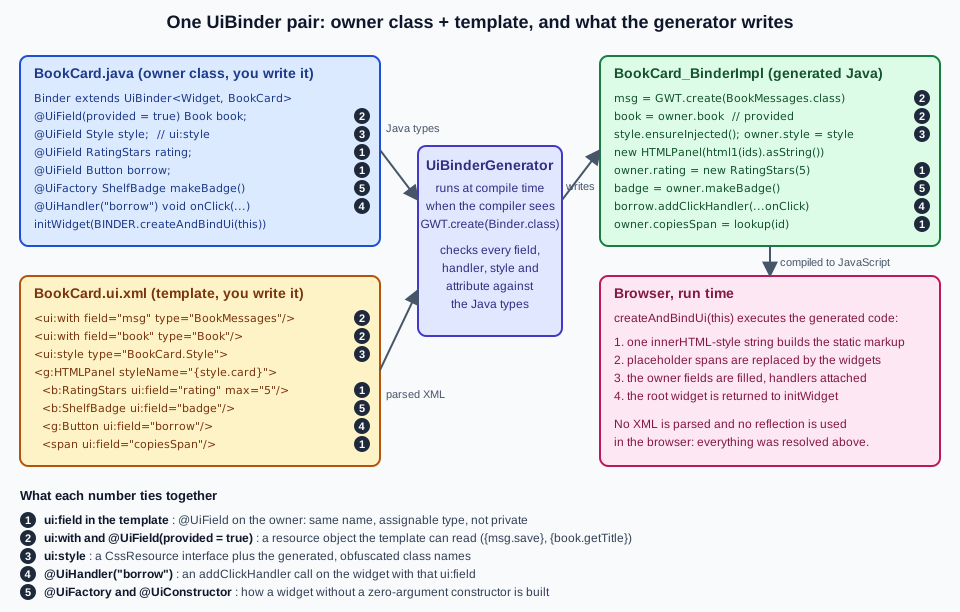
UiBinder<U, O> and GWT.create
The generator is attached to one interface.
UiBinder<U, O> has a single method, U createAndBindUi(O owner), and two type parameters:
-
Uis the type of the root object of the template and of the valuecreateAndBindUireturns: a DOM element type such asDivElementfor a template whose root is an HTML element, orWidget(or a specific widget class) for a template whose root is a widget. The Javadoc says "typically a subclass of Element or UIObject". -
Ois the owner type, the class whose@UiFieldfields are to be filled and whose@UiHandlermethods are to be called.
You declare a sub-interface (conventionally a nested Binder), ask the compiler for an implementation with GWT.create, and call createAndBindUi(this) once per instance:
public class BookCard extends Composite {
  interface Binder extends UiBinder<Widget, BookCard> {}

  private static final Binder BINDER = GWT.create(Binder.class);

  public BookCard(Book book) {
    this.book = book;
    initWidget(BINDER.createAndBindUi(this)); // fills the @UiField fields, returns the root
  }
}GWT.create(Binder.class) is deferred binding (see Deferred Binding & Generators): the rule in UiBinder.gwt.xml says <generate-with class="com.google.gwt.uibinder.rebind.UiBinderGenerator"> for every type assignable to UiBinder (and a second, identical rule for UiRenderer, covered below).
The generator runs while the compiler resolves each binder, so in the compiled JavaScript the call is a plain new of the generated BookCard_BinderImpl class.
That class keeps no per-view state (every createAndBindUi call builds its own helper object), so one binder in a static final field is shared by all instances of the owner.
Asking for the interface itself, GWT.create(UiBinder.class), fails:
[ERROR] You must use a subtype of UiBinder in GWT.create(). E.g.,
  interface Binder extends UiBinder<Widget, MyClass> {}
  GWT.create(Binder.class);
Where the template is found
The template is a classpath resource that ends in .ui.xml.
By default its name comes from the enclosing class of the binder when the binder is nested (BookCard.Binder reads .../BookCard.ui.xml) and from the binder’s own name when it is a top-level interface (BookBinder reads .../BookBinder.ui.xml), in the same package.
The Javadoc of UiBinder states this rule for the owner class (bar.baz.Foo is sought in /bar/baz/Foo.ui.xml); the 2.13.1 UiBinderGenerator source shows the nested-binder rule.
In a Maven project put the template under src/main/resources in the same package as the class, which is where the Bookshelf keeps ShellView.ui.xml and BookEditor.ui.xml.
When a missing template is the problem, the message names the exact path that was searched:
[ERROR] Unable to find resource: com/example/ub/err/e28_template_missing/Owner.ui.xmlThe root element and the two namespaces
Every template has the same skeleton: a root ui:UiBinder element in the namespace urn:ui:com.google.gwt.uibinder, plus one namespace per Java package whose classes the template uses.
The prefix is free; ui and g are the convention.
<!DOCTYPE ui:UiBinder SYSTEM "http://dl.google.com/gwt/DTD/xhtml.ent">
<ui:UiBinder xmlns:ui="urn:ui:com.google.gwt.uibinder"
             xmlns:g="urn:import:com.google.gwt.user.client.ui"
             xmlns:b="urn:import:com.example.ub.client.widgets">
  <g:Label text="Hello"/>
</ui:UiBinder>-
xmlns:g="urn:import:com.google.gwt.user.client.ui"makes every class of that package usable as an element whose name is the Java class name:<g:Label>,<g:Button>,<g:HTMLPanel>. -
The
urn:import:namespace works for any package, including your own widgets (b:RatingStarsabove). A name that is not a class of that package is a compile error:No class matching "Nope" in urn:import:com.google.gwt.user.client.ui: <g:Nope> (:2). -
The root must be in the
uinamespace and namedUiBinder, and it must contain exactly one child element (the root of the view) after the resource elements. Two roots produceElement may only contain a single child element, but found <g:Label> and <g:Label>.: <ui:UiBinder> (:1). -
The
(:2)at the end of such messages is the line of the template, so the generator points at the faulty element. -
The
DOCTYPEis optional and only needed when the template uses named HTML entities. XML does not knowThe entity "nbsp" was referenced, but not declared.. The compiler does not download the file at that URL: a copy of the entity definitions (xhtml.ent) is built intogwt-userand resolved by the generator, although an IDE may fetch it.
Source: GWT — UiBinder: HTML entities
A template without widgets
The smallest useful template contains HTML only and lets the owner read or write a few elements.
It shows the bare mechanism and is the cheapest form: no widget is created.
The root type U is then a DOM element type (see DOM & Elemental2 for com.google.gwt.dom.client).
<ui:UiBinder xmlns:ui="urn:ui:com.google.gwt.uibinder">
  <div>
    Borrowed by <span ui:field="who"/>.
  </div>
</ui:UiBinder>
public class BookLine {
interface Binder extends UiBinder<DivElement, BookLine> {}
private static final Binder BINDER = GWT.create(Binder.class);
@UiField SpanElement who;
private final DivElement root;
public BookLine() {
root = BINDER.createAndBindUi(this);
}
public Element getElement() { return root; }
public void setWho(String name) { who.setInnerText(name); }
}Source: GWT — UiBinder: Hello World
After line.setWho("Ada") and Document.get().getElementById("dom").appendChild(line.getElement()) the page contained exactly:
<div id="dom"><div>Borrowed by <span>Ada</span>.</div></div>The object is not a widget: it has no onAttach, no handlers and no add method, so it can only go into the page through the DOM (appendChild) or into a widget that accepts an element.
The id the generator used to find the span is removed after the lookup, which is why the output has no ids.
The owner could just as well extend UIObject, Widget or Composite; the Developer Guide says there are no restrictions on the owner’s superclass.
One restriction does apply: fields marked @UiField must not be private.
Widgets in a template
A template becomes useful once widgets appear as elements.
Declaring one is a call to GWT.create(<widget class>) in the generated code, so widgets are normally created through their zero-argument constructor and then configured by the attributes.
<g:Button ui:field="borrow" text="Borrow"/>
<g:ListBox visibleItemCount="1"/>
<g:Label styleName="{style.title}" text="Dune"/>Attributes are setter calls
An attribute name="value" on a widget element becomes a call to setName(value) on the widget; a visibleItemCount="1" is ListBox.setVisibleItemCount(1).
Every JavaBean-style setter of the widget can be used, and the generator converts the string to the setter’s parameter type.
The parsers registered in AttributeParsers (2.13.1 source) cover the following parameter types:
| Setter parameter | Accepted value | Example |
|---|---|---|
|
Text, with |
|
|
A literal of that type or a field reference |
|
An |
The constant name |
|
|
A length such as |
|
|
Two integers |
attributes that map to two-argument setters |
|
The constant name such as |
|
|
A URL string or a reference (also in a plain HTML |
|
A value that cannot be parsed is a compile error that names the element:
[ERROR] Cannot parse value: "many" as type int: <g:ListBox visibleItemCount='many'> (:2)
[ERROR] Class Label has no appropriate setFoo() method: <g:Label foo='x'> (:2)
Two attributes are available on every widget because they come from UIObject: styleName replaces the widget’s own style names (like setStyleName) and addStyleNames adds names without clobbering the built-in ones (like addStyleName).
The Developer Guide stresses that addStyleNames is plural.
Text and HTML bodies
A widget that implements HasText accepts text as its body (<g:Label>Hello</g:Label>) and a widget that implements HasHTML accepts markup (<g:HTML><ul><li>Sidebar</li></ul></g:HTML>).
Other panels do not accept stray text or markup; they accept child widgets.
The generator refuses both mistakes with these messages:
[ERROR] Illegal child <b> in a text-only context. Perhaps you are trying to use unescaped HTML where text is required, as in a HasText widget?: <g:Label> (:2)
[ERROR] Unexpected text in element: "Hello": <g:FlowPanel> (:2)
When markup is needed inside a widget tree use an HTMLPanel or a HasHTML widget such as <g:HTML>, as the next section explains.
Panels and their organizational elements
Any panel that implements HasWidgets can hold child widgets in a template.
Some panels need special child elements, documented in each widget’s Javadoc.
DockLayoutPanel, the root of the Bookshelf shell, gathers its children in north, south, east, west and center elements:
<g:DockLayoutPanel unit="EM">
  <g:north size="3">
    <g:Label text="{msg.appTitle}" styleName="{res.css.header}"/>
  </g:north>
  <g:west size="12">
    <g:FlowPanel styleName="{res.css.nav}">
      <g:Anchor ui:field="catalogLink" text="{msg.catalogue}"/>
      <g:Anchor ui:field="adminLink" text="{msg.admin}"/>
    </g:FlowPanel>
  </g:west>
  <g:center>
    <g:SimpleLayoutPanel ui:field="content"/>
  </g:center>
</g:DockLayoutPanel>
Source: GWT — UiBinder: Using Panels
This is the real ShellView.ui.xml of the Bookshelf client (the layout panel itself is covered on the panels-and-layout page).
Elements such as north and center do not represent runtime objects, which is why their names start with a lowercase letter: other special non-object elements follow the same convention (header, item, tab, layer).
They cannot carry a ui:field, because there would be nothing to put in the field.
With 2.13.1 the compiler does not complain about a stray ui:field on north unless the owner declares a field for it; then you get the usual Template ... has no ui:field attribute for ...Owner#n error.
The element names used by each panel are checked too: the DockLayoutPanelParser source (2.13.1) rejects any other child with Child must be one of <g:north>, <g:south>, <g:east>, <g:west> or <g:center>, but found ... and allows only one center (message from the source, not reproduced).
ui:field and @UiField
ui:field="name" on an element gives the object a name; a field with the same name in the owner class, annotated @UiField, receives it when createAndBindUi runs.
The element can be a widget, a DOM element in an HTMLPanel or in a DOM-only template, a ui:style or a ui:with resource.
@UiField(provided = true) final Book book;   // the owner creates it
@UiField Style style;                          // the ui:style block
@UiField RatingStars rating;                   // a widget
@UiField Button borrow;
@UiField SpanElement copiesSpan;               // a plain element inside the HTMLPanel
@UiField LazyDomElement<DivElement> note;      // a lazily resolved element
The rules, with the generator messages that enforce them:
-
The names must match. A
@UiFieldwhose name appears nowhere in the template is an error (the other direction is allowed: a template element with aui:fieldthat the owner does not declare is simply not bound):Template com/example/.../Owner.ui.xml has no ui:field attribute for com.example....Owner#ghost. -
The type must be assignable. The field type must be the element’s type or a supertype. A mismatch is reported by the Java compiler on the generated class, not by the generator:
Line 57: Type mismatch: cannot convert from Label to Button. Interfaces such asHasTextorHasClickHandlersare valid field types when the widget implements them. -
The field must not be private. The generated
BinderImplis a different class in the same package and assigns the field directly:Line 57: The field Owner.name is not visible. Use package-private (the default),protectedorpublic. -
Names are unique per template.
Duplicate declaration of field name. -
Plain HTML elements inside an
HTMLPanelor a DOM-only template map to thecom.google.gwt.dom.clientelement types (SpanElement,DivElement,InputElement, …). Declaring the field with a widget type fails withType mismatch: cannot convert from SpanElement to Label.
Source: GWT — UiBinder: Hello World
provided = true
@UiField(provided = true) reverses the direction: the owner creates the object and the template only uses it.
The Javadoc says that a provided field "must be filled before createAndBindUi is called".
The field therefore has to be assigned before the call, normally from a constructor argument, which makes it the dependency-injection-friendly form:
public class BookCard extends Composite {
  @UiField(provided = true) final Book book;

  public BookCard(Book book) {
    this.book = book;                          // before createAndBindUi
    initWidget(BINDER.createAndBindUi(this));
  }
}
The matching template declares the same name with ui:with (the declared type must match the field):
<ui:with field="book" type="com.example.ub.client.Book"/>
<g:Label text="{book.getTitle}"/>
The generated code reads the field and checks it with an assert, which is removed from production JavaScript (the compiler flag -checkAssertions is off by default), so a null surfaces later as a NullPointerException in the generated code, and in Development Mode or a GWTTestCase run with assertions enabled with the first message:
book = owner.book;
assert book != null : "UiField book with 'provided = true' was null";HTML templates, widget templates and HTMLPanel
A template whose root is an HTML element produces a DOM element (U is an Element type, as in BookLine).
A template whose root is a widget produces a widget.
The interesting case is a widget template that mixes free HTML and widgets; the widget for that is HTMLPanel, and UiBinder works with it very well.
The official page puts it plainly: whenever you want HTML markup inside a widget hierarchy you need an HTMLPanel instance (or the HTML widget when it is only markup, no child widgets).
<g:HTMLPanel styleName="{style.card}">
  <p>
    <ui:text from="{msg.copies}"/>: <span ui:field="copiesSpan"/>
  </p>
  <b:ShelfBadge ui:field="badge"/>
  <g:Button ui:field="borrow" text="{msg.save}"/>
</g:HTMLPanel>
How the generator handles it is visible in the generated Java.
It does not create a Label, a Button and so on by concatenating HTML.
It writes the static HTML once as a SafeHtmlTemplates method with a placeholder <span id='...'></span> where each child widget goes, builds the HTMLPanel from that string (a single parse by the browser) and then replaces each placeholder with its widget:
interface Template extends SafeHtmlTemplates {
  @Template("<span id='{0}'></span> <p> " + "{1}" + ": <span id='{2}'></span> <span id='{3}'></span> </p> <span id='{4}'></span> <span id='{5}'></span> <a href='{6}'>" + "{7}" + "</a> <div id='{8}'></div>")
  SafeHtml html1(String arg0, String arg1, String arg2, String arg3, String arg4, String arg5, SafeUri arg6, String arg7, String arg8);
}
final HTMLPanel f_HTMLPanel1 = new HTMLPanel(template_html1().asString());
f_HTMLPanel1.setStyleName("" + get_style().card() + "");
...
f_HTMLPanel1.addAndReplaceElement(get_f_TitledPanel2(), get_domId0Element().get());
f_HTMLPanel1.addAndReplaceElement(get_badge(), get_domId3Element().get());
f_HTMLPanel1.addAndReplaceElement(get_borrow(), get_domId4Element().get());The consequences are practical:
-
Static markup costs one
innerHTML-style parse, not one DOM call per element. This is the efficiency argument of the official page: browsers build DOM structures faster from big strings than from many API calls. -
Every value that reaches that string goes through
SafeHtmlUtils.htmlEscapein the generatedTemplateImpl(verified in the generated source), so text coming fromui:text,msg.copies()or a field reference cannot inject markup. -
The ids are unique (
Document.get().createUniqueId()) and removed after lookup, so you never see them in the final DOM. -
Elements marked with
ui:fieldthat are not widgets (thecopiesSpan) are looked up once when the panel is built, inside a temporary attach to the DOM.
For DOM-only and widget templates alike, the root can carry styleName and addStyleNames (widget roots) or class (element roots).
<div class="GF4HBSC"><div><div class="panel-header"><div class="GF4HBSF">Dune</div></div><div class="panel-body"><div class="gwt-Label" title="Author">Frank Herbert</div><div class="rating" title="Rating">****-</div></div></div> <p> Copies: <span class="GF4HBSD">1</span> <img src="data:image/png;base64,iVBORw0..." width="16" height="16" class="gwt-Image"> </p> <div class="gwt-Label GF4HBSE">Shelf B-1</div> <button type="button" class="gwt-Button">Save</button> <a href="data:text/plain;base64,TG9hbiB0ZXJtczogMjggZGF5cy4K">Terms of loan</a> <div>Clicked</div></div>That is the real output of the BookCard worked example below (the base64 payloads are shortened).
The class names such as GF4HBSC are obfuscated CSS class names (the ui:style section explains them).
Event handlers: @UiHandler
Writing an anonymous ClickHandler for every button is the most tedious part of a code-built UI.
With UiBinder you annotate a method of the owner and name the ui:field of the widget:
@UiHandler("borrow")
void onBorrow(ClickEvent event) {
  note.get().setInnerText("Clicked");
}

@UiHandler({"borrow", "badge"})   // one method for several widgets
void onAny(ClickEvent event) { ... }The generator (HandlerEvaluator) finds the event type from the method’s parameter, looks up the matching addXxxHandler method on each named widget and writes the anonymous handler class that calls the owner.
This is the real output for the borrow and badge fields of the worked example:
final ClickHandler handlerMethodWithNameVeryUnlikelyToCollideWithUserFieldNames1 = new ClickHandler() {
  public void onClick(ClickEvent event) {
    owner.onClick((ClickEvent) event);
  }
};
...
borrow.addClickHandler(handlerMethodWithNameVeryUnlikelyToCollideWithUserFieldNames1);
badge.addClickHandler(handlerMethodWithNameVeryUnlikelyToCollideWithUserFieldNames1);
The rules, each backed by a message from the 2.13.1 generator:
-
The method must not be
private:Method 'h' cannot be private.(package-private is the convention). -
It has one parameter, a
GwtEventsubtype (ClickEvent,KeyDownEvent,ValueChangeEvent<String>; handlers for parameterized event types have worked since 2.6). -
The names in the annotation must be names of
ui:fieldelements of the template:Method 'h' can not be bound. You probably missed ui:field='nope' in the template. -
The widget must have the matching registration method:
Field 'name' does not have an 'addValueChangeHandler' method associated.for aLabel. -
Only widgets, not DOM elements. A
@UiHandler("who")on a<span ui:field="who"/>fails withField 'who' does not have an 'addClickHandler' method associated.. To react to a click on plain markup, make it a widget (<g:InlineLabel>) or useEvent.sinkEventsin a custom widget (see the events-and-handlers and custom-widgets-and-composites pages). -
The handler registration is not exposed: the generated handler lives as long as the widget does, so the advice to remove hand-written registrations in
onUnloaddoes not apply to annotated handlers.
The same annotation has a second form inside cells, where the method receives extra parameters; see the UiRenderer section.
Widgets that need arguments: @UiConstructor, @UiFactory, provided
Every widget in a template is created by GWT.create, which needs a zero-argument constructor.
A widget without one fails the compile:
[ERROR] com.example.ub.client.widgets.ShelfBadge has no default (zero args) constructor. To fix this, you can define a @UiFactory method on the UiBinder's owner, or annotate a constructor of ShelfBadge with @UiConstructor.There are three ways out, and the message names the first two.
| Mechanism | Where it goes | Use it when |
|---|---|---|
|
On one constructor of the widget class. Its parameter names become attributes of the element. |
You own the widget and the arguments are simple values (numbers, strings, enums, field references). |
|
On a method of the owner class (name irrelevant, may be |
You do not own the widget, or the arguments come from the owner’s state. |
|
On a field of the owner that the owner assigns before |
One specific instance (a shared one, a test double, an injected one) must appear. |
@UiConstructor
The RatingStars widget of the Bookshelf has one constructor, RatingStars(int max), annotated @UiConstructor:
public class RatingStars extends Label {
  private final int max;

  @UiConstructor
  public RatingStars(int max) {
    this.max = max;
    setStyleName("rating");
    setValue(0);
  }
  ...
}
<b:RatingStars ui:field="rating" max="5"/>The attribute is named after the parameter (max) and is required: leaving it out gives <b:RatingStars> missing required attribute(s): max: <b:RatingStars> (:2).
The generated code is new RatingStars((int)get_MAX_STARS()): the value was parsed to the parameter’s type.
A class may have only one @UiConstructor (the source reports X has more than one constructor annotated with @UiConstructor).
Parameter names are read from the source, so the widget’s source must be on the GWT source path (a library that ships only classes needs its sources JAR on the classpath, as for all GWT code).
@UiFactory
ShelfBadge(String shelf) is a class the template cannot construct on its own, so the owner provides a factory:
@UiFactory
ShelfBadge makeBadge() {
  return new ShelfBadge("B-" + book.getCopies());
}
<b:ShelfBadge ui:field="badge" addStyleNames="{style.ok}"/>The generated line is final ShelfBadge badge = owner.makeBadge();.
The factory’s return type decides which elements it serves: the 2.13.1 source rejects two factories for the same type with Duplicate factory in class BookCard for type ShelfBadge (message from the source, not reproduced).
If the factory method has parameters they become required attributes of the element, like a @UiConstructor.
The factory is called on the owner, so it can use anything the owner already has; set the owner’s fields before calling createAndBindUi, because the factory runs inside it (the book field above is assigned first for that reason).
Custom parent widgets: @UiChild
A panel written by you can define which child elements it accepts.
Annotating a method with @UiChild makes it callable from the template as a child element of the panel’s tag.
The Bookshelf TitledPanel has a header slot with a limit of one and any number of captioned items:
public class TitledPanel extends Composite {
  private final SimplePanel header = new SimplePanel();
  private final FlowPanel body = new FlowPanel();
  ...
  @UiChild(tagname = "header", limit = 1)
  public void setHeader(Widget w) { header.setWidget(w); }

  @UiChild(tagname = "item")
  public void addItem(Widget w, String caption) {
    w.setTitle(caption);
    body.add(w);
  }
}
<b:TitledPanel>
<b:header><g:Label text="{book.getTitle}" styleName="{style.title}"/></b:header>
<b:item caption="Author"><g:Label text="{book.getAuthor}"/></b:item>
<b:item caption="Rating"><b:RatingStars ui:field="rating" max="5"/></b:item>
</b:TitledPanel>The generator turns each child element into a call:
f_TitledPanel2.setHeader(get_f_Label3());
f_TitledPanel2.addItem(get_f_Label4(), "Author");
f_TitledPanel2.addItem(get_rating(), "Rating");
The rules, from OwnerFieldClass and UiChildParser (2.13.1) and reproduced:
-
The element name is the annotation’s
tagname. Without atagnamethe method name must start withadd, and the tag is the rest in lowercase (addItemwould be<b:item>); otherwise the compile fails with<method> must either specify a UiChild tagname or begin with "add". -
The method takes the child widget as the first parameter; every further parameter is an attribute of the child tag (
caption). -
limitcaps the uses of one tag: a secondheadergivesCan only use the @UiChild tag header 1 time(s).: <g:Label> (:2). The default-1means no limit. -
Each child tag holds exactly one element, which must come from a
urn:importnamespace and be assignable to the first parameter’s type. -
@UiChildmethods are found in the class and its superclasses, so a subclass ofTitledPanelinherits the tags.
Source: GWT Javadoc — UiChild
One owner, several templates: @UiTemplate
By default a binder reads the template named after its enclosing class.
@UiTemplate("Name.ui.xml") on the binder interface points it elsewhere, which allows several templates for one owner (the Developer Guide gives the example of themes, and warns that it is a demonstration, not a proven theming pattern).
public class BookView extends Composite {
  @UiTemplate("CompactBookView.ui.xml")
  interface CompactBinder extends UiBinder<Widget, BookView> {}

  @UiTemplate("DetailedBookView.ui.xml")
  interface DetailedBinder extends UiBinder<Widget, BookView> {}

  private static final CompactBinder COMPACT = GWT.create(CompactBinder.class);
  private static final DetailedBinder DETAILED = GWT.create(DetailedBinder.class);

  @UiField Label title;

  private BookView(UiBinder<Widget, BookView> binder) {
    initWidget(binder.createAndBindUi(this));
  }

  public static BookView compact() { return new BookView(COMPACT); }

  public static BookView detailed() { return new BookView(DETAILED); }
  ...
}
<!-- CompactBookView.ui.xml -->
<ui:UiBinder xmlns:ui="urn:ui:com.google.gwt.uibinder" xmlns:g="urn:import:com.google.gwt.user.client.ui">
<g:Label ui:field="title" addStyleNames="compact"/>
</ui:UiBinder>
<!-- DetailedBookView.ui.xml -->
<ui:UiBinder xmlns:ui="urn:ui:com.google.gwt.uibinder" xmlns:g="urn:import:com.google.gwt.user.client.ui">
<g:HTMLPanel addStyleNames="detailed">
<h3><g:Label ui:field="title"/></h3>
</g:HTMLPanel>
</ui:UiBinder>The probe produced two different DOM trees from the same owner:
<div id="tpl"><div class="gwt-Label compact">Compact view</div><div class="detailed"><h3><div class="gwt-Label">Detailed view</div></h3></div></div>Each template must contain every @UiField of the owner (a @UiField missing from one of the templates is the no ui:field attribute error for that binder).
The name rules: the value must end with .ui.xml, otherwise Template file name must end with .ui.xml; a value without dots is relative to the binder’s package, and a dotted value (com.example.views.Compact.ui.xml) is a package-qualified path.
The generated classes are named after the binder (BookView_CompactBinderImpl, BookView_DetailedBinderImpl), which also names the messages class when the template is internationalized.
Resources in a template
The elements ui:with, ui:style, ui:image, ui:data and ui:import declare resources.
They must be direct children of the root ui:UiBinder element, before the root widget; placed elsewhere they are treated as widget children and rejected, for example Expecting only widgets in <g:FlowPanel>: <ui:style> (:2).
A resource with a field attribute is an object in the template that other attributes can read through a field reference.
Field references
A field reference is written in braces: {res.logo}, {msg.copies}, {book.getTitle}.
The first part is the field name (the field attribute of a resource, or a ui:field of the template); every further part is a method call without arguments, written without parentheses and with the exact method name.
This is not JavaBean property syntax.
{book.title} calls a method named title(), and since Book has getTitle() the 2.13.1 generator stops with:
[ERROR] Could not find no-arg method named title in type com.example.ub.client.BookFor a Messages interface or a CssResource, whose accessors are named after the key (copies(), card()), the shorthand reads naturally ({msg.copies}, {style.card}); for a bean write the getter’s real name ({book.getTitle}).
A reference to a field that was not declared reports in {msg.copies}, no field named msg: <g:Label text='{msg.copies}'> (:2) (see the pitfalls table).
References also work in plain HTML attributes (class="{style.card}", href="{terms.getSafeUri}") and in text through ui:text and ui:safehtml.
ui:with
ui:with declares a field of any type, which the generator instantiates with GWT.create(<type>).
That makes Messages interfaces, ClientBundle interfaces and any class with a default constructor (or an interface with a deferred-binding rule) available as {msg.save}, {res.style.banner}:
<ui:with field="msg" type="com.example.ub.client.widgets.BookMessages"/>
<g:Button ui:field="borrow" text="{msg.save}"/>
The generated code is msg = (BookMessages) GWT.create(BookMessages.class); and borrow.setText("" + get_msg().save() + "");.
Nothing requires the type to implement ClientBundle.
When the owner has a @UiField(provided = true) of the same name, the field is taken from the owner instead of being created (the book example above).
A type that cannot be found gives No such type com.example.Nope: <ui:with field='x' type='com.example.Nope'> (:2).
A resource that needs constructor arguments takes them from a ui:attributes child, whose attributes are matched to the constructor parameters by name; the constructor must be marked @UiConstructor, and an enum argument is given by its constant name:
public class Fancy {
  public enum Mode { LIGHT, DARK }

  private final BookMessages msg;
  private final Mode mode;

  @UiConstructor
  public Fancy(BookMessages msg, Mode mode) {
    this.msg = msg;
    this.mode = mode;
  }

  public String label() { return msg.save() + " (" + mode + ")"; }
}
<ui:with field="msg" type="com.example.ub.client.widgets.BookMessages"/>
<ui:with field="fancy" type="com.example.ub.client.widgets.Fancy">
<ui:attributes mode="DARK" msg="{msg}"/>
</ui:with>
<g:Label text="{fancy.label}"/>The label rendered Save (DARK).
Only a single ui:attributes child is allowed (<ui:with> can only contain a single <ui:attributes> child Element.), and the attribute may refer to an earlier resource (msg="{msg}").
ui:style
ui:style writes CSS where it is used.
The generator builds a CssResource interface and a ClientBundle for it, so a misspelled class is caught at compile time and the real class names are obfuscated, which gives each template its own CSS namespace.
<ui:style type="com.example.ub.client.widgets.BookCard.Style">
  .card { border: 1px solid #999; padding: 8px; }
  .title { font-weight: bold; }
  .low { color: #b00020; }
  .ok { color: #2e7d32; }
</ui:style>
<g:HTMLPanel styleName="{style.card}"> ... </g:HTMLPanel>-
fieldnames the resource (the default isstyle). Several blocks may coexist (<ui:style field="otherStyle">), each with its own.pretty. -
typeis aCssResourcesub-interface written by you. Without it the interface is generated and you cannot read the class names from Java. With it you can inject the resource (@UiField Style style;) and callstyle.low(); the template may define more classes than the interface lists, but Java only sees the ones in the interface. -
srcpoints to a CSS file relative to the template, so real projects keep CSS out of the XML.importpulls in otherCssResourcetypes. -
gss="true"selects GSS syntax for that block. It requiresCssResource.enableGssto be true, otherwiseUiBinder file has attribute gss="true", but GSS is disabled globally; the propertyCssResource.gssDefaultInUiBinder(default false) makes GSS the default for all blocks. GSS is the subject of the Styling: CSS & GSS page. -
Injection is automatic for
ui:style: the generated code callsstyle.ensureInjected()and the rules appear in astyleelement of the pagehead.
The class names are obfuscated by default (GF4HBSC above).
Setting the configuration property CssResource.style to pretty in the module (<set-configuration-property name="CssResource.style" value="pretty"/>) makes them readable, which is handy while debugging; the probe printed names such as .GCO54G-C-com-example-ub-client-widgets-BookCard_BinderImpl_GenCss_style-card.
A misspelled class in a reference is a compile error: Could not find no-arg method named prettty in type com.google.gwt.resources.client.CssResource for {style.prettty} on an untyped block.
Programmatic access (the Developer Guide’s MyFoo.MyStyle example) is the typed @UiField Style style; above: the generator assigns owner.style = style;.
An external ClientBundle brought in with ui:with is not injected for you.
This is the pitfall the compile step does not catch: the class name is applied but the rules are never added to the page unless the owner calls ensureInjected() on the style:
public interface Res extends ClientBundle {
  interface Style extends CssResource {
    String banner();
  }

  @Source("res.css")
  Style style();
}

public class Banner extends Composite {
  @UiField(provided = true) final Res res = GWT.create(Res.class);

  public Banner(boolean inject) {
    if (inject) {
      res.style().ensureInjected();   // without this the rule is never added to the page
    }
    initWidget(BINDER.createAndBindUi(this));
  }
}
The probe loaded the same page twice and counted the rule Res-Style-banner { color: navy } in the final DOM: 0 occurrences without ensureInjected(), 1 with it (the div had the class in both cases).
ui:image and ui:data
These two resource elements wrap ClientBundle methods and are listed next to ui:style by the Developer Guide ("the same is true of the other resource elements"), though their attributes are documented only in the generator source (UiBinderParser, 2.13.1):
<ui:image field="logo" src="logo.png"/>
<ui:data field="terms" src="terms.txt" mimeType="text/plain"/>
...
<g:Image resource="{logo}"/>
<a href="{terms.getSafeUri}"><ui:text from="{msg.terms}"/></a>-
ui:imagecreates anImageResource(fieldrequired;srcoptional and relative to the template;flipRtlandrepeatStyleoptional; a badrepeatStylegivesBad repeatStyle value ...). Use it as<g:Image resource="{logo}"/>; the probe’s small image was embedded in the page as a data URI. -
ui:datacreates aDataResource(fieldandsrcrequired;mimeTypeanddoNotEmbedoptional).getSafeUri()returns aSafeUri.
In the probe the 16 by 16 PNG and the 21-byte text file were small enough to be inlined, so the DOM held a data URI for each:
<img src="data:image/png;base64,iVBORw0KGgo..." width="16" height="16" class="gwt-Image">
<a href="data:text/plain;base64,TG9hbiB0ZXJtczogMjggZGF5cy4K">Terms of loan</a>A ui:data or ui:image without its required attribute fails with Missing required attribute "src".
The full story of bundling, spriting and inlining belongs to the ClientBundle & Images page.
ui:import
ui:import makes a static constant of a class available as a field, so a template can read a number or string defined in Java:
<ui:import field="com.example.ub.client.widgets.BookCard.MAX_STARS"/>
...
<b:RatingStars ui:field="rating" max="{MAX_STARS}"/>The field is referred to by its last name (MAX_STARS).
It must exist and be static (Unable to locate a field named MAX_STARS in ..., Field MAX_STARS in type ... is not static).
ui:text and ui:safehtml
ui:text inserts a text value (escaped) from a field; ui:safehtml inserts a SafeHtml value (trusted, produced by the safe-HTML builders) into an HTML context.
Both are for values you hold in Java, not for values that can change after construction.
<ui:with field="note" type="com.google.gwt.safehtml.shared.SafeHtml"/>
<g:HTMLPanel>
  <p>Copies: <ui:text from="{msg.copies}"/></p>
  <p>Note: <ui:safehtml from="{note}"/></p>
</g:HTMLPanel>
With note provided by the owner as new SafeHtmlBuilder().appendEscaped("a <b>b</b>").toSafeHtml() the page showed <p>Note: a <b>b</b></p>: the value is data, and the escaping happened in the builder.
Objects used this way are a "one-way ticket" in the words of the Developer Guide: asString() is called at render time (often at compile time, when the method just returns a constant), so a @UiField to such an object has no handle on the DOM it produced.
Rendering HTML for cells: UiRenderer
Cell widgets (see Cell Widgets) draw rows by appending HTML to a SafeHtmlBuilder, and writing that string by hand is as tedious as writing handlers.
UiBinder generates the string from a template when the binder interface extends UiRenderer instead of UiBinder.
Despite the name used in many guides and in the issue that planned this page, UiRenderer is an interface, not an annotation.
<ui:UiBinder xmlns:ui="urn:ui:com.google.gwt.uibinder">
  <ui:with field="title" type="java.lang.String"/>
  <ui:with field="author" type="java.lang.String"/>
  <div>
    <span ui:field="titleSpan"><ui:text from="{title}"/></span> by <ui:text from="{author}"/>
  </div>
</ui:UiBinder>
public class BookRowCell extends AbstractCell<Book> {
interface Renderer extends UiRenderer {
void render(SafeHtmlBuilder sb, String title, String author);
void onBrowserEvent(BookRowCell cell, NativeEvent event, Element parent, Book value);
SpanElement getTitleSpan(Element parent);
}
private static final Renderer RENDERER = GWT.create(Renderer.class);
public BookRowCell() {
super("click"); // tell the cell which events to sink
}
@Override
public void render(Context context, Book value, SafeHtmlBuilder sb) {
RENDERER.render(sb, value.getTitle(), value.getAuthor());
}
@Override
public void onBrowserEvent(Context context, Element parent, Book value, NativeEvent event,
ValueUpdater<Book> updater) {
RENDERER.onBrowserEvent(this, event, parent, value);
}
@UiHandler("titleSpan")
void onTitleClicked(ClickEvent event, Element parent, Book value) {
RENDERER.getTitleSpan(parent).setInnerText(value.getTitle() + " (selected)");
}
}How it works, all confirmed against the generated BookRowCell_RendererImpl:
-
The renderer interface needs exactly one method named
renderwhose first parameter is aSafeHtmlBuilderand which returnsvoid. The other parameters are matched by name to the template’sui:withfields (title,author), and their types must match:Type must match the type of parameter title in ...#render method.; tworendermethods give... declares more than one method named render, and none gives... does not declare a render(SafeHtmlBuilder ...) method. -
The template may contain HTML elements only, no widgets or panels (the generator has no widgets to create in a cell string).
-
onBrowserEventon the renderer takes the cell (the object that owns the@UiHandlermethods), theNativeEvent, the parentElementand any further values you want to pass verbatim to the handlers. The cell’s ownonBrowserEventdelegates to it, and the cell must list the event names in its constructor (super("click")), as every cell does. -
@UiHandler("titleSpan")takes the event as the first parameter and the extra parameters after it (Element parent,Book value), each of the same type as the matching renderer parameter. Wrong arities produceToo few parameters in ...,Too many parameters in ...andParameter value in ... is not of the same type as parameter ... in .... -
getTitleSpan(Element parent)is a getter for aui:field(the name must begetplus the field name with a capital letter) that finds the element inside the cell’s rendered parent. A style declared withui:style field="myStyle"is read by a getter with no parameters (AStyle getMyStyle()). A getter that matches nothing givesgetX does not match a "ui:field='x'" declaration in ..., or 'x' refers to something other than a ui:style or an HTML element in the template.
The generated renderer stamps the rendered root with an attribute (gwtuirendered="gwt-uid-11") and gives each ui:field element an id built from it (gwt-uid-11:titleSpan); that is how getTitleSpan and the event dispatcher find the right element in a list of many rendered cells.
The output of a CellList<Book> with one row whose title is A <b>bold</b> title and whose author is Q & A, after the probe dispatched a click on the title span through the DOM, was:
<div gwtuirendered="gwt-uid-11"><span id="gwt-uid-11:titleSpan">A <b>bold</b> title (selected)</span> by Q & A</div>The title and the author, which could come from users, were escaped; the click reached onTitleClicked and changed the text through getTitleSpan.
UiRenderer generation needs UiBinder.useSafeHtmlTemplates and UiBinder.useLazyWidgetBuilders to be true (both are the default in 2.13.1): otherwise the generator stops with Configuration property UiBinder.useSafeHtmlTemplates must be set to true to generate a UiRenderer (message from the 2.13.1 source; not reproduced).
The Javadoc of UiRenderer still labels the interface experimental and unsupported, although the Developer Guide documents it and it has been part of GWT since 2.5.
LazyPanel and LazyDomElement
Two small widgets help large templates start faster.
-
LazyPanelis an abstract panel that creates its child only when it is first shown. In a template it needs no subclass: write<g:LazyPanel>with the child inside, typically in the tabs of aTabLayoutPanelso the widgets of hidden tabs are not built until the user opens them. -
LazyDomElement<T extends Element>wraps a DOM element and delays thegetElementByIdcall untilget()is first called. A template with dozens ofui:fieldDOM elements normally looks them all up while building; declaring the field as@UiField LazyDomElement<DivElement> note;defers the lookup of that one until it is used.
The generated code for the note field of the worked example is the lazy construction new LazyDomElement<DivElement>(get_domId5()), and the call note.get().setInnerText("Clicked") in the handler is what resolves it (the DOM output above ends with <div>Clicked</div>).
get() throws a RuntimeException ("Cannot find element with id … Perhaps it is not attached to the document body.") when the element is accessed before the owner’s widget is attached to the document; this text comes from the 2.13.1 source and was not reproduced.
LazyPanel support in templates is one of the features that depend on the lazy widget builders (UiBinder.useLazyWidgetBuilders, true by default).
Internationalization: ui:msg, ui:ph and ui:attribute
UiBinder templates can be marked up for translation; this section covers the template side, and the Internationalization page covers Messages, locales and plural forms.
The generator writes a hidden Messages interface for the template (named after the binder, for example LoanStatusBinderImplGenMessages), so "anything you can do via Messages you should also be able to do in a template", except plural forms.
Turning it on
Three attributes on the root element configure the generated interface (they correspond to the arguments of the @Generate annotation of LocalizableResource), and the elements ui:msg, ui:ph and ui:attribute mark what to translate:
<ui:UiBinder xmlns:ui="urn:ui:com.google.gwt.uibinder"
             xmlns:g="urn:import:com.google.gwt.user.client.ui"
             ui:generateFormat="com.google.gwt.i18n.server.PropertyCatalogFactory"
             ui:generateKeys="com.google.gwt.i18n.server.keygen.MD5KeyGenerator"
             ui:generateLocales="default">
  <g:HTMLPanel>
    <h2 title="Loan status">
      <ui:attribute name="title" description="Tooltip of the heading"/>
      <ui:msg description="Heading of the loan box">Current loan</ui:msg>
    </h2>
    <p>
      <ui:msg description="Who has the book and until when">
        <span ui:ph="name" ui:field="reader"/> must return it by <ui:ph name="date" example="2026-11-01"><span ui:field="due"/></ui:ph>.
      </ui:msg>
    </p>
    <p><ui:msg description="Meaning example" meaning="reserve a book">Reserve</ui:msg></p>
  </g:HTMLPanel>
</ui:UiBinder>-
ui:msgmarks the text (and simple inline HTML such as<b>strongly</b>) as one translatable message.descriptiongoes to the translator and should always be given;meaningdisambiguates identical words and changes the key;keysets an explicit key. -
ui:phprotects a part of a message from translators: as an attribute (<span ui:ph="name" ...>) it hides the begin and end tags of that element but keeps the content translatable; as an element (<ui:ph name="date" example="...">...</ui:ph>) it makes the whole content opaque.exampleis shown to the translator. -
ui:attributemarks an attribute of its parent element (name="title"): the parent must supply the default value, and the value must not contain a field reference (The enclosing element needs to provide a default value for attribute "title",Attribute "title" has a field reference and so cannot be marked for localization). -
ui:fieldelements inside aui:msgare protected automatically; wrap them inui:phwhen the translator must not be able to put text between their begin and end tags. -
Widgets inside a message are only allowed inside an
HTMLPanel, the one panel that mixes markup and child widgets. Anywhere else the generator refuses:Expecting only widgets in <g:FlowPanel>: <ui:msg> (:2). -
Other root attributes are
ui:defaultLocale,ui:generateFilenameandui:baseMessagesInterface(a project-wide base interface that extendsMessages, so shared annotations live in one place).
The generated properties file
Compile with the -extra directory set (the Maven plugin’s <extra> parameter) and the compiler writes one properties file per template into the extras directory, in a folder named after the module.
For the probe (module renamed probe) the file extra/probe/com.example.ub.client.i18n.LoanStatusBinderImplGenMessages.properties contained:
# Messages from com.example.ub.client.i18n.LoanStatusBinderImplGenMessages
# Source locale en

# Description: Meaning example
# Meaning: reserve a book
1244CC17136877E04C2C2E1C7FFA2F6C=Reserve

# Description: Tooltip of the heading
B8AD6611D7027DA22F7B7F499C6C9BBB=Loan status

# Description: Who has the book and until when
#   0 - nameBegin, Example: <tag>
#   1 - nameEnd, Example: </tag>
#   2 - date, Example: 2026-11-01
F63C5DCD8EC2ECB686C9E114ED00D627={0}{1} must return it by {2}.

# Description: Heading of the loan box
F9D318AECF5562CC84E9DEE2ED2444D3=Current loan
The keys are MD5 hashes of the message content (that is what MD5KeyGenerator selects), so translations survive when messages move inside the template and an identical message used in two templates is translated once.
The ui:ph="name" attribute produced the two placeholders nameBegin and nameEnd; the Developer Guide still shows older names (brandedSpanOpen and brandedSpanClose), so read the generated comments rather than guessing.
A translator copies the file to a locale file named after the generated messages class, in the template’s package (the package prefix is dropped from the file name), next to the .ui.xml:
# src/main/resources/com/example/ub/client/i18n/LoanStatusBinderImplGenMessages_es.properties
1244CC17136877E04C2C2E1C7FFA2F6C=Reservar
B8AD6611D7027DA22F7B7F499C6C9BBB=Estado del préstamo
F63C5DCD8EC2ECB686C9E114ED00D627={0}{1} debe devolverlo antes del {2}.
F9D318AECF5562CC84E9DEE2ED2444D3=Préstamo actual
With <extend-property name="locale" values="es"/> in the module (two permutations: default and es), opening the page with ?locale=es rendered the same template in Spanish:
<h2 title="Estado del préstamo"> Préstamo actual </h2> <p> <span>Ada</span> debe devolverlo antes del <span>2026-11-01</span>. </p> <p>Reservar</p>The {0}{1} pair in a message stands for the begin and end of the placeholder element: the generator keeps the element in place, and the owner’s code still writes into it (reader.setInnerText("Ada")).
All the project’s messages for a locale can also be gathered in one file named LocalizableResource_<locale>.properties in the package com/google/gwt/i18n/client, which works because every generated Messages interface descends from LocalizableResource.
The attributes of ui:msg and ui:attribute used to be written with the ui: prefix, as the Developer Guide still does; that spelling still compiles but warns: Deprecated prefix "ui:" on "ui:description". Use "description" instead. (and the same for ui:name).
The Developer Guide says the properties land under a folder named after the fully-qualified module, while the 2.13.1 compiler wrote them under extra/probe/, the rename-to name of the probe module.
Security notes
UiBinder is safe by construction when you use it as designed, and unsafe in exactly the places where you step outside it.
-
Text is escaped.
ui:text, message strings,text="{...}"attributes and every value that reaches the HTML of anHTMLPanelgoes throughSafeHtmlUtils.htmlEscapein the generatedTemplateImpl; the cell example above escaped<b>and&in user data. The configuration propertyUiBinder.useSafeHtmlTemplatesistrueby default andUiBinder.gwt.xmlmarks it deprecated and "strongly discouraged" to turn off: leave it on. -
Never use a
ui:fieldelement’ssetInnerHTMLwith user data.@UiField SpanElement who;pluswho.setInnerHTML(userText)bypasses everything above. UsesetInnerText, orsetInnerSafeHtmlwith aSafeHtmlbuilt bySafeHtmlBuilder.appendEscapedorSafeHtmlTemplates(see SafeHtml & XSS). -
g:HTMLandui:safehtmltake trusted markup.<g:HTML>with literal markup in the template is fine; passing user text tosetHTMLis the classic XSS. KeepSafeHtmlvalues trusted by construction. -
URLs. A
hreforsrcbound to aSafeUri(for examplehref="{terms.getSafeUri}") is handled by theSafeUriAttributeParserand reaches the generated template as aSafeUriparameter (SafeUri arg6in theTemplateabove), which is sanitized. Do not build URLs from user input by concatenating strings. -
Authorisation is not a template matter. Hiding a button with
visible="false"is cosmetic; the server must check every action (see XSRF, RPC & Server Security and GWT-RPC).
Compiler and build notes
-
Templates are rewritten to Java while the compiler resolves each
GWT.createof a binder and then compiled with everything else, so there is no extra file in the output and no XML parser in the browser. When the module has locales the translated messages become part of the per-locale permutations (the probe with theeslocale printedCompiling 2 permutations). -
Run with
-gen <dir>to keep the generated sources: the probe’s-gendirectory heldBookCard_BinderImpl.java,BookCard_BinderImpl_TemplateImpl.java,BookCard_BinderImpl_GenBundle.javaandBookCard_BinderImpl_GenCss_style.javafor the main example, andBookRowCell_RendererImpl.javafor the renderer. Reading them is the fastest way to understand an error. -
-extrareceives the i18n properties files and the CSS class map (cssResource/...style.cssmap), which maps the Java names to the obfuscated ones. -
Two configuration properties live in
UiBinder.gwt.xml(2.13.1):UiBinder.useSafeHtmlTemplates(defaulttrue, deprecated) andUiBinder.useLazyWidgetBuilders(defaulttrue, "will soon disappear"; turning it off losesLazyPanelsupport and forward references). Do not change either. -
In a Maven module the templates travel with
src/main/resources. If the views live in a separate library module, that library’s JAR has to carry the Java sources and the templates, because the GWT compiler reads both as source (the Bookshelf shared module is consumed with itssourcesclassifier for the same reason).
Worked example: the Bookshelf book card
The Bookshelf catalogue shows each book as a card with a title header, author, rating, copy count, shelf badge, cover image, loan terms link and a borrow button.
The card combines everything on this page: ui:with, ui:style with a type, ui:image, ui:data, ui:import, @UiChild, @UiConstructor, @UiFactory, a provided field, @UiHandler on two widgets and a LazyDomElement.
public class BookCard extends Composite {
  public static final int MAX_STARS = 5;

  interface Binder extends UiBinder<Widget, BookCard> {}

  interface Style extends CssResource {
    String low();
    String ok();
  }

  private static final Binder BINDER = GWT.create(Binder.class);

  @UiField(provided = true) final Book book;
  @UiField Style style;
  @UiField RatingStars rating;
  @UiField SpanElement copiesSpan;
  @UiField Button borrow;
  @UiField ShelfBadge badge;
  @UiField LazyDomElement<DivElement> note;

  public BookCard(Book book) {
    this.book = book;
    initWidget(BINDER.createAndBindUi(this));
    rating.setValue(4);
    copiesSpan.setInnerText(String.valueOf(book.getCopies()));
    copiesSpan.addClassName(book.getCopies() < 2 ? style.low() : style.ok());
  }

  @UiFactory
  ShelfBadge makeBadge() {
    return new ShelfBadge("B-" + book.getCopies());
  }

  @UiHandler({"borrow", "badge"})
  void onClick(ClickEvent e) {
    note.get().setInnerText("Clicked");
  }

  public void click() { borrow.click(); }
}
<!DOCTYPE ui:UiBinder SYSTEM "http://dl.google.com/gwt/DTD/xhtml.ent">
<ui:UiBinder xmlns:ui="urn:ui:com.google.gwt.uibinder"
xmlns:g="urn:import:com.google.gwt.user.client.ui"
xmlns:b="urn:import:com.example.ub.client.widgets">
<ui:import field="com.example.ub.client.widgets.BookCard.MAX_STARS"/>
<ui:with field="msg" type="com.example.ub.client.widgets.BookMessages"/>
<ui:with field="book" type="com.example.ub.client.Book"/>
<ui:style type="com.example.ub.client.widgets.BookCard.Style">
.card { border: 1px solid #999; padding: 8px; }
.title { font-weight: bold; }
.low { color: #b00020; }
.ok { color: #2e7d32; }
</ui:style>
<ui:image field="logo" src="logo.png"/>
<ui:data field="terms" src="terms.txt" mimeType="text/plain"/>
<g:HTMLPanel styleName="{style.card}">
<b:TitledPanel>
<b:header><g:Label text="{book.getTitle}" styleName="{style.title}"/></b:header>
<b:item caption="Author"><g:Label text="{book.getAuthor}"/></b:item>
<b:item caption="Rating"><b:RatingStars ui:field="rating" max="{MAX_STARS}"/></b:item>
</b:TitledPanel>
<p>
<ui:text from="{msg.copies}"/>: <span ui:field="copiesSpan"/>
<g:Image resource="{logo}"/>
</p>
<b:ShelfBadge ui:field="badge" addStyleNames="{style.ok}"/>
<g:Button ui:field="borrow" text="{msg.save}"/>
<a href="{terms.getSafeUri}"><ui:text from="{msg.terms}"/></a>
<div ui:field="note"/>
</g:HTMLPanel>
</ui:UiBinder>public interface BookMessages extends Messages {
@DefaultMessage("Copies")
String copies();
@DefaultMessage("Save")
String save();
@DefaultMessage("Terms of loan")
String terms();
}The page builds the card for Dune (one copy left) with RootPanel.get("app").add(new BookCard(new Book("Dune", "Frank Herbert", 1))) and clicks the button.
The compile of the probe took a few seconds for a single permutation; the DOM printed by the browser was the block shown earlier in the HTMLPanel section: the title in panel-header, the author and rating in panel-body with title attributes from the caption attributes, Copies: 1 in the low class (one copy), the shelf badge Shelf B-1 with the ok class, the Save button, the loan terms link and Clicked in the lazily created note.
The shell of the application is the other half of the example: ShellView.ui.xml (shown above in the panels section) has the same structure with a DockLayoutPanel root, and its owner class is only a few lines:
public class ShellView extends Composite {
  interface Binder extends UiBinder<Widget, ShellView> {}

  private static final Binder BINDER = GWT.create(Binder.class);

  @UiField SimpleLayoutPanel content;

  private final PlaceController places;

  public ShellView(PlaceController places) {
    this.places = places;
    initWidget(BINDER.createAndBindUi(this));
  }

  public AcceptsOneWidget getContent() { return content; }

  @UiHandler("catalogLink")
  void onCatalog(ClickEvent e) { places.goTo(new CatalogPlace(0)); }

  @UiHandler("adminLink")
  void onAdmin(ClickEvent e) { places.goTo(new AdminPlace()); }
}
Source: GWT — UiBinder: Using Panels
The Bookshelf book form (BookEditor) is a third template: a HTMLPanel of labels and boxes whose @UiField names (title, author, year, copies) match the properties of Book, which is what lets the Editor framework bind them without code (the Editors page covers that), and whose @UiField @Editor.Ignore Button save is excluded from the binding.
Pitfalls
The messages below were printed by the 2.13.1 compiler for a probe module with one deliberately broken class per row (-validateOnly), or taken from the 2.13.1 generator source where the row says so.
Package names in the messages are shortened with ....
Most generator errors are followed by a second, generic line that is the real failure to search for in the log: Failed to resolve 'com.example...BookCard.Binder' via deferred binding, because the GWT.create of the binder could not complete.
| Symptom (message as printed) | Cause | Fix |
|---|---|---|
|
A |
Add |
|
The |
Make it package-private, |
|
The field type does not match the element ( |
Declare the type of the element, or a supertype or interface it implements. |
|
A widget in the template without a zero-argument constructor. |
Add |
|
A |
Add |
|
A reference to a field that no |
Add |
|
A reference is a method call, not a bean property. |
Write |
|
A misspelled class in a |
Fix the class name in the reference or the CSS. |
|
|
Use a widget ( |
|
The |
Add |
|
The event type does not fit the widget ( |
Use the event the widget fires ( |
|
A |
Package-private. |
|
Two elements share one |
Rename one. |
|
Text directly inside a panel, which holds widgets, not text. |
Put it in a |
|
Markup inside a |
Use |
|
An attribute with no setter. |
Check the setter name in the Javadoc (the match is |
|
A misspelled widget, or the wrong namespace prefix for that package. |
Fix the class name or the |
|
An attribute value that does not convert to the setter’s type. |
Use a valid literal or a field reference of that type. |
|
A |
Put the message in an |
|
Two root widgets. |
Wrap them in one panel. |
|
A |
Use it once or raise the limit. |
|
|
Fix the name and check the type is on the GWT source path. |
|
No template at the derived path. |
Create it beside the owner, or name it with |
|
|
Declare |
|
A named HTML entity without the DOCTYPE. |
Add |
|
|
Set the property, or drop the attribute. |
|
An old |
Use |
|
Old attribute spelling |
Drop the prefix. |
The class is applied but the style rule is missing (no message) |
An external |
Call |
|
The provided field was assigned after |
Assign it first, in the constructor. |
|
A |
A DOM-only template gives an element: use |
Recent changes and the outdated book
The history of UiBinder in the release notes, and how it relates to what the book teaches:
| Version | Change |
|---|---|
2.0.0 (2009-12-09) |
UiBinder arrives ("Declarative User Interface") and the Mail sample is rewritten with it. ClientBundle arrives in the same release, and UiBinder supports |
2.0.1 |
The generated |
2.5.0 |
UiBinder enhancements for rendering cells and accessing inline styles ( |
2.6.0 |
|
2.7.0 |
Experimental GSS: |
2.8.0 |
UiBinder supports |
2.13.1 |
No UiBinder change in the 2.10 to 2.13 release notes; the generator in this tag is the one described on this page. |
-
The book. The Manning book (GWT 1.3 and 1.4) predates UiBinder entirely, so there is nothing in it to correct; its UI chapters build screens in Java with panels and widgets, and every technique has a UiBinder equivalent here (the same layout panels and widgets, but declared in a template).
-
The official page. The Developer Guide page is accurate in structure but contains typos in its snippets (for instance binder interfaces written with a trailing semicolon instead of braces, an unclosed
ui:styletag and a constructor with the wrong name in theSafeHtmlrenderer example) and shows older i18n placeholder names. The code on this page was compiled, so prefer it for copying. -
IDE support. The IDE plugins of the GWT era offered template editing and validation; see the Tooling & IDE Support page for what is still maintained.