The PHP Request Model and Servers
|
This content was generated with the assistance of AI and should be verified against the official documentation before being relied on in production. The reference material consulted while preparing these pages is listed in the section bibliography. |
This page is written against PHP 8.5 (8.5.11), checked on 2026-10-05; every output on it was captured from the
official php:8.5-fpm and php:8.5-apache images, Nginx 1.31 and FrankenPHP 1.13 (Caddy 2.11). It is about plain
PHP; Laravel adds nothing to this layer except Octane, covered on
Octane and Performance. How a script is compiled and executed is on
the PHP Reference’s Getting Started and
OPcache, JIT and Performance pages.
The shared-nothing model
PHP’s engine has two lifecycles. When a PHP process starts, every extension runs its module startup (MINIT):
it registers functions, classes, constants and INI settings, once. Then, for each request, the engine runs
request startup (RINIT), executes the script, and runs request shutdown (RSHUTDOWN), which frees every
variable, object and resource the request created. Only the module-level state (and OPcache’s shared memory)
survives from one request to the next; the application’s own state never does.
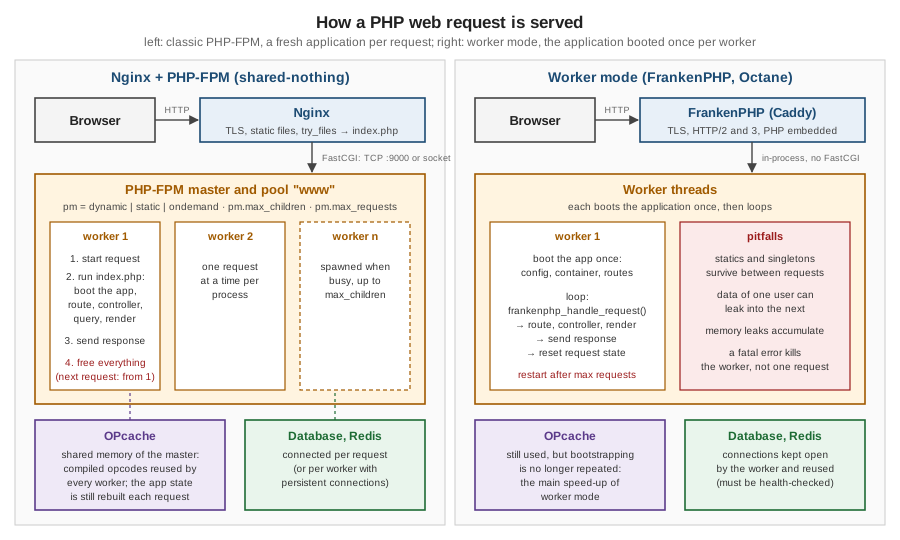
This shared-nothing model is the defining property of PHP on the web:
-
each request starts from a clean slate, so a bug or a memory leak cannot outlive it;
-
any process, on any server, can handle any request, so scaling out means adding processes and servers behind a load balancer (sessions and caches must then live in shared storage such as Redis or the database);
-
the cost is that the application boots on every request: autoloading, reading configuration, registering routes and services. OPcache removes the compile step; worker mode (below) removes the boot.
The script below makes the model visible: a static variable counts requests, and under PHP-FPM it is 1 every time,
whichever worker answers.
<?php
declare(strict_types=1);

// Shared-nothing: this static lives only for one request under PHP-FPM
static $requests = 0;
$requests++;

header('Content-Type: text/plain');
printf("pid %d, requests seen by this script: %d, SAPI %s\n", getmypid(), $requests, PHP_SAPI);
pid 7, requests seen by this script: 1, SAPI fpm-fcgi
pid 8, requests seen by this script: 1, SAPI fpm-fcgi
pid 7, requests seen by this script: 1, SAPI fpm-fcgi
pid 8, requests seen by this script: 1, SAPI fpm-fcgiSAPIs: how PHP is connected to a server
A SAPI (Server API) is the layer between the engine and whatever drives it. PHP_SAPI (or php_sapi_name()) names
the one in use:
| SAPI | PHP_SAPI |
How it works |
|---|---|---|
PHP-FPM |
|
A FastCGI process manager: a master process supervises pools of worker processes; the web server forwards requests over FastCGI (TCP or a Unix socket). The standard production setup. |
Apache module ( |
|
PHP runs inside each Apache child process (prefork MPM only, because PHP extensions are not all thread-safe). Simple, but every Apache process carries PHP, even for static files. |
CGI and FastCGI ( |
|
The original model: one process per request (CGI), or long-lived processes without FPM’s management (FastCGI). Superseded by PHP-FPM. |
Built-in server ( |
|
A single-process development server. Never for production: it handles one request at a time. |
FrankenPHP |
|
PHP embedded in the Caddy web server, as threads of one process, with an optional worker mode. |
CLI |
|
Scripts, Artisan, queue workers and cron jobs (see the PHP Reference’s Command-Line PHP). |
Source: PHP Manual — FastCGI Process Manager (FPM), Apache 2 on Unix systems and Built-in web server
Measured on the official images: the same script reports fpm-fcgi under PHP-FPM, apache2handler (with
mpm_prefork_module and php_module loaded) under php:8.5-apache, cli-server under php -S, and frankenphp
under FrankenPHP.
PHP-FPM
PHP-FPM runs one master process and one or more pools. Each pool has its own user, listen address, process
manager settings, php.ini overrides and logs, so several applications on one server can be isolated from each
other. A worker handles one request at a time; the number of workers is therefore the number of requests the pool
can serve concurrently.
; /usr/local/etc/php-fpm.d/www.conf (Debian: /etc/php/8.5/fpm/pool.d/www.conf)
[www]
user = www-data
group = www-data
listen = 9000                     ; or a socket: /run/php/php8.5-fpm.sock

pm = dynamic                      ; static | dynamic | ondemand
pm.max_children = 10              ; hard limit on workers: size it from memory
pm.start_servers = 2
pm.min_spare_servers = 1
pm.max_spare_servers = 3
pm.max_requests = 500             ; recycle a worker after 500 requests (contains slow leaks)

pm.status_path = /fpm-status
ping.path = /fpm-ping

request_slowlog_timeout = 1s      ; log a PHP backtrace of requests slower than this
slowlog = /proc/self/fd/2
request_terminate_timeout = 30s   ; kill a worker stuck on one request

catch_workers_output = yes        ; send the workers' stderr (error_log) to the FPM log
clear_env = no                    ; keep the environment variables (DB_HOST, ...) for getenv()
Source: PHP Manual — FPM configuration
The three process managers:
-
static: exactlypm.max_childrenworkers, always. Predictable latency and memory; the usual choice on a dedicated server or container. -
dynamic: betweenpm.min_spare_serversandpm.max_spare_serversidle workers, never more thanpm.max_childrenin total. Good for a server shared with other services. -
ondemand: no workers until requests arrive; idle workers exit afterpm.process_idle_timeout. Saves memory on rarely used pools, at the cost of a fork on the first request.
Size pm.max_children from memory, not from traffic: (memory available for PHP) / (memory per worker). The status
page reports what each worker used. When all workers are busy, new requests wait in the listen queue, and FPM logs
server reached pm.max_children setting; if that is frequent, either add memory and workers or make requests faster.
The status page (pm.status_path, here exposed only to the internal network through Nginx) and the slowlog
are the first tools when a site is slow. The output below is real: a request to /slow.php, which sleeps for 1.5
seconds, was counted as slow and its backtrace logged:
$ curl http://bookshelf.test/fpm-status
pool:                 www
process manager:      dynamic
accepted conn:        2
listen queue:         0
max listen queue:     0
idle processes:       1
active processes:     1
total processes:      2
max children reached: 0
slow requests:        1

$ docker logs php    # the FPM log
[05-Oct-2026 18:59:16] WARNING: [pool www] child 7, script '/app/public/slow.php' (request: "GET /slow.php") executing too slow (1.271401 sec), logging
[05-Oct-2026 18:59:16]  [pool www] pid 7
script_filename = /app/public/slow.php
[0x00007f45ace14070] usleep() /app/public/slow.php:2
[05-Oct-2026 18:59:16] NOTICE: finished trace of 7
Source: PHP Manual — FPM status page and FPM configuration
Two pitfalls showed up while capturing that output. The slowlog reads the worker’s stack with ptrace, which Docker
forbids by default: without --cap-add SYS_PTRACE FPM logs failed to ptrace(ATTACH) child 7: Operation not
permitted instead of the backtrace. And ?full on the status page adds a block per worker with its last request,
duration, CPU and memory, which is how to find the URL that is using up the pool.
fastcgi_finish_request() sends the response to the client and lets the worker continue. It is useful for short
follow-up work, but the worker stays busy (and unavailable to other requests) until the script ends; for anything
substantial use a queue (see Queues and Jobs).
<?php
declare(strict_types=1);

echo "Thanks, your review was received.\n";
fastcgi_finish_request();            // the client gets its response now

sleep(2);                            // slow follow-up work the client no longer waits for
error_log('review notification sent');
Source: fastcgi_finish_request
Measured: the client received the response immediately (client waited 0s), and the FPM log showed
NOTICE: PHP message: review notification sent two seconds later.
Nginx in front of PHP-FPM
Nginx serves static files itself and passes everything else to PHP-FPM over FastCGI. The front-controller rule
try_files $uri $uri/ /index.php?$query_string sends every URL that is not a real file to public/index.php, which
is how Laravel and Bookshelf Lite receive all their routes. This is the configuration the examples on this page ran
with:
server {
    listen 80;
    server_name bookshelf.test;
    root /app/public;                        # only public/ is reachable from the web
    index index.php;

    location / {
        try_files $uri $uri/ /index.php?$query_string;
    }

    location ~ ^/fpm-(status|ping)$ {
        allow 127.0.0.1;
        allow 172.16.0.0/12;                 # internal network only
        deny all;
        include fastcgi_params;
        fastcgi_param SCRIPT_FILENAME $fastcgi_script_name;
        fastcgi_pass php:9000;
    }

    location ~ \.php$ {
        try_files $uri =404;                 # never pass a non-existent script to PHP
        include fastcgi_params;
        fastcgi_param SCRIPT_FILENAME $realpath_root$fastcgi_script_name;
        fastcgi_param DOCUMENT_ROOT $realpath_root;
        fastcgi_pass php:9000;               # or unix:/run/php/php8.5-fpm.sock
    }

    location ~ /\. {
        deny all;                            # .env, .git and other dotfiles
    }
}The security-relevant details: the document root is public/, never the project root (so .env, vendor/ and the
source are not downloadable); try_files $uri =404 stops Nginx from passing a request for /uploads/evil.jpg/x.php
to PHP; and $realpath_root resolves symlinks, so atomic symlink-switch deployments pick up the new release. On
Apache, the equivalent is a DocumentRoot pointing at public/ with the .htaccess rewrite rules that Laravel ships.
FrankenPHP and worker mode
FrankenPHP is an application server built on the Caddy web server, with PHP embedded:
there is no FastCGI hop and no separate PHP-FPM. It serves HTTPS with automatic certificates, HTTP/2 and HTTP/3, and
early hints. In its classic mode it behaves like PHP-FPM, one fresh request at a time per thread. In worker mode a
PHP script boots the application once and then handles requests in a loop with frankenphp_handle_request(),
which removes the cost of bootstrapping from every request.
<?php
declare(strict_types=1);

// public/index.php in worker mode. Booted once per worker: config, container, routes
$booted = date('H:i:s');
$served = 0;
$visitors = [];                                   // state that outlives a request: careful

$handler = static function () use (&$served, &$visitors, $booted): void {
    $served++;
    $visitors[] = $_GET['name'] ?? 'anonymous';   // BUG: grows across requests and users
    header('Content-Type: text/plain');
    printf("worker %d booted %s, request #%d, visitors so far: %s\n",
        getmypid(), $booted, $served, implode(', ', $visitors));
};

// Handle requests until the worker is restarted (a request limit contains slow leaks)
for ($n = 0; $n < 500 && frankenphp_handle_request($handler); $n++) {
    gc_collect_cycles();
}
# Caddyfile
{
frankenphp {
worker {
file /app/public/index.php
num 1
}
}
}
:80 {
root /app/public
php_server
}$ for n in ada bob carol; do curl "localhost/books?name=$n"; done
worker 1 booted 18:55:51, request #1, visitors so far: ada
worker 1 booted 18:55:51, request #2, visitors so far: ada, bob
worker 1 booted 18:55:51, request #3, visitors so far: ada, bob, carolSource: FrankenPHP — Worker mode and FrankenPHP — Configuration
The output is the point: carol’s request sees ada’s and bob’s data. In worker mode, anything stored outside the request handler survives: static properties, singletons in a container, arrays used as caches, an authenticated user kept in a service. Code written for the shared-nothing model can leak one user’s data into another user’s response. The rules for worker mode are therefore:
-
keep request data inside the handler and reset services between requests (Laravel Octane does this for the framework’s own services, but not for your static properties or singletons);
-
restart workers regularly (here after 500 requests) to contain memory leaks;
-
expect a fatal error to kill the worker, not just one request (FrankenPHP restarts it);
-
treat long-lived connections (database, Redis) as something that can go stale.
FrankenPHP runs PHP as threads of a single process (it needs a thread-safe PHP build), which is why getmypid()
prints the same value for every request above and for the classic-mode script as well.
RoadRunner (a Go application server that runs PHP workers over pipes) and Swoole (a PHP extension with its own event loop and coroutines) offer the same booted-once model with different trade-offs; Swoole changes how I/O works and needs code written for it. Laravel supports all three through Octane.
OPcache in production
Every production PHP server should run with OPcache enabled, timestamps validation off and the cache reset on deploy (by reloading PHP-FPM or restarting FrankenPHP). The settings and the measurements are on the PHP Reference’s OPcache, JIT and Performance page. Under PHP-FPM the cache lives in the master’s shared memory, so all workers of all pools share it; restarting the master clears it.
Persistent connections and connection handling
Opening a database connection costs a round trip and authentication on every request. PDO::ATTR_PERSISTENT
keeps the connection open in the worker process after the request ends and reuses it for the worker’s next request.
Measured with PHP-FPM against MySQL 8.4, with two workers:
<?php
declare(strict_types=1);

$persistent = isset($_GET['persistent']);
$pdo = new PDO(
    'mysql:host=mysql;dbname=bookshelf;charset=utf8mb4',
    getenv('DB_USER') ?: 'bookshelf',
    getenv('DB_PASSWORD') ?: '',
    [PDO::ATTR_PERSISTENT => $persistent],
);
printf("pid %d, MySQL connection id %d (%s)\n", getmypid(),
    $pdo->query('SELECT CONNECTION_ID()')->fetchColumn(), $persistent ? 'persistent' : 'new');
pid 7, MySQL connection id 8 (new)
pid 8, MySQL connection id 9 (new)
pid 7, MySQL connection id 10 (new)
pid 8, MySQL connection id 11 (new)
pid 7, MySQL connection id 12 (persistent)
pid 8, MySQL connection id 13 (persistent)
pid 7, MySQL connection id 12 (persistent)
pid 8, MySQL connection id 13 (persistent)Source: PHP Manual — Persistent Database Connections and PDO — Connections and connection management
Persistent connections are per worker, so the database must accept pm.max_children × (number of servers)
connections, and state left on a connection (an open transaction, a table lock, session variables) is inherited by
the next request. They help when connecting is expensive (remote databases with TLS); with a local database the gain
is small. Laravel does not use them by default.
When the client disconnects, PHP stops the script at the next output by default. ignore_user_abort(true) lets it
run to the end (for example to finish a payment callback), connection_aborted() tells the script the client has
gone, and max_execution_time (or FPM’s request_terminate_timeout) still limits the total run time.
Source: PHP Manual — Connection handling and ignore_user_abort
Where older books and tutorials are outdated
-
Apache with
mod_phpas the default (Powers ch. 1-2, Nixon ch. 1-2, Kromann’s installation chapters), configured throughhttpd.confand.htaccess, is now the exception: PHP-FPM behind Nginx, Apache withmod_proxy_fcgi, or FrankenPHP are the common production setups, and containers replace hand-configured servers. -
XAMPP, MAMP and AMPPS bundles for development are replaced by
php -S, Docker, Laravel Sail and Laravel Herd (see Laravel Getting Started). -
"mod_php versus CGI versus FPM" (Beak ch. 6) is settled: plain CGI is obsolete, and FPM or an application server is the norm.
-
Worker-mode servers (FrankenPHP, RoadRunner, Swoole) and the stateful pitfalls they bring are missing from every book.
References
-
PHP Manual — FastCGI Process Manager (FPM): configuration, status page
-
PHP Manual — Persistent Database Connections and Connection handling
-
Andrew Beak — PHP 7 Zend Certification Study Guide (Apress, 2017), David Powers — PHP 7 Solutions, 4th ed. (Apress, 2019), Frank M. Kromann — Beginning PHP and MySQL, 5th ed. (Apress, 2018) and Robin Nixon — Learning PHP, MySQL & JavaScript, 5th ed. (O’Reilly, 2018)