Admin and Store Setup
|
This content was generated with the assistance of AI and should be verified against the official documentation of each platform before being relied on in production. This section’s bibliography lists the reference material consulted while preparing these pages. |
This page walks through everything you set up in the Admin of a new Magento store before it sells: where things are, how
configuration scopes work, the store structure, general settings and currencies, the catalogue (attributes, attribute
sets, categories, products and inventory), customer groups, taxes, shipping and payment methods, promotions, content, search
engine optimisation, emails and the checks to run before launch. It is written for Magento Open Source 2.4.9, Adobe
Commerce 2.4.9 and Mage-OS 3.6.0, checked on 2026-10-27. Every screen name, field label and menu path below was read
from the Admin of a real Mage-OS 3.6.0 install (the one built on
Local Development Environments), and every setting was
applied there with bin/magento config:set or the REST API and then checked from the storefront, the REST API or the Admin
itself. Adobe Commerce adds screens and features that Open Source and Mage-OS do not have; where the Adobe documentation
page carries an edition badge, trust the badge. The install itself is on
Installation; the data model behind attributes is on
EAV and Attributes; multi-store and B2B depth are on
Catalog, Multistore and B2B.
The running example is Pocket Coffee: a Madrid shop with a Spanish store view (the default) and an English one, euro prices that include VAT, a configurable product "Single-origin beans" (origin by bag size), a simple "Starter kit", a "Coffee Club" customer group with 10 percent off the beans, Spanish shipping at 4.90 EUR (free from 40 EUR) and a flat 9.90 EUR rate to six other countries.
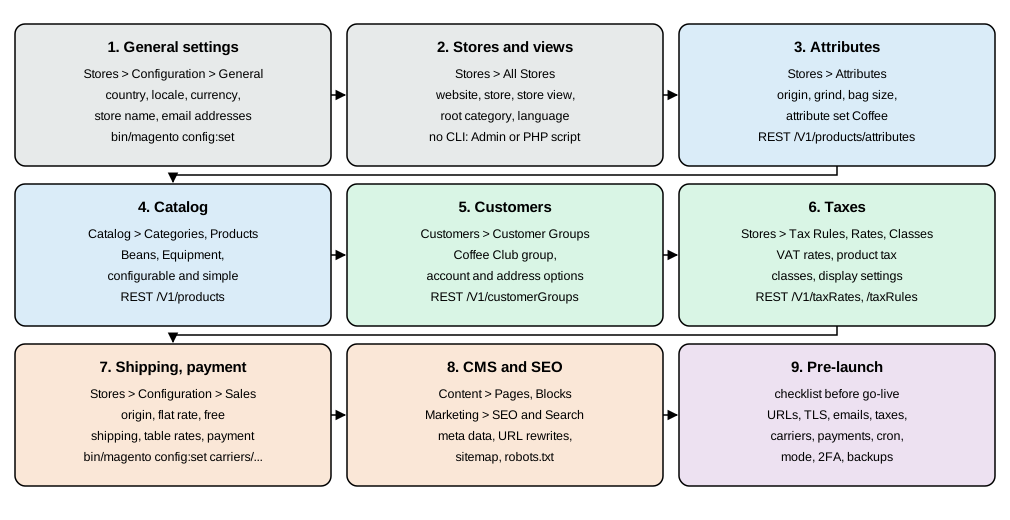
The order matters in a few places. Create the store views and the general settings first, because language, currency and URL settings affect everything you create after them. Create attributes before products, tax classes before products that use them, and set the URL suffixes before you create categories and products, because the URL rewrites are generated when a record is saved. Run the Pocket Coffee examples from the command line in this order and each step finds what it needs.
The Admin map
The Admin lives at a random path chosen by the installer (see Installation);
bin/magento info:adminuri prints it, for example /admin_483qz01. The login page answered 200 on that path and 404 on
the guessable /admin. After the login every Admin URL carries a secret key (.../admin/dashboard/index/key/<64 hex characters>/) because Add Secret Key to URLs is on by default under Stores > Configuration > Advanced > Admin >
Security; a bookmarked URL without a valid key redirects to the dashboard.
The top-level menu of the Mage-OS 3.6.0 Admin, read from the rendered page, with the leaf pages. Every leaf link answered HTTP 200 when it was followed with the session of the test administrator.
| Menu | Entries |
|---|---|
Dashboard |
Sales and customer summary. |
Sales |
Operations: Orders, Invoices, Shipments, Credit Memos, Billing Agreements, Transactions. RMA (a Mage-OS module): Manage RMA Requests, RMA Statuses, RMA Reasons, RMA Resolution Types, RMA Item Conditions. |
Catalog |
Inventory: Products, Categories. |
Customers |
All Customers, Now Online, Login as Customer Log, Customer Groups. |
Marketing |
Promotions: Catalog Price Rule, Cart Price Rules. Communications: Email Templates, Newsletter Templates, Newsletter Queue, Newsletter Subscribers. SEO & Search: URL Rewrites, Search Terms, Search Synonyms, Site Map. User Content: All Reviews, Pending Reviews. |
Content |
Elements: Pages, Blocks, Widgets, Templates. Media: Media Gallery. Design: Configuration, Themes, Schedule. |
Reports |
Marketing (Products in Cart, Search Terms, Abandoned Carts, Newsletter Problem Reports), Reviews, Sales (Orders, Tax, Invoiced, Shipping, Refunds, Coupons, PayPal Settlement), Customers, Products (Views, Bestsellers, Low Stock, Ordered, Downloads) and Statistics (Refresh Statistics). |
Stores |
Settings: All Stores, Configuration, Terms and Conditions, Order Status. Inventory: Sources, Stocks, Reservations. Taxes: Tax Rules, Tax Zones and Rates. Currency: Currency Rates, Currency Symbols. Attributes: Product, Attribute Set, Rating. |
System |
Data Transfer: Import, Export, Import/Export Tax Rates, Import History. Extensions: Integrations. Tools: Cache Management, Index Management. Permissions: All Users, Locked Users, User Roles. Action Logs: Bulk Actions. Other Settings: Notifications, Custom Variables. Admin Activity (Mage-OS): Activity Log, Login Log. |
Things you may expect from the Adobe documentation but will not find in this menu: customer segments, content staging
and scheduled changes for products, B2B company accounts, reward points and gift registries. Adobe’s documentation
presents them as Adobe Commerce features. Many Adobe pages carry an edition or platform badge; if a feature you read
about is missing from your menu, check the badge and your edition. Mage-OS also changes the look: the Admin pages of the test install were rendered with the
Mage-OS admin theme (MageOS/m137-admin-theme, from the static URL of the logo), and the stock Magento/backend theme
is deployed beside it.
Stores > Configuration has seven tabs, and the sections listed here were present on the install: General (General, Web, Currency Setup, Store Email Addresses, Contacts, Reports, Content Management, New Relic Reporting, Content Security Policy, Security.txt), Security (Google reCAPTCHA for the Admin and for the storefront), Catalog (Catalog, Inventory, XML Sitemap, RSS Feeds, Email to a Friend), Customers (Login as Customer, Newsletter, Customer Configuration, Wish List, Promotions, Persistent Shopping Cart), Sales (Sales, Sales Emails, PDF Print-outs, Tax, Checkout, Shipping Settings, Multishipping Settings, Delivery Methods, RMA, Google API, Payment Methods, 3D Secure), Services (Magento Web API, OAuth, AI Integration) and Advanced (Admin, System, Developer). The Developer section is visible only in developer mode.
Source: Adobe: Admin overview
Administrators, roles and sign-in
Create the first administrator with the installer (see the installation page) and further ones from the command line or
under System > Permissions > All Users. Restrict what each person can do with System > Permissions > User Roles,
which ties a role to a set of resources (the same ACL resources that acl.xml files define in modules).
bin/magento admin:user:create --admin-user=grace --admin-password='<admin-password>' \
  --admin-email=grace@example.test --admin-firstname=Grace --admin-lastname=Hopper
bin/magento admin:user:unlock grace        # after too many failed logins
bin/magento security:tfa:providers         # list the two-factor providers (only while Magento_TwoFactorAuth is enabled)
bin/magento security:tfa:reset <user> <provider>   # reset the second factor of one user
Source: Adobe: Two-factor authentication
admin:user:create printed "Created Magento administrator user named grace" in the test; the other commands appear in
bin/magento list. Stores > Configuration > Advanced > Admin > Security holds the policies you should read before
launch: Admin Session Lifetime (seconds), Maximum Login Failures to Lockout Account, Lockout Time (minutes),
Minimum Admin Password Length, Password Lifetime (days), Password Change, Admin Account Sharing,
Login is Case Sensitive, Add Secret Key to URLs and the password-reset limits. Two-factor authentication is on by
default (module Magento_TwoFactorAuth) and applies to the Admin and to admin API tokens: on the test install
POST /rest/V1/integration/admin/token answered "Please ask an administrator with sufficient access to configure 2FA
first." until the module was disabled on a laptop. Do not disable it anywhere real. When Adobe IMS sign-in is enabled
instead (Adobe Commerce), the native two-factor screens are disabled because Adobe IMS handles the sign-in.
Configuration scopes and how to change a setting
Almost every setting under Stores > Configuration can be set for the whole installation (Default Config), for a
website, or for a store view. Magento reads a value from the most specific scope that has one and falls back
outward, and finally to the module’s config.xml default. Values written to app/etc/env.php or app/etc/config.php
override the database and make the field read-only in the Admin.
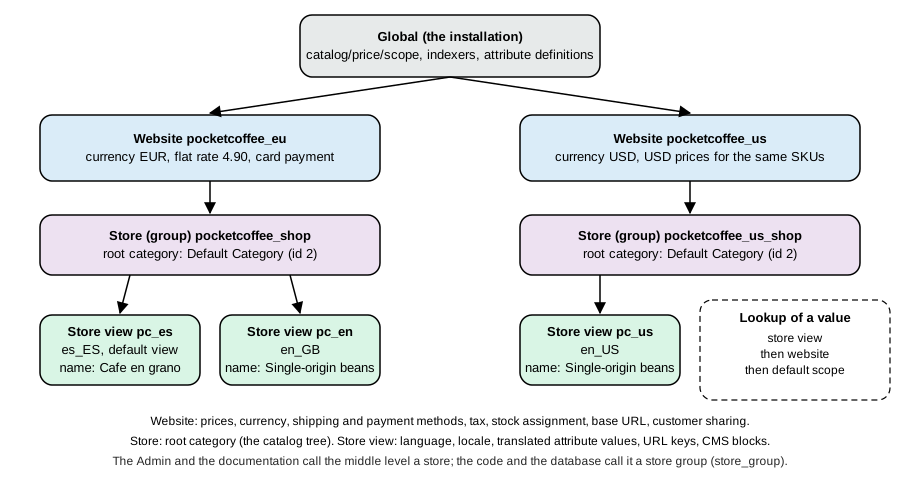
The same setting is available in three equivalent ways, which is what makes a store reproducible:
bin/magento config:set general/store_information/name "Pocket Coffee"                      # default scope
bin/magento config:set --scope=websites --scope-code=base general/store_information/name "Pocket Coffee B2C"
bin/magento config:set --scope=stores --scope-code=en general/locale/code en_US           # store view en
bin/magento config:show --scope=websites --scope-code=base general/store_information/name   # Pocket Coffee B2C
bin/magento config:set --lock-env web/cookie/cookie_lifetime 7200    # Value was saved in app/etc/env.php and locked.
Source: Adobe: Set configuration values
Facts observed with these commands: the path must exist in a module’s system.xml (an unknown path prints The "x" path doesn't exist. Verify and try again.); config:show prints only the values stored at the scope you ask for, so a
store view that inherits prints an empty line; a locked value cannot be changed again without --lock-env
(The value you set has already been locked. To change the value, use the --lock-env option.); --lock-config writes to
the shared config.php instead. Values stored with --lock-env end up under a system key of env.php, for example
{"default":{"web":{"cookie":{"cookie_lifetime":"7200"}}}}. A change made with the CLI shows in the Admin at once; the
Tax page of the test install showed the values set below as Including Tax, After Discount and Total.
Websites, stores and store views
A website holds shared customers, a base currency and often payment and shipping methods; a store (a store group) is a catalogue with a root category and a default store view; a store view is one language and presentation of a store. A single-language shop still has one website, one store and one store view; Pocket Coffee adds a second store view for English. The four entities are managed under Stores > Settings > All Stores and can be listed from the command line.
bin/magento store:list
bin/magento store:website:list
+----+------------+----------+---------+---------+------------+-----------+ | ID | Website ID | Group ID | Name | Code | Sort Order | Is Active | +----+------------+----------+---------+---------+------------+-----------+ | 0 | 0 | 0 | Admin | admin | 0 | 1 | | 1 | 1 | 1 | Español | default | 0 | 1 | | 2 | 1 | 1 | English | en | 20 | 1 | +----+------------+----------+---------+---------+------------+-----------+
Source: Adobe: Stores and store views
There is no CLI command and no REST endpoint to create a store view in 2.4.9; use Stores > All Stores > Create Store View, or
a short PHP script that bootstraps the framework and uses the store resource model of Magento_Store (this is what
produced the table above, and it is idempotent):
<?php
use Magento\Framework\App\Bootstrap;
use Magento\Store\Model\ResourceModel\Store as StoreResource;
use Magento\Store\Model\StoreFactory;
use Magento\Store\Model\StoreManagerInterface;

require __DIR__ . '/app/bootstrap.php';
$om = Bootstrap::create(BP, $_SERVER)->getObjectManager();
$om->get(\Magento\Framework\App\State::class)->setAreaCode('adminhtml');

$group = $om->get(StoreManagerInterface::class)->getGroup(1);
$store = $om->get(StoreFactory::class)->create()->load('en', 'code');
if (!$store->getId()) {
    $store->setCode('en')->setName('English')
        ->setWebsiteId($group->getWebsiteId())->setGroupId($group->getId())
        ->setSortOrder(20)->setIsActive(1);
    $om->get(StoreResource::class)->save($store);
}
Source: Adobe: Stores and store views
Run it as the file system owner from the project root (php create-store-view.php), then set the locale of the new
view, which needs the language to exist (bin/magento info:language:list printed 94 locales, including es_ES, en_US,
ca_ES and de_DE; further language packs install with Composer):
bin/magento config:set --scope=stores --scope-code=en general/locale/code en_US
curl -s -o /dev/null -w "%{http_code}\n" "http://localhost:8093/single-origin-beans.html?___store=en"    # 200
Source: Adobe: Stores and store views
By default a store view is chosen by a cookie or the ___store query parameter; to give each language its own URL set
Add Store Code to Urls (web/url/use_store) under General > Web > Url Options or give each store view its own base
URL under Base URLs. The Pocket Coffee names for the website, the store and the first store view (the installer names the website Main
Website and the view Default Store View) were set with the same kind of script.
General settings
Stores > Configuration > General is where the country, locale, store identity and emails live. These are the sections used by Pocket Coffee with their Admin labels (read from the Admin pages), the configuration path and the value applied.
| Admin section and field | Path | Pocket Coffee value | Notes |
|---|---|---|---|
General > Country Options: Default Country |
|
|
Pre-selects the country in forms and tax defaults. |
General > Country Options: Allow Countries |
|
|
Shipping and billing countries customers can choose. Default is every country. |
General > Locale Options: Timezone, Locale, Weight Unit, First Day of Week |
|
|
The installer set timezone and locale from |
General > Store Information: Store Name, Store Phone Number, Country, ZIP/Postal Code, City, Street Address, VAT Number |
|
Pocket Coffee, Madrid, 28001 |
Used in emails and invoices. Store Hours of Operation and VAT Number are optional. |
Sales > Shipping Settings > Origin: Country, ZIP/Postal Code, City |
|
|
The address shipping rates and origin-based tax are computed from. |
General > Store Email Addresses: General Contact, Sales Representative, Customer Support, two custom |
|
|
The senders used by Sales Emails, Contacts and Customer emails. Use real mailboxes before launch. |
Advanced > System > Mail Sending Settings: Disable Email Communications, Transport, Host, Port, Username, Password, Auth, SSL |
|
not changed |
Transport is Sendmail by default; choose SMTP to set host, port, Auth (NONE, PLAIN, LOGIN) and SSL (None, SSL, TLS). |
General > Web: Default Web URL, CMS Home Page, Default No-route URL, CMS No Route Page, Add Store Code to Urls, Auto-redirect to Base URL |
|
defaults |
The home page is the CMS page |
General > Web > Default Cookie Settings: Cookie Restriction Mode, Cookie Lifetime, Use HTTP Only |
|
|
Shows the cookie consent notice; the default CMS page |
Source: Adobe: General configuration
The Pocket Coffee settings were applied with one config:set per line; every command answered Value was saved.:
bin/magento config:set general/country/default ES
bin/magento config:set general/country/allow ES,DE,FR,IT,PT,NL,BE
bin/magento config:set general/locale/weight_unit kgs
bin/magento config:set general/store_information/name "Pocket Coffee"
bin/magento config:set general/store_information/country_id ES
bin/magento config:set general/store_information/postcode 28001
bin/magento config:set general/store_information/city Madrid
bin/magento config:set shipping/origin/country_id ES
bin/magento config:set shipping/origin/postcode 28001
bin/magento config:set trans_email/ident_general/email hello@example.test
bin/magento config:set trans_email/ident_sales/email orders@example.test
bin/magento config:set trans_email/ident_support/email support@example.test
Source: Adobe: General configuration
Spain is one of the 39 countries for which a state or province is required (general/region/state_required), so an
address for a Spanish customer needs region_id as well: Madrid is region 161 of the 52 Spanish regions in the
directory. The REST checkout rejected a Spanish address without it with Please check the shipping address information. "regionId" is required. Enter and try again.
Currencies
Stores > Configuration > General > Currency Setup > Currency Options has three fields: Base Currency (currency/options/base,
the currency the catalogue is priced in and the one orders are charged in), Default Display Currency
(currency/options/default) and Allowed Currencies (currency/options/allow). Pocket Coffee’s base and display
currency is EUR, set by the installer; adding USD makes it selectable:
bin/magento config:set currency/options/allow EUR,USD
curl -s http://localhost:8093/rest/V1/directory/currency            # as an administrator
Source: Adobe: Configure currency
The Catalog Price Scope (catalog/price/scope, Stores > Configuration > Catalog > Catalog > Price) is global by
default; set it to Website to price the same product differently per website, which also lets each website have its
own base currency.
The exchange rates are managed under Stores > Currency > Currency Rates (the page lists the rates between the allowed
currencies and an Import Service selector) and stored in directory_currency_rate. A new install already holds a rate
of 1.415 USD for 1 EUR, which is a placeholder: a store that shows a second currency must replace it with a real rate
or schedule an import. The import services in the 3.6.0 code are Fixer.io (legacy), Fixer Api (APILayer) and
Currency Converter API, each with an API Key and Connection Timeout in Seconds, plus Scheduled Import Settings
(Enabled, Service, Start Time, Frequency and the error-email fields). Adobe states that Fixer.io was deprecated
and replaced by Fixer API (APILayer) from 2.4.6. Scheduled imports run in cron.
Checked from the storefront side: with USD allowed and the placeholder rate, the GraphQL request below returned the starter kit at 33.96 USD (24.00 EUR x 1.415):
curl -s -X POST http://localhost:8093/graphql -H 'Content-Type: application/json' \
  -H 'Content-Currency: USD' -H 'Store: en' \
  -d '{"query":"{ products(filter:{sku:{eq:\"PC-KIT\"}}) { items { sku name price_range { minimum_price { final_price { value currency } } } } } }"}'
Source: Adobe: Configure currency
The header is Content-Currency; a request that sends Currency: USD was ignored and returned EUR. Customers see the
display currency, and the amounts are converted at the stored rate, but the payment method receives the order in the
base currency unless it supports the display currency, so confirm with your payment provider before you promise
"charge in USD". Currency symbols are customised under Stores > Currency > Currency Symbols.
Catalog
Attributes and attribute sets
An attribute is a property of a product; an attribute set is the list of attributes (arranged in groups) a product
offers in the Admin form. Every product belongs to one set, and the set decides which fields you see. The Default set
(id 4) has 64 attributes; a custom set starts as a copy of it. The model behind this is described on
EAV and Attributes. For Pocket Coffee, one set "Coffee" with the
attributes Origin, Grind, Bag size and Roast date was created through the REST API (the Admin equivalent is
Stores > Attributes > Attribute Set and Stores > Attributes > Product). Set BASE and TOKEN first:
BASE=http://localhost:8093
TOKEN=$(curl -s -X POST $BASE/rest/V1/integration/admin/token -H 'Content-Type: application/json' \
  -d "{\"username\":\"admin\",\"password\":\"${MAGENTO_ADMIN_PASSWORD}\"}" | tr -d '"')
api() { curl -s -g -X "$1" "$BASE/rest$2" -H "Authorization: Bearer $TOKEN" -H 'Content-Type: application/json' ${3:+-d "$3"}; }

# an attribute set cloned from Default (skeletonId 4)
api POST /V1/products/attribute-sets \
  '{"attributeSet":{"attribute_set_name":"Coffee","sort_order":1,"entity_type_id":4},"skeletonId":4}'
# {"attribute_set_id":9,"attribute_set_name":"Coffee","sort_order":1,"entity_type_id":4}

# a dropdown attribute used in layered navigation, with a label per store view
api POST /V1/products/attributes '{"attribute":{"attribute_code":"origin","frontend_input":"select",
  "entity_type_id":"4","is_user_defined":true,"default_frontend_label":"Origin",
  "frontend_labels":[{"store_id":1,"label":"Origen"},{"store_id":2,"label":"Origin"}],
  "is_filterable":true,"is_filterable_in_search":true,"is_searchable":true,"is_visible_on_front":true,"scope":"global",
  "options":[{"label":"Ethiopia Yirgacheffe","value":"ETH"},{"label":"Colombia Huila","value":"COL"},{"label":"Brazil Cerrado","value":"BRA"}]}}'

# put the attribute into the Product Details group of the Coffee set
api POST /V1/products/attribute-sets/attributes \
'{"attributeSetId":9,"attributeGroupId":31,"attributeCode":"origin","sortOrder":10}'These calls returned, in order, the new set (id 9), the attribute id (145 for origin, 146 for grind, 148 for
bag_size, 149 for roast_date) and "207", "208", "209", "210" for the four set assignments (the id of the
entity-attribute row). The attribute group id 31 is Product Details of the new set; list the groups of a set with
GET /V1/products/attribute-sets/groups/list?searchCriteria[filter_groups][0][filters][0][field]=attribute_set_id&searchCriteria[filter_groups][0][filters][0][value]=9.
Three traps appeared:
-
Option values that are numbers are read as option ids. Creating
bag_sizewith the options250and1000failed withSQLSTATE[23000]: Integrity constraint violation: 1452 Cannot add or update a child row: a foreign key constraint fails(on theeav_attribute_option_valuetable). Give options labels and non-numericvaluestrings, then read the generated option ids back fromGET /V1/products/attributes/<code>(fororigin: 4 Ethiopia, 5 Colombia, 6 Brazil). -
Do not send a blank first option. The REST response always lists an empty first option itself; sending your own produced a second blank entry in the dropdown.
-
A failed create still consumes an attribute id (id 147 was lost to the failed
bag_size).
An attribute used to build variants must have scope global and be a dropdown or swatch input. The attribute
screen (Stores > Attributes > Product > Add New Attribute) has the tabs Properties, Manage Labels and Storefront
Properties. Properties holds Default Label, Catalog Input Type for Store Owner (Text Field, Text Area, Text Editor,
Page Builder, Date, Date and Time, Yes/No, Multiple Select, Dropdown, Price, Media Image, Visual Swatch, Text Swatch,
Fixed Product Tax), Values Required, Attribute Code, Scope, Default Value, Unique Value and Input Validation for
Store Owner. Storefront Properties holds Use in Search, Search Weight, Visible in Advanced Search, Comparable on
Storefront, Use in Layered Navigation, Use in Search Results Layered Navigation, Position, Use for Promo Rule
Conditions, Allow HTML Tags on Storefront, Visible on Catalog Pages on Storefront, Used in Product Listing and Used
for Sorting in Product Listing; the API fields is_searchable, is_filterable, is_filterable_in_search,
is_comparable, is_visible_on_front, used_in_product_listing and used_for_sort_by map to them.
Categories
Categories live in a tree below the store’s root category (Default Category, id 2, set per store under Stores > All Stores). Pocket Coffee has two: Beans (id 3) and Equipment (id 4), created with:
api POST /V1/categories '{"category":{"parent_id":2,"name":"Beans","is_active":true,"include_in_menu":true,
  "custom_attributes":[{"attribute_code":"url_key","value":"beans"}]}}'
Source: Adobe developer docs: REST API
Products
Catalog > Inventory > Products lists and edits products. The Add Product menu of the
test install offered Simple, Virtual, Downloadable, Configurable (variants chosen by attribute values), Grouped and Bundle
products; Adobe Commerce adds more, such as the gift card. Pocket Coffee has a configurable parent PC-BEANS whose variants are simple products with the SKU
pattern PC-<ORIGIN3>-<GRIND3>-<SIZE> (four of the 18 are shown) and a simple PC-KIT.
# one variant: Ethiopia, whole bean, 250 g (option ids: origin 4, grind 7, bag size 10; tax class 4 = Food)
api POST /V1/products '{"product":{"sku":"PC-ETH-WHL-250",
  "name":"Single-origin beans, Ethiopia Yirgacheffe, whole bean, 250 g","attribute_set_id":9,"type_id":"simple",
  "price":9.90,"status":1,"visibility":1,"weight":0.25,
  "extension_attributes":{"stock_item":{"qty":100,"is_in_stock":true},"website_ids":[1]},
  "custom_attributes":[{"attribute_code":"origin","value":"4"},{"attribute_code":"grind","value":"7"},
    {"attribute_code":"bag_size","value":"10"},{"attribute_code":"tax_class_id","value":"4"}]}}'

# the configurable parent in category Beans, then its options and children
api POST /V1/products '{"product":{"sku":"PC-BEANS","name":"Single-origin beans","attribute_set_id":9,
  "type_id":"configurable","price":0,"status":1,"visibility":4,
  "extension_attributes":{"category_links":[{"position":0,"category_id":"3"}],
    "stock_item":{"is_in_stock":true},"website_ids":[1]},
  "custom_attributes":[{"attribute_code":"url_key","value":"single-origin-beans"},
    {"attribute_code":"tax_class_id","value":"4"},
    {"attribute_code":"meta_title","value":"Single-origin specialty coffee beans"},
    {"attribute_code":"meta_description","value":"Ethiopia, Colombia and Brazil beans roasted in Madrid, in 250 g and 1 kg bags."}]}}'
api POST /V1/configurable-products/PC-BEANS/options \
  '{"option":{"attribute_id":"145","label":"Origin","position":0,"is_use_default":true,"values":[{"value_index":4},{"value_index":5}]}}'
api POST /V1/configurable-products/PC-BEANS/options \
  '{"option":{"attribute_id":"148","label":"Bag size","position":1,"is_use_default":true,"values":[{"value_index":10},{"value_index":11}]}}'
api POST /V1/configurable-products/PC-BEANS/child '{"childSku":"PC-ETH-WHL-250"}' # trueThe calls returned the product ids (1 to 4 for the variants, 5 for PC-BEANS, 6 for PC-KIT) and true for each child
link. Points that matter in the Admin and in the API alike:
-
Visibility: variants are
1(Not Visible Individually), the parent4(Catalog, Search). -
Websites: a product that is not assigned to a website is invisible. The Admin product form has a Product in Websites section; the API takes
extension_attributes.website_ids. -
Tax class: the product’s Tax Class attribute (here
tax_class_id4, "Food (reduced VAT)") selects the tax rule row; see Taxes. -
Inventory: the 2.4.9 install runs Multi-Source Inventory. Stores > Inventory > Sources and Stocks define where stock lives and which sales channel it feeds (the REST API listed the source
default, "Default Source", and the stock with id 1, "Default Stock"), Reservations holds the salable-quantity ledger, andstock_item.qtyon a product wrote to the default source (inventory_source_itemheld quantity 50 forPC-KIT). After the Spanish test order below, two rows ininventory_reservationexisted,get-product-salable-quantityforPC-KITanswered 49 and the source quantity was still 50: an order reserves stock, and the source quantity drops when the shipment is created. -
URL key: each product and category has a
url_key; the URL is<key>plus the product suffix.html. -
Indexing: all 11 indexers run in Update by Schedule mode, so a product saved through the API reaches search and category pages only after cron runs the indexer.
bin/magento indexer:statusshowedidle (1 in backlog)for the Product Price, Product EAV and Catalog Search indexers after a product change;bin/magento indexer:reindexclears it immediately.
The starter kit is a plain simple product (PC-KIT, 24.00, weight 1.1, category Equipment, attribute set Default). The
storefront then served /single-origin-beans.html and /starter-kit.html with HTTP 200.
Source: Adobe: Configurable product
Categories, SEO fields and merchandising in the Admin
On each category and product the Search Engine Optimization section holds the URL Key, Meta Title, Meta Keywords
and Meta Description; the Catalog > Catalog > Product Fields Auto-Generation masks (catalog/fields_masks/*)
fill empty meta fields from a template: the defaults in the module configuration are {{name}} for the meta title and
keywords and {{name}} {{description}} for the meta description. Catalog > Catalog > Storefront sets the grid defaults (products
per page, default sort, swatches).
Customers and customer groups
A customer group decides which prices, rules and tax class apply to a shopper. Four groups exist after the install:
| Id | Code | Tax class id |
|---|---|---|
0 |
NOT LOGGED IN |
3 (Retail Customer) |
1 |
General |
3 |
2 |
Wholesale |
3 |
3 |
Retailer |
3 |
Create the Pocket Coffee group under Customers > Customer Groups or with the API; it returned id 4:
api POST /V1/customerGroups '{"group":{"code":"Coffee Club","tax_class_id":3}}'
# {"id":4,"code":"Coffee Club","tax_class_id":3,"tax_class_name":"Retail Customer"}
api POST /V1/customers "{\"customer\":{\"email\":\"ada@example.test\",\"firstname\":\"Ada\",\"lastname\":\"Lovelace\",
  \"group_id\":4,\"website_id\":1,\"store_id\":1,
  \"addresses\":[{\"firstname\":\"Ada\",\"lastname\":\"Lovelace\",\"street\":[\"Calle Ejemplo 10\"],\"city\":\"Madrid\",
  \"postcode\":\"28001\",\"country_id\":\"ES\",\"telephone\":\"600000000\",\"default_shipping\":true,\"default_billing\":true}]},
  \"password\":\"<customer-password>\"}"
Source: Adobe: Customer groups
The customer tax class chosen for the group (Tax Class) is the one tax rules match against; you need a second customer tax class only when different customers pay different taxes (for example tax-exempt organisations). The rest of the customer behaviour sits in Stores > Configuration > Customers > Customer Configuration:
-
Account Sharing Options: Share Customer Accounts is Per Website by default (the other value is Global).
-
Create New Account Options: Default Group (
customer/create_account/default_group, General by default), Require Emails Confirmation (customer/create_account/confirm), Enable Automatic Assignment to Customer Group with the VAT-ID groups (Group for Valid VAT ID - Domestic, - Intra-Union, Group for Invalid VAT ID, Validation Error Group) and Validate on Each Transaction, which checks a customer’s EU VAT number and assigns a group so business customers can be taxed differently. -
Password Options, Name and Address Options (lines in a street address, which of prefix, middle name, date of birth, VAT number, gender, telephone, company and fax to show), Login Options and CAPTCHA.
-
Stores > Configuration > Sales > Checkout > Checkout Options: Allow Guest Checkout (
checkout/options/guest_checkout), Enable Guest Checkout Login, Enable Onepage Checkout, Enable Terms and Conditions.
With Require Emails Confirmation on, a customer created through the API could not obtain a token:
POST /rest/V1/integration/customer/token answered "This account isn’t confirmed. Verify and try again." The Pocket Coffee
setup turns it off for development; leave it on in production and send the confirmation email.
Customers > All Customers lists customers, Login as Customer Log records the "Login as Customer" feature
(Magento_LoginAsCustomer, which lets an administrator open the storefront as a customer; configure it under Stores >
Configuration > Customers > Login as Customer), and Now Online shows active sessions.
Taxes
Magento’s tax model has four parts: tax classes (labels for products, customers and shipping), tax rates (a rate for a country, region and postcode pattern), tax rules (which class combinations use which rates) and the calculation settings that decide how the maths is done. Pocket Coffee sells a food product with a reduced VAT rate and equipment at the standard rate, prices include VAT, and the customer pays the tax of the shipping address. The rates 10 and 21 percent below are illustrative values for the walkthrough, not tax advice; take the rates, thresholds and rules for each country from your tax adviser.
api POST /V1/taxClasses '{"taxClass":{"class_name":"Food (reduced VAT)","class_type":"PRODUCT"}}'      # "4"
api POST /V1/taxRates '{"taxRate":{"tax_country_id":"ES","tax_region_id":0,"tax_postcode":"*","code":"ES-VAT-10","rate":10}}'
api POST /V1/taxRates '{"taxRate":{"tax_country_id":"ES","tax_region_id":0,"tax_postcode":"*","code":"ES-VAT-21","rate":21}}'
api POST /V1/taxRules '{"rule":{"code":"Spain - food 10%","priority":0,"position":1,
  "customer_tax_class_ids":[3],"product_tax_class_ids":[4],"tax_rate_ids":[3],"calculate_subtotal":false}}'
api POST /V1/taxRules '{"rule":{"code":"Spain - standard 21%","priority":0,"position":2,
  "customer_tax_class_ids":[3],"product_tax_class_ids":[2],"tax_rate_ids":[4],"calculate_subtotal":false}}'
Source: Adobe: Tax rules
The Admin screens are Stores > Taxes > Tax Rules and Tax Zones and Rates (with System > Data Transfer > Import/Export
Tax Rates for bulk loads). A tax rate with postcode * matches every postcode in the country. Product tax class 2,
Taxable Goods, exists after the install and is the default for products; class 3, Retail Customer, is the default
customer class.
The calculation settings are under Stores > Configuration > Sales > Tax. These are their Admin labels, the CLI values used and the value the Admin showed back:
| Admin field | Path | Value set | Shown in the Admin as |
|---|---|---|---|
Tax Class for Shipping |
|
|
Taxable Goods (shipping is taxed at 21 percent) |
Tax Calculation Method Based On |
|
|
Total (the other options are Unit Price and Row Total) |
Tax Calculation Based On |
|
|
Shipping Address (or Billing Address, Shipping Origin) |
Catalog Prices |
|
|
Including Tax |
Shipping Prices |
|
|
Including Tax |
Apply Customer Tax |
|
|
After Discount |
Apply Discount On Prices |
|
|
Including Tax |
Enable Cross Border Trade |
|
|
Yes |
Default Tax Destination Calculation: Default Country |
|
|
Used for visitors with no address yet. |
Display Product Prices In Catalog, Display Shipping Prices |
|
|
Including Tax |
Shopping Cart Display Settings: Display Prices, Display Subtotal, Display Shipping Amount |
|
|
Including Tax |
Source: Adobe: Tax settings
The result for a Coffee Club member in Spain is the worked example below: two 250 g bags of Ethiopia beans at 9.90 EUR and
the starter kit at 24.00 EUR, prices including VAT. Read from the cart totals of the REST API (GET
/V1/carts/mine/totals):
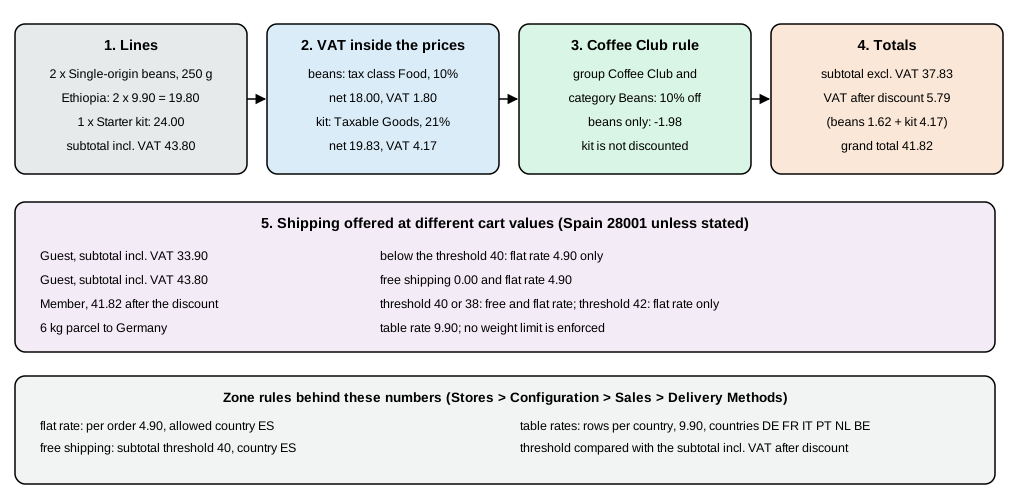
-
the beans line: price incl. VAT 9.90,
tax_percent10, discount 1.98 on the 19.80 row; -
the kit line: price incl. VAT 24.00,
tax_percent21, no discount; -
subtotal37.83,subtotal_incl_tax43.80,discount_amount-1.98,tax_amount5.79 andgrand_total41.82 (before shipping).
A guest with one bag and the kit saw subtotal_incl_tax 33.90 and tax_amount 5.07. A guest shipping to Germany saw
tax 0.00 on a 29.90 order, because no rate exists for Germany in this setup: with Enable Cross Border Trade the gross
price stays the same, and the German VAT, the EU One Stop Shop scheme and VAT ID handling are legal topics you configure
with real rates and the customer groups above. Adobe’s pages on international tax cover those cases.
Shipping
Stores > Configuration > Sales > Shipping Settings holds the Origin address (set above) and the optional Shipping Policy Parameters; Delivery Methods configures the carriers. The Mage-OS install lists these carriers: Flat Rate, Free Shipping, Table Rates, In-Store Delivery (in-store pickup), and the live carriers UPS, FedEx, DHL and USPS (the last four need accounts with the carrier). Each carrier has Enabled, Title, Method Name, Ship to Applicable Countries / Ship to Specific Countries, Show Method if Not Applicable, Displayed Error Message and Sort Order, and the offline carriers add Calculate Handling Fee and Handling Fee.
Pocket Coffee has two zones (Spain; six other countries) and a free-shipping threshold:
# Zone 1, Spain: flat rate per order, only for ES
bin/magento config:set carriers/flatrate/active 1
bin/magento config:set carriers/flatrate/type O                 # O = Per Order (I = Per Item)
bin/magento config:set carriers/flatrate/price 4.90
bin/magento config:set carriers/flatrate/sallowspecific 1
bin/magento config:set carriers/flatrate/specificcountry ES
bin/magento config:set carriers/flatrate/title "Pocket Coffee shipping"
bin/magento config:set carriers/flatrate/name "Spain, 1 to 3 days"
# free shipping from 40 EUR, only for ES
bin/magento config:set carriers/freeshipping/active 1
bin/magento config:set carriers/freeshipping/free_shipping_subtotal 40
bin/magento config:set carriers/freeshipping/sallowspecific 1
bin/magento config:set carriers/freeshipping/specificcountry ES
# Zone 2: table rates for six countries, condition = weight
bin/magento config:set carriers/tablerate/active 1
bin/magento config:set carriers/tablerate/condition_name package_weight
bin/magento config:set carriers/tablerate/sallowspecific 1
bin/magento config:set carriers/tablerate/specificcountry DE,FR,IT,PT,NL,BE
bin/magento config:set carriers/tablerate/title "Pocket Coffee Europe"
bin/magento config:set carriers/tablerate/name "European Union, 3 to 6 days"
Source: Adobe: Shipping settings
The Table Rates carrier needs rows. They are imported from a CSV file in the Admin, at website scope (switch the scope
selector to the website, then use Import next to Table Rates in Delivery Methods, which is not shown at the default
scope). The CSV has five columns in this order: Country, Region/State, Zip/Postal Code, Weight (and above) (the
header changes with the chosen Condition: Weight vs. Destination, Price vs. Destination or # of Items vs.
Destination) and Shipping Price. The importer accepts ISO 3-letter country codes and stored the two-letter code:
Country,Region/State,Zip/Postal Code,Weight (and above),Shipping Price
DEU,*,*,0,9.90
FRA,*,*,0,9.90
ITA,*,*,0,9.90
PRT,*,*,0,9.90
NLD,*,*,0,9.90
BEL,*,*,0,9.90
The import was performed with the Admin’s own form (a multipart POST of the CSV together with the Condition to the
configuration save URL at website scope). It answered "You saved the configuration." and shipping_tablerate held six
rows (website_id 1, dest_country_id DE and so on, condition_name package_weight, condition_value 0, price 9.90).
Two errors are worth knowing. Posting the file without the Condition field failed with "Something went wrong while
importing table rates." (an Array to string conversion in the CSV column resolver in the log). And rows inserted with
website_id 0 (the "all websites" id) were not used: the rate lookup matches the website of the request, so rows must
belong to website 1 when the store runs on website 1.
Checked with the shipping estimate API for a postcode of the destination:
| Cart and destination | Methods returned (amount) |
|---|---|
Guest, kit and one 250 g bag (33.90 incl. VAT), Spain |
Flat rate 4.90 only |
Guest, kit and two bags (43.80), Spain |
Free shipping 0.00 and flat rate 4.90 |
Guest, 1 kg bag, Germany |
Table rate 9.90 ("European Union, 3 to 6 days") |
Any cart, United States |
No method: the country is not allowed |
Both rates stay available when free shipping qualifies: Magento offers every applicable method, so the free method is
listed next to the 4.90 flat rate and the customer picks. To remove the paid method when the threshold is met, Adobe’s documentation describes a Cart Price Rule with a
free-shipping action (not run here), or sort and label the methods so the cheapest is obvious. About the threshold, the Include Tax to Amount switch (carriers/freeshipping/tax_including) was No, yet
the amount compared was the VAT-inclusive subtotal after discounts: with the member cart (37.83 excluding VAT, 41.82
including VAT after the 1.98 discount) thresholds of 38 and 40 offered free shipping and 42 did not, with the switch at
either value. That is the behaviour when catalogue prices include tax; re-test it if you switch to prices excluding tax.
Also note that the offline carriers do not enforce a parcel weight limit. A cart of six 1 kg bags (6 kg) still received the 9.90 table rate to Germany. A 5 kg limit per parcel must be modelled with table-rate tiers, a live carrier’s Maximum Package Weight, or a validation module.
Payment methods
Stores > Configuration > Sales > Payment Methods lists the methods available for the Merchant Location (Spain on the test install). The page showed PayPal solutions (Express Checkout, Payments Pro Hosted Solution, Website Payments Standard) and the Other Payment Methods: Zero Subtotal Checkout, Check / Money Order, Bank Transfer Payment, Cash On Delivery Payment and Purchase Order; 3D Secure settings sit in their own section. Card processing needs an extension from the Marketplace or the payment provider; see Checkout and Payments. For the test orders the offline Check / Money Order method was used and was the only method offered at checkout.
Promotions
Two kinds of rule give discounts. Catalog Price Rules change the displayed price of products matching conditions (the
indexer catalogrule_rule applies them); Cart Price Rules apply in the cart and can use coupons. The Coffee Club rule
is a cart price rule restricted to the Coffee Club group and to category Beans:
api POST /V1/salesRules '{"rule":{"name":"Coffee Club 10% on beans","website_ids":[1],"customer_group_ids":[4],
  "uses_per_customer":0,"is_active":true,"stop_rules_processing":false,"is_advanced":true,"sort_order":0,
  "simple_action":"by_percent","discount_amount":10,"discount_qty":0,"discount_step":0,"apply_to_shipping":false,
  "coupon_type":"NO_COUPON",
  "condition":{"condition_type":"Magento\\SalesRule\\Model\\Rule\\Condition\\Combine","aggregator_type":"all","value":"1"},
  "action_condition":{"condition_type":"Magento\\SalesRule\\Model\\Rule\\Condition\\Product\\Combine",
    "aggregator_type":"all","value":"1","conditions":[
    {"condition_type":"Magento\\SalesRule\\Model\\Rule\\Condition\\Product","operator":"==",
     "attribute_name":"category_ids","value":"3"}]}}}'
Source: Adobe: Cart price rules
In the Admin this is Marketing > Promotions > Cart Price Rules, with the customer group in Customer Groups and the
category in the Actions tab. The condition field in the API is attribute_name; sending attribute fails with
"%fieldName" is not supported. The rule discounted only the two bean lines (1.98 EUR) and left the kit alone; it applied
once the customer was signed in as a Coffee Club member. Guests, who are in group 0, saw no discount.
Placing a test order
Run a test order for every zone before launch. These two were placed through the guest checkout API with the offline Check / Money Order method: a Spanish order with the kit and flat-rate shipping, and a German order with a 1 kg bag and the table rate.
CART=$(curl -s -X POST $BASE/rest/V1/guest-carts | tr -d '"')
curl -s -X POST $BASE/rest/V1/guest-carts/$CART/items -H 'Content-Type: application/json' \
  -d "{\"cartItem\":{\"quote_id\":\"$CART\",\"sku\":\"PC-KIT\",\"qty\":1}}"
ADDR='{"region":"Madrid","region_id":161,"country_id":"ES","street":["Calle Ejemplo 10"],"postcode":"28001",
  "city":"Madrid","firstname":"Ada","lastname":"Lovelace","email":"ada@example.test","telephone":"600000000"}'
curl -s -X POST $BASE/rest/V1/guest-carts/$CART/shipping-information -H 'Content-Type: application/json' \
  -d "{\"addressInformation\":{\"shipping_address\":$ADDR,\"billing_address\":$ADDR,
       \"shipping_carrier_code\":\"flatrate\",\"shipping_method_code\":\"flatrate\"}}"
curl -s -X POST $BASE/rest/V1/guest-carts/$CART/payment-information -H 'Content-Type: application/json' \
-d "{\"email\":\"ada@example.test\",\"paymentMethod\":{\"method\":\"checkmo\"},\"billing_address\":$ADDR}"The order API returned the order ids and GET /V1/orders listed them: 000000001 (Germany, grand total 39.80 EUR with 9.90
shipping and no tax) and 000000002 (Spain, grand total 28.90 EUR, of which shipping 4.05 net and 4.90 gross, and 5.02
tax: 4.17 on the kit and 0.85 on shipping), both with status pending. Sales > Orders shows them. Before the Spanish
region was added the order failed with the regionId message quoted above.
CMS content
Content > Elements > Pages holds pages, Blocks holds reusable fragments, Widgets places blocks and dynamic lists on
pages, and Templates stores Page Builder layouts. The default install ships pages home, no-route, enable-cookies
and privacy-policy-cookie-restriction-mode. Pocket Coffee adds a "Shipping and returns" page and a banner block through
the API, which is also how you migrate content between environments:
api POST /V1/cmsPage '{"page":{"identifier":"shipping-and-returns","title":"Shipping and returns","page_layout":"1column",
  "meta_title":"Shipping and returns","meta_description":"Delivery zones, prices and the return policy for Pocket Coffee orders.",
  "content_heading":"Shipping and returns","content":"<p>Spain: 4.90 EUR, free from 40 EUR. European Union: 9.90 EUR.</p>","active":true}}'
api POST /V1/cmsBlock '{"block":{"identifier":"free-shipping-banner","title":"Free shipping banner",
  "content":"<p>Free shipping in Spain from 40 EUR.</p>","active":true}}'
Source: Adobe: Pages
The page answered 200 at /shipping-and-returns with the meta description set. The page was created for all store views;
a store_id field in the body is rejected by the API ("%fieldName" is not supported). Stores >
Configuration > General > Content Management sets the WYSIWYG Options and Advanced Content Tools (Page Builder); in
2.4.9 the default editor is HugeRTE, which replaces TinyMCE. Content > Design > Configuration applies a theme, logo, head
defaults (title, description, scripts) and the robots instructions per scope, and Content > Design > Themes lists the
registered themes (Magento Luma, Magento Blank and the backend themes on the test install).
Search engine optimisation settings
Magento sets sensible technical defaults; your work is URLs, meta data, the sitemap and robots.txt.
URLs. Stores > Configuration > General > Web > Search Engine Optimization > Use Web Server Rewrites (web/seo/use_rewrites)
removes index.php from URLs. Catalog > Catalog > Search Engine Optimization offers Product URL Suffix, Category URL
Suffix, Use Categories Path for Product URLs, Create Permanent Redirect for URLs if URL Key Changed, Generate
"category/product" URL Rewrites, Apply transliteration for product URL, Product URL Rewrite Scope, Page Title
Separator and Use Canonical Link Meta Tag for categories and products. Pocket Coffee uses .html for products and an empty
suffix for categories (set before the categories were created):
bin/magento config:set catalog/seo/product_url_suffix .html
bin/magento config:set catalog/seo/category_url_suffix ""
bin/magento config:set catalog/seo/save_rewrites_history 1
bin/magento config:set catalog/seo/product_use_categories 0
bin/magento config:set catalog/seo/product_canonical_tag 1
bin/magento config:set catalog/seo/category_canonical_tag 1
Source: Adobe: SEO overview
The result: /beans, /equipment, /single-origin-beans.html and /starter-kit.html. A rewrite is stored as a row of
url_rewrite (request_path, target_path, redirect_type, store_id); Marketing > SEO & Search > URL Rewrites manages them.
With Create Permanent Redirect for URLs if URL Key Changed on, changing the starter kit’s URL key to
starter-kit-grinder made the old URL answer 301 to the new one (starter-kit.html redirected to
http://localhost:8093/starter-kit-grinder.html) and added the row starter-kit.html -> starter-kit-grinder.html with
redirect type 301. Settle the suffixes before you create the categories and products, because the rewrites are written when a record is saved.
Meta data. Each product, category and CMS page has a meta title, description and keywords. On the configurable
product page the rendered head contained <meta name="description" content="Ethiopia, Colombia and Brazil beans roasted in
Madrid, in 250 g and 1 kg bags."/>, <meta name="robots" content="INDEX,FOLLOW"/>, <title>Single-origin specialty coffee
beans</title>, <link rel="canonical" href="http://localhost:8093/single-origin-beans.html" />, Open Graph tags
(og:title, og:url, og:image, og:description) and the product wrapped in schema.org/Product microdata.
No hreflang link and no JSON-LD block was present: add hreflang for the two store views and JSON-LD with a theme
change or an extension if you need them.
Sitemap. Marketing > SEO & Search > Site Map defines one or more sitemap files; Stores > Configuration > Catalog > XML
Sitemap has Categories Options, Products Options and CMS Pages Options (frequency and priority), Generation
Settings (a cron schedule), Sitemap File Limits and Search Engine Submission Settings (add the sitemap to robots.txt).
The sitemap grid entry and generation were created with a script that uses the sitemap model, and the resulting
pub/sitemap.xml listed the home page, both categories, the privacy page, the shipping page and both products with
lastmod, changefreq and priority; the cron job sitemap_generate (class Magento\Sitemap\Model\Observer) regenerates the files on the schedule you set.
robots.txt. Magento serves /robots.txt from configuration, so no file is deployed: set the content in the
design/search_engine_robots/custom_instructions value (Content > Design > Configuration > Search Engine Robots) and
the default meta robots in design/search_engine_robots/default_robots:
bin/magento config:set design/search_engine_robots/custom_instructions $'User-agent: *\nDisallow: /checkout/\nSitemap: http://localhost:8093/sitemap.xml'
bin/magento config:set design/search_engine_robots/default_robots INDEX,FOLLOW
curl -s http://localhost:8093/robots.txt
User-agent: * Disallow: /checkout/ Sitemap: http://localhost:8093/sitemap.xml
Source: Adobe: Sitemap
The value you edit is custom_instructions; default_custom_instructions holds the factory text that the reset button
restores, and design/head/default_robots is not a valid path (config:set rejects it). Keep the staging and development hosts at
NOINDEX,NOFOLLOW.
Speed and links. Magento’s Full Page Cache, JavaScript and CSS minification and bundling, image formats and the Back/Forward Cache and Speculative Loading settings under Advanced > System are performance topics covered on Caching, Indexing and Performance. The books and Adobe recommend fast pages, clean URLs, one canonical URL per page and a sitemap as the base; product and category copy is the rest of the work.
Transactional emails use templates under Marketing > Communications > Email Templates and the sender identities in Store Email Addresses. Stores > Configuration > Sales > Sales Emails enables each order, invoice, shipment and credit memo email with a template and optional copy recipients, Contacts configures the contact form, and Newsletter the subscription emails. Email delivery needs a transport (see Mail Sending Settings above); on a laptop use a mail catcher. Brand the templates and Stores > Configuration > Sales > Sales > Invoice and Packing Slip Design before launch: Adobe’s pre-launch checklist asks for both.
Pre-launch checklist
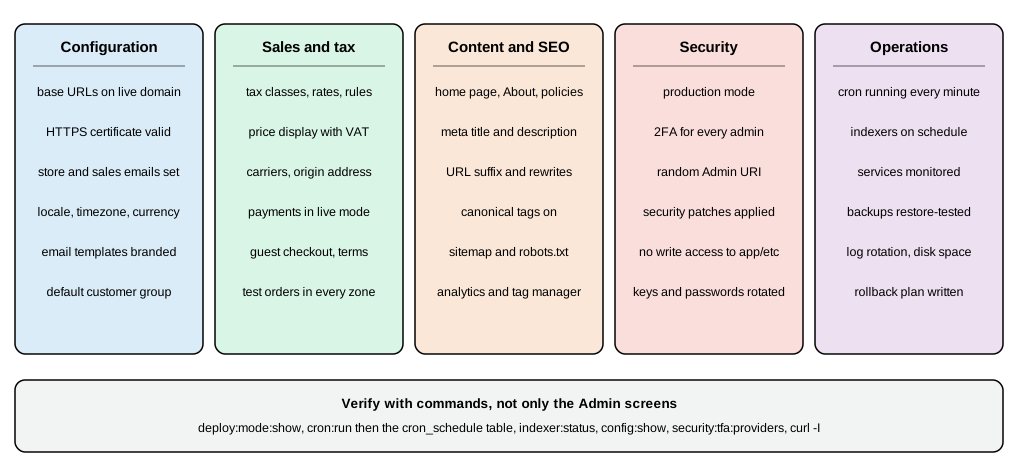
Adobe’s prelaunch checklist (updated 2026-10-08) groups the checks as General settings (store URLs, a signed and trusted certificate for the base URL domain, all store email addresses), Marketing settings (email templates, sales communications such as invoices and packing slips, Google tools), Sales settings (cart options, checkout options with terms and guest checkout, taxes, delivery methods, payment methods with test transactions in sandbox mode) and System settings (cron jobs running at the right interval). The table adds the verification command for each item and the Pocket Coffee value.
| Check | How to verify | Pocket Coffee |
|---|---|---|
Store URLs and HTTPS |
|
|
Mode and cache |
|
|
Cron and indexers |
|
every minute; indexers |
Emails |
Order a test product and read the confirmation; check |
real mailboxes, branded templates |
Taxes |
Add each product class to a cart for each country you sell to and read the totals |
10 percent beans, 21 percent equipment and shipping, tax shown inclusive |
Shipping |
|
Spain 4.90 and free from 40, six countries 9.90, US none |
Payment |
One real order in live mode with a small amount, then refund it |
offline methods for the test, a provider for production |
Catalogue and SEO |
View-source of a product page, |
canonical, meta description, sitemap and robots as above |
Security |
2FA on for every administrator, random Admin URI, |
Security bulletins read and applied, see Security |
Backups and rollback |
A restored copy of the database and |
dump script, tested restore |
Source: Adobe: Prelaunch checklist
A launch is a deployment as well as a configuration exercise: the configuration above is exported with bin/magento
app:config:dump into app/etc/config.php so every environment gets the same values, secrets stay in env.php or in
environment variables, and the deployment itself follows the build and release steps of
Upgrades.
What could not be run
Run on 2026-10-27 on the Mage-OS 3.6.0 install: the config:set and REST commands shown, the Admin login with the
session of a test administrator, every leaf link of the Admin menu (each answered HTTP 200), the Admin configuration
pages for General, Currency Setup, Tax, Shipping Settings, Delivery Methods, Customer Configuration, Checkout, Web,
Catalog, XML Sitemap, Admin and System (their fields, labels and selected options were read back), the Table Rates import
through the Admin’s own form, a configurable product, customers, a cart price rule, test orders for Spain and Germany,
CMS pages, the sitemap and robots.txt. Documented from Adobe’s pages and not executed: the Admin forms through a
browser (the pages were fetched over HTTP, not clicked), app:config:dump, scheduled currency imports (needs a
provider API key), live carriers (UPS, FedEx, DHL, USPS), PayPal and card payments, customer emails, Adobe Commerce-only
features (segments, staging, B2B, reward points, gift registry) and the Adobe IMS sign-in.