Static Site Generation
|
This content was generated with the assistance of AI and should be verified against the official documentation before being relied on in production. The reference material consulted while preparing these pages is listed in the section bibliography. |
This page is written against Next.js 16.3.8 (the latest release on 2026-10-03, when the facts and examples below were
checked; the official documentation reports @doc-version 16.3.8), React 19.3.0 and Node.js 20.9.0 or later. It covers
the App Router in depth and the Pages Router (getStaticProps, getStaticPaths, Automatic Static Optimization)
side by side. Caching only matters here where it changes the result, and every example says which model it uses: the
previous model (the default: a route is prerendered unless it reads request data) or Cache Components (the opt-in
cacheComponents: true model, in which a static shell is prerendered and everything else is dynamic unless you cache
it). Every example was built with next build and served with next start (Node.js 24.16, macOS), the static exports
were also served from a plain file server, and the results quoted below are what the build or curl printed. The
scratch app is a copy of the Bookshelf — the catalogue of books, authors and reviews that this section grows — and
each example is followed by the official page it derives from.
Static site generation (SSG) means that the HTML of a page is produced once, at build time, written to disk, and then
served unchanged to every visitor, usually from a CDN. This page explains why that is Next.js’s default behaviour, how
generateStaticParams turns one dynamic route into many files, what happens to a path that was not built, how to ship
nothing but files with output: 'export', and what the same ideas look like in the Pages Router. It builds on
Rendering Fundamentals (the spectrum of rendering strategies) and
Dynamic Routes and Route Groups (the [param] folders that
generateStaticParams fills in). Its neighbours are
Server-Side Rendering (the per-request opposite), and the pages on client-side
rendering, incremental static regeneration, hydration and partial prerendering, which are written alongside this one;
they are only mentioned here, not linked. For the React ideas underneath, see
Server Rendering, SSG and React Server Components.
What SSG Is and Why It Is the Default
Next.js does not ask you to choose "static" for a page. It renders a route at build time unless something in it needs
a request, and that is called prerendering (the official glossary lists "static rendering" as another name for it).
A route that never reads cookies(), headers(), searchParams, or uncached data stays static, and next build
marks it with a hollow circle in the route table. So "SSG" in Next.js is mostly a property of what your code does not
do, not a switch you flip.
What the build writes for a static route is a bundle of files, not just HTML:
-
the HTML for the first load, rendered from the Server Components (and, for Client Components, the server render of them);
-
the RSC payload, React’s serialised description of the same tree, which the browser fetches instead of HTML when a user navigates to the page with
next/link(the page on Rendering Fundamentals describes both); -
a small meta file with the status and the headers to send, and, per route segment, segment payloads that make prefetching cheap.
The scratch app’s .next/server/app/books folder after next build shows exactly that, one set per generated path:
next build writes for one statically generated route$ ls .next/server/app/books
1.html 1.meta 1.rsc 1.segments
2.html 2.meta 2.rsc 2.segments
3.html 3.meta 3.rsc 3.segments
4.html 4.meta 4.rsc 4.segments
...
$ ls .next/server/app/books/1.segments
_full.segment.rsc _tree.segment.rsc booksSource: Glossary: Prerendering
Static generation is the cheapest and fastest strategy there is: no server work per request, a response that a CDN can cache for as long as you like, and nothing to scale. Its price is that the output is the same for everybody and only as fresh as the last build (or, with the next page’s subject, the last revalidation). Use it for content that is public and changes rarely: marketing pages, documentation, a catalogue, blog posts. The decision table below puts it next to the other strategies; the rendering spectrum is covered in depth on the Rendering Fundamentals page.
| Strategy | When the HTML is produced | Same for every visitor? | Typical use |
|---|---|---|---|
SSG (prerendering) |
At |
Yes. |
Catalogue, docs, marketing pages, blog. |
ISR (static plus revalidation) |
At build, then again in the background after a time or an event. |
Yes. |
A catalogue whose data changes between deploys. |
SSR (dynamic rendering) |
On every request. |
No, it may depend on cookies, headers, |
"My shelf", a search page, anything personalised. |
CSR |
In the browser, after the first load. |
No. |
Highly interactive panels behind a login. |
Source: Building public pages and Caching
The Build Pipeline
Everything on this page happens inside next build, so it helps to see the stages once. The stage names below are the
ones the 16.3.8 CLI prints.
server and client bundles"] B --> C["Type check"] C --> D["Collect page data:
read segment config,
call generateStaticParams"] D --> E["Generate static pages:
a worker pool renders
every route and param"] E --> F["Write .next/server/app:
html, rsc, meta, segments"] F --> G["Print the route table"] F --> H{"output: export?"} H -->|yes| I["Copy to out/:
HTML, RSC txt, assets, public/"] H -->|no| J["next start serves the files and
renders unlisted params on demand"]
Two details matter later. First, generateStaticParams runs in the collect page data stage, before any page or
layout is generated, so a failure there stops the build before a single page is rendered. Second, the generate static
pages stage is where your Server Components actually execute, in a pool of worker processes (nine on the machine used
for this page); every statically rendered route and every param combination is one unit of work, and this stage is the
build-time cost the section on Build Output and Build-Time Cost measures.
This is the real output for the Bookshelf catalogue built below:
$ npx next build
  Creating an optimized production build ...
✓ Compiled successfully in 138ms
  Finished TypeScript in 436ms ...
  Collecting page data using 9 workers ...
  Generating static pages using 9 workers (0/19) ...
✓ Generating static pages using 9 workers (19/19) in 139ms

Route (app)
┌ ○ /
├ ○ /_not-found
├   /api/books/[id]
│ ├ ● /api/books/1
│ ├ ● /api/books/2
│ ├ ● /api/books/3
│ └ ● /api/books/4
├ ○ /books
├ ○ /books.json
├   /books/[id]
│ ├ ● /books/1
│ ├ ● /books/2
│ ├ ● /books/3
│ └ ● /books/4
├ ○ /robots.txt
├   /shelves/[genre]/[id]
│ ├ ● /shelves/scifi/1
│ ├ ● /shelves/scifi/2
│ ├ ● /shelves/scifi/3
│ └ ● /shelves/classic/4
└ ○ /sitemap.xml


○  (Static)  prerendered as static content
●  (SSG)     prerendered as static HTML (uses generateStaticParams)
Source: CLI: next build
Read the symbols as follows. ○ is a route that is static and has no dynamic segment (/books, /robots.txt).
● is a route that was generated from generateStaticParams; the indented lines under a bracketed route are the
concrete paths that were built. ƒ (not in this table, but you will see it next to anything that reads request data)
means "dynamic, rendered on demand". With Cache Components on, a fourth symbol, ◐ (Partial Prerender), appears.
Since 16.0 the table no longer prints per-route sizes or the "First Load JS" column; use next experimental-analyze
(still labelled experimental in 16.3) or the bundle analyzer when you need numbers.
When a Route Is Static
The rule in the previous model: the route is prerendered unless a component reads a Request-time API (cookies(),
headers(), draftMode(), searchParams), fetches with cache: 'no-store', or sets a dynamic segment config. In
Cache Components the rule is different in an important way: any uncached data or request data is dynamic, and the
build tells you where, instead of silently switching the whole route to dynamic. Both are described on
Rendering Fundamentals; what this page needs is the consequences for a
static page.
Everything evaluated during the build is frozen into the files. That includes the time, random numbers, and environment variables:
export default function Stamp() {
  // runs once, during next build: every visitor sees the same value
  return <p>Built at {new Date().toISOString()}</p>;
}
Requesting /books/1 twice, 1.5 seconds apart, returned the same Built at instant both times
(2026-10-03T14:30:22.219Z), and /books/2, generated in the same build, differed from it only by milliseconds. The
same page with Cache Components fails the build instead, which is the more helpful behaviour:
new Date() with cacheComponents: trueError: Route "/books/[id]": Next.js encountered the unstable value `new Date()` while prerendering.
This value can change between renders, so it must be either prerendered or computed later.
Ways to fix this:
- [dynamic] Render at request time by adding a dynamic data access (e.g. `await connection()`) before this call
- [cache] Prerender and cache the value with `"use cache"`
- [client] Render the value on the client with `"use client"`
- [measure] If the value is for telemetry, use a timing API such as `performance.now()`
Learn more: https://nextjs.org/docs/messages/blocking-prerender-current-timeSource: blocking-prerender-current-time
The same applies to environment variables: a process.env.X read in a statically rendered Server Component is
replaced by its value at build time, so changing the variable on the server later changes nothing until you rebuild.
Only the dedicated runtime-reading patterns (a dynamic route, connection()) read the environment per request. The
page on configuration and environment variables explains the build-time versus runtime split in full.
Finally, static means public: whatever is in the HTML or the RSC payload is visible to everyone and can be cached by a CDN. Never put user-specific or secret data in a statically generated page.
generateStaticParams
A route with a dynamic segment (/books/[id]) is not static by itself, because Next.js does not know the values of
id at build time. generateStaticParams supplies them. You export it from a page, a layout or a route file,
and it returns an array in which each object fills in the dynamic segments of one path:
| Route | generateStaticParams returns |
|---|---|
|
|
|
|
|
|
Source: generateStaticParams: Returns
Values are strings (or arrays of strings for catch-all segments), because they come from URLs; convert numeric ids
with String(). The function replaces the Pages Router getStaticPaths (introduced as generateStaticParams in 13.0),
and it is allowed to be async.
A single dynamic segment: the Bookshelf book page
This is the page used for every example that follows. The data layer is a stand-in for a database or a CMS; in a real
project it would be the lib/books.ts of the Bookshelf, and getBook is wrapped in React’s cache so
generateMetadata and the page share one lookup.
import { cache } from "react";

export type Book = {
  id: string;
  title: string;
  author: string;
  genre: string;
  priceCents: number;
};

const books: Book[] = [
  { id: "1", title: "Dune", author: "Frank Herbert", genre: "scifi", priceCents: 999 },
  { id: "2", title: "Neuromancer", author: "William Gibson", genre: "scifi", priceCents: 899 },
  { id: "3", title: "Solaris", author: "Stanislaw Lem", genre: "scifi", priceCents: 799 },
  { id: "4", title: "Emma", author: "Jane Austen", genre: "classic", priceCents: 599 },
];

export async function listBooks(): Promise<Book[]> {
  return books;
}

// cache() memoizes per render pass, so generateMetadata and the page share one lookup
export const getBook = cache(async (id: string): Promise<Book | undefined> => {
  return books.find((b) => b.id === id);
});

export async function listGenres(): Promise<string[]> {
  return [...new Set(books.map((b) => b.genre))];
}

export async function listBooksByGenre(genre: string): Promise<Book[]> {
  return books.filter((b) => b.genre === genre);
}import type { Metadata } from "next";
import { notFound } from "next/navigation";
import { getBook, listBooks } from "@/lib/books";
// Runs during next build, before the page itself is generated
export async function generateStaticParams() {
const books = await listBooks();
return books.map((b) => ({ id: b.id }));
}
// Also evaluated at build time for every generated path: the <title> is in the static HTML
export async function generateMetadata({ params }: PageProps<"/books/[id]">): Promise<Metadata> {
const { id } = await params;
const book = await getBook(id);
return {
title: book?.title ?? "Not found",
description: book ? `${book.title} by ${book.author}` : undefined,
};
}
export default async function BookPage({ params }: PageProps<"/books/[id]">) {
const { id } = await params;
const book = await getBook(id);
if (!book) notFound();
return (
<main>
<h1>{book.title}</h1>
<p>{book.author}</p>
<p>Built at {new Date().toISOString()}</p>
</main>
);
}Source: generateStaticParams and generateMetadata
next build prints ● /books/1 to ● /books/4 (the table above), and the files exist as 1.html to 4.html.
curl against next start confirmed what is served:
$ curl -si localhost:3502/books/1 | head -5
HTTP/1.1 200 OK
x-nextjs-cache: HIT
Cache-Control: s-maxage=31536000
Content-Type: text/html; charset=utf-8

$ curl -s localhost:3502/books/1 | grep -o '<title>[^<]*'
<title>Dune | Bookshelf
x-nextjs-cache: HIT says the response came from the prerendered cache, and s-maxage=31536000 (one year) tells a CDN
it may keep it, because in the previous model a static page never expires unless you revalidate it. (With Cache
Components the header is s-maxage=900, stale-while-revalidate=… for the page below, because the "use cache"
function’s default cacheLife profile revalidates every 15 minutes.) Two details in the code are deliberate:
params is a promise and is awaited (synchronous access was removed in 16), and PageProps<'/books/[id]'> is a
type that Next.js generates, so no hand-written prop types are needed.
During next dev the function is called whenever you navigate to the route, so a new item in your data shows up
without a restart; during next build it runs once, before the pages; and during revalidation it is not called
again. fetch calls with the same URL and options are memoized across generate-prefixed functions, layouts and
pages; use React cache (as above) when the data does not come from fetch.
Several dynamic segments: top-down and bottom-up
For /shelves/[genre]/[id] there are two ways to produce the pairs. Bottom-up: the page returns both values
([{ genre: 'scifi', id: '1' }, …]) in one function. Top-down: the parent layout produces the genres, and the
child page’s generateStaticParams runs once for every genre the parent produced and receives that genre. You can
generate params for the segment you are in and the ones above it, never the ones below.
import { listGenres } from "@/lib/books";

// Top down: this layout can only generate [genre]
export async function generateStaticParams() {
  const genres = await listGenres();
  return genres.map((genre) => ({ genre }));
}

export default async function ShelfLayout({ children, params }: LayoutProps<"/shelves/[genre]">) {
  const { genre } = await params;
  return (
    <section>
      <h2>Shelf: {genre}</h2>
      {children}
    </section>
  );
}import { getBook, listBooksByGenre } from "@/lib/books";
// Runs once for every { genre } the parent generated; only parent params are passed in
export async function generateStaticParams({ params }: { params: { genre: string } }) {
const books = await listBooksByGenre(params.genre);
return books.map((b) => ({ id: b.id }));
}
export default async function ShelfBookPage({ params }: PageProps<"/shelves/[genre]/[id]">) {
const { genre, id } = await params;
const book = await getBook(id);
return (
<p>
{genre}: {book?.title}
</p>
);
}The build logged one call to the layout’s function (listGenres) and then one listBooksByGenre per genre
(scifi, classic), and produced /shelves/scifi/1, /shelves/scifi/2, /shelves/scifi/3 and
/shelves/classic/4. Note that the child’s params argument is a plain object holding only the parent’s params; it
is not a promise, unlike the params prop of the page. Top-down avoids loading the whole catalogue to find the
genres and lets each level ask a cheaper question; bottom-up is simpler when one query returns everything. When the
parent segment is a root parameter, a nested generateStaticParams can also read it with the next/root-params
getters (16.3, Server Components only).
Paths that were not built: dynamicParams
generateStaticParams does not have to list everything. The segment option dynamicParams decides what happens to a
path that is not in the list:
| Value | Behaviour for a path not returned by generateStaticParams |
|---|---|
|
The page is rendered on the first request, then cached like any built page. An id that does not exist runs
|
|
A 404, immediately, without running any of your code. |
Source: dynamicParams
To see both, the page was rebuilt returning only the first two books (books.slice(0, 2)). The route table then
lists only /books/1 and /books/2, and the first request for /books/3 was generated on demand:
dynamicParams = true (the default)$ curl -sI localhost:3502/books/3 | grep -i -E "HTTP|x-nextjs-cache"
HTTP/1.1 200 OK
x-nextjs-cache: MISS
$ curl -sI localhost:3502/books/3 | grep -i -E "HTTP|x-nextjs-cache"
HTTP/1.1 200 OK
x-nextjs-cache: HIT
$ curl -sI localhost:3502/books/99 | grep -i -E "HTTP|x-nextjs-cache"
HTTP/1.1 404 Not Found
x-nextjs-cache: MISSAnd with export const dynamicParams = false; added above generateStaticParams, /books/3 returned 404 at once
(and no data function ran), while /books/1 stayed a 200 HIT:
// Only the paths from generateStaticParams exist; everything else is a 404
export const dynamicParams = false;

export async function generateStaticParams() {
  const books = await listBooks();
  return books.slice(0, 2).map((b) => ({ id: b.id }));
}The sequence on a first request for an unlisted path in the default mode:
Choosing between the two is a trade between build time and strictness. Return the whole list and keep the default when
the catalogue is small; return the top items and leave dynamicParams on when the list is huge (the unlisted ones are
built when first visited, which is how most large catalogues keep builds short); set false when the list is a closed
set (supported locales, a fixed set of categories) and a 404 for anything else is exactly what you want. Because unknown
ids are not cached, a crawler that enumerates ids makes your server hit the data source each time; false or a
cheap existence check in front of the data call avoids that.
Two special forms are worth knowing. Returning an empty array defers every path to the first request (the build
generates none of them), and so does export const dynamic = 'force-static':
export async function generateStaticParams() {
  return []; // you must return an array, even an empty one; otherwise the route is dynamic
}The build then printed ● /books/[id] with no children, and the first request for /books/2 was a MISS, the second a
HIT.
With Cache Components: at least one param, and no dynamicParams
Cache Components changes three things here, all verified by building the same page with cacheComponents: true.
-
generateStaticParamsmust return at least one param. An empty array fails the build:Error: When using Cache Components, all `generateStaticParams` functions must return at least one result. This is to ensure that we can perform build-time validation that there is no other dynamic accesses that would cause a runtime error. Learn more: https://nextjs.org/docs/messages/empty-generate-static-paramsThe samples are what lets the build validate the route: it renders the page with each sample, and fails if something reads request data or uncached data outside
<Suspense>or"use cache". A placeholder such as[{ id: '__placeholder__' }]that your page turns intonotFound()silences the error but validates nothing. -
dynamicParamsis rejected. Addingexport const dynamicParams = falsefails the build with the message "Route segment config dynamicParams is not compatible withnextConfig.cacheComponents. Please remove it." The option is not available because params that were not listed are served differently (below). -
export const dynamic = 'force-static'is rejected too, with the same message for"dynamic". Remove it; use"use cache"to say what is cacheable.
The Bookshelf page under Cache Components needs only the date moved into a cached function:
async function builtAt() {
  "use cache";
  return new Date().toISOString();
}

export default async function BookPage({ params }: PageProps<"/books/[id]">) {
  const { id } = await params;
  const book = await getBook(id);
  if (!book) notFound();
  return (
    <main>
      <h1>{book.title}</h1>
      <p>{book.author}</p>
      <p>Built at {await builtAt()}</p>
    </main>
  );
}The route table for that build:
├   /books/[id]
│ ├ ◐ /books/[id]
│ ├ ○ /books/1
│ ├ ○ /books/2
│ └ ◐ [+2 more paths]
...
○  (Static)             prerendered as static content
●  (SSG)                prerendered as static HTML (uses generateStaticParams)
◐  (Partial Prerender)  prerendered as static HTML with dynamic server-streamed content
The table abbreviates long lists ([+2 more paths]). The extra ◐ /books/[id] row is the App Shell: the part of the page that does not depend on the param. A path that
was not listed (with only two samples, /books/3) was answered on the first request (x-nextjs-cache: MISS, then
HIT) and /books/99 returned a 404. In 16.3 you can add partialPrefetching: true to the config so that an unlisted
URL gets the shell instantly and is upgraded in the background; that is the Cache Components counterpart of
fallback: true, and it is described on the page about incremental static regeneration.
If a route has no generateStaticParams, every param is runtime data under Cache Components, and reading params
must happen inside <Suspense> (or loading.tsx) or the build fails with blocking-prerender-dynamic; the Streaming
and Suspense page has the details.
In Route Handlers
generateStaticParams also works in a route.ts, and it is how you ship JSON or other files as static assets. The
example from the scratch app:
import { getBook, listBooks } from "@/lib/books";

export async function generateStaticParams() {
  return (await listBooks()).map((b) => ({ id: b.id }));
}

export async function GET(_request: Request, { params }: RouteContext<"/api/books/[id]">) {
  const { id } = await params;
  const book = await getBook(id);
  if (!book) return Response.json({ error: "not found" }, { status: 404 });
  return Response.json(book);
}$ curl -si localhost:3502/api/books/2 | grep -i -E "HTTP|x-nextjs-cache|cache-control|content-type"
HTTP/1.1 200 OK
x-nextjs-cache: HIT
cache-control: s-maxage=31536000
content-type: application/json
$ curl -s localhost:3502/api/books/2
{"id":"2","title":"Neuromancer","author":"William Gibson","genre":"scifi","priceCents":899}A GET Route Handler with no generateStaticParams and no config is not prerendered since 15.0 (it is
dynamic; the build table shows ƒ). To make it a static file, mark it export const dynamic = 'force-static', as in
the next example (previous model; under Cache Components the option is rejected, and a handler that reads nothing from
the request is prerendered by default):
import { listBooks } from "@/lib/books";

export const dynamic = "force-static";

export async function GET() {
  return Response.json(await listBooks());
}
Source: Static exports: Route Handlers
The build listed ○ /books.json, and the response was a HIT with cache-control: s-maxage=31536000. Only GET is
static, and a handler that reads the Request cannot be.
Static Metadata and Metadata Files
Metadata is part of the page, so it is prerendered with it. The metadata object and generateMetadata are evaluated
at build time for static routes (the <title>Dune | Bookshelf shown above comes from generateMetadata), and so are the
file conventions that generate files: sitemap.ts, robots.ts, manifest.ts, opengraph-image and the icon files.
Those Route-Handler-like files are static unless they use request data (sitemap.xml and robots.txt were ○ (Static)
in the table above and served with x-nextjs-cache: HIT).
import type { Metadata } from "next";

export const metadata: Metadata = {
  title: { default: "Bookshelf", template: "%s | Bookshelf" },
  metadataBase: new URL("https://bookshelf.example.com"),
};

export default function RootLayout({ children }: LayoutProps<"/">) {
  return (
    <html lang="en">
      <body>{children}</body>
    </html>
  );
}import type { MetadataRoute } from "next";
import { listBooks } from "@/lib/books";
export default async function sitemap(): Promise<MetadataRoute.Sitemap> {
const books = await listBooks();
return [
{ url: "https://bookshelf.example.com/", changeFrequency: "monthly" },
...books.map((b) => ({ url: `https://bookshelf.example.com/books/${b.id}` })),
];
}import type { MetadataRoute } from "next";
export default function robots(): MetadataRoute.Robots {
return {
rules: { userAgent: "*", allow: "/" },
sitemap: "https://bookshelf.example.com/sitemap.xml",
};
}Source: sitemap.xml, robots.txt and Metadata and OG images
Under output: 'export' (below), these files must opt in with export const dynamic = "force-static", like any other
Route Handler, or the build stops. A page whose metadata needs a database call, like the book title above, simply moves
that call into the build.
Worked Example: the Bookshelf Catalogue as a Static Site
Putting the pieces together, this is the static part of the Bookshelf front end: a home page, a catalogue, one page
per book, one page per shelf entry, a JSON feed, a sitemap and robots.txt.
app/
├── layout.tsx                    metadata template, metadataBase
├── page.tsx                      ○ /
├── sitemap.ts                    ○ /sitemap.xml
├── robots.ts                     ○ /robots.txt
├── books.json/route.ts           ○ /books.json  (dynamic = "force-static")
├── books/
│   ├── page.tsx                  ○ /books
│   └── [id]/page.tsx             ● /books/1 ... /books/4
├── shelves/[genre]/
│   ├── layout.tsx                generateStaticParams -> genres (top-down)
│   └── [id]/page.tsx             ● /shelves/scifi/1 ... /shelves/classic/4
└── api/books/[id]/route.ts       ● /api/books/1 ... /api/books/4
lib/books.ts the data stand-inimport Link from "next/link";
import { listBooks } from "@/lib/books";
export const metadata = { title: "Catalogue" };
export default async function BooksPage() {
const books = await listBooks();
return (
<main>
<h1>Catalogue</h1>
<ul>
{books.map((b) => (
<li key={b.id}>
<Link href={`/books/${b.id}`}>{b.title}</Link> by {b.author}
</li>
))}
</ul>
</main>
);
}Source: Layouts and Pages
The data call in BooksPage runs at build time and its result is baked into books.html; the data layer is therefore
never reachable from the browser. The build’s route table is the one shown earlier. A request to next start shows that
the list is already in the HTML, not fetched by JavaScript (React adds the <!-- -→ comments between adjacent text
nodes):
$ curl -s localhost:3502/books | grep -o '<li>.*</li>' | head -c 140
<li><a href="/books/1">Dune</a> by <!-- -->Frank Herbert</li><li><a href="/books/2">Neuromancer</a> by <!-- -->Will...
The same app with CACHE_COMPONENTS=1 (the next.config.ts of the scratch app turns on cacheComponents from that
variable) built after two edits: the dynamic = "force-static" line removed from books.json/route.ts, and the
new Date() moved into a "use cache" function as above.
Static Export: output: 'export'
A static export goes one step further than prerendering: it produces a folder of HTML, CSS and JavaScript that any web server can host, with no Node.js server at all. Enable it in the config:
import type { NextConfig } from "next";

const nextConfig: NextConfig = {
  output: "export",

  // Optional: /books/1 becomes /books/1/index.html instead of /books/1.html
  // trailingSlash: true,

  // Optional: stop Next.js redirecting /me to /me/ (and the reverse)
  // skipTrailingSlashRedirect: true,

  // Optional: write to dist/ instead of out/
  // distDir: "dist",
};

export default nextConfig;
Source: Static exports: configuration and output
next build now also fills the out/ folder. This is the layout it wrote for the Bookshelf, with Next.js’s own
bookkeeping files trimmed:
out/ folder (default trailingSlash: false)out/
├── index.html
├── 404.html
├── books.html
├── books.json
├── books/
│ ├── 1.html 1.txt 1/__next.books.$d$id.__PAGE__.txt ...
│ └── 4.html 4.txt
├── shelves/scifi/1.html ... shelves/classic/4.html
├── api/books/1 ... api/books/4 (JSON, no file extension)
├── robots.txt
├── sitemap.xml
└── _next/static/... (hashed JS and CSS)With trailingSlash: true the same build wrote books/1/index.html, books/index.html and index.html per route
(folders instead of sibling files), while books.json and robots.txt stayed plain files: URLs with a file extension
never get a trailing slash. The .txt files are RSC payloads that the browser fetches when a user clicks a next/link;
they must be served, with their extension, next to the HTML.
Do not run next start on an export. It refuses, and the message names the right tool:
Error: "next start" does not work with "output: export" configuration. Use "npx serve@latest out" instead.What is supported
Server Components run during the build (their output becomes the HTML and a static payload for client navigation), Client
Components work as in any SPA (with SWR or TanStack Query for data in the browser), and next/link, prefetching,
dynamic imports, CSS Modules and the Metadata API work. Route Handlers work for GET when marked force-static.
Browser-only APIs (window, localStorage) belong in useEffect because Client Components are also prerendered.
What is not supported, and what the build really does
The official list is below, extended with what Next.js 16.3.8 actually did in the scratch app. The important finding is that not every unsupported feature is a build error: several are silently dropped, so read this table before trusting a green build.
| Feature | Observed in the build | What to do |
|---|---|---|
Dynamic route without |
Build error: |
Provide the list of paths. ( |
|
Build error: the route "couldn’t be rendered statically because it used |
Read them in a Client Component ( |
Route Handler (and |
Build error: |
Add |
Server Actions ( |
Build error: |
Call a separate API from Client Components. |
Default |
|
Set |
|
Only a warning: |
Implement them on the host (nginx, CloudFront, |
Proxy ( |
Not tried; the official list marks them unsupported (a static host has no process to run them). |
Rebuild and redeploy to change content; use a server deployment for any of these. |
Pages Router: |
Build error: |
Use |
Pages Router: API routes |
Only a warning ( |
Host the API elsewhere. |
Pages Router: |
The build succeeded and |
Use |
Source: Static exports: unsupported features, Pages Router static exports, and the messages generate-static-params, export-no-custom-routes and export-image-api
Images: a custom loader
next/image needs a server to resize images, and an export has none, so you point it at an external image service with
a custom loader. A loader is a function from (src, width, quality) to a URL:
import type { NextConfig } from "next";

const nextConfig: NextConfig = {
  output: "export",
  images: { loader: "custom", loaderFile: "./lib/image-loader.ts" },
};

export default nextConfig;// A custom loader maps (src, width, quality) to the URL of an external image service
export default function bookshelfLoader({ src, width, quality }: { src: string; width: number; quality?: number }) {
return `https://images.bookshelf.example.com${src}?w=${width}&q=${quality ?? 75}`;
}With a 50 by 50 pixel Image whose src is /cover.png, the exported HTML contained
src="https://images.bookshelf.example.com/cover.png?w=128&q=75" and a matching srcSet. (images.unoptimized: true
is the other route: the original file is served as it is.)
Source: Static exports: Image Optimization and images
Hosting the out/ folder
Any file server works, provided it maps a clean URL to the right file. The official guide shows an nginx configuration; this is a shortened version of the same idea for the Bookshelf:
trailingSlash: false; not run)server {
listen 80;
server_name bookshelf.example.com;
root /var/www/out;
# /books/1 -> books/1.html; /books/ -> books/index.html is only produced with trailingSlash: true
location / {
try_files $uri $uri.html $uri/index.html =404;
}
error_page 404 /404.html;
location = /404.html {
internal;
}
}Source: Static exports: deploying. For GitHub Pages, the official project provides a template at nextjs/deploy-github-pages.
Amazon S3 and CloudFront
The recommended AWS setup is a private S3 bucket behind CloudFront with Origin Access Control, which the
S3 Security and Static Hosting page walks through end to end (the
section "Hosting a static site: private bucket, CloudFront and OAC"), and the distribution itself is described on
CloudFront CDN. Those pages host a single-page app: they send every 403/404 to
/index.html with a 200. A Next.js export is not an SPA: each route has its own file, so that fallback would show
the home page for a mistyped URL and hides real 404s. Use a custom error response with the response page
path /404.html and keep the response code 404; with a private bucket and no s3:ListBucket permission S3 answers
403 for a missing key, so add the same response for 403 (the CloudFront page explains the permission).
The remaining gap is that CloudFront’s default root object only applies to /, and S3’s REST endpoint does not
resolve /books/1 to books/1.html. A tiny CloudFront Function on the viewer request closes it. This function was
run against the scratch export with a small Node.js file server that applies it, and returned the right file for every
URL below:
trailingSlash: false)// Map clean URLs to the files `next build` wrote to out/
function handler(event) {
var request = event.request;
var uri = request.uri;
if (uri.endsWith("/")) {
uri = uri.slice(0, -1);
}
if (uri === "") {
request.uri = "/index.html";
} else if (uri.lastIndexOf(".") < uri.lastIndexOf("/")) {
// no file extension: /books/1 -> /books/1.html
request.uri = uri + ".html";
}
return request;
}/ -> 200 text/html
/books -> 200 text/html
/books/ -> 200 text/html
/books/2 -> 200 text/html
/books/99 -> 404 text/html (the 404.html page)
/books.json -> 200 application/json
/books/2.txt -> 200 text/plain (the RSC payload for client navigation)Upload with the AWS CLI (placeholder bucket and distribution names; this part was not run against a real AWS account).
Hashed assets under _next/static never change, so they can be cached for a year; HTML must be revalidated so a
deploy is seen at once:
out/ to S3 and invalidating CloudFront# hashed, immutable assets
aws s3 sync out/_next/static s3://BUCKET_NAME/_next/static \
--cache-control "public,max-age=31536000,immutable"
# everything else: always revalidate
aws s3 sync out s3://BUCKET_NAME --delete --exclude "_next/static/*" \
--cache-control "public,max-age=0,must-revalidate"
aws cloudfront create-invalidation --distribution-id DISTRIBUTION_ID --paths "/*"Two things bite here. Extensionless files such as out/api/books/1 (the output of a dynamic Route Handler) get no
content type from aws s3 sync (S3 serves them as binary/octet-stream) and the rewrite above would turn their URL
into .html; avoid dynamic Route Handlers in an export, or give static files a real name (books.json). And the
invalidation "/*" is the simplest choice but empties the whole cache, including hashed assets that did not change; the
CloudFront page covers narrower invalidations and cache policies.
Google Cloud
On Google Cloud the equivalent is a Cloud Storage bucket behind a global external Application Load Balancer with
Cloud CDN. The Cloud Storage Security and Static Sites
page hosts the Bookshelf static site that way, and
Cloud CDN and Media CDN covers the caching layer. The same two
rules apply (this part was not run against a real project). Keep the 404 for unknown paths instead of sending them to
index.html: set the bucket’s not-found page to 404.html (the status code stays 404). And make sure /books/1
reaches a file: export with trailingSlash: true so that the bucket’s main page suffix index.html serves
/books/1/, or keep the default layout and add a URL-map rewrite for extensionless routes, as the Cloud CDN page
suggests for single-page apps.
The Pages Router: getStaticProps, getStaticPaths and Automatic Static Optimization
In the pages/ directory SSG is a small set of explicit functions, and a page with none of them is static anyway.
Automatic Static Optimization
A page is statically optimised when it has no getServerSideProps and no getInitialProps. Nothing to opt in:
// No getServerSideProps / getInitialProps: Automatic Static Optimization prerenders this page
import Link from "next/link";

export default function Home() {
  return (
    <main>
      <h1>Bookshelf</h1>
      <Link href="/books">Catalogue</Link>
    </main>
  );
}
The build printed ○ / and .next/server/pages/index.html exists (it would be index.js if the page had
getServerSideProps). Caveats: a custom App with getInitialProps switches the optimisation off for pages without
getStaticProps; during prerender the router’s query is empty and is filled in after hydration for dynamic routes,
for pages whose URL has a query string, and when rewrites are configured, so wait for router.isReady before reading it;
and avoid asPath before isReady, or you get a hydration mismatch.
Source: Automatic Static Optimization
getStaticProps
Export getStaticProps from a page to run code at build time and pass the result as props. It runs only on the
server, never ships to the browser, and cannot read the request (no cookies, no query string); use Proxy in front of it
if you must vary the output.
import type { GetStaticProps, InferGetStaticPropsType } from "next";
import Link from "next/link";
import { listBooks, type Book } from "@/lib/books";

export const getStaticProps = (async () => {
  const books = await listBooks();
  return { props: { books } };
}) satisfies GetStaticProps<{ books: Book[] }>;

export default function Books({ books }: InferGetStaticPropsType<typeof getStaticProps>) {
  return (
    <main>
      <h1>Catalogue</h1>
      <ul>
        {books.map((b) => (
          <li key={b.id}>
            <Link href={`/books/${b.id}`}>{b.title}</Link>
          </li>
        ))}
      </ul>
    </main>
  );
}
Source: getStaticProps
The return value is an object with one of props, redirect (send the visitor elsewhere) or notFound: true (a 404),
and optionally revalidate (seconds, which makes the page ISR). The props are serialised into the HTML as JSON and
shipped to the browser so React can hydrate, which means nothing sensitive may go in props. next build writes
both an HTML file and a JSON file per page; the HTML serves the first load and the JSON serves client navigation
(/_next/data/<buildId>/books/3.json). In development getStaticProps runs on every request.
getStaticPaths and fallback
A dynamic page that uses getStaticProps must also export getStaticPaths, which lists the paths to build and says
what to do with the rest. This is the file that was built and exercised with each of the three fallback values:
import type { GetStaticPaths, GetStaticProps, InferGetStaticPropsType } from "next";
import { useRouter } from "next/router";
import { getBook, listBooks, type Book } from "@/lib/books";

export const getStaticPaths = (async () => {
  const books = await listBooks();
  return {
    // only the first two books are built; the third is left to `fallback`
    paths: books.slice(0, 2).map((b) => ({ params: { id: b.id } })),
    fallback: "blocking", // false | true | "blocking"
  };
}) satisfies GetStaticPaths;

export const getStaticProps = (async ({ params }) => {
  const book = await getBook(params!.id as string);
  if (!book) return { notFound: true };
  return { props: { book } };
}) satisfies GetStaticProps<{ book: Book }, { id: string }>;

export default function BookPage({ book }: InferGetStaticPropsType<typeof getStaticProps>) {
  const router = useRouter();
  // with fallback: true the first render has empty props
  if (router.isFallback) return <p>Loading...</p>;
  return (
    <main>
      <h1>{book.title}</h1>
      <p>{book.author}</p>
    </main>
  );
}
Source: getStaticPaths and getStaticPaths API reference
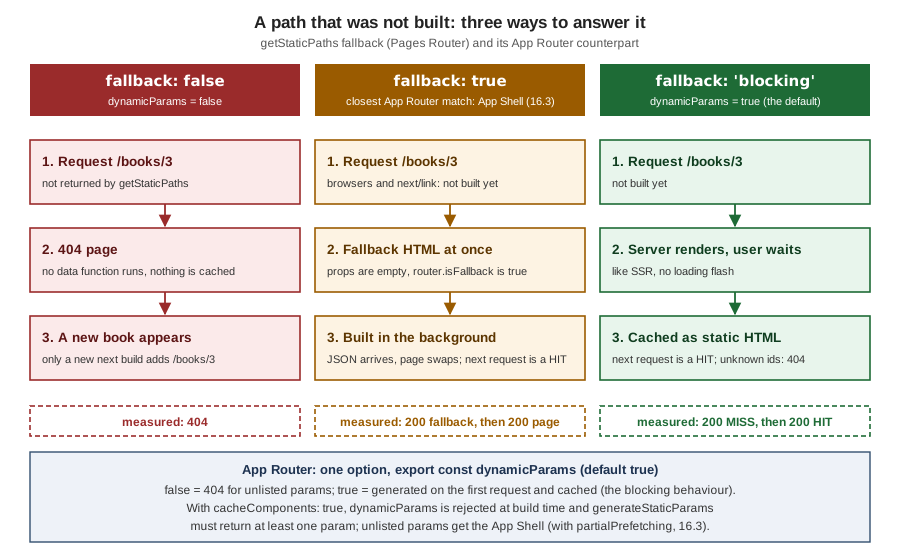
In all three runs the route table was the same (● /books/1, ● /books/2; getStaticPaths runs only at build time
in production, and on every request in development). What differed was the answer for a path outside the list, measured
with next start:
fallback |
Request for /books/3 (exists, not built) and /books/99 (does not exist) |
How it works |
|---|---|---|
|
|
Only the paths returned are served. New data needs a new build. |
|
|
The fallback HTML has empty props and |
|
|
Next.js server-renders the page, caches it, and serves it from the cache from then on. No loading state, so no flash. |
Two documented behaviours the experiment did not need: crawlers are served the blocking behaviour even with
fallback: true (so they do not index the loading state), and neither true nor 'blocking' ever updates a page that
was generated; for that, add revalidate (ISR). Another rule: with fallback: true, your component must handle the
empty-props render (the isFallback check above) or it crashes on book.title.
The Pages Router and the App Router side by side
| Need | Pages Router | App Router |
|---|---|---|
Prerender with no data |
Automatic Static Optimization (no data function) |
A page with no Request-time API is prerendered |
Prerender with data |
|
An |
List the paths of a dynamic route |
|
|
|
Only listed paths exist. |
|
|
Wait, then cache. |
The default ( |
|
Fallback render with |
The App Shell with Cache Components and |
404 for a missing record |
|
|
Redirect |
|
|
Regenerate after a time |
|
|
Where the data lands |
|
The RSC payload (only what Client Components receive as props is serialised) |
Per-page |
|
|
Static export of a dynamic route |
|
|
staticGeneration* Configuration
Three experimental options tune the generate static pages stage. They live under experimental and the official
page marks them as experimental, not recommended for production:
import type { NextConfig } from "next";

const nextConfig: NextConfig = {
  experimental: {
    staticGenerationRetryCount: 1,
    staticGenerationMaxConcurrency: 8,
    staticGenerationMinPagesPerWorker: 25,
  },
};

export default nextConfig;
Source: staticGeneration*
| Option | Meaning (official description) |
|---|---|
|
How many times to retry a failed page generation before failing the build. |
|
The maximum number of pages processed per worker. |
|
The minimum number of pages processed before a new worker is started. |
Next.js prints · staticGenerationRetryCount: 1 under "Experiments (use with caution)" when you set one. In the
scratch app a page that threw a transient upstream failure error on its first attempt still failed the build with
staticGenerationRetryCount: 1, so do not count on the retry to hide a flaky data source in your render code:
make the data fetching itself resilient. The concurrency option has a measurable effect, shown next.
Build Output and Build-Time Cost
Static generation moves cost from the request to the build: a site with 10,000 products renders 10,000 pages every time you build. Three levers keep that bearable.
-
Build fewer paths. Return the top few hundred from
generateStaticParams(orgetStaticPaths) and leavedynamicParams: true(orfallback: 'blocking'); the rest are built on first visit and cached. The Pages Router guide even suggests returningpaths: []in preview environments to skip static generation there. -
Make each page cheap. The data call is usually the cost. Memoize with
fetchor Reactcache, fetch lists in one query rather than one per page, and keepgenerateStaticParamslight. -
Tune the pool.
staticGenerationMaxConcurrencycontrols how many pages a worker handles at once, which matters when each page waits on a slow network call.
To see the third lever, a scratch route app/slow/[n] generated 300 params, each awaiting a simulated 200 ms
upstream call, and the whole build was timed (Node.js 24.16, Turbopack, nine workers, macOS laptop; the numbers are
for orientation only):
| Setting | Stage time |
|---|---|
Default |
1.2 s |
|
7.8 s |
|
2.1 s |
|
0.7 s |
A build that waits on a network is latency bound, so more concurrency helps until the upstream throttles you; a build
that does CPU work is worker bound, so extra concurrency only adds memory use. Measure on your own pages, and watch
the upstream rate limits. Two more build-time facts: a parent segment’s generateStaticParams runs once and a child’s once per parent value, and a page that fails to render fails the whole build (Export
encountered an error on /flaky/page: /flaky, exiting the build.), which is what you want for a catalogue but a reason
to keep fragile third-party calls out of the build or behind a fallback.
What Changed Since Next.js 13 and 14
| Version | Change | Effect on this page’s code |
|---|---|---|
9.3 |
|
Still the Pages Router way, unchanged. |
13.0 |
|
Return |
13.3 |
|
A config option, built by |
13.4 |
The App Router became stable, with Route Handlers and Server Components in static exports. |
Static export works without the Pages Router. |
14.0 |
|
Only |
15.0 |
|
|
16.0 |
Synchronous |
|
16.x (Cache Components) |
|
See the Cache Components section above. |
16.3 |
ISR with an App Shell for unlisted params ( |
The Cache Components counterpart of |
Pitfalls
| Mistake | Symptom | Fix |
|---|---|---|
Expecting a static page to be fresh |
The content changed in the CMS but the site still shows the old text. |
Rebuild, revalidate on demand, or use ISR (the next page of this section). A static page is a snapshot of its build. |
|
One value for everybody, frozen at build time. With Cache Components: build error |
Compute it on the client, behind |
|
Build error |
Return at least one real sample. |
|
Build error: segment config is not compatible with |
Remove them. |
Unlisted ids with |
Every unknown id hits your data source; a 404 is not cached. |
|
An unhandled |
|
|
Putting secrets or user data into |
It is in the HTML and the data file, publicly cacheable. |
Keep per-user data in dynamic routes or Client Components that call authenticated APIs. |
Exporting with a feature a static host cannot serve ( |
Sometimes a build error, sometimes only a warning, and then silently missing behaviour in production. |
Check the table above; drop the feature or deploy a server. |
|
|
|
Host does not map |
404 or 403 on every deep link, but the home page works. |
A CloudFront Function or nginx |
An SPA-style "send every 404 to `/index.html`" rule |
Mistyped URLs show the home page with a |
Keep the |
Dynamic Route Handlers in an export |
Files without an extension, wrong content type on S3, broken by the |
Use a fixed file name ( |
Very large |
Build time grows with the catalogue and can time out. |
Build the top items, leave |
Where the Books Are Outdated
| Book statement or practice | Current approach |
|---|---|
SSG is |
Both still work in the Pages Router. In the App Router, a prerendered async Server Component plus |
Product pages built with |
|
A static export is produced with a separate |
|
|
A custom loader or |
|
The Metadata API ( |
A static page is "SSG", a dynamic one is "SSR", and the choice is yours per page. |
The route is static unless it reads request data (previous model), or is split into shell and holes (Cache Components). It is a consequence of the code, not a flag. |
References
-
Real-World Next.js (Packt, 2022), the publisher page, consulted for the SSG concepts only
-
Practical Next.js for E-Commerce (Apress, 2023), the publisher page, consulted for the SSG concepts only