RateLimiter
|
This content was generated with the assistance of AI and should be verified against the official documentation before being relied on in production. The reference material consulted while preparing these pages is listed in the section bibliography. |
A rate limiter decides how many calls may pass in a period of time. Resilience4j’s RateLimiter does it in the calling
process: it counts permits, parks the caller for a short while when none is left, and throws RequestNotPermitted when
waiting would take too long. You use it on the two sides of a call. On the client side it keeps you under the quota of
a third-party API, such as the Bookshelf ISBN-metadata API. On the server side it protects your own endpoint from a
burst. This page was written against Resilience4j 2.4.0, Spring Boot 4.1.x, Spring Framework 7.0.x and Java 21 and verified
on 4 October 2026. The resilience4j.ratelimiter.* properties, the aspect and the Actuator output are identical on Spring
Boot 3.5.x with resilience4j-spring-boot3: only the Java package of the auto-configuration (io.github.resilience4j.springboot3
instead of io.github.resilience4j.springboot) and Boot’s health API package differ. The Java API is the same on both.
Its scope is deliberately narrow, and the last section of this page says where it ends: the limit is per JVM instance, cycle based and kept in memory.
The cycle model
The limiter divides time into cycles of limitRefreshPeriod. Each cycle starts with limitForPeriod permits. A call
takes a permit; when the cycle changes the counter is raised again by limitForPeriod, but never above it. A call that
finds no permit waits until the next cycle, but no longer than timeoutDuration. If the permit would arrive after the
timeout, the call fails with RequestNotPermitted.
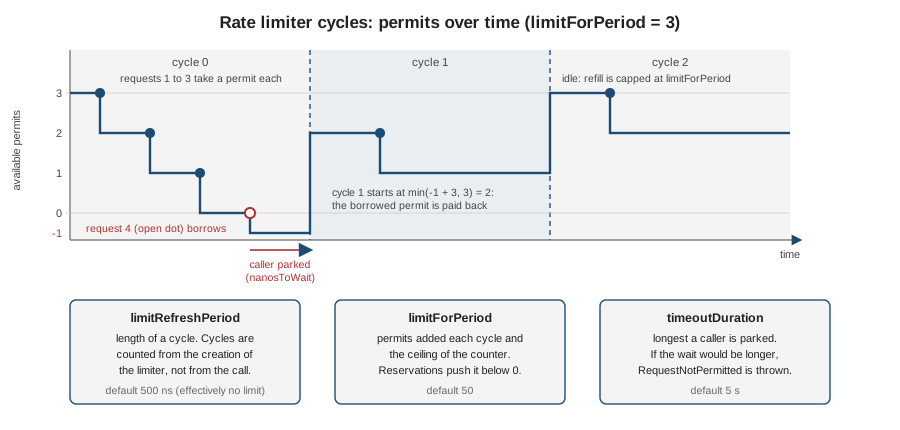
Four details follow from the implementation, and each one matters in production:
-
It is a fixed window, not a sliding one. Cycles are counted from the creation of the limiter, not from the first call. Permits are not refilled gradually. A client can therefore use
limitForPeriodpermits at the end of a cycle andlimitForPeriodmore at the start of the next one: a burst of up to twice the limit across the boundary. -
Unused permits are lost. The counter is capped at
limitForPeriod, so an idle limiter does not store credit. -
Permits can go negative. A waiting caller reserves a permit of a future cycle at once. The counter shows
-1, and the next cycle starts with the borrowed permit already spent. This is the "permit reservation" the Resilience4j sources describe, and it keeps waiting callers in order. -
The defaults do not limit anything.
limitRefreshPerioddefaults to 500 nanoseconds andlimitForPeriodto 50, which is about 100 million permits per second. Always set both.
A walkthrough with a fake clock
RateLimiter.of accepts a nanosecond supplier. It is also how the limiter’s own tests control time, and it makes the
cycle model easy to see:
AtomicLong clock = new AtomicLong(0);                          // nanoseconds
RateLimiterConfig config = RateLimiterConfig.custom()
    .limitForPeriod(3)
    .limitRefreshPeriod(Duration.ofSeconds(1))
    .timeoutDuration(Duration.ZERO)                            // never wait
    .build();
RateLimiter limiter = RateLimiter.of("isbn", config, clock::get);

limiter.acquirePermission();   // true
limiter.acquirePermission();   // true
limiter.acquirePermission();   // true
limiter.acquirePermission();   // false: cycle 0 is used up and the timeout is zero

clock.set(Duration.ofMillis(999).toNanos());
limiter.acquirePermission();   // false: still cycle 0

clock.set(Duration.ofMillis(1000).toNanos());
limiter.getMetrics().getAvailablePermissions();   // 3: cycle 1 started

clock.set(Duration.ofMillis(11_000).toNanos());   // ten idle cycles
limiter.getMetrics().getAvailablePermissions();   // still 3: no accumulation
Source: Resilience4j: RateLimiter and the
v2.4.0
AtomicRateLimiter source.
The three properties
| Builder method | Spring Boot property | Default (2.4.0) | Meaning |
|---|---|---|---|
|
|
|
Permits per cycle and the ceiling of the counter. Must be at least 1. |
|
|
|
Length of a cycle. The builder rejects anything shorter than one nanosecond. |
|
|
|
How long a caller may be parked waiting for a permit. |
In application.yml durations use Spring’s format (1s, 500ms, 1h). The complete property table, including the
properties that exist only in Spring Boot, is in Every property with its default.
A caller waits the whole timeout before failing
There is one behaviour the readme.io page does not state. When no permit will arrive within timeoutDuration, the
limiter does not fail at once: it parks the thread for the entire timeout and only then reports false. A test with a
limiter holding one permit per 10 seconds and a 300 ms timeout showed the second call being rejected after 308 ms. With the
default 5 seconds, a rejected request costs a thread for 5 seconds. For server endpoints that must answer immediately, set
timeoutDuration: 0. If the thread is interrupted while it waits, RateLimiter.waitForPermission and the decorators
throw AcquirePermissionCancelledException, an IllegalStateException from resilience4j-core, and re-set the interrupt flag.
Reserving a permit
acquirePermission() blocks. reservePermission() does the bookkeeping without blocking and returns what the caller
must do: 0 if the permit is available now, a positive number of nanoseconds to wait, or -1 if it would exceed the
timeout. It is the building block for non-blocking and reactive integrations, which sleep for the returned time on their own
scheduler:
AtomicLong clock = new AtomicLong(0);
RateLimiterConfig config = RateLimiterConfig.custom()
    .limitForPeriod(2)
    .limitRefreshPeriod(Duration.ofSeconds(1))
    .timeoutDuration(Duration.ofMillis(2500))
    .build();
RateLimiter limiter = RateLimiter.of("isbn", config, clock::get);

clock.set(Duration.ofMillis(400).toNanos());   // 400 ms into cycle 0

limiter.reservePermission();   // 0 ns: permit available now
limiter.reservePermission();   // 0 ns
limiter.reservePermission();   // 600 ms: a permit of cycle 1
limiter.reservePermission();   // 600 ms: the second permit of cycle 1
limiter.reservePermission();   // 1600 ms: cycle 2
limiter.reservePermission();   // 1600 ms
limiter.reservePermission();   // -1: cycle 3 would be 2600 ms away, over the 2500 ms timeout

limiter.getMetrics().getAvailablePermissions();   // -4: four permits are borrowed
Source: Resilience4j: RateLimiter (RateLimiter API) and the
v2.4.0
RateLimiter interface.
The sequence below shows what acquirePermission() does inside a decorated call when the cycle is exhausted:
refill the counter (capped), reserve a permit,
compute nanosToWait (CAS on one state object) alt a permit is available now L-->>D: true else nanosToWait is within timeoutDuration L->>L: park the thread for nanosToWait L-->>D: true else nanosToWait is over timeoutDuration L->>L: park the thread for timeoutDuration L-->>D: false D-->>C: throws RequestNotPermitted end D->>S: supplier.get() S-->>D: result or exception D->>L: onResult / onError (drainPermissionsOnResult) D-->>C: result
AtomicRateLimiter and SemaphoreBasedRateLimiter
Resilience4j 2.4.0 ships two implementations of the RateLimiter interface, both in
io.github.resilience4j.ratelimiter.internal:
AtomicRateLimiter |
SemaphoreBasedRateLimiter |
|
|---|---|---|
Mechanism |
One immutable state object (cycle, permits, |
A fair |
Permit reservation ( |
Supported. Permits can go negative. |
Not supported: it throws |
Created by |
|
Only by calling its constructor yourself. |
Weak point |
The compare-and-set loop spins briefly under very heavy contention. |
Lowering |
Atomic is the default and the only one Spring Boot uses. RateLimiterRegistry, RateLimiter.of and
RateLimiter.ofDefaults all construct an AtomicRateLimiter; there is no property and no registry option to select the
semaphore variant, and nothing in the Spring Boot starter instantiates it. A run on 2.4.0 confirmed it: the limiter
returned by the registry, by RateLimiter.ofDefaults("x") and by the Boot auto-configuration is an AtomicRateLimiter.
RateLimiterConfig config = RateLimiterConfig.custom()
    .limitForPeriod(2)
    .limitRefreshPeriod(Duration.ofMillis(200))
    .timeoutDuration(Duration.ZERO)
    .build();

RateLimiter limiter = new SemaphoreBasedRateLimiter("isbn", config);   // starts its own scheduler thread

limiter.acquirePermission();   // true
limiter.acquirePermission();   // true
limiter.acquirePermission();   // false
Thread.sleep(260);             // the scheduler refilled the semaphore
limiter.acquirePermission();   // true

limiter.reservePermission();   // throws UnsupportedOperationException
Source: Resilience4j: RateLimiter and the
v2.4.0
SemaphoreBasedRateLimiter source.
The weak point of the semaphore variant is in its refresh task: it releases limitForPeriod - availablePermits() permits,
and Semaphore.release rejects a negative count. In a run, a limiter created with 5 permits and lowered to 2
through changeLimitForPeriod while the 5 were unused never refilled again, because scheduleAtFixedRate suppresses
further executions after the task throws. You will rarely need this class. Prefer the default, and treat the semaphore
variant as a curiosity unless you have measured a reason.
drainPermissionsOnResult
Sometimes the remote service says you exceeded its quota although your limiter let the call through, because its
window does not line up with your cycles or other clients share the quota. drainPermissionsOnResult lets the limiter
learn from that. It takes a predicate over the call’s outcome, an Either<Throwable, Result> from
io.github.resilience4j.core.functions: when it returns true, the limiter drains every permit left in the current
cycle, so your own callers stop hitting an API that already refused you. The default predicate always returns false.
record Reply(int status, String body) { }

RateLimiterConfig config = RateLimiterConfig.custom()
    .limitForPeriod(10)
    .limitRefreshPeriod(Duration.ofSeconds(10))
    .timeoutDuration(Duration.ZERO)
    .drainPermissionsOnResult(result ->
        result.isRight() && result.get() instanceof Reply reply && reply.status() == 429)
    .build();
RateLimiter limiter = RateLimiter.of("isbn", config);

Supplier<Reply> call = RateLimiter.decorateSupplier(limiter, () -> new Reply(429, "slow down"));
call.get();                                          // the upstream answered 429

limiter.getMetrics().getAvailablePermissions();     // 0: nine permits were drained
Source: Resilience4j: RateLimiter and the
v2.4.0
RateLimiterConfig source.
A drain publishes a DRAINED event (shown in the events section). drainPermissions() can also be called directly. The decorators
check the predicate after every call, and the 2.3.0 release notes list the fix that made the Kotlin
executeSuspendFunction respect it too (issue 2179).
drainPermissionsOnResult is not a Spring Boot property in 2.4.0. It exists only on RateLimiterConfig.Builder;
there is no reference to it in resilience4j-framework-common, resilience4j-spring6 or resilience4j-spring-boot4. In a Boot
application set it with a RateLimiterConfigCustomizer bean, which Boot applies on top of the YAML. The Bookshelf ISBN
client uses RestClient, which throws HttpClientErrorException.TooManyRequests on a 429 (a left value in the Either):
@Configuration
class IsbnLimiterConfig {

    @Bean
    RateLimiterConfigCustomizer isbnDrainOn429() {
        return RateLimiterConfigCustomizer.of("isbn", builder -> builder
            .drainPermissionsOnResult(result -> result.isLeft()
                && result.getLeft() instanceof HttpClientErrorException.TooManyRequests));
    }
}
Source: Resilience4j: Spring Boot 2 & 3 (customizers) and the
v2.4.0
CommonRateLimiterConfigurationProperties source (the properties that are bound from YAML).
Every property with its default
Resilience4j binds resilience4j.ratelimiter.* through RateLimiterProperties (@ConfigurationProperties(prefix =
"resilience4j.ratelimiter")). Both configs.<name> and instances.<name> take the same keys; every instance starts from configs.default
(when it exists); an instance that names a baseConfig then takes that configuration’s keys on top of it, and its own keys win. An instance that is not in the file at all
(for example one created by an annotation with a new name) takes configs.default.
Spring Boot property (under resilience4j.ratelimiter.instances.<name> or .configs.<name>) |
Builder method | Default (2.4.0) | Notes |
|---|---|---|---|
|
|
|
At least 1; a lower value fails the binding with |
|
|
|
Spring duration format. |
|
|
|
|
|
|
|
When |
|
(not on the builder) |
none |
Name of a shared entry under |
|
(not on the builder) |
|
Includes this limiter in the |
|
(not on the builder) |
|
Lets a limiter in the |
|
(not on the builder) |
|
Buffers the limiter’s events so the |
|
(not on the builder) |
|
Size of the circular event buffer when |
Two more keys live one level up, directly under resilience4j.ratelimiter:
| Property | Default | Meaning |
|---|---|---|
|
|
Position of the |
|
empty |
Registry-wide tags added to the limiter’s metrics. |
drainPermissionsOnResult is intentionally absent from both tables: it is Java-only, as described above. This is the complete
set of keys that the 2.4.0 binder reads; the shared structure of configs and instances is described in
Spring Boot configuration.
resilience4j:
  ratelimiter:
    configs:
      default:
        limitForPeriod: 10
        limitRefreshPeriod: 1s
        timeoutDuration: 0            # reject at once: never park a request thread
    instances:
      isbn:                           # client side: stay under the third-party quota
        baseConfig: default
        limitForPeriod: 5
        limitRefreshPeriod: 1s
        timeoutDuration: 500ms        # a short wait smooths small bursts
        subscribeForEvents: true
        eventConsumerBufferSize: 50
        registerHealthIndicator: true
        writableStackTraceEnabled: false
      search:                         # server side: protect our own endpoint
        baseConfig: default
        limitForPeriod: 3
        limitRefreshPeriod: 2s
        timeoutDuration: 0
        subscribeForEvents: true

management:
  endpoints:
    web:
      exposure:
        include: health,ratelimiters,ratelimiterevents,metrics
  endpoint:
    health:
      show-details: always
  health:
    ratelimiters:
      enabled: true
Source: Resilience4j: Spring Boot 2 & 3 and the
v2.4.0 resilience4j-spring-boot4
source. Boot 3.5 uses the same keys. The actuator exposure shown here is for illustration: expose only the endpoints you
need, and put them behind authentication, as the Spring Boot metrics page explains
(Metrics and observability).
Changing limits at runtime
changeLimitForPeriod(int) and changeTimeoutDuration(Duration) replace the limiter’s configuration atomically, keeping the
current cycle and the permits already used. There is no changeLimitRefreshPeriod: the cycle length is fixed when the limiter is
created.
RateLimiter limiter = registry.rateLimiter("isbn");   // limitForPeriod 2, timeout 0, cycle 1 s

limiter.changeLimitForPeriod(10);
limiter.changeTimeoutDuration(Duration.ofMillis(250));

limiter.getRateLimiterConfig().getLimitForPeriod();    // 10
limiter.getMetrics().getAvailablePermissions();        // still 2: the current cycle is not topped up
// next cycle: min(2 + 10, 10) = 10 permits
Source: Resilience4j: RateLimiter (changeLimitForPeriod,
changeTimeoutDuration).
A new limitForPeriod takes effect at the next cycle boundary; a new timeoutDuration takes effect for the next call. This is
the hook for adaptive throttling, for example lowering the client limit after the upstream answers Retry-After, or
raising it after a plan upgrade. Three cautions apply:
-
The change lives in memory in this instance. It is lost on restart and not seen by other replicas.
-
Instances created by the registry from
application.ymlare not refreshed when you edit the YAML. Spring Cloud’s refresh scope support is a separate auto-configuration (RateLimiterRefreshScopedRegistryAutoConfiguration) and needs Spring Cloud on the classpath. -
Do not expose the change as an unauthenticated endpoint: anyone who can call it can switch your limit off.
The @RateLimiter annotation
With spring-boot-starter-aspectj on the classpath (see
Getting started), annotating a method or class guards every call to it. The
annotation has four attributes: name, configuration, fallbackMethod and permits.
| Attribute | Default | Meaning |
|---|---|---|
|
required |
The limiter instance. The value goes through Resilience4j’s SpEL resolver, so a name can be computed, but every distinct value creates one more instance: never derive it from unbounded input. |
|
|
Which shared configuration to use for a new instance. If neither it nor |
|
|
A method on the same class, called when the limiter throws. See Fallbacks and composition. |
|
|
Number of permits a call needs. See the finding below. |
@RateLimiter(permits = n) exists in 2.4.0 but is ignored by the Spring 6 aspect. The attribute was added in 2.3.0 (release
notes: "Specify required RateLimiter permits in annotations", issue 2121). In the v2.4.0 tree the only code that reads
rateLimiterAnnotation.permits() is the aspect of the old resilience4j-spring module (Spring 5), which 2.4.0 no longer builds
or publishes. RateLimiterAspect in resilience4j-spring6, the module behind both resilience4j-spring-boot3 and
resilience4j-spring-boot4, calls executeCheckedSupplier without a permit count, and the Reactor and RxJava aspect
extensions do not read it either. A test confirmed it on Boot 4.1.1: a method annotated with permits = 3 consumed one
permit per call, while RateLimiter.decorateSupplier(limiter, 3, …) consumed three. Until this is fixed, use the
programmatic API for calls that cost more than one permit, such as a batch request that the provider counts per item.
@Component
public class IsbnMetadataClient {

    private final RestClient http;

    public IsbnMetadataClient(RestClient.Builder builder,
                              @Value("${bookshelf.isbn.url}") String baseUrl) {
        this.http = builder.baseUrl(baseUrl).build();
    }

    @RateLimiter(name = "isbn")
    public String title(String isbn) {
        return http.get().uri("/isbn/{isbn}", isbn).retrieve().body(String.class);
    }
}

// a batch of 40 inputs costs 40 permits: use the API, not the annotation
RateLimiter embeddings = registry.rateLimiter("embeddings");
String result = embeddings.executeSupplier(40, () -> client.embed(batch));
Source: Resilience4j: Spring Boot 2 & 3 (annotations),
the v2.4.0
@RateLimiter source and the
v2.4.0
resilience4j-spring6 aspect. The self-invocation pitfall (a call from a method of the same bean bypasses the proxy)
applies as for every annotation and is covered in Annotations and aspect order.
Decorators composes the limiter with other patterns programmatically. The following test-checked snippet also shows the
event publisher and the exception message:
RateLimiter isbn = registry.rateLimiter("isbn");

isbn.getEventPublisher()
    .onSuccess(e -> log.info("permitted x{}", e.getNumberOfPermits()))
    .onFailure(e -> log.warn("rejected x{}", e.getNumberOfPermits()));

Supplier<String> title = Decorators.ofSupplier(() -> client.fetchTitle("9780132350884"))
    .withRateLimiter(isbn)
    .decorate();

title.get();   // permitted; once the cycle is exhausted: RequestNotPermitted
               // "RateLimiter 'isbn' does not permit further calls"
Source: Resilience4j: RateLimiter. Decorators and the registries are
covered in Registries, configuration and decorators
and Programmatic usage. Reactive code uses the
RateLimiterOperator of resilience4j-reactor, covered in
Reactive, Kotlin and RxJava.
RequestNotPermitted and HTTP 429
When no permit can be had in time, the limiter throws RequestNotPermitted, an unchecked exception. It extends
RuntimeException directly, so it is not a CallNotPermittedException or a BulkheadFullException: catch it by its own type.
Its message is "RateLimiter 'name' does not permit further calls", and getCausingRateLimiterName() returns the name.
Its stack trace is cut when writableStackTraceEnabled is false.
If it escapes from a controller method, Spring answers 500. The right answer to a client that sent too many requests is
429 Too Many Requests, defined in RFC 6585, together with a Retry-After header that
tells the client when to come back. Retry-After is defined in RFC 9110 (section 10.2.3) as
either a number of seconds or an HTTP date. The body can follow RFC 9457 Problem Details, which
Spring supports with ProblemDetail. A @RestControllerAdvice maps all three at once:
@RestControllerAdvice
public class RateLimitAdvice {

    private final RateLimiterRegistry registry;

    public RateLimitAdvice(RateLimiterRegistry registry) {
        this.registry = registry;
    }

    @ExceptionHandler(RequestNotPermitted.class)
    ResponseEntity<ProblemDetail> tooManyRequests(RequestNotPermitted ex) {
        // Retry-After is delay-seconds (RFC 9110, section 10.2.3): one refresh period is the worst-case wait
        long retryAfter = registry.find(ex.getCausingRateLimiterName())
            .map(RateLimiter::getRateLimiterConfig)
            .map(c -> Math.max(1, ceilSeconds(c.getLimitRefreshPeriod())))
            .orElse(1L);

        ProblemDetail problem = ProblemDetail.forStatusAndDetail(
            HttpStatus.TOO_MANY_REQUESTS, "Too many requests. Retry after " + retryAfter + " second(s).");
        problem.setTitle("Rate limit exceeded");
        problem.setProperty("limiter", ex.getCausingRateLimiterName());

        return ResponseEntity.status(HttpStatus.TOO_MANY_REQUESTS)
            .header(HttpHeaders.RETRY_AFTER, String.valueOf(retryAfter))
            .body(problem);
    }

    private static long ceilSeconds(Duration d) {
        return (d.toMillis() + 999) / 1000;
    }
}
Source: Spring Framework: Error Responses
and Resilience4j: RateLimiter. The Retry-After value is an upper
bound: the limiter does not expose the exact time to the next permit through a public interface, so the handler uses the cycle length.
The endpoint and its service are ordinary. The limiter is on the service method and has timeoutDuration: 0, so a rejected request
costs no thread time:
@Service
public class SearchService {

    @RateLimiter(name = "search")
    public List<String> search(String query) {
        return List.of("Domain-Driven Design", "Clean Architecture");
    }
}

@RestController
public class SearchController {

    private final SearchService service;

    public SearchController(SearchService service) {
        this.service = service;
    }

    @GetMapping("/books/search")
    public List<String> search(@RequestParam String q) {
        return service.search(q);
    }
}With limitForPeriod: 3 and limitRefreshPeriod: 2s, the fourth request within two seconds is rejected. This is the
response of the run on Boot 4.1.1:
curl -i 'http://localhost:8080/books/search?q=ddd'HTTP/1.1 429
Retry-After: 2
Content-Type: application/problem+json
{"detail":"Too many requests. Retry after 2 second(s).","instance":"/books/search","status":429,"title":"Rate limit exceeded","limiter":"search"}Source: the output of the example above, run with spring-boot-starter-web on Spring Boot 4.1.1.
The handler works for annotated and programmatic use alike, because both throw the same exception. If you would rather answer
from a fallback than fail, put a fallbackMethod on the annotation (see
Fallbacks and composition); a fallback that catches
RequestNotPermitted should not pretend the call succeeded when the caller needs real data.
Where the limiter sits in the aspect order
With default settings the aspects nest as Retry, CircuitBreaker, RateLimiter, TimeLimiter and Bulkhead from the outside in. The
limiter is inside the circuit breaker and outside the time limiter and the bulkhead. A breaker records every exception it does
not ignore as a failure, so a RequestNotPermitted thrown by your own limiter counts towards opening the circuit. Rejections from your
own limiter usually should not trip a circuit breaker; list RequestNotPermitted under the breaker’s ignoreExceptions if the same
method has both. The retry, which is outside the limiter, would retry a rejection unless you exclude it: a client that was told
to slow down should not retry at once.
Client-side throttling of the Bookshelf ISBN API
The third-party ISBN-metadata API has a quota. If Bookshelf exceeds it, the provider answers 429 with a Retry-After header and,
if the abuse continues, may block the key. The client side combines three things:
-
A limiter slightly below the quota (for example
limitForPeriod: 5per second when the provider allows 6), so that the provider rarely has to refuse. A shorttimeoutDuration(here 500 ms) lets small bursts wait instead of failing. -
drainPermissionsOnResulton 429, as shown above, so that when the provider does refuse the rest of the cycle is not wasted. -
A retry that honours
Retry-After, described in Retry.
The RestClient exposes the upstream header on HttpClientErrorException.TooManyRequests:
try {
    return isbn.title("9780132350884");
} catch (HttpClientErrorException.TooManyRequests e) {
    String retryAfter = e.getResponseHeaders().getFirst(HttpHeaders.RETRY_AFTER);   // for example "30"
    // hand it to the retry wait function, or lower the limit with changeLimitForPeriod
    throw e;
}
Source: Spring Framework: REST Clients and
RFC 9110 (Retry-After).
A run against a WireMock stub of the API shows the sequence. The first call is permitted and leaves 4 of 5 permits; the second
returns 429 with Retry-After: 30, which makes the drain predicate fire and leaves 0 permits; the third call is refused locally with
RequestNotPermitted without reaching the provider. A stub answering 429 stands in for the real API, which the page does not name.
The same events appear in the buffer behind ratelimiterevents, described next. A related use case, keeping a Spring AI application
under the requests-per-minute limit of a model provider, is worked through in
Spring AI: rate limiting and concurrency.
That page uses the programmatic limiter together with Spring Framework 7’s @ConcurrencyLimit; the latter is compared with the
Bulkhead in Bulkhead.
Events, metrics and health
Events
Every acquirePermission publishes one event if a consumer is registered:
RateLimiterEvent.Type |
Published when |
|---|---|
|
A permit was obtained, immediately or after a wait. |
|
The wait would exceed |
|
|
The publisher has onSuccess and onFailure shortcuts and the generic onEvent. In a run on Boot 4.1.1, one permitted call, a 429
that drained the limiter and a rejected call produced SUCCESSFUL_ACQUIRE, SUCCESSFUL_ACQUIRE, DRAINED and
FAILED_ACQUIRE. The DRAINED event’s getNumberOfPermits() was 0 in that run even though four permits had been dropped: the
implementation reports Math.min(permitsBeforeDrain, 0), so it is never positive, and you should not use it to count the drained permits.
With subscribeForEvents: true the Boot starter keeps the last eventConsumerBufferSize events per instance for the
ratelimiterevents endpoint:
curl -s http://localhost:8080/actuator/ratelimiters
curl -s http://localhost:8080/actuator/ratelimiterevents/isbn{"rateLimiters":["bulk","held","isbn","search"]}{"rateLimiterEvents":[
{"creationTime":"2026-10-04T17:51:04.269750+02:00[Europe/Madrid]","rateLimiterName":"isbn","type":"SUCCESSFUL_ACQUIRE"},
{"creationTime":"2026-10-04T17:51:04.476988+02:00[Europe/Madrid]","rateLimiterName":"isbn","type":"DRAINED"},
{"creationTime":"2026-10-04T17:51:04.987348+02:00[Europe/Madrid]","rateLimiterName":"isbn","type":"FAILED_ACQUIRE"}]}Source: the output of the example above (one successful event was removed for brevity), and the
Resilience4j: Spring Boot 2 & 3 endpoint section. The endpoint also
accepts /actuator/ratelimiterevents/{name}/{type} with the event type in lower case, for example failed_acquire. The
endpoint ids are ratelimiters and ratelimiterevents; both need to be listed in management.endpoints.web.exposure.include.
Metrics
The Micrometer binder registers two gauges per limiter, tagged with name and any registry or instance tags:
| Meter | Prometheus name | Meaning |
|---|---|---|
|
|
|
|
|
Threads currently parked waiting for a permit. |
These are gauges, not counters: Resilience4j does not count permitted or rejected calls as meters. To graph the rejection
rate, count FAILED_ACQUIRE events yourself, or count the 429 responses of your server metrics. The waiting_threads gauge is the
early warning that timeoutDuration is too long: threads piling up there are threads taken from your pool.
curl -s http://localhost:8080/actuator/metrics/resilience4j.ratelimiter.available.permissions{"availableTags":[{"tag":"name","values":["search","bulk","held","isbn"]}],"description":"The number of available permissions","measurements":[{"statistic":"VALUE","value":7.0}],"name":"resilience4j.ratelimiter.available.permissions"}Source: the output of the example above, and the Resilience4j: Micrometer page. The meters, their tags and the Prometheus and Grafana setup are covered across all patterns in Observability.
Health
With registerHealthIndicator: true on a limiter and management.health.ratelimiters.enabled: true, the limiter appears under the
rateLimiters health component with its availablePermissions and numberOfWaitingThreads. The status is UP when a permit is available
or nobody is waiting, RATE_LIMITED (a custom status) when threads are waiting and the next permit is further away than the timeout, with
DOWN instead if allowHealthIndicatorToFail is true, and UNKNOWN otherwise. A run with one permit per 30 seconds and a thread parked
for its 2 second timeout gave:
"rateLimiters":{"details":{"held":{"details":{"availablePermissions":0,"numberOfWaitingThreads":1},"status":"RATE_LIMITED"},"isbn":{"details":{"availablePermissions":5,"numberOfWaitingThreads":0},"status":"UP"}},"status":"UP"}Source: the output of the example above, and the v2.4.0 source of
RateLimitersHealthIndicator.
The aggregate rateLimiters status stayed UP while one instance was RATE_LIMITED, because the default aggregator does not know the custom status. A
rate limiter that is doing its job should not make the application unhealthy, so leave allowHealthIndicatorToFail off and do not wire this
into a liveness probe (see Health probes and lifecycle).
Pitfalls
| Pitfall | What happens and what to do |
|---|---|
Defaults left in place |
|
Long |
A rejected request still holds its thread for the whole timeout. Use |
Expecting a sliding window |
Cycles are fixed windows: a burst of up to twice the limit can cross a boundary. |
|
Ignored by the Spring 6 aspect in 2.4.0. Use |
|
Not a Spring Boot property in 2.4.0: it is silently not applied. Use a |
Per-instance limits across replicas |
Three replicas with |
Lowering the limit on the semaphore limiter |
Can stop its refresh task for good. Use the default |
|
List it in the breaker’s |
One limiter name for unrelated calls |
Callers compete for the same permits. One instance per remote quota, as the instance-management guidance in Registries, configuration and decorators says. |
What changed recently
-
2.0.x removed Vavr from the core modules (
Eitheris nowio.github.resilience4j.core.functions.Either, which is whatdrainPermissionsOnResultreceives) and requires Java 17. -
2.3.0 added the
permitsattribute to@RateLimiterand fixedexecuteSuspendFunctionso that it respectsdrainPermissionsOnResult. As found above, the Spring 6 aspect does not usepermits. -
2.4.0 adds
resilience4j-spring-boot4. TheRateLimiterAPI, the properties and the aspect are unchanged from 2.3.x; the aspect still lives inresilience4j-spring6. The release notes for 2.4.0 are only on the GitHub release page. -
The readme.io RateLimiter page predates these features and does not document
drainPermissionsOnResult; treat the v2.4.0 source as the reference for names and defaults.
Beyond in-process rate limiting
The Resilience4j RateLimiter has a precise scope, and it is easy to ask more of it than it gives:
-
Per instance. The counter lives in one JVM. Ten replicas, each with
limitForPeriod: 10, allow 100 calls per cycle in total, and scaling out silently raises the limit. A shared quota needs shared state. -
No per-client keys. One limiter instance is one bucket. It does not know your users, API keys or tenants. You can create one instance per key through the registry, but the registry is unbounded and then holds one limiter per key forever.
-
Nothing persistent. The counter is in memory. A restart resets it, and a rolling deployment resets it replica by replica.
-
Fixed windows and no burst shaping. There is no token bucket with a separate burst capacity and refill rate.
Distributed and per-client rate limiting is what Bucket4j adds to this same section. Start with Resilience4j versus Bucket4j for when to use which limiter (and how to combine them), then read Bucket4j: Distributed Rate Limiting for a token bucket whose state lives in Redis, a JDBC database or a cache grid, so one quota holds across every replica and every API key gets its own bucket. Gateway-level limits, quotas and plans in an API manager are covered by issue #184 (API managers, secret managers, gateways and scaling), which is not in scope here.
What exists at the edge today is the Spring Cloud Gateway RequestRateLimiter filter, which is Redis based and not Resilience4j; it is
introduced with the other gateway filters in
Gateway and OpenFeign. Use the in-process limiter for what it
is good at: protecting a specific call you make from overload, or a specific endpoint of this instance from a burst. Use a shared limiter for
quotas that must hold across the whole fleet.
References
-
resilience4j-ratelimitersource at v2.4.0 (AtomicRateLimiter,SemaphoreBasedRateLimiter,RateLimiterConfig,RequestNotPermitted) -
resilience4j-spring6rate limiter aspect and properties at v2.4.0 -
Resilience4j release notes up to 2.3.0 and the v2.4.0 release
-
RFC 9110: HTTP Semantics (
Retry-After), RFC 6585: Additional HTTP Status Codes (429) and RFC 9457: Problem Details for HTTP APIs -
Spring Framework: Error Responses (
ProblemDetail)