WC-CLI
|
This content was generated with the assistance of AI and should be verified against the official documentation of each platform before being relied on in production. This section’s bibliography lists the reference material consulted while preparing these pages. |
WC-CLI is the part of WooCommerce that adds the wp wc family of commands to WP-CLI, the command-line interface of
WordPress. It lets a shell script, a deployment job or a developer at a terminal create products, place orders, run
maintenance tools, check the High-Performance Order Storage (HPOS) tables and export or import store settings without a
browser and without HTTP credentials. It has shipped with WooCommerce since 3.0.0; this page was written and run against
WooCommerce 11.2.1 (published 2026-10-09) on WordPress 7.1.3 with WP-CLI 2.12.0, PHP 8.3.36 and MariaDB 11.8.9, and
checked on 2026-10-27. It applies to any self-hosted WooCommerce store whose host lets you run wp. WP-CLI itself
(installation, global parameters and the core commands) is covered in WP-CLI.
The thread of the page is the Pocket Coffee shop: a second way to create the catalogue that the
REST API and Webhooks page built over HTTP, then a bulk price rise,
a first order, the HPOS checks that follow it, and a Blueprint of the store settings. WC-CLI is, by design, the same code as
the REST API, so reading that page first explains most of the behaviour here; the HPOS commands belong with
HPOS: High-Performance Order Storage, the queue behind
woocommerce_deliver_webhook_async with Action Scheduler, and a first
installation with Installation and Local Environments.
Shell scripting basics are on the Command-line PHP page and in the
Docker material of this site (Docker).
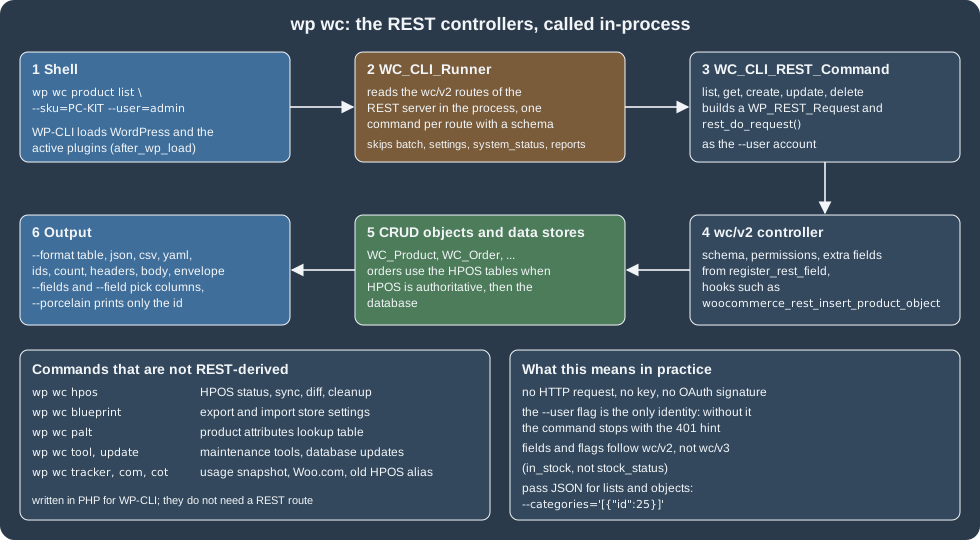
How WC-CLI is built
There are two kinds of command, and the difference explains most surprises.
Commands generated from REST routes. When wp wc starts, the class WC_CLI_Runner creates an in-process WordPress REST
server, lets every plugin register its routes, and walks the routes of the wc/v2 namespace. For every route that has a
JSON Schema title it registers a WP-CLI command named after that title: wp wc product, wp wc shop_order,
wp wc product_variation and so on, with up to five subcommands (list, get, create, update, delete) depending on
the methods the route supports, and one option for every argument of the route. Batch routes are skipped, and so are the
routes settings, system_status (with its tools) and reports, because they are better served by wp option, wp wc tool
and the admin. Running a command builds a WP_REST_Request, defines REST_REQUEST, and dispatches it with
rest_do_request() inside the same PHP process: there is no HTTP request, no consumer key and no OAuth signature. The
controller code, the permission checks, the validation and the hooks are exactly those of the REST API.
Three consequences are worth stating plainly:
-
The identity of a command is the
--userglobal flag of WP-CLI. Without it the request is anonymous and the controller answers 401; WC-CLI adds a hint to the message (below). -
The version is
wc/v2, notwc/v3. The field names are the v2 ones (in_stock, notstock_status), the help text lists the v2 arguments, and--format=headersshowsLinkURLs of/wp-json/wc/v2/.... Behaviour that only the v3 controllers have is missing; the clearest example found on 11.2.1 is thatcoupon_linesof an order are applied as discounts bywc/v3but only stored bywc/v2. -
Anything that extends the REST API extends WC-CLI too. The
roast_datefield that the REST page added withregister_rest_field()appeared inwp wc product get 22 --field=roast_date(it printed2026-10-27) without any CLI code.
Hand-written commands. Some groups do not use REST at all: hpos (and its deprecated alias cot), blueprint, palt
(product attributes lookup table), tool, update, tracker and com. They are PHP classes that call WP-CLI’s API
directly, so they have their own options and output.
The official documentation page for wp wc lists the groups and says to check availability with wp wc --info; on 11.2.1
that command prints the usage of the wp wc namespace (the list of groups), which serves the same purpose.
Running it
WP-CLI is installed once per server (see the WP-CLI site) and is run from the WordPress directory or
with --path. Where PHP is not installed on the host, the equivalent is a short-lived container of the official
wordpress:cli image attached to the network and volumes of the site, which is how every command on this page was run
(the database settings are passed as environment variables, shown here as placeholders):
#!/bin/sh
# wp.sh - run WP-CLI against the local WordPress container (usage: ./wp.sh wc product list --user=admin)
exec docker run --rm --network ec-wp --volumes-from ec-wordpress -u 33:33 \
  -e WORDPRESS_DB_HOST=ec-wordpress-db -e WORDPRESS_DB_USER=wpuser \
  -e WORDPRESS_DB_PASSWORD="${DB_PASSWORD}" -e WORDPRESS_DB_NAME=wordpress \
-e HOME=/tmp wordpress:cli-php8.3 wp --path=/var/www/html "$@"In the examples below the command is written wp ... and the administrator is --user=admin; on the test store the
administrator is called admin, and wp stood for the wrapper above. Help is built in and is generated from the REST
schema, so it always matches the installed version:
wp wc                         # every group
wp wc product                 # the subcommands of a group
wp help wc product list # all options of one command (also: wp wc product list --help)Without --user, a REST-derived command stops with the reminder that the 401 comes from a missing user:
$ wp wc product list --format=count
Error: Sorry, you cannot list resources.
Make sure to include the --user flag with an account that has permissions for this action. {"status":401}
The user can be an id, a login or an email address, and it must have the capability the REST controller checks
(manage_woocommerce and the post capabilities of the resource; an Administrator or a Shop manager works). A command
that should run as a service identity is best run as a dedicated Shop manager user.
The command groups
The groups registered on 11.2.1 (the list is what wp wc printed):
| Group | Kind | Use |
|---|---|---|
|
REST ( |
Catalogue: products with their variations, attributes, terms, categories, tags, brands, shipping classes and reviews |
|
REST |
Orders, refunds and order notes (the order group is |
|
REST |
Customers, their downloads, and coupons |
|
REST |
Shipping zones and methods, payment gateways, tax rates and classes ( |
|
REST |
Webhooks. The |
|
Hand-written |
HPOS status, sync and repair; see below |
|
Hand-written |
Export and import of store settings; see below |
|
Hand-written |
System tools ( |
Two corrections to commonly repeated advice. There is no wp wc setting or wp wc settings group (the official command
index and FAQ still mention wp wc setting update): store settings are options, so use wp option update, or the
/wc/v3/settings REST routes. And the first thing a new store needs, its setup wizard, is a browser flow that no wp wc
command runs; the general settings are set with options, as the installation page shows.
Conventions of the generated commands
| Flag or argument | Behaviour |
|---|---|
|
Required. The WordPress user the command acts as. |
Positional ids |
|
|
Limit a |
|
|
|
On |
|
|
Lists and objects |
Pass JSON: |
Filters |
The arguments of the REST collection: |
|
Prints the number of queries the command ran and, ordered by duration, the slowest queries ( |
Exit codes follow WP-CLI: 0 on success and 1 on an error, with the message on standard error, so set -e scripts stop at the
first failure (wp wc product get 999999 printed Error: Invalid ID. {"status":404} and returned 1).
Pocket Coffee from the command line
Products
The commands below create, read, update and delete the Pocket Coffee mug (SKU PC-MUG-CLI); --porcelain returns the id
that the next commands use.
ID=$(wp wc product create --name="Pocket Mug" --type=simple --regular_price=9.50 \
       --sku=PC-MUG-CLI --manage_stock=true --stock_quantity=25 --user=admin --porcelain)
wp wc product list --sku=PC-MUG-CLI --fields=id,name,sku,price,stock_quantity --user=admin
wp wc product update "$ID" --regular_price=10.00 --user=admin --porcelain
wp wc product get "$ID" --field=price --user=admin
wp wc product list --sku=PC-MUG-CLI --fields=id,sku,price --format=csv --user=admin
wp wc product list --format=count --user=admin
wp wc product delete "$ID" --force=true --user=adminid name sku price stock_quantity
197 Pocket Mug PC-MUG-CLI 9.50 25
197
10.00
id,sku,price
197,PC-MUG-CLI,10.00
32
Success: Deleted product 197.The 197 after the table is what update --porcelain printed (the first --porcelain call stored the id in the shell
variable instead of printing it), and the 32 is the count of products at that moment (printed without a newline). A --format=ids list is the usual input of loops:
wp wc product list --sku=PC-KIT --format=ids --user=admin
wp wc product list --sku=PC-KIT --fields=id,sku,price --format=yaml --user=admin
Source: WooCommerce docs: wc product
22
---
-
  id: 22
  sku: PC-KIT
  price: "24.00"
A variable product, its variations and a bulk change
A variable product is created with its attributes as JSON, and each variation is a separate product_variation command
that takes the parent id first:
PID=$(wp wc product create --name="Single-origin beans (CLI)" --type=variable --sku=PC-BEANS-CLI \
        --categories='[{"id":25}]' --user=admin --porcelain \
        --attributes='[{"name":"Grind","visible":true,"variation":true,"options":["Whole bean","Espresso"]},
                       {"name":"Size","visible":true,"variation":true,"options":["250 g","1 kg"]}]')

wp wc product_variation create "$PID" --sku=PC-ETH-ESP-250-CLI --regular_price=9.90 \
   --manage_stock=true --stock_quantity=40 --user=admin --porcelain \
   --attributes='[{"name":"Grind","option":"Espresso"},{"name":"Size","option":"250 g"}]'

wp wc product_variation list "$PID" --fields=id,sku,price,attributes --format=json --user=admin
Source: WooCommerce docs: wc product
[{"id":206,"sku":"PC-ETH-ESP-250-CLI","price":"9.90","attributes":[{"id":0,"name":"Grind","slug":"grind","option":"Espresso"},{"id":0,"name":"Size","slug":"size","option":"250 g"}]}](On the test store the variable product got id 205 and this first variation 206; the JSON above is the entry of variation
206 in a list that, at that time, held only that variation. The other three variations were created the same way.) A bulk change is a loop over a csv list: raise every kilo bag
by 1.00 EUR, leaving the small bags alone.
wp wc product_variation list "$PID" --fields=id,sku,regular_price --format=csv --user=admin \
  | tail -n +2 \
  | while IFS=, read -r id sku price; do
      case "$sku" in
        *-1KG-*) wp wc product_variation update "$PID" "$id" \
                   --regular_price="$(awk -v p="$price" 'BEGIN { printf "%.2f", p + 1 }')" \
                   --user=admin --porcelain ;;
      esac
    done
wp wc product_variation list "$PID" --fields=id,sku,regular_price --user=admin376
375
id sku regular_price
376 PC-ETH-ESP-1KG-CLI 30.90
375 PC-ETH-WHL-1KG-CLI 30.90
373 PC-ETH-WHL-250-CLI 8.90
206 PC-ETH-ESP-250-CLI 9.90For the 18-variation product of the REST page, the variations/generate and variations/batch calls of REST are the better
tool (one request instead of eighteen process starts); WC-CLI skips batch routes, so a loop is the CLI way. Every
wp start loads WordPress and all plugins, which costs a few hundred milliseconds, and a loop of a thousand updates is
therefore minutes; for large changes prefer one wp eval-file script that uses the CRUD objects, or the REST batch.
Customers, orders, notes and refunds
CID=$(wp wc customer create --email=grace.cli@example.test --first_name=Grace --last_name=Hopper \
        --user=admin --porcelain)

OID=$(wp wc shop_order create --status=processing --customer_id="$CID" --payment_method=bacs \
        --billing='{"first_name":"Grace","last_name":"Hopper","email":"grace.cli@example.test","country":"DE","city":"Berlin","postcode":"10115","address_1":"Unter den Linden 1"}' \
        --line_items="[{\"product_id\":${PID},\"variation_id\":206,\"quantity\":2}]" \
        --shipping_lines='[{"method_id":"flat_rate","method_title":"Flat rate","total":"9.90"}]' \
        --user=admin --porcelain)

wp wc shop_order get "$OID" --fields=id,status,total,currency,payment_method --user=admin
wp wc order_note create "$OID" --note="Packed on 2026-10-27" --user=admin --porcelain
wp wc shop_order update "$OID" --status=completed --user=admin --porcelain
wp wc shop_order list --status=completed --customer="$CID" --fields=id,status,total --user=admin
wp wc shop_order_refund create "$OID" --amount=5.00 --reason="Late delivery" --api_refund=false \
   --user=admin --porcelain
wp wc shop_order_refund list "$OID" --fields=id,amount,reason --user=admin
Source: WooCommerce docs: wc shop_order
Field	Value
id	207
status	processing
currency	EUR
total	29.70
payment_method	bacs
195
207
id	status	total
207	completed	29.70
210
id	amount	reason
210	5.00	Late delivery
The Field Value table is how get prints one item. The order total is 29.70 (two bags at 9.90 plus 9.90 shipping); the
note and the refund returned their own ids (195 and 210), update returned the order id, and --api_refund=false records the
refund without asking the gateway, which is required for bank transfer exactly as on the REST API. The orders landed in
the HPOS table, as the section below shows. The test container has no mail transport, so each state change also printed
sendmail: can't connect to remote host (127.0.0.1) on standard error while the commands still succeeded.
A complete seed script
Every command above is combined in one script that builds the Pocket Coffee demo data from scratch: a category, a variable
product with four variations, a coupon, a customer and a first order. It needs bash and WP_USER (the administrator); WP
defaults to wp.
#!/usr/bin/env bash
# Seeds a Pocket Coffee category, a variable product with four variations, a coupon,
# a customer and a first order with WC-CLI. Run it from the WordPress directory, or set WP to a wrapper.
set -euo pipefail

WP="${WP:-wp}"
ACT="--user=${WP_USER:-admin}"

category=$($WP wc product_cat create --name="Beans (CLI seed)" "$ACT" --porcelain)

product=$($WP wc product create \
  --name="Single-origin beans (seed)" --type=variable --sku=PC-SEED-BEANS \
  --categories="[{\"id\":${category}}]" \
  --attributes='[{"name":"Grind","visible":true,"variation":true,"options":["Whole bean","Espresso"]},
                 {"name":"Size","visible":true,"variation":true,"options":["250 g","1 kg"]}]' \
  "$ACT" --porcelain)

kilo_bag=""
for row in "Whole bean|250 g|WHL-250|8.90" "Whole bean|1 kg|WHL-1KG|29.90" \
           "Espresso|250 g|ESP-250|8.90" "Espresso|1 kg|ESP-1KG|29.90"; do
  IFS='|' read -r grind size code price <<<"$row"
  id=$($WP wc product_variation create "$product" \
    --sku="PC-SEED-$code" --regular_price="$price" --manage_stock=true --stock_quantity=40 \
    --attributes="[{\"name\":\"Grind\",\"option\":\"${grind}\"},{\"name\":\"Size\",\"option\":\"${size}\"}]" \
    "$ACT" --porcelain)
  if [ "$code" = "WHL-1KG" ]; then kilo_bag=$id; fi
done

$WP wc shop_coupon create --code=coffeeclub-seed --discount_type=percent --amount=10 \
  --product_categories="[${category}]" "$ACT" --porcelain >/dev/null

customer=$($WP wc customer create --email=ada.seed@example.test --first_name=Ada --last_name=Lovelace "$ACT" --porcelain)

order=$($WP wc shop_order create --status=processing --customer_id="$customer" --payment_method=bacs \
  --billing='{"first_name":"Ada","last_name":"Lovelace","address_1":"Calle de Alcala 1","city":"Madrid","postcode":"28014","country":"ES","state":"M","email":"ada.seed@example.test"}' \
  --line_items="[{\"product_id\":${product},\"variation_id\":${kilo_bag},\"quantity\":2}]" \
  --shipping_lines='[{"method_id":"flat_rate","method_title":"Flat rate","total":"4.90"}]' \
  "$ACT" --porcelain)

echo "category=$category product=$product customer=$customer order=$order"
$WP wc shop_order get "$order" --fields=id,status,discount_total,total,currency "$ACT"category=36 product=397 customer=11 order=403
Field Value
id 403
status processing
currency EUR
discount_total 0.00
total 64.70The total is 2 bags at 29.90 plus 4.90 of shipping. The discount_total is 0.00 on purpose: the script does not send
--coupon_lines. Sending --coupon_lines='[{"code":"coffeeclub-seed"}]' created a coupon line with a discount of 0.00
(on create, and on a later update, which added a second line), because the wc/v2 controller behind WC-CLI stores a
coupon line as given and does not calculate it; the same request through PUT /wc/v3/orders/<id> calculated 5.98 of
discount and a total of 58.72. For discounted orders use the REST v3 API, or pass the discount amounts yourself. The Coffee
Club rule of the running example (10 percent on beans for members) needs that calculation, which is why the page that
covers it, Taxes, Coupons, Currencies and i18n, builds it
with the coupon engine.
Webhooks, gateways and the rest
wp wc webhook list --fields=id,name,status,topic --user=admin
WH=$(wp wc webhook create --name="Pocket Coffee cli" --topic=order.updated \
       --delivery_url=https://roastery.example.test/hooks --secret="${WC_WEBHOOK_SECRET}" \
       --status=paused --user=admin --porcelain)
wp wc webhook update "$WH" --status=active --user=admin --porcelain
wp wc webhook get "$WH" --fields=id,topic,status,hooks --format=json --user=admin
wp wc webhook delete "$WH" --force=true --user=admin
Source: WooCommerce docs: wc webhook
id	name	status	topic
3	Pocket Coffee failing demo	disabled	product.updated
1	Pocket Coffee order placed	active	order.created
2	Pocket Coffee batch roasted	active	action.woocommerce_pocket_coffee_batch_roasted
4
{"id":4,"status":"active","topic":"order.updated","hooks":["woocommerce_update_order","woocommerce_order_refunded"]}
Success: Deleted webhook 4.
(The first listing shows the webhooks of the REST page that already existed on the store, among them one that was disabled by
repeated failures; the test delivery URL of the new webhook was not contacted, the commands only store it. The id 4 after the
listing is what update --porcelain printed; the one from create went into WH. The delivery URL is on a reserved
domain, unlike the webhooks of the REST page, which pointed at a receiver on the Docker network.) Other generated commands read and change configuration:
wp wc payment_gateway get bacs --fields=id,title,enabled --user=admin
wp wc tax_class list --fields=slug,name --user=admin
wp wc product_cat list --fields=id,name,slug,count --user=admin --per_page=3Field Value
id bacs
title Direct bank transfer
enabled true
slug name
standard Standard rate
reduced-rate Reduced rate
zero-rate Zero rate
id name slug count
32 Beans beans 1
36 Beans (CLI seed) beans-cli-seed 1
25 Beans (REST demo) beans-rest-demo 2wp wc payment_gateway update bacs --enabled=true is the way to switch bacs, cheque and cod on or off from a script (it
was run once on the test store while it was set up; cod additionally needs a shipping method that supports it). wp wc
shipping_zone list and shipping_zone_method list <zone> read the zones; the latter printed PHP warnings of the type Undefined array key
from the v2 controller on this store, whose zones carried class-cost settings from other tests, while still returning the
rows: warnings on standard error do not change the exit code, so a script that treats any output on standard error as a
failure needs to be tolerant, or run the command through the REST API instead.
Maintenance commands
wp wc update
wp wc tool list --fields=id,name,action --user=admin
Source: WooCommerce docs: wc tool
Success: No updates required. Database version is 11.2.1
id	name	action
clear_transients	WooCommerce transients	Clear transients
clear_expired_transients	Expired transients	Clear transients
delete_orphaned_variations	Orphaned variations	Delete orphaned variations
clear_expired_download_permissions	Used-up download permissions	Clean up download permissions
regenerate_product_lookup_tables	Product lookup tables	Regenerate
...-
wp wc updateruns the pending WooCommerce database updates (the same as the "Update database" button after an upgrade); on a store that is up to date it says so. In a deployment script it belongs right after the plugin files are replaced and before traffic is switched back. -
wp wc tool listshows the system tools of WooCommerce > Status > Tools, andwp wc tool run <id>runs one. The ids on 11.2.1 areclear_transients,clear_expired_transients,delete_orphaned_variations,clear_expired_download_permissions,regenerate_product_lookup_tables,repair_coupons_lookup_table,recount_terms,reset_roles,clear_sessions,clear_template_cache,clear_system_status_theme_info_cache,install_pages,delete_taxes,regenerate_thumbnails,db_update_routine,recreate_order_address_fts_index,verify_db_tables,regenerate_product_attributes_lookup_table,abort_product_attributes_lookup_table_regeneration,clear_woocommerce_analytics_cache,refresh_remote_inbox_notifications,delete_inbox_notification,regenerate_order_fulfillment_status,hpos_legacy_cleanup,delete_custom_orders_table,schedule_expired_transient_files_cleanupandrebuild_analytics_tax_data. Several are destructive (delete_taxes,reset_roles,delete_custom_orders_table,hpos_legacy_cleanup): read the name twice. The list was printed;tool runwas not run on the shared test store. -
wp wc paltmanages the product attributes lookup table that speeds up attribute filtering:info,enable,disable,regenerate(immediate),initiate_regeneration,abort_regeneration,resume_regeneration,cleanup_regeneration_progressandregenerate_for_product <id>.wp wc palt infoprinted the table name, whether its use is enabled and the row count (and, while another test was regenerating it, a warning that a regeneration was in progress). -
wp wc tracker snapshotdumps, to the screen, the usage data WooCommerce sends when usage tracking is on (site, theme, plugins, counts and gateways): read it before you accept tracking on a store with privacy requirements. It was run and its output (which includes the site URL and plugin lists) is not reproduced here. -
wp wc com connect,disconnectandextensionmanage the WooCommerce.com connection and Marketplace extensions with an application password. They need a Woo.com account and were not run.
HPOS from the command line
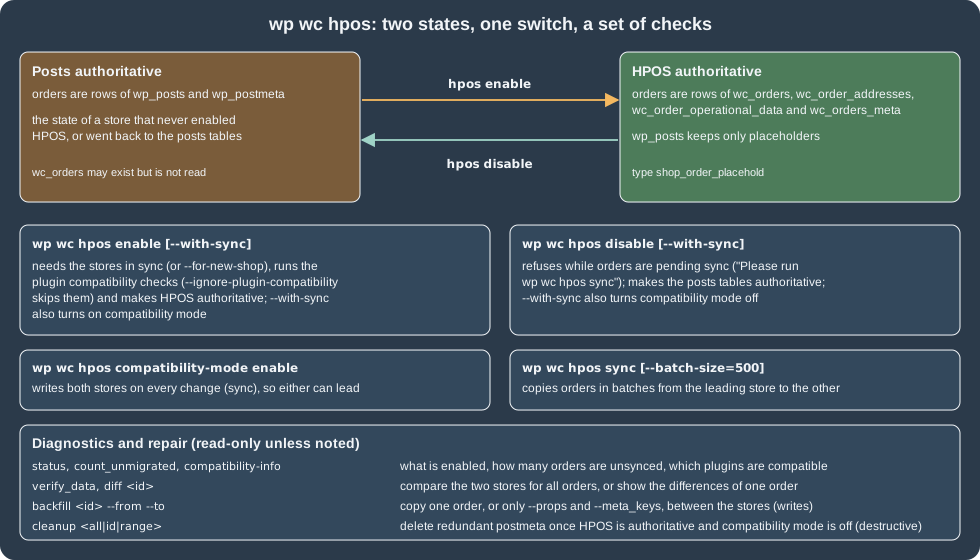
The wp wc hpos commands move and check orders between the classic posts tables and the HPOS tables (wc_orders,
wc_order_addresses, wc_order_operational_data, wc_orders_meta). They are hand-written, need no --user, and have
been the supported interface since the namespace was renamed from wp wc cot in 8.9.0; the old name still works as a
deprecated alias.
| Command | What it does |
|---|---|
|
Summary: whether HPOS and compatibility mode are enabled, the unsynced orders and the orders subject to cleanup. |
|
Makes HPOS authoritative if the stores are in sync, or if the shop is new. Checks that active plugins are compatible; |
|
Makes the posts tables authoritative again, if no orders are pending sync; |
|
Turns the two-way write (sync) on or off. |
|
Number of orders pending sync. |
|
Copies orders from the authoritative store to the other one, in batches. |
|
Compares the two stores for all orders and lists the differing columns. |
|
Shows the property differences of one order between the stores. It does not repair anything. |
|
Copies a whole order or only some properties and meta keys from one store to the other, regardless of the setting. |
|
Deletes redundant postmeta of migrated orders once HPOS is authoritative and compatibility mode is off. Destructive; stops when the post looks newer than the HPOS row unless |
|
Lists active plugins that declared, did not declare or contradict HPOS compatibility. Inactive plugins are counted as "uncertain". |
Source: WooCommerce docs: HPOS CLI tools
The history of the commands, from the changelog: cot migrate was replaced by cot sync in 7.1.0 (2022-11-08), hpos diff
arrived in 8.6.0 (2024-02-13), hpos backfill in 8.7.0 (2024-03-01), the cot namespace was deprecated and aliased to hpos
in 8.9.0 (2024-05-14), cleanup learned to remove the metadata of deleted orders in 9.0.0 (2024-06-18), and the
compatibility-mode enable and disable commands arrived in 9.1.0 (2024-07-10).
What was run on the test store, whose HPOS is enabled and authoritative, with compatibility mode (sync) off:
$ wp wc hpos status
HPOS enabled?: yes
Compatibility mode enabled?: no
Unsynced orders: 80
Orders subject to cleanup: 7

$ wp wc hpos count_unmigrated
There are 80 orders to be synced.

$ wp wc hpos diff 207
Warning: Differences found for order 207:
property	hpos	post
status	completed	draft
cart_tax	0
total	29.70	0.00
customer_id	6	0
billing_email	grace.cli@example.test
date_modified	2026-10-27T18:47:13+00:00	2026-10-27T18:47:07+00:00
payment_method	bacs
billing_first_name	Grace
billing_last_name	Hopper
billing_address_1	Unter den Linden 1
...
The numbers explain the model. The orders created in this section by wp wc shop_order create exist in full only in
wc_orders; their posts rows are placeholders in draft status with a zero total, which diff shows column by column.
With sync off that is correct and expected: HPOS is the source of truth and the posts side is not maintained, which is
exactly why code must never read orders with get_post() or WP_Query. verify_data on this store reported
Error: 6 orders were verified in 0 seconds. 1 error found followed by the JSON of the columns that differed for an
order that another test had written only to the HPOS table; on a store that migrated with sync, a clean run ends with
Success: <n> orders were verified in <s> seconds.
wp wc hpos compatibility-info printed 14 compatible plugins found: and the plugin names; a plugin that does not declare
compatibility appears under "uncertain" and blocks enable unless --ignore-plugin-compatibility is passed. Compatibility
is declared in code with FeaturesUtil::declare_compatibility( 'custom_order_tables', __FILE__, true ), as the plugins on
the REST page and in the Extension Development page do.
The state-changing commands (enable, disable, compatibility-mode, sync, backfill, cleanup, verify_data
--re-migrate) were not run, because the test store is shared and its HPOS settings must not change; their behaviour and
outputs in this page come from the help text of 11.2.1 and the official CLI tools page. A migration of an existing store
that follows those documents looks like this (to rehearse on a staging copy first, with a database backup):
wp wc hpos compatibility-info            # every active plugin declared compatible?
wp wc hpos compatibility-mode enable     # new writes go to both stores
wp wc hpos sync --batch-size=500         # copy the existing orders
wp wc hpos verify_data                   # expect: Success: N orders were verified
wp wc hpos enable                        # HPOS becomes authoritative
# ... run for a while with compatibility mode on, then, once everything is verified:
wp wc hpos compatibility-mode disable
wp wc hpos cleanup all --batch-size=500  # optional and destructive: removes redundant postmeta
Source: WooCommerce docs: HPOS CLI tools
For a brand-new store the single command is wp wc hpos enable --for-new-shop; a scripted install is not enabled
automatically (the REST and installation pages show wp wc hpos status reporting HPOS enabled?: no right after a
wp plugin install woocommerce --activate).
Blueprints
A Blueprint is a JSON file that describes the settings of a WooCommerce store so that it can be rebuilt elsewhere:
plugins and themes to install, WooCommerce options to set and a few table rows. It is the WooCommerce counterpart of
WordPress Playground blueprints and uses a similar steps array. The admin has an export and import screen under
WooCommerce > Settings > Advanced > Blueprint (the blueprint feature has been on by default since 9.9.0); the command line
has two commands:
wp wc blueprint export <save-to> [--steps=<steps>]
wp wc blueprint import <schema-path> [--show-messages=<all|error|info|debug>] [--yes]
Source: WooCommerce docs: wc blueprint
Export
--steps names the exporters to run. The names are the aliases of the exporters: installPlugin, installTheme,
setWCSettingsGeneral, setWCSettingsProducts, setWCSettingsTax, setWCShipping, setWCSettingsAccount,
setWCSettingsEmails, setWCSettingsIntegrations, setWCSettingsSiteVisibility and setWCSettingsAdvanced. Without the
option everything is exported (28 steps on the test store). The shop’s general settings are a small file:
wp wc blueprint export pocket-coffee-general.json --steps=setWCSettingsGeneral --user=adminSource: WooCommerce docs: wc blueprint
{
    "landingPage": "\/wp-admin\/admin.php?page=wc-admin",
    "steps": [
        {
            "step": "setSiteOptions",
            "options": {
                "woocommerce_store_address": "",
                "woocommerce_store_address_2": "",
                "woocommerce_store_city": "",
                "woocommerce_default_country": "ES:M",
                "woocommerce_store_postcode": "",
                "woocommerce_allowed_countries": "all",
                "woocommerce_all_except_countries": "",
                "woocommerce_specific_allowed_countries": "",
                "woocommerce_ship_to_countries": "",
                "woocommerce_specific_ship_to_countries": "",
                "woocommerce_default_customer_address": "base",
                "woocommerce_address_autocomplete_enabled": "no",
                "woocommerce_calc_taxes": "yes",
                "woocommerce_enable_coupons": "yes",
                "woocommerce_calc_discounts_sequentially": "no",
                "woocommerce_currency": "EUR",
                "woocommerce_currency_pos": "left",
                "woocommerce_price_thousand_sep": ",",
                "woocommerce_price_decimal_sep": ".",
                "woocommerce_price_num_decimals": "2"
            }
        }
    ]
}
The file contains steps. The step types that the importer knows are installPlugin, installTheme, activatePlugin,
activateTheme, setSiteOptions and runSql. The full export also contains runSql steps for the tables that hold
settings (tax rates and classes, shipping zones and methods, pickup locations); their SQL uses the placeholder
{WC_BLUEPRINT_TABLE_PREFIX} instead of wp_ since 11.0.0, so a Blueprint can be imported into a site with another table
prefix. A tax class step, as exported, looks like this (the runSql step carries it as a literal resource named schema.sql):
replace into `{WC_BLUEPRINT_TABLE_PREFIX}wc_tax_rate_classes` (`tax_rate_class_id`, `name`, `slug`) VALUES ('1', 'Reduced rate', 'reduced-rate');Source: WooCommerce docs: wc blueprint
Payment gateway settings are excluded from exports since 11.2.0 (they must be configured by hand after an import), and the install steps list WordPress.org plugins and (since 10.1.0) only WordPress.org themes.
Treat an export as sensitive: the full file of the test store contained option groups such as the email sender and the MaxMind geolocation settings (which can hold a licence key). Read it before it leaves the machine, and do not commit it blindly.
Import
A Blueprint can be hand-written. This one sets the shop’s country and currency and a marker option of Pocket Coffee:
{
  "landingPage": "/wp-admin/admin.php?page=wc-settings",
  "steps": [
    {
      "step": "setSiteOptions",
      "options": {
        "pocket_coffee_blueprint_demo": "imported",
        "woocommerce_default_country": "ES:M",
        "woocommerce_currency": "EUR"
      }
    }
  ]
}
Source: WooCommerce docs: wc blueprint
wp wc blueprint import pocket-coffee-blueprint.json --yes --show-messages=all --user=adminSource: WooCommerce docs: wc blueprint
Warning: A Blueprint imported with WP-CLI can change anything this command can access on the site — including data that is not described in the file. Only import files from a source you trust.
Step Processor	Type	Message
setSiteOptions	info	pocket_coffee_blueprint_demo has been updated.
setSiteOptions	info	woocommerce_default_country has not been updated because the current value is already up to date.
setSiteOptions	info	woocommerce_currency has not been updated because the current value is already up to date.
Success: pocket-coffee-blueprint.json imported successfully
The marker option was deleted again afterwards with wp option delete. An unknown step stops the import and --show-messages=all
says why:
Error: Failed to import pc-wccli-bad.json. Run with --show-messages=all to debug
Step Processor	Type	Message
setSiteOptionz	error	Unable to find an importer
Safety rules, all documented in the changelog: the importer lists what the file will do before running it (including the
number of database queries and the plugins and themes it installs or activates, 11.1.0), the options that must never be
overwritten (for example the roles option wp_user_roles) are on a restricted list that is matched regardless of casing and
accents (11.1.0), importing on a multisite network needs a network super administrator (11.2.0), and the UI import is
restricted to "coming soon" mode (9.9.0), a restriction that the command-line import on the live-mode test store did not
apply. --yes skips the confirmation, which makes Blueprints usable in provisioning scripts and CI, and also means the file
is trusted blindly: pin it in version control and review changes like code. A Blueprint does not carry products, orders or
customers, only settings and the tables listed above; moving content is a job for the export and import tools, REST or a
database copy.
Scripting and automation patterns
-
Capture ids with
--porcelain, loop over--format=ids, and quote the variables. A failed command returns 1, soset -euo pipefailstops a script at the first error, which also stops a pipe at the producer that failed. -
Choose the identity once:
WP_USERin the seed script, orwp --user=<id>at the top of a wrapper function. Do not run as an Administrator what a Shop manager can do. -
Mind the plugin load.
wp --skip-pluginsalso skips WooCommerce, sowp wcdisappears;--skip-plugins=<other>skips only the named plugin.--skip-themesis safe: 11.1.0 and 11.2.0 fixed the cases where a WP-CLI run that skipped the theme consumed the queued rewrite flush and dropped the theme’s rewrite rules. -
Mind the process cost. Each
wpcall boots WordPress; for thousands of items, call RESTbatchroutes or onewp eval-filethat uses CRUD objects (wc_get_products(),wc_get_orders(), theWC_ProductandWC_Ordersetters). Never loop over orders withget_post_meta(): with HPOS the data is not in postmeta. -
Schedule with the system cron, not with WP-Cron, when you need exact times:
wp cron event run --due-nowandwp action-scheduler run(see Action Scheduler) in a cron job give predictable queues, and on a deploymentwp wc updatefollowed bywp wc hpos statusis a cheap health check. -
Debug with
--debug=wcto count queries per command, and with--format=headersor--format=envelopeto see what the underlying REST call returned. -
Do not run
wpas root on a server; use the site’s user so that files that WooCommerce creates (logs, uploads) keep the right owner.
Troubleshooting
| Symptom | Cause and fix |
|---|---|
|
The command ran anonymously. Add |
|
The argument order is |
|
|
Delete printed |
The flag |
A list or object option is ignored or rejected |
Quote the JSON with single quotes and double quotes inside; use a double-quoted shell string with escaped inner quotes only when a shell variable has to be inserted. |
|
They do not exist: use |
|
There are unsynced orders or an incompatible plugin: run |
|
Run |
Warnings such as |
PHP notices from an extension or from a v2 controller reading a setting that was never saved; they do not change the result. Fix the data or the extension, or silence them in |
What was run and what was not
-
Run on WooCommerce 11.2.1 with WP-CLI 2.12.0:
wp wcandwp help wc product list; the 401 hint without--user; product create, list, update, get, csv, yaml, ids, count and delete (including the--forcequirk); a variable product, four variations and the bulk loop; a customer, an order, an order note, a status change and a manual refund; the complete seed script; webhook create, update, get, list and delete;payment_gateway get,shipping_zone list,tax_class listandproduct_cat list;--format=headersand--debug=wc; theroast_datefield inwp wc product get;wp wc update,wp wc tool listandwp wc palt info;wp wc hpos status,count_unmigrated,diff,verify_dataandcompatibility-info; Blueprint export (whole store,setWCSettingsGeneral,setWCSettingsTaxwithinstallPlugin) and import (a valid file and an invalid step, plus a missing file:Error: Invalid schema path). -
Not run:
wp wc hpos enable,disable,sync,backfill,cleanup,compatibility-modeandverify_data --re-migrate(they change the shared store’s order storage),wp wc tool run(global effects),wp wc com ...(needs a Woo.com account), the admin Blueprint screen, and the import of a full store Blueprint with plugin and theme steps (it would install software on the shared test store). -
Documentation tensions to know about: the official command index and FAQ list
wp wc settingalthough no such group exists on 11.2.1; the overview page says WC-CLI "leverages the capabilities of the WC REST API" without saying that it is the v2 API; the FAQ’swp wc product delete 123 --forceform does not delete (use--force=true); the HPOS CLI page documentsdiffformatslistandjsonwhile the help liststable,csv,jsonandyaml.