Getting Started
|
This content was generated with the assistance of AI and should be verified against the official documentation before being relied on in production. The reference material consulted while preparing these pages is listed in the section bibliography. |
This page is written against PHP 8.5 (8.5.11, released 2026-09-24), checked on 2026-10-05. PHP 8.6 is at release candidate 2 and scheduled for general availability on 2026-11-19; where it adds something relevant to a page, it is flagged as upcoming in 8.6. Where PHP 8.4 or 8.3 behave differently, the pages say so.
It covers what PHP is, where it comes from, how to install it, how to run code from the command line and from the
built-in web server, and what happens inside the engine when a script runs. Later pages build on a small, original
running scenario: a library catalogue of Book, Author and Loan objects, run from the command line.
What PHP is
PHP (a recursive acronym for PHP: Hypertext Preprocessor) is a general-purpose, dynamically and gradually typed scripting language that is especially suited to web development. PHP code is usually embedded in, or produces, HTML, and runs on the server: the browser only ever sees the output.
PHP is used for three broad kinds of work:
-
Server-side scripting, its traditional field: a web server hands each request to PHP (through PHP-FPM, an Apache module or an application server such as FrankenPHP), PHP runs a script and returns the response. This is the topic of the PHP and Laravel section.
-
Command-line scripting: PHP scripts run with the
phpbinary, without any web server, for cron jobs, build tools, queue workers and command-line applications such as Composer, PHPStan or Laravel’s Artisan. The Command-Line PHP page covers this in depth. -
Long-running applications: worker-mode servers (FrankenPHP, RoadRunner, Swoole), event loops built on fibers and queue workers keep a PHP process alive across many units of work.
The language itself has grown far beyond its templating roots. Modern PHP has a rich
type system (union, intersection and DNF types,
never, typed properties and constants), a full object model with
enumerations,
property hooks and
asymmetric visibility,
attributes, first-class callables, the pipe operator, generators
and fibers.
<?php

declare(strict_types=1);

// PHP can be used as a template language...
$title = 'Library catalogue';
?>
<h1><?= htmlspecialchars($title, ENT_QUOTES | ENT_SUBSTITUTE, 'UTF-8') ?></h1>
<?php
// ...or as a general-purpose language.
$isbns = ['978-0-00-000001-1', '978-0-00-000002-8'];
echo count($isbns), " books\n";
Running it with php catalogue.php prints:
<h1>Library catalogue</h1>
2 books
Source: What is PHP? and What can PHP do?
A short history
PHP’s history explains several of its quirks, such as the big standard library of global functions with inconsistent naming, and why so many old tutorials are wrong today.
| Version | Year | What it brought |
|---|---|---|
Personal Home Page Tools, PHP/FI 2.0 |
1994-1997 |
Rasmus Lerdorf’s set of C binaries for tracking visits to his home page grows into a form interpreter (Forms Interpreter) with embedded HTML. |
PHP 3 |
1998 |
Andi Gutmans and Zeev Suraski rewrite the parser; extensions and the name PHP: Hypertext Preprocessor arrive. |
PHP 4 |
2000 |
The Zend Engine 1.0, sessions, output buffering. |
PHP 5 |
2004 |
Zend Engine 2: a real object model (visibility, interfaces, exceptions), PDO, SimpleXML. 5.3 (2009) added namespaces, closures and late static binding; 5.4 traits and short array syntax. |
PHP 6 |
— |
Abandoned: the attempt to make strings Unicode-native was dropped, and the version number was skipped. |
PHP 7.0-7.4 |
2015-2019 |
The PHPNG engine roughly doubled performance and halved memory; scalar and return types, |
PHP 8.0 |
2020 |
JIT, union types, named arguments, attributes, |
PHP 8.1-8.5 |
2021-2025 |
Enums, readonly, fibers, first-class callables (8.1); readonly classes, DNF types (8.2); typed class constants, |
The What’s New and Migration page has the release-by-release detail and links every migration guide.
Source: History of PHP
How PHP evolves today: the RFC process and the PHP Foundation
PHP has no single owner. Changes to the language are proposed as RFCs (Requests for Comments) on the PHP wiki,
discussed on the internals mailing list, and voted on by people with a php.net account who contribute to the
project. A language change needs a two-thirds majority. Each RFC records the target version, the vote and the
implementation, so it is the definitive explanation of why a feature behaves the way it does; the pages of this
section link the RFC where the manual is terse.
Since late 2021 The PHP Foundation, a non-profit collective funded by companies and individuals, pays a team of core developers to work on php-src. The release managers of each version are elected separately; a new minor version ships every year, in late November, after a series of alphas, betas and release candidates.
Source: PHP RFC wiki and The PHP Foundation
Supported versions
Each PHP branch receives two years of active support (bug and security fixes) followed by two years of security support only, and every support window ends on 31 December. On 2026-10-05 this means:
| Branch | Latest patch | Active support until | Security support until |
|---|---|---|---|
8.5 |
8.5.11 |
2027-12-31 |
2029-12-31 |
8.4 |
8.4.26 |
2026-12-31 |
2028-12-31 |
8.3 |
8.3.35 |
(ended) |
2027-12-31 |
8.2 |
8.2.34 |
(ended) |
2026-12-31 |
PHP 8.1 and older are end-of-life: they receive no fixes at all, not even for security problems. Run a supported version in production, and prefer the newest one for new projects.
Source: Supported Versions and Unsupported Branches
Installing PHP
PHP ships as source code; operating systems, package managers and container images provide binaries. The PHP binary for the command line (the CLI SAPI) is all you need to follow this section; web servers are covered in The PHP Request Model and Servers.
The quick option: php.new and Laravel Herd
The fastest way to get a current PHP together with Composer on a developer machine is php.new, a one-line installer maintained by the Laravel team that also installs the Laravel installer. It installs a static PHP build into your home directory and can be re-run to update:
# Linux
/bin/bash -c "$(curl -fsSL https://php.new/install/linux/8.5)"

# macOS
/bin/bash -c "$(curl -fsSL https://php.new/install/mac/8.5)"

php --version
composer --version
On Windows the same site provides a PowerShell command. Laravel Herd (macOS and Windows) is a graphical alternative
that bundles several PHP versions, Composer, Nginx and a DNS resolver for *.test sites; it is free, with a paid Pro
tier for services such as databases and mail testing.
Linux
Distributions package PHP, split into a core package and one package per extension. The distribution’s version is often one or two releases behind; community repositories provide current versions.
# Debian / Ubuntu (distribution version)
sudo apt install php-cli php-mbstring php-intl php-xml php-sqlite3

# Fedora / RHEL family
sudo dnf install php-cli php-mbstring php-intl php-xml php-pdo

# Alpine (packages are versioned, e.g. php84, php85)
apk add php85 php85-mbstring php85-intl

php -v
php -m        # list the loaded extensions
The manual has a page per platform (Debian, Fedora/dnf, Arch/pacman, Alpine, OpenBSD) plus instructions for building
from source with ./configure && make. Building from source is rarely needed except for custom extensions or
patches.
macOS
macOS no longer ships PHP. Install it with Homebrew, php.new or Herd:
brew install php
php -v
brew services start php # optionally run PHP-FPM in the backgroundWindows
The official Windows builds are zip files on windows.php.net. Choose the Non Thread Safe (NTS) build for the CLI,
PHP-FPM-style FastCGI with IIS, or Herd; the Thread Safe (TS) build is only needed for Apache’s threaded mod_php.
Unzip it, copy php.ini-development to php.ini, enable the extensions you need with extension= lines and add
the folder to PATH. Herd for Windows and php.new for PowerShell automate the same steps.
Docker
The official php image on Docker Hub has tags per version and variant: cli (command line), fpm (FastCGI process
manager), apache (Apache with mod_php), each also available on Alpine. It contains the
docker-php-ext-install, docker-php-ext-enable and docker-php-ext-configure helpers for compiling bundled
extensions, and PECL/PIE for others:
# Run a one-off command against PHP 8.5
docker run --rm php:8.5-cli php -r 'echo PHP_VERSION, PHP_EOL;'

# Run a script from the current directory
docker run --rm -v "$PWD":/app -w /app php:8.5-cli php catalogue.php

# Try the 8.6 release candidate
docker run --rm php:8.6-rc-cli php -v
A minimal image for this section’s examples, adding intl and the GMP extension:
FROM php:8.5-cli
RUN apt-get update \
 && apt-get install -y --no-install-recommends libicu-dev libgmp-dev \
 && docker-php-ext-install intl gmp \
 && rm -rf /var/lib/apt/lists/*
COPY --from=composer:2 /usr/bin/composer /usr/bin/composer
WORKDIR /app
Source: php — Official Image on Docker Hub and Introduction to Composer (manual)
Whatever the platform, check the result with php -v and php --ini, which shows which configuration file was
loaded. The Configuration and Extensions page
explains php.ini.
Running PHP from the command line
The php binary runs code in several ways.
Running a script
<?php

declare(strict_types=1);

// hello.php -- the classic first program
echo "Hello, World!\n";
printf("Running PHP %s on %s\n", PHP_VERSION, PHP_OS_FAMILY);
$ php hello.php
Hello, World!
Running PHP 8.5.11 on LinuxSource: Your first PHP-enabled page
A file only contains PHP code between <?php and ?>; everything else is output verbatim. Files that contain only
PHP code should omit the closing ?>, so that no stray whitespace after it is sent to the output (the
Basic Syntax and Style page explains why).
One-liners with -r, linting with -l
php -r runs code given on the command line, without the <?php tag; -l checks syntax without running anything:
$ php -r 'echo str_repeat("=", 10), PHP_EOL;'
==========

$ php -r 'var_dump(array_first(["a" => 1, "b" => 2]));'
int(1)

$ php -l hello.php
No syntax errors detected in hello.php
Use single quotes around the code in a POSIX shell, so the shell does not expand PHP’s $variables.
Source: Command line options
The interactive shell, -a
php -a opens an interactive shell (it needs the readline extension, present in most builds). Each statement is
executed as you type it, with tab completion of functions, classes and variables:
$ php -a
Interactive shell

php > $isbn = '978-0-00-000001-1';
php > echo strlen(str_replace('-', '', $isbn)), PHP_EOL;
13
php > exit
For anything beyond quick experiments, a REPL such as PsySH (on which Laravel’s Tinker is built) offers pretty-printed results and documentation lookup.
Source: Interactive shell
Other useful options
| Option | Purpose |
|---|---|
|
Print the version (and whether OPcache/Xdebug are loaded). |
|
List compiled-in and loaded extensions. |
|
|
|
Show which |
|
Override an ini setting for this run, e.g. |
|
Ignore every |
|
Reflection on a function, a class, an extension, or an extension’s configuration ( |
|
Start the built-in web server (see below). |
|
Process standard input line by line, like |
$ php --rf str_contains
Function [ <internal:Core> function str_contains ] {

  - Parameters [2] {
    Parameter #0 [ <required> string $haystack ]
    Parameter #1 [ <required> string $needle ]
  }
  - Return [ bool ]
}

# Count the lines of a file that mention "PHP", awk-style
$ printf 'PHP\nJava\nPHP 8\n' | php -B '$n = 0;' -R 'if (str_contains($argn, "PHP")) $n++;' -E 'echo $n, PHP_EOL;'
2
Source: Command line options
Executable scripts and shebangs
On Unix-like systems a PHP script can be made executable with a shebang line. PHP’s CLI ignores the first line
when it starts with #!:
#!/usr/bin/env php
<?php

declare(strict_types=1);

// bin/catalogue -- make it executable with: chmod +x bin/catalogue
if ($argc < 2) {
    fwrite(STDERR, "Usage: {$argv[0]} <title>\n");
    exit(1);
}

$title = $argv[1];
echo "Searching the catalogue for \"{$title}\"...\n";
exit(0);
$ ./bin/catalogue
Usage: ./bin/catalogue <title>
$ echo $?
1
$ ./bin/catalogue Dune
Searching the catalogue for "Dune"...$argv holds the script name followed by its arguments, and $argc their count. exit() with an integer sets the
process exit status. The Command-Line PHP page covers
getopt, standard streams, signals and building full CLI tools.
Source: Executing PHP files
The built-in web server
php -S starts a small, single-threaded HTTP server that runs PHP scripts. It is meant for development and
testing only: it serves requests one at a time by default, and is not hardened for exposure to a network.
# Serve the public/ directory on http://localhost:8000
php -S localhost:8000 -t public

# Several worker processes (useful when a page fetches other URLs from the same server)
PHP_CLI_SERVER_WORKERS=4 php -S localhost:8000 -t public
Without a router, the server serves the requested file if it exists (.php files are executed, others are sent with
a guessed Content-Type) and falls back to index.php or index.html. With a router script as the last argument,
every request goes through that script; returning false tells the server to serve the requested file as-is. This is
how front-controller applications, Laravel included, are served in development:
<?php

declare(strict_types=1);

// router.php -- run with: php -S localhost:8000 router.php
$path = parse_url($_SERVER['REQUEST_URI'] ?? '/', PHP_URL_PATH) ?: '/';

// Let the server deliver existing static files (CSS, images...) directly.
if ($path !== '/' && is_file(__DIR__ . '/public' . $path)) {
    return false;
}

header('Content-Type: application/json');
echo json_encode([
    'path' => $path,
    'method' => $_SERVER['REQUEST_METHOD'] ?? 'GET',
    'books' => ['Dune', 'Neuromancer'],
], JSON_THROW_ON_ERROR | JSON_PRETTY_PRINT);
$ curl -s http://localhost:8000/books
{
"path": "\/books",
"method": "GET",
"books": [
"Dune",
"Neuromancer"
]
}The server logs each request to the terminal. In production, PHP runs behind PHP-FPM or an application server instead; see The PHP Request Model and Servers.
Source: Built-in web server
How a PHP script runs
When you run php catalogue.php, or a web server forwards a request, the Zend Engine processes the file in two
phases:
-
Compilation. The lexer turns the source text into tokens (
T_FUNCTION,T_VARIABLE, …, whichtoken_get_all()andPhpToken::tokenize()expose), the parser builds an abstract syntax tree (AST), and the compiler turns the AST into arrays of opcodes, the instructions of PHP’s virtual machine. -
Execution. The Zend VM executes the opcodes one handler at a time, calling internal functions implemented in C by the core and the extensions.
Without caching, this compilation is repeated for every file on every request. OPcache, bundled with PHP and enabled by default for web SAPIs, stores the compiled opcodes in shared memory so that later requests skip compilation entirely; it can also preload code at server start. Since PHP 8.0 OPcache includes a JIT compiler that turns hot opcodes into native machine code; it pays off for CPU-bound work (image processing, numeric code), much less for typical I/O-bound web requests.
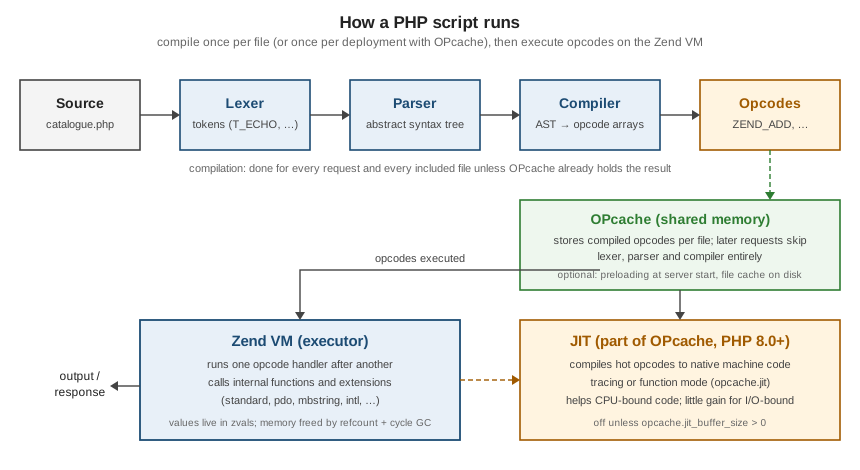
You can look at each stage from PHP itself:
<?php

declare(strict_types=1);

$code = '<?php echo 1 + 2;';

foreach (PhpToken::tokenize($code) as $token) {
    printf("%-14s %s\n", $token->getTokenName(), json_encode($token->text));
}

var_dump(function_exists('opcache_get_status'));   // true when OPcache is loaded
T_OPEN_TAG "<?php "
T_ECHO "echo"
T_WHITESPACE " "
T_LNUMBER "1"
T_WHITESPACE " "
+ "+"
T_WHITESPACE " "
T_LNUMBER "2"
; ";"
bool(true)The OPcache, JIT and Performance page explains the cache, preloading and the JIT settings, and References and Memory Management how values are stored (zvals), counted and garbage-collected.
Source: The PhpToken class and OPcache introduction
A first look at the running scenario
The examples in this section share an original domain: a small library catalogue. Here is a first version, written in the style used throughout the section (strict types, typed properties, constructor promotion and a backed enum); the following pages explain every construct:
<?php

declare(strict_types=1);

enum Format: string
{
    case Hardcover = 'hardcover';
    case Paperback = 'paperback';
    case Ebook = 'ebook';
}

final readonly class Author
{
    public function __construct(public string $name) {}
}

final readonly class Book
{
    public function __construct(
        public string $isbn,
        public string $title,
        public Author $author,
        public int $year,
        public Format $format = Format::Paperback,
    ) {}
}

$books = [
    new Book('978-0-00-000001-1', 'The Left Hand of Darkness', new Author('Ursula K. Le Guin'), 1969),
    new Book('978-0-00-000002-8', 'Kindred', new Author('Octavia E. Butler'), 1979, Format::Hardcover),
    new Book('978-0-00-000003-5', 'Solaris', new Author('Stanisław Lem'), 1961, Format::Ebook),
];

$before1970 = array_filter($books, fn (Book $b): bool => $b->year < 1970);
usort($before1970, fn (Book $a, Book $b): int => $a->year <=> $b->year);

foreach ($before1970 as $book) {
    printf("%d  %-28s %s (%s)\n", $book->year, $book->title, $book->author->name, $book->format->value);
}
1961 Solaris Stanisław Lem (ebook)
1969 The Left Hand of Darkness Ursula K. Le Guin (paperback)Source: Constructors and Destructors (constructor promotion) and Backed enumerations
Where older books and tutorials are outdated
Most PHP books still in circulation were written for PHP 5 or 7 (2017-2019 for the books consulted for this section). When following them, keep in mind:
-
Local setup. XAMPP, MAMP or AMPPS bundles are no longer necessary for learning: the CLI,
php -S, Docker, php.new and Herd cover development, and PHP-FPM behind Nginx or FrankenPHP is the production norm. PEAR has been replaced by Composer, and PECL by PIE for installing extensions. -
Versions. Every PHP 5.x and 7.x release, and 8.0 and 8.1, are end-of-life. Code written for them may rely on removed features (
each(),create_function(), themysql_*functions, mcrypt) or on the pre-8.0 comparison rules; see What’s New and Migration. -
short_open_tagand ASP tags. Write<?php(and<?=for echo, which is always available); ASP-style<%tags were removed in PHP 7.0.
References
-
PHP Manual — A simple tutorial and Your first PHP-enabled page
-
PHP Manual — Installation and Configuration, Unix, Debian, DNF, macOS, Windows
-
PHP Manual — Using PHP from the command line: options, usage, interactive shell, built-in web server
-
php.net — Supported Versions, Unsupported Branches, Releases
-
Laravel — Installing PHP and the Laravel Installer (php.new)