Native and Mobile Apps
|
This section documents OAuth 2.0 (RFC 6749) as amended by the OAuth 2.0 Security Best Current Practice (RFC 9700 / BCP 240), the OAuth 1.0 Protocol (RFC 5849) for historical context, and OpenID Connect Core 1.0, as published at the IETF Datatracker and the OpenID Foundation specifications — and, on the Spring pages, Spring Boot 4.1.x and Spring Security 7.1.x as published at the Spring Security reference documentation — which are the references these pages are written and verified against. OAuth 2.1 is still an Internet-Draft ( This content was generated with the assistance of AI and should be verified against those official specifications before being relied on in production. This section’s bibliography lists the reference material consulted while preparing these pages. |
A native or mobile app is a public client — it ships to a device the app’s own developer does not control at runtime, and it cannot keep a secret. RFC 8252, also published as BCP 212, is the OAuth working group’s Best Current Practice for exactly this client shape, and its central finding is not a set of tuning knobs: it is a flat prohibition on the one design most native apps reached for first, followed by a specific, workable alternative and the reasons that alternative is not just safer but genuinely better for the user.
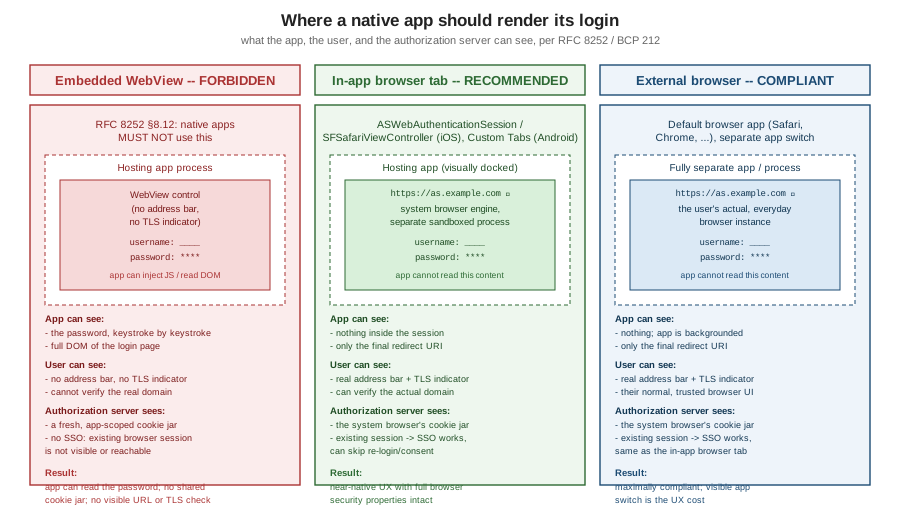
RFC 8252 §8.12: native apps MUST NOT use embedded user-agents
RFC 8252 §8.12 states this as a normative MUST NOT: native apps must not use an embedded user-agent — commonly an embedded WebView (WKWebView/UIWebView on iOS, WebView on Android) — to render the
authorization request. This is not a stylistic preference; it is the single most load-bearing rule on this page,
and every recommendation below follows from it.
An embedded WebView is a browser control the hosting app creates, owns, and can fully instrument. Loading the authorization server’s login page inside one breaks three separate security properties at once:
-
The app can read the password. A WebView is just another view inside the app’s own process. The hosting app can inject JavaScript into it, read its DOM, intercept form submissions, or simply log every keystroke — there is no boundary between "the page rendered inside my WebView" and "code I, the app developer, can run against that page". The user believes they are typing a password into the authorization server’s login form; technically, they are typing it into a control the app itself fully controls. This applies whether or not the app’s developer has any intention of misusing it — the point is that the user has no way to verify the intention either way, which is exactly the trust problem OAuth exists to avoid.
-
The cookie jar is not shared, so single sign-on breaks. A real system browser keeps one shared cookie store across every site the user visits in it, which is what lets a user who is already signed in to the authorization server in Safari or Chrome skip the login prompt entirely when a new app requests authorization. An embedded WebView is a separate, app-scoped cookie jar with no visibility into the system browser’s session. Every app that uses an embedded WebView forces the user to log in again, from scratch, no matter how recently they authenticated elsewhere — and, worse, trains users to expect and routinely re-enter their password inside arbitrary in-app screens, which is precisely the habit that makes phishing easier.
-
The user cannot see the real URL or the TLS indicator. A system browser’s address bar is the user’s one reliable way to confirm which domain they are actually typing credentials into and that the connection is genuinely secured. An embedded WebView typically has no address bar at all, or a fake one the hosting app drew itself — either way, a user has no independent way to verify they are talking to
as.example.comand not a pixel-perfect phishing page the app chose to load instead.
|
RFC 8252 §8.12’s prohibition is unconditional: it is not "avoid embedded WebViews where practical" or "prefer the system browser when available". It is a MUST NOT. A native app that renders its authorization request in an embedded WebView is non-compliant with BCP 212 regardless of how the rest of its OAuth integration is built. |
The correct choices
RFC 8252 §7 names two acceptable ways to run the authorization request, both of which restore all three properties the embedded WebView breaks:
-
The external browser. The app hands the authorization URL to the operating system, which opens it in the user’s actual default browser app (Safari, Chrome, or whatever the user has chosen) — a fully separate process, with the system browser’s own cookie jar, address bar, and TLS indicator. This is the maximally compliant option, but it is also the most jarring for the user: the app visibly disappears and a different app (the browser) takes over the screen.
-
The in-app browser tab — better for UX. A view that looks embedded in the app but is, underneath, rendered by the system browser’s own engine and process, with the system browser’s cookie jar and security chrome intact. This gets almost all of the external browser’s security properties while keeping the user visually inside the calling app:
-
iOS:
ASWebAuthenticationSession— the current API, purpose-built for exactly this: it shares the system browser’s cookies (so SSO works), shows a real address bar and TLS indicator, and is sandboxed away from the calling app’s process, so the app cannot read what happens inside it. It also natively supports the callback-URL completion handler pattern the authorization redirect needs. -
iOS:
SFSafariViewController(older) — the APIASWebAuthenticationSessionsuperseded for authentication use; it shares Safari’s cookie jar and chrome the same way, but lacks the dedicated authentication-session completion callback, so it needs the redirect handled through the app’s own universal-link or custom-scheme handling instead. PreferASWebAuthenticationSessionon any OS version that supports it. For the native Swift side —ASWebAuthenticationSession, Sign in with Apple and passkeys — see Security and Privacy, and for configuring universal links (associated domains,apple-app-site-association) see App Intents, Siri, Shortcuts, Spotlight, Deep Links and Extensions. -
Android: Custom Tabs (
androidx.browser.customtabs) — the equivalent mechanism, backed by whichever Custom-Tabs-capable browser is installed (typically Chrome), sharing that browser’s cookie jar and address bar while visually docking into the calling app.
-
Both options satisfy §8.12; the choice between them is a UX trade-off, not a security one — pick the in-app browser tab unless there is a specific reason to want the more disruptive full app-switch of the external browser.
Wire-level: the authorization request from a native app
The request itself looks like any other authorization-code request — what differs is where it is opened
(an in-app browser tab or external browser, never an embedded WebView) and the redirect_uri scheme, which
must be one of the three options below:
GET /authorize?response_type=code
    &client_id=native-app
    &redirect_uri=https%3A%2F%2Fapp.example.com%2Fcallback
    &scope=orders.read%20offline_access
    &state=af0ifjsldkj
    &code_challenge=E9Melhoa2OwvFrEMTJguCHaoeK1t8URWbuGJSstw-cM
    &code_challenge_method=S256 HTTP/1.1
Host: as.example.com
The authorization server authenticates the user and obtains consent entirely on its own login page — the app
supplies none of that UI — then redirects back to the claimed https://app.example.com/callback URI, which the
operating system routes straight back into the app because of the verified Universal Link / App Link
association, without ever opening in an ordinary browser tab visible to the user:
HTTP/1.1 302 Found
Location: https://app.example.com/callback?code=SplxlOBeZQQYbYS6WxSbIA&state=af0ifjsldkj
The app then completes the exchange itself, from its own process, presenting the code_verifier that matches
the code_challenge sent above:
POST /token HTTP/1.1
Host: as.example.com
Content-Type: application/x-www-form-urlencoded

grant_type=authorization_code
&code=SplxlOBeZQQYbYS6WxSbIA
&redirect_uri=https%3A%2F%2Fapp.example.com%2Fcallback
&client_id=native-app
&code_verifier=dBjftJeZ4CVP-mB92K27uhbUJU1p1r_wW1gFWFOEjXk
Because native-app is a public client, no client_secret is presented at all — code_verifier is the only
proof the token request has to offer, which is exactly why PKCE is not optional for this client shape.
The three redirect-URI options
Once the authorization server has authenticated the user and obtained consent, it needs to redirect back into the native app — there is no page for the browser to keep showing. RFC 8252 §7 covers three ways to make that redirect land back in the app, each with a different trade-off:
| Option | How it works | Trade-offs and hijacking risk |
|---|---|---|
Private-use URI scheme (e.g. |
The app registers a custom URI scheme with the OS; the OS routes any link using that scheme to the registered app. |
Simplest to set up, but schemes are not exclusive — any app can attempt to register the same scheme, and
on a device where more than one app claims it, the OS’s tie-breaking behaviour is not guaranteed to favour the
legitimate app. A malicious app registering the same scheme can intercept the authorization response,
including the authorization code. Mandatory PKCE (below) is exactly what neutralises this: even if a rogue app
captures the code, it cannot redeem it without the |
Claimed |
The redirect URI is an ordinary |
The strongest option: the OS verifies domain ownership before ever routing the link to the app, so there is no scheme-squatting equivalent. Requires owning and maintaining the claimed domain and its association file, and a small number of OS/browser edge cases (the user disabling universal links, or opening the link in a context that doesn’t honour them) can fall through to opening the link in an ordinary browser tab instead of the app. |
Loopback interface redirect ( |
The app runs a temporary local HTTP listener on the loopback interface and uses that as the redirect URI; the system browser delivers the redirect straight to the app’s own local server. |
Well suited to native desktop apps without a claimed HTTPS domain or scheme registration story. RFC 8252
requires using the loopback IP literal (not |
|
PKCE is mandatory for public native clients, full stop — this is true independently of the OAuth 2.1
draft’s broader move to require PKCE for every authorization-code client. A native app has no client secret to
protect an intercepted authorization code with; the |
App-to-app SSO and OIDC Native SSO
The redirect-URI mechanics above solve one app authenticating once. A user who has, say, five apps from the same organisation on their device still benefits from a single sign-on experience across them, and two complementary mechanisms address that:
-
App-to-app SSO via the shared browser session. Because both the external browser and the in-app browser tab share the system browser’s cookie jar, a user who authenticates once in one app’s
ASWebAuthenticationSession/ Custom Tab is, from the authorization server’s point of view, already logged in when a second app opens its own authorization request — the authorization server’s session cookie is presented automatically, and the user typically sees only a consent screen (or nothing at all, for a first-party app configured to skip consent) rather than a fresh login prompt. -
OIDC Native SSO for Mobile Apps 1.0 goes further: it standardises a device secret mechanism so that a refresh token obtained by one app in an SSO-enabled group can be used, via a token-endpoint extension, to obtain tokens for a sibling app in the same group without any browser interaction at all — useful for suites of first-party apps that want SSO to survive even when the shared-cookie-jar mechanism above is unavailable (for instance, across app switches with no browser step at all).
AppAuth for iOS and Android
Implementing the redirect handling, PKCE generation, and browser-session management above correctly, by hand,
on every platform is exactly the kind of security-sensitive plumbing best not reinvented per app. AppAuth
(AppAuth-iOS / AppAuth-Android), maintained under the OpenID Foundation umbrella, is the reference client
library that implements RFC 8252 and OIDC correctly out of the box — in-app browser tab selection,
PKCE, and the redirect-URI handling for whichever of the three options above is configured — and is the
recommended starting point rather than a hand-rolled integration.
Why the authorization server, not the app, should own login
Everything above has been about how to open the authorization request safely. This section is about why it matters that it happens in a real browser the authorization server controls, rather than inside the app — which is the payoff the whole native-app story is building toward.
The moment login happens in a system browser or in-app browser tab pointed at the authorization server’s own login page, authentication becomes entirely the authorization server’s responsibility, invisible to the app. That single fact unlocks capabilities that are structurally unavailable when an app instead collects a password itself and posts it to a token endpoint — which is exactly the ROPC pattern documented, and rejected, on Legacy Grants: Implicit and Password:
-
CAPTCHA and bot/brute-force defences. A browser-rendered login page can run a CAPTCHA challenge, rate-limit by IP or device fingerprint, and apply risk-based throttling — none of which has anywhere to run inside a bare token-endpoint request.
-
Step-up and 2FA. The authorization server’s login page can prompt for a second factor exactly when its own risk engine decides one is warranted — see Authentication Methods: 2FA and Passwordless for the full factor catalogue and the RFC 9470 step-up challenge mechanism. 2FA here is always an additional layer on top of whichever primary factor the user is authenticating with — it is never itself a login method, and adding it never makes a flow "passwordless" on its own.
-
Passkeys. WebAuthn/FIDO2 ceremonies are, by their nature, browser (or platform-authenticator) APIs; they are simply not reachable from a form field an app posts to a token endpoint.
-
Device-risk checks. Browser-side device and session signals (cookies, TLS fingerprinting, prior-session history) that a risk engine can evaluate before allowing a login are only visible when the login happens in that browser context in the first place.
-
Consent screens. The authorization server can show, and the user can decline, exactly what scopes are being requested — something a native login form has no protocol slot for at all.
-
Federation and password-manager autofill. "Sign in with Google/Apple/Microsoft" buttons, and the browser’s own password-manager autofill, both depend on the login happening in a real browser context that those integrations can hook into.
-
Every one of the above can change without an app release. Because all of this logic lives on the authorization server’s login page, tightening a CAPTCHA threshold, rolling out step-up for a newly risky scope, or adding a new federated identity provider is a server-side deployment — no app-store review, no staged rollout, no fleet of installed app versions to worry about supporting.
None of this is possible when the app itself renders the login form and posts a password straight to a token endpoint, because at that point the authorization server never gets a chance to run any of its own login logic at all — it just receives a credential and has to trust it blindly. This is precisely the gap Legacy Grants: Implicit and Password documents as disqualifying for ROPC, and it is why "open a real browser" is not a compliance checkbox on this page but the actual mechanism that makes every one of the capabilities above possible.
Sequence: authorization code + PKCE from a native app, via an in-app browser tab
Common pitfalls to audit for
A codebase that predates RFC 8252, or one that was ported from a platform SDK’s older sample code, often carries one or more of these — each is worth an explicit grep before calling a native OAuth integration compliant:
-
An embedded
WKWebView/UIWebViewor AndroidWebViewanywhere near the string/authorize— the single clearest §8.12 violation, regardless of how well-intentioned the surrounding code is. -
A
redirect_uriusing a private-use scheme with no PKCE — the scheme-squatting risk described above with no mitigation in place at all. -
A claimed-
httpsredirect URI whose association file (apple-app-site-association/assetlinks.json) is missing, misconfigured, or not served over HTTPS with the correct content type — silently falling back to opening the redirect in an ordinary browser tab instead of routing into the app. -
A loopback redirect using
localhostinstead of the127.0.0.1literal RFC 8252 requires —localhostresolution is not guaranteed consistent across a device’s network configuration. -
Refresh tokens or access tokens written to platform storage that is not the OS-provided secure storage (
Keychainon iOS,EncryptedSharedPreferences/Keystore-backed storage on Android) — a native-app storage concern parallel to, but distinct from, the browser storage concerns on Browser-Based Apps (SPAs). For the React Native realization of this guidance —react-native-app-auth,expo-secure-storeandreact-native-keychain— see Security in the React Native section, and for native Swift Keychain access see Security and Privacy in the Apple Platforms section.