Dependency Injection
|
This section documents ASP.NET Core on .NET 10 (LTS), the current release — the minimal hosting model, the middleware pipeline, dependency injection, Minimal APIs, MVC & Razor Pages, Blazor with the current render modes, SignalR and gRPC, EF Core, ASP.NET Core Identity and policy-based authorization, output caching, rate limiting, and Native-AOT-aware building — as described by the official documentation at Microsoft Learn, which is the reference these pages are written and verified against. This content was generated with the assistance of AI and should be verified against the official documentation before being relied on in production. .NET ships a major release every November and its APIs continue to evolve: the examples here target .NET 10 / C# 14. This section’s bibliography lists the reference material consulted while preparing these pages. |
ASP.NET Core is built on dependency injection: the framework, and your code, declare the services they need as constructor parameters and the container supplies them.
The container
builder.Services is an IServiceCollection — a list of service descriptors (service type, implementation,
lifetime). builder.Build() compiles it into an IServiceProvider that resolves instances.
builder.Services.AddScoped<IOrderService, OrderService>();
builder.Services.AddHttpClient<IPaymentGateway, StripeGateway>();
builder.Services.AddSingleton(TimeProvider.System);Lifetimes
| Lifetime | One instance per… |
|---|---|
|
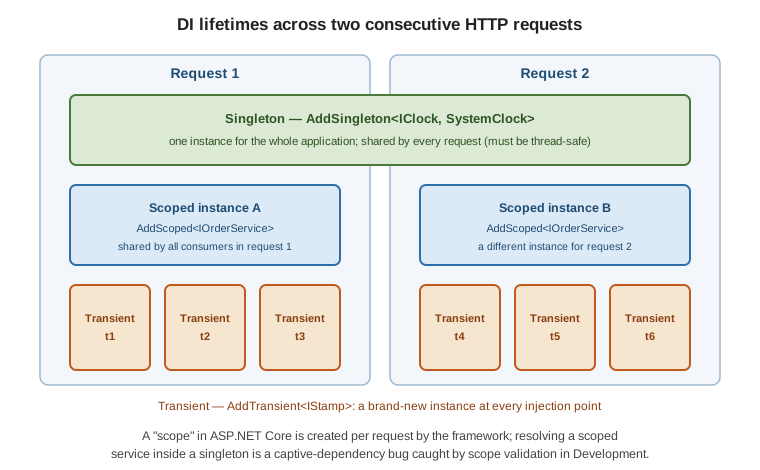
Application. Created once, shared by every request. Must be thread-safe. |
|
Scope — in ASP.NET Core, one HTTP request. The typical choice for services that touch a
|
|
Resolution. A new instance every time it is injected. |
Captive dependency: if a singleton takes a scoped (or transient) service in its constructor, that short-lived service is trapped for the whole application lifetime. In Development the container validates scopes at build time and throws when this happens.
// WRONG: singleton capturing a scoped DbContext
builder.Services.AddSingleton<CacheWarmer>();       // ctor: CacheWarmer(AppDbContext db)

// RIGHT: take IServiceScopeFactory and open a scope per unit of work
public sealed class CacheWarmer(IServiceScopeFactory scopeFactory)
{
    public async Task WarmAsync()
    {
        using var scope = scopeFactory.CreateScope();
        var db = scope.ServiceProvider.GetRequiredService<AppDbContext>();
        // ...
    }
}
Registration techniques
services.AddScoped<IClock, SystemClock>();                       // implementation type
services.AddSingleton<IClock>(new SystemClock());                // instance
services.AddScoped<IClock>(sp => new SystemClock(sp.GetRequiredService<TimeProvider>())); // factory

services.TryAddScoped<IClock, SystemClock>();                    // no-op if already registered
services.TryAddEnumerable(ServiceDescriptor.Singleton<IStartupFilter, MyFilter>()); // add once to a set

// keyed services -- pick an implementation by key
services.AddKeyedScoped<INotifier, EmailNotifier>("email");
services.AddKeyedScoped<INotifier, SmsNotifier>("sms");
public sealed class SignupHandler([FromKeyedServices("email")] INotifier notifier);See .NET dependency injection and keyed services.
Consuming services
-
Controllers, Razor Pages, SignalR hubs,
IMiddleware— constructor injection. -
Minimal API handlers — add the service as a parameter; the framework infers it from the container.
[FromKeyedServices("…")]selects a keyed one.app.MapPost("/orders", async (CreateOrder cmd, IOrderService orders) => await orders.CreateAsync(cmd)); -
Razor / Blazor components —
@inject IOrderService Orders(or[Inject]on a property).@inject IClock Clock <p>Server time: @Clock.UtcNow</p> -
Singletons / background services — inject
IServiceScopeFactoryand open a scope per unit of work.
Replacing the container
Third-party containers plug in via UseServiceProviderFactory. Autofac, for example, adds assembly scanning
and richer registration:
builder.Host.UseServiceProviderFactory(new AutofacServiceProviderFactory());
builder.Host.ConfigureContainer<ContainerBuilder>(b =>
    b.RegisterAssemblyTypes(typeof(Program).Assembly)
     .Where(t => t.Name.EndsWith("Repository"))
     .AsImplementedInterfaces());
The built-in container is deliberately minimal; reach for a replacement only when you need features it lacks. See DI guidelines.