Building, Signing and Preparing a Release
|
This content was generated with the assistance of AI and should be verified against the official documentation of Android before being relied on in production. See the section bibliography for the reference material consulted while preparing these pages. |
Publishing an Android app means turning a tree of Kotlin sources and resources into one signed artifact that
Google Play and, ultimately, a user’s device will accept. That path has three distinct stages — building
(compiling and, for release, shrinking the code with R8), packaging (choosing between an installable APK
and the Play-only Android App Bundle format), and signing (attaching a cryptographic identity to the
artifact that Android verifies on every install and update) — and each stage has its own failure modes if
skipped or misconfigured. This page covers all three for TrailMate, the running example introduced in
Getting Started with Android, building on the android {} DSL and
build variants from Project Structure, Gradle and Build
Variants. It stops short of the Play Console itself — creating a listing, staged rollouts, testing tracks and
the Play App Signing enrollment flow are covered in
Publishing on Google Play — and stops short of library
publishing, covered in
Building and Publishing Android Libraries to Maven
Central. The baseline throughout is AGP 9.4.1 / Gradle 9.6 / JDK 17, as established on the project
structure page.
Build Types: Debug vs. Release
Every Android module ships with two build types by default, debug and release, each producing a separate
variant of the app with its own source set (src/debug/, src/release/) and its own BuildConfig constants.
They differ in what they optimize for:
debug |
release |
|
|---|---|---|
|
|
|
|
|
|
|
|
|
Signing |
the auto-generated debug keystore ( |
a release keystore you generate and control (see below) |
|
typically |
none — this is the identity Play and users see |
// app/build.gradle.kts
android {
    buildTypes {
        debug {
            applicationIdSuffix = ".debug"
            isDebuggable = true
        }
        release {
            isMinifyEnabled = true
            isShrinkResources = true
            proguardFiles(
                getDefaultProguardFile("proguard-android-optimize.txt"),
                "proguard-rules.pro"
            )
            signingConfig = signingConfigs.getByName("release")
        }
    }
}getDefaultProguardFile("proguard-android-optimize.txt") pulls in AGP’s own baseline rules (keep
Activity/Service/ContentProvider subclasses reachable from the manifest, keep Parcelable CREATOR
fields, and similar Android-framework requirements every app needs); proguard-rules.pro is where TrailMate
adds its own, project-specific rules. See
Android Developers — Configure Build Variants.
R8: Shrinking, Obfuscating and Optimizing
R8 is the single tool AGP uses for two historically separate jobs: it is D8’s superset, so it still converts
JVM bytecode to DEX, but for a release build with isMinifyEnabled = true it also:
-
Shrinks — performs whole-program reachability analysis from the app’s entry points (the manifest’s components, plus anything a keep rule pins) and removes classes, methods and fields nothing reaches.
-
Obfuscates — renames surviving classes/methods/fields to short, meaningless names (
a,b,a.a, …), shrinking the DEX further and making reverse-engineering harder. -
Optimizes — inlines, removes dead branches, merges classes where safe, and otherwise rewrites the bytecode graph for size and speed beyond what a naive compiler would do.
This is not the legacy standalone proguard.jar tool; AGP replaced ProGuard with R8 as the default shrinker
years ago, but it still reads the same proguard-rules.pro syntax (-keep, -keepclassmembers,
-dontwarn, …) for backward compatibility, which is why the file and the rule syntax keep the ProGuard name.
Keep Rules
Reachability analysis is static: it cannot see through reflection, JNI, Retrofit’s dynamic proxy generation, or
Gson/Moshi/kotlinx.serialization reading field names at runtime. Anything reached only that way must be pinned
with an explicit -keep rule, or R8 will strip or rename it and the app will crash or silently misbehave only
in the release build — a class of bug that never reproduces in debug and is easy to ship by accident.
// app/proguard-rules.pro

# Keep DTOs whose field names Retrofit/kotlinx.serialization read via reflection.
-keep class com.example.trailmate.core.network.dto.** { *; }

# Keep Room-generated implementations (Room's own consumer rules already cover most of this,
# but explicit entities are kept for clarity when annotation processing changes shape).
-keep class com.example.trailmate.core.database.** { *; }

# Kotlin coroutines/Compose internals commonly warn under R8 without affecting correctness.
-dontwarn kotlinx.coroutines.**

# Keep the app's own Parcelable CREATOR fields (belt-and-suspenders on top of AGP's default rule).
-keepclassmembers class com.example.trailmate.** implements android.os.Parcelable {
    public static final ** CREATOR;
}Most libraries ship their own consumer ProGuard rules bundled in their AAR (Retrofit, Room, Hilt, Moshi and
Gson all do), so an app rarely has to hand-write rules for a well-maintained third-party dependency — only for
its own reflection-based code and DTOs. Over-broad -keep class com.example.trailmate.** { *; } rules defeat
shrinking almost entirely and are a common mistake; keep rules should be as narrow as the reflective access
actually requires. See
Android Developers — Shrink, Obfuscate and Optimize Your App and
Android Developers — Shrink, Obfuscate and Optimize Your App
(keep rules).
Mapping Files
Because R8 renames classes and methods, a release build’s stack traces arrive obfuscated
(Exception in a.b.c: at a.b.c.a(Unknown Source)), useless without the corresponding mapping file. AGP
writes one per release build to
app/build/outputs/mapping/release/mapping.txt, a text table of original.name → obfuscated.name for every
renamed symbol. That file must never ship inside the app; it is instead retained and, when the app is
distributed through Google Play, uploaded to the Play Console (App bundle explorer → Downloads, or
automatically via the Play publishing Gradle plugin) so Play Console’s own crash reporting (and Firebase
Crashlytics, via its own upload step) can de-obfuscate stack traces back to real symbol names. Losing the
mapping file for a shipped versionCode means every crash report from that release stays permanently
unreadable, so archiving it (per release, keyed by versionCode) is worth automating in CI rather than treating
as optional. See
Android Developers — Decode an
Obfuscated Stack Trace.
Resource Shrinking
isShrinkResources = true (only effective alongside isMinifyEnabled = true, since it relies on R8 having
already found which code — and therefore which resource references — survives) removes resources nothing in
the surviving code references: unused drawables, layouts kept only for a since-deleted screen, unused string
sets in alternate locales, and so on. It cannot detect resources referenced only by name at runtime (for
example resources.getIdentifier("ic_trail_$difficulty", …)); those need an explicit keep in a
res/raw/keep.xml resource:
<?xml version="1.0" encoding="utf-8"?>
<!-- app/src/main/res/raw/keep.xml -->
<resources xmlns:tools="http://schemas.android.com/tools"
tools:keep="@drawable/ic_trail_easy,@drawable/ic_trail_moderate,@drawable/ic_trail_hard" />Packaging: APK vs. Android App Bundle
An APK (.apk) is a single, complete, installable archive: every resource for every density and every
native library for every ABI the app supports, in one file. An Android App Bundle (.aab) is a publishing
format, not an installable one: it packages the same content split by dimension (density, ABI, language) and
defers assembling a device-specific APK set to Google Play at install time (dynamic delivery), so a given
device only downloads the density, ABI and language slices it actually needs. Google Play has required the AAB
format for new apps since August 2021, and it is the default artifact Android Studio’s release build config
now produces.
# generate a release AAB from the command line
./gradlew :app:bundleRelease
# generate a release APK from the command line (still useful for direct-install / non-Play distribution)
./gradlew :app:assembleReleasebundletool: Extracting and Testing an AAB Locally
Because an .aab is not directly installable, testing what Play would actually generate for a specific device
requires Google’s bundletool command-line tool.
# build a full APK set (one split-APK set per supported device configuration) from the AAB
java -jar bundletool.jar build-apks \
    --bundle=app/build/outputs/bundle/release/app-release.aab \
    --output=trailmate.apks \
    --ks=release.keystore \
    --ks-key-alias=trailmate \
    --ks-pass=file:keystore_password.txt

# install the right split-APK set for the currently connected device/emulator
java -jar bundletool.jar install-apks --apks=trailmate.apksbuild-apks --local-testing produces a set installable without Play at all, which is how a release AAB is
validated end to end (splits resolve correctly, the app launches) before it is ever uploaded. See
Android Developers — bundletool and
Android Developers — About Android App Bundles.
versionCode and versionName Strategy
Every build variant carries two version identifiers, read by Android at install time and shown to users respectively:
-
versionCode— a positive integer, invisible to users, that Android and Play use to decide whether an artifact is an upgrade. Play Console rejects an upload whoseversionCodeis not strictly greater than everyversionCodealready live for that app. -
versionName— an arbitrary human-readable string ("2.4.1"), shown in Play Store listings and device settings; it has no ordering semantics Android itself enforces.
Two common versionCode strategies:
| Strategy | Scheme | Trade-off |
|---|---|---|
Monotonic counter |
increment by 1 (or a fixed step, e.g. |
simplest; carries no information about when a build was made; a single shared counter for |
Date-based |
e.g. |
self-documenting (the code tells you roughly when it was cut); still monotonic as long as releases are cut in chronological order; risks overflowing the encoding scheme’s assumptions if two releases ship the same hour |
Whichever scheme is chosen, the single-source-of-truth pattern keeps both identifiers out of
AndroidManifest.xml and out of scattered literals, computing them once in Gradle and reading them from a
single place (a version catalog entry, a version.properties file, or CI’s own build-number output) rather
than hand-editing build.gradle.kts per release:
// app/build.gradle.kts
val versionProps = java.util.Properties().apply {
    load(rootProject.file("version.properties").inputStream())
}

android {
    defaultConfig {
        versionCode = versionProps.getProperty("VERSION_CODE").toInt()
        versionName = versionProps.getProperty("VERSION_NAME")
    }
}Signing
An unsigned or debug-signed artifact cannot be published: Android verifies a signing certificate on every install and on every update (an update whose signature does not match the currently installed app’s is rejected outright), so a release keystore is the app’s long-term identity, not just a build requirement.
Creating a Keystore
Two equivalent ways to generate a release keystore:
-
keytool(bundled with the JDK), from the command line:keytool -genkeypair -v \ -keystore release.keystore \ -alias trailmate \ -keyalg RSA -keysize 2048 -validity 10000keytoolthen prompts interactively for the keystore password, the key password and the certificate’s distinguished name fields; none of those values belong in a script or a committed file. -
Android Studio’s "Generate Signed Bundle / APK" wizard (Build → Generate Signed Bundle / APK → Create new…), which drives the same
keytoollogic through a form and can also load an existing keystore for day-to-day signed builds without touching the command line.
-validity 10000 (roughly 27 years) matters because Play requires an app’s signing certificate to remain valid
past a very long horizon; a certificate that expires mid-lifecycle of an app that is still being updated is a
real, avoidable failure mode.
Wiring signingConfigs Without Committing Secrets
The keystore file itself, its passwords, and the key alias must never be committed to source control. The standard pattern reads them from a local, gitignored properties file and falls back to CI environment variables for any value the file doesn’t supply, so the same build script works locally and in automation:
// app/build.gradle.kts
import java.util.Properties

val keystoreProperties = Properties().apply {
    val propsFile = rootProject.file("keystore.properties")
    if (propsFile.exists()) {
        load(propsFile.inputStream())
    }
}

android {
    signingConfigs {
        create("release") {
            storeFile = (keystoreProperties.getProperty("storeFile") ?: System.getenv("KEYSTORE_PATH"))
                ?.let { rootProject.file(it) }
            storePassword = keystoreProperties.getProperty("storePassword")
                ?: System.getenv("KEYSTORE_PASSWORD")
            keyAlias = keystoreProperties.getProperty("keyAlias")
                ?: System.getenv("KEY_ALIAS")
            keyPassword = keystoreProperties.getProperty("keyPassword")
                ?: System.getenv("KEY_PASSWORD")
        }
    }
    buildTypes {
        release {
            signingConfig = signingConfigs.getByName("release")
        }
    }
}# keystore.properties -- lives at the repo root, listed in .gitignore, never committed
storeFile=../release.keystore
storePassword=<local-only, not committed>
keyAlias=trailmate
keyPassword=<local-only, not committed># .gitignore
keystore.properties
*.keystore
*.jksCI builds typically skip keystore.properties entirely and rely only on the System.getenv(…) fallbacks:
KEYSTORE_PATH points at the keystore file, which is decoded from a secret at build time rather than checked
into the repository in any form, and KEYSTORE_PASSWORD, KEY_ALIAS and KEY_PASSWORD come from the CI
provider’s own encrypted secrets store. These are the same four names the release workflow in
CI/CD with GitHub Actions exports, and the two must match
exactly — a signing config left without a storeFile or password makes bundleRelease fail. See
Android Developers — Sign Your App.
APK Signature Schemes
Android has accumulated four signing schemes, each addressing a limitation of the one before it, and a modern build applies several of them simultaneously (AGP’s default signing config since API 30-targeting builds enables v1 through v3, with v4 available where the app opts in):
| Scheme | What it covers |
|---|---|
v1 (JAR signing) |
the original scheme, per-entry signatures inside the ZIP/JAR structure; kept only for compatibility with API levels below 24, since it does not protect large parts of the archive’s own structure |
v2 (APK Signature Scheme) |
introduced in Android 7.0 (API 24); signs the whole APK as a contiguous block (not per-file), closing gaps v1 left open and making installation faster since the whole file is verified in one pass |
v3 |
introduced in Android 9.0 (API 28); adds key rotation support, so an app’s signing key can be rotated over time while preserving a verifiable link back to the original key |
v4 |
introduced in Android 11 (API 30); a lightweight signature built alongside an APK-content hash tree, required for incremental/streamed installs (e.g. via ADB’s incremental install or Play’s own delivery); always accompanied by a v2 or v3 signature over the same content, never used alone |
Inspecting a Signed Artifact with apksigner
apksigner, also bundled with the Android SDK build-tools, verifies which schemes an artifact actually carries
and prints its signing certificate details — the standard way to confirm a CI-produced release artifact was
signed as expected before it is uploaded:
apksigner verify --verbose --print-certs app-release.apkwhich reports, per scheme, whether verification succeeded (Verified using v1/v2/v3/v4 scheme: true/false)
and the signer certificate’s subject, SHA-1 and SHA-256 fingerprints. See
Android Developers — apksigner and
Android Open Source Project — APK Signature
Scheme.
The Debug Keystore’s Fingerprint
The auto-generated debug keystore (~/.android/debug.keystore, alias androiddebugkey, password
android — a fixed, publicly known default used only for local development, never for anything reachable in
production) has its own SHA-1/SHA-256 fingerprint, which many Google APIs (Maps SDK, Google Sign-In, Firebase)
require registering per-environment (debug vs. release) in their respective consoles:
keytool -list -v -keystore ~/.android/debug.keystore -alias androiddebugkey -storepass android -keypass androidThe command prints both fingerprints; the release keystore’s fingerprint is obtained the same way, substituting its own path, alias and password. A common mistake is registering only the release fingerprint with a third-party API console and then finding the corresponding feature broken in every debug build, or vice versa — both fingerprints normally need registering, side by side, wherever an API key is scoped by certificate.
Upload Key vs. App Signing Key
Once an app is enrolled in Play App Signing (mandatory for any app published as an AAB), the keystore generated above is technically the upload key, not the key that ever reaches a user’s device: Google Play verifies the upload key’s signature on every upload, then strips it and re-signs the artifact with a separate app signing key that only Google holds.
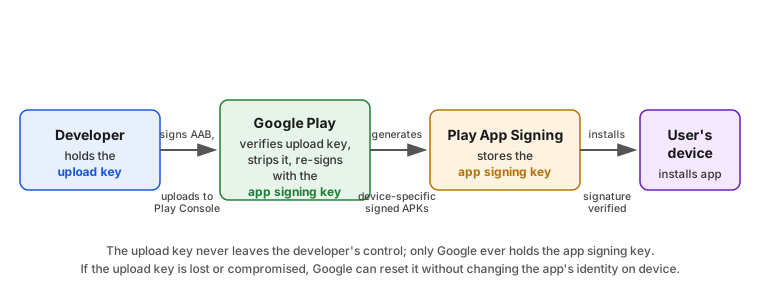
This separation is what makes upload-key loss recoverable (Google can reset a lost or compromised upload key without changing the app’s identity on device, since the app signing key — the one users' devices actually trust — never left Google’s custody) and is covered in full, including enrollment and key-reset procedures, in Publishing on Google Play. See Google Play Help — About App Signing.
The 16 KB Page-Size Compliance Check
Android has historically assumed a 4 KB memory page size; newer hardware supports larger pages (16 KB), which
reduces app launch time and memory pressure but requires an app’s native code to be built and aligned for
it. Any app that ships native libraries (.so files, whether its own JNI code or a third-party native
dependency) and targets API level 35 or higher must support 16 KB pages: as of February 1, 2027, app
updates without 16 KB support will no longer be accepted for apps targeting API 35+. Meeting the requirement
needs AGP 8.5.1 or newer and NDK r28 or newer (both are satisfied by this section’s AGP 9.4.1
baseline); apps with no native code at all are unaffected, since the requirement is specifically about native
library page alignment. See
Android Developers — Support 16 KB Page Sizes.
Release Checklist
-
versionCodeincremented past everyversionCodealready live for this application,versionNameupdated to match the release notes. -
isMinifyEnabledandisShrinkResourcesbothtrueon thereleasebuild type;proguard-rules.proreviewed for any new reflection-based code (new DTOs, new libraries) that needs a keep rule. -
Release build produced and smoke-tested end to end:
./gradlew :app:bundleRelease, then verified locally withbundletool build-apks --local-testingbefore upload. -
mapping.txtfor this exactversionCodearchived (and, if using Play’s own crash reporting or Firebase Crashlytics, uploaded) before the artifact is discarded from the build output directory. -
apksigner verify --print-certsrun against the built artifact, confirming the expected signing certificate and signature schemes. -
Release keystore,
keystore.propertiesand any CI secret values confirmed absent from the git history for this branch (never just the working tree). -
If the app ships native code and targets API 35+: confirmed 16 KB page-size support (AGP 8.5.1+/NDK r28+) ahead of the February 1, 2027 enforcement date.
-
Debug and release SHA-1/SHA-256 fingerprints re-confirmed against every certificate-scoped API key (Maps, Google Sign-In, Firebase) still in use.
-
Release notes drafted for the target Play Console track, and the upload key/app signing key relationship (see Publishing on Google Play) understood by whoever holds the keystore, before it is needed under time pressure.