Catalog and Pricing
|
This content was generated with the assistance of AI and should be verified against the official documentation of each platform before being relied on in production. This section’s bibliography lists the reference material consulted while preparing these pages. |
This page was written against PrestaShop 9.2.0 (released on 2026-09-30, Symfony 6.4, PHP 8.5.12 in the official Docker image, Hummingbird 2.1.2 as the default theme) and checked on 2026-10-27. Catalog and pricing belong to the open-source core, so everything below is available on every installation; there are no plans or editions. The page is the first of the "sell" pages. It explains how a product with variants is stored, how the price shown to a customer is calculated step by step, which table or class decides each step, and how promotions are expressed (specific prices, group reductions, cart rules and, since 9.1, the new discount system behind a feature flag). The next page, Cart, Checkout and Orders, follows the same cart into an order, and Payment and Carrier Modules shows how the amount is paid. The module and CQRS vocabulary comes from Module Basics and CQRS and Domain.
The running example is the Pocket Coffee shop: one product, "Single-origin beans", with three origins, three grinds and two
sizes (18 combinations), a "Starter kit" simple product, a Coffee Club customer group with 10% off beans, and a Spanish VAT
rule. The objects created in the shop carry the prefix PCFF (the module names carry pcff) so that they stay apart from the
other examples of this section; drop the prefix in a real shop. Everything on this page was run on a real PrestaShop 9.2.0
shop in Docker: the data was created with the Admin API (curl) and with a small module of console commands, the prices
were measured with Product::getPriceStatic(), and the cart and the checkout were exercised through the real storefront with
curl. The section "What was run and what was not" lists what could not be run.
The catalog model
A product in PrestaShop 9 has one of four types. The type is chosen when the product is created and decides which tabs the back office shows and which tables the product uses.
Type (ProductType) |
What it is | Pocket Coffee example |
|---|---|---|
|
A simple product with one price, one stock and no variants. |
The "Starter kit" (hand grinder and 250 g of beans) at 24.00 EUR. |
|
A product with variants. Each variant is a combination: one value of every attribute group the product uses. |
"Single-origin beans": origin, grind and size give 18 combinations. |
|
A bundle of other products sold under one price, with a rule for how the stock of the parts is decremented. |
Not used; a "coffee and grinder" bundle would be a pack. |
|
A product that is not shipped, optionally with a downloadable file. A cart that holds only virtual products skips the delivery step of the checkout. |
The "Tasting workshop ticket" used later in this page. |
The type names are the constants of PrestaShop\PrestaShop\Core\Domain\Product\ValueObject\ProductType (standard, pack,
virtual, combinations), and the Admin API accepts the same strings in the type field when a product is created. Since 9.0
the legacy product page is gone (the old Smarty-era page and 18 of its hooks were removed, together with 7 login hooks), so a
module that used to add a tab to the product page must use the hooks of the new Symfony product page; see
Hooks.
Where the data lives
The tables a pricing question touches are few and worth knowing by name, because a module that needs a report or a bulk change will read them directly or through the legacy classes.
| Table | Content |
|---|---|
|
The product: base price ( |
|
The attribute groups (Origin, Grind, Size) and their values (Ethiopia Yirgacheffe, Whole bean, 250 g). Attributes belong to the shop, not to a product. |
|
One row per combination ( |
|
The quantity, per product and per combination ( |
|
Specific prices, the per-product priority override, and catalog price rules that generate specific prices. |
|
Percentage reductions per customer group and category. |
|
Tax rates, the rule groups a product points to, and the country, state and zip code rules inside a group. |
|
Cart rules (vouchers and automatic promotions) with their restrictions, and the five discount types of the new discount system. |
Two facts about the data model cause most of the mistakes. First, the price stored in ps_product.price is the tax
excluded price; the tax is added at read time from the tax rules group of the product and the country of the address in the
cart. The Admin API shows both numbers, but its priceTaxIncluded is computed for the shop’s default country (Great Britain
in the test shop, which has no rule in the Spanish groups), so the two values were equal in the responses below. Second, the
price of a combination is not a price but an impact: the price of combination 41 (Ethiopia, whole bean, 1 kg) is the
product price plus the impact stored in ps_product_attribute.price.
Creating the Pocket Coffee catalog
The catalog is built in four steps: the attribute groups and values, the product, its combinations, and the details that the generic Admin API does not cover (references, price impacts, stock and the promotions), which are done with CQRS commands from a small module. The commands below talk to the Admin API of the local Docker shop; the access token comes from the OAuth2 client credentials flow described in Admin API and is kept in an environment variable, never in the command line history.
Attributes and the product with the Admin API
# Placeholders: PS_URL is the shop, PS_API_TOKEN a bearer token with the scopes shown below
export PS_URL=http://localhost:8080
export PS_API_TOKEN=<token from POST ${PS_URL}/admin-api/access_token, scopes: attribute_group_write attribute_write product_write>
AUTH="Authorization: Bearer ${PS_API_TOKEN}"
JSON="Content-Type: application/json"

# Three attribute groups (names are keyed by language id: 1 = English, 2 = Spanish)
curl -s -X POST "${PS_URL}/admin-api/attributes/groups" -H "$AUTH" -H "$JSON" -d '{
  "names":{"1":"PCFF Origin","2":"PCFF Origen"},"publicNames":{"1":"Origin","2":"Origen"},"type":"select","shopIds":[1]}'
curl -s -X POST "${PS_URL}/admin-api/attributes/groups" -H "$AUTH" -H "$JSON" -d '{
  "names":{"1":"PCFF Grind","2":"PCFF Molienda"},"publicNames":{"1":"Grind","2":"Molienda"},"type":"select","shopIds":[1]}'
curl -s -X POST "${PS_URL}/admin-api/attributes/groups" -H "$AUTH" -H "$JSON" -d '{
  "names":{"1":"PCFF Size","2":"PCFF Tamano"},"publicNames":{"1":"Size","2":"Tamaño"},"type":"select","shopIds":[1]}'
# -> {"attributeGroupId":5,...} {"attributeGroupId":6,...} {"attributeGroupId":7,...}

# Eight values; "color" is required by the command even when the group is not a color group
curl -s -X POST "${PS_URL}/admin-api/attributes/attributes" -H "$AUTH" -H "$JSON" -d '{
  "attributeGroupId":5,"names":{"1":"Ethiopia Yirgacheffe","2":"Etiopía Yirgacheffe"},"color":"","shopIds":[1]}'
# ... Colombia Huila and Brazil Cerrado (group 5), Whole bean, Espresso, Filter (group 6), 250 g and 1 kg (group 7)
# -> attribute ids 26-28 (origin), 29-31 (grind), 32-33 (size)

# The product: a "combinations" product with an English and a Spanish name, tax rules group 1 and the 250 g base price
curl -s -X POST "${PS_URL}/admin-api/products" -H "$AUTH" -H "$JSON" -d '{
  "type":"combinations","names":{"1":"PCFF Single-origin beans","2":"PCFF Café de origen"}}'
# -> {"productId":20,"type":"combinations","enabled":false,...}
curl -s -X PATCH "${PS_URL}/admin-api/products/20" -H "$AUTH" -H "Content-Type: application/merge-patch+json" -d '{
  "descriptions":{"1":"Freshly roasted single-origin coffee beans.","2":"Café de origen recién tostado."},
  "priceTaxExcluded":8.90,"taxRulesGroupId":1,"reference":"PC-BEANS","weight":0.25,"enabled":true}'

# 3 x 3 x 2 = 18 combinations in one call
curl -s -X POST "${PS_URL}/admin-api/products/20/generate-combinations" -H "$AUTH" -H "$JSON" -d '{
  "groupedAttributes":[
    {"attributeGroupId":5,"attributeIds":[26,27,28]},
    {"attributeGroupId":6,"attributeIds":[29,30,31]},
    {"attributeGroupId":7,"attributeIds":[32,33]}]}'
# -> {"productId":20,"newCombinationIds":[40,41,42,...,57]}
Source: PrestaShop devdocs: Admin API
A few details of those calls are easy to get wrong. Language ids are the keys of every localized field; the Admin API echoes
them back as locales (en-US, es-ES). PATCH needs the content type application/merge-patch+json; the same endpoint
rejects a plain application/json body. generate-combinations reads groupedAttributes, a list of objects, not a map of
group id to value ids, and it fails with a PHP warning ("Undefined array key groupedAttributes") when the map form is sent.
The product is created disabled and with price 0, so a product is never visible by accident. Finally, the call to create a
tax rule needs behavior as an integer; a string such as this_tax_only is rejected with a serializer error.
The names of the access scopes (attribute_group_write, attribute_write, product_write, tax_write,
tax_rules_group_write, tax_rule_write, customer_group_write, discount_write, carrier_write) are the ones listed
when an API client is created; a token that lacks one answers 403 Invalid scope. A token is valid for 3600 seconds.
Taxes: the rules the product points to
The Spanish rate of the beans (the example uses 10%, and 21% for the equipment; the numbers are illustrative, a real shop uses the rates its accountant gives it) is built from three objects: a tax with its rate, a tax rules group, and one rule that ties them to a country.
# A tax is a name and a rate (the rate must be a JSON number, not a string)
curl -s -X POST "${PS_URL}/admin-api/taxes" -H "$AUTH" -H "$JSON" -d '{"names":{"1":"PCFF IVA 10%","2":"PCFF IVA 10%"},"rate":10.0,"enabled":true}'
curl -s -X POST "${PS_URL}/admin-api/taxes" -H "$AUTH" -H "$JSON" -d '{"names":{"1":"PCFF IVA 21%","2":"PCFF IVA 21%"},"rate":21.0,"enabled":true}'

# A tax rules group is what a product (or a carrier) points to
curl -s -X POST "${PS_URL}/admin-api/tax-rules-groups" -H "$AUTH" -H "$JSON" -d '{"name":"PCFF ES reduced VAT","enabled":true,"shopIds":[1]}'
curl -s -X POST "${PS_URL}/admin-api/tax-rules-groups" -H "$AUTH" -H "$JSON" -d '{"name":"PCFF ES standard VAT","enabled":true,"shopIds":[1]}'

# A rule: in this group, for country 6 (Spain), apply tax 1 only (behavior 0)
curl -s -X POST "${PS_URL}/admin-api/tax-rules" -H "$AUTH" -H "$JSON" -d '{"taxRulesGroupId":1,"countryId":6,"taxId":1,"behavior":0,"description":"Spain reduced"}'
curl -s -X POST "${PS_URL}/admin-api/tax-rules" -H "$AUTH" -H "$JSON" -d '{"taxRulesGroupId":2,"countryId":6,"taxId":2,"behavior":0,"description":"Spain standard"}'A rule has a country, an optional state, an optional zip code range and a behavior, which says what happens when several
rules match the same address: 0 (TaxCalculator::ONE_TAX_ONLY_METHOD) applies this tax only, 1 (COMBINE_METHOD) adds the
rates of all matching rules, and 2 (ONE_AFTER_ANOTHER_METHOD) applies one tax on top of the previous one, the way some
Canadian provinces do. The country that counts is the one of the address chosen by the configuration key PS_TAX_ADDRESS_TYPE,
which is id_address_delivery by default and can be id_address_invoice.
A group without a rule for the country of the address charges no tax at all, which was visible in the test: the German customer (address in Berlin, no rule for Germany in either group) saw the same amount with and without tax, while the Madrid customer paid 10% more. A shop that sells to several countries therefore needs a rule per country in every group, or the EU VAT handling of the back office (the country list, "Enable tax", and the VAT number field of the address) configured, which is described in Back Office and Store Setup. The country must also be enabled: Spain and Germany are disabled in a fresh installation and an address in a disabled country cannot be used in a cart.
Combinations: references, price impacts and stock with CQRS
generate-combinations creates the rows, but not their SKUs, prices or stock. The Admin API of 9.2.0 can list and read
combinations, not edit them, so the second step is a module with a console command that dispatches the CQRS commands
UpdateCombinationCommand and UpdateCombinationStockAvailableCommand. The command also adds the first specific price of the
page, which is explained below. The module is pcffcatalog; the file layout and the services.yml follow
Module Basics.
The pricing rule of Pocket Coffee is: the product price (8.90) is the 250 g price, the 1 kg bag costs 29.90, and Ethiopia costs 1.00 more per 250 g. That gives these impacts on the product price: 0.00 for Colombia and Brazil in 250 g, 21.00 for them in 1 kg (29.90 minus 8.90), 1.00 for Ethiopia in 250 g and 25.00 for Ethiopia in 1 kg (21.00 plus 4 times 1.00). The weight impact of the 1 kg bag is 0.75 kg on top of the product weight of 0.25 kg.
<?php

declare(strict_types=1);

namespace PrestaShop\Module\Pcffcatalog\Command;

use Combination;
use DateTimeImmutable;
use PrestaShop\PrestaShop\Core\CommandBus\CommandBusInterface;
use PrestaShop\PrestaShop\Core\Domain\Product\Combination\Command\UpdateCombinationCommand;
use PrestaShop\PrestaShop\Core\Domain\Product\Combination\Command\UpdateCombinationStockAvailableCommand;
use PrestaShop\PrestaShop\Core\Domain\Product\SpecificPrice\Command\AddSpecificPriceCommand;
use PrestaShop\PrestaShop\Core\Domain\Product\Stock\Command\UpdateProductStockAvailableCommand;
use PrestaShop\PrestaShop\Core\Domain\Shop\ValueObject\ShopConstraint;
use PrestaShop\PrestaShop\Core\Domain\ValueObject\Reduction;
use Product;
use Symfony\Component\Console\Attribute\AsCommand;
use Symfony\Component\Console\Command\Command;
use Symfony\Component\Console\Input\InputArgument;
use Symfony\Component\Console\Input\InputInterface;
use Symfony\Component\Console\Input\InputOption;
use Symfony\Component\Console\Output\OutputInterface;

#[AsCommand(name: 'pcffcatalog:seed', description: 'Fills the Pocket Coffee beans product with references, price impacts, stock and specific prices')]
final class SeedCommand extends Command
{
    private const ORIGIN = ['Ethiopia Yirgacheffe' => 'ETH', 'Colombia Huila' => 'COL', 'Brazil Cerrado' => 'BRA'];
    private const GRIND = ['Whole bean' => 'WHL', 'Espresso' => 'ESP', 'Filter' => 'FIL'];
    private const SIZE = ['250 g' => '250', '1 kg' => '1KG'];

    public function __construct(private readonly CommandBusInterface $commandBus)
    {
        parent::__construct();
    }

    protected function configure(): void
    {
        $this->addArgument('product-id', InputArgument::REQUIRED, 'Id of the product with the 18 generated combinations');
        $this->addOption('kit-id', null, InputOption::VALUE_REQUIRED, 'Id of the simple Starter kit product that receives 20 units of stock');
    }

    protected function execute(InputInterface $input, OutputInterface $output): int
    {
        $productId = (int) $input->getArgument('product-id');
        $shop = ShopConstraint::shop(1);
        $product = new Product($productId, false, 1);

        // 1. One row per combination: attribute names -> SKU, price impact and weight impact
        $byCombination = [];
        foreach ($product->getAttributeCombinations(1) as $row) {
            $byCombination[(int) $row['id_product_attribute']][$row['group_name']] = $row['attribute_name'];
        }

        foreach ($byCombination as $combinationId => $attributes) {
            $origin = $attributes['PCFF Origin'];
            $grind = $attributes['PCFF Grind'];
            $size = $attributes['PCFF Size'];

            // Base product price 8.90 is the 250 g price; 1 kg costs 29.90 (+21.00); Ethiopia costs +1.00 per 250 g
            $impact = ('1 kg' === $size ? 21.0 : 0.0) + ('Ethiopia Yirgacheffe' === $origin ? ('1 kg' === $size ? 4.0 : 1.0) : 0.0);
            $weight = '1 kg' === $size ? '0.75' : '0';

            $command = (new UpdateCombinationCommand($combinationId, $shop))
                ->setReference(sprintf('PC-%s-%s-%s', self::ORIGIN[$origin], self::GRIND[$grind], self::SIZE[$size]))
                ->setImpactOnPrice(number_format($impact, 2, '.', ''))
                ->setImpactOnWeight($weight);
            $this->commandBus->handle($command);

            $this->commandBus->handle((new UpdateCombinationStockAvailableCommand($combinationId, $shop))->setFixedQuantity(50));
            $output->writeln(sprintf('combination %d -> %s', $combinationId, (new Combination($combinationId))->reference));
        }

        if (null !== $input->getOption('kit-id')) {
            $this->commandBus->handle((new UpdateProductStockAvailableCommand((int) $input->getOption('kit-id'), $shop))->setDeltaQuantity(20));
            $output->writeln('kit stock: +20');
        }

        // 2. Specific price: 5% off from the third bag, valid for every customer until the end of the year
        $volume = new AddSpecificPriceCommand(
            $productId,
            Reduction::TYPE_PERCENTAGE,
            '5',
            false,
            '-1',
            3,
            new DateTimeImmutable('2026-10-01 00:00:00'),
            new DateTimeImmutable('2026-12-31 23:59:59')
        );
        $volume->setShopId(1);
        $this->commandBus->handle($volume);
        $output->writeln('specific price: 5% from quantity 3');

        return Command::SUCCESS;
    }
}
services:
_defaults:
public: false
autowire: true
autoconfigure: true
PrestaShop\Module\Pcffcatalog\Command\SeedCommand: ~
PrestaShop\Module\Pcffcatalog\Command\ClubCommand: ~
PrestaShop\Module\Pcffcatalog\Command\ReportCommand: ~
PrestaShop\Module\Pcffcatalog\Command\WorkshopCommand: ~Run from the shop root, the command printed one line per combination and the specific price:
php bin/console prestashop:module install pcffcatalog
php bin/console pcffcatalog:seed 20 --kit-id=22
# combination 40 -> PC-ETH-WHL-250
# combination 41 -> PC-ETH-WHL-1KG
# combination 42 -> PC-ETH-ESP-250
# ... 18 lines up to PC-BRA-FIL-1KG
# kit stock: +20
# specific price: 5% from quantity 3The Admin API then lists the result. The first combination (PC-ETH-WHL-250) is the default one, the one the product page
selects first; default_on is set on the first combination that generate-combinations creates.
| Combination id | Reference | Impact on price (tax excl.) | Resulting price (tax excl.) |
|---|---|---|---|
40 |
|
1.00 |
9.90 |
41 |
|
25.00 |
33.90 |
42, 44 |
|
1.00 |
9.90 |
43, 45 |
|
25.00 |
33.90 |
46, 48, 50 |
|
0.00 |
8.90 |
47, 49, 51 |
|
21.00 |
29.90 |
52, 54, 56 |
|
0.00 |
8.90 |
53, 55, 57 |
|
21.00 |
29.90 |
A combination can also carry its own EAN/GTIN, ISBN, MPN, UPC, wholesale price, unit price impact (for "price per kilogram"
displays), eco-tax, minimal quantity, low stock threshold, available date and images; the UpdateCombinationCommand setters
cover all of them. Since 9.0 the barcode field is gtin: setEan13() is still there on UpdateProductCommand but is marked deprecated since 9.0, will
be removed in 10.0 and only forwards to setGtin(). The "Starter kit" (product 22) was created the same way as the beans, with
"type":"standard", priceTaxExcluded 24.00, taxRulesGroupId 2 and reference PC-KIT; its stock is set by the
--kit-id option because a quantity sent in the PATCH was ignored in the test (the response kept quantity 0).
How a price is calculated
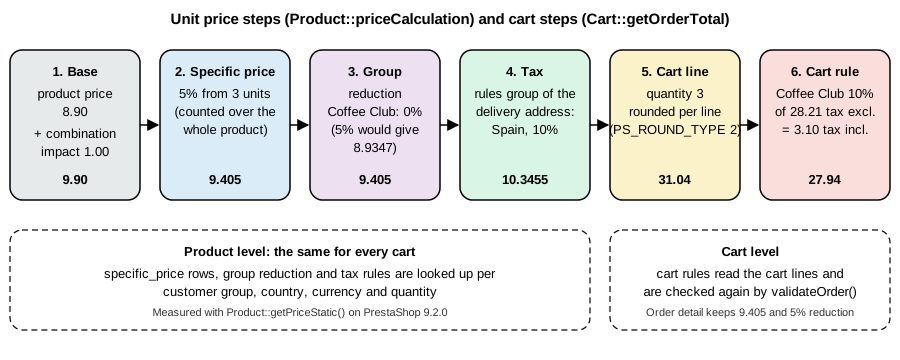
Everything a customer sees as a price comes from Product::priceCalculation(), called through Product::getPriceStatic()
(and by the product page, the listing pages, the cart and the order). The method receives the product, the combination, the
customer group, the country, the state and zip code (for tax), the currency, the quantity and the cart, and performs the
steps in this order. The order matters: it is the reason a percentage specific price and a percentage group reduction multiply
instead of adding.
The figure shows the same steps with the numbers of one Pocket Coffee cart line, measured on the shop: three bags of Ethiopia whole bean 250 g bought by a Coffee Club member whose delivery address is in Madrid.
Three consequences of that order are worth remembering when a price looks wrong.
-
A fixed price in a specific price replaces the product price, but the combination impact is still added unless the specific price targets that very combination: a specific price on the product with price 6.00 gives 6.00 plus the impact of the combination the customer picked.
-
The tax is added before the reduction, and an amount reduction is converted to the tax mode of the request (a reduction entered tax included is divided by the rate when the price is requested tax excluded). A percentage reduction gives the same result in both modes.
-
The group reduction is applied to the price that already includes the specific price reduction. The test shop showed it: with the Coffee Club group set to a 5% reduction, the price of one bag to a member went from 10.89 to 10.3455 (a factor of 0.95), and the three-bag price with the 5% specific price went from 9.405 to 8.9347 (0.95 times 0.95, not 0.90). The reduction was reset to 0 afterwards because the Coffee Club discount of the example is a cart rule.
The hook actionProductPriceCalculation receives the price by reference (together with the specific price and the specific
price reduction) and is the supported way for a module to change a price without an override; it is called for every price
calculation, so the code in it must be cheap. The hooks actionGetProductPropertiesBefore, actionGetProductPropertiesAfter and
actionGetProductPropertiesAfterUnitPrice act later, on the presented product array of listings and the product page.
Rounding is configured in the back office under Shop Parameters, General. The keys read by the calculation are
PS_PRICE_ROUND_MODE (2, half up, in the test shop) and PS_ROUND_TYPE (Order::ROUND_ITEM 1, ROUND_LINE 2 or
ROUND_TOTAL 3; 2 in the test shop, so amounts are rounded per cart line). The same cart can therefore total a cent more or
less under a different rounding type, and a customer who compares the unit price (10.3455) with the line total (31.04) sees
the rounding at work.
Specific prices
A specific price is a row in ps_specific_price that replaces the price of a product, or reduces it, when a set of conditions
matches. It is the right tool for sales, quantity discounts, prices per customer group or country, and prices in a currency. The
back-office tab "Pricing" of a product edits the same rows. The fields are the following; a zero in a condition column means
"any".
| Column | Meaning |
|---|---|
|
The product, and optionally one combination (0 for all combinations). |
|
Conditions: shop, currency, country of the address, customer group and a single customer. |
|
Not 0 for a price that exists only for one cart (for example a price an employee changed in a back-office cart). |
|
A fixed price, tax excluded, or |
|
The minimum quantity for the row to apply (1 for always). |
|
The reduction value, |
|
The validity window. |
|
Not 0 when the row was generated by a catalog price rule. |
The row created by the seed command above is the quantity discount of the example: 5% from the third bag, for everybody, until the
end of the year. In the database it is price -1, from_quantity 3, reduction 0.05, reduction_type percentage,
from 2026-10-01 00:00:00, to 2026-12-31 23:59:59. The AddSpecificPriceCommand takes the product, the reduction type and
value, a flag for tax, the fixed price (the string -1 means "initial price", the product price), the starting quantity and the
two dates, and then optional setters for the shop, combination, currency, country, group and customer. It is the command to use
from a module.
Which row wins
Several rows can match one price request. SpecificPrice::getSpecificPrice() chooses with one SQL query that keeps the rows whose
conditions match (and whose quantity and date window match) and orders them by
-
id_product_attributedescending: a row for the exact combination beats a row for the whole product; -
id_cartdescending: a price made for this very cart beats the others; -
from_quantitydescending: the highest threshold reached; -
id_specific_price_ruleascending: a hand-made row beats a rule-generated row; -
a score computed from the configured priority of the conditions;
-
the latest
to, then the latestfrom.
The score uses the priority list. Its default is the configuration key PS_SPECIFIC_PRICE_PRIORITIES, which reads
id_group;id_currency;id_country;id_shop in the test shop, meaning: a row that names the customer’s group is preferred over a
row that names the currency, then the country, then the shop. A customer-specific row (id_customer) is always put in front
of the list. The order can be overridden for one product (the table ps_specific_price_priority), through the product page or
the commands SetSpecificPricePriorityForProductCommand and RemoveSpecificPricePriorityForProductCommand. Only one row applies; the
rows are not added to each other, which is why a promotion by group and a promotion by quantity on the same product need a
single combined row or a cart rule.
The quantity used for from_quantity deserves a note. When the price is requested for a cart, the quantity compared with
from_quantity is the quantity of the whole product in the cart, summed over its combinations, unless the setting
"Quantity discounts based on" (key PS_QTY_DISCOUNT_ON_COMBINATION) is switched to combinations. The Pocket Coffee cart showed it:
three bags of Ethiopia 250 g plus one bag of Colombia 1 kg make four bags of the same product, so the 5% row applied to the
Colombia line too (28.405 instead of 29.90). A shop that wants "buy three of the same variant" has to enable the per-combination
setting.
Catalog price rules
A catalog price rule (ps_specific_price_rule with conditions on category, brand, supplier, feature or attribute) generates
specific price rows for every matching product when it is saved or when a product changes, which makes it the tool for
"10% off everything in Equipment during November". The generated rows carry id_specific_price_rule. In 9.2 the page is behind
the feature flag catalog_price_rule (disabled in the test shop); the commands AddCatalogPriceRuleCommand,
EditCatalogPriceRuleCommand and DeleteCatalogPriceRuleCommand exist in the domain layer. Catalog price rules were not run in
the test, and they are applied to the product price, before any cart rule, so they do not need a code or a cart.
Customer groups
A customer belongs to one or more groups, one of which is the default group (id_default_group). A group has a percentage
reduction (applied as the last price step, see above), a flag for showing prices tax included or excluded
(price_display_method) and a flag for showing prices at all (show_prices). Three groups exist from the installation:
Visitor (not logged in), Guest and Customer. A reduction can also be set per category and group (ps_group_reduction), and
the category reduction wins over the group-wide percentage. Several other pieces of the shop are restricted by group: carriers,
payment modules, product visibility in categories and cart rules. A new group has to be added to those restrictions by hand
(or by the module that installs it); the payment and carrier restrictions are the usual surprise and are described in
Payment and Carrier Modules.
The Coffee Club of the example is a group named "PCFF Coffee Club" with a reduction of 0: membership alone gives nothing, and the 10% comes from the cart rule that checks the membership. The alternative is to set the reduction on the group; it is simpler and shows in the product price, but it applies to every product and category the group can see, which is not what "10% off beans" means.
Customers, addresses and the Coffee Club rule
The second command of the module creates the category, the group, the two test customers with an address each, and the rule. It is shown in full because a cart rule is a legacy object model with side tables, and the details are easy to miss.
<?php

declare(strict_types=1);

namespace PrestaShop\Module\Pcffcatalog\Command;

use Address;
use Category;
use Customer;
use Db;
use Group;
use PrestaShop\PrestaShop\Core\CommandBus\CommandBusInterface;
use PrestaShop\PrestaShop\Core\Domain\Product\Command\SetAssociatedProductCategoriesCommand;
use PrestaShop\PrestaShop\Core\Domain\Shop\ValueObject\ShopConstraint;
use CartRule;
use State;
use Symfony\Component\Console\Attribute\AsCommand;
use Symfony\Component\Console\Command\Command;
use Symfony\Component\Console\Input\InputArgument;
use Symfony\Component\Console\Input\InputInterface;
use Symfony\Component\Console\Output\OutputInterface;
use Tools;
use Validate;

#[AsCommand(name: 'pcffcatalog:club', description: 'Creates the Beans category, the Coffee Club group, two customers and the automatic Coffee Club cart rule')]
final class ClubCommand extends Command
{
    public function __construct(private readonly CommandBusInterface $commandBus)
    {
        parent::__construct();
    }

    protected function configure(): void
    {
        $this->addArgument('product-id', InputArgument::REQUIRED, 'Id of the beans product');
    }

    protected function execute(InputInterface $input, OutputInterface $output): int
    {
        $productId = (int) $input->getArgument('product-id');

        // Category "Beans" below Home (id 2), and the product assigned to it
        $category = new Category();
        $category->name = [1 => 'PCFF Beans', 2 => 'PCFF Granos'];
        $category->link_rewrite = [1 => 'pcff-beans', 2 => 'pcff-granos'];
        $category->id_parent = 2;
        $category->active = true;
        $category->add();
        $this->commandBus->handle(new SetAssociatedProductCategoriesCommand($productId, (int) $category->id, [(int) $category->id], ShopConstraint::shop(1)));
        $output->writeln('category ' . $category->id);

        // Customer group "Coffee Club" (membership only, the 10% lives in a cart rule)
        $group = new Group();
        $group->name = [1 => 'PCFF Coffee Club', 2 => 'PCFF Club del Café'];
        $group->reduction = 0;
        $group->price_display_method = 0;
        $group->add();
        $output->writeln('group ' . $group->id);

        // Customers: ada is a member and lives in Madrid, grace is a guest-type customer in Berlin
        $ada = $this->customer('Ada', 'Lovelace', 'pcff-ada@example.test', (int) $group->id, [(int) $group->id, 3]);
        $grace = $this->customer('Grace', 'Hopper', 'pcff-grace@example.test', 3, [3]);
        $this->address($ada, 'Calle de Alcalá 1', '28014', 'Madrid', 6, 'M');
        $this->address($grace, 'Unter den Linden 1', '10117', 'Berlin', 1, null);

        // Automatic cart rule (no code): members get 10% off products of the Beans category
        $rule = new CartRule();
        $rule->name = [1 => 'PCFF Coffee Club 10% on beans', 2 => 'PCFF Club del Café 10% en granos'];
        $rule->description = 'Members of the Coffee Club get 10% off beans';
        $rule->code = '';
        $rule->date_from = '2026-10-01 00:00:00';
        $rule->date_to = '2027-12-31 23:59:59';
        $rule->quantity = 1000;
        $rule->quantity_per_user = 1000;
        $rule->priority = 1;
        $rule->partial_use = false;
        $rule->minimum_amount = 0;
        $rule->minimum_amount_currency = 1;
        $rule->group_restriction = true;
        $rule->product_restriction = true;
        $rule->reduction_percent = 10;
        // 0 = whole order, -1 = cheapest product, -2 = the products selected by the product restriction
        $rule->reduction_product = -2;
        $rule->active = true;
        $rule->add();

        Db::getInstance()->insert('cart_rule_group', ['id_cart_rule' => (int) $rule->id, 'id_group' => (int) $group->id]);
        Db::getInstance()->insert('cart_rule_product_rule_group', ['id_cart_rule' => (int) $rule->id, 'quantity' => 1]);
        $ruleGroupId = (int) Db::getInstance()->Insert_ID();
        Db::getInstance()->insert('cart_rule_product_rule', ['id_product_rule_group' => $ruleGroupId, 'type' => 'categories']);
        $productRuleId = (int) Db::getInstance()->Insert_ID();
        Db::getInstance()->insert('cart_rule_product_rule_value', ['id_product_rule' => $productRuleId, 'id_item' => (int) $category->id]);
        Db::getInstance()->update('configuration', ['value' => 1], "name = 'PS_CART_RULE_FEATURE_ACTIVE'");
        $output->writeln('cart rule ' . $rule->id);

        return Command::SUCCESS;
    }

    /** @param int[] $groups */
    private function customer(string $first, string $last, string $email, int $defaultGroup, array $groups): Customer
    {
        $customer = new Customer();
        $customer->firstname = $first;
        $customer->lastname = $last;
        $customer->email = $email;
        $customer->passwd = Tools::hash(Tools::passwdGen(24));
        $customer->id_default_group = $defaultGroup;
        $customer->id_lang = 1;
        $customer->active = true;
        $customer->add();
        $customer->updateGroup($groups);

        return $customer;
    }

    private function address(Customer $customer, string $street, string $zip, string $city, int $countryId, ?string $stateIso): void
    {
        $address = new Address();
        $address->id_customer = (int) $customer->id;
        $address->alias = 'Home';
        $address->firstname = $customer->firstname;
        $address->lastname = $customer->lastname;
        $address->address1 = $street;
        $address->postcode = $zip;
        $address->city = $city;
        $address->id_country = $countryId;
        $address->dni = 6 === $countryId ? '00000000T' : '';
        if (null !== $stateIso) {
            $address->id_state = (int) State::getIdByIso($stateIso, $countryId);
        }
        $address->add();
    }
}php bin/console pcffcatalog:club 20
# category 11
# group 7
# cart rule 1Cart rules
A cart rule is a voucher or an automatic promotion that acts on the cart: a percentage or amount off the order or off selected
products, free shipping, or a free gift. It is evaluated every time the cart is read (the cart page, the checkout, and again when
the order is created) and it never changes the price of a product, so it does not show in listings. A rule with a code is applied
by the customer; a rule with an empty code is added to the cart automatically by CartRule::autoAddToCart() as soon as it is valid
for the cart, which is how the Coffee Club discount works with no coupon to type.
Field of ps_cart_rule |
Meaning |
|---|---|
|
Validity window and on/off switch. |
|
The coupon code (empty for an automatic rule) and whether the rule is offered to the customer in the cart as a suggestion. |
|
How many times the rule can still be used overall, per customer and (new discount system) in total. |
|
Restricts the rule to one customer (0 for anybody). |
|
The cart value required, with the tax and shipping options and the currency of the threshold. |
|
The number of products required in the cart. |
|
Switch on the lists stored in |
|
Switches on the product rule groups: |
|
Switches on the compatibility list in |
|
Which rule wins when two rules cannot be combined (the lower number wins) and the order of application. |
|
When the voucher is worth more than the order, whether the rest is kept in a new voucher. |
|
The benefit: free shipping, a percentage, or an amount with its tax mode and currency. |
|
What the percentage or amount applies to: |
|
Excludes products that already have a specific price from the reduction. |
|
A free product added to the cart. |
|
0 for rules made with the legacy page; 1 to 5 ( |
The field that cost the most time in the example is reduction_product. The first version of the Coffee Club rule had a product
restriction on the Beans category but left reduction_product at 0. In a cart that held only beans the result was right
(5.662, which is 10% of 56.62). As soon as the starter kit was added the discount became 8.062, 10% of the whole cart: the
product restriction decided whether the rule was valid (there is at least one bean in the cart) but not what it applied to.
Setting reduction_product to -2, which the back-office form does when "Selected product(s)" is chosen, gave 5.662 again. The
final command above sets it with a comment for that reason.
What the core checks before accepting a rule
CartRule::checkValidity() runs when the customer adds a code, when the rule is added automatically, on every cart refresh and
again inside validateOrder(). It returns an error message (shown to the customer, in the language of the cart) as soon as one
check fails. In order, the checks cover: the module hook actionValidateCartRule (a module can accept or reject the rule and
set its own message), the rule being disabled, exhausted, not yet valid or expired, the per-customer usage limit, the customer
restriction and the group restriction (a guest who is not logged in sees "Please log in first"), the delivery address, the
country restriction, the carrier restriction, the exclusion of products on sale, the minimum amount, the product restrictions, the
gift product (existence, availability, stock), the compatibility with the other rules in the cart, and a rule that an employee
removed from an order by hand. A rule that fails at validateOrder() time is removed from the cart and, when it has a code and the
customer is logged in, the customer is sent back to the order page to see why. The value of a rule can also be taken over by a
module through the hooks actionGetCartRuleContextualValue and actionApplyCartRule.
Two rules are compatible when neither has cart_rule_restriction set. When both have it, the pair must be listed in
ps_cart_rule_combination. If they are not compatible, the rule with the lower priority number stays and the other one is
refused, or removed from the cart if it was the older one.
Measuring the example
The third command of the module reads the prices and builds a cart for each test customer, adds the rules automatically and prints what the core computed. It is a report, not part of a real module, but it is the quickest way to see all the price steps at once.
<?php

declare(strict_types=1);

namespace PrestaShop\Module\Pcffcatalog\Command;

use Address;
use Cart;
use CartRule;
use Context;
use Customer;
use Product;
use Symfony\Component\Console\Attribute\AsCommand;
use Symfony\Component\Console\Command\Command;
use Symfony\Component\Console\Input\InputInterface;
use Symfony\Component\Console\Output\OutputInterface;

#[AsCommand(name: 'pcffcatalog:report', description: 'Prints the price of the Pocket Coffee beans for different customers, quantities and carts')]
final class ReportCommand extends Command
{
    protected function execute(InputInterface $input, OutputInterface $output): int
    {
        $ada = new Customer((int) Customer::customerExists('pcff-ada@example.test', true));
        $grace = new Customer((int) Customer::customerExists('pcff-grace@example.test', true));
        $adaAddress = (int) (new Customer($ada->id))->getAddresses(1)[0]['id_address'];
        $graceAddress = (int) (new Customer($grace->id))->getAddresses(1)[0]['id_address'];
        $productId = (int) Product::getIdByReference('PC-BEANS');
        $ethiopia250 = (int) \Combination::getIdByReference($productId, 'PC-ETH-WHL-250');
        $colombia1kg = (int) \Combination::getIdByReference($productId, 'PC-COL-FIL-1KG');

        $context = Context::getContext();
        $context->currency = new \Currency(1);
        $context->language = new \Language(1);
        $context->employee = new \Employee(1);

        $output->writeln('product ' . $productId . ', combinations ' . $ethiopia250 . ' and ' . $colombia1kg);
        $rows = [
            ['ETH-WHL-250, 1 unit, tax excl., guest', $ethiopia250, false, 1, null, null],
            ['ETH-WHL-250, 1 unit, tax incl. ES, ada', $ethiopia250, true, 1, $ada, $adaAddress],
            ['ETH-WHL-250, 3 units, tax excl., ada', $ethiopia250, false, 3, $ada, $adaAddress],
            ['COL-FIL-1KG, 1 unit, tax excl., grace', $colombia1kg, false, 1, $grace, $graceAddress],
            ['COL-FIL-1KG, 1 unit, tax incl. ES, ada', $colombia1kg, true, 1, $ada, $adaAddress],
        ];
        foreach ($rows as [$label, $combination, $tax, $qty, $customer, $addressId]) {
            $specific = null;
            $price = Product::getPriceStatic($productId, $tax, $combination, 6, null, false, true, $qty, false, $customer?->id, null, $addressId, $specific);
            $output->writeln(sprintf('%-45s %9.4f  specific price: %s', $label, $price, $specific ? $specific['id_specific_price'] . ' (' . $specific['reduction'] . ')' : 'none'));
        }

        // Same combination in the second currency (conversion rate of the shop currency table)
        $context->currency = new \Currency(2);
        $usd = Product::getPriceStatic($productId, false, $ethiopia250, 6, null, false, true, 1, false, null, null, null);
        $output->writeln(sprintf('%-45s %9.4f  (conversion rate %.6f)', 'ETH-WHL-250, 1 unit, tax excl., USD', $usd, $context->currency->conversion_rate));
        $context->currency = new \Currency(1);

        // A cart for each customer: three bags of ETH-WHL-250, one COL-FIL-1KG and one starter kit
        foreach ([[$ada, $adaAddress], [$grace, $graceAddress]] as [$customer, $addressId]) {
            $cart = new Cart();
            $cart->id_customer = (int) $customer->id;
            $cart->id_address_delivery = $addressId;
            $cart->id_address_invoice = $addressId;
            $cart->id_currency = 1;
            $cart->id_lang = 1;
            $cart->id_shop = 1;
            $cart->id_shop_group = 1;
            $cart->secure_key = $customer->secure_key;
            $cart->add();
            $context->customer = $customer;
            $context->cart = $cart;
            $cart->updateQty(3, $productId, $ethiopia250);
            $cart->updateQty(1, $productId, $colombia1kg);
            $cart->updateQty(1, (int) Product::getIdByReference('PC-KIT'));
            CartRule::autoAddToCart($context);
            $cart = new Cart((int) $cart->id);
            $context->cart = $cart;
            $output->writeln('--- cart of ' . $customer->email);
            foreach ($cart->getCartRules() as $rule) {
                $output->writeln(sprintf('cart rule %d "%s": %.4f tax excl. / %.4f tax incl.', $rule['id_cart_rule'], $rule['name'], $rule['value_tax_exc'], $rule['value_real']));
            }
            foreach ($cart->getProducts(true) as $line) {
                $output->writeln(sprintf('line %s x%d unit tax excl. %.4f, total tax excl. %.4f', $line['reference'], $line['cart_quantity'], $line['price'], $line['total']));
            }
            $output->writeln(sprintf('products before discounts, tax excl.: %.2f', $cart->getOrderTotal(false, Cart::ONLY_PRODUCTS)));
            $output->writeln(sprintf('discounts, tax incl.: %.2f', $cart->getOrderTotal(true, Cart::ONLY_DISCOUNTS)));
            $output->writeln(sprintf('total without shipping, tax excl.: %.2f, tax incl.: %.2f', $cart->getOrderTotal(false, Cart::BOTH_WITHOUT_SHIPPING), $cart->getOrderTotal(true, Cart::BOTH_WITHOUT_SHIPPING)));
            $cart->delete();
        }

        return Command::SUCCESS;
    }
}The output, with the new discount system rule of the next section already created, was:
product 20, combinations 40 and 51
ETH-WHL-250, 1 unit, tax excl., guest            9.9000  specific price: none
ETH-WHL-250, 1 unit, tax incl. ES, ada          10.8900  specific price: none
ETH-WHL-250, 3 units, tax excl., ada             9.4050  specific price: 4 (0.050000)
COL-FIL-1KG, 1 unit, tax excl., grace           29.9000  specific price: none
COL-FIL-1KG, 1 unit, tax incl. ES, ada          32.8900  specific price: none
ETH-WHL-250, 1 unit, tax excl., USD             11.0612  (conversion rate 1.117294)
--- cart of pcff-ada@example.test
cart rule 1 "PCFF Coffee Club 10% on beans": 5.6620 tax excl. / 6.2282 tax incl.
cart rule 2 "PCFF Club 5% on starter kits": 1.2000 tax excl. / 1.4520 tax incl.
line PC-ETH-WHL-250 x3 unit tax excl. 9.4050, total tax excl. 28.2100
line PC-COL-FIL-1KG x1 unit tax excl. 28.4050, total tax excl. 28.4100
line PC-KIT x1 unit tax excl. 24.0000, total tax excl. 24.0000
products before discounts, tax excl.: 80.62
discounts, tax incl.: 7.68
total without shipping, tax excl.: 73.76, tax incl.: 83.65
--- cart of pcff-grace@example.test
line PC-ETH-WHL-250 x3 unit tax excl. 9.4050, total tax excl. 28.2100
line PC-COL-FIL-1KG x1 unit tax excl. 28.4050, total tax excl. 28.4100
line PC-KIT x1 unit tax excl. 24.0000, total tax excl. 24.0000
products before discounts, tax excl.: 80.62
discounts, tax incl.: 0.00
total without shipping, tax excl.: 80.62, tax incl.: 80.62
Read it from the top. The guest price is 9.90 (8.90 plus the 1.00 impact). Madrid adds 10% (10.89), and a Colombia 1 kg bag costs 29.90 plus 10%, which is 32.89. The price in the second currency is the price converted with the rate of the currency table, 9.90 times 1.117294 (11.0612); a specific price can instead name the currency and carry a fixed price in it, which skips the conversion. The member’s cart gets both rules without a code, the beans rule on the bean lines only and the kit rule on the kit only; the German customer gets neither (not a member) and pays no tax (no rule for Germany), so the same cart costs 80.62 for her and 83.65 for the member. The order total of 83.65 matches the amount the storefront showed in the checkout when the same items were bought later through the real front office.
The new discount system
PrestaShop 9.1 introduced a redesigned discount management ("Discounts" in the back office, announced as the improved
discounts system) and 9.2 kept it behind the feature flag discount, disabled by default. The devdocs describe it as work in
progress: it uses the existing cart rule tables, adds a type to each rule (free_shipping, cart_level, order_level,
product_level, free_gift, seeded in ps_cart_rule_type), stores which types can be combined with which
(ps_cart_rule_compatible_types), and routes the compatibility decision to a DiscountApplicationService when the flag is
enabled. Its commands (AddDiscountCommand, UpdateDiscountCommand, DuplicateDiscountCommand, bulk status and delete) and the
query GetDiscountForEditing are exposed by the Admin API under /discounts, marked experimental, and they work with the flag
off. The 9.2.0 core has no command to create a legacy cart rule (the page listing AddCartRuleCommand in the domain references
describes classes that are not in the 9.2.0 source): the new AddDiscountCommand is the CQRS way, and the legacy
CartRule object model, as in the seed command, is the other.
The second rule of the report above was created with the API:
curl -s -X POST "${PS_URL}/admin-api/discounts" -H "$AUTH" -H "$JSON" -d '{
  "type":"product_level",
  "names":{"1":"PCFF Club 5% on starter kits","2":"PCFF Club 5% en kits"},
  "description":"Coffee Club members get 5% off equipment",
  "code":"","enabled":true,"reductionPercent":5,
  "customerGroupIds":[7],
  "productConditions":[{"quantity":1,"type":"at_least_one_product_rule","rules":[{"type":"categories","itemIds":[2]}]}],
  "highlightInCart":false,"allowPartialUse":false,"priority":2,
  "validFrom":"2026-10-01 00:00:00","validTo":"2027-12-31 23:59:59"}'
# -> {"discountId":2,"type":"product_level",...,"reductionPercent":5.0,"customerGroupIds":[7],...}The row it wrote is a normal ps_cart_rule row with id_cart_rule_type 4, reduction_product -2, the group restriction and a
product rule group on category 2 (Home), and the cart read it like any other rule (value 1.20, 5% of the 24.00 kit). A trap in the
experimental endpoint: the first request carried the dates in ISO format (2026-10-01T00:00:00+00:00) and the response showed
validFrom as the time of the request and validTo as null; a PATCH with 2026-10-01 00:00:00 and 2027-12-31 23:59:59 set both
correctly, so send the dates in that format and read the resource back. The productConditions types accepted by the API are
categories, products, combinations, manufacturers, suppliers, attributes and features, and the group types are
all_product_rules and at_least_one_product_rule. A discount can also hold a gift product, a minimum amount, carrier and
country lists, a total quantity and a quantity per user.
The pricing side has its own switch: the flag new_pricing (introduced in 9.2, marked beta, disabled in the test shop) prepares
a new pricing model, and no behaviour of it was tested. Modules that read or write cart rules or the price should be tested with
both the discount flag on and off, because 9.1 and 9.2 treat the flag as a runtime switch.
Vertical solutions from the books, with current features
The PrestaShop books of the 1.5 and 1.6 era build shops for events, bookings and deposits by combining core features. All of
those techniques still exist in 9.2 and are simpler now; the books' module-writing steps for these jobs (overrides of
Cart or Product, Smarty hooks of the 1.6 product page) are not valid on 9.x.
Event tickets and workshops. A ticket is a virtual product (no address, no shipping) with a limited stock and, if wanted, a sales window. The example creates the "Tasting workshop ticket" with 30 seats and a 20% early-bird price until 15 November through the CQRS commands, to show the same products and prices from code:
<?php

declare(strict_types=1);

namespace PrestaShop\Module\Pcffcatalog\Command;

use Context;
use DateTimeImmutable;
use Employee;
use PrestaShop\PrestaShop\Core\CommandBus\CommandBusInterface;
use PrestaShop\PrestaShop\Core\Domain\Product\Command\AddProductCommand;
use PrestaShop\PrestaShop\Core\Domain\Product\Command\UpdateProductCommand;
use PrestaShop\PrestaShop\Core\Domain\Product\ProductId;
use PrestaShop\PrestaShop\Core\Domain\Product\SpecificPrice\Command\AddSpecificPriceCommand;
use PrestaShop\PrestaShop\Core\Domain\Product\Stock\Command\UpdateProductStockAvailableCommand;
use PrestaShop\PrestaShop\Core\Domain\Product\ValueObject\ProductType;
use PrestaShop\PrestaShop\Core\Domain\Shop\ValueObject\ShopConstraint;
use PrestaShop\PrestaShop\Core\Domain\ValueObject\Reduction;
use Product;
use Symfony\Component\Console\Attribute\AsCommand;
use Symfony\Component\Console\Command\Command;
use Symfony\Component\Console\Input\InputInterface;
use Symfony\Component\Console\Output\OutputInterface;

#[AsCommand(name: 'pcffcatalog:workshop', description: 'Creates the virtual "Tasting workshop" ticket with 30 seats and an early-bird specific price')]
final class WorkshopCommand extends Command
{
    public function __construct(private readonly CommandBusInterface $commandBus)
    {
        parent::__construct();
    }

    protected function execute(InputInterface $input, OutputInterface $output): int
    {
        $shop = ShopConstraint::shop(1);
        Context::getContext()->employee = new Employee(1);

        /** @var ProductId $id */
        $id = $this->commandBus->handle(new AddProductCommand(
            ProductType::TYPE_VIRTUAL,
            1,
            [1 => 'PCFF Tasting workshop ticket', 2 => 'PCFF Entrada al taller de cata']
        ));
        $productId = $id->getValue();

        $this->commandBus->handle(
            (new UpdateProductCommand($productId, $shop))
                ->setReference('PC-WORKSHOP')
                ->setPrice('15.00')
                ->setTaxRulesGroupId(2)
                ->setActive(true)
        );
        $this->commandBus->handle((new UpdateProductStockAvailableCommand($productId, $shop))->setDeltaQuantity(30));

        // Early bird: 20% off until 15 November, for every customer, from the first ticket
        $earlyBird = new AddSpecificPriceCommand(
            $productId,
            Reduction::TYPE_PERCENTAGE,
            '20',
            false,
            '-1',
            1,
            new DateTimeImmutable('2026-10-01 00:00:00'),
            new DateTimeImmutable('2026-11-15 23:59:59')
        );
        $earlyBird->setShopId(1);
        $this->commandBus->handle($earlyBird);

        $output->writeln(sprintf('product %d, price today: %.2f (tax excluded)', $productId, Product::getPriceStatic($productId, false, null, 2)));

        return Command::SUCCESS;
    }
}php bin/console pcffcatalog:workshop
# product 25, price today: 12.00 (tax excluded)The price today is 15.00 minus 20%. A cart that holds only this ticket showed three steps in the real checkout: personal
information, addresses (the invoice address is still asked) and payment, with no delivery step; the devdocs describe the
addresses step as skipped too, which is not what 9.2.0 did. The stock of 30 seats is the ceiling because the shop-wide
setting "Allow ordering of out-of-stock products" was off (the configuration key PS_ORDER_OUT_OF_STOCK is 0). For a ticket that is delivered as a
file, a ProductDownload (the "Virtual product" tab) adds the download link in the order confirmation e-mail the first time the
order becomes paid.
Bookings and deposits. A booking with dates is a product whose combinations are the dates (one attribute group "Date"), with the stock of each combination as the capacity; a deposit is a second product at the deposit price whose reference points at the main product, or a specific price that reduces the price while the customer pays the rest in the shop. The core has no calendar, so anything beyond fixed dates (time slots, hours, resources) needs a module. That part was not run: the example above covers the stock and price mechanics only.
Memberships and member prices. The Coffee Club is the pattern: a group, a rule or a group reduction, and an assignment of
customers to the group. Moving a customer into the group on purchase of a "membership" product is done with the hook
actionOrderStatusPostUpdate (see Cart, Checkout and Orders) and
Customer::updateGroup().
Hooks and extension points for prices and promotions
The hooks below exist in the 9.2.0 database of hooks and are the supported way to adapt the behaviour described above.
| Hook | When it runs |
|---|---|
|
At the end of |
|
While a product array is prepared for a listing or a product page. |
|
Product and combination changes (the CQRS commands raise them too). |
|
Cart changes. |
|
Accept, reject or value a cart rule from a module. |
|
Change what the cart presenter returns to templates. |
|
Change the free shipping thresholds. |
Overrides of Product, SpecificPrice, Cart or CartRule are the other route, and the one the books use. They are
exclusive (two modules cannot reliably override the same class), discouraged in distributed modules, and forbidden in modules
submitted to the Addons marketplace; prefer the hooks above, a decorated service, or your own table with an ObjectModel. See
Module Upgrades, Overrides and Decoration.
Pitfalls collected from the run
-
priceTaxIncludedin the Admin API depends on the default country of the shop; compute tax-included prices for a customer withProduct::getPriceStatic()and an address, or read them from the cart. -
The combination
pricecolumn is an impact, not a price;ean13is nowgtin. -
A group without a rule for the country of the address charges no tax; countries and zones must be enabled before an address in them can be used.
-
A specific price counts the quantity of the whole product in the cart unless
PS_QTY_DISCOUNT_ON_COMBINATIONis set. -
A cart rule with a product restriction needs
reduction_product-2 to apply only to the selected products. -
Rules without a code are applied automatically; use a code or a group restriction if the promotion must not be universal.
-
Group, carrier and payment restrictions are stored in separate tables; a new group is invisible to payment modules and carriers until it is added to them.
-
In a console command the legacy context has no employee, currency or language; set them before calling code that reads them (
Product::getPriceStatic()throws "If no employee is assigned in the context, cart ID must be provided" otherwise). -
Cache problems after editing
services.ymlor adding a command: runphp -d memory_limit=1G bin/console cache:clear; the default memory limit of the CLI image can be too small to warm the cache of a shop with many modules.
What was run and what was not
Run on PrestaShop 9.2.0 in Docker (Apache 2.4.68, PHP 8.5.12, MySQL 8.4): the attribute, product, combination, tax, tax rules
group, tax rule and discount calls shown above through the Admin API; the module pcffcatalog with its three commands and the
workshop command (installed, php -l clean, executed); the price report and the cart simulation; a real front-office purchase
of the same cart with curl (login, add to cart, address, delivery and payment) which showed the same totals as the report; the
group reduction experiment (set to 5%, measured, reset to 0); the product page refresh endpoint, which printed the quantity
discount table (3 units: 5%, you save 4.49 on a 29.90 bag); and the effect of the missing tax rule for Germany.
Not run: catalog price rules (the page is behind the flag catalog_price_rule, disabled), the new_pricing flag, the back-office
forms for specific prices and cart rules (the same data was written through the API and commands), the per-combination setting
PS_QTY_DISCOUNT_ON_COMBINATION, packs, customizable products, and anything that needs the Addons marketplace.
References
-
PrestaShop project blog: Improved discounts system in PrestaShop 9.1
-
PrestaShop 9.2.0 source: classes/ (Product, SpecificPrice, CartRule, Cart)
-
Arnaldo Pérez Castaño, PrestaShop Recipes, Apress, 2017 (PrestaShop 1.6): background for bookings, tickets and deposits; its overrides and 1.6 hooks are legacy