Customers, Multistore and i18n
|
This content was generated with the assistance of AI and should be verified against the official documentation of each platform before being relied on in production. This section’s bibliography lists the reference material consulted while preparing these pages. |
A PrestaShop store is rarely just a catalog: it has people who buy (customers), rules that treat some of them differently (groups), sometimes more than one storefront on the same installation (multistore), several languages and currencies, and static content such as delivery terms or a roast calendar (CMS pages). All of this is data and configuration that module and theme code has to respect, because almost every query in the core is filtered by customer group, shop, language or currency. This page explains the model behind each of those topics and shows how to work with it from the back office, PHP, the CQRS command bus and the Webservice. It was written against PrestaShop 9.2.0 (released 2026-09-30; Symfony 6.4.46, PHP 8.5.12 and Hummingbird 2.1.2 in the official Docker image) and checked on 2026-10-27. The data model is the same in 8.x; the places where 9.x differs are named in the text.
The running example is Pocket Coffee. The page creates a Coffee Club customer group with a 10% reduction, enrols customers into it with a small module, runs the shop as two storefronts (a Spanish shop in euros and a second shop whose default currency is the dollar), shows prices formatted for three locales, and publishes a "Roast calendar" CMS page in English and Spanish. Everything was executed in disposable PrestaShop 9.2.0 Docker shops: the customer, group, Webservice and currency examples ran in the shared test shop or in a second, throw-away installation, and the multistore examples ran only in the throw-away installation because turning multistore on changes the whole shop. The section What was run and what was not lists the exact limits. Related pages: Catalog and Pricing for specific prices and cart rules, Hooks for the hook mechanism used below, and Themes: Hummingbird and Classic for per-shop themes.
Customers
The customer record
A customer is a row of ps_customer (class Customer, an ObjectModel). The columns that matter in day-to-day work are
these.
| Column | Meaning | Notes |
|---|---|---|
|
Primary key. |
|
|
The shop where the account was created. |
With |
|
The customer’s default group. |
Drives the group reduction and the price display method, see Customer groups. |
|
Language of the customer, used for e-mails. |
Nullable. |
|
Identity. |
|
|
Password hash. |
Hashed with bcrypt; the front office also stores |
|
Social title and date of birth. |
Optional, controlled by the registration form settings. |
|
Newsletter and partner offers consent. |
The |
|
B2B identity. |
Shown only when the B2B mode is enabled in Customer Settings. |
|
B2B payment terms and risk level. |
Used by the "Improved B2B" flag introduced in 9.2. |
|
Guest account, created by guest checkout, without a password the customer knows. |
A guest can later be turned into a registered customer. |
|
Account enabled, account soft-deleted. |
Deleting a customer in the back office sets |
|
Private note for the merchant. |
|
|
Per-customer key used in URLs and payment return pages. |
Read-only through the Webservice. |
|
Password recovery. |
The default test shop contains two customers created by the installer and its bundled modules: the demo customer
pub@prestashop.com and an anonymous placeholder customer anonymous@psgdpr.com created by the psgdpr module, which
replaces the personal data of customers who ask to be forgotten.
Registration, guests and required fields
The front office has three ways to create a customer, and they all end up in CustomerPersister
(classes/form/CustomerPersister.php):
-
Registration page (
/registration), the form of thecustomer_formobject. The form fields come fromCustomerFormatterand can be extended by modules with theadditionalCustomerFormFieldshook and validated withvalidateCustomerFormFields. -
Checkout, personal information step. The same form, optionally with a password. If
PS_GUEST_CHECKOUT_ENABLEDis1(it is1after a fresh install) the visitor can leave the password empty; the account is then created withis_guest=1and placed in the Guest group. -
Back office, Customers > Customers > Add new customer, which runs
AddCustomerCommand.
A guest can become a registered customer afterwards: the front office offers "Create an account" on the order
confirmation page, and the back office has the TransformGuestToCustomerCommand. The Customer Settings page
(Shop Parameters > Customer Settings, route admin_customer_preferences at /configure/shop/customer-preferences/) holds
the switches that change this flow.
| Configuration key | Value after install | Effect |
|---|---|---|
|
|
Allow checkout without creating an account. |
|
|
Send the "account created" e-mail. |
|
|
Show the partner offers (opt-in) checkbox. |
|
|
Minutes a customer must wait before asking for another password reset e-mail. |
|
|
Group ids of visitors, guests and registered customers. |
Required fields of the customer form are set in the back office (Customer Settings) through
SetRequiredFieldsForCustomerCommand and read with GetRequiredFieldsForCustomer. They are stored in the
ps_required_field table, which ObjectModel reads when it validates an object (the code path is
getFieldsRequiredDatabase() in ObjectModel), so the rule applies to customers created from PHP and from the
Webservice as well, not only to the front form. This was read from the source, not run.
Hooks around customers
| Hook | Type | When it fires |
|---|---|---|
|
action |
The registration form is built; a module returns extra |
|
action |
The form is submitted; a module validates the fields it added. |
|
action |
Before the account is created in |
|
action |
The account was created from the front office. Parameter |
|
action |
The customer edited the account in the front office. |
|
action |
Before and after a successful login. |
|
action |
Logout. |
|
action |
Group membership changes in |
|
action |
Generic |
actionCustomerAccountAdd only fires for accounts created through CustomerPersister. A module that must react to every
new customer, whoever creates it, uses the actionObjectCustomerAddAfter hook instead. The module in
Enrolling customers in the Coffee Club uses the front-office hook on purpose, because the club is a
sign-up perk.
Creating a customer with the CQRS command bus
Since 1.7.7 the back office creates customers by dispatching AddCustomerCommand on the command bus. Code that needs the
same behaviour (validation, the "account created" e-mail rules, group handling) can dispatch the same command. In
PrestaShop 9 the bus is PrestaShopBundle\CommandBus\MessengerCommandBus, built on Symfony Messenger.
<?php

use PrestaShop\Decimal\DecimalNumber;
use PrestaShop\PrestaShop\Core\Domain\Customer\Command\AddCustomerCommand;
use PrestaShop\PrestaShop\Core\Domain\Customer\Group\Command\AddCustomerGroupCommand;
use PrestaShop\PrestaShop\Core\Domain\Customer\Group\Query\GetCustomerGroupForEditing;

// $bus is the 'prestashop.core.command_bus' service (injected in a module service or controller)
$groupId = $bus->handle(new AddCustomerGroupCommand(
    [1 => 'Coffee Club', 2 => 'Club del Café'],   // localized names, indexed by language id
    new DecimalNumber('10'),                         // reduction in percent
    false,                                           // false: prices shown tax included
    true,                                            // show prices
    [1]                                              // shop ids
));

$customerId = $bus->handle(new AddCustomerCommand(
    'Ada', 'Lovelace', 'ada@example.test', 'a-long-random-password',
    3,                                  // default group id (Customer)
    [3, $groupId->getValue()],          // group ids the customer belongs to
    1                                   // shop id
));

$group = $bus->handle(new GetCustomerGroupForEditing($groupId->getValue()));
echo $group->getReduction(); // 10This sequence was run in a PrestaShop 9.2.0 container through a small script that boots AdminKernel, using a prepared
language context (the console and plain PHP scripts do not set one up, see the pitfalls table). It returned group id 5
and customer id 5, the group read back as reduction 10 with the names in both languages, and the customer belonged to
groups 3 and 5. The constructor signatures printed by reflection are the ones in the listing: AddCustomerCommand takes
firstName, lastName, email, password, defaultGroupId, groupIds, shopId and the optional genderId,
isEnabled, isPartnerOffersSubscribed, birthday, isGuest; AddCustomerGroupCommand takes localizedNames,
reductionPercent, displayPriceTaxExcluded, showPrice and shopIds. Passwords given to the command are hashed by the
handler.
Customer groups
The built-in groups
A fresh install creates three groups. Their ids are stored in configuration so modules do not hard-code them.
| Id | Name | Configuration key | Who is in it |
|---|---|---|---|
1 |
Visitor |
|
Anyone who is not logged in. Never stored in |
2 |
Guest |
|
Customers created by guest checkout ( |
3 |
Customer |
|
Registered customers. New accounts get it as default group. |
The Webservice lists them with their translated names, for example Visitor/Visitante, Guest/Invitado and
Customer/Cliente in the test shop that has English and Spanish installed.
What a group controls
A group is a row of ps_group plus ps_group_lang (the name, one row per language) and ps_group_shop (the shops where
the group exists). The row itself holds only three settings:
| Field | Type | Meaning |
|---|---|---|
|
decimal(5,2) |
A percentage taken off every price shown to a customer whose default group this is. |
|
tinyint |
|
|
tinyint |
|
Everything else that depends on a group lives in other tables and reads the customer’s membership in ps_customer_group:
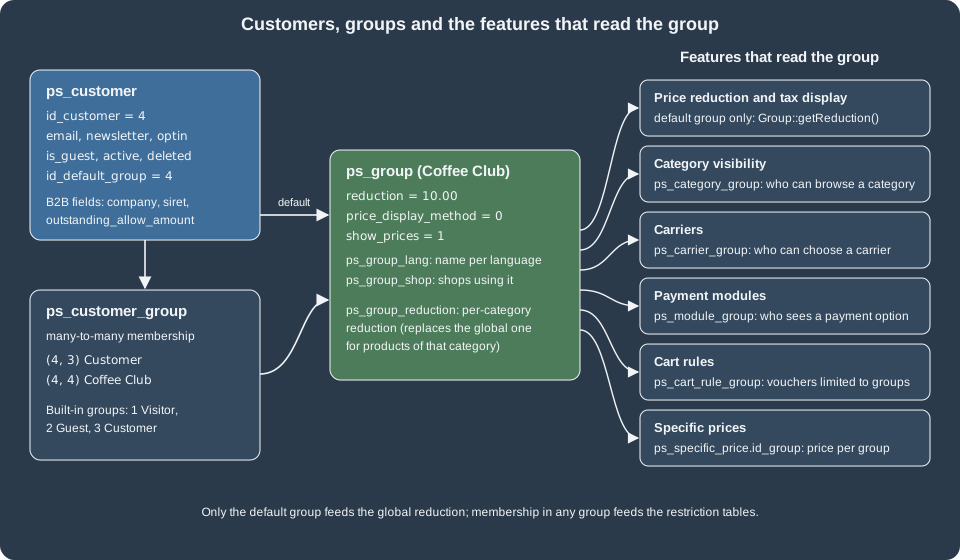
-
ps_category_group: which groups can browse a category (set in the category form). -
ps_carrier_group: which groups can choose a carrier. -
ps_module_group: which groups see a payment module (Payment > Preferences > Group restrictions). -
ps_cart_rule_group: cart rules that apply only to some groups. -
ps_specific_price.id_group: a price that applies only to one group, or0for all. -
ps_group_reduction: a reduction per group and per category (see below).
How the reduction is computed
The price code in Product::priceCalculation() applies the group reduction last, after the specific price. It first asks
GroupReduction::getValueForProduct() for a reduction defined for the product’s category and the customer’s default
group. If there is one, that value is used; otherwise the global reduction of the group is used. A category
reduction therefore replaces the global one for those products, it does not add to it.
The rule was exercised on the demo product 1 (price 23.90, with a built-in 20% specific price, so the unit price is 19.12 tax excluded) for a customer in a second installation:
| Situation | Group reduction | Price (tax excluded) |
|---|---|---|
Default group Customer (3), also a member of the Coffee Club (group 4) |
0.00 |
19.12 |
Default group switched to the Coffee Club (reduction 10) |
10.00 |
17.208 |
Coffee Club default, plus a 20% reduction for the product’s category |
category 20% |
15.296 |
Default group restored to Customer |
0.00 |
19.12 |
Membership alone does not give the global reduction. A customer who is a member of the Coffee Club but keeps Customer
as default group pays the full price; Group::getReduction($idCustomer) returned 0.00 in that state. This is the most
common surprise when a module "adds the customer to the group" and the discount does not appear: either also change the
default group, or give the club its benefit through a cart rule or a specific price restricted to the group, both of which
look at the membership.
Prices are cached per request: after changing a group, call Product::flushPriceCache(), Group::clearCachedValues() and
GroupReduction::resetStaticCache() in scripts and tests, or the old value is returned.
Creating the Coffee Club through the Webservice
The legacy Webservice also exposes groups and customers. The key used below is read from an environment variable and was
created in the back office or with WebserviceKey, see Webservice API.
cat > group.xml <<'XML'
<?xml version="1.0" encoding="UTF-8"?>
<prestashop xmlns:xlink="http://www.w3.org/1999/xlink">
  <group>
    <reduction>10</reduction>
    <price_display_method>0</price_display_method>
    <show_prices>1</show_prices>
    <name>
      <language id="1">Coffee Club</language>
      <language id="2">Club del Café</language>
    </name>
  </group>
</prestashop>
XML

curl -s -u "${PS_WS_KEY}:" -X POST --data-binary @group.xml http://localhost:8080/api/groupsThe request returned 201 Created and the new group with id 4 (the test copy of the group was named with a PCFG prefix so that it could be found and removed afterwards). Creating a customer needs the associations block to
choose the groups, and the default group is id_default_group:
<prestashop xmlns:xlink="http://www.w3.org/1999/xlink">
  <customer>
    <id_default_group>4</id_default_group>
    <id_lang>2</id_lang>
    <passwd>a-long-random-password</passwd>
    <lastname>Lovelace</lastname>
    <firstname>Ada</firstname>
    <email>ada@example.test</email>
    <active>1</active>
    <associations>
      <groups>
        <group><id>3</id></group>
        <group><id>4</id></group>
      </groups>
    </associations>
  </customer>
</prestashop>
The POST returned 201 Created (the test copy used pcfg-ada@example.test) with customer id 3, id_default_group 4 and both group associations. The passwd field
was sent in clear text and came back as a bcrypt hash: the Webservice hashes it (setWsPasswd), even though the synopsis
schema labels the field isHashedPassword. Reading back with a filter and JSON output:
curl -s -g -u "${PS_WS_KEY}:" \
  'http://localhost:8080/api/customers?display=[id,firstname,email]&filter[email]=[ada@example.test]&output_format=JSON'
# {"customers":[{"id":3,"firstname":"Ada","email":"ada@example.test"}]}Enrolling customers in the Coffee Club
The Coffee Club perk is "members get 10% off beans". This module creates the group when it is installed and adds every
customer who ticks the newsletter box while registering. It hooks actionCustomerAccountAdd because the club is a
sign-up perk; swap the hook for actionObjectCustomerAddAfter to enrol customers created elsewhere as well.
<?php

declare(strict_types=1);

if (!defined('_PS_VERSION_')) {
    exit;
}

class Pcfgclub extends Module
{
    private const CONFIG_GROUP_ID = 'PCFGCLUB_GROUP_ID';

    public function __construct()
    {
        $this->name = 'pcfgclub';
        $this->tab = 'pricing_promotion';
        $this->version = '1.0.0';
        $this->author = 'Pocket Coffee';
        $this->need_instance = 0;
        $this->ps_versions_compliancy = ['min' => '9.0.0', 'max' => '9.99.99'];
        $this->bootstrap = true;

        parent::__construct();

        $this->displayName = $this->trans('Coffee Club enrolment', [], 'Modules.Pcfgclub.Admin');
        $this->description = $this->trans('Adds new subscribers to the Coffee Club customer group.', [], 'Modules.Pcfgclub.Admin');
    }

    public function isUsingNewTranslationSystem(): bool
    {
        return true;
    }

    public function install(): bool
    {
        return parent::install()
            && $this->createClubGroup()
            && $this->registerHook('actionCustomerAccountAdd');
    }

    public function uninstall(): bool
    {
        $groupId = (int) Configuration::get(self::CONFIG_GROUP_ID);
        if ($groupId > 0) {
            (new Group($groupId))->delete();
        }

        return Configuration::deleteByName(self::CONFIG_GROUP_ID) && parent::uninstall();
    }

    private function createClubGroup(): bool
    {
        $group = new Group();
        $group->reduction = 10;
        $group->price_display_method = 0; // 0 = tax included, 1 = tax excluded
        $group->show_prices = true;
        foreach (Language::getIDs(false) as $idLang) {
            $group->name[$idLang] = 'Coffee Club';
        }

        return $group->add() && Configuration::updateValue(self::CONFIG_GROUP_ID, (int) $group->id);
    }

    /**
     * @param array{newCustomer: Customer} $params
     */
    public function hookActionCustomerAccountAdd(array $params): void
    {
        $customer = $params['newCustomer'] ?? null;
        $groupId = (int) Configuration::get(self::CONFIG_GROUP_ID);

        if (!$customer instanceof Customer || $groupId <= 0 || !$customer->newsletter) {
            return;
        }

        $customer->addGroups([$groupId]);
    }
}The module was installed with bin/console prestashop:module install pcfgclub (the test copy named the group
PCFG Coffee Club), php -l reported no syntax errors, and
PHP CS Fixer 3.95.27 with the PrestaShop coding standard reported nothing for the class. A real registration was then
submitted to the front office (POST /registration with the form fields firstname, lastname, email, password,
newsletter=1, customer_privacy=1, psgdpr=1, submitCreate=1): the HTTP answer was a redirect to the home page and
the database showed the new customer in groups 3 and 4 with id_default_group 3. The group exists, the membership is
there, and the reduction still needs the default group or a group-restricted cart rule, as explained above. Translation
domains follow Modules.Pcfgclub.Admin; see Module Translations.
Source: PrestaShop devdocs: Hooks
Multistore
The model
Multistore lets one installation serve several storefronts that share a catalog and a back office. There are three levels:
-
the installation, which holds global configuration (the "all shops" context);
-
shop groups (
ps_shop_group), each with three sharing flags:share_customer,share_orderandshare_stock; -
shops (
ps_shop), each belonging to one group, with a root category (id_category), atheme_nameand one or more URLs inps_shop_url(domain,domain_ssl,physical_uri,virtual_uri,main,active).
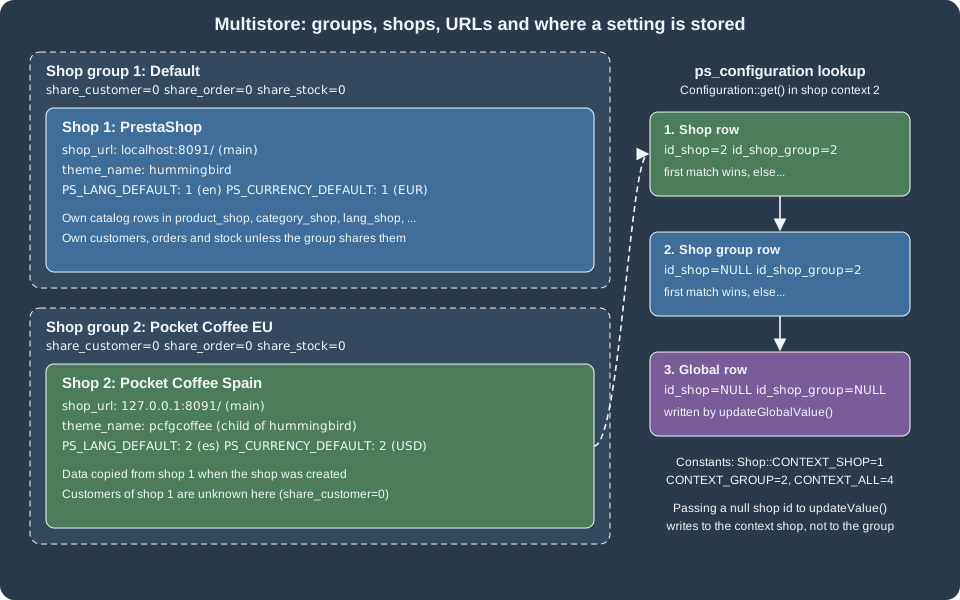
The feature is off after install: Shop::isFeatureActive() is false and the database has one group ("Default") and one
shop. It is switched on in the back office (Shop Parameters > General > Enable multistore), by the configuration key
PS_MULTISHOP_FEATURE_ACTIVE, or in code by the multistore feature adapter
prestashop.adapter.feature.multistore (enable(), disable(), isActive() for "enabled" and isUsed() for "enabled
and at least two active shops"). Once enabled, Advanced Parameters > Multistore appears, and a context selector at the top
of every back office page chooses whether you are editing all shops, one group or one shop.
| Context | Constant | Value stored for it |
|---|---|---|
Single shop |
|
A row with |
Shop group |
|
A row with |
All shops |
|
A row with both NULL. |
Creating a second shop
The following script was run in a throw-away PrestaShop 9.2.0 installation. It enables the feature, creates a shop group, a shop with its URL and copies the catalog data from shop 1. The back office does the same thing when you submit Advanced Parameters > Multistore > Add a new shop and tick the data to import.
<?php

require '/var/www/html/config/config.inc.php';

Configuration::updateGlobalValue('PS_MULTISHOP_FEATURE_ACTIVE', 1);

$group = new ShopGroup();
$group->name = 'Pocket Coffee EU';
$group->share_customer = 0;
$group->share_order = 0;
$group->share_stock = 0;
$group->active = 1;
$group->add();

$shop = new Shop();
$shop->name = 'Pocket Coffee Spain';
$shop->id_shop_group = $group->id;
$shop->id_category = 2;                // root category of the shop (Home)
$shop->theme_name = 'hummingbird';
$shop->active = 1;
$shop->add();

$url = new ShopUrl();
$url->id_shop = $shop->id;
$url->domain = 'shop-es.example.test';
$url->domain_ssl = 'shop-es.example.test';
$url->physical_uri = '/';
$url->virtual_uri = '';
$url->main = 1;
$url->active = 1;
$url->add();

// copyShopData() reads the "categoryBox" request value, as the back office form does
$_POST['categoryBox'] = [2];
$shop->copyShopData(1, [
    'lang' => true, 'currency' => true, 'country' => true, 'zone' => true, 'group' => true,
    'tax_rules_group' => true, 'carrier' => true, 'cms' => true, 'contact' => true,
    'module' => true, 'hook_module' => true, 'image' => true, 'product' => true,
    'product_attribute' => true, 'stock_available' => true, 'attribute' => true,
    'attribute_group' => true, 'feature' => true, 'manufacturer' => true, 'supplier' => true,
]);
Source: PrestaShop devdocs: Multistore
In the test installation the second shop used the domain 127.0.0.1:8091 next to localhost:8091 for shop 1, which is
a convenient way to have two hostnames on one machine. In production, each shop needs its own domain or a virtual_uri
(a path such as /es/), and the web server must answer for the domain. A first attempt that imported only a subset of
the tables ended in a fatal TypeError on the home page of the new shop (a product price was null in the price
formatter). The import list above is the one that produced a working second storefront, including product_attribute,
stock_available, attribute, attribute_group and image; the exact missing row was not isolated. When you create
shops from code, import every table the pages read, or rebuild the *_shop associations yourself.
A call to copyShopData() outside the back office also needs the categoryBox request value, otherwise it fails with an
error on a null value.
Configuration values per context
Configuration::get() and Configuration::updateValue() take optional shop group and shop ids. The documentation advises
against passing explicit ids and to rely on the current context instead, except for updateGlobalValue(), which writes
the "all shops" row. Two details of the signature
updateValue($key, $values, $html = false, $idShopGroup = null, $idShop = null) are worth knowing, and both were checked
by running them:
-
updateGlobalValue()isupdateValue($key, $values, $html, 0, 0). -
A
nullshop id is replaced by the context shop, not by "no shop". Passing only a group id while the context is a single shop wrote a row for that shop and group. To write a group-level value pass0as the shop id.
The script below writes three values for the same key and reads them back in each context.
<?php

Configuration::updateGlobalValue('PCFG_GREETING', 'Welcome to Pocket Coffee');             // all shops
Configuration::updateValue('PCFG_GREETING', 'Pocket Coffee EU welcome', false, 2, 0);       // group 2
Configuration::updateValue('PCFG_GREETING', 'Hola desde la tienda de España', false, 2, 2); // group 2, shop 2

Shop::setContext(Shop::CONTEXT_ALL);
echo Configuration::get('PCFG_GREETING');   // Welcome to Pocket Coffee
Shop::setContext(Shop::CONTEXT_GROUP, 2);
echo Configuration::get('PCFG_GREETING');   // Pocket Coffee EU welcome
Shop::setContext(Shop::CONTEXT_SHOP, 1);
echo Configuration::get('PCFG_GREETING');   // Welcome to Pocket Coffee  (shop 1 has no own row: falls back)
Shop::setContext(Shop::CONTEXT_SHOP, 2);
echo Configuration::get('PCFG_GREETING'); // Hola desde la tienda de EspañaThe rows in ps_configuration were (NULL, NULL), (group 2, NULL) and (group 2, shop 2), and
Shop::getContextListShopID() returned both shops in the "all" context and only shop 2 in the context of group 2. The
lookup order, from the most specific context to the most general one, is shown in the diagram. Setting a value in a parent
context does not overwrite values already stored for its children.
In Symfony code the same lookup goes through the legacy configuration adapter
prestashop.adapter.legacy.configuration with a ShopConstraint value object
(new ShopConstraint($shopId, $shopGroupId)), and settings forms become multistore-aware by implementing getParent()
with MultistoreConfigurationType and giving each field a multistore_configuration_key option. The shop context adapter
prestashop.adapter.shop.context answers isSingleShopContext(), isShopGroupContext(), isAllContext(),
getContextShopID() and getContextListShopID().
What differs per shop
In the test installation the two shops were given different settings and the home pages were fetched from each hostname:
| Setting | Shop 1 (localhost:8091) |
Shop 2 (127.0.0.1:8091) |
|---|---|---|
|
|
|
|
1 (English) |
2 (Spanish) |
|
1 (EUR) |
2 (USD) |
|
|
|
Stylesheets |
|
the same file plus the child theme’s |
Price in the product list |
|
|
The last row is an important detail: changing the default currency of a shop re-labels the amounts, it does not convert
them. The product price column holds 23.90 in the shop’s default currency, so shop 2 showed 23,90 $ for a product that
costs 23.90 euros in shop 1. Converting amounts is the job of the conversion_rate of the secondary currencies, which
applies to a currency that is not the default one. When a store changes its default currency, the catalog prices must be
re-imported or converted by the merchant.
Customer sharing was tested with the same two shops. A customer created in shop 1 was looked up with
Customer::customerExists($email, true, true) in each shop context:
| Shop group setting | Found in shop 1 | Found in shop 2 |
|---|---|---|
|
yes |
no, the e-mail can register again |
|
yes |
yes |
share_order and share_stock follow the same rule for order history and for stock levels. They cannot be changed once
orders or stock exist without consequences, so decide them before the shops go live.
Source: PrestaShop devdocs: Multistore
Writing multistore-aware SQL
Tables that hold shop data come in pairs, for example product and product_shop, and language tables carry an id_shop
column when texts differ per shop (cms_lang has id_shop). The Shop class generates the joins and restrictions:
<?php

// A table that exists in every shop: join its *_shop association table
$sql = 'SELECT wp.`id_product`
        FROM `' . _DB_PREFIX_ . 'wishlist_product` wp
        LEFT JOIN `' . _DB_PREFIX_ . 'product` p ON p.`id_product` = wp.`id_product`
        ' . Shop::addSqlAssociation('product', 'p');

// A table that exists only in some shops: restrict by shop (or by group with $share = true)
$sql = 'SELECT date_add, COUNT(`date_add`) AS total FROM `' . _DB_PREFIX_ . 'connections` WHERE 1 ' . Shop::addSqlRestriction();

// A language table that differs per shop
$sql = '... LEFT JOIN `' . _DB_PREFIX_ . 'product_lang` pl ON pl.`id_product` = wp.`id_product`' . Shop::addSqlRestrictionOnLang('pl');Module settings stored with Configuration are multistore-ready by default. Files uploaded per shop use the
-g<groupId> and -s<shopId> filename suffixes, as the documentation describes with the advertising module example.
Webservice and Admin API in multistore
With multistore active the Webservice accepts id_shop and id_group_shop query parameters, and a key is valid only for
the shops it is associated with (ps_webservice_account_shop). In the test installation a key associated with shop 1
only got {"errors":[{"code":132,"message":"No permission for this key on this shop"}]} for id_shop=2 and for
id_group_shop=2; after the association was added, GET /api/products?id_shop=2 returned the products, /api/shops
listed both shops with their theme_name, and /api/shop_urls listed both URLs. An id_shop that does not exist
produced a redirect to the shop home page rather than a Webservice error. The configurations resource lists the rows of
all contexts together (the global row and the shop row of PS_LANG_DEFAULT appeared in one list). Details are in
Webservice API.
The Admin API handles multistore differently: every request must carry exactly one of shopId, shopGroupId, shopIds
or allShops, otherwise it returns 400 Bad Request, and the support is gated behind the feature flag
admin_api_multistore, which is disabled by default in 9.2.0. That behaviour is from the documentation and was not run.
Languages
The language record
A language is a row of ps_lang with an iso_code (es), a language_code (es-es), a locale (es-ES), the date
formats date_format_lite and date_format_full, an is_rtl flag and an active flag. The association table
ps_lang_shop says which shops use it. The locale is what the CLDR-based formatting and the Symfony translator use; the
language_code is what appears in URLs and in the lang attribute of older code paths.
In the test shop after the Spanish pack was added:
| id_lang | iso_code | locale | language_code | active | date_format_lite |
|---|---|---|---|---|---|
1 |
|
|
|
1 |
|
2 |
|
|
|
1 |
|
Languages are managed in International > Localization > Languages. Adding a language downloads the language pack
(translation catalogs for the core, modules and the default theme) from the PrestaShop translation service and creates
the multilingual rows (*_lang tables) for existing content, copying the default-language texts into the new language
until someone translates them. The same operation exists as the AddLanguageCommand (name, ISO code, IETF tag, date
formats, flag and "no picture" image paths, RTL flag, active flag, shop association) and as the legacy
Language::downloadAndInstallLanguagePack($isoCode, $version, $params, $installModuleTranslations). The legacy call needs
a booted Symfony kernel: in a plain PHP script it created the es row and the *_lang rows (19 product translations)
and then died on a missing container (Call to a member function get() on null), so run it with
$GLOBALS['kernel'] set or from the back office.
Multilingual data
Content that exists in several languages uses a *_lang table keyed by (id, id_lang) or (id, id_lang, id_shop). In an
ObjectModel the fields flagged 'lang' => true are arrays indexed by language id. The Webservice returns them as an
array of {id, value} objects, or as a single value when the request is limited to one language
(?language=2), and accepts <language id="2"> children on write. The same structure appears in the Pocket Coffee group
example above.
Front-office URLs carry the language when more than one language is active and friendly URLs are on: the Spanish roast
calendar page is /es/content/6-calendario-de-tueste, the English one /content/6-roast-calendar. The default language
has no prefix. In a multistore installation a shop can have a different default language (PS_LANG_DEFAULT per shop), as
the table in Multistore shows.
Locale-aware formatting
Number, date and currency formatting comes from the CLDR data bundled with the core and is exposed through locale objects.
The repository service is prestashop.core.localization.locale.repository. This output comes from the test shop:
<?php

$repo = $container->get('prestashop.core.localization.locale.repository');
foreach (['en-US', 'es-ES', 'de-DE', 'fr-FR'] as $code) {
    $locale = $repo->getLocale($code);
    echo $code, ' ', $locale->formatPrice(1234.5, 'EUR'), ' ', $locale->formatPrice(29.9, 'USD'), ' ', $locale->formatNumber(1234.5), PHP_EOL;
}| Locale | formatPrice(1234.5, 'EUR') |
formatPrice(29.9, 'USD') |
formatNumber(1234.5) |
|---|---|---|---|
|
|
|
|
|
|
|
|
|
|
|
|
|
|
|
|
Templates never format prices by hand: Smarty and Twig use the price formatter and the $currency and $language context.
Themes translate their own wordings with the {l} function, covered in
Themes: Hummingbird and Classic and
Module Translations.
Currencies
The currency record
A currency is a row of ps_currency (iso_code, numeric_iso_code, precision, conversion_rate, active, deleted,
unofficial, modified), a localized name, symbol and pattern per language in ps_currency_lang, and the shops where
it is available in ps_currency_shop (which carries its own conversion_rate). The test shop had EUR (rate 1.000000,
the default) and USD (rate 1.117294, fetched at install time).
| Concept | Behaviour |
|---|---|
Default currency ( |
The currency in which catalog prices are stored. The conversion rate of the default currency is 1. |
Secondary currency |
|
Official currency |
Created from a CLDR ISO code: name, symbol, numeric code and precision come from the bundled data ( |
Unofficial currency |
A merchant-defined currency such as a loyalty-point unit ( |
Automatic exchange rates |
A cron or the "Update exchange rates" action refreshes official rates ( |
Per-module and per-country restrictions |
|
Adding GBP and converting 10 euros ran like this in the throw-away installation:
<?php

use PrestaShop\PrestaShop\Core\Domain\Currency\Command\AddCurrencyCommand;

$currencyId = $bus->handle(new AddCurrencyCommand('GBP', 0.86, true));   // iso code, exchange rate, enabled
$currency = new Currency($currencyId->getValue());

echo $currency->numeric_iso_code;                               // 826
echo $currency->precision;                                       // 2
echo Tools::convertPrice(10, $currencyId->getValue());         // 8.6   (from the default currency)
echo Tools::convertPrice(8.6, $currencyId->getValue(), false); // 10    (back to the default currency)
echo $repo->getLocale('en-GB')->formatPrice(8.6, 'GBP');        // £8.60
The numeric code and precision were filled from the bundled CLDR data without any extra input, and the currency was then
removed with DeleteCurrencyCommand. The other domain commands are EditCurrencyCommand, EditUnofficialCurrencyCommand,
ToggleCurrencyStatusCommand, BulkToggleCurrenciesStatusCommand, BulkDeleteCurrenciesCommand, and the queries
GetCurrencyForEditing, GetCurrencyExchangeRate and GetReferenceCurrency. The back office manages currencies in
International > Localization > Currencies (route admin_currencies_index), and the Webservice exposes them as the
currencies resource.
CMS pages
Pages and categories
CMS pages are the static content of the store: delivery terms, legal notice, "About us". A page is a row of ps_cms
(id_cms_category, position, active, indexation) with texts in ps_cms_lang (meta_title, head_seo_title,
meta_description, content, link_rewrite per language and shop), and it belongs to a category in ps_cms_category
(a tree, with ps_cms_category_lang). Association with shops is in ps_cms_shop. The installer creates five pages:
Delivery, Legal Notice, Terms and conditions of use, About us and Secure payment.
The back office manages them in Design > Pages (route admin_cms_pages_index). The themes render them with
templates/cms/page.tpl and templates/cms/category.tpl, and the sitemap page and the footer link list modules read the
same tables. The Webservice exposes them as content_management_system.
Creating a page from code
This script ran against the throw-away installation with English and Spanish installed. It creates a category and the Pocket Coffee "Roast calendar" page and prints the URLs.
<?php

use PrestaShop\PrestaShop\Core\Domain\CmsPage\Command\AddCmsPageCommand;
use PrestaShop\PrestaShop\Core\Domain\CmsPageCategory\Command\AddCmsPageCategoryCommand;

$categoryCommand = new AddCmsPageCategoryCommand(
    [1 => 'Pocket Coffee guides', 2 => 'Guías de Pocket Coffee'],        // names
    [1 => 'pocket-coffee-guides', 2 => 'guias-pocket-coffee'],           // friendly URLs
    1,                                                                    // parent category id (Home)
    true                                                                  // displayed
);
$categoryCommand->setLocalisedDescription([1 => '', 2 => '']);          // required by the handler
$categoryCommand->setLocalisedMetaTitle([1 => '', 2 => '']);
$categoryCommand->setLocalisedMetaDescription([1 => '', 2 => '']);
$categoryCommand->setShopAssociation([1]);
$categoryId = $bus->handle($categoryCommand);

$pageId = $bus->handle(new AddCmsPageCommand(
    $categoryId->getValue(),
    [1 => 'Roast calendar', 2 => 'Calendario de tueste'],                                        // titles
    [1 => 'Roast calendar | Pocket Coffee', 2 => 'Calendario de tueste | Pocket Coffee'],        // meta titles
    [1 => 'When we roast each origin.', 2 => 'Cuándo tostamos cada origen.'],                    // meta descriptions
    [1 => 'roast-calendar', 2 => 'calendario-de-tueste'],                                         // friendly URLs
    [1 => '<p>Ethiopia on Mondays, Colombia on Wednesdays, Brazil on Fridays.</p>',
     2 => '<p>Etiopía los lunes, Colombia los miércoles, Brasil los viernes.</p>'],               // content
    true,                                                                                         // indexed by search engines
    true,                                                                                         // displayed
    [1]                                                                                           // shop ids
));
echo $link->getCMSLink($pageId->getValue(), null, null, 2, 1);The page got id 6 (the installer creates 1 to 5) and the two URLs printed were
http://localhost:8091/content/6-roast-calendar and http://localhost:8091/es/content/6-calendario-de-tueste. Fetching
them returned HTTP 200, the titles Roast calendar | Pocket Coffee and Calendario de tueste | Pocket Coffee, the
body class layout-full-width page-cms cms-id-6 and the translated content. With multistore active, ps_cms_lang held
one row per language and shop (four rows for the page) but ps_cms_shop contained only shop 1, the shop given in the
command: the page is associated with shop 1 only.
AddCmsPageCategoryCommand is the one command in this page whose constructor is not enough: the handler asserts that the
description, meta title and meta description arrays are present, and without the three setters it throws a TypeError
on a null argument. The page-level listing and form hooks are actionCmsPageGridDefinitionModifier,
actionCmsPageGridQueryBuilderModifier, actionCmsPageGridDataModifier, actionCmsPageGridFilterFormModifier and
actionCmsPageGridPresenterModifier, with the same set for categories.
What was run and what was not
-
Run in the shared PrestaShop 9.2.0 test shop: Webservice group and customer creation with XML, the read filters, languages and JSON output, the custom
roast_batchesresource used on the Webservice page,php -land PHP CS Fixer on the modules. -
Run in a second, disposable 9.2.0 installation: the CQRS group and customer commands, the front-office registration and the
pcfgclubhook, the group reduction calculations, the currency commands and locale formatting, the CMS commands and URLs, the complete multistore sequence (feature switch, group, shop, URL, data copy, configuration contexts, per-shop theme, language and currency, customer sharing, Webservice withid_shop), and the theme tests mentioned in the Themes page. -
Not run: the Admin API in multistore mode and the
admin_api_multistoreflag, the Improved B2B flag, automatic exchange-rate refresh, a shop on a real second domain with HTTPS, the language pack download for languages other than Spanish, Ask AI and the One Page Checkout interaction with customer forms. -
Behaviour taken from the code, not from a guide: the global group reduction follows only the default group of the customer, and a category reduction replaces it. The numbers in the reduction table come from running the price code.
Pitfalls
| Pitfall | What happens and what to do |
|---|---|
Adding a customer to a group does not apply the group reduction. |
The global reduction reads |
Group reduction and category reduction are added in the mind but not in the code. |
A category reduction replaces the global group reduction for products of that category. |
Price changes are not visible in a script. |
|
|
In a CLI script set |
|
The null shop id is replaced by the context shop. Use |
Console commands and scripts fail with "Cannot build Language context". |
Commands that do not prepare the language context fail when they reach code that needs it; |
A new shop shows a fatal error on the home page. |
Required |
Changing the default currency "changes the price". |
It re-labels the stored amounts. Convert the catalog separately. |
A customer cannot register in the second shop with the same e-mail. |
|
|
Call the three |
A password is sent to the Webservice in clear text. |
The server hashes the value, but the request carries it as is: use HTTPS only. |