Production and Deployment
|
This section documents the current Vaadin release line — Vaadin 24 LTS / 25.x, Java 17+, Spring Boot 3 / Jakarta EE 10 — as published at the official Vaadin documentation, which is the reference these pages are written and verified against. No specific patch version is pinned. Flow (server-side Java) is the authoring style used throughout, with Hilla / React shown where it differs; Vaadin 7 and the pre-Flow architecture appear only as migration contrast. This content was generated with the assistance of AI and should be verified against the official documentation before being relied on in production, since Vaadin ships major releases roughly twice a year and its ecosystem iterates. This section’s bibliography lists the reference material consulted while preparing these pages. |
In development, Vaadin serves the frontend from a live dev server. A production build compiles, bundles and minifies it into the deployable artifact, and validates any commercial component licences. This page follows Deploying to Production.
The production build
A generated project has a production Maven profile that activates vaadin:build-frontend and sets
vaadin.productionMode=true:
<profile>
  <id>production</id>
  <build>
    <plugins>
      <plugin>
        <groupId>com.vaadin</groupId>
        <artifactId>vaadin-maven-plugin</artifactId>
        <executions>
          <execution>
            <goals>
              <goal>build-frontend</goal>
            </goals>
          </execution>
        </executions>
      </plugin>
    </plugins>
  </build>
</profile>
mvn -Pproduction packageThe build produces an optimised frontend bundle (tree-shaken, minified, split, with a hashed filename per
chunk and a precompressed .gz / .br), embeds it in the artifact, and disables dev tools and the dev
server. Commercial components (Charts, Grid Pro, …) validate their licence at this step: a CI machine needs a
vaadin.offlineKey or a server-license file, or the build fails. See
Production build.
frontend dev server + live reload
no bundling"] src --> prod["mvn -Pproduction package
build-frontend: tree-shake, minify,
split, precompress; licence check"] prod --> war["WAR
(servlet container)"] prod --> jar["executable Spring Boot jar"] prod --> native["GraalVM native image"] jar --> docker["Docker image"] war --> docker
Deployment targets
| Target | Notes |
|---|---|
Spring Boot jar |
|
WAR |
Set |
Docker |
A multi-stage build: build with Maven, copy the jar (or its layered directories) into a slim JRE image. |
GraalVM native image |
|
Cloud |
AWS (Elastic Beanstalk / ECS), Azure (App Service / Container Apps), Google Cloud (Cloud Run) — each documented at Cloud providers. For running the container image on AWS, see ECS and Fargate and Choosing a Compute Service. For Google Cloud, see Cloud Run and Deploying Microservices on GKE. |
FROM eclipse-temurin:21-jdk AS build
WORKDIR /app
COPY . .
RUN ./mvnw -Pproduction -DskipTests package

FROM eclipse-temurin:21-jre
COPY --from=build /app/target/my-app.jar /app.jar
EXPOSE 8080
ENTRYPOINT ["java", "-jar", "/app.jar"]
Reverse proxies and sticky sessions
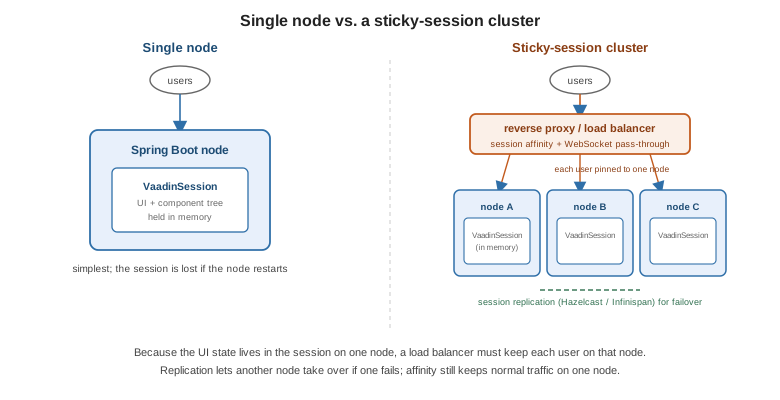
The UI state lives in the VaadinSession on one server. Behind a load balancer you therefore need session
affinity (sticky sessions), and the proxy must pass through WebSocket upgrades for push
(Server Push). See
Reverse proxies.
Clustering
For failover, enable session replication in the container (Hazelcast, Infinispan, Spring Session) so a
dropped node’s sessions survive on another; the VaadinSession and its component tree are serialisable.
Even with replication, keep affinity on so normal traffic stays on one node. See
Distributed deployment.
Troubleshooting
-
Blank page / 404 on frontend assets — the production build did not run (
build-frontendmissing, or the profile not active). -
Licence error in CI — provide the offline key / server-license file.
-
Push disconnects — the proxy is not forwarding WebSocket upgrades; fall back to
Transport.LONG_POLLINGor fix the proxy config.
See also
-
Configuration and Dev Tools — development mode and the
vaadin.*properties. -
Server Push — WebSocket transport behind a proxy.
-
UI Component Libraries — which components need a production licence.
-
Jakarta EE and CDI — deploying a WAR to a Jakarta EE server.
-
Deploying to Production — the official reference.