Apache Kafka Architecture
|
This content was generated with the assistance of AI and should be verified against the official documentation before being relied on in production; see the section bibliography for the reference material consulted while preparing these pages. |
Getting Started with Messaging introduced Kafka’s vocabulary — record, topic, producer, consumer, broker — at the level needed to send and receive a first event. This page goes one level deeper: what a Kafka event actually is on the wire, how a topic’s partitions turn into files on a broker’s disk, how a cluster of brokers agrees on cluster metadata without ZooKeeper, how a partition’s replicas stay consistent, and how Kafka eventually reclaims the disk space a topic consumes. Producer- and consumer-specific configuration (batching, acknowledgements, consumer groups, rebalancing) is covered on their own pages elsewhere in this reference; this page is about the log and the cluster underneath them.
Events, topics, partitions, and offsets
An event — Kafka’s own documentation and API use record just as often, and the two terms are interchangeable in this reference — is the unit Kafka stores and moves. Every record carries four things: a key, a value, a timestamp, and a set of headers. The key and value are both just bytes as far as the broker is concerned — serialization happens entirely in the client, never on the broker — the timestamp defaults to the producer’s wall-clock time at send but can be set explicitly, and headers are an ordered list of string-keyed, byte-valued pairs carried alongside the record for metadata that does not belong in the value itself (a trace id, a schema version, a content type).
package com.example.messaging.kafka;

import java.nio.charset.StandardCharsets;
import java.util.Properties;

import org.apache.kafka.clients.producer.KafkaProducer;
import org.apache.kafka.clients.producer.Producer;
import org.apache.kafka.clients.producer.ProducerRecord;
import org.apache.kafka.common.header.internals.RecordHeader;

public class OrderEventProducer {

    public static void main(String[] args) {
        Properties props = new Properties();
        props.put("bootstrap.servers", "localhost:9092");
        props.put("key.serializer", "org.apache.kafka.common.serialization.StringSerializer");
        props.put("value.serializer", "org.apache.kafka.common.serialization.StringSerializer");

        try (Producer<String, String> producer = new KafkaProducer<>(props)) {
            ProducerRecord<String, String> record = new ProducerRecord<>(
                    "orders",                       // topic
                    3,                               // partition -- explicit; omit to let the partitioner choose
                    System.currentTimeMillis(),      // event timestamp
                    "order-42",                      // key -- also what a partitioner hashes on when set
                    "{\"status\":\"created\"}");     // value
            record.headers().add(new RecordHeader("trace-id",
                    "4c2f9e".getBytes(StandardCharsets.UTF_8)));

            producer.send(record);
        }
    }
}
This constructor is the one that exposes all four parts of a record explicitly — topic, partition, timestamp,
key, value — plus the mutable Headers every record carries regardless of which constructor built it. See
Apache Kafka Javadoc — ProducerRecord for every constructor overload and what each field defaults to when omitted.
A topic is a named, append-only log, and it is always divided into one or more partitions — a topic with a single partition is just the special case of one. A partition, not a topic, is Kafka’s actual unit of ordering and of parallelism: records are only ever ordered within a partition (see Delivery Guarantees for how that ordering interacts with retries and redelivery), and a partition is the smallest unit of work Kafka can hand to a separate consumer, a separate broker, or a separate disk. A topic’s partition count is therefore the hard ceiling on how many consumer instances within one consumer group can be usefully reading it in parallel — a five-partition topic can keep at most five consumers in one group busy, no matter how many more are added.
Every record written to a partition is assigned the next offset, a per-partition, monotonically increasing integer position — 0, 1, 2, and so on — that never gets reassigned or reused, even after old records are deleted by retention or compaction (covered below). A consumer’s read position is just an offset it commits, which is what lets it resume from exactly where it left off, or deliberately rewind to reprocess history that is still retained. The generic-vs-Kafka-vs-RabbitMQ vocabulary table in Getting Started with Messaging covers how this differs from a RabbitMQ queue, which has no offset concept at all because a message is simply gone once acknowledged.
Segments and the on-disk log
A partition’s log is not one ever-growing file — a broker splits each partition into segments, ordinary files
on the broker’s local disk, and only the newest segment (the active segment) is open for appends at any moment.
A new segment is rolled — the active segment is closed and a new one opened — when the active segment reaches
segment.bytes (1 GiB by default) or, independently, when segment.ms has elapsed since the segment was
created, whichever comes first. Splitting the log this way is what makes both retention and log compaction
practical: a broker can delete or compact whole closed segment files as a unit instead of rewriting or
scanning one gigantic file, and each segment additionally has a paired index file the broker uses to seek to a
given offset or timestamp without scanning the segment sequentially. This on-disk log is what a broker — a single Kafka server process; a cluster is many of them — actually stores and serves: producers append to a
partition’s active segment through the leader broker for that partition, and consumers read sequentially forward
from whatever offset they last committed, entirely by reading these segment files back off disk (often straight
out of the page cache, when the data is recent).
KRaft controllers and the metadata log
A Kafka cluster needs, at every moment, one place both brokers and clients can trust for cluster metadata — which topics and partitions exist, which broker currently leads each partition, which brokers are alive, access control lists, and so on. For most of Kafka’s history that place was an external Apache ZooKeeper ensemble: brokers registered themselves in ZooKeeper, one broker was elected the controller by winning a ZooKeeper lock, and the controller pushed metadata changes out to every other broker. ZooKeeper mode is historical at this point, not current practice — it was formally proposed for removal in KIP-500, and Kafka 4.0 is the first release line that runs only on its replacement, KRaft ("Kafka Raft"), with no ZooKeeper dependency left in the codebase at all.
KRaft replaces the external ZooKeeper ensemble with a small quorum of Kafka’s own processes, running the Raft
consensus algorithm directly, called controllers. One controller in the quorum is the active controller — the current Raft leader — and it is the only one that services metadata writes; the rest are follower
controllers, replicating the active controller’s stream of metadata changes and standing ready to be elected
active controller themselves if the current one fails. That stream of changes is itself stored the same way
ordinary topic data is: as an internal, replicated, append-only metadata log (the __cluster_metadata topic),
so the controller quorum’s own state is durable and recoverable using the same log mechanics as everything else
in the cluster. Brokers no longer talk to an external ZooKeeper at all — each broker fetches its view of the
cluster metadata directly from the active controller and applies it to an in-memory metadata cache, the same
role ZooKeeper watches used to play.
A controller process can be configured to also act as a broker on the same node (a combined server, the setup
the single-node docker run command in
Getting Started with Messaging uses), or the controller and broker
roles can be split across dedicated processes for a larger production cluster; either way, the quorum described
above is what elects the active controller and stores the metadata log, regardless of which processes it is
deployed on. A cluster still running in ZooKeeper mode migrates onto KRaft while remaining online, following the
bridge-release procedure Kafka’s own migration guide documents; see
Apache Kafka Documentation — KRaft vs. ZooKeeper for the
exact migration steps and the behavioral differences between the two modes, and
Apache Kafka Documentation — KRaft for how to configure and
operate a KRaft cluster (process.roles, controller.quorum.bootstrap.servers, and the rest of the
controller-specific configuration).
Replication: leader, followers, and in-sync replicas
Every partition is replicated onto multiple brokers — a replication factor of 3 is Kafka’s common default
recommendation — and, at any moment, exactly one of a partition’s replicas is its leader: the only replica any
producer or consumer actually reads from or writes to. Every other replica is a follower, which does nothing
but continuously fetch and append the leader’s log to its own copy, never serving a client request directly. A
follower that has fully caught up to the leader’s log — within the bound replica.lag.time.max.ms allows — is
a member of that partition’s in-sync replica set, or ISR; a follower that falls too far behind is dropped
from the ISR until it catches back up. The ISR is what the leader consults when a producer sends with
acks=all, and it is what a controller consults when the current leader fails and a new one must be chosen: see
Delivery Guarantees for how acks, min.insync.replicas, and
the ISR combine to define Kafka’s durability guarantee in depth — this page only needs the ISR as the set of
replicas eligible to become the next leader.
That eligibility rule was, for a long time, absolute: only a current ISR member could become leader without
data loss, which meant a partition that lost every ISR member at once (an unlikely but real failure mode) had no
safe leader to elect at all. Eligible leader replicas (ELR) relax this: the controller additionally tracks a
small set of replicas that recently fell out of the ISR but are still known to hold every record up to the
partition’s high watermark, and, in a clean election, treats them as leader-eligible alongside the current ISR.
This does not weaken the durability guarantee — an ELR member is, by construction, exactly as caught-up as an
ISR member was at the moment it was recorded — it only widens the pool of safe candidates the controller can
pick from when the ISR itself has shrunk further than anyone would like. See
Apache Kafka Documentation — Eligible Leader
Replicas for the full mechanics, the eligible.leader.replicas.version setting, and how to inspect a
partition’s current ELR set.
package com.example.messaging.kafka;

import java.util.Collections;
import java.util.Map;
import java.util.Properties;
import java.util.concurrent.ExecutionException;

import org.apache.kafka.clients.admin.Admin;
import org.apache.kafka.clients.admin.DescribeTopicsResult;
import org.apache.kafka.clients.admin.TopicDescription;
import org.apache.kafka.common.TopicPartitionInfo;

public class TopicReplicationInspector {

    public static void main(String[] args) throws ExecutionException, InterruptedException {
        Properties props = new Properties();
        props.put("bootstrap.servers", "localhost:9092");

        try (Admin admin = Admin.create(props)) {
            DescribeTopicsResult result = admin.describeTopics(Collections.singletonList("orders"));
            Map<String, TopicDescription> descriptions = result.allTopicNames().get();
            TopicDescription orders = descriptions.get("orders");

            for (TopicPartitionInfo partition : orders.partitions()) {
                System.out.printf("partition=%d leader=%d replicas=%s isr=%s%n",
                        partition.partition(),
                        partition.leader().id(),
                        partition.replicas(),
                        partition.isr());
            }
        }
    }
}
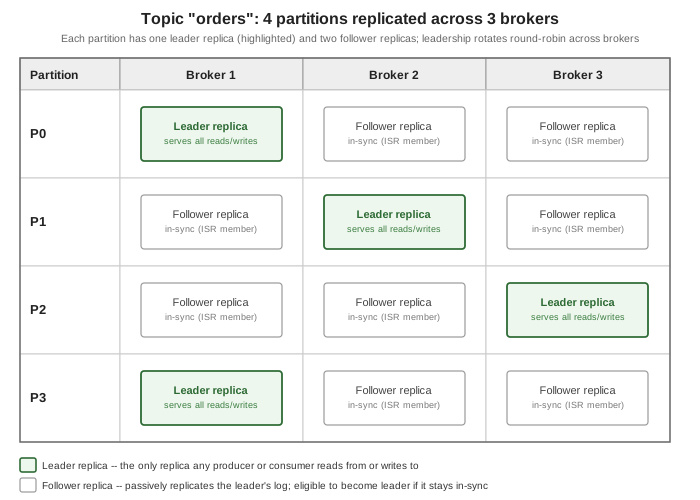
TopicPartitionInfo is exactly the leader/replicas/ISR view the figure below draws for a four-partition topic:
each partition names one broker as leader and the other two as in-sync followers, with leadership itself spread
round-robin so that no single broker leads every partition in the topic.
See Apache Kafka Javadoc — Admin for the rest of the administrative client this example is built on.
Retention, log compaction, and tombstones
Kafka reclaims disk space from old segments in one of two ways, chosen per topic with cleanup.policy, and a
topic may even combine both.
Time- and size-based retention (cleanup.policy=delete, the default) discards whole closed segments once
they age out: retention.ms bounds how long a record is kept regardless of size (7 days by default), and
retention.bytes independently bounds the partition’s total on-disk size regardless of age. Either limit, once
crossed, only ever deletes complete segment files from the oldest end of the log — never the active segment,
and never a record in isolation — which is exactly why segmenting the log the way described above matters:
deletion is a cheap file-system operation on whole files, not a rewrite of the log.
Log compaction (cleanup.policy=compact) is a different policy entirely, and it does not delete by age or
size at all: for a compacted topic, Kafka guarantees to retain at least the last known record for every key
that has ever been written, and is free to discard every earlier record sharing that key once a background
compaction pass has run. This is the mechanism behind Kafka Streams' changelog topics and any topic used as a
key/value snapshot rather than a pure event history — "the current state of every key", not "everything that
ever happened". To delete a key from a compacted topic outright, a producer writes a tombstone: a record with
that key and a null value. Kafka keeps the tombstone itself around for at least delete.retention.ms (so that
a consumer that was behind still sees the deletion rather than the key simply vanishing), then compacts the
tombstone away too, at which point the key is gone from the log entirely, exactly as if it had never been
written — until a new record with that key arrives.
package com.example.messaging.kafka;

import java.util.Collections;
import java.util.Map;
import java.util.Properties;
import java.util.concurrent.ExecutionException;

import org.apache.kafka.clients.admin.Admin;
import org.apache.kafka.clients.admin.NewTopic;

public class CompactedProfileTopic {

    public static void main(String[] args) throws ExecutionException, InterruptedException {
        Properties props = new Properties();
        props.put("bootstrap.servers", "localhost:9092");

        Map<String, String> configs = Map.of(
                "cleanup.policy", "compact",         // keep only the last record per key, not by age or size
                "segment.bytes", "134217728",        // 128 MiB -- roll to a new segment at this size
                "min.cleanable.dirty.ratio", "0.5",  // trigger compaction once 50% of the log is "dirty"
                "delete.retention.ms", "86400000");  // keep tombstones around for 1 day before compacting them away

        NewTopic customerProfiles = new NewTopic("customer-profiles", 4, (short) 3).configs(configs);

        try (Admin admin = Admin.create(props)) {
            admin.createTopics(Collections.singletonList(customerProfiles)).all().get();
        }
    }
}
A record with a null value published to this topic is a tombstone for its key — see
Apache Kafka Documentation — Design: Log
Compaction Basics for the full compaction algorithm, the guarantees it makes about ordering and about how far
behind a compaction pass is allowed to lag, and the complete set of cleanup.policy-related configurations this
example uses.
Tiered storage
Both retention and compaction above still assume every retained byte lives on the broker’s own local disk, which
ties how much history a topic can afford to keep to how much disk each broker happens to have attached.
Tiered storage decouples the two: a broker keeps only its most recent segments on local disk (the local
tier) and offloads older, closed segments to a separate remote tier — an object store such as S3 or HDFS,
addressed through a pluggable RemoteStorageManager — once they age past a configurable point, while still
serving reads against that older data transparently to a consumer that asks for it. This is what makes very long
retention windows (weeks or months, rather than days) practical without provisioning every broker’s local disks
to hold that much data directly, and, because the remote tier is not tied to any one broker, it also removes
local disk size as a constraint on how much history a partition can retain at all. Tiered storage is enabled per
cluster with remote.log.storage.system.enable and then opted into per topic; see
Apache Kafka Documentation — Tiered Storage for the
configuration reference and the current set of supported remote storage plugins.
The Java version floor
kafka-clients and the broker itself do not share the same minimum Java version, and the gap is deliberate
rather than an oversight: it is generally far easier to move a standalone service (a broker) onto a newer JVM
than it is to move every application that merely embeds a client library, so the client-side floor is kept
lower for longer.
| Component | Minimum Java version |
|---|---|
|
Java 11 |
Kafka Streams |
Java 11 |
Brokers, Kafka Connect, and command-line tools |
Java 17 |
See Apache Kafka Documentation — Java Version for the exact set of supported JVM versions per component, and the KIP-1013 proposal for why the broker floor was raised to Java 17 specifically.