The Universal Journal (ACDOCA)
|
This content was generated with the assistance of AI and should be verified against the official documentation before being relied on in production. |
Before SAP S/4HANA, a company kept two sets of records for the same business event: the accountants' general ledger and the cost accountants' Controlling tables, with a reconciliation step to make them agree. SAP S/4HANA replaces both with one list of journal entry lines, the Universal Journal, stored in a database table named ACDOCA. This page explains what that table holds, which older tables it replaced and which stay, a small oddity (it has no primary key on the database), how to read its data through a released CDS view instead of the raw table, and how to add your own fields. It is written against SAP S/4HANA 2025 FPS02 (on premise and Private Edition) and SAP S/4HANA Cloud Public Edition 2608. The data model is the same in both; the Public Edition help describes the Universal Journal without naming tables and limits extensions to the key user tools, which the page points out.
Before you read
-
Finance Overview: what Financial Accounting (FI) and Controlling (CO) are, because the Universal Journal joins them.
-
Ledgers, Currencies and Exchange Rates: what a ledger and a currency type are, because every ACDOCA row carries both.
-
Architecture and the Virtual Data Model: what a released CDS view is, because the recommended way to read ACDOCA is a view on top of it.
Key terms
-
Universal Journal: the book of original entry for FI and CO in SAP S/4HANA, whose line items are stored once in ACDOCA.
-
Journal entry: the SAP S/4HANA name for what used to be an accounting document plus its Controlling document; one header and several lines.
-
Line item: one row of a journal entry, for one account and one amount.
-
Coding block: the set of account assignment fields on a line, such as cost center, project and internal order.
-
Open item: a line on an account kept open item by open item that waits to be cleared.
-
Cost element: a classification of costs; in SAP S/4HANA a special type of G/L account.
The idea: one place for every line
SAP describes the Universal Journal as the book of original entry for business transactions in Financial Accounting and Controlling, and as the single source of truth in SAP S/4HANA. A business event, such as paying a salary, produces one journal entry, and the entry’s lines are written once. Totals, for example the balance of an account, are calculated on the fly when somebody asks for them instead of being stored again, which SAP says keeps the memory footprint small.
Five application areas write to it: General Ledger Accounting (FI-GL), Asset Accounting (FI-AA), Controlling (CO), Profitability Analysis (only margin analysis, not costing-based) and the Material Ledger. The consequences that matter to a newcomer are these:
-
There is no reconciliation between financial accounting and management accounting, because both read the same lines.
-
Cost elements are no longer separate master data in Controlling. They are a special type of G/L account kept in the general ledger, so a cost center posting and a G/L posting use the same account.
-
The ledger is a column of the line, so parallel accounting under several principles lives in the same table.
-
The old "real-time integration of FI and CO" is not needed any more. SAP’s FAQ explains that this only means the technical link between the two components is gone because they share ACDOCA.
The data model
Which tables hold what
Not every accounting table was replaced. The FAQ says so directly: many tables were replaced by ACDOCA, but not all. Three tables matter for a first reading.
| Table | Holds | Status in SAP S/4HANA |
|---|---|---|
|
The header of a journal entry: the data that applies to the whole entry. |
Unchanged. Its primary key is always written in the same transaction as a new journal entry. |
|
The source documents that serve as the basis for journal entries in ACDOCA, and the entries for open item management. |
Still exists. It is not the line item table of the general ledger any more. |
|
The line items of the Universal Journal, for all ledgers: the complete set of document items of the leading ledger and of each non-leading ledger. |
The one line item table that FI and CO both use. |
The relation between them is the familiar one: one BKPF header has several lines. The page on journal entries (Journal
Entries, Document Types and Posting Keys) explains what the header fields mean. What changed is where the lines are read
from: reports that need all lines of all ledgers read ACDOCA, and BSEG is consulted for the source document and for open
items.
The tables ACDOCA absorbed
The entries of the following tables are now completely contained in ACDOCA, according to SAP’s FAQ.
| Absorbed tables | What they held in SAP ERP |
|---|---|
|
The tables of New General Ledger Accounting (line items and totals, with the joint venture and funds management variants). |
|
The actual data of Controlling. Statistical postings and target data stay in these three tables. |
|
The Material Ledger table. |
|
The line items of Fixed Assets (Asset Accounting). |
SAP adds that the list is not exhaustive and covers only some of the most important tables. The figure shows the model: the grayed tables on the right are the ones whose entries moved into ACDOCA.
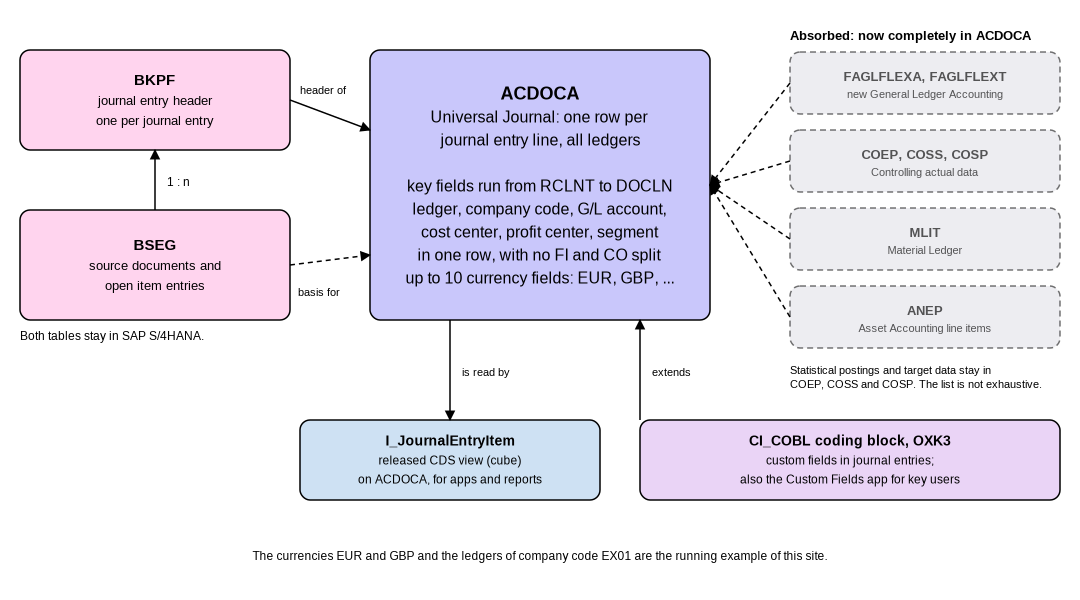
A practical warning follows for anyone who learned SAP before S/4HANA, or who reads older material written for SAP ERP with
New General Ledger Accounting: a report or a custom program that selects from FAGLFLEXA or COEP for actual data is
reading the old model. In SAP S/4HANA the same data is in ACDOCA, and the released CDS view described below is the way
to read it.
Why ACDOCA has no primary key on the database
Open the table in the ABAP Dictionary (transaction SE11) and you see key fields marked, from RCLNT to DOCLN. The
FAQ then states that there is nevertheless no primary key on the database. SAP gives the reason: to reduce the memory
footprint and to allow flexible partitioning, the table is created without a primary key on the database. A special
setting in the ABAP Dictionary stops the key from being created. You can check the state with the function Database
object, Check in SE11 or SE14.
This does not mean that duplicates are allowed. The primary key of BKPF is always inserted in the same transaction when
a new journal entry is posted, and SAP states that this prevents the unintended insertion of duplicate document numbers in
ACDOCA. The practical lesson for a developer is to treat the document number as unique because the header enforces it,
not because the database does for ACDOCA.
Currencies in one row
Each posting fills every currency field of its row according to the configured conversion rules. SAP states that the
Universal Journal can handle up to 10 currency fields: two are preconfigured and eight are freely definable. The
preconfigured ones named in the FAQ are the company code currency and the controlling area currency, and they cannot be
changed; the controlling area currency exists only if you use Controlling. The ledgers and currencies page explains the
currency types and how a recommended group currency fits in, and the currency types it lists are authoritative for
the settings screens of your release. For the running example, the point is that the euro amount of company code EX01 and
its British pound group amount are two columns of the same row, translated when the line is posted.
A worked example: one entry, four rows
Example Trading Co. (company code EX01, euro, group currency British pound, leading ledger 0L and non-leading ledger 2L)
books the USD 12,500 invoice for IT services of the sibling page on journal entries: one debit line on an expense account
and one credit line on the supplier account, translated at the illustrative rates USD to EUR 0.80 and USD to GBP 0.75.
Nothing in this invoice is valued differently by the two accounting principles, so each ledger holds both lines. The
account names and the amounts are made up for this site.
| Table | Ledger | Line | EUR (company code currency) | GBP (group currency) |
|---|---|---|---|---|
|
One header for the whole entry |
|||
|
|
1: IT services expense, debit |
10,000.00 |
9,375.00 |
|
|
2: supplier account, credit |
-10,000.00 |
-9,375.00 |
|
|
1: IT services expense, debit |
10,000.00 |
9,375.00 |
|
|
2: supplier account, credit |
-10,000.00 |
-9,375.00 |
Two things to check by hand. The number of ACDOCA rows is the number of lines times the number of ledgers that receive them:
And every ledger balances in every currency. In euro, , and in pounds,
; the same holds for 2L. The table shows the credit side as a negative number to make
the balance visible. That is a presentation chosen for this page; the sign convention and the debit or credit indicator of
the real table fields are what the system documentation of your release describes. The point of the example is the
shape: the header is stored once, the lines are stored once per ledger, and all currencies sit in each row. This is also
why a balance can be computed on the fly: it is a sum over rows of one table, not a separate stored total.
The supplier line is an open item until the payment clears it. SAP states that BSEG stores the entries relating to open
item management, so the open item information of this credit line is kept there as well as in ACDOCA.
Reading the data: the old views and the released CDS view
Views that kept the old names
SAP’s open item documentation still refers to the views BSIS (G/L accounts), BSID (customer accounts) and BSIK
(vendor accounts) when it advises which fields to pick as clearing criteria. They are called views there, which fits the
FAQ’s statement that the entries of the former tables now live in ACDOCA and BSEG. The help pages used for this page do not
list the full set of such views or say how each is built, and the cleared-item counterparts are not described on them, so
check in your own system which views exist and how they are built before relying on one in a new program. Treat the names as a compatibility layer for older reports, not as a data model to design
new code against.
The released CDS view I_JournalEntryItem
New code and new apps should not select from ACDOCA directly. SAP provides a released CDS view of type cube,
I_JournalEntryItem, that gives access to all details of a journal entry item (database table ACDOCA) together with the
most important business entities: company code, G/L account, profit center, segment and others. It is built on the
business objects ledger, accounting document, company code, G/L account, cost center and profit center. Its measures
include the amount in company code currency, the amount in transaction currency and the amount in global currency; SAP
adds that the global currency corresponds in most cases to the group currency. Three points from the same page:
-
The view does not expose the technical balance carried forward items of period 000.
-
If you want to use the Custom Fields app and the Custom Logic app to extend custom fields, you need to use this view.
-
It checks authorizations for ledgers, company codes, financial account types and segments, so a reader sees only what the role allows.
The page lists some elements of the view as deprecated since SAP S/4HANA 2020 with named successors, so check the current element names in your release. For how such a view fits the layers of the virtual data model, see Architecture and the Virtual Data Model; for how a CDS view is written, see CDS View Entities. A list of the other released views of General Ledger Accounting is on the page "CDS Views for General Ledger Accounting".
Reading it from ABAP is the same as reading any CDS view with a SELECT statement, as the page on CDS view entities
shows. This page gives no listing for it: the documentation page of the view describes its attributes only in words, and an
element name is not stated here unless it appears on a page SAP publishes. List the exact element names in the data
preview of the ABAP Development Tools in your own system, which requires an SAP system; not run here.
Adding your own fields
SAP names three ways to add custom fields in Finance, and which are open to you depends on the edition.
| Option | What it does | Where it applies |
|---|---|---|
Classic coding block extension: transaction |
Extends many processes that lead to journal entries in ACDOCA. It also extends other tables, including |
Named on the on-premise help page, which is the one that covers it. |
Custom Fields app, business contexts Accounting: Journal Entry Item and Accounting: Coding Block |
A key user adds custom fields that extend journal entries locally. SAP recommends adding a classic coding block field
with |
Both. In the Public Edition, key users extend journal entries with the Custom Fields and Custom Logic apps. |
CO-PA characteristics: Custom Fields app (Accounting: Market Segment) or transaction |
Extends the CO-PA operating concern with custom characteristics. Fields created with |
Named on the on-premise help page for |
SAP also offers substitution and validation rules, maintained with the Manage Substitution/Validation Rules app, to fill
or check fields of FI postings automatically; for example, rules can be defined for the Journal Entry Item business
context. SAP Note 2453614 is named as the entry point for extensibility in Finance. The key user tools, and the
Custom Fields app in general, are the subject of Key User Extensibility. A
transaction code such as OXK3 or KEA5 is run in SAP GUI, so it requires an SAP system; not run here.
In the two editions
| Topic | On premise and Private Edition (2025 FPS02) | Cloud Public Edition (2608) |
|---|---|---|
Documentation of the table |
The help names ACDOCA, the absorbed tables, and the coding block structure. |
The Universal Journal page describes the same concept without naming tables, and describes extensions through the Custom Fields and Custom Logic apps. |
Reading the lines |
Released CDS view |
Released CDS views and apps; direct table access is not what the documentation offers. |
Adding fields |
|
Custom Fields app and Custom Logic app. |
The Public Edition column states what its help page says and does not say; it is not a claim that the table is absent.
Summary
-
The Universal Journal is the one list of journal entry lines for FI and CO in SAP S/4HANA, stored in the table ACDOCA and written once per line and ledger.
-
BKPFstill holds the header andBSEGstill holds the source documents and the open item entries; the entries of the New G/L, Controlling actual data, Material Ledger and Asset line item tables are now completely in ACDOCA. -
ACDOCA has no primary key on the database, by design, to save memory and allow flexible partitioning; the key of
BKPFprevents duplicate document numbers. -
One row carries up to ten currency fields, so the euro and pound amounts of
EX01are columns of the same row. -
Read it through the released view
I_JournalEntryItem, and add fields through the coding block, the Custom Fields app or CO-PA characteristics, depending on the edition.
Try it
To do this by hand, follow the guide Post Balanced Journal Entries in a Teaching Ledger: it posts balanced journal entries in a teaching ledger.