Allocations: Assessment, Distribution and Activity Allocation
|
This content was generated with the assistance of AI and should be verified against the official documentation before being relied on in production. |
Some costs cannot be charged to the right place when they arise. The rent for the office building is paid once, but the administration, the sales team and the production line all use the space. An allocation is the period-end step that passes such a cost from the cost center that collected it (the sender) to the cost centers that caused it (the receivers), using a key such as floor area or number of employees. A related step, the activity allocation, charges one department for the hours of service it received from another, at a price per hour. This page explains the three classic methods (assessment, distribution and activity allocation), the vocabulary of senders, receivers, rules and tracing factors, how cycles and segments hold the definitions, how Universal Allocation runs them in current releases, and how a rent cost of 1,000.00 EUR is split in numbers. It is written against SAP S/4HANA 2025 FPS02 (on premise and Private Edition) and SAP S/4HANA Cloud Public Edition 2608. The ideas are the same in both; the page says where the help pages of the two editions differ.
Before you read
-
Controlling Overview and Cost Elements: the controlling area, cost centers, and the cost element categories 42 and 43 that allocations use.
-
Organizational Units of Accounting: the company code, the controlling area and the cost center.
-
The Universal Journal: why an allocation is a journal entry.
-
Ledgers, Currencies and Exchange Rates: the ledgers
0Land2Lthat an allocation can post to.
Key terms
-
Allocation: the period-end passing of costs, or of activity quantities, from sender objects to receiver objects.
-
Sender: the object, for example a cost center together with an account, that holds the value to be passed on.
-
Receiver: the object, for example a cost center, that is charged with the allocated value.
-
Tracing factor: the number that decides what share of the sender value each receiver gets, for example floor area or hours used. In Universal Allocation the Receiver Basis tab of a segment holds it.
-
Statistical key figure: a number kept on a Controlling object that is not an amount, for example the number of employees or the floor area, used as a tracing factor.
-
Allocation cycle: the definition of one allocation run: a header with validity and settings, and one or more segments.
-
Allocation segment: the part of a cycle that holds the senders, the receivers and the rules for one allocation.
-
Activity type: a measurable service that a cost center provides, such as machine hours, valued with a price per unit.
-
Universal Allocation: the group of apps in current releases for defining, running and checking allocations.
Why costs are allocated
Controlling tries to answer where in the company costs arose and for what purpose. Some costs are naturally collected in one place: telephone charges, rent, insurance or the cafeteria are paid for the whole company and entered on a collector cost center, so that the person entering the invoice does not need to know who used the service. At the end of the period, the collected cost has to move to the cost centers that caused it, otherwise the sales team looks cheaper than it is and the collector looks far too expensive. SAP’s help for the older periodic reposting describes the same pattern: postings relevant to Controlling are entered in Financial Accounting on a collector and, at period end, the collected costs are reposted to the cost centers that incurred them by user-defined keys.
An allocation changes where a cost sits, not how much cost there is. The sender is credited with the amount, the receivers are debited with the same total, and the total of the controlling area is unchanged. The page Controlling Overview and Cost Elements shows that for a 400.00 EUR assessment; this page generalizes it.
In SAP S/4HANA an allocation is a journal entry of the Universal Journal. SAP’s help for the run types states that a
live run of actual data generates journal entries and posts to the Universal Journal table ACDOCA, while plan data is
posted to the planned data line items table ACDOCP and generates no journal entries.
Three methods and two generations of tools
SAP’s help distinguishes the following allocation methods. The first two differ in what the receiver sees afterward; the third moves activity quantities instead of plain costs.
| Method | What it does, in SAP’s words |
|---|---|
Distribution |
Amounts and quantities of one or more senders are distributed to one or more receivers, from service cost centers to production cost centers, for example. The postings use the original account or cost element, so its information stays intact on the receiver. |
Assessment (Universal Allocation: overhead allocation) |
The amounts are posted to a separate overhead allocation account rather than to the original accounts. That account bundles costs posted on various primary accounts and gives them a new meaning. The information from the original account is lost. Overhead allocation is chosen when the composition of the cost means nothing to the receiver but the label of the overhead account does. |
Activity allocation |
A cost center is charged for the activity it received. Measured quantities are valued with the price of the activity type, so the sender is credited and the receiver debited with quantity times price. Direct activity allocation records the quantities itself; indirect activity allocation derives them with keys. |
Two generations of tools appear in SAP’s help.
-
The classic cycles of Cost Center Accounting define periodic reposting, distribution, assessment and indirect activity allocation as cycles with segments and tracing factors. SAP’s help for them says to create a separate cycle for the plan and for the actual allocation of the same allocation type.
-
Universal Allocation is the group of apps that allows you to allocate plan or actual values from sender objects to receiver objects. SAP lists its allocation types as Distribution, Overhead Allocation, Top-down Distribution and Intercompany Allocation. Overhead allocation posts to a secondary cost element of category 42, the category that Controlling Overview and Cost Elements gives to assessment. A job template migrates cycles from the predecessor app for actual cost center overhead allocation to Universal Allocation, and the Monitor Cycle Migration app follows the migration.
SAP’s list of Universal Allocation types does not include indirect activity allocation, direct activity allocation or manual cost allocation; they keep their own pages and apps, described below.
Cycles, segments, senders and receivers
An allocation cycle summarizes the rules and settings that enable an allocation. It consists of header data and one or more allocation segments that are processed together. The header holds what is valid for every segment, for example the validity period. In the segment you define who sends, who receives and by which rule.
header: validity, company code, ledger, allocation type"] --> B["Segment 1"] A --> C["Segment 2"] B --> D["Rules
sender rule + receiver rule"] B --> E["Senders
account + cost center"] B --> F["Receivers
cost centers, WBS elements, ..."] B --> G["Receiver basis
tracing factors"]
SAP gives these properties of cycles and segments:
-
Time-based. Each cycle has a validity period in its header, and the cycle must be valid for the entire fiscal period. A cycle valid from January 10th can first be run for February, and a cycle defined only for the first half of a year cannot allocate in the second half.
-
Cycles run in order. If several cycles are entered, the system executes them in the order entered, and the result of one cycle is passed to the next. Cycles that depend on each other must be run in that order. SAP recommends splitting a large allocation into several cycles, for run time and so that a change needs only the affected cycles repeated.
-
Segments are independent unless the cycle is processed iteratively. The order of segments in a cycle does not matter, and the result of one segment is not used by the next.
-
Iterative processing is a processing indicator available in the Cost Centers and Profit Centers contexts: a cost center that receives in one segment can send in another, and processing continues until all senders are completely credited. SAP lists the other indicators too: Incremental (Margin Analysis, top-down distribution), Cumulative (cost centers, smoothing amounts over periods) and Flexible Ledger (post to another ledger).
What can be sender and receiver depends on the allocation context, which you choose when you define the cycle.
| Context | Allocates, in SAP’s words | Allocation types |
|---|---|---|
Cost Centers |
Primary and secondary cost elements of one or more sending cost centers to one or more receiving cost centers or WBS elements. |
Distribution, Overhead Allocation, Intercompany Allocation |
Profit Centers |
Amounts and quantities of one or more sending profit centers to one or more receiving profit centers. |
Distribution, Overhead Allocation |
Margin Analysis |
Primary and secondary cost elements of one or more sending cost centers to one or more receiving profitability segments. |
Distribution, Overhead Allocation, Top-Down Distribution |
For the cost elements, SAP lists the categories for posting: 01, 03, 04 and 22 for distribution and 42 for overhead and intercompany allocation. In overhead allocation within the cost center and margin analysis contexts every posting uses the secondary cost element defined in the segment header as the overhead allocation account, and every posting has the category 42 Assessment.
Sender rules and receiver rules
The allocation rules decide how much leaves the sender and how it is split. They are made of a sender rule and a receiver rule, and SAP states that all sender and receiver rules can be combined for distribution, overhead allocation and intercompany allocation. The tracing factor is the reference number the receiver rule uses.
Sender rules
| Sender rule | What leaves the sender |
|---|---|
Posted amounts |
The amount posted on the sender in the database. You can enter a Sender Share in percent: 100 % allocates all of it, and 50 % allocates half and leaves the other half on the sender. SAP’s example: a sender balance of 50,000 EUR and a share of 50 % credits the sender with 25,000 EUR, leaving 25,000 EUR. |
Fixed amounts |
A fixed amount each time the cycle runs, whatever the sender’s balance is. |
Fixed rates |
A rate per unit of the receiver tracing factor. The sender is credited with the fixed rate times the total of the tracing factors, and each receiver is debited with its tracing factor times the rate. |
Receiver rules
| Receiver rule | How the sender value is split |
|---|---|
Variable portions |
By reference data that the system reads: amounts, quantities or statistical key figures. You choose the variable portion type on the Receiver Basis tab. |
Fixed percentages |
Each receiver gets a percentage you enter, which cannot exceed 100 %. If the percentages total less than 100 %, the sender is credited only with that part of the amount available. |
Fixed portions |
Handled like variable portions, but you, not the system, enter the portion. SAP states the limit of 5 characters and 2 decimals. |
Fixed amounts |
A fixed amount for each receiver. The sender is credited with the sum of these amounts, subject to the sender rule. |
The variable portion type is one of three. Value Field takes posted amounts, in local, global or transaction currency, for actual or plan data (with a plan category) and a G/L account. Quantity takes a posted quantity for an account and a unit of measure. Statistical Key Figure takes a key figure you name. SAP’s example for a value field: reference postings on account 123456 of 1,000, 2,000 and 1,000 in local currency on three cost centers give shares of 25 %, 50 % and 25 %. SAP also warns that a statistical key figure used as reference must allow postings on the receiving objects, otherwise the allocation fails.
SAP adds a precision about what counts as posted. With the Posted Amounts sender rule or the Variable Portions receiver rule in the cost center and margin analysis contexts, balances are taken from real postings to cost center objects, typically with the account assignment types KS (cost center) or KL (cost center and activity type); statistical or attributed records are not included.
The arithmetic of an allocation
Let be the amount that the sender releases and the tracing factor of receiver . The receiver rule Variable portions (and, with typed numbers, Fixed portions) gives receiver the share
so that the shares add up to the whole released amount:
With the sender rule Posted amounts and a sender share , the released amount is , where is the posted balance of the sender. With the sender rule Fixed rates and a rate per unit of the tracing factor, the receivers are debited and the sender is credited with instead of its balance.
An activity allocation is plain valuation. With quantity in the unit of the activity type and price per unit, the allocated cost is
Worked example: rent for three cost centers
Example Trading Co. collects the office rent of 1,000.00 EUR on a collector cost center EX-RENT of controlling area
EX00 (an illustrative cost center; the rent was posted from company code EX01, as in
Controlling Overview and Cost Elements). The
tracing factor is the floor area kept as a statistical key figure: EX-ADM has 120 square meters, EX-SALES 180 and
EX-PROD 300 (illustrative cost centers and areas). The segment uses the sender rule Posted amounts with a sender share
of 100 % and the receiver rule Variable portions with a statistical key figure as reference.
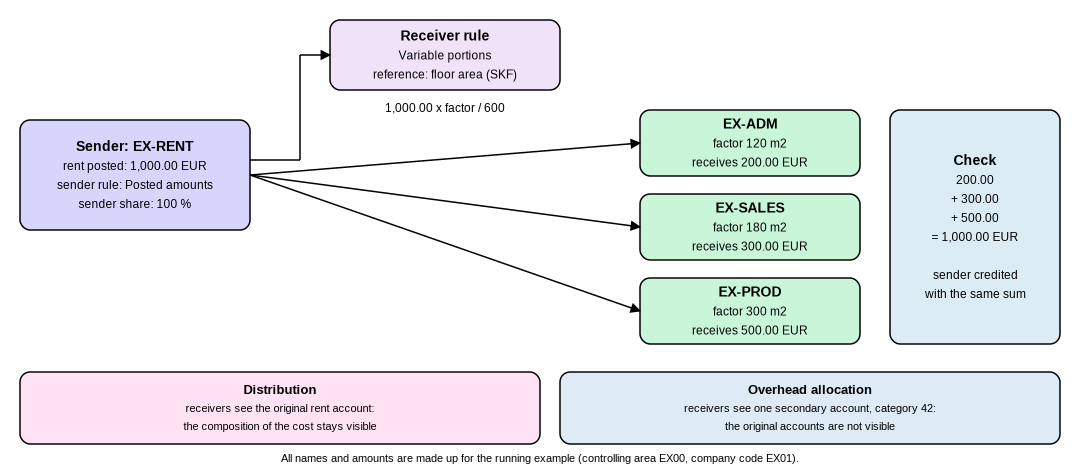
The factors add up to 120 + 180 + 300 = 600 square meters, so the formula gives
| Receiver | Floor area (factor) | Share of 600 | Allocated amount |
|---|---|---|---|
|
120 |
20 % |
1,000.00 x 120 / 600 = 200.00 EUR |
|
180 |
30 % |
1,000.00 x 180 / 600 = 300.00 EUR |
|
300 |
50 % |
1,000.00 x 300 / 600 = 500.00 EUR |
Total |
600 |
100 % |
1,000.00 EUR |
After the run, EX-RENT is credited with 1,000.00 EUR and is left with a balance of 0.00 EUR, and the three receivers
are debited with the amounts above. The sum over the controlling area is unchanged.
The same cost under distribution and under overhead allocation
The allocation type decides which account the receiver sees. With distribution, the three lines are posted on the
original rent account, so each receiver still sees "rent". With overhead allocation, they are posted on the overhead
allocation account of the segment header, a secondary cost element of category 42 (for example the illustrative
940000 used on the controlling page), and the receivers see only that account. The amounts are the same.
| Cost center | Posted rent | Distribution | Overhead allocation (account 42) |
|---|---|---|---|
|
+1,000.00 EUR |
-1,000.00 on the rent account |
-1,000.00 on the overhead allocation account |
|
0.00 EUR |
+200.00 on the rent account |
+200.00 on the overhead allocation account |
|
0.00 EUR |
+300.00 on the rent account |
+300.00 on the overhead allocation account |
|
0.00 EUR |
+500.00 on the rent account |
+500.00 on the overhead allocation account |
SAP’s help for overhead allocation adds that the original cost elements are not visible on the receivers, while the sender and receiver information appears in the controlling document, and that it fits when the composition of the cost is unimportant for the receiver, for example cafeteria costs.
Other receiver and sender rules on the same rent
Fixed percentages of 20 %, 30 % and 50 % give the same result without any statistical key figure: 200.00, 300.00 and 500.00 EUR. The percentages must total 100 % to take care of the whole value. Fixed portions of 20, 30 and 50 behave the same way.
With the sender rule Fixed rates and a rate of 1.50 EUR per square meter, the receivers are debited 180.00, 270.00 and
450.00 EUR, which total 900.00 EUR. The sender is credited with 1.50 x 600 = 900.00 EUR, so 100.00 EUR stays on
EX-RENT.
With a sender share of 50 % on Posted amounts, 500.00 EUR is released and split 100.00, 150.00 and 250.00 EUR; the other 500.00 EUR stays on the sender.
The Receiver Weighting Factors tab applies a weight to a receiver on top of the reference. SAP states that, for
variable portions, each receiver has a default factor of 1, and that a combination is excluded by setting its factor to
0. The weighted reference of a receiver is , with factor , the divisor
Factor Per (a power of 10) and the reference , and the amount is . If the
company excludes EX-PROD from the rent allocation (factor 0, the others 1), the weighted references are 120, 180 and
0, and 1,000.00 x 120 / 300 = 400.00 EUR goes to EX-ADM and 600.00 EUR to EX-SALES.
Negative reference values can occur when the factors are read from the database. SAP lets you choose, per segment, how Universal Allocation scales negative factors: no normalization, standard scaling, absolute value, negative factors become zero, smallest negative factor becomes zero (also with the variant in which zero stays zero), and positive factors become zero. The choice matters only when the factors have different signs.
Activity allocation
Cost centers that provide a measurable service, such as the IT help desk, are charged by activity, not by a key. A cost center can have one, several or no activity types. Planning and allocation need quantities in activity units, valued with activity prices (allocation prices). Typical activity types for cost centers, in SAP’s words, are machine hours, administrator hours, CPU minutes or units produced.
Direct activity allocation
In direct activity allocation, the activity is measured and recorded, for example when a business transaction is confirmed, and the system multiplies the activity produced by the price of the activity type. SAP’s example: the plumbers cost center performs 2 hours of repairs for a production cost center at 15 EUR per hour, so 2 x 15 = 30 EUR; the sender is credited and the receiver debited.
In the running example, a cost center EX-IT (illustrative) offers the activity type support hours at a plan price of
50.00 EUR per hour (an assumed price). EX-SALES used 12 hours and EX-PROD used 8 hours in the period:
| Receiver | Hours q | Price p | Allocated cost C = q x p |
|---|---|---|---|
|
12 |
50.00 EUR/h |
600.00 EUR |
|
8 |
50.00 EUR/h |
400.00 EUR |
Total, credited to |
20 |
1,000.00 EUR |
SAP names the sources of the price: if the receiver is not a cost object (a cost center, business process or order), the manually set price or, without one, the plan price is used; if the receiver is a cost object such as a production order, the valuation price comes from the valuation variant. On premise the classic transactions KB21N, KB23N and KB24N enter, display and reverse direct activity allocations, and the Manage Direct Activity Allocation app (F3697, in the Public Edition F3697A) covers the same functions. SAP’s help adds that activity allocations always post to all ledgers with the same quantity, and that the values can differ between ledgers when ledger-specific cost rates exist.
Indirect activity allocation
When measuring hours is too much effort, indirect activity allocation derives them with keys. SAP describes two methods, depending on the category of the activity type. In the first, the sender cost center posts its total activity quantity (a category 3 activity type), the segment uses the sender rule Posted quantities, and the quantity is distributed among receivers by a tracing factor. In the second, the system determines the sender quantity inversely from the receivers (a category 2 activity type), using either a weighting factor (sender rule Inversely determined quantities) or a fixed quantity (sender rule Fixed quantities). SAP’s example for the first: the Quality Control cost center has 1,000 hours of Testing at 50 USD per hour, which is 50,000 USD, and the tracing factor of 4,000 and 6,000 test items gives 20,000 USD and 30,000 USD to the two receivers.
In the running example, EX-IT posted 20 hours at 50.00 EUR per hour, and the tracing factor is the number of tickets,
30 for EX-SALES and 20 for EX-PROD. The hours split as 12 and 8 and the cost as 600.00 and 400.00 EUR, as in the
direct case. With the inverse method, a weighting factor of 0.3 hours per ticket gives 0.3 x 30 = 9 hours and
0.3 x 20 = 6 hours, so the sender activity is 15 hours; at 50.00 EUR per hour the sender is credited 750.00 EUR and the
receivers debited 450.00 and 300.00 EUR.
Activity type category 1 (manual entry, manual allocation) cannot be used for indirect allocation. Consumption quantities cannot be allocated by assessment or overhead allocation; SAP says direct activity allocation is the way to allocate activity quantities.
Manual cost allocation
For a one-off correction, manual cost allocation posts secondary costs by hand: the system credits a sender and debits a receiver. SAP names the classic transactions KB15N, KB16N and KB17N (enter, display and reverse) and the app Reassign Costs and Revenues (F2009). It applies to actual postings only, and SAP warns that a manual allocation loses the value flow, because a new process chain starts. Category 43 may not be used; it is for activity allocation only.
Sources: Activity Type (SAP Help Portal, on premise), Direct Activity Allocation (SAP Help Portal, on premise), Manage Direct Activity Allocation (SAP Help Portal, Public Edition), Indirect Activity Allocation (SAP Help Portal, on premise), Senders and Receivers for Indirect Activity Allocation (SAP Help Portal, on premise), Manual Cost Allocation (SAP Help Portal, on premise)
Top-down distribution and intercompany allocation
Top-down distribution belongs to Margin Analysis. It spreads an amount posted at an aggregated level, such as a freight invoice booked on a product group, to a more detailed level such as the product, using a reference like sales revenue. Unlike an allocation it does not reduce the sender; it only distributes to a finer level. Its rules are fixed by SAP: the sender rule is Posted Amounts and the receiver rule is Variable Portions, a top-down template controls how each characteristic is used, and a top-down cycle allows only one segment. With illustrative numbers, a freight cost of 1,000.00 EUR on a product group with revenue of 3,000.00 EUR on product A and 1,000.00 EUR on product B is distributed as 1,000.00 x 3,000 / 4,000 = 750.00 EUR to product A and 250.00 EUR to product B.
Intercompany allocation passes costs from one company code to cost centers and WBS elements of other company codes.
It is processed by the prima nota principle, can be defined for and posted to the leading ledger only (the results are
then copied to the ledgers enabled for allocation), and is incompatible with flexible ledgers. A clearing account must
be assigned to the overhead account, normally a profit and loss account of the type nonoperating expense or income.
The two editions differ in one sentence: the on-premise page says you cannot allocate within the same company code,
while the Public Edition page says receivers may belong to the same or to other company codes. Company code EX01 of
the running example is a single company code, so this page does not use intercompany allocation.
Defining and running a cycle
The apps of Universal Allocation are listed in the help as follows.
| App ID | App | Use |
|---|---|---|
F3338A |
Manage Allocations |
Create and edit allocation cycles and segments. The earlier app F3338 is marked deprecated in the Public Edition help and called the old version on premise. |
F3548 |
Run Allocations |
Perform allocation runs: test runs, live runs, and reversal of completed live runs. |
F4363 |
Allocation Results |
View allocation run results, in a table or as a network graph, and reverse runs or cycles. |
F4022 |
Allocation Flow |
Display allocated cost flows in fiscal periods as network graphs. |
F4935 |
Manage Cycle Run Groups |
Organize cycles into groups to run them concurrently or one after the other. |
F5596 |
Import Allocation Data - Values |
Upload allocation segment values. |
The steps below follow SAP’s description of the Manage Allocations app and of creating segments. They need an SAP system with cost centers, statistical key figures and a controlling area, so they are not run here (requires an SAP system; not run here).
-
In Manage Allocations, create a cycle: a technical name, a description, the company code and the leading ledger, the allocation context and type (Distribution or Overhead Allocation), and the validity period.
-
Under Segments, choose Create, name the segment and, on the Rules tab, pick the sender rule (Posted amounts) and the receiver rule (Variable portions or Fixed percentages).
-
On the Senders tab, select the account and the cost center that hold the value (
EX-RENT). Sender Basis appears only with the sender rules Fixed rates or Fixed amounts. -
On the Receivers tab, select cost centers, WBS elements or groups (
EX-ADM,EX-SALES,EX-PROD). -
On the Receiver Basis tab, enter the percentages, portions or amounts, or choose the variable portion type and the statistical key figure. Apply receiver weighting factors and the scaling of negative factors if needed.
-
Save, and use Check Segment to look for warnings or errors. SAP also offers an estimate of the number of sender and receiver combinations before a run to find overly broad selections.
-
In Run Allocations, start a test run for the period; the journal entries shown in Allocation Results are simulated.
-
Start the live run. SAP states that a live run can be performed once per fiscal period for a data set; to run again you perform a reversal run first, from Allocation Results, in the Run view for a whole run or in the Cycle view for one cycle and period. Plan data posts to
ACDOCPwithout journal entries; actual data creates journal entries inACDOCA. -
Check the result in Allocation Results, in the cost center reports or in the G/L Account Balance app.
SAP’s help also describes scheduling the runs as background jobs, with the job templates Universal Allocation Run - Cost Centers, Profit Centers and Margin Analysis, for single or recurring runs and for cycles or cycle groups. The Public Edition demo of the Manage Allocations app does the same for a telephone cost collector: a posted amount on one cost center, receiver rule Fixed Percentages for the cost centers of a group, a test or actual run, and a result in which the 1,000 EUR is spread by the maintained percentages.
Sources: Manage Allocations (SAP Help Portal, Public Edition), Universal Allocation (SAP Help Portal, Public Edition), Creating Allocation Segments (SAP Help Portal, on premise), Run Allocations (SAP Help Portal, on premise), Allocation Results (SAP Help Portal, on premise), Allocation Run Types (SAP Help Portal, on premise), Scheduling Allocation Runs (SAP Help Portal, on premise)
Plan allocations and the classic reposting
The same ideas apply to plan data, so that plan and actual can be compared. SAP’s help for Cost Center Accounting lists the plan allocations to internal orders: distribution by distribution keys keeps the original cost element, assessment uses an assessment cost element, and indirect activity allocation allocates activities by keys. A separate Perform Plan Overhead Allocation app runs plan overhead allocation cycles from cost centers to other cost centers or projects, and it can allocate imported plan data only from cost centers, so the account assignment type of the imported data must be KS. In the classic cycles, SAP lists the sender and receiver rules as posted amount, fixed amount and fixed price for senders, and variable portions, fixed amounts, fixed percentages and fixed portions for receivers, with tracing factors such as actual costs, planned costs, actual statistical key figures and actual activity. A tracing factor for a segment must exist before the cycle runs: the result of segment 1 cannot be the tracing factor of segment 2.
Differences between the editions
-
Manage Allocations. The Public Edition help describes Manage Allocations (F3338A) and marks the earlier app deprecated; the on-premise help names its page Manage Allocations (Old Version). Use the app name in your own launchpad.
-
Intercompany allocation. See the section above: the two pages differ on allocation within the same company code.
-
Setting up clearing accounts. On premise the Customizing activity Assign Intercompany Clearing Accounts is under Controlling, Cost Center Accounting, Actual Postings; the Public Edition page names an Automatic Account Determination app and the role Administrator (SAP_BR_ADMINISTRATOR) for the settings.
-
Cycle groups. The on-premise pages mention defining cycle groups in Manage Global Hierarchies, and the apps table lists Manage Cycle Run Groups (F4935); use the app that your release offers.
-
Cost element categories. The Public Edition does not list categories 03, 04 and 31 on its cost element categories page; see Controlling Overview and Cost Elements.
Common errors and pitfalls
-
Percentages that do not add up to 100 %. With fixed percentages, less than 100 % credits the sender with only that part. The rest stays on the sender.
-
Running a live run twice in a period. A live run for the same data set can be done once per fiscal period; reverse the run first.
-
Cycle not valid for the whole period. A cycle that starts on the 10th cannot run for that month.
-
Expecting the order of segments to matter. It does not, unless the cycle is processed iteratively.
-
Using a key figure that cannot be posted to the receivers. The allocation fails if the statistical key figure does not allow postings to the cost objects on the Receivers tab.
-
Basing the reference on statistical or attributed postings. Posted amounts and variable portions read real postings with the assignment types KS or KL only.
-
Choosing assessment when receivers need the cost type. Overhead allocation loses the original account; use distribution to keep it.
-
Using category 43 or activity allocation by hand for a cost correction. Category 43 is for activity allocation only; use manual cost allocation for corrections.
-
Mixing up allocation and settlement. Settlement moves orders and projects to receivers with category 21 or 22; see Controlling Overview and Cost Elements.
Summary
-
An allocation passes cost or activity from a sender to receivers at period end. The sender is credited, the receivers are debited with the same total, and the total of the controlling area does not change.
-
Distribution keeps the original account on the receiver. Assessment (overhead allocation in Universal Allocation) posts to one secondary account of category 42 and hides the original accounts.
-
A sender rule decides how much leaves the sender (posted amounts with a share, fixed amounts, fixed rates). A receiver rule splits it (variable portions, fixed percentages, fixed portions, fixed amounts) by a tracing factor, so that .
-
Activity allocation values quantities with a price, ; direct allocation records the quantities, and indirect allocation derives them with keys.
-
A cycle holds a validity period and segments; a segment holds senders, receivers and rules. Universal Allocation defines cycles in Manage Allocations and runs them in Run Allocations with test, live and reversal runs, and shows the result in Allocation Results.
-
The example splits 1,000.00 EUR of rent into 200.00, 300.00 and 500.00 EUR by floor area.
Try it
To do this by hand, follow the guide Allocate Costs and Read a Trial Balance: it allocates costs between cost centers and reads a trial balance.
References
-
Key Concepts in Universal Allocation (SAP Help Portal, on premise)
-
Top-Down Distribution in Universal Allocation (SAP Help Portal, on premise)
-
Schedule Allocation Cycle Migrations (SAP Help Portal, Public Edition)
-
Manage Direct Activity Allocation (SAP Help Portal, Public Edition)
-
Senders and Receivers for Indirect Activity Allocation (SAP Help Portal, on premise)
-
Cost Center Allocations (Plan) (SAP Help Portal, on premise)
-
Perform Plan Overhead Allocation (SAP Help Portal, on premise)
-
Defining Periodic Repostings or Periodic Allocations (SAP Help Portal, on premise)
-
Sender and Receiver Rules for Periodic Repostings/Allocations (SAP Help Portal, on premise)