SAP Finance Guide: Allocate Costs and Read a Trial Balance
|
This content was generated with the assistance of AI and should be verified against the official documentation before being relied on in production. |
Checked on 2026-11-13 against CAP Node.js 10.2 (@sap/cds 10.2.2, @sap/cds-dk 10.2.1), the Fiori elements preview of cds watch (SAPUI5 1.145.0), curl 8.7 and Node.js 24.21.
What you build
This is a teaching model built with CAP. It is not SAP S/4HANA or SAP SuccessFactors and does not reproduce their screens.
You build a small model of the period-end allocation of Example Trading Co. (company code EX01, euro). The office rent of 1,000.00 EUR was paid once and sits on a collector cost center, EX-RENT. Administration, sales and production use the building, so at the end of March the rent has to move to the cost centers that caused it. You describe that move as an allocation cycle: the sender, the share of its balance that it releases, and the receivers with a tracing factor, here the floor area of each cost center. Your service runs the cycle and posts the result as journal lines. Then you read a trial balance, the list of every account with its starting balance, its debits, its credits and its ending balance, and see that the total of the debits equals the total of the credits, before and after the allocation.
Before you start
-
No account is needed: the CAP tools and curl install without signing in. Installing
@sap/cds-dkmeans accepting the SAP Developer License Agreement, version 3.2, which the lab README names. -
Do the guides Your First CAP Service and Model a Domain and Add Custom Logic in CAP first: they explain
cds init, CDS files, CSV data,cds watchand handlers. The guide Post Balanced Journal Entries in a Teaching Ledger builds the idea of a balanced entry that this guide relies on. -
Read Allocations: Assessment, Distribution and Activity Allocation for senders, receivers, rules and tracing factors, Cost Centers and Internal Orders for the cost center, Financial Reporting and Analytics for the trial balance, and Controlling Overview and Cost Elements for the secondary cost element of category 42 that an assessment posts on.
-
You need curl 7.82 or newer, which has the option
--json.curl --versionprints the version. -
The names.
CostCenter,GLAccount,CompanyCode,FiscalPeriodandAmountInCompanyCodeCurrencyare element names that the page of the SAP viewI_JournalEntryItemBasicprints. The parametersFromPostingDateandToPostingDateof the trial balance and its four measures (starting, debit, credit and ending balance) follow the page of the SAP viewC_Trialbalanceq0001, which has the input parametersP_FromPostingDateandP_ToPostingDate. The words sender share, tracing factor, Factor Per, receiver weighting factor and overhead allocation account come from the Manage Allocations help pages. The other names (AllocationCycles,KeyFigures,Document,Sourceand so on) and the sign convention (a debit is a positive amount, a credit a negative one) are this model’s own. Codes and amounts are made up: the cost centersEX-RENT,EX-ADM,EX-SALESandEX-PRODand the floor areas 120, 180 and 300 square meters are the illustrative values of the reference page on allocations, the account numbers113100(bank),300000(share capital) and455000(rent) are invented example numbers, and940000is the illustrative overhead allocation account of the controlling page. SAP does not deliver any of them. -
The figures are drawings of the editor, the terminal, the browser and the Fiori pages, not screenshots. A highlighted box with a number marks the file, the command or the page part of the step with the same number.
Steps
Create the project and the model
-
Create a CAP project named
cost-allocationand install it, as in the first guide:cds init cost-allocation --nodejs cd cost-allocation npm install -
Create
db/schema.cds.CostCentersandGLAccountsare the master data.KeyFiguresholds the statistical key figure: a number such as the floor area, not an amount.JournalLinesholds one line of the journal: a G/L account, a cost center and a signed amount.AllocationCyclesand its receivers describe an allocation. The comments in the file say which names come from SAP.using { cuid } from '@sap/cds/common'; namespace sap.guide.costalloc; // A teaching model of cost allocation, not SAP S/4HANA. CostCenter, GLAccount, // CompanyCode, FiscalPeriod and AmountInCompanyCodeCurrency are element names // of the SAP view I_JournalEntryItemBasic; the other names are our own. entity CostCenters { key CostCenter : String(10); Name : String(40); } // Category 1 is a primary cost element, 42 an assessment account. Balance sheet // accounts have no category. entity GLAccounts { key GLAccount : String(10); Name : String(40); CostElementCategory : String(2); } // A statistical key figure (here: floor area) is a number, not an amount. It is // the tracing factor that decides how much of a cost each receiver gets. entity KeyFigures { key CostCenter : String(10); key KeyFigure : String(10); key FiscalYear : String(4); Value : Decimal(13,3); Unit : String(3); } // One line of the journal. A debit is a positive amount and a credit a // negative amount, so the lines of a balanced posting add up to zero. entity JournalLines : cuid { CompanyCode : String(4) default 'EX01'; Document : String(30); PostingDate : Date; FiscalYear : String(4); FiscalPeriod : String(3); GLAccount : String(10); CostCenter : String(10); AmountInCompanyCodeCurrency : Decimal(15,2); Text : String(60); Source : String(10) default 'POSTING'; } // tag::cycle[] // An allocation cycle: the sender, the rule and the receivers. entity AllocationCycles { key Cycle : String(10); Description : String(60); AllocationType : String(12) default 'ASSESSMENT'; SenderCostCenter : String(10); SenderAccount : String(10); SenderShare : Decimal(5,2) default 100; OverheadAccount : String(10) default '940000'; KeyFigure : String(10); FactorPer : Integer default 1; Receivers : Composition of many AllocationReceivers on Receivers.Cycle = $self; } entity AllocationReceivers : cuid { Cycle : Association to AllocationCycles; CostCenter : String(10); Factor : Decimal(9,3) default 1; } // end::cycle[] -
Create the six CSV files in
db/data. The file names are the namespace, a dash and the entity name. The cost centers and the accounts first. Account455000is a primary cost element (category 1) and940000an assessment account (category 42), as on the controlling page.CostCenter,Name EX-RENT,Office rent (collector) EX-ADM,Administration EX-SALES,Sales EX-PROD,ProductionGLAccount,Name,CostElementCategory 113100,Bank, 300000,Share capital, 455000,Rent,1 940000,Overhead allocation,42The floor areas of 2026 are the tracing factors:
CostCenter,KeyFigure,FiscalYear,Value,Unit
EX-ADM,AREA,2026,120,M2
EX-SALES,AREA,2026,180,M2
EX-PROD,AREA,2026,300,M2
The journal starts with two entries that are there from the beginning. The first is an opening balance of 20,000.00 EUR in January: a debit on the bank and a credit on the share capital. The second is the rent of March: 1,000.00 EUR as a debit on the rent account with the cost center
EX-RENT, and a credit of the same amount on the bank. Each document adds up to zero.ID,CompanyCode,Document,PostingDate,FiscalYear,FiscalPeriod,GLAccount,CostCenter,AmountInCompanyCodeCurrency,Text,Source cccccccc-0000-0000-0000-000000000001,EX01,OPEN-2026,2026-01-02,2026,001,113100,,20000.00,Opening balance,POSTING cccccccc-0000-0000-0000-000000000002,EX01,OPEN-2026,2026-01-02,2026,001,300000,,-20000.00,Opening balance,POSTING cccccccc-0000-0000-0000-000000000003,EX01,RENT-2026-03,2026-03-05,2026,003,455000,EX-RENT,1000.00,Office rent March,POSTING cccccccc-0000-0000-0000-000000000004,EX01,RENT-2026-03,2026-03-05,2026,003,113100,,-1000.00,Office rent March,POSTINGLast, the allocation cycle
RENTand its three receivers. The cycle is an assessment: senderEX-RENTon account455000, 100 percent of the balance, posted on the overhead account940000, with the key figureAREAas tracing factor. Each receiver has the weighting factor 1.Cycle,Description,AllocationType,SenderCostCenter,SenderAccount,SenderShare,OverheadAccount,KeyFigure,FactorPer RENT,Rent by floor area,ASSESSMENT,EX-RENT,455000,100,940000,AREA,1ID,Cycle_Cycle,CostCenter,Factor dddddddd-0000-0000-0000-000000000001,RENT,EX-ADM,1 dddddddd-0000-0000-0000-000000000002,RENT,EX-SALES,1 dddddddd-0000-0000-0000-000000000003,RENT,EX-PROD,1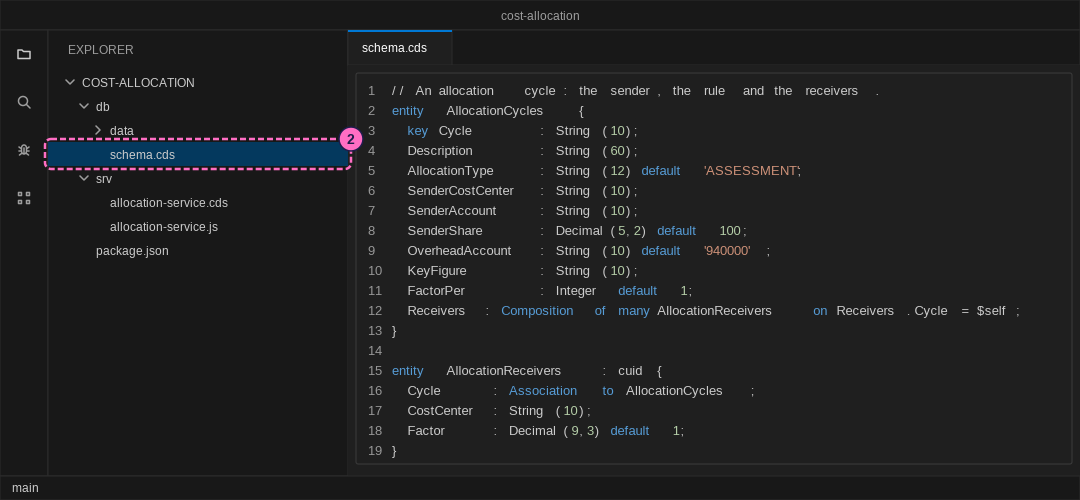
Write the allocation rules
-
Create
srv/allocation-service.cds. It exposes the entities as an OData service and adds three things.CostCenterBalancesis a view that adds up the lines per cost center and account.runAllocationis an action that runs a cycle for one fiscal year and period.trialBalanceis a function that takes a time frame and returns the trial balance.using { sap.guide.costalloc as db } from '../db/schema'; service AllocationService { @readonly entity CostCenters as projection on db.CostCenters; @readonly entity GLAccounts as projection on db.GLAccounts; entity KeyFigures as projection on db.KeyFigures; entity AllocationCycles as projection on db.AllocationCycles; entity AllocationReceivers as projection on db.AllocationReceivers; entity JournalLines as projection on db.JournalLines; // The balance of every cost center on every account, added up from the lines. @readonly entity CostCenterBalances as select from db.JournalLines { key CostCenter, key GLAccount, sum(AmountInCompanyCodeCurrency) as Balance : Decimal(15,2) } where CostCenter is not null group by CostCenter, GLAccount; // tag::actions[] type RunLine { CostCenter : String(10); GLAccount : String(10); Amount : Decimal(15,2); } type RunResult { Cycle : String(10); PostingDate : Date; Released : Decimal(15,2); Lines : many RunLine; } action runAllocation(Cycle : String(10), FiscalYear : String(4), FiscalPeriod : String(3)) returns RunResult; type TrialBalanceRow { GLAccount : String(10); Name : String(40); StartingBalance : Decimal(15,2); Debits : Decimal(15,2); Credits : Decimal(15,2); EndingBalance : Decimal(15,2); } type TrialBalanceResult { Rows : many TrialBalanceRow; TotalStartingBalance : Decimal(15,2); TotalDebits : Decimal(15,2); TotalCredits : Decimal(15,2); TotalEndingBalance : Decimal(15,2); Balanced : Boolean; } function trialBalance(FromPostingDate : Date, ToPostingDate : Date) returns TrialBalanceResult; // end::actions[] } -
Create
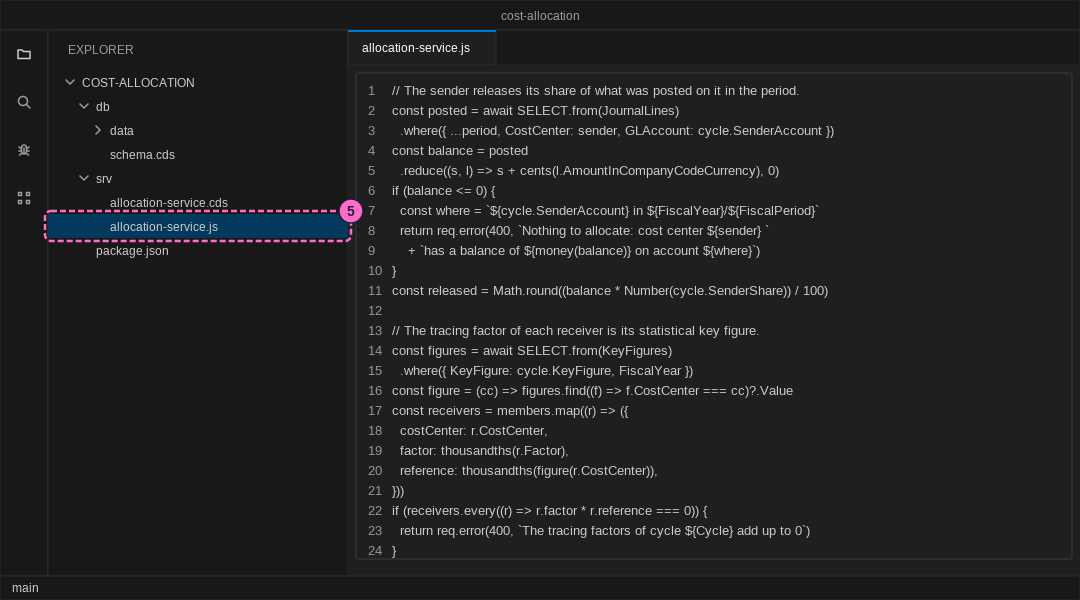
srv/allocation-service.js. CAP loads it next to the service of the same name. The functionsplitshares the released cents out; it works in whole cents and thousandths, so every sum is exact. The handler ofrunAllocationfollows the steps of an allocation: it removes the lines of an earlier run of the same cycle and period (SAP’s help says that a repeated period-based allocation reverses and overwrites the line items), takes the sender’s balance and its share, reads the tracing factor of each receiver, splits the amount, and posts the lines with the posting date of the last day of the month, as the help says for an actual allocation. An assessment posts on the overhead account, a distribution on the original account. The handler oftrialBalanceadds up the lines per account: the lines before the start date make the starting balance, the later debits and credits within the time frame make the movement.import cds from '@sap/cds' // The rules of the teaching model. Amounts are handled as whole cents and // tracing factors as thousandths, so every sum is exact. const cents = (amount) => Math.round(Number(amount) * 100) const money = (c) => (c / 100).toFixed(2) const thousandths = (x) => Math.round(Number(x ?? 0) * 1000) // tag::share[] // Splits `released` cents among the receivers by weighted reference, // (Factor / FactorPer) * tracing factor, as the SAP help page on receiver // weighting factors describes. FactorPer is the same for every receiver, so // it cancels out of the proportion. Left-over cents go to the largest remainder. export function split(released, receivers) { const weights = receivers.map((r) => BigInt(r.factor) * BigInt(r.reference)) const total = weights.reduce((a, w) => a + w, 0n) const whole = BigInt(released) const parts = weights.map((w) => (whole * w) / total) const rest = weights.map((w) => (whole * w) % total) let left = Number(whole - parts.reduce((a, p) => a + p, 0n)) const order = rest.map((_, i) => i) .sort((a, b) => Number(rest[b] - rest[a]) || a - b) for (const i of order) if (left-- > 0) parts[i] += 1n return parts.map(Number) } // end::share[] const lastDay = (year, period) => { const month = String(Number(period)).padStart(2, '0') const day = new Date(Date.UTC(Number(year), Number(period), 0)).getUTCDate() return `${year}-${month}-${day}` } export default class AllocationService extends cds.ApplicationService { init() { const { AllocationCycles, AllocationReceivers, KeyFigures } = this.entities const { JournalLines, GLAccounts } = this.entities // tag::run[] this.on('runAllocation', async (req) => { const { Cycle, FiscalYear, FiscalPeriod } = req.data const month = Number(FiscalPeriod) if (!(month >= 1 && month <= 12)) { return req.error(400, `Fiscal period ${FiscalPeriod} must be 001 to 012`) } const cycle = await SELECT.one.from(AllocationCycles, Cycle) if (!cycle) return req.error(404, `Allocation cycle ${Cycle} does not exist`) const members = await SELECT.from(AllocationReceivers) .where({ Cycle_Cycle: Cycle }) const period = { FiscalYear, FiscalPeriod } const document = `ALLOC-${Cycle}-${FiscalYear}-${FiscalPeriod}` const sender = cycle.SenderCostCenter // Running a cycle again in the same period replaces its earlier lines. await DELETE.from(JournalLines) .where({ Source: 'ALLOCATION', Document: document }) // The sender releases its share of what was posted on it in the period. const posted = await SELECT.from(JournalLines) .where({ ...period, CostCenter: sender, GLAccount: cycle.SenderAccount }) const balance = posted .reduce((s, l) => s + cents(l.AmountInCompanyCodeCurrency), 0) if (balance <= 0) { const where = `${cycle.SenderAccount} in ${FiscalYear}/${FiscalPeriod}` return req.error(400, `Nothing to allocate: cost center ${sender} ` + `has a balance of ${money(balance)} on account ${where}`) } const released = Math.round((balance * Number(cycle.SenderShare)) / 100) // The tracing factor of each receiver is its statistical key figure. const figures = await SELECT.from(KeyFigures) .where({ KeyFigure: cycle.KeyFigure, FiscalYear }) const figure = (cc) => figures.find((f) => f.CostCenter === cc)?.Value const receivers = members.map((r) => ({ costCenter: r.CostCenter, factor: thousandths(r.Factor), reference: thousandths(figure(r.CostCenter)), })) if (receivers.every((r) => r.factor * r.reference === 0)) { return req.error(400, `The tracing factors of cycle ${Cycle} add up to 0`) } const shares = split(released, receivers) // Assessment posts on the overhead account, distribution on the original one. const distribution = cycle.AllocationType === 'DISTRIBUTION' const account = distribution ? cycle.SenderAccount : cycle.OverheadAccount const postingDate = lastDay(FiscalYear, FiscalPeriod) const lines = [{ CostCenter: sender, Amount: money(-released) }] receivers.forEach((r, i) => { if (shares[i]) { lines.push({ CostCenter: r.costCenter, Amount: money(shares[i]) }) } }) await INSERT.into(JournalLines).entries(lines.map((l) => ({ Document: document, PostingDate: postingDate, ...period, GLAccount: account, CostCenter: l.CostCenter, AmountInCompanyCodeCurrency: l.Amount, Text: cycle.Description, Source: 'ALLOCATION', }))) return { Cycle, PostingDate: postingDate, Released: money(released), Lines: lines.map((l) => ({ ...l, GLAccount: account })), } }) // end::run[] // tag::trial[] this.on('trialBalance', async (req) => { const { FromPostingDate: from, ToPostingDate: to } = req.data if (!from || !to || from > to) { return req.error(400, 'Give FromPostingDate and ToPostingDate, from first') } const lines = await SELECT.from(JournalLines) .where({ PostingDate: { '<=': to } }) const accounts = await SELECT.from(GLAccounts) const name = (id) => accounts.find((a) => a.GLAccount === id)?.Name ?? '' const sums = {} for (const l of lines) { const s = (sums[l.GLAccount] ??= { start: 0, debit: 0, credit: 0 }) const c = cents(l.AmountInCompanyCodeCurrency) if (l.PostingDate < from) s.start += c else if (c > 0) s.debit += c else s.credit -= c } const Rows = Object.keys(sums).sort().map((id) => { const { start, debit, credit } = sums[id] return { GLAccount: id, Name: name(id), StartingBalance: money(start), Debits: money(debit), Credits: money(credit), EndingBalance: money(start + debit - credit), } }) const sum = (key) => Rows.reduce((s, r) => s + cents(r[key]), 0) const [start, debit, credit, end] = ['StartingBalance', 'Debits', 'Credits', 'EndingBalance'].map(sum) return { Rows, TotalStartingBalance: money(start), TotalDebits: money(debit), TotalCredits: money(credit), TotalEndingBalance: money(end), Balanced: debit === credit && end === 0, } }) // end::trial[] return super.init() } }Source: Receiver Weighting Factors (SAP Help Portal, on premise), Overhead Allocation (SAP Help Portal, on premise)
Start the service and run the allocation
-
In the terminal, in the project folder, start the server. The log shows the six CSV files loaded and
AllocationServiceserved at/odata/v4/allocation; the lineimpl: 'srv/allocation-service.js'shows that CAP found your rules. Your log may show one more line about bindings, which you can ignore.cds watch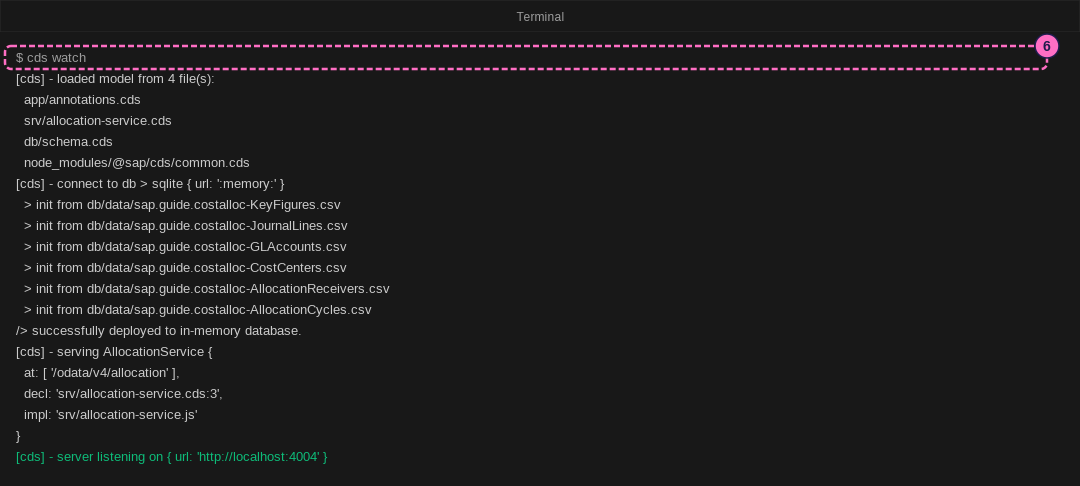
-
Open a second terminal in the project folder and read the balance of every cost center. Only
EX-RENThas a balance: the rent of 1,000.00 EUR, on account455000. Administration, sales and production carry nothing yet, so they look free of rent.curl -s http://localhost:4004/odata/v4/allocation/CostCenterBalances
-
Create the folder
httpand in it the filerun-allocation.json. It names the cycle and the period that the action runs for.{ "Cycle": "RENT", "FiscalYear": "2026", "FiscalPeriod": "003" }Post it. The option
--jsonsets the content type, and-wprints the status after the answer:curl -s -w "\nHTTP %{http_code}\n" --json @http/run-allocation.json http://localhost:4004/odata/v4/allocation/runAllocationThe answer is
HTTP 200. The cycle released 1,000.00, and the answer lists four lines on account940000: a credit of -1,000.00 forEX-RENTand debits of 200.00 forEX-ADM, 300.00 forEX-SALESand 500.00 forEX-PROD. The posting date is2026-03-31, the last day of the month.Check the split by hand. The tracing factors are the floor areas, 120 + 180 + 300 = 600 square meters, so
EX-ADMgets 1,000.00 x 120 / 600 = 200.00,EX-SALESgets 1,000.00 x 180 / 600 = 300.00 andEX-PRODgets 1,000.00 x 300 / 600 = 500.00. With for the amount that the sender releases and for the tracing factor of receiver , the rule isThe receivers are debited with exactly what the sender is credited with, so the allocation changes where the cost sits, not how much cost there is.

Read the balances and the trial balance
-
Create
app/annotations.cds. The first part gives the fields their labels, the second builds the list report: its title and its three columns.using AllocationService as service from '../srv/allocation-service'; // Fiori elements list report of the cost center balances. annotate service.CostCenterBalances with { CostCenter @title : 'Cost Center'; GLAccount @title : 'G/L Account'; Balance @title : 'Balance in Company Code Currency'; }; annotate service.CostCenterBalances with @( UI.HeaderInfo : { TypeName : 'Cost Center Balance', TypeNamePlural : 'Cost Center Balances' }, UI.LineItem : [ { Value : CostCenter }, { Value : GLAccount }, { Value : Balance } ] ); -
Open http://localhost:4004/$fiori-preview/AllocationService/CostCenterBalances?sap-language=EN#preview-app. The list report Cost Center Balances (5) shows what the allocation did.
EX-RENTstill has the rent of 1,000.00 on455000and now also -1,000.00 on940000, so the sender nets to zero overall. Administration, sales and production carry 200.00, 500.00 and 300.00 on940000, and455000no longer shows the rent on them: with an assessment the receivers see only the overhead account. The preview needs an internet connection, because it loads SAPUI5 from the SAP content network.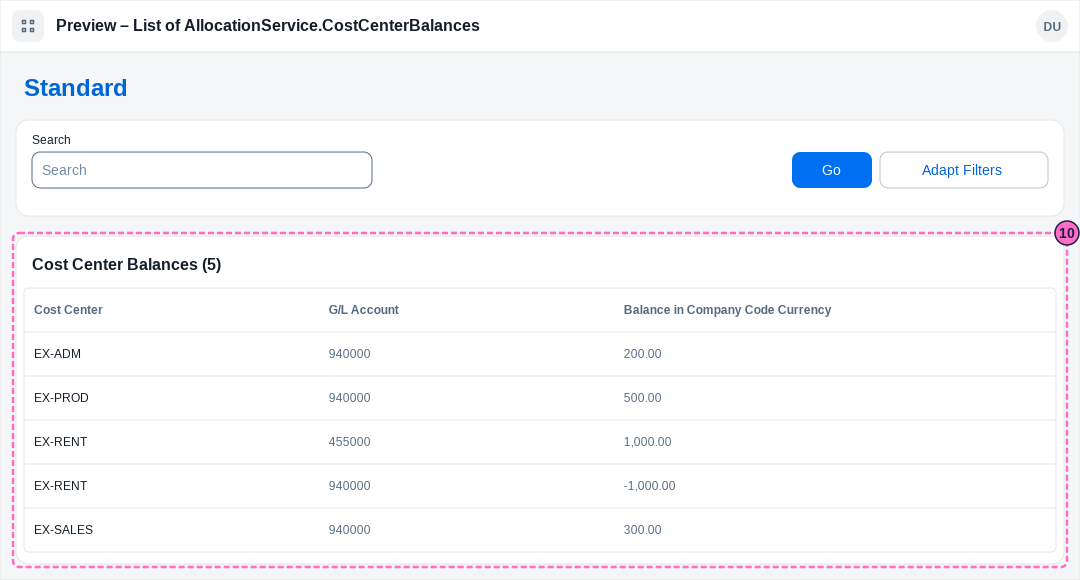
-
Read the trial balance of March. The function takes a time frame, as the SAP view does with its two date parameters. The answer is one row per G/L account that has a balance or a movement, with
StartingBalance,Debits,CreditsandEndingBalance, then the totals andBalanced. The quotes keep the shell from reading the brackets and the commas.curl -s "http://localhost:4004/odata/v4/allocation/trialBalance(FromPostingDate=2026-03-01,ToPostingDate=2026-03-31)"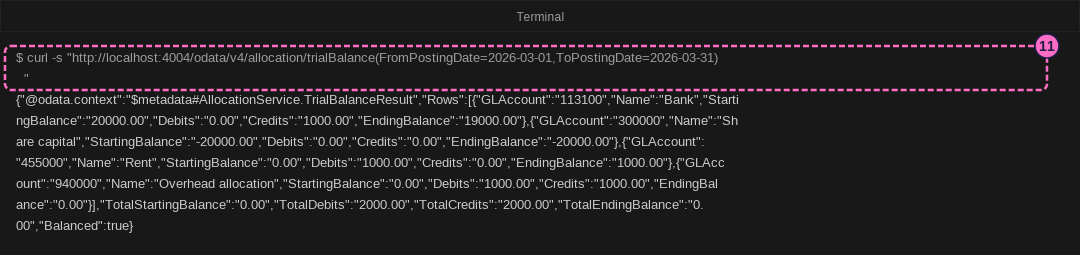
-
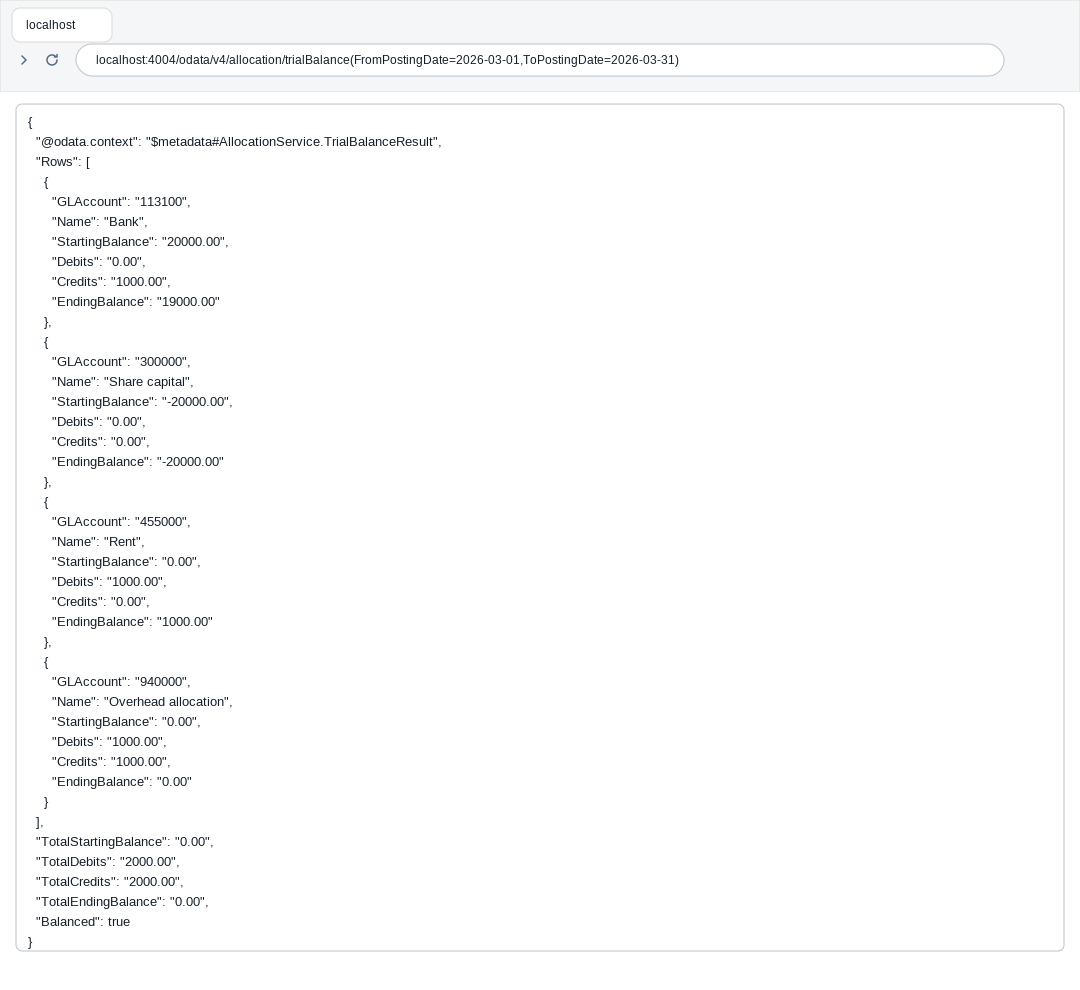
Open http://localhost:4004/odata/v4/allocation/trialBalance(FromPostingDate=2026-03-01,ToPostingDate=2026-03-31) in the browser to read the same answer as text with one value per line, as the figure under What you build shows it; a browser’s pretty-print option gives you the indentation. The bank starts the month with 20,000.00, pays the rent (credits 1,000.00) and ends with 19,000.00. The share capital stays at -20,000.00, and the rent account has debits of 1,000.00 and ends with 1,000.00. The overhead allocation account
940000has debits of 1,000.00 (the three receivers) and credits of 1,000.00 (the sender) and ends with 0.00: the assessment moved cost between cost centers without adding any.TotalDebitsandTotalCreditsare both 2,000.00,TotalEndingBalanceis 0.00 andBalancedistrue.Check it by hand. Each ending balance is the starting balance plus the debits minus the credits, for the bank 20,000.00 + 0.00 - 1,000.00 = 19,000.00. Adding the four accounts in the order of the answer, the debits and the credits of the month are
so the debits equal the credits, and the ending balances add up to zero:
The trial balance is the proof that no line was posted without its counter line. This model adds up the lines of the journal when you ask, as the SAP view does: a trial balance is not stored.
Check the result
-
The run of step 8 answers
HTTP 200withReleased1000.00 and the lines 200.00, 300.00 and 500.00. -
The list report shows five rows, and
EX-RENThas 1,000.00 on455000and -1,000.00 on940000. -
The trial balance of March has
TotalDebitsandTotalCreditsof 2000.00 andBalancedtrue. The trial balance of April (FromPostingDate=2026-04-01,ToPostingDate=2026-04-30) has no debits and no credits, and its starting balances are the ending balances of March.
Variations
The database lives in memory. Stop cds watch with Ctrl+C and start it again between the variations, so that each one starts from the CSV files.
-
Release only half of the rent. Run the cycle once, as in step 8. Then create
http/share-50.jsonwith the content{ "SenderShare": 50 }, change the cycle, and run it again:curl -s -X PATCH --json @http/share-50.json "http://localhost:4004/odata/v4/allocation/AllocationCycles('RENT')" curl -s --json @http/run-allocation.json http://localhost:4004/odata/v4/allocation/runAllocationThe second run replaces the lines of the first. It releases 500.00 and credits
EX-RENTwith -500.00, and the receivers get 100.00, 150.00 and 250.00, since 500.00 x 120 / 600 = 100.00. The other 500.00 stays on the sender. The trial balance of March now shows debits and credits of 500.00 on940000(not 1,500.00, because the first lines were replaced),TotalDebitsandTotalCreditsof 1500.00, andBalancedtrue. -
Distribute instead of assess. Create
http/distribution.jsonwith{ "AllocationType": "DISTRIBUTION" }and send it with the samecurl -X PATCHcommand, then run the cycle. The four lines now carry account455000. In the list reportEX-ADMshows 200.00 on455000, so each receiver still sees that the cost is rent, andEX-RENTends with 0.00 on455000. This is the difference that the reference page describes: distribution keeps the original account, assessment hides it behind the overhead account. -
Change a tracing factor so that the shares no longer divide evenly. Create
http/key-figure-area.jsonwith{ "Value": 125 }and change the floor area ofEX-ADM, then run the cycle:curl -s -X PATCH --json @http/key-figure-area.json "http://localhost:4004/odata/v4/allocation/KeyFigures(CostCenter='EX-ADM',KeyFigure='AREA',FiscalYear='2026')"The areas now add up to 125 + 180 + 300 = 605 square meters, and 1,000.00 x 125 / 605 = 206.61157 EUR, 1,000.00 x 180 / 605 = 297.52066 EUR and 1,000.00 x 300 / 605 = 495.86777 EUR. In whole cents these are 20,661.157, 29,752.066 and 49,586.777, which round down to 20,661, 29,752 and 49,586 and add up to 99,999 cents, one cent short. The model gives the left-over cent to the receiver with the largest remainder,
EX-PROD, and the answer shows 206.61, 297.52 and 495.87, which add up to 1,000.00. That rule is this model’s own choice; the SAP help pages used here do not say how SAP rounds. -
Weight a receiver. The Receiver Weighting Factors page of the SAP help has an example: 500 from one sender, tracing factors of 200, 200 and 300 employees, weighting factors 20, 30 and 50 and a Factor Per of 100. The weighted reference of a receiver is , with weighting factor , divisor and tracing factor , and the amount is . With numbers, (20 / 100) x 200 = 40, (30 / 100) x 200 = 60 and (50 / 100) x 300 = 150, which add up to 250, so the receivers get 500 x 40 / 250 = 80, 500 x 60 / 250 = 120 and 500 x 150 / 250 = 300. The model implements the same two calculations through the field
Factorof a receiver and the fieldFactorPerof the cycle, and the testthe SAP help example of receiver weighting factorsintest/allocation.test.jsreproduces those three amounts. The SAP page also says that a receiver is excluded by setting its factor to 0; the testa weighting factor of 0 excludes a receivershows the model giving 400.00 and 600.00 whenEX-PRODhas the factor 0. -
Break the books on purpose. Create
http/lone-line.jsonwith a single line (a debit of 100.00 on455000forEX-ADM, dated 2026-03-20, without a counter line) and post it toJournalLines:{ "Document": "TEST-1", "PostingDate": "2026-03-20", "FiscalYear": "2026", "FiscalPeriod": "003", "GLAccount": "455000", "CostCenter": "EX-ADM", "AmountInCompanyCodeCurrency": 100.00, "Text": "A single line without its counter line" }curl -s -o /dev/null -w "HTTP %{http_code}\n" --json @http/lone-line.json http://localhost:4004/odata/v4/allocation/JournalLinesThe answer is
HTTP 201: the model does not check balance when a line is posted, unlike the ledger of the first finance guide. Read the trial balance of March again.TotalDebitsis 1100.00,TotalCreditsis 1000.00,TotalEndingBalanceis 100.00 andBalancedisfalse. The difference of 100.00 is exactly the lone line, and the account with the odd balance,455000, shows where to look.
What can go wrong
| Symptom | Cause | Fix |
|---|---|---|
|
The model allocates what was posted on the sender in the fiscal period of the run, and nothing was posted on |
Run the cycle for a period that has a posting on the sender, here |
|
No receiver has a tracing factor: the key figure of the cycle has no row in |
Make |
|
The model uses the calendar year with 12 monthly periods. |
Use a period from |
|
The |
Use |
|
A date is missing, or the start date is later than the end date. |
Write the time frame as |
|
A line was posted without its counter line, so debits and credits differ. |
Find the account with the odd ending balance, then post the missing line or remove the wrong one. |
Clean up
Press Ctrl+C in the terminal that runs cds watch. The database lives only in memory, so everything you posted is gone at the next start; the CSV files bring back the opening balance, the rent and the cycle.
Where to go next
-
Previous guides: Your First CAP Service, Model a Domain and Add Custom Logic in CAP and Post Balanced Journal Entries in a Teaching Ledger.
-
Reference: Allocations: Assessment, Distribution and Activity Allocation.
-
Reference: Cost Centers and Internal Orders.
-
Reference: Financial Reporting and Analytics.