SAP Finance Guide: Follow a Purchase and a Sale through the Ledger
|
This content was generated with the assistance of AI and should be verified against the official documentation before being relied on in production. |
Checked on 2026-11-13 against CAP Node.js 10.2 (@sap/cds 10.2.2, @sap/cds-dk 10.2.1, @cap-js/cds-test 1.0.2), the Fiori elements preview of cds watch (SAPUI5 1.145.0), curl 8.7 and Node.js 24.21.
What you build
This is a teaching model built with CAP. It is not SAP S/4HANA or SAP SuccessFactors and does not reproduce their screens.
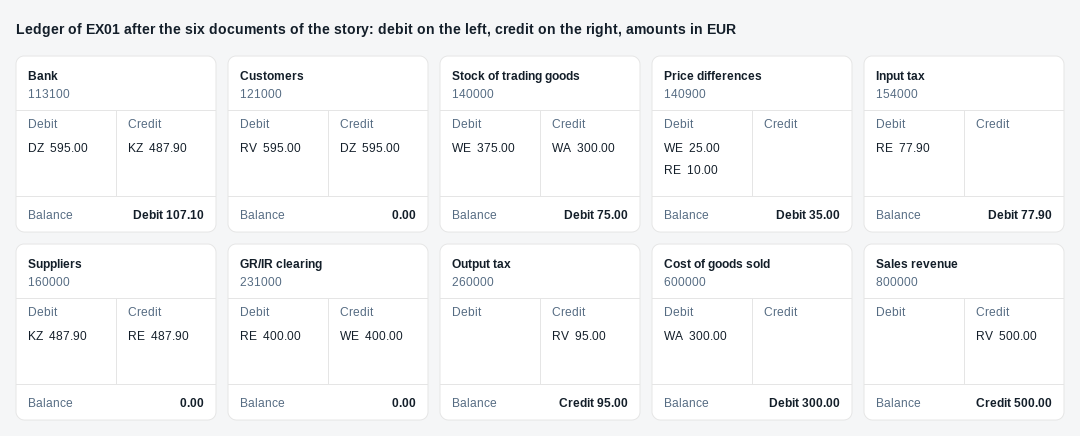
You build a small ledger for the company code EX01 of Example Trading Co. (euro, ledger 0L) with six actions, one for each business event of a purchase and a sale: a goods receipt, a supplier invoice, a payment to the supplier, a sale (the goods issue and the billing document), a payment from the customer, and the clearing of open items. No action receives a G/L account. Each one builds its lines from a transaction key such as BSX (stock) or WRX (GR/IR clearing), and a table of account determination turns the key into the account, the way Account Determination and Automatic Postings describes. You buy 50 pieces, receive them, get the invoice and pay it, sell 40 of them, get paid, clear the open items that add up to zero, and read the ledger as T-accounts.
Before you start
-
No account is needed: the CAP tools and curl install without signing in. Installing
@sap/cds-dkmeans accepting the SAP Developer License Agreement, version 3.2, which the lab README names. -
Do the guides Your First CAP Service (it explains
cds init, CDS files, CSV data andcds watch) and Post Balanced Journal Entries in a Teaching Ledger first. This guide uses the same sign convention: a debit is a positive amount and a credit a negative one. -
Read the pages that the model copies: Accounts Payable (goods receipt, invoice, GR/IR clearing and payment), Accounts Receivable, Dunning and Credit Management (order to cash), Open Item Management and Clearing and Account Determination and Automatic Postings.
-
You need curl 7.82 or newer, which has the option
--json.curl --versionprints the version. -
The names.
CompanyCode,Ledger,GLAccountandAmountInCompanyCodeCurrencyare element names of the SAP viewI_JournalEntryItemBasic, as in the first finance guide. The transaction keysBSX,PRD,WRXandGBBand the account keyERLare the ones that the account determination page names from SAP pages. The keysINTAX,OUTTAX,VENDOR,CUSTOMERandBANK, the document type codesWE,RE,WAandRV(KZandDZare listed on Journal Entries, Document Types and Posting Keys), the entity names, the account numbers and the purchase order, material, supplier and customer codes are this model’s own. All codes and amounts are made up, and the tax rate of 19 percent is illustrative. -
The figures are drawings of the editor, the terminal, the browser and the Fiori page, not screenshots. A highlighted box with a number marks the file, the command or the page part of the step with the same number.
Steps
Create the project and the model
-
Create a CAP project named
ledger-postingsand install it, as in the first guide:cds init ledger-postings --nodejs cd ledger-postings npm install -
Create
db/schema.cds.DocumentsandDocumentItemshold the postings: a document is the posting of one business event, and its lines have the keysDocumentandItemNumber. Every line carries the transaction key it came from, the G/L account, and, for a supplier or customer line, the partner.ClearingDocumentandClearingDatestay empty until the line is cleared.GLAccountssays which accounts are managed with open items, andAccountDeterminationis the table that turns a key into an account.MaterialsandPurchaseOrdersare the master data of the purchase.namespace sap.guide.ledgerpostings; // A teaching model of postings that follow business events, not SAP S/4HANA. // CompanyCode, Ledger, GLAccount and AmountInCompanyCodeCurrency are element // names of the SAP view I_JournalEntryItemBasic; the other names are our own. entity GLAccounts { key Account : String(10); Name : String(40); OpenItemManaged : Boolean; } // Which G/L account a transaction key posts to. ValuationClass is '-' for a // key that does not depend on it (our own convention). entity AccountDetermination { key TransactionKey : String(10); key ValuationClass : String(4); GLAccount : String(10); } entity Materials { key ID : String(10); Name : String(40); ValuationClass : String(4); StandardPrice : Decimal(15,2); StockQuantity : Integer default 0; } entity PurchaseOrders { key ID : String(10); Supplier : String(10); Material : Association to Materials; Quantity : Integer; Price : Decimal(15,2); ReceivedQuantity : Integer default 0; InvoicedQuantity : Integer default 0; } // An accounting document: the posting of one business event. entity Documents { key DocumentNumber : String(10); DocumentType : String(2); CompanyCode : String(4) default 'EX01'; Ledger : String(2) default '0L'; PostingDate : Date; Description : String(60); Items : Composition of many DocumentItems on Items.Document = $self; } // One line. A debit is a positive amount and a credit a negative amount. // A line of an open-item-managed account is open until it is cleared. entity DocumentItems { key Document : Association to Documents; key ItemNumber : Integer; TransactionKey : String(10); GLAccount : String(10); ProfitCenter : String(10); Partner : String(10); Reference : String(20); AmountInCompanyCodeCurrency : Decimal(15,2); ClearingDocument : String(10); ClearingDate : Date; } -
Create the four CSV files in
db/data. The G/L accounts are the ten that the story uses. The accounts withtrue(customers, suppliers and GR/IR clearing) are managed with open items. In the determination table the keysBSX,PRD,WRXandGBBdepend on the valuation class3100of the material, and the other keys do not (-). The materialM-100has a standard price of 7.50 EUR and no stock. The purchase orderPO-1orders 50 pieces from the supplierV-1000at 8.00 EUR.Account,Name,OpenItemManaged 113100,Bank,false 121000,Customers,true 140000,Stock of trading goods,false 140900,Price differences,false 154000,Input tax,false 160000,Suppliers,true 231000,GR/IR clearing,true 260000,Output tax,false 600000,Cost of goods sold,false 800000,Sales revenue,falseTransactionKey,ValuationClass,GLAccount BSX,3100,140000 PRD,3100,140900 WRX,3100,231000 GBB,3100,600000 INTAX,-,154000 VENDOR,-,160000 BANK,-,113100 CUSTOMER,-,121000 ERL,-,800000 OUTTAX,-,260000ID,Name,ValuationClass,StandardPrice,StockQuantity M-100,Trading good,3100,7.50,0ID,Supplier,Material_ID,Quantity,Price,ReceivedQuantity,InvoicedQuantity PO-1,V-1000,M-100,50,8.00,0,0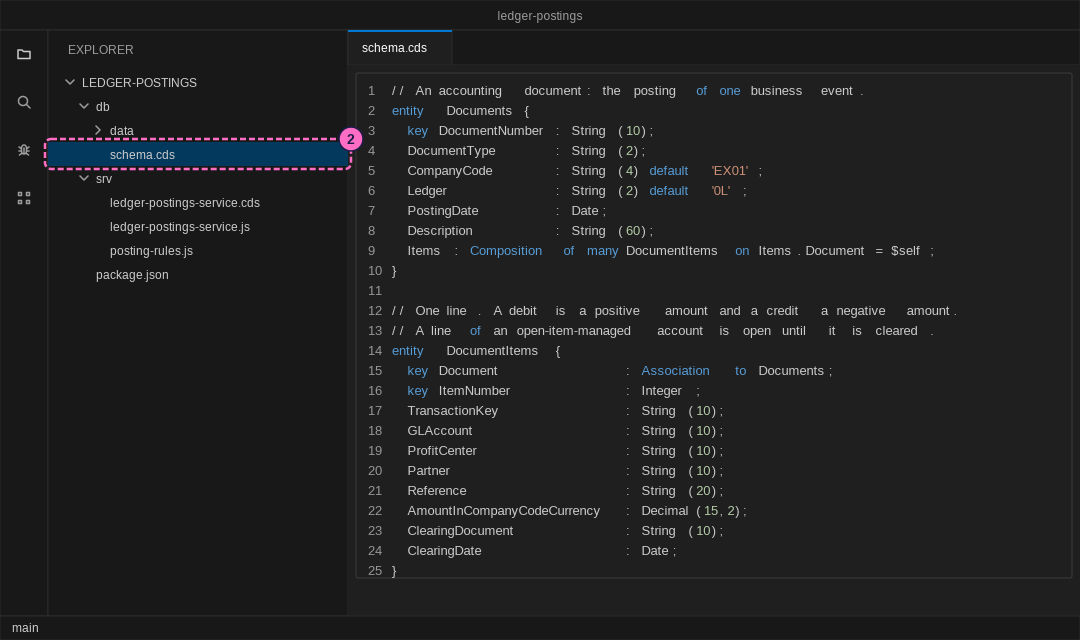
Write the posting rules
-
Create
srv/ledger-postings-service.cds. The entities are read-only: documents come into being only through the actions.AccountBalancesandOpenItemsare views that add up the lines and list the open ones. The six actions take no G/L account.using { sap.guide.ledgerpostings as db } from '../db/schema'; service LedgerPostingsService { @readonly entity Documents as projection on db.Documents; @readonly @cds.redirection.target entity DocumentItems as projection on db.DocumentItems; @readonly entity GLAccounts as projection on db.GLAccounts; @readonly entity Materials as projection on db.Materials; @readonly entity PurchaseOrders as projection on db.PurchaseOrders; @readonly entity AccountDetermination as projection on db.AccountDetermination; // Debits, credits and balance of every account (a debit balance is positive). @readonly entity AccountBalances as select from db.DocumentItems { key GLAccount, sum(case when AmountInCompanyCodeCurrency > 0 then AmountInCompanyCodeCurrency else 0 end) as Debits : Decimal(15,2), sum(case when AmountInCompanyCodeCurrency < 0 then -AmountInCompanyCodeCurrency else 0 end) as Credits : Decimal(15,2), sum(AmountInCompanyCodeCurrency) as Balance : Decimal(15,2) } group by GLAccount; // The lines of open-item-managed accounts that are not cleared yet. @readonly entity OpenItems as select from db.DocumentItems as i inner join db.GLAccounts as a on a.Account = i.GLAccount { key i.Document.DocumentNumber as DocumentNumber, key i.ItemNumber, i.GLAccount, i.Partner, i.Reference, i.AmountInCompanyCodeCurrency } where i.ClearingDocument is null and a.OpenItemManaged = true; type Cleared { ClearingDocument : String(10); ClearedItems : Integer; } action postGoodsReceipt(PurchaseOrder : String(10), Quantity : Integer, PostingDate : Date) returns Documents; action postInvoiceReceipt(PurchaseOrder : String(10), Quantity : Integer, InvoicePrice : Decimal(15,2), PostingDate : Date) returns Documents; action payVendor(Document : String(10), PostingDate : Date) returns Documents; action postSale(Material : String(10), Quantity : Integer, NetPrice : Decimal(15,2), Customer : String(10), PostingDate : Date, ProfitCenter : String(10)) returns Documents; action receiveCustomerPayment(Customer : String(10), Amount : Decimal(15,2), PostingDate : Date) returns Documents; action clearOpenItems(GLAccount : String(10), Partner : String(10), Reference : String(20), ClearingDate : Date) returns Cleared; } -
Create
srv/posting-rules.js. One function per business event returns its lines as a key and an amount in cents, a debit positive and a credit negative, so that the sums are exact. The goods receipt values the stock line at the standard price and the offsetting line at the order price, and the difference goes to the price difference line. The invoice clears GR/IR at the order price and credits the supplier with the gross amount. The sale posts the goods issue (cost of goods sold against stock) and the billing document (customer against revenue and output tax).// The posting rules of the teaching ledger: one function per business event. // Each returns the lines of the document as { key, cents }, a debit positive // and a credit negative. The G/L account of a line is found later, from the // transaction key. Amounts are whole cents, so that the sums are exact. export const cents = (amount) => Math.round(Number(amount) * 100) export const money = (c) => (c / 100).toFixed(2) // An illustrative tax rate of 19 percent, the same for input and output tax. const tax = (net) => Math.round((net * 19) / 100) const nonZero = (lines) => lines.filter((line) => line.cents !== 0) // tag::goods-receipt[] // Stock at the standard price, the offsetting entry at the order price, and // the difference to the price difference account. export function goodsReceipt({ quantity, price, standardPrice }) { const stock = quantity * cents(standardPrice) const received = quantity * cents(price) return nonZero([ { key: 'BSX', cents: stock }, { key: 'PRD', cents: received - stock }, { key: 'WRX', cents: -received }, ]) } // end::goods-receipt[] // The invoice clears GR/IR at the order price. A different invoice price goes // to the price difference account. The supplier is credited with the gross. export function invoiceReceipt({ quantity, price, invoicePrice }) { const net = quantity * cents(invoicePrice) const ordered = quantity * cents(price) const inputTax = tax(net) return nonZero([ { key: 'WRX', cents: ordered }, { key: 'PRD', cents: net - ordered }, { key: 'INTAX', cents: inputTax }, { key: 'VENDOR', cents: -(net + inputTax) }, ]) } export const vendorPayment = (amount) => [ { key: 'VENDOR', cents: amount }, { key: 'BANK', cents: -amount }, ] export const customerPayment = (amount) => [ { key: 'BANK', cents: amount }, { key: 'CUSTOMER', cents: -amount }, ] export const goodsIssue = ({ quantity, standardPrice }) => [ { key: 'GBB', cents: quantity * cents(standardPrice) }, { key: 'BSX', cents: -quantity * cents(standardPrice) }, ] export function billing({ quantity, netPrice }) { const net = quantity * cents(netPrice) const outputTax = tax(net) return [ { key: 'CUSTOMER', cents: net + outputTax }, { key: 'ERL', cents: -net }, { key: 'OUTTAX', cents: -outputTax }, ] } -
Create
srv/ledger-postings-service.js. CAP loads it next to the service of the same name, andthis.onattaches a handler to each action. The functionpostis the heart of the model: it finds the account of every line inAccountDetermination, refuses a document that does not balance, numbers it and stores it with its lines.clearOpenItemsmarks open items of one account as cleared when they add up to zero, and gives them the number of the latest document that takes part as the clearing document.import cds from '@sap/cds' import * as rules from './posting-rules.js' const { cents, money } = rules const db = cds.entities('sap.guide.ledgerpostings') const { Documents, DocumentItems, AccountDetermination } = db const { Materials, PurchaseOrders } = db // These keys look their account up by the valuation class of the material. const BY_CLASS = ['BSX', 'PRD', 'WRX', 'GBB'] export default class LedgerPostingsService extends cds.ApplicationService { init() { this.on('postGoodsReceipt', goodsReceipt) this.on('postInvoiceReceipt', invoiceReceipt) this.on('payVendor', payVendor) this.on('postSale', sale) this.on('receiveCustomerPayment', customerPayment) this.on('clearOpenItems', clearOpenItems) return super.init() } } async function goodsReceipt(req) { const { PurchaseOrder, Quantity, PostingDate } = req.data const { po, material } = await order(req, PurchaseOrder) const open = po.Quantity - po.ReceivedQuantity if (Quantity > open) { return req.reject(400, `${PurchaseOrder} has only ${open} pieces open`) } const lines = rules.goodsReceipt({ quantity: Quantity, price: po.Price, standardPrice: material.StandardPrice, }) await UPDATE(PurchaseOrders, PurchaseOrder).with({ ReceivedQuantity: po.ReceivedQuantity + Quantity, }) await UPDATE(Materials, material.ID).with({ StockQuantity: material.StockQuantity + Quantity, }) const text = `Goods receipt ${PurchaseOrder}` const refs = { Reference: PurchaseOrder, Class: material.ValuationClass } return post(req, 'WE', PostingDate, text, lines, refs) } async function invoiceReceipt(req) { const { PurchaseOrder, Quantity, InvoicePrice, PostingDate } = req.data const { po, material } = await order(req, PurchaseOrder) if (Quantity > po.Quantity - po.InvoicedQuantity) { return req.reject(400, `${PurchaseOrder} has fewer pieces left to invoice`) } const lines = rules.invoiceReceipt({ quantity: Quantity, price: po.Price, invoicePrice: InvoicePrice, }) await UPDATE(PurchaseOrders, PurchaseOrder).with({ InvoicedQuantity: po.InvoicedQuantity + Quantity, }) const text = `Invoice ${PurchaseOrder}` const refs = { Reference: PurchaseOrder, Partner: po.Supplier, Class: material.ValuationClass, } return post(req, 'RE', PostingDate, text, lines, refs) } async function payVendor(req) { const { Document, PostingDate } = req.data const item = await SELECT.one.from(DocumentItems).where({ Document_DocumentNumber: Document, TransactionKey: 'VENDOR', }) if (!item) return req.reject(404, `Document ${Document} has no supplier line`) const lines = rules.vendorPayment(-cents(item.AmountInCompanyCodeCurrency)) const refs = { Reference: Document, Partner: item.Partner } return post(req, 'KZ', PostingDate, `Payment of ${Document}`, lines, refs) } async function sale(req) { const { Material, Quantity, NetPrice, Customer, PostingDate } = req.data const material = await SELECT.one.from(Materials, Material) if (!material) return req.reject(404, `Material ${Material} not found`) if (Quantity > material.StockQuantity) { const stock = `Stock of ${Material} is ${material.StockQuantity}` return req.reject(400, `${stock}, the sale needs ${Quantity}`) } await UPDATE(Materials, Material).with({ StockQuantity: material.StockQuantity - Quantity, }) const refs = { ProfitCenter: req.data.ProfitCenter ?? 'EX-RETAIL', Class: material.ValuationClass, Partner: Customer, } const issue = rules.goodsIssue({ quantity: Quantity, standardPrice: material.StandardPrice, }) await post(req, 'WA', PostingDate, `Goods issue ${Material}`, issue, refs) const bill = rules.billing({ quantity: Quantity, netPrice: NetPrice }) return post(req, 'RV', PostingDate, `Billing ${Customer}`, bill, refs) } async function customerPayment(req) { const { Customer, Amount, PostingDate } = req.data const lines = rules.customerPayment(cents(Amount)) const text = `Payment of ${Customer}` return post(req, 'DZ', PostingDate, text, lines, { Partner: Customer }) } async function order(req, id) { const po = await SELECT.one.from(PurchaseOrders, id) if (!po) return req.reject(404, `Purchase order ${id} not found`) const material = await SELECT.one.from(Materials, po.Material_ID) return { po, material } } // tag::post[] // Finds the G/L account of every line from its transaction key, checks that // the document balances, numbers it and stores it with its lines. async function post(req, type, date, text, lines, refs) { const items = [] for (const line of lines) { const ValuationClass = BY_CLASS.includes(line.key) ? refs.Class : '-' const found = await SELECT.one.from(AccountDetermination) .where({ TransactionKey: line.key, ValuationClass }) if (!found) { return req.reject(400, `No account is determined for key ${line.key}`) } items.push({ ItemNumber: items.length + 1, TransactionKey: line.key, GLAccount: found.GLAccount, ProfitCenter: ['GBB', 'ERL'].includes(line.key) ? refs.ProfitCenter : null, Partner: ['VENDOR', 'CUSTOMER'].includes(line.key) ? refs.Partner : null, Reference: refs.Reference ?? null, AmountInCompanyCodeCurrency: money(line.cents), }) } const sum = lines.reduce((total, line) => total + line.cents, 0) if (sum !== 0) return req.reject(500, `Not balanced by ${money(sum)}`) const { count } = await SELECT.one`count(*) as count`.from(Documents) const DocumentNumber = String(100000001 + count) await INSERT.into(Documents).entries({ DocumentNumber, DocumentType: type, PostingDate: date, Description: text, Items: items, }) return SELECT.one.from(Documents, DocumentNumber) } // end::post[] // tag::clear[] // Clears the open items of one account that add up to zero. The clearing // document is the number of the latest document that takes part. async function clearOpenItems(req) { const { GLAccount, Partner, Reference, ClearingDate } = req.data const where = { GLAccount, ClearingDocument: null } if (Partner) where.Partner = Partner if (Reference) where.Reference = Reference const items = await SELECT.from(DocumentItems).where(where) const amounts = items.map((i) => cents(i.AmountInCompanyCodeCurrency)) const debits = amounts.filter((c) => c > 0).reduce((t, c) => t + c, 0) const credits = -amounts.filter((c) => c < 0).reduce((t, c) => t + c, 0) if (items.length < 2 || debits !== credits) { const message = `debits ${money(debits)}, credits ${money(credits)}` return req.reject(400, `Items do not add up to zero: ${message}`) } const numbers = items.map((i) => i.Document_DocumentNumber) const ClearingDocument = numbers.sort().at(-1) await UPDATE(DocumentItems).set({ ClearingDocument, ClearingDate }).where(where) return { ClearingDocument, ClearedItems: items.length } } // end::clear[]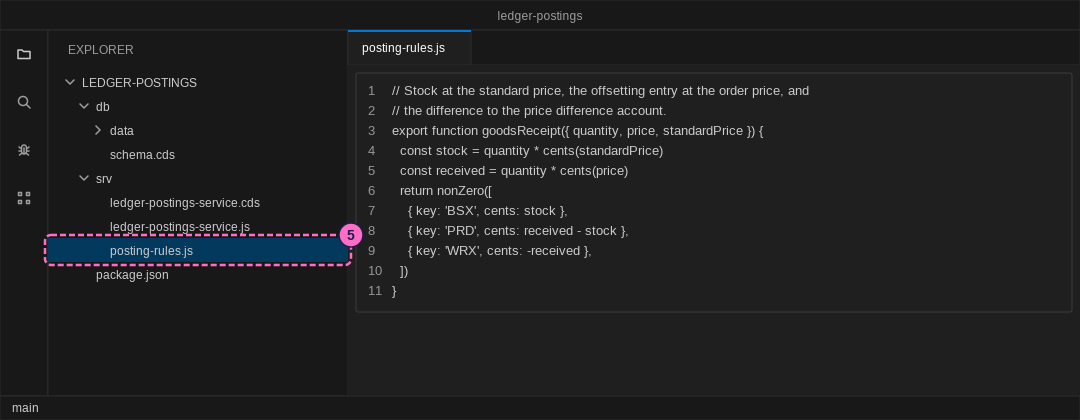
Follow the purchase
-
In the terminal, in the project folder, start the server. The log shows the four CSV files loaded and
LedgerPostingsServiceserved at/odata/v4/ledger-postings.cds watch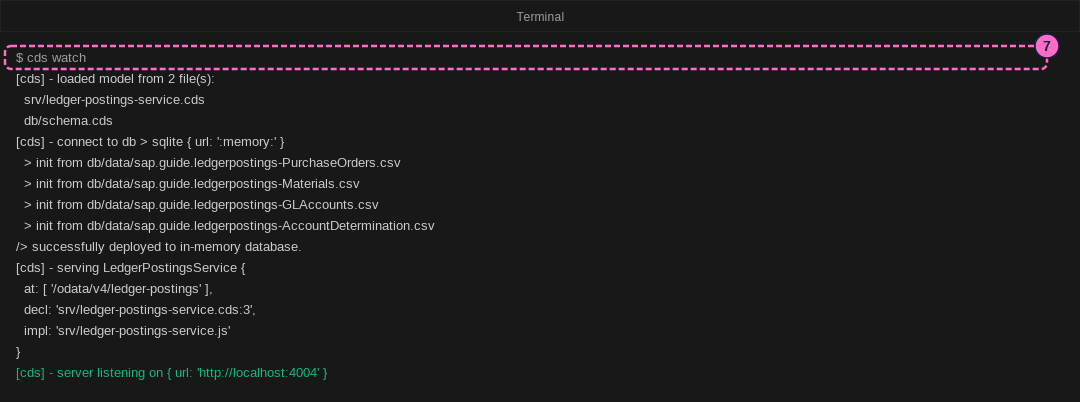
-
Create the folder
httpand in itgoods-receipt.json. It receives all 50 pieces ofPO-1.{ "PurchaseOrder": "PO-1", "Quantity": 50, "PostingDate": "2026-03-03" }Open a second terminal in the project folder, set the address of the service once, and post the goods receipt. The option
-w "\n"ends the answer with a line break. The answer is the header of the new document, number100000001, typeWE.export BASE=http://localhost:4004/odata/v4/ledger-postings curl -sw "\n" --json @http/goods-receipt.json $BASE/postGoodsReceipt
-
Read the lines of the document. Open http://localhost:4004/odata/v4/ledger-postings/DocumentItems?$select=TransactionKey,GLAccount,AmountInCompanyCodeCurrency in the browser. Three lines are there, and you typed no account:
BSXfound140000,PRDfound140900andWRXfound231000.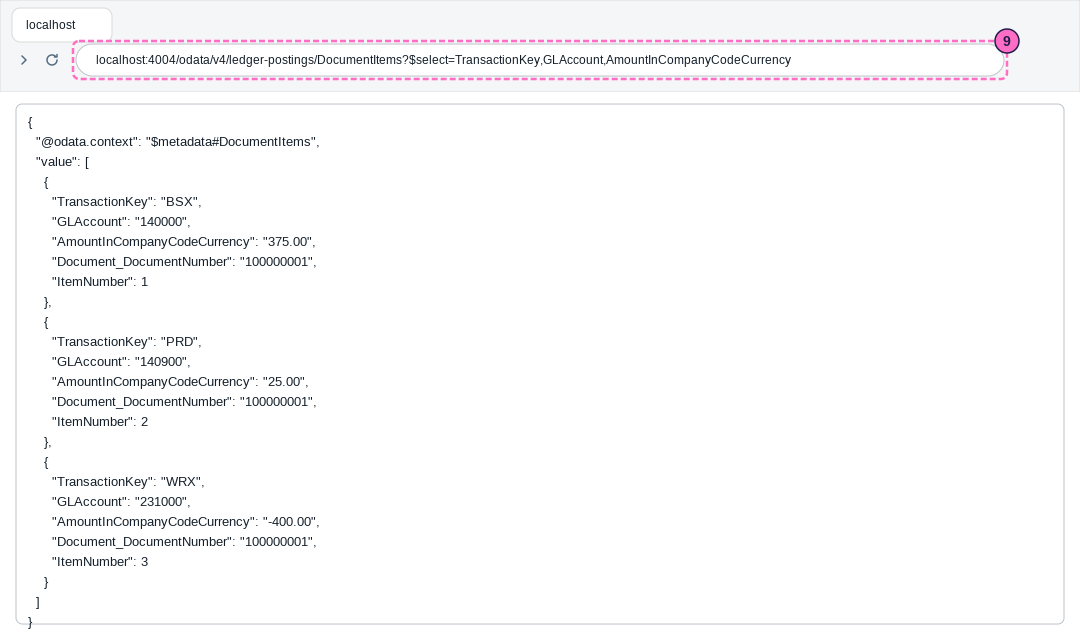
-
Create
http/invoice-receipt.json, the supplier’s invoice for the 50 pieces at 8.20 EUR, and post it:{ "PurchaseOrder": "PO-1", "Quantity": 50, "InvoicePrice": 8.20, "PostingDate": "2026-03-10" }curl -sw "\n" --json @http/invoice-receipt.json $BASE/postInvoiceReceiptThe answer is document
100000002, typeRE. -
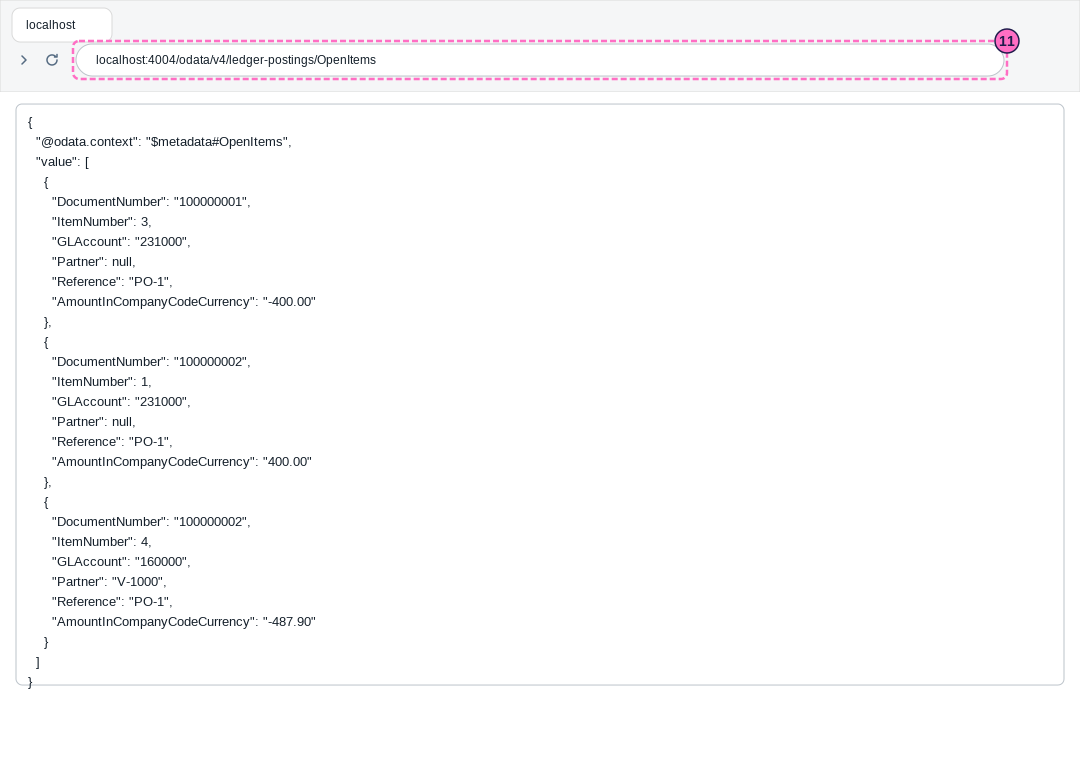
Open http://localhost:4004/odata/v4/ledger-postings/OpenItems in the browser. The three open items are the GR/IR line of the goods receipt (-400.00), the GR/IR line of the invoice (400.00) and the supplier line of the invoice (-487.90). The stock, price difference and tax lines are on accounts that are not managed with open items, so they are not listed.
-
Create
http/clear-gr-ir.jsonand clear the GR/IR items ofPO-1. They add up to zero, so both are cleared, and the answer names the clearing document100000002, the latest document that takes part, and 2 cleared items.{ "GLAccount": "231000", "Reference": "PO-1", "ClearingDate": "2026-03-10" }curl -sw "\n" --json @http/clear-gr-ir.json $BASE/clearOpenItems -
Create
http/pay-vendor.jsonand pay the invoice document100000002. The payment is document100000003, typeKZ: a debit on the supplier account and a credit on the bank.{ "Document": "100000002", "PostingDate": "2026-03-20" }curl -sw "\n" --json @http/pay-vendor.json $BASE/payVendor -
Create
http/clear-suppliers.jsonand clear the supplier account ofV-1000. The invoice item (-487.90) and the payment item (487.90) are cleared with the clearing document100000003.{ "GLAccount": "160000", "Partner": "V-1000", "ClearingDate": "2026-03-20" }curl -sw "\n" --json @http/clear-suppliers.json $BASE/clearOpenItems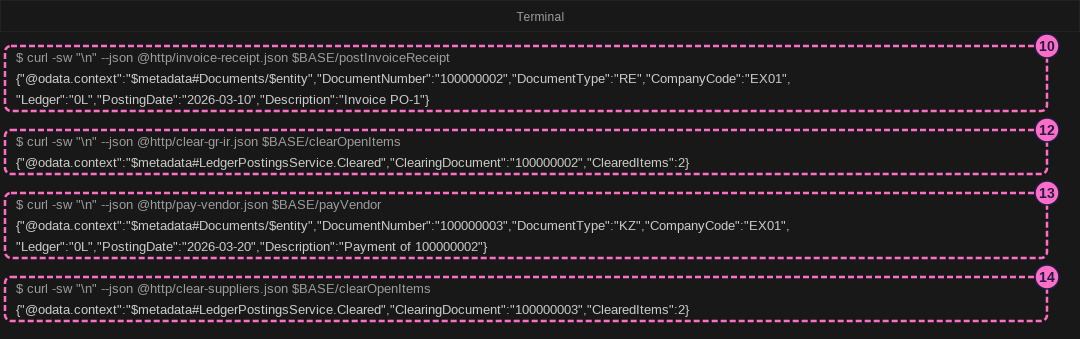
Follow the sale
-
Create
http/sale.jsonand post the sale of 40 pieces at 12.50 EUR net to the customerC-2000. The action posts two documents:100000004for the goods issue (typeWA) and100000005for the billing document (typeRV). The answer is the header of the billing document.{ "Material": "M-100", "Quantity": 40, "NetPrice": 12.50, "Customer": "C-2000", "PostingDate": "2026-03-25" }curl -sw "\n" --json @http/sale.json $BASE/postSale -
Create
http/customer-payment.json, the customer’s payment of 595.00 EUR, and post it. It is document100000006, typeDZ: a debit on the bank and a credit on the customer account.{ "Customer": "C-2000", "Amount": 595.00, "PostingDate": "2026-04-02" }curl -sw "\n" --json @http/customer-payment.json $BASE/receiveCustomerPayment -
Look at the open items again with
curl -s $BASE/OpenItems. Two items remain, both on the customer account121000: the invoice item of 595.00 and the payment item of -595.00. The payment did not clear the invoice by itself. Clearing is a step of its own, as the open items page describes. -
Create
http/clear-customers.jsonand clear the customer account ofC-2000. The answer names the clearing document100000006and 2 cleared items, andcurl -s $BASE/OpenItemsnow answers with an empty list.{ "GLAccount": "121000", "Partner": "C-2000", "ClearingDate": "2026-04-02" }curl -sw "\n" --json @http/clear-customers.json $BASE/clearOpenItems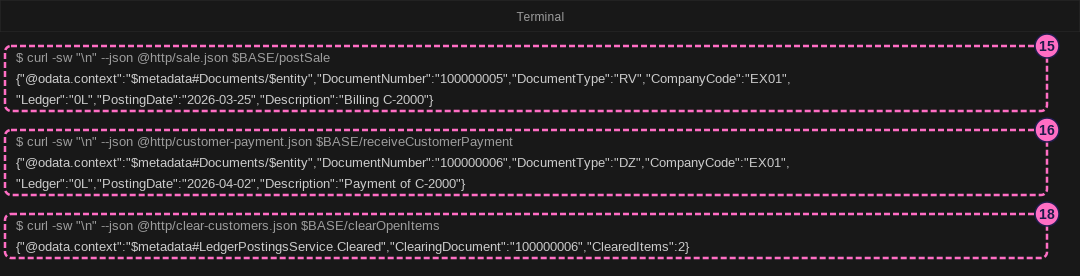
Read the ledger
-
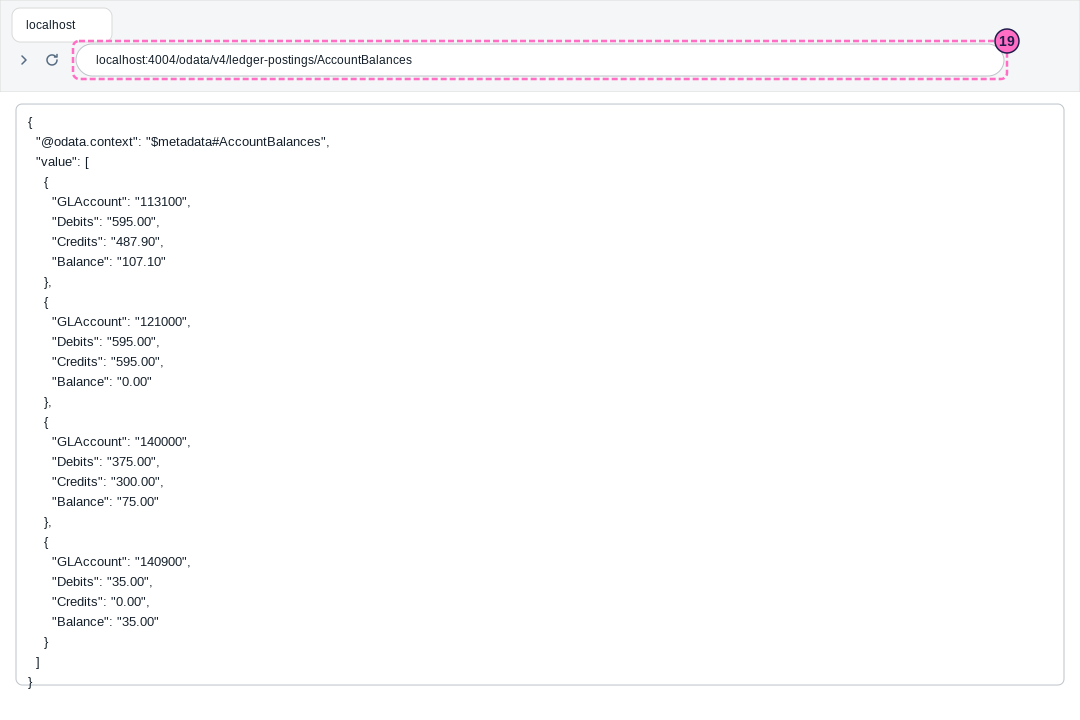
Open http://localhost:4004/odata/v4/ledger-postings/AccountBalances in the browser. For each account the view gives the debits, the credits and the balance. The figure shows the first four of the ten accounts; the others are in the T-accounts of the result figure and in the table of the next section.
-
Create
app/annotations.cds. The first part gives the fields their labels, the second builds the list report of the documents and the object page with the table of the lines.using LedgerPostingsService as service from '../srv/ledger-postings-service'; annotate service.Documents with { DocumentNumber @title : 'Document Number'; DocumentType @title : 'Type'; PostingDate @title : 'Posting Date'; Description @title : 'Description'; CompanyCode @title : 'Company Code'; Ledger @title : 'Ledger'; }; annotate service.DocumentItems with { ItemNumber @title : 'Item'; TransactionKey @title : 'Key'; GLAccount @title : 'G/L Account'; ProfitCenter @title : 'Profit Center'; Partner @title : 'Partner'; Reference @title : 'Reference'; AmountInCompanyCodeCurrency @title : 'Amount in Company Code Currency'; ClearingDocument @title : 'Clearing Document'; }; annotate service.Documents with @( UI.LineItem : [ { Value : DocumentNumber }, { Value : DocumentType }, { Value : PostingDate }, { Value : Description }, { Value : CompanyCode } ], UI.HeaderInfo : { TypeName : 'Document', TypeNamePlural : 'Documents', Title : { Value : Description } }, UI.Facets : [ { $Type : 'UI.ReferenceFacet', Label : 'General', Target : '@UI.FieldGroup#General' }, { $Type : 'UI.ReferenceFacet', Label : 'Lines', Target : 'Items/@UI.LineItem' } ], UI.FieldGroup #General : { Data : [{ Value : DocumentNumber }, { Value : PostingDate }, { Value : CompanyCode }, { Value : Ledger }] } ); annotate service.DocumentItems with @( UI.LineItem : [ { Value : ItemNumber }, { Value : TransactionKey }, { Value : GLAccount }, { Value : AmountInCompanyCodeCurrency }, { Value : ClearingDocument } ] ); -
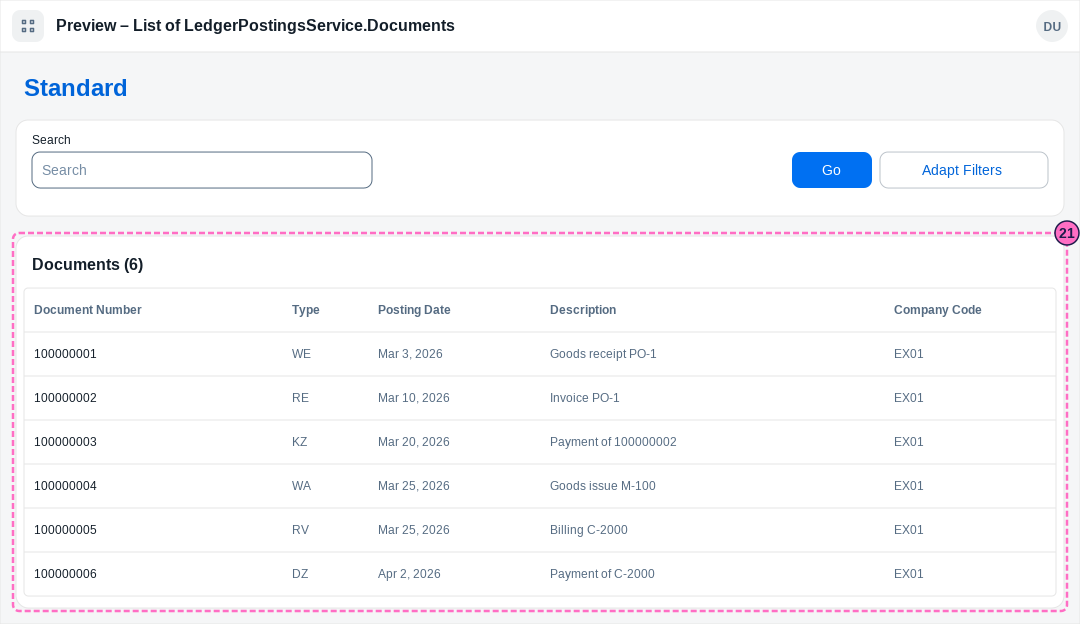
Open http://localhost:4004/$fiori-preview/LedgerPostingsService/Documents?sap-language=EN#preview-app. The list report Documents (6) shows the six documents in the order of their numbers. Click a document to see its lines on the object page. The entities are read-only, so the page has no Create or Delete button.
Check the result
The lines of every document are the ones the tests of the lab assert. All amounts are in EUR.
| Document | Type | Line (key, account) | Debit | Credit |
|---|---|---|---|---|
|
|
|
375.00 |
|
|
25.00 |
|||
|
400.00 |
|||
|
|
|
400.00 |
|
|
10.00 |
|||
|
77.90 |
|||
|
487.90 |
|||
|
|
|
487.90 |
|
|
487.90 |
|||
|
|
|
300.00 |
|
|
300.00 |
|||
|
|
|
595.00 |
|
|
500.00 |
|||
|
95.00 |
|||
|
|
|
595.00 |
|
|
595.00 |
The sums on this page are the amounts that the service answered and npm test asserts. The goods receipt values 50 pieces at the standard price of 7.50 and at the order price of 8.00:
The invoice is for net, the tax is and the supplier is credited with . GR/IR is cleared at the order value of 400.00, and the extra goes to the price difference line:
The sale of 40 pieces costs and bills net, with output tax , so the customer owes . Then:
-
GR/IR clearing has debits and credits of 400.00 each: the goods were received and invoiced, nothing is left.
-
The suppliers and customers accounts balance at zero, and
OpenItemsis empty: every open item was cleared. -
The stock account is , which is the 10 pieces left at the standard price of 7.50, and
curl -s $BASE/MaterialsshowsStockQuantity10. -
The price difference account holds , which is the invoice net minus the stock value: .
-
The bank account is .
-
The whole ledger balances, as every posting does: all debits are and all credits are .
The goods receipt function is also checked against the worked example of the SAP Learning page Describing Automatic Account Determination. For 10 pieces with a standard price of 10 and an order price of 12, that page posts 100 to stock, 120 to GR/IR clearing and the difference of 20 to a price difference account, and the test sap-learning-example.test.js expects the same three lines. For an invoice of 110 against the goods receipt value of 120, the page clears the full 120 and posts the gap of 10 on another account. This model puts the gap on the price difference line too, so its account differs from the page’s example but the amount is the same.
Run the tests with npm test in a copy of the lab project ledger-postings. They post the story of this guide and the cases of the next sections, and they pass.
Variations
-
Invoice only part of the goods. Restart
cds watch(the database is in memory), post the goods receipt again, and post an invoice for 30 pieces:curl -sw "\n" --json '{"PurchaseOrder":"PO-1","Quantity":30,"InvoicePrice":8.00,"PostingDate":"2026-03-10"}' $BASE/postInvoiceReceiptThe invoice clears only of GR/IR. Clearing
PO-1answersItems do not add up to zero: debits 240.00, credits 400.00with HTTP 400: the credit balance of 160.00 is goods received and not yet invoiced, 20 pieces at 8.00, as the accounts payable page explains. -
Sell for the other profit center. After the goods receipt, post a sale of 10 pieces with
ProfitCenterset:curl -sw "\n" --json '{"Material":"M-100","Quantity":10,"NetPrice":11.00,"Customer":"C-3000","PostingDate":"2026-03-26","ProfitCenter":"EX-WHOLE"}' $BASE/postSaleThe lines with the profit center
EX-WHOLEare the cost of goods sold of 75.00 on600000and the revenue of -110.00 on800000. -
Take a key out of the determination table. In
db/data/sap.guide.ledgerpostings-AccountDetermination.csvdelete the line ofWRX, save, and post the goods receipt. The answer isNo account is determined for key WRXwith HTTP 400, and nothing is stored: the received quantity ofPO-1and the stock ofM-100are still 0, because the request is rolled back. Put the line back to continue.
What can go wrong
| Symptom | Cause | Fix |
|---|---|---|
|
The goods receipt asks for more pieces than the purchase order has open (60 instead of 50). |
Lower |
|
The goods receipt was posted before in this run, so nothing is open. |
Skip the step, or restart |
|
The sale was posted a second time, or asks for more pieces than the stock. |
Sell at most the stock, or post a goods receipt first. |
|
The open items selected for clearing do not add up to zero, as after a partial invoice. |
Post the missing document first, or select items that add up to zero. |
|
Nothing is open for the account, the partner or the reference: the items are cleared already, or the document is not posted yet. |
Check |
|
The determination table has no row for the key and the valuation class of the material. |
Add the row to the CSV file. |
Clean up
Press Ctrl+C in the terminal that runs cds watch. The database lives only in memory, so the six documents are gone at the next start; the CSV files bring back the accounts, the material and the purchase order.
Where to go next
-
Previous guide: Post Balanced Journal Entries in a Teaching Ledger.
-
Reference: Accounts Payable.
-
Reference: Accounts Receivable, Dunning and Credit Management.
-
Reference: Open Item Management and Clearing.
-
Reference: Account Determination and Automatic Postings.