Payment Terms, Cash Discount and Installment Plans
|
This content was generated with the assistance of AI and should be verified against the official documentation before being relied on in production. |
Every invoice answers two questions before anyone pays it: when is it due, and is there a reward for paying early? In SAP
both answers come from one small key, the payment terms (also called terms of payment) that sits on the invoice. The key
holds the number of days, the discount percentages, and the rule for the date from which the days are counted. This page
explains what is in the key, how the system turns it into a due date and a discount amount, how the same key can split
one invoice into installments, which settings change the arithmetic, and how to judge a discount by the yearly rate it
is worth. It follows the fictitious Example Trading Co. (company code EX01, euro) and uses made-up numbers throughout.
It is written against SAP S/4HANA 2025 FPS02 (on premise and Private Edition) and SAP S/4HANA Cloud Public Edition 2608.
The ideas are the same in both; the names of the settings and apps differ, and the page says where.
Before you read
-
Accounts Payable: the supplier invoice and the outgoing payment, which this page goes deeper into.
-
Accounts Receivable, Dunning and Credit Management: the customer invoice, the incoming payment and dunning.
-
Open Item Management and Clearing: open items and clearing, which a payment with a discount relies on.
-
Account Determination and Automatic Postings: how the cash discount account is found.
Key terms
-
Payment terms: the key that holds the days, the cash discount percentages and the baseline date rule of an invoice.
-
Baseline date: the date from which the days of the payment terms are counted.
-
Cash discount: a percentage taken off the invoice when it is paid within an agreed period.
-
Discount base: the amount the discount percentage is applied to.
-
Installment payment: an invoice that is paid in several parts, each with its own payment terms.
-
Days in arrears: how many days an item is paid after its due date.
What a payment terms key holds
SAP’s help describes the key in two parts. For an individual payment it determines the valid cash discount rate with a maximum of three payment terms, namely the first cash discount period, the second cash discount period and the due date for net payment, and also a baseline date for the payment. For payment in installments it determines the installment terms instead, covered further down. If the key is stored in the customer or supplier master record, the system proposes it whenever you enter an item for that partner; the business partner page of this section shows where it sits in the company code data.
The clerk can also type the terms without a key. The days and percentages go into the Days/Perc. fields, two discount levels and the net due date at most. SAP’s example: to enter "2/10 Net 30", enter 10 days and 2 percent in the first two fields. Up to three decimal places are allowed in the percentage, for example 2.125.
Three ideas make up every key.
| Idea | What it says | Example for EX01 |
|---|---|---|
Discount periods |
Up to two periods after the baseline date, each with a percentage. Pay inside the period and the discount applies. |
3 percent within 10 days, 2 percent within 20 days. |
Net due date |
The number of days after the baseline date by which the full amount is due. |
30 days. |
Baseline date |
The date the days are counted from. The key carries the rule that proposes it. |
The document date of the invoice. |
Sources: Terms of Payment (Accounts Receivable) (SAP Help Portal, on premise), Terms of Payment (Accounts Payable) (SAP Help Portal, on premise), Cash Discounts (SAP Help Portal, on premise)
The baseline date
The terms count days, so the system needs a starting day. SAP’s help says the key contains the baseline date as of which the payment term days apply. On a line item, the baseline date and the net payment terms are what the system adds to get the due date: SAP’s own formula for the days in arrears is the baseline date for the due calculation plus the net payment terms period, or plus the cash discount days 1 when the customer took a discount.
What the help pages used here do not list are the options of the key’s baseline date default. One page, about the Prompt Payment Act function for US federal government, mentions that the document date can be selected as the default baseline date for invoices in the payment term Customizing. This page therefore does not list the other choices of the default; the Customizing activity that maintains the key shows them. The date chosen can differ from the posting date, which matters: an invoice dated 2026-05-04 and entered a few days later still counts its days from the date the key selects.
Due dates and the cash discount
The three payment dates of one invoice
Example Trading Co. sells goods for EUR 5,000.00 net. With 19 percent tax of EUR 950.00 the gross invoice is EUR 5,950.00. The made-up payment terms are 3 percent within 10 days, 2 percent within 20 days and net in 30 days. The baseline date is the document date, 2026-05-04.
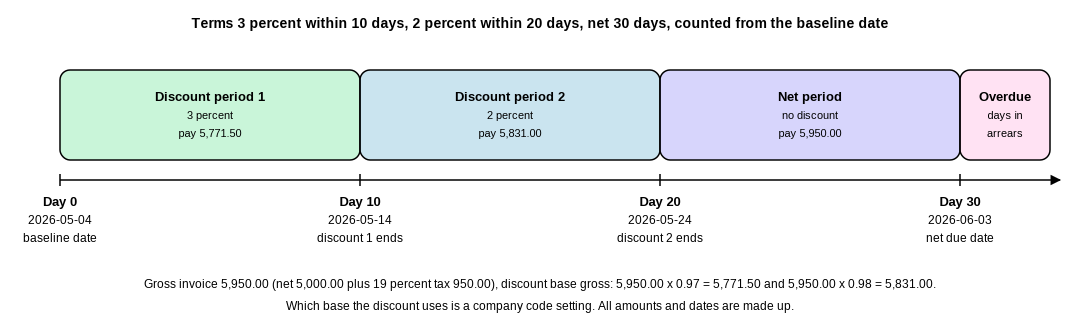
The dates are the baseline date plus 10, 20 and 30 days. Weekends are not considered in this arithmetic: 2026-05-24 happens to be a Sunday.
| Period | Last day | Discount | Payment on a gross base |
|---|---|---|---|
Discount period 1 |
2026-05-14 |
3 percent |
EUR 5,771.50 |
Discount period 2 |
2026-05-24 |
2 percent |
EUR 5,831.00 |
Net period |
2026-06-03 |
none |
EUR 5,950.00 |
The amounts come from one formula, the discount amount as a percentage of the discount base, taken off the invoice:
with the discount base, the discount rate, the gross invoice amount and the amount paid. For the two periods, with the gross amount as the base:
What the discount is applied to
SAP’s help says that the Disc.Base field takes the amount the discount is based on, and that it does not have to equal the line item. When the field is empty, the system works the base out from two things. The first is whether the cash discount is calculated on the net or the gross amount (without or with tax); this is set in the system configuration. The second is whether G/L account line items were posted as without cash discount: the standard example is an invoice for goods and shipping, where the discount is valid for the goods only, so the shipping goes on its own line with the without cash discount field selected. The base is then the total of the lines where that field is not selected. The Disc. Amount field lets you type the discount directly and so overrides the system’s calculation. The help adds that the system calculates the discount when the document is posted.
The base amount per company code is a pair of settings. SAP’s page on the base amount says the tax base can include the
cash discount (gross) or not (net), and that the base for the cash discount can be defined as well, per company code.
Only some combinations are possible: gross discount base with gross tax base, net discount base with gross tax base, and
net discount base with net tax base. A net tax base with a gross discount base works only for tax calculation with a
jurisdiction code. The effect on the invoice of EX01:
| Period | Discount base | Discount | Payment | Base type |
|---|---|---|---|---|
Period 1 |
EUR 5,950.00 |
EUR 178.50 |
EUR 5,771.50 |
gross |
Period 1 |
EUR 5,000.00 |
EUR 150.00 |
EUR 5,800.00 |
net |
Period 2 |
EUR 5,950.00 |
EUR 119.00 |
EUR 5,831.00 |
gross |
Period 2 |
EUR 5,000.00 |
EUR 100.00 |
EUR 5,850.00 |
net |
The net rows follow the same formula with , so and . Which row is right for a real company code is a configuration fact. The reading guide here is only that the choice moves the discount by 28.50 in period 1, so a discount study must state the base.
For a down payment, SAP says the cash discount base is generally the invoice amount. If a discount was deducted when the down payment was posted, the base of the closing invoice is reduced by the down payment, so the discount is granted on the remaining amount only.
Posting a payment inside a discount period
A customer pays EX01 within period 1, on 2026-05-12, and takes the 3 percent. During clearing, SAP says, the system can
post cash discounts paid or received automatically, once you have defined the accounts. The customer item of EUR 5,950.00
is cleared in full:
| Line | Debit EUR | Credit EUR |
|---|---|---|
Bank account |
5,771.50 |
|
Cash discount (expense, automatic) |
178.50 |
|
Customer (reconciliation account) |
5,950.00 |
|
Total |
5,950.00 |
5,950.00 |
Tax is ignored here to keep the lines visible. The account determination page of this section explains which accounts the automatic lines use and shows the mirror posting on the supplier side. The customer item is cleared by a clearing document, as described on the open items page.
Gross posting and net posting
On the supplier side, the document type decides how the cash discount is handled when the invoice is entered. SAP’s help for invoice verification describes two standard types. With a gross posting the discount is not considered when the invoice is entered, and only at payment is the discount posted to an account. With a net posting the expected discount is taken into account right away: the cost is posted minus the discount, and a cash discount clearing account holds the other side until payment. The accounts payable page covers the net posting for assets.
A consequence is the tax. SAP’s example posts an invoice of 100 with 15 percent tax net of a 5 percent discount: the input tax is debited with 15 when the invoice is posted, but only 95 (100 less 5 percent) is to be taxed, so the correct tax is . The difference of 0.75 is credited to the input tax account when the invoice is paid, and the system corrects the tax automatically.
What a discount is worth as a yearly rate
A discount of 2 percent for paying 20 days early sounds small. The yearly rate shows it is not. If you pay the discounted amount instead of the full amount, you give the supplier money for the number of days between the discount deadline and the net due date, and you gain a percentage of what you paid. The following is general finance arithmetic. SAP does not compute it, and it is not an SAP formula: it is a way to compare a discount with the cost of borrowing.
Let be the discount rate, the last day of the discount period and the net due day. Paying of the invoice instead of the whole means paying early by days. The percentage gained on the money paid is . Scaled to a 365-day year, the simple annual rate and the compounded rate are:
For the terms of the running example, the discount of period 1 is measured against the net due date (20 days earlier) and the discount of period 2 against the same date (10 days earlier). The table also shows the common "2/10 net 30" of the accounts payable page.
| Terms | p | D | N - D | Simple rate | Compounded rate |
|---|---|---|---|---|---|
3 percent in 10 days, net 30 |
0.03 |
10 |
20 |
56.44 percent |
74.35 percent |
2 percent in 20 days, net 30 |
0.02 |
20 |
10 |
74.49 percent |
109.05 percent |
2 percent in 10 days, net 30 |
0.02 |
10 |
20 |
37.24 percent |
44.59 percent |
The first row, as a check:
The second discount, although it is the smaller percentage, has the higher yearly rate: it is given up for only the last 10 days of credit, so each day of credit costs more. A treasurer would take either one if funds are available, and skip it only if borrowing costs more than the rate in the table. The table assumes 365 days a year and ignores the tax effect of the discount and the cost of the payment itself.
The SAP apps measure something simpler. The Cash Discount Utilization app divides the discounts taken by the discounts offered in a period and multiplies by 100 percent. With a made-up EUR 3,000.00 taken out of EUR 4,000.00 offered, the ratio is 75 percent:
Installment payments
A payment terms key can also describe installments. SAP’s help says the terms for installment payments are made up of individual payment terms, one for each installment. When you post an installment payment, the total amount is split into individual items for each installment and each one is calculated with its own payment term. When you enter such a key, the Days/Perc. fields remain empty and the text Due in is displayed.
SAP’s example for a supplier invoice posts 1,000.00 with posting key 31 on the supplier line and 40 on the expense line. Until the posting is simulated, the supplier line shows 0.00. The simulation then shows three supplier lines of 300.00, 400.00 and 300.00, and after posting the total amount is replaced by the individual installments. The accounts payable page of this section shows this example with its sums.
On the sales side, SAP’s installment plan example shows how the percentages work. A customer buys a washing machine for USD 1,000.00 and makes a down payment of 20 percent on February 1, then pays monthly installments of 13.33 percent over six months. The system calculates each installment as a percentage of the invoice total, takes rounding differences into account on the last payment date, and creates one customer line item in financial accounting for each installment:
| Item | Due | Amount USD |
|---|---|---|
Down payment |
February 1 |
200.00 |
Installment 1 |
March 1 |
133.33 |
Installment 2 |
April 1 |
133.33 |
Installment 3 |
May 1 |
133.33 |
Installment 4 |
June 1 |
133.33 |
Installment 5 |
July 1 |
133.33 |
Installment 6 |
August 1 |
133.35 |
The last installment is 0.02 higher than the others: six times 133.33 is 799.98, which leaves 0.02 of the remaining 800.00 for the last due date.
A plan for EX01
Example Trading Co. invoices EUR 1,000.00 and offers a made-up plan with three installments of 33.33 percent each, due net 30, net 60 and net 90 days after the baseline date of 2026-05-04. Each installment amount is the percentage of the invoice, and the 0.10 of rounding goes to the last one, as SAP describes:
| Installment | Due date | Amount EUR |
|---|---|---|
1 |
2026-06-03 |
333.30 |
2 |
2026-07-03 |
333.30 |
3 |
2026-08-02 |
333.40 |
Total |
1,000.00 |
Each installment is its own open item on the customer account, so it is cleared by its own payment, and a missed installment shows up as a separate item with its own days in arrears. The default for the payment block and the payment method that the key proposes comes from the key for installment payments as a whole, not from the individual installment terms; SAP states that only the defaults defined for the installment key are effective.
How the terms change days in arrears
The payment terms also decide when a payment counts as late. SAP’s help gives the rule for incoming payments: if the customer does not take a discount, the date used is the baseline date for the due calculation plus the net payment terms period; if the customer takes a discount, whatever its size, it is the baseline date plus cash discount days 1. The days in arrears are the payment date minus that date, so a negative number means the payment was within the terms. With the terms of the running example (baseline date 2026-05-04):
| Payment | Paid on | Date used | Calculation | Days in arrears |
|---|---|---|---|---|
EUR 5,950.00, no discount |
2026-06-05 |
2026-06-03 |
baseline + 30 days |
2 |
EUR 5,771.50, 3 percent taken |
2026-05-12 |
2026-05-14 |
baseline + 10 days |
-2 |
EUR 5,831.00, 2 percent taken |
2026-05-18 |
2026-05-14 |
baseline + 10 days |
4 |
The third row shows the rule SAP highlights: the customer took only 2 percent, but because a discount was taken at all, the date used is the end of discount period 1, so the payment is 4 days beyond terms although it is inside period 2. The reference date used to decide the cash discount period itself, for incoming and outgoing payments, is by default the document date of the payment document; Customizing for the tolerance group of the business partner can select the value date of the payment item instead.
Tolerances and the discount
A customer may pay a little too much or too little. SAP’s help says differences within the tolerance limits are posted automatically: the system adjusts the cash discount by the difference, or, if the discount cannot be adjusted, posts to a separate expense or revenue account. Tolerances are defined for the clerk (tolerance group for employees, which includes the maximum cash discount percentage a clerk may grant per line item) and separately for the business partner (which also carries grace days for cash discount deductions). When both exist, the lower limit applies.
SAP’s example: an invoice of EUR 100 with the net amount due within 60 days and a 3 percent discount if paid within 30 days. The clerk’s limits are EUR 5 and 0.5 percent for payment differences, adjusting the discount by EUR 2; the partner’s limits are EUR 100 and 10 percent, adjusting the discount by EUR 10. The system accepts and clears differences up to EUR 0.50, which is 0.5 percent of EUR 100 and the lowest limit. A maximum of EUR 2 can be adjusted through the cash discount posting.
The page on number ranges, field status variants and tolerance groups of this section introduces tolerance groups in general.
Where you maintain and watch payment terms
| Topic | On premise | Public Edition |
|---|---|---|
Define the key |
Customizing for Accounts Receivable and Accounts Payable, Business Transactions, Incoming Invoices/Credit Memos, Maintain Terms of Payment (a help page for utilities billing names this path; the AP and AR pages say that the terms are maintained in the Implementation Guide). |
The configuration activity Maintain Terms of Payment, found with the search function of the configuration environment. |
Define installments |
The Implementation Guide of Accounts Receivable and Accounts Payable, as the installment pages say. |
The configuration activity Define Terms of Payment for Installment Payments. |
Tolerances and grace days |
Tolerance groups for employees and for business partners. |
The activities Define Tolerance Groups for Employees and Define Tolerances for Customers and Suppliers. |
Read the terms as data |
The CDS views |
The same CDS views, released for use. |
Look ahead |
The Cash Discount Forecast and Cash Discount Utilization apps. |
The same apps, with app IDs |
The Public Edition help groups these under "General Payment Settings" and says to use Configuration Help from within each activity for the exact settings. The configuration activities require an SAP system; not run here.
The CDS views give the payment terms as master data. The view of terms holds the key, its name, whether the payment is an installment, and the conditions view holds the discount days, the net payment days and the discount percentages. A separate view gives, for each key of installment type, the installment item, its percentage and the payment terms of that item. In the Public Edition the released API for payment terms exposes the cash discount percentages and days and the net payment days next to the key.
The Cash Discount Forecast app shows the discounts that will expire in a period you define, split by company, payment terms and payment day, including blocked invoices. SAP’s note is practical: pay on the current payment day, because if you wait for the next one the discounts will have expired. In the Public Edition, the situation template Cash Discount at Risk tells accounts payable accountants when an invoice that is blocked for payment is approaching its cash discount due date; the template triggers when the date is 90 days away.
Sources: General Payment Settings (SAP Help Portal, Public Edition), Determination of Due Date (SAP Help Portal, on premise), Payment Terms and Payment Terms Conditions (SAP Help Portal, Public Edition), Installment Items for Terms of Payment (SAP Help Portal, Public Edition), Payment Terms (SAP Help Portal, Public Edition), Cash Discount Forecast, F1735 (SAP Help Portal, Public Edition), Cash Discount Utilization, F1736 (SAP Help Portal, Public Edition), Cash Discount at Risk (SAP Help Portal, Public Edition), Payment Terms and Payment Terms Conditions (SAP Help Portal, on premise)
Common errors and pitfalls
-
Counting days from the wrong date. The days run from the baseline date, which can differ from the posting date. Check the date the key selects.
-
Comparing a discount without its base. A gross base and a net base differ by the discount on the tax: EUR 28.50 in period 1 of the example.
-
Changing the terms after the system has adopted them. SAP warns that once adopted they are no longer changed automatically when the terms or the supplier change on an invoice, so check and reset them by hand.
-
Paying on the next payment day when the discount ends before it. The forecast app exists for this.
-
Expecting every installment to carry the default block of its own term. Only the defaults of the installment key apply.
-
Reading a discount as a small number. 2 percent for 10 days of credit is 74.49 percent a year as a simple rate.
Summary
-
A payment terms key holds up to two discount periods and a net due date, counted from a baseline date; it can also describe installments. It is proposed from the business partner or typed on the line.
-
The discount is the percentage of the discount base, and the base can be gross or net, minus lines marked without cash discount. In the example EUR 5,950.00 gives 178.50 (3 percent) and 119.00 (2 percent).
-
A payment inside a discount period clears the item in full, with the discount posted automatically to the account that Customizing defines.
-
A gross posting books the discount at payment; a net posting takes it into account at invoice entry, and tax is corrected at payment.
-
An installment key splits one invoice into items, each with its own terms, with rounding on the last item (333.30, 333.30, 333.40 in the example).
-
Days in arrears use the baseline date plus the net days, or plus the discount days 1 when a discount was taken.
-
As a yearly rate, 2 percent for 10 days is 74.49 percent (simple); the SAP apps measure taken against offered discounts.
References
-
Terms of Payment (Accounts Receivable) (SAP Help Portal, on premise)
-
Terms of Payment (Accounts Payable) (SAP Help Portal, on premise)
-
Terms of Payment for Installment Payments (Accounts Payable) (SAP Help Portal, on premise)
-
Terms of Payment for Installment Payments (Accounts Receivable) (SAP Help Portal, on premise)
-
Down Payments and Cash Discount (SAP Help Portal, on premise)
-
Types of Cash Discount Clearing (SAP Help Portal, on premise)
-
Automatic Posting for Clearing Transactions (SAP Help Portal, on premise)
-
Calculation of Days in Arrears (SAP Help Portal, on premise)
-
Reference Date for Cash Discount and Days in Arrears (SAP Help Portal, on premise)
-
Difference Within Tolerance Limits (SAP Help Portal, on premise)
-
Calculation Logic: Cash Discount Utilization (SAP Help Portal, on premise)
-
Using PPA: Scenario 1 - Ordinary Goods (SAP Help Portal, on premise)
-
Payment Terms and Payment Terms Conditions (SAP Help Portal, on premise)
-
Payment Terms and Payment Terms Conditions (SAP Help Portal, Public Edition)
-
Installment Items for Terms of Payment (SAP Help Portal, Public Edition)
-
Cash Discount Forecast, F1735 (SAP Help Portal, Public Edition)
-
Cash Discount Utilization, F1736 (SAP Help Portal, Public Edition)