SAP Finance Guide: Compute a Depreciation Schedule
|
This content was generated with the assistance of AI and should be verified against the official documentation before being relied on in production. |
Checked on 2026-11-13 against CAP Node.js 10.2 (@sap/cds 10.2.2, @sap/cds-dk 10.2.1, @cap-js/cds-test 1.0.2), curl 8.7, jq 1.7 and Node.js 24.21.
What you build
This is a teaching model built with CAP. It is not SAP S/4HANA or SAP SuccessFactors and does not reproduce their screens.
You build a small service for the company code EX01 of Example Trading Co. It holds two fixed assets, a delivery van of 15,000.00 EUR for the profit center EX-RETAIL and warehouse shelving of 12,000.00 EUR for EX-WHOLE, and it has a function that turns a method, a base amount and a number of years into a depreciation schedule: for every year the depreciation, and the net book value that is left. It knows the three methods that Asset Accounting describes: straight-line over the total useful life, straight-line from the net book value over the remaining life, and declining balance with a changeover to straight-line. You call the function with curl, and a test file proves the amounts against the worked examples of the SAP help pages: 1,000 over 10 years is 100 a year, a net book value of 500 over 5 remaining years is 100, and a net book value of 700 with a useful life of 10 and a factor of 3 is 210.
Before you start
-
No account is needed: the CAP tools, curl and jq install without signing in. Installing
@sap/cds-dkmeans accepting the SAP Developer License Agreement, version 3.2, which the lab README names. -
Do the guide Your First CAP Service first (it explains
cds init, CDS files, CSV data andcds watch). The guide Post Balanced Journal Entries in a Teaching Ledger is a good second step, but this guide does not depend on it. -
Read Asset Accounting for the terms (acquisition and production cost, net book value, depreciation key) and the formulas. This guide computes the table in the section A depreciation schedule for the van.
-
You need curl and
jq.jqprints each row of an answer on its own line; it is optional, and without it the answer is one long line of JSON. -
The names. The formulas and the three worked examples come from three pages of the SAP Help Portal for Asset Accounting, SAP S/4HANA 2025 FPS02 (Straight-Line Depreciation over Total Useful Life, Straight-Line from the Book Value over Remaining Useful Life, Declining-Balance Method of Depreciation), and the changeover conditions from the page Changeover Method; the Sources list them. The names of the model (
Assets,AcquisitionCost,UsefulLife,Method,Factor,Year,Depreciation,NetBookValue,Rule) and the function namescalculateandplanare our own. The asset numbers, the amounts, the profit centers and the factor of 2 are made up for the example. -
The figures are drawings of the editor and the terminal, not screenshots. A highlighted box with a number marks the file or the line of the step with the same number.
Steps
Create the project and the model
-
Create a CAP project named
depreciationand install it, as in the first guide:cds init depreciation --nodejs cd depreciation npm install -
Create
db/schema.cds. The entityAssetsis the asset master record of the model: the acquisition cost, the useful life in years, the depreciation method and, for declining balance, the factor.using { managed } from '@sap/cds/common'; namespace sap.guide.depreciation; // A teaching model of fixed assets, not SAP S/4HANA. The names are our own. // The three methods are the ones that the SAP help describes: straight-line // over the total useful life, straight-line from the net book value over the // remaining life, and declining balance with a changeover to straight-line. entity Assets : managed { key ID : String(12); Description : String(60); CompanyCode : String(4) default 'EX01'; ProfitCenter : String(10); Currency : String(3) default 'EUR'; AcquisitionCost : Decimal(15,2); UsefulLife : Integer; Method : String(20); Factor : Decimal(4,2); } -
Create the file
db/data/sap.guide.depreciation-Assets.csv. The file name is the namespace, a dash and the entity name. It holds the delivery van (declining balance, factor 2) and the shelving (straight-line over 10 years).ID,Description,CompanyCode,ProfitCenter,Currency,AcquisitionCost,UsefulLife,Method,Factor 10001,Delivery van,EX01,EX-RETAIL,EUR,15000.00,5,declining-balance,2 10002,Warehouse shelving,EX01,EX-WHOLE,EUR,12000.00,10,straight-line,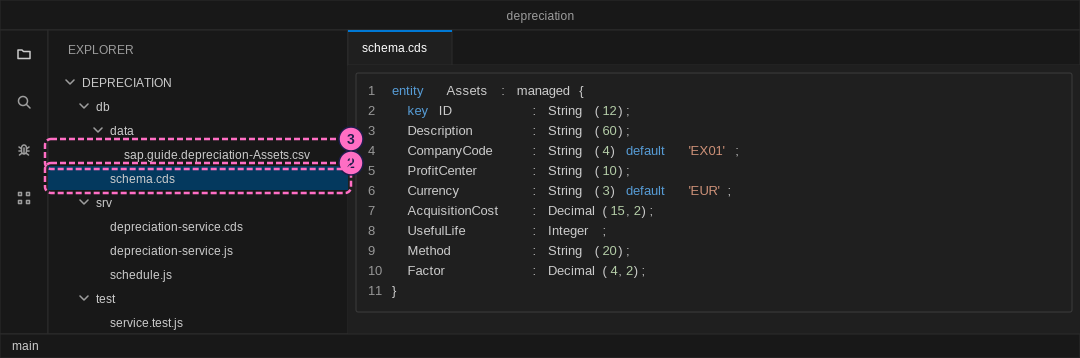
Write the depreciation rules
-
Create
srv/schedule.js. It is plain JavaScript without CAP, so you can test it alone. Amounts are whole cents, so that the sums are exact.evenAmountis the division of the two straight-line methods: depreciation is the acquisition and production cost (APC) divided by the useful life, or the net book value divided by the remaining life. The base differs, the division is the same.decliningAmountis the net book value times the rate from the useful life and the factor. The functionschedulegoes through the years. For declining balance it takes the declining amount until that amount is lower than the straight-line amount of the APC; from then on it spreads the net book value over the remaining years (the changeover). The last year takes what is left, so that the net book value ends at exactly zero.// The depreciation rules of the teaching model. Amounts are whole cents, so // that the sums are exact; the last year takes what the rounding left over. export const METHODS = ['straight-line', 'remaining-life', 'declining-balance'] export const toCents = (amount) => Math.round(Number(amount) * 100) export const money = (cents) => (cents / 100).toFixed(2) // Depreciation = APC / useful life (straight-line over the total life) and // Depreciation = net book value / remaining life (from the book value) are the // same division; the base is the APC in one case and the book value in the other. export const evenAmount = (baseCents, years) => Math.round(baseCents / years) // Depreciation = net book value * (100% / useful life * factor) export const decliningAmount = (nbvCents, years, factor) => Math.round((nbvCents * factor) / years) export function check({ method, base, years, factor }) { if (!METHODS.includes(method)) { return `Unknown method ${method}; use ${METHODS.join(', ')}` } if (!(Number(base) > 0)) return 'Base must be greater than zero' if (!Number.isInteger(years) || years < 1) { return 'Years must be a whole number of at least 1' } if (method === 'declining-balance' && !(Number(factor) > 0)) { return 'The declining-balance method needs a Factor greater than zero' } } export function schedule({ method, base, years, factor }) { const apc = toCents(base) const rows = [] let nbv = apc let changed = false for (let year = 1; year <= years; year++) { const remaining = years - year + 1 let amount = evenAmount(nbv, remaining) let rule = 'straight-line' if (method === 'remaining-life') rule = 'remaining-life' if (method === 'declining-balance') { const declining = decliningAmount(nbv, years, factor) // Changeover: once the declining amount is lower than the straight-line // amount of the APC, the book value is spread over the remaining years. if (!changed && declining < evenAmount(apc, years)) changed = true if (changed) rule = 'changeover' else [amount, rule] = [declining, 'declining'] } if (year === years) amount = nbv nbv -= amount rows.push({ Year: year, Depreciation: money(amount), AccumulatedDepreciation: money(apc - nbv), NetBookValue: money(nbv), Rule: rule, }) } return rows }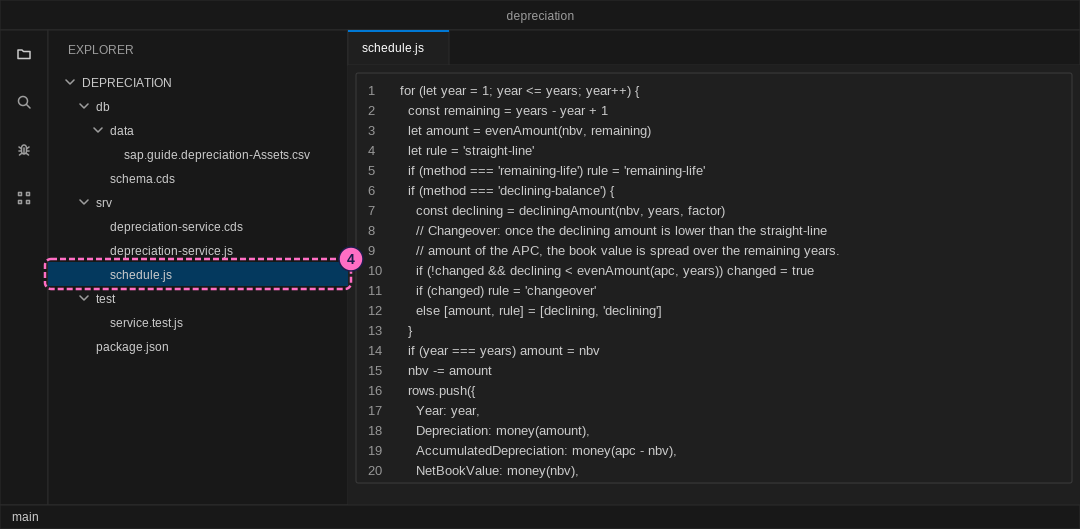
-
Create
srv/depreciation-service.cds. It exposes the assets read-only and declares two functions. The unbound functioncalculatetakes the method, the base, the years and the factor. The functionplanis bound to an asset: it takes its numbers from the master record. A parameter is optional unless it is markednot null, so a call withoutFactoris allowed; the service checks it for declining balance. The functions are calledcalculateandplanbecause CAP warns about a custom function namedschedule, which would shadow a method of the service base class.using { sap.guide.depreciation as db } from '../db/schema'; service DepreciationService { @readonly entity Assets as projection on db.Assets actions { function plan() returns many ScheduleLine; }; // One row of a depreciation schedule: the amount of a year, the total so // far and the net book value at the end of the year. type ScheduleLine { Year : Integer; Depreciation : Decimal(15,2); AccumulatedDepreciation : Decimal(15,2); NetBookValue : Decimal(15,2); Rule : String(20); } function calculate(Method : String, Base : Decimal(15,2), Years : Integer, Factor : Decimal(4,2)) returns many ScheduleLine; } -
Create
srv/depreciation-service.js. CAP loads it next to the service of the same name. The handler ofcalculatereads the parameters fromreq.data, checks them withcheckand answers HTTP 400 withreq.errorwhen they are wrong. The handler ofplanis declared for the entityAssets, so CAP gives it the key of the asset inreq.params.import cds from '@sap/cds' import { check, schedule } from './schedule.js' export default class DepreciationService extends cds.ApplicationService { init() { const { Assets } = this.entities // Unbound function: the caller gives the method and the numbers. this.on('calculate', (req) => { const { Method: method, Base: base, Years: years, Factor: factor } = req.data const problem = check({ method, base, years, factor }) if (problem) return req.error(400, problem) return schedule({ method, base, years, factor }) }) // Bound function: the numbers come from the asset master record. this.on('plan', Assets, async (req) => { const asset = await SELECT.one.from(Assets).where(req.params[0]) if (!asset) return req.error(404, 'Asset not found') const input = { method: asset.Method, base: asset.AcquisitionCost, years: asset.UsefulLife, factor: asset.Factor, } const problem = check(input) if (problem) return req.error(400, problem) return schedule(input) }) return super.init() } }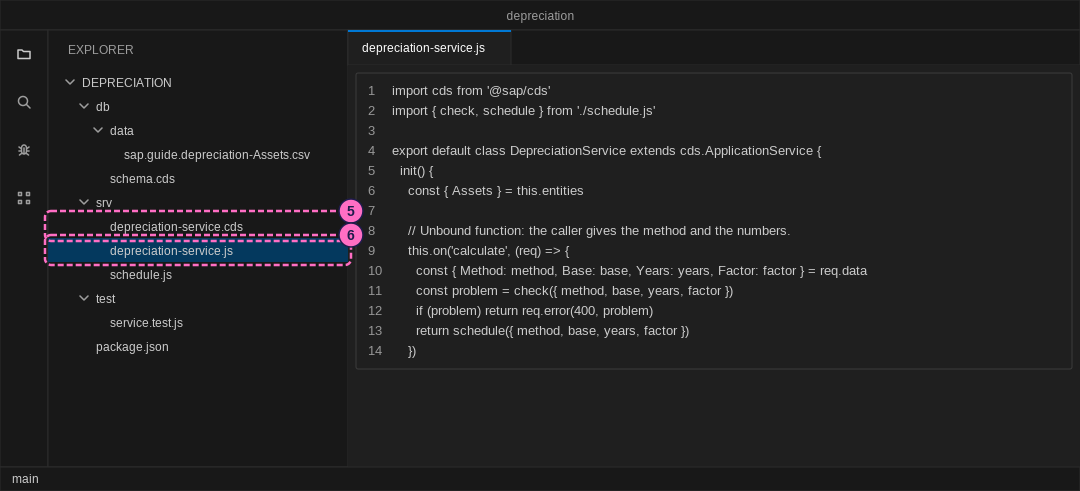
Start the service and ask for schedules
-
In the terminal, in the project folder, start the server. The log shows the CSV file loaded and
DepreciationServiceserved at/odata/v4/depreciation; the lineimpl: 'srv/depreciation-service.js'shows that CAP found your rules.cds watch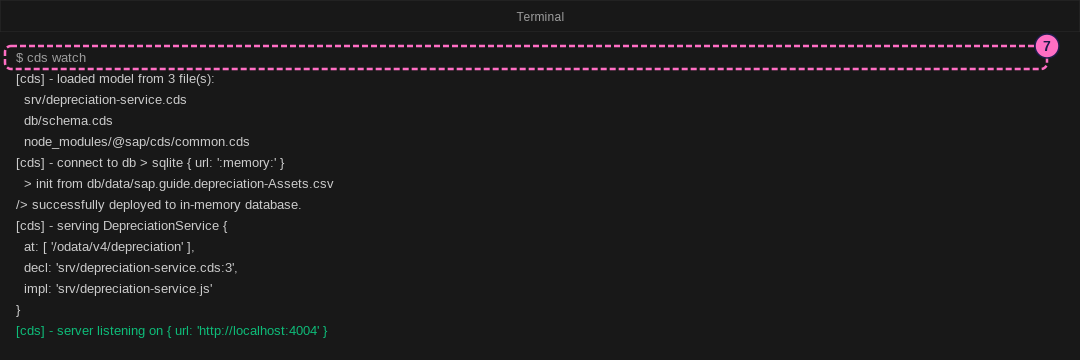
-
Open a second terminal in the project folder. A function is called with GET, with its parameters in the address. Ask for the straight-line schedule of 15,000 over 5 years. Put the address in double quotes, because the shell reads the parentheses and the single quotes otherwise. The command is one line; the figure wraps it the way the terminal does. Every year is 3,000.00 and the net book value ends at 0.00.
curl -s "http://localhost:4004/odata/v4/depreciation/calculate(Method='straight-line',Base=15000,Years=5)" | jq -c '.value[] | {Year,Depreciation,NetBookValue,Rule}' -
Ask for the SAP help example of the remaining-life method: a net book value of 500 and 5 remaining years. Here
Baseis the net book value andYearsthe remaining life. The answer is 100.00 in each year, 500 / 5 = 100.curl -s "http://localhost:4004/odata/v4/depreciation/calculate(Method='remaining-life',Base=500,Years=5)" | jq -c '.value[] | {Year,Depreciation,NetBookValue,Rule}'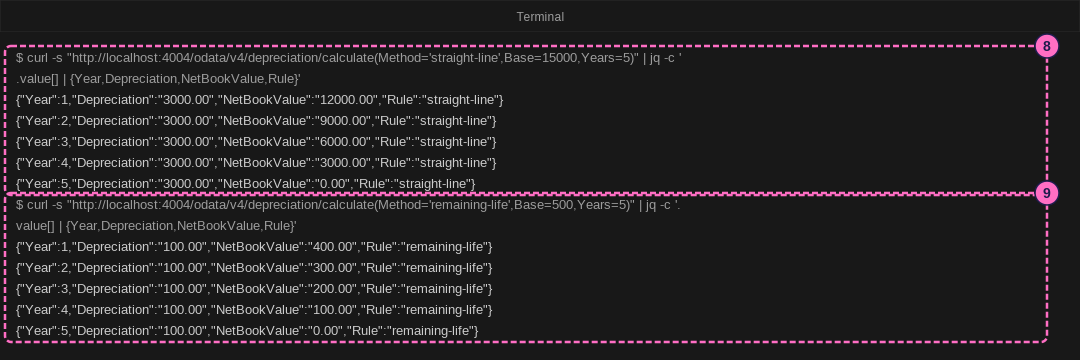
-
Ask for the declining-balance schedule of the van: 15,000, 5 years, factor 2. The rate is 100% / 5 times 2 = 40%. The first two years are declining, 6,000.00 and 3,600.00. In year 3 the declining amount (2,160.00) is lower than the straight-line amount of the APC (3,000.00), so the rule changes to
changeoverand the net book value of 5,400.00 is spread over the 3 remaining years, 1,800.00 each.curl -s "http://localhost:4004/odata/v4/depreciation/calculate(Method='declining-balance',Base=15000,Years=5,Factor=2)" | jq -c '.value[] | {Year,Depreciation,NetBookValue,Rule}' -
Ask for the same schedule through the asset master record.
planis bound to the asset10001, so the address names the asset and the numbers come from the CSV file. The answer is the same as in step 10.curl -s "http://localhost:4004/odata/v4/depreciation/Assets('10001')/plan()" | jq -c '.value[] | {Year,Depreciation,NetBookValue,Rule}'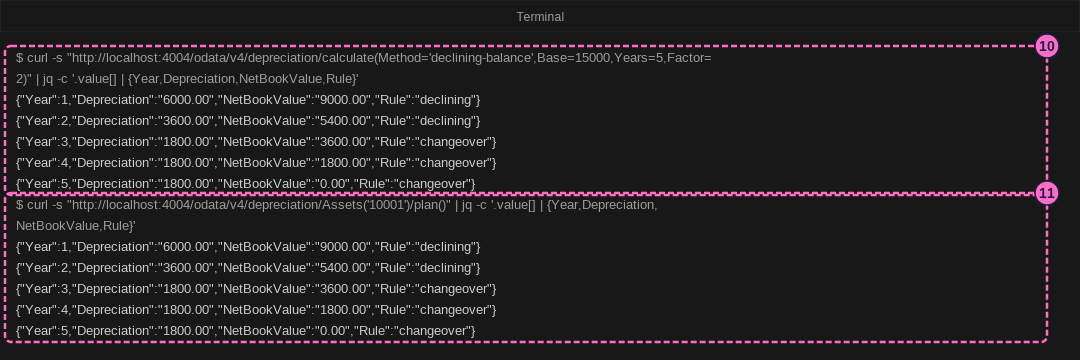
-
Ask for a method that the model does not know, and add
-wto see the status. The answer is HTTP 400 with the messageUnknown method sum-of-digits; use straight-line, remaining-life, declining-balance.curl -s -w "\nHTTP %{http_code}\n" "http://localhost:4004/odata/v4/depreciation/calculate(Method='sum-of-digits',Base=15000,Years=5)" -
Ask for declining balance without a
Factor. The answer is HTTP 400 withThe declining-balance method needs a Factor greater than zero.curl -s -w "\nHTTP %{http_code}\n" "http://localhost:4004/odata/v4/depreciation/calculate(Method='declining-balance',Base=15000,Years=5)"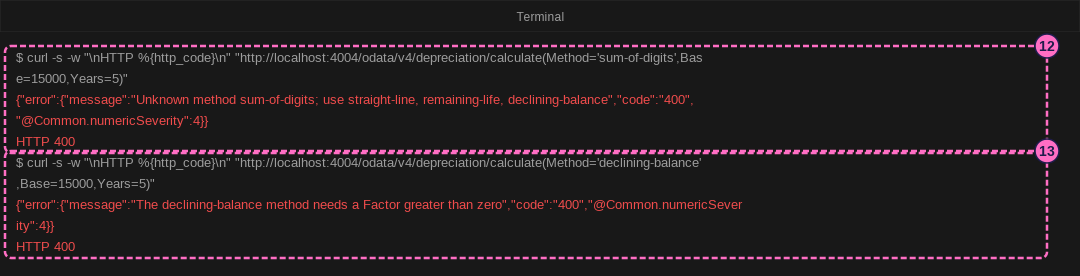
Prove the amounts with a test
-
Add the test tooling and a test script. Run the command in the second terminal, then open
package.jsonand add"test": "node --test"to itsscriptsobject.npm add --save-dev @cap-js/cds-test -
Create
test/service.test.js. The first three tests are the worked examples of the SAP help pages. The next ones check the van, the group area of the example of Asset Accounting (an APC of 15,300.00 gives 3,060.00 a year), the rounding (1,000.00 over 3 years is 333.33, 333.34 and 333.33, and the years add up to exactly 1,000.00), the function calls and the rejected input.import cds from '@sap/cds' import { test } from 'node:test' import assert from 'node:assert' import { decliningAmount, evenAmount, schedule } from '../srv/schedule.js' const { GET } = cds.test(import.meta.dirname + '/..') const url = '/odata/v4/depreciation' const amounts = (rows) => rows.map((r) => r.Depreciation) const nbvs = (rows) => rows.map((r) => r.NetBookValue) const fn = (m, base, years, factor) => `${url}/calculate(Method='${m}',Base=${base},Years=${years},Factor=${factor})` const rejected = async (path) => { try { await GET(path); assert.fail('should be rejected') } catch (e) { return e.response ?? e } } // tag::sap[] // The three worked examples of the SAP help pages for the methods. test('SAP example: APC 1,000 over 10 years is 100 a year', () => { assert.equal(evenAmount(100000, 10), 10000) }) test('SAP example: net book value 500 over 5 remaining years is 100', () => { assert.equal(evenAmount(50000, 5), 10000) }) test('SAP example: net book value 700, life 10, factor 3 is 210', () => { assert.equal(decliningAmount(70000, 10, 3), 21000) }) // end::sap[] // tag::van[] test('straight-line schedule of the van', () => { const rows = schedule({ method: 'straight-line', base: 15000, years: 5 }) assert.deepEqual(amounts(rows), Array(5).fill('3000.00')) assert.equal(rows[4].NetBookValue, '0.00') }) test('declining balance with changeover for the van', () => { const rows = schedule( { method: 'declining-balance', base: 15000, years: 5, factor: 2 }) assert.deepEqual(amounts(rows), ['6000.00', '3600.00', '1800.00', '1800.00', '1800.00']) assert.deepEqual(nbvs(rows), ['9000.00', '5400.00', '3600.00', '1800.00', '0.00']) assert.deepEqual(rows.map((r) => r.Rule), ['declining', 'declining', 'changeover', 'changeover', 'changeover']) }) // end::van[] test('the group area of EX01 has an APC of 15,300.00: 3,060.00 a year', () => { const rows = schedule({ method: 'straight-line', base: 15300, years: 5 }) assert.deepEqual(new Set(amounts(rows)), new Set(['3060.00'])) }) test('the sum of every schedule equals the base, whatever the rounding', () => { for (const method of ['straight-line', 'remaining-life', 'declining-balance']) { const rows = schedule({ method, base: 1000, years: 3, factor: 2 }) const sum = (a, r) => a + Math.round(Number(r.Depreciation) * 100) assert.equal(rows.reduce(sum, 0), 100000) } const rows = schedule({ method: 'straight-line', base: 1000, years: 3 }) assert.deepEqual(amounts(rows), ['333.33', '333.34', '333.33']) }) test('the function answers the remaining-life example', async () => { const { status, data } = await GET(fn('remaining-life', 500, 5, 0)) assert.equal(status, 200) assert.deepEqual(amounts(data.value), Array(5).fill('100.00')) }) test('the bound function reads the van from its master record', async () => { const { data } = await GET(`${url}/Assets('10001')/plan()`) assert.deepEqual(amounts(data.value), ['6000.00', '3600.00', '1800.00', '1800.00', '1800.00']) }) test('the bound function uses the method of the shelving', async () => { const { data } = await GET(`${url}/Assets('10002')/plan()`) assert.equal(data.value.length, 10) assert.equal(data.value[0].Depreciation, '1200.00') }) test('rejects an unknown method', async () => { const r = await rejected(fn('sum-of-digits', 15000, 5, 0)) assert.equal(r.status, 400) assert.match(r.data.error.message, /Unknown method sum-of-digits/) }) test('rejects declining balance without a factor and zero years', async () => { const a = await rejected(fn('declining-balance', 15000, 5, 0)) assert.match(a.data.error.message, /needs a Factor/) const b = await rejected(fn('straight-line', 15000, 0, 0)) assert.match(b.data.error.message, /Years must be a whole number/) })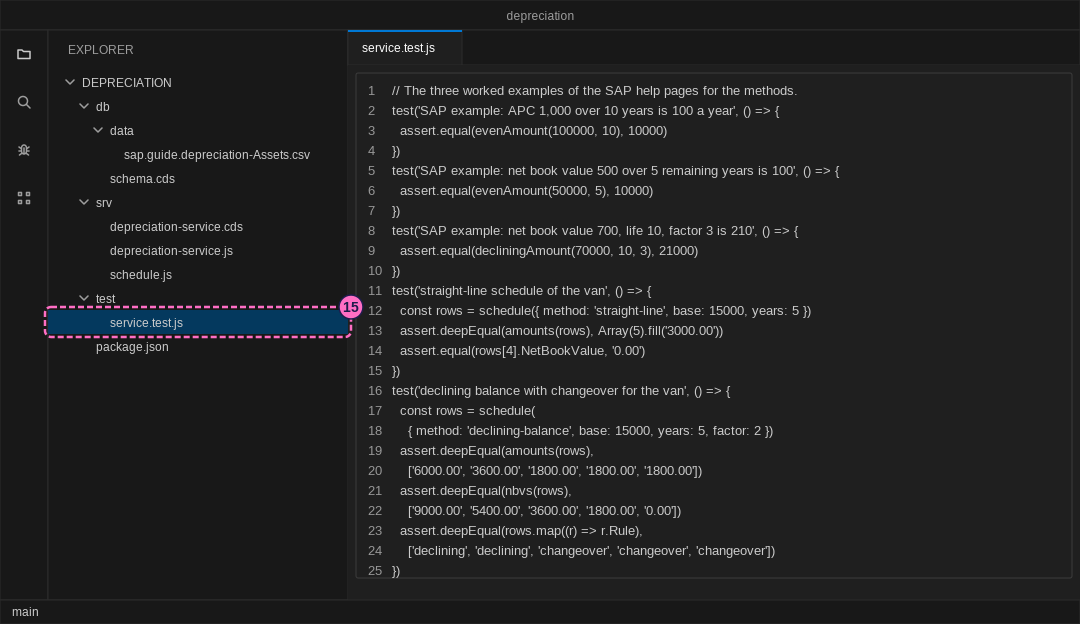
-
Run the tests.
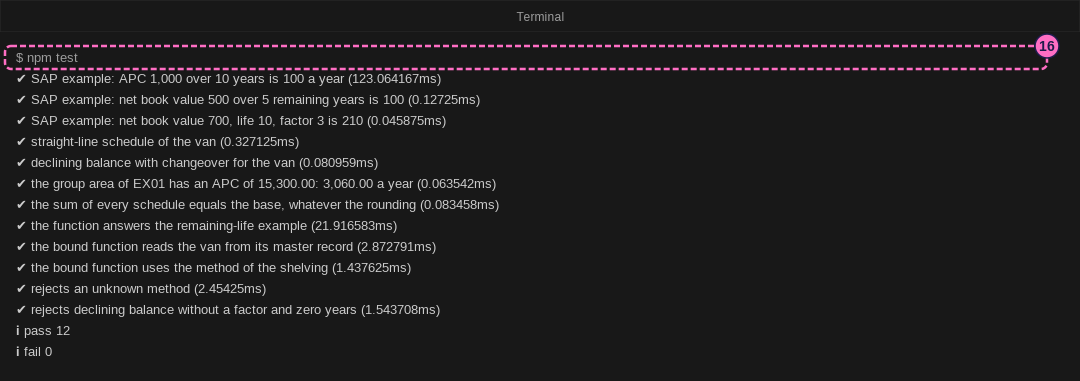
cds.teststarts the service itself, socds watchdoes not need to run. Every test is marked with a check. The times in parentheses differ from run to run, and the figure at the top of the page leaves out the banner lines ofnpm.npm test
Check the result
The sums on this page are the amounts that the service answered and the tests assert. With the acquisition and production cost, the useful life and the net book value at the start of year :
-
Straight-line over the total life, the formula of the SAP help page, gives for the van:
-
Straight-line from the net book value, , gives the example of the SAP help page, a net book value of 500 and 5 remaining years:
-
Declining balance, , gives the SAP example (net book value 700, useful life 10, factor 3) and the first years of the van, with the changeover in year 3:
These are the amounts in the table of the section A depreciation schedule for the van in Asset Accounting.
Check that:
-
the straight-line answer of step 8 and the remaining-life answer of step 9 show the same amount in every year, and the net book value ends at
0.00; -
the answers of steps 10 and 11 are identical, and the sum of the five depreciation amounts is 15,000.00;
-
npm testof step 16 shows a check for every test and no failed test.
Variations
-
Change the changeover rule. SAP’s help lists several changeover methods, among them a changeover as soon as the amount of the next phase is higher. In
srv/schedule.jsreplaceevenAmount(apc, years)in the line that setschangedbyevenAmount(nbv, remaining)and ask for the van again. The schedule is 6,000.00, 3,600.00, 2,160.00, 1,620.00 and 1,620.00, which also adds up to 15,000.00, but the changeover comes a year later. A real depreciation key sets its changeover method in Customizing, so the year of the changeover follows the key. Undo the edit afterwards: two tests fail with it. -
Ask for the shelving:
Assets('10002')/plan()answers 10 rows of 1,200.00, because 12,000 / 10 = 1,200. -
Ask for the group area of the example in Asset Accounting, an APC of 15,300.00 over 5 years:
calculate(Method='straight-line',Base=15300,Years=5)answers 3,060.00 a year.
What can go wrong
| Symptom | Cause | Fix |
|---|---|---|
|
The address was not in double quotes, so the shell read the parentheses of the function call. |
Put the whole address in double quotes, as in step 8. |
|
The function was called with POST ( |
Call it with GET, which is curl’s default. |
|
The method is not one of |
Correct the parameters of the call. |
|
A custom function was named |
Choose another name, as in step 5. |
Two tests fail after the edit of the first variation |
The expected amounts of the van assume the changeover rule of step 4. |
Undo the edit, or change the expected amounts in the test deliberately. |
Clean up
Press Ctrl+C in the terminal that runs cds watch. The database lives only in memory and the service stores nothing, so there is nothing to remove.
Where to go next
-
Previous guides: Your First CAP Service and Post Balanced Journal Entries in a Teaching Ledger.
-
Reference: Asset Accounting.
-
Reference: Ledgers, Currencies and Exchange Rates, for the two valuations of the van in the ledgers
0Land2L.