Unreal Engine
|
This content was generated with the assistance of AI and should be verified against the official documentation before being relied on in production. |
Unreal Engine is Epic Games' real-time 3D engine: an editor for building levels and assets, a C++ runtime, the Blueprints visual scripting language, and a renderer built around Nanite, Lumen and MegaLights, with builds for desktop, mobile, consoles and XR headsets. It is what a team reaches for when high-end visuals, large worlds and a complete set of tools matter more than a small footprint. This sub-section teaches Unreal Engine 5.8 with C++ base classes and Blueprint subclasses. It covers the editor, the object model, the gameplay framework, input, rendering, animation, physics, worlds, UI, AI, networking, packaging, profiling and testing. It follows one running example, the Bookshelf, from a single book actor to a co-op library packaged for Windows and Android, and it says plainly where Unreal stands in 2026: 5.8 is the current release, UE6 is announced with Early Access targeted for the end of 2027, and the licence charges nothing until a product earns more than US$1M. The pages build on the general pages of Graphics & Games; read those first if the rendering pipeline or the transformation chain are new to you.
What Unreal Engine and its neighbours are
| Name | What it is |
|---|---|
Epic Games Launcher |
The desktop application that installs binary versions of the engine on Windows and macOS. |
Unreal Editor |
The application where levels, Blueprints, materials and other assets are assembled, and where the game runs with Play In Editor. |
Unreal Build Tool and Unreal Automation Tool |
UBT compiles the modules of a project. UAT drives longer jobs such as cooking and packaging, and the Unreal Header Tool generates the reflection code that the macros ask for. |
Blueprints |
The visual scripting language. A Blueprint class can extend a C++ class, which is how the Bookshelf is built. |
Fab |
Epic’s marketplace for assets and plugins. |
Unreal Editor for Fortnite and Verse |
UEFN is a separate editor for experiences that run inside Fortnite, and Verse is its programming language. Both are context for UE 5.8 and central to the announced UE6. |
Direct3D 12, Vulkan, Metal and OpenGL ES |
The graphics APIs underneath, reached through Unreal’s Render Hardware Interface (RHI). Vulkan, Metal and OpenGL teach them directly. |
The difference between a graphics API and an engine is explained in Graphics APIs vs Game Engines, and how to decide between them in Choosing an API or Engine. The language itself is in the C++ Reference. If you know Unity, Epic’s Unreal Engine for Unity Developers maps the concepts of one engine to the other.
Where Unreal Engine sits
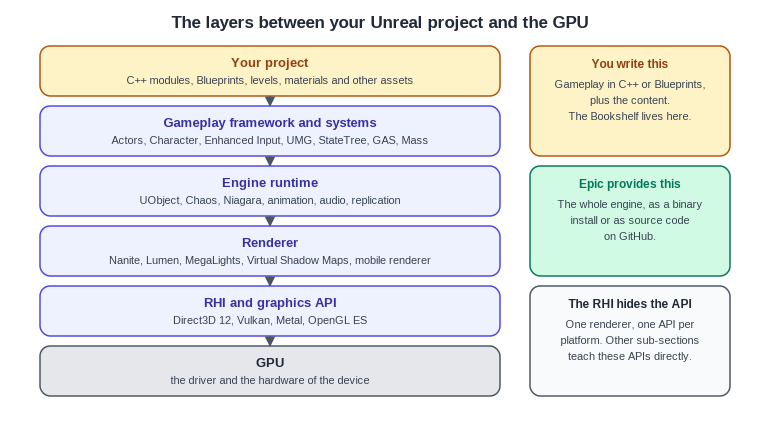
An Unreal project is modules of C++, Blueprints and content. You write gameplay on top of the framework classes, and the engine runs it in the same way on every platform. The renderer draws the scene through the RHI, which is why the same project can build for Direct3D 12, Vulkan or Metal. The figure is also a map of this sub-section: the first groups of pages are about the top layers, and Rendering Overview reaches down to the renderer and the RHI. Because the source of the whole engine is available, every layer below your project can be read, and with a source build it can be changed.
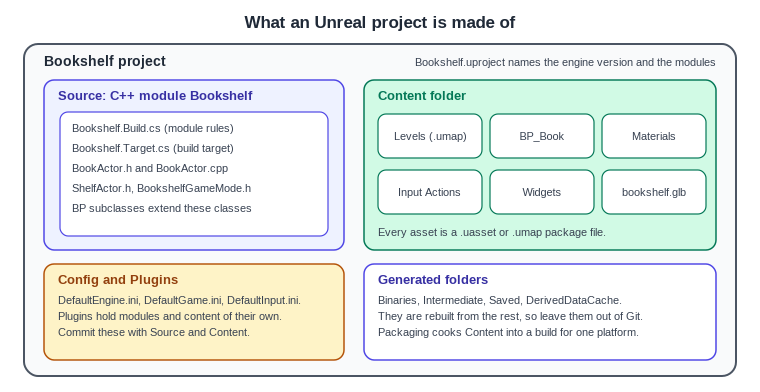
The vocabulary of the figure is used on every page: a level holds actors, an actor is made of components, an asset is a .uasset file under Content, and a module is a unit of C++ code with its own Build.cs. The folders in detail are on Project Structure and Modules, and the windows of the editor on Editor Tour.
The release model
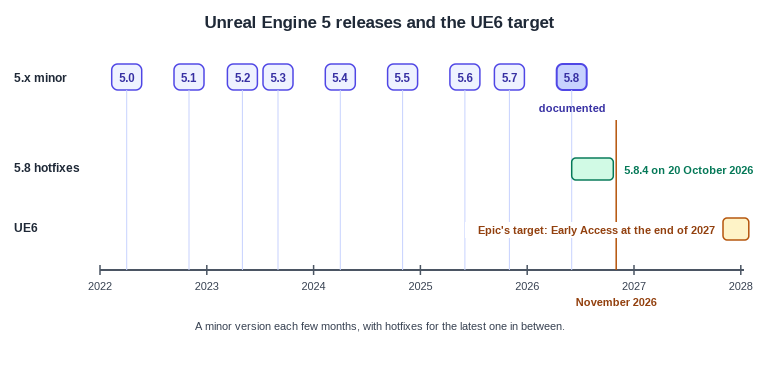
Epic ships a minor version a few times a year, each with its own release notes, and in between it publishes hotfixes for the latest minor version (5.8.1, 5.8.2 and so on). There is no long-term support version: a project chooses a minor version, takes its hotfixes and moves to a newer one when it has a reason to. Each feature carries a stability label in the release notes: Production Ready, Beta or Experimental. A new project should start on the latest minor version with its latest hotfix. Epic has announced UE6 and targets Early Access for the end of 2027, and Verse, UEFN and UE6 Context explains what that means for a project started today.
Version baseline
The facts below were checked on 5 November 2026 against the official pages cited in the last column. Epic’s pages on unrealengine.com refused automated requests that day, so the items that cite them come from search excerpts of those pages rather than from a full reading. Where two of Epic’s own pages disagree, the row says so. Items that follow a release can change, so check them again before relying on them.
| Item | Version and status | Source |
|---|---|---|
Documented version |
Unreal Engine 5.8, released on 17 June 2026. The documentation is titled "Unreal Engine 5.8 Documentation". |
|
Latest hotfix |
5.8.4, posted on 20 October 2026. No later hotfix had been announced. |
|
Previous minor |
5.7, November 2025: PCG and Substrate production-ready, Nanite Foliage experimental. |
|
Rendering in 5.8 |
MegaLights production-ready. Lumen Lite beta. Substrate NPR Shading, Mesh Terrain, Fast Geometry Streaming and the Procedural Vegetation Editor experimental. Multi-pass deferred rendering is the default path across mobile platforms. |
|
Systems in 5.8 |
Control Rig Physics beta. Movie Render Graph production-ready. Incremental Cooking beta. Unreal MCP Server experimental. Mass overhauled, with a new MassCore module. StateTree trees can define their starting state. Enhanced Input and Common Input are merged into one system, with an Input Debugger. Zenserver is the default cooked output store. |
|
Iris replication |
The release notes call Iris "production-ready for licensees in UE 5.8", while Epic’s Iris documentation pages still carry an Experimental label. The two statements are not reconciled, so read Iris as opt-in; see Networking and Replication. |
|
UE6 |
Announced at State of Unreal on 17 June 2026. Epic targets Early Access at the end of 2027 and moves gameplay programming to Verse. Epic’s road-map post says that Actors and Blueprints stay in the early versions and are to be deprecated later, with conversion tools. |
|
Windows toolchain |
Visual Studio 2026 recommended, 2022 17.14 minimum in the release notes. MSVC 14.50 recommended, 14.38 minimum. Windows SDK 10.0.26100.0 default, 10.0.22621.0 minimum. The hardware page keeps Visual Studio 2022 for Nintendo development and for AGDE below v26.1.102. |
|
macOS toolchain |
Epic’s pages disagree. The macOS requirements page recommends the latest Sequoia, with Sonoma 14.5 as the minimum, and Xcode 26.1.1 with 26.0 as the minimum, and says that Xcode 26.4 is not compatible. Its hardware section writes "Sequoia 14" where its version history writes "Sequoia 15". The release notes list the latest Sonoma 14 with Xcode 15.4 for macOS builds, and Sequoia 15 with Xcode 26.1.1 for iOS, tvOS, iPadOS and visionOS builds. Follow the requirements page for the editor and the release notes for what each target builds with. |
|
Linux toolchain |
Ubuntu 22.04, Rocky Linux 8 or Red Hat Linux 8 or newer, with clang 20.1.8. |
|
Android toolchain |
Android Studio Koala 2024.1.2 Patch 1, NDK r27c, build-tools 35.0.1, OpenJDK 21.0.3, minimum install SDK 26. Epic’s pages disagree on the target: the requirements page gives a recommended target of SDK 35, with SDK 34 as the minimum for compilation, while the release notes give SDK 35 as the recommended compile SDK and SDK 34 as the default target for shipping. |
|
Google Play |
From 31 August 2026 new apps and updates must target API level 36, or 35 for Wear OS and Automotive OS and 34 for TV and XR. Neither of Epic’s figures above meets this for a phone app, so raise the target in the project; see Android and Mobile. |
|
Licence |
Free until a product’s lifetime gross revenue exceeds US$1M, then a 5 percent royalty, with Epic Games Store revenue exempt. Epic’s FAQ gives 3.5 percent under Launch Everywhere with Epic. Non-game companies with more than US$1M of annual gross revenue buy seats at US$1,850 per user per year. Read the terms on Epic’s pages before you ship. |
|
Input |
Enhanced Input is enabled by default. Epic’s page calls the older mappings the legacy input system and offers an upgrade path. It does not call them deprecated. |
|
UE4 to UE5 |
Sequencer for Matinee, Chaos for PhysX as the default, Niagara for Cascade, World Partition for World Composition, and Lumen for Light Propagation Volumes and Distance-Field Global Illumination. |
When to choose what
Choose Unreal Engine when the visuals, the size of the world or the built-in systems matter most: Nanite, Lumen, the gameplay framework, replication and the animation tools are all there from the first day, with the source to read. It asks for more in return: strong hardware for development, large downloads, and C++ for anything Blueprints cannot do. There is no Web target. Choose Blueprints only for prototypes and for designers' logic, and C++ with Blueprint subclasses for anything that will grow; C++ and Blueprints Together explains the split. The general criteria are in Choosing an API or Engine, and what a shipped game costs is in Versions, Licensing and History.
What’s covered
Foundations
| Page | Covers |
|---|---|
UE1 to UE5, the 5.x timeline, stability labels, the UE6 outlook, the royalty, the seat licence and the EULA. |
|
The Launcher against a GitHub source build, toolchains per operating system and IDEs. |
|
The viewport, Outliner, Details panel, Content Browser, modes and Play In Editor. |
|
|
|
Specifiers, |
|
The actor lifecycle, component kinds, attachment, transforms and tick groups. |
|
GameMode, GameState, PlayerState, PlayerController, Pawn, Character, GameInstance and subsystems. |
|
Graph types, events, variables, functions, macros, flow control and debugging. |
|
Direct references, casting, interfaces and event dispatchers. |
|
|
|
Naming prefixes, containers, strings, delegates, logging, asserts and the coding standard. |
|
Input Actions, Mapping Contexts, modifiers, triggers and migrating from |
|
Data Tables, Data Assets, soft references, async loading, Gameplay Tags and Game Features. |
Graphics
| Page | Covers |
|---|---|
Deferred and forward rendering, the mobile renderer, scalability, RHIs and VR through OpenXR. |
|
PBR inputs, the expression graph, parameters and instances, functions, Substrate and Substrate NPR. |
|
Light types and mobility, Lumen, Lumen Lite, MegaLights, Virtual Shadow Maps and baked lighting. |
|
Clusters, LOD-free rendering, Nanite Foliage and limits. |
|
Systems, emitters, modules, CPU and GPU simulation and migrating from Cascade. |
|
Post Process Volumes, camera components and the spring arm. |
Animation and physics
| Page | Covers |
|---|---|
Skeletons, sequences, blend spaces, montages and notifies. |
|
Control Rig, Modular Rig, the IK Retargeter, Pose Search and Mover. |
|
Level Sequences, tracks and the Movie Render Graph. |
|
Collision channels and presets, hit and overlap, traces, bodies, constraints and destruction. |
Worlds, UI, AI and systems
| Page | Covers |
|---|---|
The streaming grid, Data Layers, HLOD, One File Per Actor, PCG and Mesh Terrain. |
|
Widget Blueprints, bindings and events, MVVM, CommonUI and Slate basics. |
|
NavMesh, AIController and AI Perception. |
|
Behaviour trees, Blackboards, EQS, StateTree and Smart Objects. |
|
The entity model, fragments, processors and crowds. |
|
The Ability System Component, abilities, effects, attributes, tags, cues and prediction. |
|
Authority and roles, replication, RepNotify, RPCs, relevancy, dormancy, Iris and dedicated servers. |
|
Sound Cues, MetaSounds and attenuation. |
Shipping
| Page | Covers |
|---|---|
Cook, stage and package, build configurations, pak and IoStore, Zen and incremental cooking. |
|
SDK and NDK setup, App Bundles, the Play target API, device profiles, the mobile renderer and iOS notes. |
|
Stat commands, Unreal Insights, GPU profiling, memory and scalability. |
|
Automation tests, Functional Tests and Gauntlet. |
|
Verse and UEFN as context and the announced UE6 direction. |
|
Every book correction as a migration table, with the upgrade procedure. |
|
The one-page A4 summary and the PDF to download. |
Coverage map
Official documentation areas
All addresses are under https://dev.epicgames.com/documentation/en-us/unreal-engine/, with the Unreal Engine 5.8 Documentation as the entry point.
| Area | Official documentation | Pages |
|---|---|---|
Getting started |
install-unreal-engine, building-unreal-engine-from-source, creating-a-new-project-in-unreal-engine, unreal-editor-interface, content-browser-in-unreal-engine, unreal-engine-directory-structure and unreal-engine-for-unity-developers: Launcher against source build, templates, |
Installing and Building from Source, Editor Tour, Project Structure and Modules |
Objects and reflection |
objects-in-unreal-engine, reflection-system-in-unreal-engine, unreal-engine-uproperties, ufunctions-in-unreal-engine, unreal-object-handling-in-unreal-engine, smart-pointers-in-unreal-engine and epic-cplusplus-coding-standard-for-unreal-engine: |
UObject, Reflection and Garbage Collection, Unreal C++ Idioms |
C++ build |
programming-with-cplusplus-in-unreal-engine, unreal-engine-modules, unreal-build-tool-in-unreal-engine and the Live Coding page: modules, |
|
Actors and framework |
actors-in-unreal-engine, components-in-unreal-engine, gameplay-framework-in-unreal-engine and the pages on game mode and game state, player controllers, pawns and characters: actor lifecycle, GameMode, GameState, PlayerState, possession and CharacterMovement |
|
Blueprints |
blueprints-visual-scripting-in-unreal-engine, the pages on Blueprint communication, interfaces and event dispatchers, and BlueprintAPI: graphs, events, functions, macros, interfaces and dispatchers |
Blueprints Visual Scripting, Blueprint Communication, C++ and Blueprints Together |
Input and data |
enhanced-input-in-unreal-engine, and the pages on data assets, asset management, gameplay tags, and game features and modular gameplay: input actions and contexts, Data Tables, soft references, tags and Game Features |
|
Rendering |
The pages on Nanite, Lumen, MegaLights, materials and Substrate: Nanite, Lumen, Virtual Shadow Maps, the material graph and instances, Substrate |
Rendering Overview, Nanite and Virtual Geometry, Lighting, Lumen and MegaLights, Materials and the Material Editor, Post-Processing and Cameras |
VFX and animation |
The pages on Niagara, Animation Blueprints, Control Rig, Motion Matching and Sequencer: systems, emitters, modules, blend spaces, Pose Search and cinematics |
Niagara VFX, Animation Blueprints and State Machines, Control Rig and Motion Matching, Sequencer Cinematics |
Physics and worlds |
The pages on physics, collision, traces, Chaos destruction, Mover, World Partition and procedural-content-generation-overview: channels, hit and overlap, traces, streaming, Data Layers, HLOD and PCG |
Chaos Physics and Collision, World Partition and PCG, Control Rig and Motion Matching |
Systems |
gameplay-ability-system-for-unreal-engine, the UMG, Slate and CommonUI pages, and the AI pages on behaviour trees, AI Perception, navigation, StateTree, Smart Objects and Mass Entity: GAS, widgets, MVVM and the AI stack |
Gameplay Ability System, UMG, Slate and CommonUI, AI, Navigation and Perception, Behavior Trees and StateTree, Mass Entity, Audio and MetaSounds |
Networking |
The pages on networking and multiplayer, replicated properties, remote procedure calls, dormancy and Iris: authority, roles, RepNotify, RPCs, relevancy and Iris |
|
Shipping and profiling |
packaging-your-project, the cooking page, the Android support and packaging pages, and the pages on Unreal Insights and stat commands: cook, stage and package, AAB, device profiles, traces and stat commands |
Packaging for Desktop, Android and Mobile, Profiling and Optimization, Testing and Automation |
References and samples |
API, BlueprintAPI, lyra-sample-game-in-unreal-engine, the samples and tutorials pages, the community learning site and the Verse language reference |
Concepts from the books
Each row names the chapters that contribute a concept, and the last column the pages that cover it. M1-4 means module 1, chapter 4 of ATZ. The short names are BPV (Romero and Sewell, Blueprints Visual Scripting for Unreal Engine), MIS (Misra, Learning Unreal Engine Android Game Development), COR (Cordone, Unreal Development Kit Game Programming with UnrealScript), CAR (Carnall, Unreal Engine 4.X By Example), ATZ (Lee, Doran and Misra, Unreal Engine: Game Development from A to Z) and LIR (Li and Roberts, Unreal Engine 5 Game Development with C++ Scripting). The books are consulted references: no text, figure or code is copied from them, and where a book and the official documentation disagree the documentation is followed.
All six are listed in the section bibliography.
| Concept | Chapters | Pages |
|---|---|---|
Editor and interface |
BPV 1; MIS 2; ATZ M1-1, M2-1; CAR 1; LIR 1 |
|
Installing, source builds |
MIS 1 and 2; LIR 1 and 2; COR 1 (UDK) |
|
Project and C++ structure |
LIR 2 and 4; CAR 4 |
|
Reflection, UObject, garbage collection |
LIR 3 and 4; CAR 4 and 5; COR 3 (UnrealScript class tree, historical) |
|
Actors and components |
BPV 3 and 5; MIS 4; LIR 6; COR 10 |
|
Gameplay framework, game flow |
BPV 3 and 11; LIR 5 and 11; CAR 5 |
|
Blueprint basics, data structures, flow control |
BPV 1, 2 and 13; MIS 5; CAR 2 and 3; ATZ M2-8 |
|
Blueprint communication, tips |
BPV 4 and 15 |
|
Mixing C++ and Blueprints |
LIR 6 and 7; CAR 5 and 6; ATZ M2-9 |
|
Input |
BPV 6; CAR 5; LIR 4 and 7 |
|
Materials |
ATZ M1-4, M2-7; CAR 8 |
|
Lighting |
ATZ M1-4, M2-6 |
|
Particles |
ATZ M1-6 |
|
Animation, sound |
CAR 3; ATZ M1-5, M1-6; LIR 7 |
Animation Blueprints and State Machines, Audio and MetaSounds |
Cinematics |
MIS 6; ATZ M1-7, M2-5; LIR 12 |
|
Collision, math and traces |
BPV 14; LIR 8 |
|
Terrain, greyboxing, interiors and exteriors |
ATZ M1-7, M2-2 to M2-4 |
|
UI |
BPV 7; MIS 7; ATZ M2-10 |
|
AI |
BPV 9 and 10; CAR 7 and 8; LIR 7; ATZ M1-5 |
|
States and state machines |
COR 6 |
|
Multiplayer |
CAR 9; LIR 10 and 11; COR 8 |
|
Packaging and mobile publishing |
BPV 12; MIS 7; ATZ M2-11; LIR 12 |
|
Debugging, code quality, optimisation |
COR 9; LIR 9 and 12 |
|
VR |
BPV 16 |
|
Visual scripting history (Kismet) |
COR 7 |
Official concepts missing from the books
These systems have no row in the table above: the books predate them or leave them out. They are covered from the official documentation.
| Concept | Pages |
|---|---|
Nanite and Nanite Foliage |
|
Lumen, Lumen Lite, MegaLights and Virtual Shadow Maps |
|
Substrate |
|
Enhanced Input as the default |
|
World Partition, PCG and Mesh Terrain |
|
Control Rig, Motion Matching and Mover |
|
MetaSounds |
|
CommonUI and the Viewmodel plugin |
|
StateTree and Smart Objects |
|
Mass Entity |
|
The Gameplay Ability System |
|
Iris |
|
Data Assets, Gameplay Tags and Game Features |
|
Zen and Incremental Cooking |
|
Unreal Insights |
|
Automation tests and Gauntlet |
|
Verse and UEFN |
Reading path
-
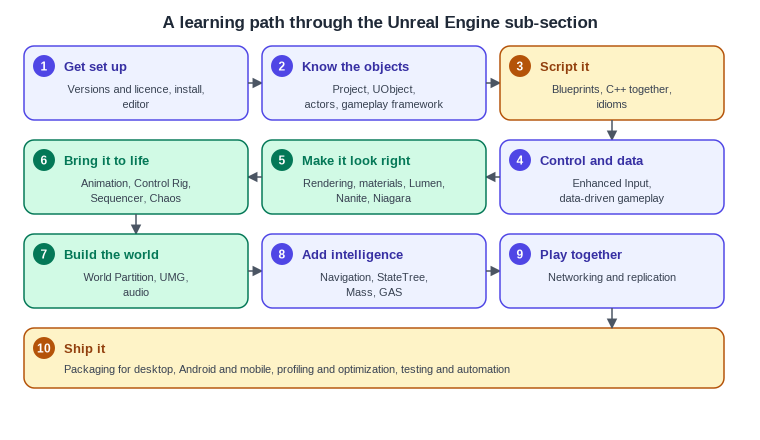
Get set up: Versions, Licensing and History, Installing and Building from Source and Editor Tour.
-
Know the objects: Project Structure and Modules, UObject, Reflection and Garbage Collection, Actors and Components and Gameplay Framework.
-
Script it: Blueprints Visual Scripting, Blueprint Communication, C++ and Blueprints Together and Unreal C++ Idioms.
-
Control and data: Enhanced Input and Data-Driven Gameplay.
-
Make it look right: Rendering Overview, Materials and the Material Editor, Lighting, Lumen and MegaLights, Nanite and Virtual Geometry, Niagara VFX and Post-Processing and Cameras.
-
Bring it to life: Animation Blueprints and State Machines, Control Rig and Motion Matching, Sequencer Cinematics and Chaos Physics and Collision.
-
Build the world: World Partition and PCG, UMG, Slate and CommonUI and Audio and MetaSounds.
-
Add intelligence: AI, Navigation and Perception, Behavior Trees and StateTree, Mass Entity and Gameplay Ability System.
-
Play together: Networking and Replication.
-
Ship it: Packaging for Desktop, Android and Mobile, Profiling and Optimization and Testing and Automation.
If you learned Unreal from a book or tutorial written before UE5, start with What Has Changed Since the Older Unreal Engine Guides. Verse, UEFN and UE6 Context is for the end of the path. Keep the Unreal Engine Cheat Sheet at hand throughout.
Running example
The Bookshelf runs on UE 5.8 from the Third Person template, with a C++ module named Bookshelf, C++ base classes and Blueprint subclasses. It imports the shared bookshelf.glb model used by every sub-section of Graphics & Games, so that the same shelf can be compared across APIs and engines. Each code example shows the header and source pair, with the Blueprint equivalent where it helps.
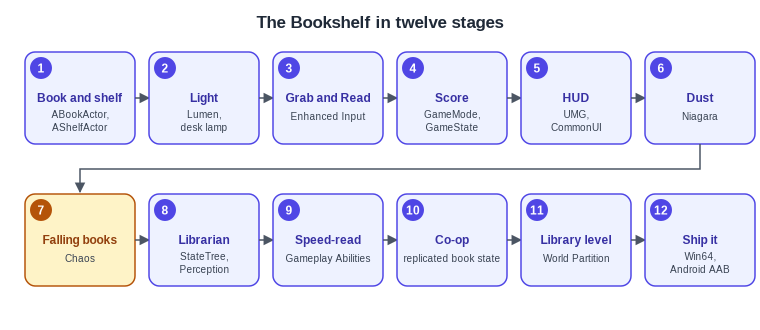
-
ABookActorandAShelfActor, a static-mesh book with a material instance and a socketed row of books, built from the shared model (Actors and Components, C++ and Blueprints Together and Materials and the Material Editor) -
Lumen lighting with a MegaLights desk lamp (Lighting, Lumen and MegaLights)
-
a "Grab/Read" action (Enhanced Input)
-
ABookshelfGameModeand a score in the GameState (Gameplay Framework) -
a HUD with the book title (UMG, Slate and CommonUI)
-
dust when a book is pulled (Niagara VFX)
-
books that can fall (Chaos Physics and Collision)
-
a "librarian" NPC that re-shelves books (AI, Navigation and Perception and Behavior Trees and StateTree)
-
a "Speed-read" ability (Gameplay Ability System)
-
two-player co-op with replicated book state (Networking and Replication)
-
a library level in a partitioned world (World Partition and PCG)
-
builds for Win64 and for Android as an App Bundle (Packaging for Desktop and Android and Mobile)
Related material on this site
-
Graphics & Games for the section overview, the shared Bookshelf assets and the bibliography of every book and official source used.
-
Unreal Engine Cheat Sheet for a one-page printable summary.
-
C++ Reference for the language of the pages, with Memory Management and Smart Pointers and Build and Tooling as the counterparts of
TSharedPtrand of the Unreal Build Tool. -
Unity for the other engine of this section.
-
Multiplayer Game Architecture for the networking theory behind Networking and Replication.
-
Publishing on Google Play and Signing, Capabilities and Configuration for the store and signing context of Android and Mobile.
-
The Rendering Pipeline and The Game Loop and Frame Timing for the engine-neutral background.
Bibliography
Books
The Unreal Engine pages draw on six books, most of them written for UE4. The books are consulted references for concept coverage: no text, figure or code is copied from them, and where a book and the official documentation disagree the documentation is followed. The complete entries, with every other source of the section, are in the section bibliography.
-
Marcos Romero and Brenden Sewell, Blueprints Visual Scripting for Unreal Engine, 2nd edition, Packt, 2019, ISBN 978-1-78934-706-7: O’Reilly listing.
-
Nitish Misra, Learning Unreal Engine Android Game Development, Packt, 2015, ISBN 978-1-78439-436-3: Packt.
-
Rachel Cordone, Unreal Development Kit Game Programming with UnrealScript: Beginner’s Guide, Packt, 2011, ISBN 978-1-84969-192-5, written for Unreal Engine 3.
-
Benjamin Carnall, Unreal Engine 4.X By Example, Packt, 2016, ISBN 978-1-78588-553-2: O’Reilly listing.
-
Joanna Lee, John P. Doran and Nitish Misra, Unreal Engine: Game Development from A to Z, Packt, 2016, ISBN 978-1-78712-328-1: O’Reilly listing.
-
Zhenyu George Li and E. Wyn Roberts, Unreal Engine 5 Game Development with C++ Scripting, Packt, 2023, ISBN 978-1-80461-393-1: Packt.
References
-
Unreal Engine 5.8 documentation: https://dev.epicgames.com/documentation/en-us/unreal-engine/unreal-engine-5-8-documentation
-
C++ API: https://dev.epicgames.com/documentation/en-us/unreal-engine/API and Blueprint API: https://dev.epicgames.com/documentation/en-us/unreal-engine/BlueprintAPI
-
Unreal Engine 5.8 release notes: https://dev.epicgames.com/documentation/en-us/unreal-engine/unreal-engine-5-8-release-notes
-
Unreal Engine 5 migration guide: https://dev.epicgames.com/documentation/en-us/unreal-engine/unreal-engine-5-migration-guide
-
Lyra sample game: https://dev.epicgames.com/documentation/en-us/unreal-engine/lyra-sample-game-in-unreal-engine
-
Epic Developer Community learning: https://dev.epicgames.com/community/unreal-engine/learning
-
Licence: https://www.unrealengine.com/en-US/license and EULA: https://www.unrealengine.com/en-US/eula/unreal
-
Source access: https://github.com/EpicGames/UnrealEngine
-
The books and the other sources of the section bibliography