What Has Changed Since the Older Unreal Engine Guides
|
This content was generated with the assistance of AI and should be verified against the official documentation before being relied on in production. |
The ideas in the older Unreal books are still sound: actors made of components, the gameplay framework, Blueprint graphs, the reflection macros, collision channels, material graphs, authority and replication. What has changed is much of what is typed and clicked: the input bindings, the cinematic, particle and physics tools, the lighting workflow, the toolchains, the Android steps, the licence and the addresses of the community sites. This page lists, book by book, the statements that are out of date and what to do today, so that you can keep reading the books for their explanations and use the pages of this sub-section for current steps. It documents Unreal Engine 5.8. The facts were checked on 5 November 2026 against Epic’s release notes, requirements pages and migration guide and against Google Play’s requirements page. Epic’s licence, FAQ and news pages refused automated requests that day, so the licence figures below come from search excerpts of those pages. For the changes that affect all graphics libraries, not only Unreal Engine, see What Has Changed Since the Older Guides.
The books have the short names used in the tables, and chapter numbers are those of the books. For the learning path, M1-4 means module 1, chapter 4.
| Short name | Book | Targets |
|---|---|---|
BPV |
Marcos Romero and Brenden Sewell, Blueprints Visual Scripting for Unreal Engine, 2nd edition, Packt, 2019 |
UE 4.20 to 4.22 |
MIS |
Nitish Misra, Learning Unreal Engine Android Game Development, Packt, 2015 |
UE 4.4 to 4.7, NDK r9c |
COR |
Rachel Cordone, Unreal Development Kit Game Programming with UnrealScript: Beginner’s Guide, Packt, 2011 |
UDK 2011 (UE3) |
CAR |
Benjamin Carnall, Unreal Engine 4.X By Example, Packt, 2016 |
UE 4.10 and 4.11 |
ATZ |
Joanna Lee, John P. Doran and Nitish Misra, Unreal Engine: Game Development from A to Z, Packt learning path, 2016 |
UE 4.7 to 4.10 |
LIR |
Zhenyu George Li and E. Wyn Roberts, Unreal Engine 5 Game Development with C++ Scripting, Packt, 2023 |
UE 5.0 and later, Visual Studio 2022 |
All six are listed in the section bibliography.
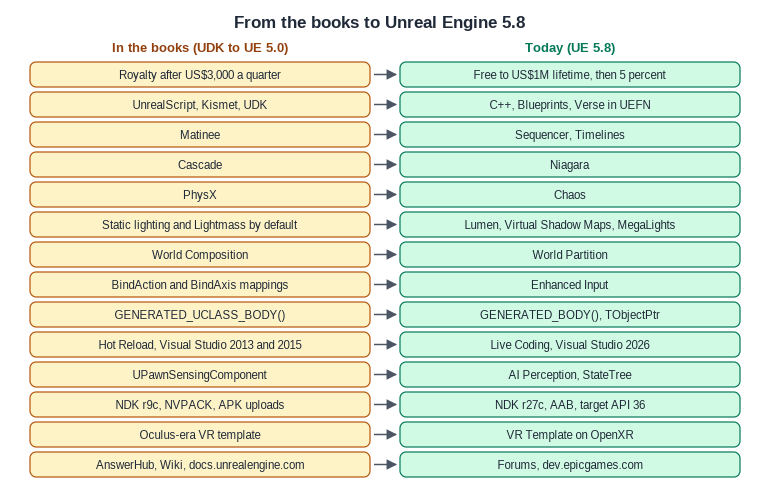
The left column is the style of the books; the right column is what the pages of this sub-section use. Some of the left column still works, which is why an old tutorial does not always fail on the first step: Lightmass and static lighting remain supported, the legacy input bindings still compile, and Hot Reload remains a fallback when Live Coding is turned off.
From UE3 to UE5
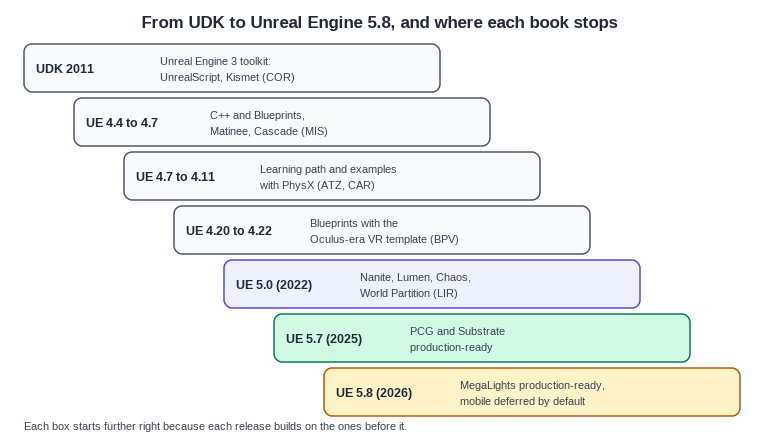
Three breaks matter when you read an older guide. UE3 and UDK were scripted in UnrealScript and Kismet; UE4 dropped UnrealScript in 2014 for C++ and Blueprints, so nothing typed in a UDK book carries over. UE4 went free in 2015 with a royalty, so licence advice from before that date and the thresholds of the following years are both obsolete. UE5 arrived in 2022 with a new generation of systems, and Epic’s migration guide lists what replaces what: Sequencer for Matinee, Chaos for PhysX as the default, Niagara for Cascade, World Partition for World Composition, and Lumen for Light Propagation Volumes and Distance-Field Global Illumination. The story in full is on Versions, Licensing and History.
Check the version of a tutorial before anything else. A UE 4.27 tutorial looks almost like a UE 5.8 one until it reaches lighting, input or particles, and UE 5.0 itself predates most of what this sub-section recommends.
The corrections, book by book
Several books
| Chapters | What the books say | What is current | Release or date | Read more |
|---|---|---|---|---|
MIS 1, ATZ M3-1 |
A royalty of 5 percent after the first US$3,000 per product per quarter. |
Free until a product’s lifetime gross revenue exceeds US$1M, then 5 percent, with Epic Games Store revenue exempt. Epic’s FAQ describes 3.5 percent under Launch Everywhere with Epic. Non-game companies above US$1M of annual revenue buy seats at US$1,850 per user per year. |
Current terms |
|
MIS 6, ATZ M1-7, M2-5 and M3-6 |
Matinee for cutscenes and animated actors. |
Matinee is not part of Unreal Engine 5. Use Sequencer for cinematics and Blueprint Timelines for small animated values. |
UE 5.0 |
|
ATZ M1-4 and M2-6, MIS |
Static lighting and Lightmass as the default way to light a level. |
Lumen and Virtual Shadow Maps are the defaults for new desktop projects, and MegaLights is production-ready. Baked lighting remains a good choice for mobile. |
UE 5.0 and 5.8 |
|
CAR 4 to 9, LIR 4 and 7, BPV 6 |
Action and Axis mappings bound with |
Enhanced Input, which Epic’s page says is enabled by default. Epic calls the old mappings the legacy input system. In 5.8 Enhanced Input and Common Input are merged into one system. |
UE 5 and 5.8 |
|
MIS 1 and 2, CAR |
Visual Studio 2013 or 2015 and Hot Reload. |
Visual Studio 2026 is recommended and 2022 17.14 is the minimum in the 5.8 release notes. Live Coding is the default way to recompile. |
UE 5.8 |
Installing and Building from Source, Project Structure and Modules |
MIS 7, BPV 12 |
NDK r9c, NVPACK and APK uploads. |
Android Studio Koala, NDK r27c and SDK 35 for compiling, an Android App Bundle for upload, and a target of API level 36 for new apps and updates on Google Play. |
UE 5.8, 31 August 2026 |
|
MIS, ATZ, CAR, LIR |
Links to AnswerHub, the Unreal Wiki and docs.unrealengine.com. |
Epic’s documentation lives on dev.epicgames.com, and questions and learning material are on the Epic Developer Community. |
Current |
|
COR, ATZ |
PhysX as the physics engine. |
Chaos is the default in UE5. |
UE 5.0 |
Blueprints Visual Scripting for Unreal Engine (BPV)
| Chapters | What the book says | What is current | Release or date | Read more |
|---|---|---|---|---|
16 |
The VR chapter is built on the Oculus-era VR template of UE 4. |
The VR Template runs on OpenXR, so one project targets many headsets. |
UE 5 |
|
Whole book |
UE 4.20 to 4.22. |
The graphs, events, variables and flow control are the same. Check each node name and menu path against UE 5.8. |
UE 5.8 |
Learning Unreal Engine Android Game Development (MIS)
| Chapters | What the book says | What is current | Release or date | Read more |
|---|---|---|---|---|
1 |
PS4 "Project Morpheus", HTML5 export and the Oculus Rift as targets. |
HTML5 export is no longer part of the engine: threads on Epic’s forums name UE 4.24 as the last version with it, after which it moved out to a community-maintained platform extension. VR goes through OpenXR. |
After UE 4.24 |
Unreal Development Kit Game Programming with UnrealScript (COR)
| Chapters | What the book says | What is current | Release or date | Read more |
|---|---|---|---|---|
Whole book |
UnrealScript, Kismet, UDK |
UnrealScript was dropped in UE4 for C++ and Blueprints. Verse exists in UEFN and is planned for UE6. Read this book as history only. |
2014 |
Versions, Licensing and History, Verse, UEFN and UE6 Context |
6 |
UnrealScript |
Decision logic moves to StateTree or behaviour trees, and character states to Animation Blueprints. |
UE 5 |
Unreal Engine 4.X By Example (CAR)
| Chapters | What the book says | What is current | Release or date | Read more |
|---|---|---|---|---|
6 and 9 |
|
|
UE 4.x and UE 5 |
UObject, Reflection and Garbage Collection, C++ and Blueprints Together |
Unreal Engine: Game Development from A to Z (ATZ)
| Chapters | What the book says | What is current | Release or date | Read more |
|---|---|---|---|---|
M1-6 |
Cascade for particles. |
Cascade is deprecated. Use Niagara, with the Cascade to Niagara converter plugin for existing effects. |
UE 5 |
|
M1-7, M2-4 |
World Composition for large levels. |
World Partition. Epic’s migration guide says World Composition is deprecated and provides a conversion commandlet. Mesh Terrain is experimental in 5.8. |
UE 5.0 and 5.8 |
Unreal Engine 5 Game Development with C++ Scripting (LIR)
| Chapters | What the book says | What is current | Release or date | Read more |
|---|---|---|---|---|
7 |
|
AI Perception, with StateTree and Smart Objects for decisions. |
UE 5 |
|
Whole book |
UE 5.0 only. |
It predates Enhanced Input as the default, Mass, StateTree, Motion Matching, MegaLights, Iris and Substrate. |
UE 5.1 to 5.8 |
Mass Entity, Control Rig and Motion Matching, Networking and Replication, Materials and the Material Editor |
Moving an older project
-
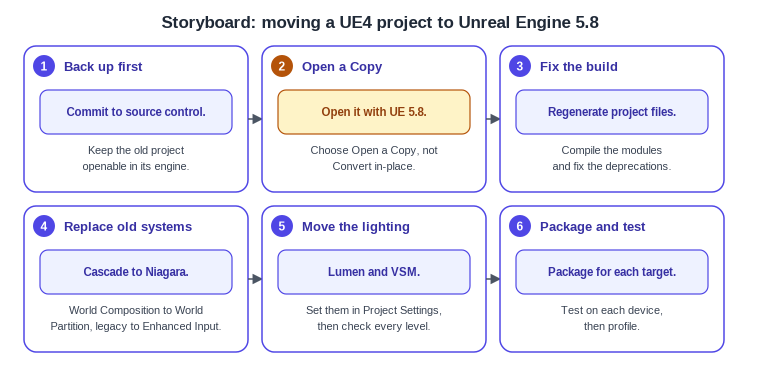
Commit the project to source control, so that you can always go back. Once a project is upgraded, an older engine cannot open it.
-
Open the project with UE 5.8 and choose Open a Copy. Epic’s migration guide recommends this, and warns that Convert in-place and Skip conversion can corrupt or lose data.
-
For a C++ project, regenerate the project files, compile the modules and fix the deprecation errors, starting with the constructors and with
TObjectPtrmembers (UObject, Reflection and Garbage Collection). -
Convert Cascade effects with the converter plugin (Niagara VFX), convert World Composition maps with
WorldPartitionConvertCommandlet(World Partition and PCG) and port the input (Enhanced Input). -
Turn on Lumen and Virtual Shadow Maps in the project settings if the project did not get them, and review each level (Lighting, Lumen and MegaLights).
-
Package for each target, test on the devices and profile again (Packaging for Desktop, Android and Mobile and Profiling and Optimization).
The migration guide says that projects from UE 4.0 to 4.26 load in the same or any newer version, and that very old projects may need fixes for deprecated references. A UE3 or UDK project has no such path: rebuild it.
What is still correct in the books
-
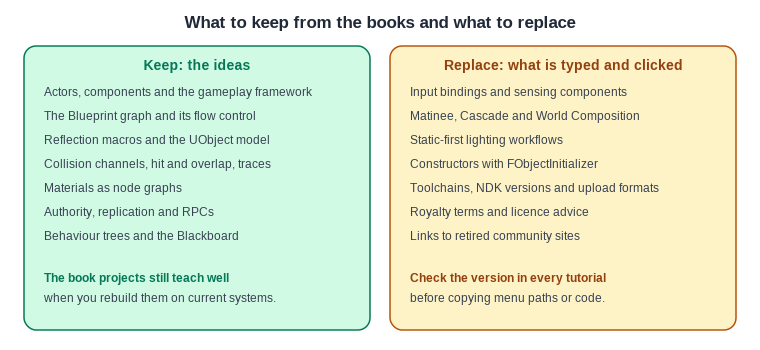
The explanations of actors, components, the gameplay framework, Blueprint graphs and flow control, collision channels, traces and material graphs remain correct. Only some of the names around them have changed.
-
The replication model in CAR and LIR, with authority, replicated properties and RPCs, is the model of UE 5.8, although Iris now sits underneath for projects that enable it.
-
The UnrealScript class tree in COR explains where the classes of the gameplay framework came from.
-
Where a book and Epic’s documentation disagree, follow the documentation for the version you use.
See also
-
Unreal Engine for the sub-section overview, the version baseline and its coverage map.
-
Versions, Licensing and History for the release timeline and the licence.
-
Unreal Engine Cheat Sheet for the one-page map from old to new.
References
-
Unreal Engine 5 Migration Guide: https://dev.epicgames.com/documentation/en-us/unreal-engine/unreal-engine-5-migration-guide
-
Unreal Engine 5.8 Release Notes: https://dev.epicgames.com/documentation/en-us/unreal-engine/unreal-engine-5-8-release-notes
-
Enhanced Input: https://dev.epicgames.com/documentation/en-us/unreal-engine/enhanced-input-in-unreal-engine
-
Android development requirements: https://dev.epicgames.com/documentation/en-us/unreal-engine/android-development-requirements-for-unreal-engine
-
Google Play target API level: https://developer.android.com/google/play/requirements/target-sdk
-
Unreal Engine licence: https://www.unrealengine.com/en-US/license and FAQ: https://www.unrealengine.com/en-US/faq
-
HTML5 in UE4 and UE5, Epic forums: https://forums.unrealengine.com/t/does-html5-export-work-for-unreal-4-27-and-5/503734
-
The books listed in the section bibliography