OpenGL
|
This content was generated with the assistance of AI and should be verified against the official documentation before being relied on in production. |
OpenGL is the cross-platform graphics API that taught a generation of programmers how a GPU draws. This sub-section teaches desktop OpenGL 4.6, OpenGL ES 3.2, their shading languages GLSL 4.60 and GLSL ES 3.20, and EGL 1.5, the glue that connects them to a window. It follows one running example, the Bookshelf GL program, from a single triangle to a small game, and it says plainly where OpenGL stands in 2026: frozen at version 4.6, deprecated on Apple platforms, still extended by Khronos and still the base of OpenGL ES on Android and embedded devices. The pages build on the general pages of Graphics & Games; read those first if the rendering pipeline or the transformation chain are new to you.
What OpenGL, OpenGL ES, GLSL and EGL are
| Name | What it is |
|---|---|
OpenGL |
A specification, maintained by the Khronos Group, of a C API that sends buffers, textures, shaders and draw commands to the GPU. Drivers implement it; there is no library to download. Version 4.6 is the last. |
OpenGL ES |
The subset and variant for phones, tablets and embedded devices. ES 2.0 and 3.0 dominate mobile history, and ES 3.2 is the last version. WebGL is its JavaScript binding. |
GLSL and GLSL ES |
The C-like shading languages in which the programmable stages are written. A shader is passed to the driver as text (or as SPIR-V since OpenGL 4.6) and compiled at run time. |
EGL |
The Khronos API that creates displays, surfaces and contexts for OpenGL ES (and desktop OpenGL) on Android, embedded Linux and several desktop systems. |
OpenGL is a state machine with a global current context: a function call changes the state of the context that is current on the calling thread. The pages in this sub-section keep returning to that fact, because it explains the shape of the API, its convenience for learning and its cost compared with the explicit APIs described in Explicit vs Implicit Graphics APIs.
The family tree
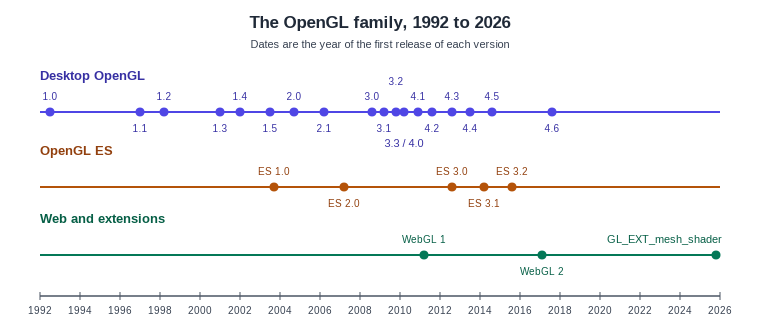
Desktop OpenGL grew from IRIS GL (see History of Real-Time Graphics) through a fixed-function era to the shader-based versions 2.0 and 3.x, and then through 4.0 to 4.6 added tessellation, compute shaders, direct state access and SPIR-V. OpenGL ES forked from it for mobile hardware; ES 2.0 removed the fixed function pipeline in 2007, years before the desktop did. WebGL 1 and 2 expose ES 2.0 and ES 3.0 to JavaScript. The details and the mapping between versions are on Versions, Profiles and Extensions.
Version baseline
The facts below were re-verified on 1 November 2026 against the official pages cited in the last column.
| Item | Version and status | Source |
|---|---|---|
Desktop OpenGL |
4.6, core and compatibility profiles. First released on 31 July 2017; the specification was last revised on 5 May 2022. No 4.7 or 5.0 exists. |
|
GLSL |
4.60, specification dated 14 August 2023. SPIR-V shaders are core since 4.6 ( |
|
OpenGL ES and GLSL ES |
ES 3.2 (specification of 5 May 2022) with GLSL ES 3.20 (14 August 2023). ES 1.x is deprecated. |
|
EGL |
1.5 |
|
New extension activity |
|
|
Android |
OpenGL ES 2.0 from API level 8, 3.0 from 18, 3.1 from 21 and 3.2 from 24, declared with |
|
Apple |
OpenGL deprecated in macOS 10.14 and OpenGL ES in iOS 12 (2018). Frozen; macOS offers up to a 4.1 core context. |
|
Translation layers |
ANGLE (Direct3D 11, OpenGL, Vulkan and Metal backends, the default WebGL backend of Chrome and Firefox on Windows) and Mesa Zink (OpenGL 4.6 on Vulkan) |
|
Setup libraries |
GLFW 3.5.1 and the glad2 loader generator |
When to choose OpenGL in 2026
Choose OpenGL when you are learning how the pipeline works, when you maintain or extend an existing OpenGL code base, when you target Android or embedded Linux devices where ES is the lowest common denominator, or when a small cross-platform tool matters more than the last 20 percent of performance. Choose Vulkan, Metal or WebGPU for a new engine, for features such as ray tracing, or for an Apple-only product. The full reasoning is in OpenGL in 2026, and the general criteria are in Choosing an API or Engine.
What’s covered
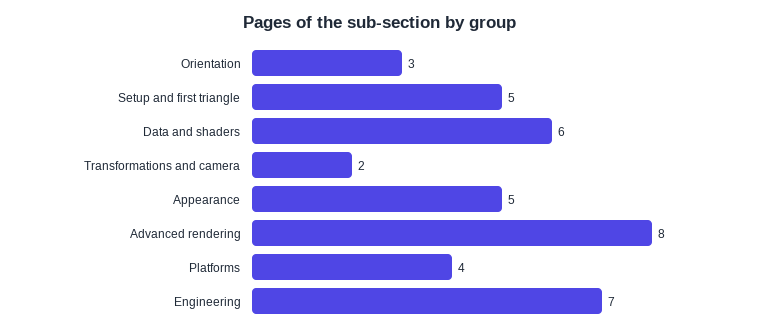
Orientation
| Page | Covers |
|---|---|
Frozen core, live extensions, Apple, Android, ANGLE, Zink and a decision guide. |
|
Core and compatibility profiles, version and extension queries, the GL, GLSL, ES and WebGL version mapping. |
|
The corrections for the seven books, row by row. |
Setup and first triangle
| Page | Covers |
|---|---|
CMake, GLFW, glad2 and GLM, window hints, the render loop. |
|
WGL, GLX, EGL and CGL, loaders, GLFW and SDL, headless contexts. |
|
Display, config, surface and context lifecycle on Android and embedded Linux. |
|
The smallest complete program, in six steps. |
|
Every stage of the pipeline, fixed and programmable. |
Data and shaders
| Page | Covers |
|---|---|
Buffer objects, immutable storage, vertex formats, index buffers. |
|
Types, swizzles, qualifiers, interface blocks, built-ins. |
|
Compile and link, separable programs, binaries, SPIR-V. |
|
Uniforms, std140 and std430 blocks, binding points. |
|
The 4.5 object model without bind-to-edit. |
|
GLSL ES versions, precision, one shader for GL, ES and WebGL. |
Transformations and camera
| Page | Covers |
|---|---|
Model, view and projection with GLM, NDC, depth range, reverse-Z. |
|
Perspective and orthographic cameras, resize, orbit camera. |
Appearance
| Page | Covers |
|---|---|
Texture objects, mipmaps, samplers, sRGB, compressed formats. |
|
Normals, ambient, diffuse and specular, several lights. |
|
Tangent space, normal and specular maps. |
|
Metallic-roughness and an image-based lighting overview. |
|
Depth test, culling, blending, transparency order, stencil outlines. |
Advanced rendering
| Page | Covers |
|---|---|
FBOs, renderbuffers, multiple render targets, post-processing. |
|
Depth textures, PCF, bias. |
|
Instancing, multi-draw indirect, bindless extensions. |
|
The optional geometry and tessellation stages. |
|
Work groups, image load and store, barriers, particles. |
|
GL_EXT_mesh_shader: task and mesh stages. |
|
Fences, occlusion and timer queries, transform feedback. |
|
MSAA, resolve, HDR and tone mapping. |
Platforms
| Page | Covers |
|---|---|
GLSurfaceView, threading, NDK and EGL, ANGLE. |
|
Deprecated status, GLKit legacy, migrating to Metal. |
|
EGL with GBM and KMS, Mesa, Zink, llvmpipe, Raspberry Pi. |
|
WebGL 1 and 2 against ES 2 and 3. |
Engineering
| Page | Covers |
|---|---|
KHR_debug, labels, RenderDoc, apitrace, common mistakes. |
|
State sorting, batching, streaming, timer queries, tile-based GPUs. |
|
OBJ, glTF 2.0, image decoding, KTX2. |
|
Font atlases, Dear ImGui, GLFW input, picking. |
|
Vertex-shader skinning and glTF skins. |
|
A concept map from GL to the explicit APIs. |
|
The one-page A4 summary and the PDF to download. |
Coverage map
Official documentation areas
| Area | Official documentation | Pages |
|---|---|---|
GL and ES registry |
The OpenGL and OpenGL ES registries, extension lists, |
Versions, Profiles and Extensions, Getting Started on the Desktop |
Reference pages |
The OpenGL 4 and OpenGL ES 3 reference pages; every code example links its page |
|
GLSL specifications |
GLSL 4.60, GLSL ES 3.20 and GLSL 1.50 |
The OpenGL Shading Language (GLSL), GLSL ES and Shader Portability |
EGL |
EGL 1.5: display, config, surface, context, swap interval |
EGL: Displays, Configs, Surfaces and Contexts, Contexts, Windows and Loaders |
OpenGL Wiki |
Getting Started, Rendering Pipeline Overview, Vertex Specification, buffer, VAO, shader, interface blocks, UBO, SSBO, texture, sampler, framebuffer, debug output, DSA, SPIR-V, compute, sync, common mistakes, loading functions |
The OpenGL Rendering Pipeline, Buffers and Vertex Specification, Direct State Access, Debugging and Tools |
Android |
The OpenGL ES guide: environment, shapes, drawing, projection, motion, touch |
|
Apple |
The archived OpenGL Programming Guide for Mac and Migrating OpenGL code to Metal |
|
ANGLE and Mesa |
ANGLE, Mesa, Zink and llvmpipe |
|
Setup |
GLFW documentation and the glad2 generator |
Getting Started on the Desktop, Contexts, Windows and Loaders |
Conformance |
VK-GL-CTS and the OpenGL-Registry repository |
Concepts from the books
The seven books and course notes are listed in the section bibliography. The short names are SB4 (OpenGL SuperBible, 4th edition), ES2PG (OpenGL ES 2.0 Programming Guide), ES3PG (OpenGL ES 3.0 Programming Guide), GLSL150 (the GLSL 1.50 specification), BRO (OpenGL ES 2 for Android), MAR (Game and Graphics Programming for iOS and Android with OpenGL ES 2.0) and APU (the Spanish notes Apuntes de OpenGL y GLUT). Each cell lists the chapters that contribute the concept, and the last column the pages that cover it. The books are consulted references: no text, figure or code is copied from them, and where a book and the official documentation disagree the documentation is followed.
| Concept | SB4 | ES2PG | ES3PG | GLSL150 | BRO | MAR | APU | Pages |
|---|---|---|---|---|---|---|---|---|
Pipeline overview |
1 and 15 |
1 |
1 |
section 2 |
2 and 3 |
- |
X |
|
Context and window setup |
2 and 19 to 21 |
3 and 15 |
3 and 16 |
- |
1 |
1 |
X |
Getting Started on the Desktop, Contexts, Windows and Loaders, EGL: Displays, Configs, Surfaces and Contexts |
Hello triangle and primitives |
3 |
2 |
2 |
- |
2 and 3 |
2 |
X |
|
Buffers and vertex arrays |
11 |
6 |
6 |
- |
2 and 8 |
3 and 5 |
- |
|
The GLSL language |
15 to 17 |
5 |
5 |
all |
3 |
2 |
- |
The OpenGL Shading Language (GLSL), GLSL ES and Shader Portability |
Shaders, programs and binaries |
15 |
4 |
4 |
- |
3 |
2 |
- |
|
Transforms, camera and viewport |
4 |
8 |
8 |
- |
5 and 6 |
2 and 7 |
X |
Coordinate Systems and Transforms in OpenGL, Cameras and Projection in OpenGL |
Primitive assembly and rasterisation |
3 |
7 |
7 |
- |
- |
- |
- |
|
Textures, including 3D, arrays and ETC2 |
8 and 9 |
9 |
9 |
- |
7 and 11 |
4 |
- |
|
Lighting and materials |
5, 6, 16 and 17 |
8 and 10 |
8 and 10 |
- |
13 |
10 |
X |
Lighting with Blinn-Phong in OpenGL, Materials and Normal Mapping in OpenGL |
Depth, blending, stencil and hidden surfaces |
3 and 6 |
11 |
11 |
- |
- |
4 |
X |
|
Framebuffers, render to texture and multiple render targets |
18 |
12 |
12 |
- |
- |
11 |
- |
|
Shadows |
14 |
13 |
14 |
- |
- |
10 |
- |
|
Instancing, transform feedback and synchronisation |
- |
- |
6, 8, 13 and 14 |
- |
- |
- |
- |
Instancing and Indirect Drawing, Synchronisation, Queries and Transform Feedback |
Particles |
- |
13 |
14 |
- |
10 |
11 |
- |
|
Picking, interaction and menus |
12 |
- |
- |
- |
9 |
6 |
X |
|
Occlusion queries |
13 |
- |
14 |
- |
- |
- |
- |
|
Curves, terrain and skybox |
10 |
- |
14 |
- |
11 and 12 |
- |
- |
Geometry and Tessellation Shaders, Textures and Samplers in OpenGL |
Model loading (OBJ) |
- |
- |
- |
- |
8 |
3 |
- |
|
Skeletal animation |
- |
- |
- |
- |
- |
12 |
- |
|
Physics, pathfinding and audio in a GL game |
- |
- |
- |
- |
- |
6, 8 and 9 |
- |
|
Optimisation |
11 |
13 |
14 |
- |
- |
5 |
- |
|
Android specifics |
- |
15 |
16 |
- |
1 and 14 |
1 |
- |
|
State queries and errors |
- |
14 |
15 |
- |
- |
- |
- |
Official concepts missing from the books
Several features that every current program uses were introduced after all seven books were written. They are covered from the official documentation.
| Concept | Pages |
|---|---|
Direct State Access (4.5) |
|
SPIR-V shaders (4.6) |
|
|
|
Immutable and persistently mapped buffers (4.4) |
Buffers and Vertex Specification, Synchronisation, Queries and Transform Feedback |
Multi-draw indirect |
|
Compute shaders (4.3 and ES 3.1) |
|
|
Coordinate Systems and Transforms in OpenGL, Blending, Depth and Stencil in OpenGL |
ASTC, KTX2 and Basis |
Textures and Samplers in OpenGL, Asset Loading: glTF and OBJ |
glTF 2.0 |
Asset Loading: glTF and OBJ, Physically Based Rendering Basics in OpenGL |
|
|
ANGLE and Zink layering |
|
The Android ANGLE roadmap |
|
RenderDoc |
|
glad2 |
Getting Started on the Desktop, Contexts, Windows and Loaders |
Porting to Vulkan and WebGPU |
Where the books are out of date, the page that covers the concept says so, and What Has Changed Since the Older OpenGL Guides collects the corrections.
Reading path
-
Read OpenGL in 2026 and Versions, Profiles and Extensions to know which API you are learning and on which platforms it runs.
-
Set up with Getting Started on the Desktop, then draw the Hello Triangle and read The OpenGL Rendering Pipeline.
-
Learn data and shaders: Buffers and Vertex Specification, The OpenGL Shading Language (GLSL) and Uniforms, UBOs and SSBOs.
-
Add the camera with Coordinate Systems and Transforms in OpenGL.
-
Give surfaces an appearance with Textures and Samplers in OpenGL, Lighting with Blinn-Phong in OpenGL and Blending, Depth and Stencil in OpenGL.
-
Continue with the advanced pages on framebuffers, shadows, instancing, compute and post-processing, then the platform pages for the devices you target.
-
Finish with debugging, performance and the porting map, and keep the OpenGL Cheat Sheet at hand.
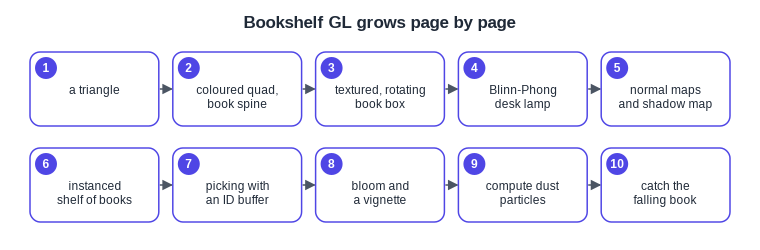
Bookshelf GL, the running example
Bookshelf GL is a C++20 program built with CMake, GLFW, glad2 and GLM. Its baseline is an OpenGL 4.1 core context, so that it
runs on macOS, with optional 4.6 paths (direct state access, SPIR-V, compute and mesh shaders). An Android variant in Kotlin
with GLSurfaceView uses an OpenGL ES 3.0 context and shares the ES-compatible GLSL. It loads the shared
bookshelf.glb and the textures described on the
section landing page, and it grows page by page:
-
a triangle (Hello Triangle)
-
a coloured quad that becomes a book spine (Buffers and Vertex Specification)
-
a textured, rotating book box (Textures and Samplers in OpenGL)
-
the shelf mesh lit by a Blinn-Phong desk lamp (Lighting with Blinn-Phong in OpenGL)
-
normal-mapped wood and a shadow map (Materials and Normal Mapping in OpenGL, Shadow Mapping)
-
an instanced shelf of books (Instancing and Indirect Drawing)
-
picking a book with an ID buffer (Text, UI and Input)
-
post-processing with bloom and a vignette (Framebuffers and Render to Texture)
-
compute-shader dust particles (Compute Shaders in OpenGL)
-
a tiny game, "catch the falling book", with an orbit camera, input, a score and timer queries (OpenGL Performance)
Related material on this site
-
Graphics & Games for the section overview, the shared Bookshelf assets and the bibliography of every book and official source used.
-
OpenGL Cheat Sheet for a one-page printable summary.
-
The Rendering Pipeline and Coordinate Spaces and Transforms for the API-neutral background.
-
Graphics: Canvas, OpenGL ES and GLTextureView for the Android user interface integration.
Bibliography
Books
The OpenGL pages draw on seven books and course notes. The books are consulted references for concept coverage: no text, figure or code is copied from them, and where a book and the official documentation disagree the documentation is followed. The complete entries, with every other source of the section, are in the section bibliography.
-
Richard S. Wright Jr., Benjamin Lipchak and Nicholas Haemel, OpenGL SuperBible: Comprehensive Tutorial and Reference, 4th edition, Addison-Wesley, 2007, ISBN 978-0-321-49882-3: InformIT.
-
Aaftab Munshi, Dan Ginsburg and Dave Shreiner, OpenGL ES 2.0 Programming Guide, Addison-Wesley, 2008, ISBN 978-0-321-50279-7: InformIT.
-
Dan Ginsburg, Budirijanto Purnomo, Dave Shreiner and Aaftab Munshi, OpenGL ES 3.0 Programming Guide, 2nd edition, Addison-Wesley, 2014, ISBN 978-0-321-93388-1: InformIT.
-
John Kessenich (ed.), The OpenGL Shading Language, Version 1.50, Khronos Group, 2009: specification.
-
Kevin Brothaler, OpenGL ES 2 for Android: A Quick-Start Guide, Pragmatic Bookshelf, 2013, ISBN 978-1-937785-34-5: publisher page.
-
Romain Marucchi-Foino, Game and Graphics Programming for iOS and Android with OpenGL ES 2.0, Wrox / Wiley, 2012, ISBN 978-1-119-97591-5: Wiley.
-
Cristina Cañero Morales, Apuntes de OpenGL y GLUT, unpublished course notes in Spanish, year not stated; cited without a link.
References
-
OpenGL registry: https://registry.khronos.org/OpenGL/index_gl.php
-
OpenGL ES registry: https://registry.khronos.org/OpenGL/index_es.php
-
OpenGL 4 reference pages: https://registry.khronos.org/OpenGL-Refpages/gl4/
-
OpenGL ES 3 reference pages: https://registry.khronos.org/OpenGL-Refpages/es3/
-
GLSL 4.60 specification: https://registry.khronos.org/OpenGL/specs/gl/GLSLangSpec.4.60.html
-
EGL registry: https://registry.khronos.org/EGL/
-
OpenGL Wiki: https://wikis.khronos.org/opengl/
-
Khronos: OpenGL https://www.khronos.org/opengl/ and OpenGL ES https://www.khronos.org/opengles/
-
Mesh shader announcement: https://www.khronos.org/news/archives/opengl-resurges-in-2025-with-mesh-shader-extensions-for-gaming
-
Android OpenGL ES guide: https://developer.android.com/develop/ui/views/graphics/opengl/about-opengl
-
Apple, migrating OpenGL code to Metal: https://developer.apple.com/documentation/metal/migrating-opengl-code-to-metal
-
ANGLE: https://github.com/google/angle and Mesa Zink: https://docs.mesa3d.org/drivers/zink.html
-
GLFW: https://www.glfw.org/docs/latest/ and glad: https://gen.glad.sh/
-
The books and the other sources of the section bibliography