Augmented and Mixed Reality Basics
|
This content was generated with the assistance of AI and should be verified against the official documentation before being relied on in production. |
This page was checked in November 2026. It explains the ideas that every augmented reality (AR), mixed reality (MR) and virtual reality (VR) platform shares, and it names the current platform layers: OpenXR 1.1 (the Khronos standard, released on 15 April 2024 and extended by patch releases since), the W3C WebXR Device API, ARCore (SDK 1.56.0 at the time of writing, plus ARCore for Jetpack XR on Android XR) and ARKit with RealityKit on Apple platforms. The examples need a physical device: an ARCore-supported Android phone, an iPhone or iPad with ARKit, a WebXR-capable browser on an AR-capable device, or an OpenXR runtime with a headset. The Apple side has its own pages in this repository, see ARKit and RealityKit and visionOS, and sensors and CameraX on Android are covered in Android device features, so neither is re-taught here.
The running example is the Bookshelf: a small shelf (see bookshelf.glb) that the user places on the floor by tapping a detected plane.
What AR, MR and XR mean
-
Virtual reality replaces the user’s view with a rendered scene, usually through a head-mounted display (HMD).
-
Augmented reality draws virtual content over a view of the real world. On a phone the view is the camera image; on glasses it is the real world seen through the optics.
-
Mixed reality anchors virtual content in the real world and lets the two interact: virtual objects hidden behind a real sofa (occlusion), resting on a real table (planes and meshes), lit by real light (light estimation). Headsets achieve it through video passthrough.
-
XR is the umbrella term for all of them, and it is the word the standards use (OpenXR, WebXR).
All of them share one rendering problem: the virtual camera must follow the real camera (or the user’s eyes) so exactly that virtual objects look fixed in the world. Everything below serves that goal.
Six degrees of freedom: tracking and SLAM
A device has six degrees of freedom (6DoF) when its pose in space is known completely: three for position (x, y, z) and three for orientation (yaw, pitch, roll, usually stored as a quaternion, see Rotations and Quaternions). A 3DoF device (an old phone-in-a-viewer headset, or a compass-only AR browser) knows orientation only: objects stay in the right direction but slide when the user walks.
Current phones and headsets reach 6DoF with visual-inertial odometry (VIO), one of the techniques grouped under the name SLAM (simultaneous localisation and mapping):
-
The camera finds distinctive image points (features) and follows them from frame to frame.
-
The inertial measurement unit (IMU: gyroscope and accelerometer, sampled several hundred times per second) predicts the motion between camera frames.
-
An estimator fuses both and outputs a pose, the position and orientation of the device in a world frame whose origin is where tracking started. At the same time it builds a sparse map of feature points, which it uses to correct drift and to find planes.
The estimated pose is a rigid transform, a rotation and a translation :
The view matrix used for rendering is the inverse of the camera pose (see Coordinate Spaces and Transforms).
Monocular VIO measures distance only up to a scale that the IMU resolves, which is why a phone needs a little sideways motion before tracking starts. Tracking fails in darkness, in front of blank walls, with fast motion blur, and on reflective surfaces. Platforms report this as a tracking state (for example "tracking", "paused" or "stopped" in ARCore) and the application must stop placing content while tracking is not good.
Sensor fusion in one equation
The simplest fusion of a gyroscope and an accelerometer is the complementary filter. The gyroscope is smooth but drifts; the accelerometer gives the direction of gravity, which does not drift but is noisy. For a tilt angle:
Production trackers use Kalman-style filters over the whole state, but the principle is the same. For orientation only,
Android exposes a ready-made fused sensor, the rotation vector, which you convert with
SensorManager.getRotationMatrixFromVector and SensorManager.getOrientation; if the screen can rotate, remap the axes
with SensorManager.remapCoordinateSystem. In an AR session you should read the camera pose from ARCore instead, because
it fuses the camera as well.
Planes, anchors and hit tests
Tracking alone gives the camera pose. To fix content to the world you need three more concepts, which appear under the same or similar names in ARCore, ARKit and OpenXR:
-
A plane (ARCore
Plane, ARKitARPlaneAnchor) is a flat region found in the feature map, with a pose, an extent and a polygon boundary, and a classification such as floor, wall, ceiling or table. Planes are estimates that grow, merge and move as the map improves. -
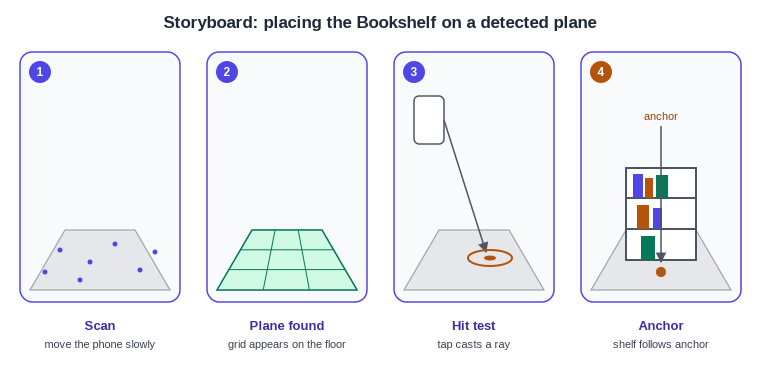
A hit test or raycast shoots a ray from a screen point (or from a controller) into the world and returns where it meets a plane, a feature point or, when depth is available, the measured surface.
-
An anchor is a pose that the system keeps up to date. When tracking corrects its map, anchors move with it, so content attached to an anchor does not drift. Rendering content at a pose copied once from a hit result is the most common AR mistake, because the pose goes stale.
The storyboard shows the full flow for the Bookshelf.
ARCore: hit test and anchor (Kotlin)
import com.google.ar.core.Anchor
import com.google.ar.core.Config
import com.google.ar.core.Frame
import com.google.ar.core.Plane
import com.google.ar.core.Session
import com.google.ar.core.TrackingState

fun configure(session: Session) {
    val config = Config(session).apply {
        planeFindingMode = Config.PlaneFindingMode.HORIZONTAL_AND_VERTICAL
        lightEstimationMode = Config.LightEstimationMode.ENVIRONMENTAL_HDR
    }
    session.configure(config)
}

/** Returns an anchor on the first plane hit by the tap, or null. */
fun placeShelf(frame: Frame, tapX: Float, tapY: Float): Anchor? {
    if (frame.camera.trackingState != TrackingState.TRACKING) return null
    for (hit in frame.hitTest(tapX, tapY)) {
        val trackable = hit.trackable
        if (trackable is Plane && trackable.isPoseInPolygon(hit.hitPose) &&
            trackable.type == Plane.Type.HORIZONTAL_UPWARD_FACING
        ) {
            return hit.createAnchor()   // keep this; ARCore updates its pose
        }
    }
    return null
}

/** Called every frame: build matrices from the camera and the anchor. */
fun drawFrame(session: Session, anchor: Anchor?, view: FloatArray, proj: FloatArray, model: FloatArray) {
    val frame = session.update()                       // latest camera image and pose
    frame.camera.getViewMatrix(view, 0)
    frame.camera.getProjectionMatrix(proj, 0, 0.1f, 100f)
    if (anchor != null && anchor.trackingState == TrackingState.TRACKING) {
        anchor.pose.toMatrix(model, 0)                 // shelf model matrix
        // draw the camera background first, then bookshelf.glb with view, proj, model
    }
}
Source: ARCore: Work with anchors
ARKit and RealityKit: raycast and anchor (Swift)
import ARKit
import RealityKit

final class ShelfViewController: UIViewController {
    let arView = ARView(frame: .zero)

    override func viewDidLoad() {
        super.viewDidLoad()
        arView.frame = view.bounds
        view.addSubview(arView)

        let config = ARWorldTrackingConfiguration()
        config.planeDetection = [.horizontal]
        arView.session.run(config)

        arView.addGestureRecognizer(UITapGestureRecognizer(target: self, action: #selector(handleTap(_:))))
    }

    @objc func handleTap(_ gesture: UITapGestureRecognizer) {
        let point = gesture.location(in: arView)
        guard let result = arView.raycast(from: point,
                                          allowing: .existingPlaneGeometry,
                                          alignment: .horizontal).first else { return }
        let anchor = AnchorEntity(raycastResult: result)       // follows the plane estimate
        if let shelf = try? Entity.load(named: "bookshelf") {  // bookshelf.usdz in the app bundle
            anchor.addChild(shelf)
        }
        arView.scene.addAnchor(anchor)
    }
}
Source: Apple: ARView
RealityKit loads USDZ and Reality files, so convert the Bookshelf from glTF first. RealityKit is an entity-component system, the pattern described in Entity Component System.
Kinds of AR
| Kind | How the content is attached | Examples and notes |
|---|---|---|
Marker-based |
A known image or fiducial is detected in the camera frame and its pose gives the anchor. |
ARToolkit-style square markers; ARCore Augmented Images; ARKit image tracking. Very robust, needs a printed target. |
Markerless |
SLAM builds a map of the environment; planes and feature points are the anchors. |
ARCore and ARKit world tracking; the default for furniture previews and games. |
Location-based |
GPS and compass place content at geographic coordinates. |
AR browsers of the early 2010s. Accurate to metres, not centimetres, so content drifts and floats. |
Geospatial |
The camera image is matched against a visual positioning service, giving a precise global pose. |
ARCore Geospatial API; ARKit geo-anchors in supported cities. Needs network access and coverage. |
Scene-understanding MR |
Depth, meshes and semantics from sensors give occlusion, physics and surface placement. |
ARCore Depth API, ARKit scene reconstruction, headset passthrough runtimes. |
OpenXR: one API for headsets, glasses and phones
OpenXR is the royalty-free Khronos standard that lets one application run on many XR devices. It replaced the situation in which every headset vendor shipped its own SDK. The application talks to the loader, which finds the runtime that the user has chosen as active; the runtime implements the API for one vendor’s hardware. Optional API layers sit between them for validation and logging. Android XR, Meta Quest, SteamVR and the open-source Monado are examples of runtimes.
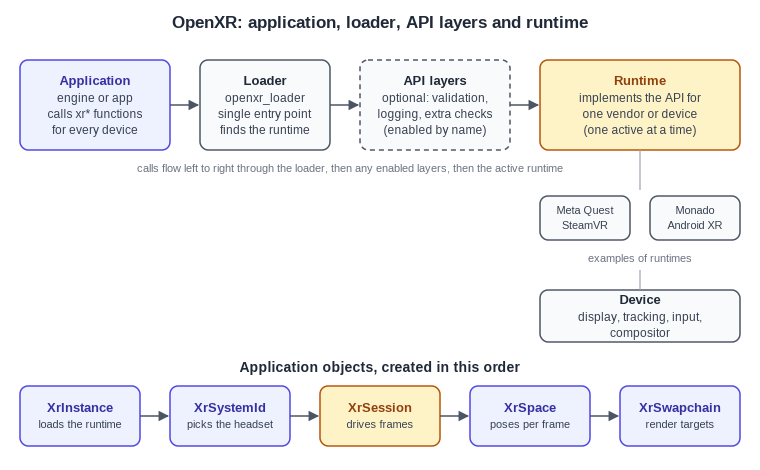
The object chain in the lower half of the figure is the shape of every OpenXR program:
-
An
XrInstanceis created with the extensions you need (for example a graphics binding such asXR_KHR_opengl_enable,XR_KHR_vulkan_enable2,XR_KHR_opengl_es_enableor a Metal or D3D binding). -
xrGetSystempicks a system, the headset and its controllers, for a form factor such as head-mounted display or handheld display. -
xrCreateSessionbinds the system to your graphics device. -
Spaces define coordinate frames. Reference spaces are view (the head), local (a fixed origin where the session began), local floor (local, at floor height, promoted to the core in OpenXR 1.1) and stage (a bounded room). Action spaces follow controllers and hands.
-
A swapchain provides the images that you render into, one per eye (or one array texture). The compositor shows them.
-
Input uses actions and action sets with suggested bindings per interaction profile, so the same code works for different controllers.
The frame loop
The loop is driven by the runtime, not by a timer: xrWaitFrame blocks until it is time to start the next frame and
returns a predicted display time. You locate the views for that time, render, and submit layers with xrEndFrame. The
prediction is what keeps content steady while the head moves: the pose is extrapolated to the moment the photons leave
the display, and the compositor may re-project the last image just before scan-out (timewarp or reprojection) to hide
small errors. A quad layer or projection layer is composited by the runtime, which is why UI text drawn into a quad
layer stays sharper than text drawn into the eye buffers.
#include <openxr/openxr.h>
#include <string.h>

/* Minimal instance, system and session-less setup; the graphics binding is chosen at xrCreateSession. */
XrResult create_instance_and_system(XrInstance *instance, XrSystemId *system) {
    const char *extensions[] = { "XR_KHR_opengl_es_enable" };   /* match your graphics API */

    XrInstanceCreateInfo ici = { XR_TYPE_INSTANCE_CREATE_INFO };
    strncpy(ici.applicationInfo.applicationName, "Bookshelf", XR_MAX_APPLICATION_NAME_SIZE - 1);
    ici.applicationInfo.apiVersion = XR_API_VERSION_1_1;
    ici.enabledExtensionCount = 1;
    ici.enabledExtensionNames = extensions;
    XrResult r = xrCreateInstance(&ici, instance);
    if (XR_FAILED(r)) return r;

    XrSystemGetInfo sgi = { XR_TYPE_SYSTEM_GET_INFO };
    sgi.formFactor = XR_FORM_FACTOR_HEAD_MOUNTED_DISPLAY;
    return xrGetSystem(*instance, &sgi, system);
}

/* One frame of the loop: wait, begin, render both views, end. */
void run_frame(XrSession session, XrSpace local, XrCompositionLayerBaseHeader **layers, uint32_t layer_count) {
    XrFrameState fs = { XR_TYPE_FRAME_STATE };
    xrWaitFrame(session, NULL, &fs);                  /* blocks; gives predictedDisplayTime */
    XrFrameBeginInfo fbi = { XR_TYPE_FRAME_BEGIN_INFO };
    xrBeginFrame(session, &fbi);

    /* xrLocateViews(session, &vli, &vs, 2, &count, views) with fs.predictedDisplayTime,
       then render each eye into its swapchain image and fill the projection layer. */

    XrFrameEndInfo fei = { XR_TYPE_FRAME_END_INFO };
    fei.displayTime = fs.predictedDisplayTime;
    fei.environmentBlendMode = XR_ENVIRONMENT_BLEND_MODE_OPAQUE;   /* ADDITIVE or ALPHA_BLEND for AR */
    fei.layerCount = layer_count;
    fei.layers = (const XrCompositionLayerBaseHeader *const *)layers;
    xrEndFrame(session, &fei);
}
Source: OpenXR 1.1 specification
The environment blend mode tells the compositor how your image combines with the real world: opaque for VR, additive for
see-through glasses, alpha blend for video passthrough. An application that wants to run in VR and MR enumerates the
supported modes with xrEnumerateEnvironmentBlendModes and picks one. Because the loader and layers are standard,
validation is one environment setting away, and the OpenXR SDK ships a loader, headers and sample code.
WebXR: XR in the browser
The WebXR Device API (a W3C specification) exposes the same ideas to JavaScript. A page asks the browser for an
immersive-vr or immersive-ar session, creates a WebGL (or WebGPU, where supported) layer, and receives a frame
callback with the viewer pose. AR features such as hit testing are optional features requested by name.
// Start an AR session with hit testing, then place the shelf where the viewer looks.
async function startAr(canvas) {
  if (!navigator.xr || !(await navigator.xr.isSessionSupported('immersive-ar'))) {
    throw new Error('immersive-ar is not supported here');
  }
  const gl = canvas.getContext('webgl2', { xrCompatible: true });
  const session = await navigator.xr.requestSession('immersive-ar', {
    requiredFeatures: ['hit-test'],
    optionalFeatures: ['anchors', 'light-estimation'],
  });
  await session.updateRenderState({ baseLayer: new XRWebGLLayer(session, gl) });

  const refSpace = await session.requestReferenceSpace('local');
  const viewerSpace = await session.requestReferenceSpace('viewer');
  const hitSource = await session.requestHitTestSource({ space: viewerSpace });
  let shelfPose = null;

  session.addEventListener('select', () => {
    // A tap or controller trigger: freeze the last hit as the shelf pose.
    if (lastHit) shelfPose = lastHit;
  });

  let lastHit = null;
  session.requestAnimationFrame(function onFrame(time, frame) {
    session.requestAnimationFrame(onFrame);
    const results = frame.getHitTestResults(hitSource);
    if (results.length) lastHit = results[0].getPose(refSpace).transform;

    const viewerPose = frame.getViewerPose(refSpace);
    if (!viewerPose) return;                             // tracking lost
    gl.bindFramebuffer(gl.FRAMEBUFFER, session.renderState.baseLayer.framebuffer);
    for (const view of viewerPose.views) {
      const vp = session.renderState.baseLayer.getViewport(view);
      gl.viewport(vp.x, vp.y, vp.width, vp.height);
      // view.projectionMatrix and view.transform.inverse.matrix drive the draw calls.
    }
  });
}Support varies by browser and device, so always feature-detect with isSessionSupported and check the compatibility
tables. The specification itself is at W3C WebXR Device API, and hit testing is a separate
module, WebXR Hit Test Module.
ARCore, ARKit and Android XR
| Concept | ARCore (Android, SDK 1.56.0) | ARKit (Apple) |
|---|---|---|
Session |
|
|
Camera pose |
|
|
Planes |
|
|
Hit test |
|
|
Anchors |
|
|
Marker images |
Augmented Images database |
|
Global positioning |
Geospatial API (visual positioning) |
|
Depth and meshes |
Depth API, Raw Depth |
LiDAR scene reconstruction on supported devices |
Android XR is Google’s platform for headsets and glasses; it is built on OpenXR, and its Jetpack XR libraries (including ARCore for Jetpack XR) give Kotlin access to planes, anchors and hand tracking. For Unity, AR Foundation wraps ARCore, ARKit and OpenXR behind one component set, and Unreal has equivalent AR and OpenXR plugins; both are cheaper than writing the platform code when you already use the engine (see Choosing an API or Engine).
The AR camera: from intrinsics to a projection matrix
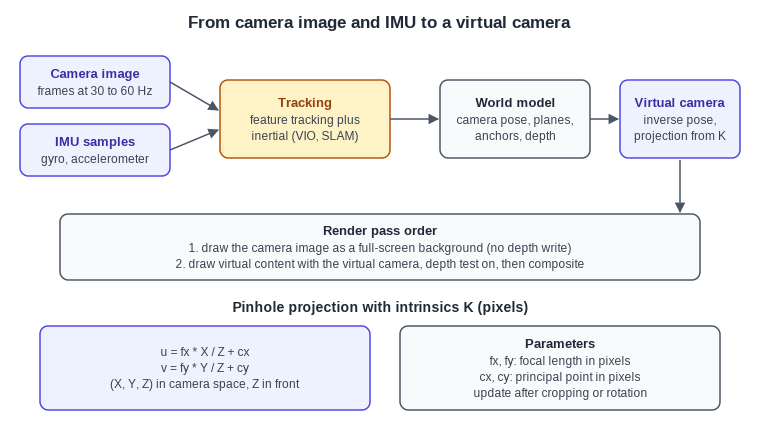
In AR the virtual camera must have the same optics as the real camera, or virtual objects would not line up with the image. The real camera is described by its intrinsics : focal lengths and principal point , all in pixels. A point in camera space in front of the camera lands on the pixel
ARCore (Camera.getImageIntrinsics) and ARKit (ARCamera.intrinsics) report these values for the camera image, and both
also hand you a ready projection matrix. Building it yourself is useful for custom renderers. For an OpenGL-style clip
space (camera looking down negative Z, pixel origin at the top-left, image size , near and far planes
) the projection is
For Vulkan, Metal, WebGPU and Direct3D the depth row changes to a zero-to-one range (see Vectors, Matrices and Homogeneous Coordinates).
/* Column-major 4x4 (OpenGL layout): m[column * 4 + row]. Pixel origin at the top-left. */
void projection_from_intrinsics(float fx, float fy, float cx, float cy,
                                float W, float H, float n, float f, float m[16]) {
    for (int i = 0; i < 16; ++i) m[i] = 0.0f;
    m[0 * 4 + 0] = 2.0f * fx / W;
    m[1 * 4 + 1] = 2.0f * fy / H;
    m[2 * 4 + 0] = 1.0f - 2.0f * cx / W;
    m[2 * 4 + 1] = 2.0f * cy / H - 1.0f;
    m[2 * 4 + 2] = -(f + n) / (f - n);
    m[2 * 4 + 3] = -1.0f;
    m[3 * 4 + 2] = -2.0f * f * n / (f - n);
}
Source: ARCore: Camera
Practical details that cause most AR misalignment:
-
The camera image and the screen have different aspect ratios and orientations. Apply the display rotation and the cropping to the intrinsics, or let the SDK’s display transform (ARCore
Frame.transformCoordinates2d, ARKitdisplayTransform) do it. -
Draw the camera image first and without writing depth, then draw virtual content. For occlusion by real objects, use the depth image as an extra depth test.
-
Match lighting with the platform’s light estimate (ARCore environmental HDR, ARKit light estimation) so that the shelf does not look pasted on; the lighting models are in Lighting and Shading Models.
-
Keep the render loop locked to the camera frames: the tracker delivers one pose per camera frame, and rendering with the pose of an older frame is visible as lag.
Common mistakes
-
Placing content at a copied hit pose instead of creating an anchor.
-
Ignoring the tracking state, so content jumps after a tracking loss.
-
Building a 3DoF experience by reading only orientation sensors and then expecting objects to stay put when the user walks.
-
Requiring features that most devices lack. Request optional features as optional and degrade gracefully.
-
Forgetting that a plane is an estimate: do not store plane polygons as permanent geometry.
-
Running heavy rendering on a phone without thermal budgeting; AR keeps the camera, the CPU and the GPU busy at once.
-
Writing a custom view model for head-mounted displays in 2026 instead of using the OpenXR view and space model.
Performance notes
-
Motion-to-photon latency is the number that matters, not frame rate alone. Predict poses to the display time, as
xrWaitFramedoes, and avoid extra buffering. -
Headsets run at 72 to 120 Hz or more; missing a frame is much more noticeable than on a flat screen, so budget the frame with some margin (see Performance and Profiling).
-
Single-pass stereo (instanced or multiview rendering) draws both eyes in one pass and cuts the CPU cost of draw calls nearly in half.
-
Foveated rendering lowers the shading rate outside the gaze or lens centre on hardware that supports it.
What the books say, and where they are outdated
Two sources in this section’s bibliography look at the view model and sensors from different decades. Sun’s The Java 3D API Specification (version 1.3) defines a view model that covers a window on a monitor, a head-mounted display and a room-mounted display with head tracking: a view platform in the scene, a physical body (eye and head geometry), a physical environment (screens, trackers and sensors) and a policy for where the eyepoint sits. The ideas of separating "where the viewer is in the virtual world" from "what the display hardware is" and of calibrating the eye to the display are exactly what OpenXR calls the view, local and stage reference spaces and the per-eye view poses and fields of view. The Java 3D chapters on input devices describe polled sensors and a sensor read per frame; OpenXR’s action system and predicted poses are their modern equivalent.
Raghav Sood’s Pro Android Augmented Reality (Apress, 2012) is a practical tour of the early phone-AR approach: camera preview with an overlay, orientation from the compass and accelerometer, location from GPS, markers through the AndAR port of ARToolkit, and a basic OpenGL ES model viewer for OBJ files. It remains a good explanation of why location-based AR floats and why markers are robust, but most of its code no longer runs.
| What the book teaches | Current practice |
|---|---|
Eclipse with ADT, minSdk 7 |
Android Studio; current ARCore needs far newer API levels than the book’s targets. |
|
The rotation-vector sensor, or ARCore camera poses, which also fuse the camera. |
|
CameraX or Camera2; inside an AR session, ARCore owns the camera. |
Google Maps Android API v1 ( |
Shut down; Maps SDK for Android v2 and later, or Maps Compose, or the ARCore Geospatial API. |
AndAR (an ARToolkit port hosted on the closed Google Code) for marker tracking |
ARCore Augmented Images and Geospatial API, ARCore for Jetpack XR, and OpenXR on Android XR. |
OpenGL ES 1.x fixed function ( |
ES 3.x shaders or Vulkan, or an engine or renderer that loads glTF (Filament, SceneView, Unity, Unreal). |
Project Glass as the flagship head-worn device |
Discontinued; Android XR is the current platform for glasses and headsets. |
Java 3D’s own head-mounted and room-mounted view model |
OpenXR 1.1 spaces, views and the loader and runtime architecture. |
See it in
Metal: Metal on visionOS; Unity: XR Development; Unreal Engine: Rendering Overview.
References
-
Daniel Selman, Java 3D Programming: Manning
-
Raghav Sood, Pro Android Augmented Reality: Apress on SpringerLink, companion code at GitHub
-
Sun Microsystems, The Java 3D API Specification 1.3: the project now lives at JogAmp