Licensing and Pricing
|
This content was generated with the assistance of AI and should be verified against the official documentation before being relied on in production. |
A game engine is also a legal and financial relationship, and for Unity that relationship changed more between 2023 and 2026 than its renderer did. Which plan a studio needs is decided by money, not by features: the same Editor, the same C# API and the same renderers run under every plan, and the plan only decides who is allowed to use them, whether the splash screen is optional, and which extra services come with the seat. This page explains the plans and the thresholds that choose between them, how a licence reaches the machine, what happened with the Runtime Fee, and what the Asset Store licences add on top.
The facts were checked in November 2026 against the pages cited in the text and listed in the references. The version documented is Unity 6.3 LTS (6000.3, supported until December 2027); the plan terms are the same for the later Unity 6 releases, including 6.6, because Unity sells plans, not versions. This is a description of published terms, not legal advice: prices and thresholds can change with each yearly adjustment, so confirm them on Unity’s pricing pages and in the Editor Software Terms before a purchase or a contract. Platforms: the Editor runs on Windows, macOS and Linux; the plans below apply on all of them.
The plans and their thresholds
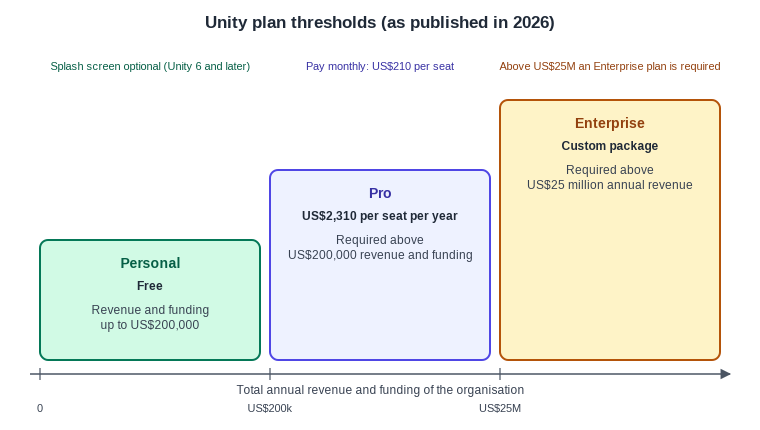
Unity publishes four plans. Three form a ladder keyed to the money the organisation makes or raises; the fourth is for non-gaming work:
| Plan | Who it is for | Price in 2026 | What it adds |
|---|---|---|---|
Personal |
Individuals and small organisations with up to US$200,000 of revenue and funding |
Free |
The Unity Engine and the Editor; the splash screen is optional for projects made with Unity 6 and later |
Pro |
Required for organisations above US$200,000 of annual revenue and funding; anyone below may buy it voluntarily |
US$2,310 per seat per year prepaid, or US$210 per seat per month |
Unity lists console and Apple Vision Pro publishing among the Pro features, with the other Pro services and support |
Enterprise |
Required for organisations above US$25 million of annual revenue; custom packages |
Negotiated with Unity |
A customised package; organisations above the threshold are contacted by Unity to move to it |
Industry |
Non-gaming customers (manufacturing, automotive, simulation and similar) |
Subscription, listed by Unity separately |
Pricing and packaging for non-game use; the Runtime Fee cancellation did not change this plan |
The threshold language matters. Unity’s wording is "total annual revenue and funding": a start-up that has raised US$500,000 but earns nothing is above the Personal ceiling, because funding counts. For Personal, Unity’s own product page describes eligibility as "less than US$200K of revenue and funds raised in the last 12 months", which is the number to compare against. The Enterprise rule has a gentler formulation: the US$25 million figure is annual revenue and funding, and an organisation that is already on Enterprise below that threshold may remain on it.
Source: Unity Personal: eligibility
Reading the ladder for a real project
Three situations cover most readers of this section:
-
Learning, a hobby project or a game jam. Personal. Nothing in the Editor is limited, so every example on the following pages works under it.
-
A small studio that is earning money. The studio is allowed to stay on Personal until revenue plus funding passes US$200,000 in the period Unity measures. After that Pro is required for every seat that uses the Editor. The practical advice is to plan the upgrade a quarter before the threshold, because subscriptions bill per seat.
-
A larger studio or a publisher. Pro per seat up to US$25 million and then a conversation with Unity about Enterprise. Unity lists console publishing among the Pro features, so check the entitlements before planning a console release.
The Bookshelf running example of this section needs nothing beyond Personal.
Price changes in 2026
Unity committed to predictable yearly price adjustments. For 2026 the announcement states that Pro and Enterprise saw a five per cent increase starting on 12 January 2026, which took Pro to US$2,310 per seat per year. Two other changes of the same announcement matter to teams:
-
Havok Physics for Unity. Starting with Unity 6.3, the Havok Physics package is no longer included with Pro, Enterprise or Industry seats. It remains supported for the rest of Unity 2022 LTS and Unity 6.0 LTS. The built-in PhysX-based physics of 3D Physics is unaffected, and so is the data-oriented physics of the DOTS packages.
-
Unity DevOps services. The cloud pricing for Unity Version Control and Build Automation was restructured from 1 March 2026: unlimited cloud seats for the version control product, a larger free storage allowance and metered egress. These are optional services; the Editor does not require them.
Source: Unity: pricing updates
The Unity 6 threshold increase
The Personal ceiling had been US$100,000 and was doubled to US$200,000 when Unity 6 was released on 17 October 2024. Unity’s pricing page says the increased financial threshold took effect with that release. This is the date that most older articles and videos get wrong: a tutorial written for Unity 2022 describes a threshold half as large and plan names that have since changed.
The splash screen
Unity Personal projects used to show a "Made with Unity" splash screen that could not be removed. The 2024 announcement made it optional for Personal games made with Unity 6 and later, and Unity’s Personal
page now describes it as customisable. In the Editor the setting is in Project Settings under Player, in the Splash Image section; from a script the same switch is the PlayerSettings.SplashScreen.show property, which is useful
for build scripts that must keep the splash screen for a particular build profile (Build Profiles and Platforms).
#if UNITY_EDITOR
using UnityEditor;
using UnityEngine;

namespace Bookshelf.Editor
{
    /// <summary>Menu items that toggle the splash screen for the active project.</summary>
    public static class SplashScreenMenu
    {
        [MenuItem("Bookshelf/Splash Screen/Show")]
        private static void Show() => Set(true);

        [MenuItem("Bookshelf/Splash Screen/Hide")]
        private static void Hide() => Set(false);

        private static void Set(bool show)
        {
            PlayerSettings.SplashScreen.show = show;
            Debug.Log($"Splash screen shown: {PlayerSettings.SplashScreen.show}");
        }
    }
}
#endif
Source: PlayerSettings.SplashScreen.show
The setting does not change the licence terms. Hiding the splash screen is a permission that depends on the plan that is activated on the machine that makes the build, not something a project can grant itself.
How a licence reaches the machine
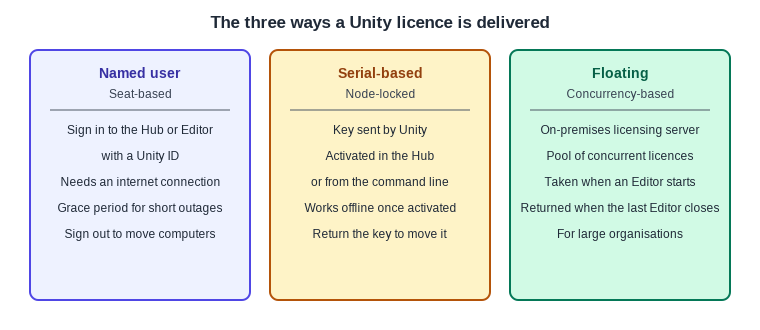
Whichever plan applies, the Editor needs an activated licence. Unity describes three delivery models:
-
Named user licensing is seat based. A person signs in to the Hub or the Editor with a Unity ID and receives every entitlement of the subscriptions of the organisations they belong to. It needs an internet connection, with a grace period for temporary outages; to move to another computer you sign out on the first and sign in on the second. This is the model for Personal and for most Pro seats.
-
Serial-based licensing is node locked. Unity sends a key, which is activated in the Hub or from the command line and is tied to that computer; after the activation it works offline. Returning the key frees it.
-
Floating licensing is concurrency based, for organisations with a pool of seats shared by many people. An on-premises Unity Licensing Server hands a licence to each client when an Editor starts and takes it back when the last Editor on that client closes.
Source: Licensing overview
For Unity Personal the Hub is the only way to activate and return a licence. For the other plans the Hub is recommended and the command line is available for build machines. For a shared build machine, use a serial or a floating licence rather than a personal Unity ID, so that the seat does not depend on one person’s account.
Source: License activation methods
Command-line activation on a build machine
# Activate a serial-based licence on a CI agent (all values come from your secret store,
# never from the repository). Replace the placeholders with the real values.
"$UNITY_EDITOR_PATH" -batchmode -nographics -quit \
  -serial "$UNITY_SERIAL" \
  -username "$UNITY_ACCOUNT_EMAIL" \
  -password "$UNITY_ACCOUNT_PASSWORD" \
  -logFile -

# Return the licence when the job ends, so the seat is free for the next agent.
"$UNITY_EDITOR_PATH" -batchmode -nographics -quit -returnlicense -logFile -The credentials in the snippet are environment variables, and the page never contains a real serial: store them in the secret store of your CI system. Floating licensing is configured differently, through a licensing client configuration file that points at the server; see the Licensing Server documentation in the references.
The Runtime Fee, announced and cancelled
In September 2023 Unity announced a per-install "Runtime Fee" for games above revenue and install thresholds. The announcement was met with strong criticism from developers; the fee was revised and then, on 12 September 2024, cancelled for games customers with immediate effect. Non-gaming Industry customers were not affected by the cancellation. Unity’s explanation was a trade: the Runtime Fee goes away, the Personal ceiling is doubled, the splash screen becomes optional, and the Pro price rises on a predictable yearly schedule. The Editor Software Terms were later updated to remove the language related to the cancelled fee.
Practically, a game that is released in 2026 pays Unity nothing per install or per player; the costs are the seat subscriptions above the threshold, optional services such as ads, cloud services and DevOps, and the platform holders' own fees (consoles, stores). Terms written in 2023 or early 2024 describe a fee that does not exist.
Asset Store licences
The Asset Store is the marketplace for assets that are used in a Unity project; it is described on the Asset Store and Packages page. The licence for assets bought or downloaded from it is separate from the plan that licenses the Editor:
-
Unity’s Asset Store Terms say that assets licensed from the store, whether made by Unity or by third parties, are subject to the standard Asset Store End User License Agreement.
-
Some assets are governed by a separate end user licence of their provider, which is shown with the asset.
-
Components inside an asset can carry third-party software licences, and where those conflict with the terms the third-party licences prevail for those components.
-
Redistribution rights differ between licences, so read the licence text of an asset before shipping it or sharing the project source.
For a studio the working rule is to keep a table of every asset in the project with its licence and its source, next to the Packages manifest, and to read the licence of anything that goes into a shipped game. The shared Bookshelf model and textures of this section, bookshelf.glb and the PNG textures beside it, are original files made for the site and carry no third-party licence.
Choosing a plan: a checklist
-
Total the revenue and funding of the whole organisation, not of the project. If it is near US$200,000 in the period Unity uses, budget for Pro.
-
Count the seats: every person who opens the Editor needs one, and build agents need a serial or a floating licence.
-
Decide whether console or Apple Vision Pro publishing is needed; it determines whether Pro is needed before the threshold.
-
Check which paid services are wanted (version control, build automation, multiplayer, ads) and price them separately.
-
Re-read the pricing page at renewal; Unity has committed to a yearly adjustment.
Common mistakes
-
Using a 2023 article’s thresholds or the Runtime Fee as a reason not to choose Unity. Both are out of date.
-
Treating the splash screen option as a way around the plan thresholds. It is a setting that depends on the plan, not a loophole.
-
Activating a Personal licence on a build server through a personal Unity ID. Use a serial or floating licence for shared machines.
-
Committing a serial, a password or a licence file to version control. Keep them in the secret store of the build system.
-
Assuming an Asset Store asset can be reused in another product without reading its licence.
-
Forgetting that Havok Physics for Unity stopped being bundled with seats from Unity 6.3.
Cost notes
-
Per seat prices are the largest recurring cost; they scale with the number of people who open the Editor, not with the size of the game.
-
Prepaying the year is cheaper than paying monthly: US$2,310 against twelve payments of US$210, which is US$2,520.
-
A floating licence pool is cheaper than named seats when many people use the Editor only occasionally, because the pool is sized for concurrency.
What changed recently
| When | What |
|---|---|
September 2023 |
the Runtime Fee announced for games above install and revenue thresholds |
12 September 2024 |
the Runtime Fee cancelled for games customers, effective immediately |
17 October 2024 (Unity 6) |
Personal ceiling raised from US$100,000 to US$200,000; the splash screen becomes optional for Personal games made with Unity 6 and later |
December 2025 (Unity 6.3 LTS) |
Havok Physics for Unity no longer included with Pro, Enterprise or Industry seats |
12 January 2026 |
Pro and Enterprise prices up by 5 per cent, Pro at US$2,310 per seat per year |
1 March 2026 |
DevOps cloud pricing restructured: unlimited Unity Version Control seats on the public cloud, more free storage, metered egress |
Where the books are outdated
UIA chapter 1 introduces Unity as it was for the 2020.3 LTS release, before the plan changes of 2024 and 2026, so its plan details are historical. In 2026:
| Book (2020.3 era) | Today |
|---|---|
UIA ch. 1: plan names and revenue ceilings of 2021 and 2022 |
Personal up to US$200,000 of revenue and funding; Pro above that, at US$2,310 per seat per year; Enterprise above US$25 million of annual revenue |
UIA ch. 1: the splash screen of the free plan |
The splash screen is optional for Personal projects made with Unity 6 and later |
UIA ch. 1: licence activation |
The Unity Hub is the place to activate and return licences; for Personal it is the only one |
UIA ch. 1: no mention of a per-install fee |
A Runtime Fee was announced in 2023 and cancelled on 12 September 2024; no per-install charge exists |
See also
-
Getting Started: Hub and Editor: install the Hub, pick an Editor version and activate a licence.
-
Build Profiles and Platforms: the settings that depend on the plan, such as console publishing.
-
Asset Store and Packages: the marketplace and its licences.
-
Testing and CI: licences on build agents.
-
Choosing an API or an Engine: how costs and licences enter the decision between an engine and an API.
-
Graphics APIs vs Game Engines: what an engine licence buys.