Resource Loading and Streaming
|
This content was generated with the assistance of AI and should be verified against the official documentation before being relied on in production. |
A game’s assets are bigger than the memory you want to spend on them. Textures for a whole level, meshes at every level of detail and sound banks cannot all sit in RAM, and loading them on the render thread causes hitches. The usual answer is streaming: keep a small working set resident, read what will be needed soon from disk in the background, and release what is no longer needed. Metal gives you three building blocks for it, and this page explains each and how they combine:
-
the I/O command queue (
MTLIOCommandQueue), which reads and decompresses files straight into Metal resources on its own queue; -
sparse textures, which let a texture be larger than the memory behind it by mapping only some of its tiles;
-
heaps (
MTLHeap), which let you suballocate many resources from one allocation and make several of them share the same bytes.
The facts were checked in November 2026. The I/O queue, heaps and heap-based sparse textures date from iOS 16, iPadOS 16, macOS 13,
tvOS 16 and visionOS 1 (heap-based sparse textures arrived earlier, in iOS 13 and macOS 11; the sparse page-size controls came with iOS 16 and macOS 13). Metal 4,
available from the 26 OSes, adds placement sparse textures and queue-level mapping updates with MTL4CommandQueue. The code
needs Xcode 27 (Swift 6.4) to build against the 27 SDKs; the Metal 3 parts also build with older tools. Metal 4 hardware means an
A14 or later or an Apple silicon Mac; the older APIs work on any Metal 3 device.
In the running example (the Bookshelf, a multiplatform SwiftUI app hosting an MTKView, with a Metal 4 path and a Metal 3
fallback) the shelf starts small. Here we grow it into a library: thousands of books whose cover textures cannot all be resident, so the app
streams covers in as the camera approaches a section and evicts them as it leaves. That scene is the motivating case for every
section below. The resource basics (buffers, textures, storage modes) are in
Buffers and Vertex Descriptors and
Textures and Samplers; the general idea of texture streaming and mipmaps is in
Textures, Sampling and Mipmaps.
Fast resource loading with MTLIOCommandQueue
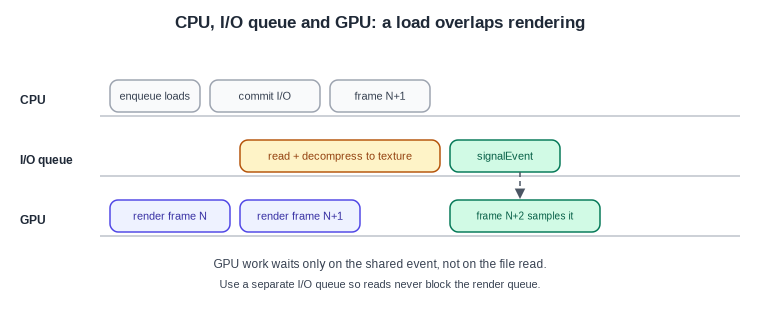
Why a separate queue
Loading with MTKTextureLoader or with Data(contentsOf:) followed by replace(region:...) costs CPU time to read, to decompress and
to copy, and it happens on a thread you manage. The I/O command queue moves the whole job into the system: you describe what to read
from which file into which resource, the system schedules the read (and the decompression) off your threads and, where the hardware
permits, writes straight into the resource, and you learn about completion through an event or a handler. It behaves like a queue of
its own, next to the render queue, so I/O does not block rendering and rendering does not delay I/O.
The objects
| Type | Role |
|---|---|
|
Created by |
|
Configuration: |
|
A file prepared for I/O. |
|
The list of loads. Commands: |
|
|
Queue options
-
Priority orders the I/O queue relative to other system I/O. Use
highfor what the next frame needs (a texture for a door the player is about to open),lowfor prefetching a whole level behind a loading screen. -
Type
concurrentallows commands to overlap,serialruns them in order. A streaming system that does not care about order uses concurrent; a loader whose later commands depend on earlier ones either uses serial or insertsaddBarrier(). -
maxCommandsInFlightandmaxCommandBufferCountcap how much is outstanding. Set them to what your memory for staging can bear. -
Scratch buffer allocator. For compressed files the queue needs scratch memory. By default the system provides it; implement
MTLIOScratchBufferAllocator.makeScratchBuffer(minimumSize:)(returning anMTLIOScratchBufferthat wraps aMTLBuffer) to control the allocation and reuse it.
Compression
The supported codecs are in MTLIOCompressionMethod: zlib, lzfse, lz4, lzma and lzBitmap. You compress an asset offline into
chunks with the C functions of the same family (MTLIOCreateCompressionContext, MTLIOCompressionContextAppendData,
MTLIOFlushAndDestroyCompressionContext, with MTLIOCompressionContextDefaultChunkSize() for the chunk size), then open it with
makeIOFileHandle(url:compressionMethod:) and load from it as if it were raw: offsets refer to the uncompressed data. lz4 and
lzfse decode fastest; lzma gives the smallest files and the slowest decode, so it suits assets shipped once and read rarely. Block
compressed texture formats (ASTC, BC) already shrink a texture, and compressing the file on top usually still gains a little.
A streaming loader
import Metal

/// Loads texture data from an asset file into GPU textures on a dedicated I/O queue.
final class TextureStreamer {
    private let device: MTLDevice
    private let ioQueue: MTLIOCommandQueue
    private let event: MTLSharedEvent
    private var counter: UInt64 = 0
    private var handles: [URL: MTLIOFileHandle] = [:]

    init(device: MTLDevice) throws {
        self.device = device
        let descriptor = MTLIOCommandQueueDescriptor()
        descriptor.priority = .normal
        descriptor.type = .concurrent
        descriptor.maxCommandBufferCount = 16
        ioQueue = try device.makeIOCommandQueue(descriptor: descriptor)
        guard let event = device.makeSharedEvent() else { throw CocoaError(.featureUnsupported) }
        self.event = event
    }

    private func handle(for url: URL) throws -> MTLIOFileHandle {
        if let existing = handles[url] { return existing }
        let handle = try device.makeIOFileHandle(url: url)
        handles[url] = handle
        return handle
    }

    /// Reads one 2D level of raw pixel data into `texture`.
    /// - Returns: the event value that is signalled when the data is in the texture.
    func load(into texture: MTLTexture,
              level: Int,
              from url: URL,
              fileOffset: Int,
              bytesPerRow: Int) throws -> UInt64 {
        let width = max(1, texture.width >> level)
        let height = max(1, texture.height >> level)
        let size = MTLSize(width: width, height: height, depth: 1)

        guard let commandBuffer = ioQueue.makeCommandBuffer() else { throw CocoaError(.fileReadUnknown) }
        commandBuffer.load(texture,
                           slice: 0,
                           level: level,
                           size: size,
                           sourceBytesPerRow: bytesPerRow,
                           sourceBytesPerImage: bytesPerRow * height,
                           destinationOrigin: MTLOrigin(x: 0, y: 0, z: 0),
                           sourceHandle: try handle(for: url),
                           sourceHandleOffset: fileOffset)
        counter += 1
        commandBuffer.signalEvent(event, value: counter)
        commandBuffer.addCompletedHandler { buffer in
            if buffer.status == .error { print("I/O failed: \(String(describing: buffer.error))") }
        }
        commandBuffer.commit()
        return counter
    }

    /// Makes a GPU queue wait for a load, without blocking any thread.
    func makeGPUWait(queue: MTL4CommandQueue, for value: UInt64) {
        queue.waitForEvent(event, value: value)
    }

    /// Whether the data has arrived, for polling in the game loop.
    func isLoaded(_ value: UInt64) -> Bool { event.signaledValue >= value }
}
Source: Metal: Resource loading
Notes on the loader:
-
The texture must exist before the load: create it
privatewithshaderReadusage and the right size, and add it to your residency set (Metal 4) oruseResourcecall (Metal 3). The load writes into it; it does not create it. -
Do not sample the texture until the event has reached the value. Either make the render queue wait (
MTL4CommandQueue.waitForEvent(_:value:), orencodeWaitForEventon a Metal 3 command buffer), or checksignaledValueon the CPU and switch the material from a placeholder texture to the real one, which is the better design for a streamer because the frame never stalls. -
commit()submits;enqueue()only reserves the position in the queue, which fixes the order of two I/O buffers you will commit from different threads. -
An invalid range or a bad file leaves the status at
error; checkerrorin the completed handler. -
Group small reads into one I/O command buffer. Each buffer has a fixed cost; many tiny buffers lose the benefit.
Sparse textures
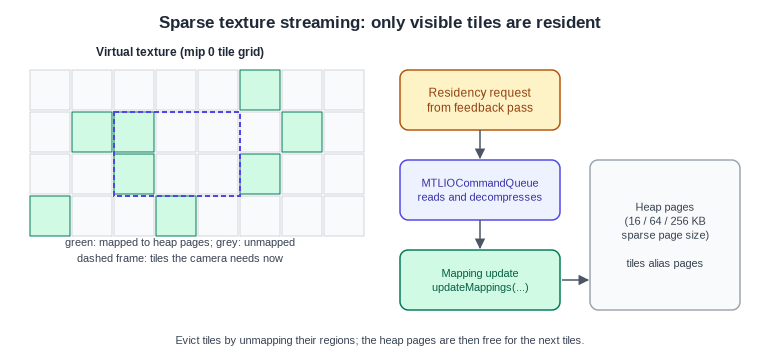
A normal texture needs memory for every texel of every mip level, even if the camera only sees a small part of it. A sparse texture separates the texture’s address space from its memory: it is divided into tiles (the unit of memory, one page of a given size), and you choose which tiles are backed by memory. Unmapped tiles read as zero, or report themselves as not resident to the shader. This is the building block of virtual texturing: a huge texture, such as the terrain or a library wall of cover images, with only the visible, high-resolution tiles resident.
Page sizes and tiles
MTLSparsePageSize offers size16, size64 and size256 (kilobytes). The size of a tile in texels follows from the pixel format and
the page size; ask the device with sparseTileSize(textureType:pixelFormat:sampleCount:sparsePageSize:), which returns an
MTLSize. For rgba8Unorm and a 64 KB page, for instance, a tile covers 128 by 128 texels. Smaller pages give finer
control and less waste; larger pages mean fewer mapping operations and less bookkeeping. Mip levels smaller than a tile cannot be
split, and are stored together in a mip tail that is always resident: firstMipmapInTail tells you where it starts and
tailSizeInBytes how big it is. isSparse tells you the texture is sparse.
Two ways to back a sparse texture
| Kind | How it gets memory | Mapping API | Availability |
|---|---|---|---|
Heap-based sparse |
A heap of type |
|
iOS 13 / macOS 11; page-size control iOS 16 / macOS 13 |
Placement sparse (Metal 4) |
A texture created from a descriptor whose |
|
26 OSes |
The placement kind lets many sparse textures draw their tiles from one heap, so several virtual textures share a single memory pool that you size for the whole scene. That is the model to prefer on Metal 4.
Mapping tiles with Metal 4
import Metal

/// A virtual cover atlas whose tiles are mapped from one pool heap.
final class VirtualCoverAtlas {
    let texture: MTLTexture
    let heap: MTLHeap
    let tile: MTLSize
    let pageSize: Int
    private var freeOffsets: [Int] = []

    init(device: MTLDevice, size: Int, poolMegabytes: Int) throws {
        // 1. A sparse texture with no memory behind it yet.
        let descriptor = MTLTextureDescriptor.texture2DDescriptor(pixelFormat: .rgba8Unorm,
                                                                 width: size, height: size,
                                                                 mipmapped: true)
        descriptor.storageMode = .private
        descriptor.usage = .shaderRead
        descriptor.placementSparsePageSize = .size64
        guard let texture = device.makeTexture(descriptor: descriptor) else {
            throw CocoaError(.featureUnsupported)
        }
        self.texture = texture
        self.tile = device.sparseTileSize(textureType: .type2D, pixelFormat: .rgba8Unorm,
                                          sampleCount: 1, sparsePageSize: .size64)

        // 2. A placement heap whose pages back the tiles.
        let heapDescriptor = MTLHeapDescriptor()
        heapDescriptor.type = .placement
        heapDescriptor.storageMode = .private
        heapDescriptor.size = poolMegabytes << 20
        heapDescriptor.sparsePageSize = .size64
        guard let heap = device.makeHeap(descriptor: heapDescriptor) else {
            throw CocoaError(.featureUnsupported)
        }
        self.heap = heap
        self.pageSize = 64 * 1024
        freeOffsets = stride(from: 0, to: heapDescriptor.size, by: pageSize).map { $0 }
    }

    /// Maps the tile at (tileX, tileY) of mip level 0 and returns the heap offset used.
    func map(tileX: Int, tileY: Int, queue: MTL4CommandQueue) -> Int? {
        guard let offset = freeOffsets.popLast() else { return nil }   // pool exhausted: evict first
        let region = MTLRegion(origin: MTLOrigin(x: tileX * tile.width, y: tileY * tile.height, z: 0),
                               size: MTLSize(width: tile.width, height: tile.height, depth: 1))
        let operation = MTL4UpdateSparseTextureMappingOperation(mode: .map,
                                                                textureRegion: region,
                                                                textureLevel: 0,
                                                                textureSlice: 0,
                                                                heapOffset: offset)
        queue.updateMappings(texture: texture, heap: heap, operations: [operation])
        return offset
    }

    /// Unmaps a tile and returns its page to the pool.
    func unmap(tileX: Int, tileY: Int, heapOffset: Int, queue: MTL4CommandQueue) {
        let region = MTLRegion(origin: MTLOrigin(x: tileX * tile.width, y: tileY * tile.height, z: 0),
                               size: MTLSize(width: tile.width, height: tile.height, depth: 1))
        let operation = MTL4UpdateSparseTextureMappingOperation(mode: .unmap,
                                                                textureRegion: region,
                                                                textureLevel: 0,
                                                                textureSlice: 0,
                                                                heapOffset: heapOffset)
        queue.updateMappings(texture: texture, heap: nil, operations: [operation])
        freeOffsets.append(heapOffset)
    }
}Rules from the documentation that this code relies on:
-
A
nilheap is allowed only for unmap operations; for a map operation the heap must be non-nil and its sparse page size at least the texture’s. -
After a mapping update you must issue a barrier against the
resourceStatestage (MTLStages.resourceState) before commands that use the new mapping, as with any Metal 4 pass dependency. -
The texture’s
sparseTextureTiertells you the capability level of the sparse implementation on this device. -
Mapped tiles contain undefined data until you fill them. Fill them with the I/O queue (loading into the region of the texture), with a blit copy or with a render pass, and signal an event the sampling pass waits for.
Reading sparse textures in a shader
Sampling an unmapped tile must not read garbage. MSL gives two tools: clamp the lod so a sample never goes below the finest resident level, and use the sparse sampling functions, which return the colour together with a residency flag.
#include <metal_stdlib>
using namespace metal;

struct VertexOut {
    float4 position [[position]];
    float2 uv;
};

fragment float4 cover_fragment(VertexOut in [[stage_in]],
                               texture2d<float> cover [[texture(0)]],
                               constant float &minimumResidentLod [[buffer(0)]],
                               device atomic_uint *requestedTiles [[buffer(1)]])
{
    constexpr sampler linearSampler(filter::linear, mip_filter::linear, address::clamp_to_edge);

    // Sample no finer than the level known to be resident.
    sparse_color<float4> result = cover.sparse_sample(linearSampler, in.uv,
                                                      min_lod_clamp(minimumResidentLod));
    if (!result.resident()) {
        // Record a request: the CPU or a compute pass reads these and maps tiles.
        atomic_fetch_add_explicit(requestedTiles, 1u, memory_order_relaxed);
    }
    return result.value();
}A real engine writes the tile identifier (not a counter) into a feedback buffer, gathers the unique requests in a compute pass, and sorts them by distance. The loop is always the same: sample, record what was missing, load it, map it, sample again. Until the tile arrives the shader shows the coarser, resident level, which looks blurry for a few frames instead of black.
Heaps
An MTLHeap is a memory pool. Creating buffers and textures from it with makeBuffer(length:options:) and
makeTexture(descriptor:) is cheaper than creating each on its own, and it lets you control exactly where each lives.
Setting (MTLHeapDescriptor) |
Meaning |
|---|---|
|
|
|
Total bytes. Ask |
|
Fixed for every resource in the heap. |
|
Page size for sparse resources allocated from the heap. |
Heaps report size, usedSize, currentAllocatedSize and maxAvailableSize(alignment:); the last one is how to know whether an allocation
will fit before you try. setPurgeableState(_:) marks a heap’s contents as discardable under memory pressure.
Placement heaps and aliasing
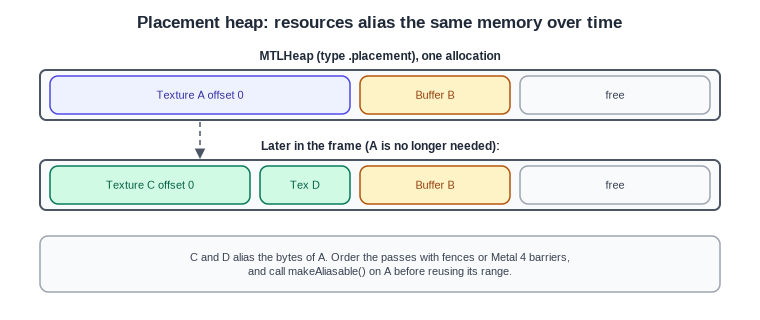
In a placement heap you create resources with makeTexture(descriptor:offset:) and makeBuffer(length:options:offset:) at offsets
you choose. Two resources may occupy the same range as long as they are not alive at the same time. The pattern is the transient
render target: a bloom downsample chain used in one pass and a particle sort buffer used in another can share a block, which can cut
the frame’s memory in half.
import Metal

func makeTransientHeap(device: MTLDevice,
                       bloom: MTLTextureDescriptor,
                       sortBytes: Int) -> (heap: MTLHeap, bloomTexture: MTLTexture, sortBuffer: MTLBuffer)? {
    let bloomSize = device.heapTextureSizeAndAlign(descriptor: bloom)
    let sortSize = device.heapBufferSizeAndAlign(length: sortBytes, options: .storageModePrivate)
    // Both resources start at offset 0 and overlap; the size is the larger of the two.
    let descriptor = MTLHeapDescriptor()
    descriptor.type = .placement
    descriptor.storageMode = .private
    descriptor.hazardTrackingMode = .untracked          // you order the passes yourself
    descriptor.size = max(bloomSize.size, sortSize.size)

    guard let heap = device.makeHeap(descriptor: descriptor),
          let bloomTexture = heap.makeTexture(descriptor: bloom, offset: 0),
          let sortBuffer = heap.makeBuffer(length: sortBytes, options: .storageModePrivate, offset: 0)
    else { return nil }
    return (heap, bloomTexture, sortBuffer)
}
// Order the passes so the bloom textures are dead before the sort buffer is written, with a fence
// or a Metal 4 barrier that includes MTL4VisibilityOptions.resourceAlias, and call
// bloomTexture.makeAliasable() when the aliasing is intended.
Source: MTLHeap
Aliasing rules to follow:
-
Use
.untrackedhazard tracking on the heap and order the passes yourself with fences or Metal 4 barriers. Tracked resources would add edges you do not want for resources that overlap. -
A barrier whose visibility options include
resourceAliasmakes the second user see the memory as the first left it, so the new resource must be cleared or written before it is read. -
makeAliasable()on a resource tells Metal future allocations may reuse its memory. Do not touch the resource afterwards. -
Large or long-lived resources (the mesh and texture streaming pool) are the opposite case: allocate them once and keep them.
Argument-buffer and bindless use of heaps (useHeap, residency sets) is in
Argument Buffers and Bindless Resources.
A streaming design for the Bookshelf library
-
Pool. One placement heap of 256 MB holds all cover tiles; each cover atlas is a placement sparse texture.
-
Request. The cover fragment shader writes missing tile identifiers into a feedback buffer; a compute pass deduplicates them (see Compute Kernels).
-
Load. The CPU reads the feedback from a frame two or three frames old, picks the nearest tiles, and queues I/O command buffers that load the data into the mapped region.
-
Map. After the data lands (event reached) the mapping update enqueues on the render queue, followed by a
resourceStatebarrier. -
Evict. When the pool is nearly full, unmap tiles that have not been requested for many frames, least recently used first.
-
Fall back. Always keep the mip tail and a few coarse levels resident so a miss shows a blurry cover, not a hole.
Mesh data streams the same way: LOD chains live in the file, and the I/O queue loads vertex ranges into buffers allocated from the heap. Mesh Shaders covers how to render with them.
Where the books are outdated
| Book | Statement | Today |
|---|---|---|
MBT ch. 25 (Metal by Tutorials, 4th ed.) |
Heaps are taught together with argument buffers under the Metal 3 resource model. |
Metal 4 uses explicit residency sets and queue-level barriers, and adds placement sparse textures. The older API still works. |
CLA ch. 6 (Metal Programming Guide) |
Lists PVRTC among the compressed texture formats. |
PVRTC is deprecated (iOS 18 / macOS 15); use ASTC, or BC on Mac. For streaming, add |
Fast resource loading and sparse textures are among the official concepts that neither book covers, so this page is the reference for them.
Common mistakes and performance notes
-
Sampling before the load finishes. The render queue must wait for the event, or the material must keep the placeholder until
signaledValueis reached. -
Forgetting residency. Resources loaded into and sampled from must be in a residency set or
useResourcecall. -
Tiny I/O buffers. Batch reads; one command buffer with many loads beats many one-load buffers.
-
Mapping without a barrier. Issue the
resourceStatebarrier after a mapping update. -
Fragmented pool. Use fixed-size pages (one tile size) so freed pages fit any new tile.
-
Streaming on the main thread. Mapping and I/O calls are cheap to issue, but gather feedback, scoring and file reading on a worker.
-
Ignoring the mip tail. It is always resident and counts toward memory.
-
Large pages for small textures. A 256 KB page wastes memory for a small texture; match the page size to the content.
-
Debugging. The Metal debugger’s Memory tab shows heap usage and the dependency viewer shows which passes read a texture; see Debugging and Profiling.
References
-
Resource loading: https://developer.apple.com/documentation/metal/resource-loading
-
MTLIOCommandQueue: https://developer.apple.com/documentation/metal/mtliocommandqueue
-
MTLIOCommandBuffer: https://developer.apple.com/documentation/metal/mtliocommandbuffer
-
MTLIOCommandQueueDescriptor: https://developer.apple.com/documentation/metal/mtliocommandqueuedescriptor
-
MTLIOCompressionMethod: https://developer.apple.com/documentation/metal/mtliocompressionmethod
-
Memory heaps: https://developer.apple.com/documentation/metal/memory-heaps
-
MTLHeap: https://developer.apple.com/documentation/metal/mtlheap
-
MTLHeapDescriptor: https://developer.apple.com/documentation/metal/mtlheapdescriptor
-
MTLSparsePageSize: https://developer.apple.com/documentation/metal/mtlsparsepagesize
-
MTLResourceStateCommandEncoder: https://developer.apple.com/documentation/metal/mtlresourcestatecommandencoder
-
MTL4CommandQueue: https://developer.apple.com/documentation/metal/mtl4commandqueue
-
MTL4UpdateSparseTextureMappingOperation: https://developer.apple.com/documentation/metal/mtl4updatesparsetexturemappingoperation
-
Metal Shading Language specification: https://developer.apple.com/metal/Metal-Shading-Language-Specification.pdf
-
Metal Feature Set Tables: https://developer.apple.com/metal/Metal-Feature-Set-Tables.pdf
-
Metal by Tutorials (publisher page): https://www.kodeco.com/books/metal-by-tutorials
-
Metal Programming Guide (publisher page): https://www.informit.com/store/metal-programming-guide-tutorial-and-reference-via-9780134668949