1D Discrete Convolution
| This documentation was generated with the assistance of AI. Please report any inaccuracies. |
Convolution combines a signal with a kernel by sliding the (reversed) kernel across the signal and, at every
position, summing the products of overlapping samples. It is the standard discrete convolution operation
described in Wikipedia contributors, Convolution, and implemented as
Convolver1D in the com.irurueta.numerical.signal.processing package.
The convolution sum
For a signal and a kernel , the discrete convolution is defined as:
Convolver1D computes exactly this sum, with the kernel index playing the role of and an extra
offset — the kernel center — controlling which output sample aligns with which part of the kernel.
For every output position :
where is the configured kernelCenter. As increases, the signal index (i - c) - j decreases —
the kernel is effectively applied in reverse relative to the sliding position, which is what distinguishes
convolution from plain correlation. The result has length
(the "full" convolution, in the same sense as NumPy’s or MATLAB’s conv(…, 'full')), since that is the range
of positions at which the kernel overlaps the signal by at least one sample.
The kernelCenter value determines where edge extension is needed:
-
kernelCenter = 0(the default) makes the kernel purely "trailing": edge extension is only required near the end of the result. -
kernelCenter = kernel.length / 2centers the kernel: edge extension is required symmetrically at both the beginning and the end of the result, which avoids introducing a phase shift when the kernel is meant to be a symmetric filter (e.g. a smoothing or blurring kernel).
Edge extension
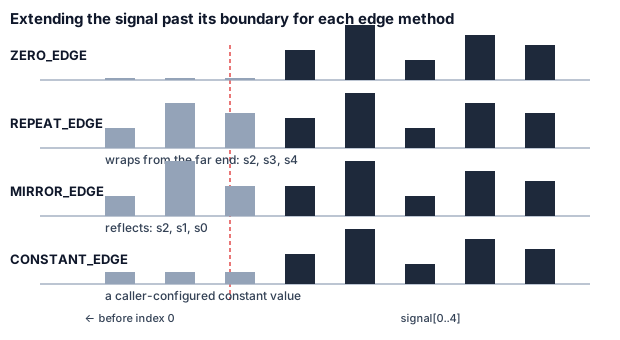
Every kernel position that would require a signal sample outside [0, signal.length) is resolved by one of four
ConvolverEdgeMethod strategies:
| Mode | Behavior for a position pos outside signal boundaries |
|---|---|
|
Returns |
|
Returns a caller-configured constant ( |
|
Wraps around: |
|
Reflects the signal at each boundary, alternating orientation every |
Library implementation
Convolver1D can be used either as a configured instance or through static one-shot overloads:
-
Instance usage:
setSignal(double[]),setKernel(double[]),setKernelCenter(int),setEdgeMethod(ConvolverEdgeMethod),setConstantValue(double), thenconvolve()(returns a new array) orconvolve(double[] result)(writes into a caller-supplied buffer of the required length).isReady()checks that a signal and kernel are set and thatkernelCenterlies within the kernel’s bounds. -
Static usage: many overloads of
Convolver1D.convolve(signal, kernel, …), from the simplestconvolve(signal, kernel)(zero-edge,kernelCenter = 0) up to the fully-parameterized form acceptingkernelCenter,edgeMethod,constantValue, an output buffer, and a listener. -
Convolver1DListener— optional; reportsonStartConvolution(),onConvolveProgressChange(float), andonFinishConvolution(), useful for tracking progress on large signals.
Use kernelCenter = 0 for causal/one-sided kernels (e.g. exponential smoothing), and
kernelCenter = kernel.length / 2 for symmetric kernels (e.g. a Gaussian or moving-average blur) to keep the
output aligned with the input rather than shifted. Pick MIRROR_EDGE or REPEAT_EDGE over the default
ZERO_EDGE when convolving near a boundary would otherwise pull the result toward zero (e.g. smoothing a
signal that does not naturally decay at its ends).
|
Example
Applying a 3-tap centered moving-average filter to a signal, extending the signal by mirroring at the edges instead of assuming it drops to zero:
final var signal = new double[]{1.0, 2.0, 3.0, 10.0, 3.0, 2.0, 1.0};
final var kernel = new double[]{1.0 / 3.0, 1.0 / 3.0, 1.0 / 3.0};

final var convolver = new Convolver1D(signal, kernel);
convolver.setKernelCenter(1); // center the 3-tap kernel on each output sample
convolver.setEdgeMethod(ConvolverEdgeMethod.MIRROR_EDGE);

final var smoothed = convolver.convolve();| Class | Javadoc | Source |
|---|---|---|
|
||
|