Time Constraints and Validity Periods
|
This content was generated with the assistance of AI and should be verified against the official documentation before being relied on in production. |
Think of a rental agreement. At any date you can ask who lives in the flat, and the answer must be exactly one tenant: when a new tenant moves in on the first of the month, the old agreement ends on the last day of the month before. A parking permit works differently, because a person can hold several at once, and a gym card may simply not exist for most people. SAP Human Resources applies the same thinking to employee data. Every record of an infotype is valid for a period, and a rule called the time constraint decides whether a record must exist, whether two records may be valid on the same day and whether holes in the history are allowed. This page explains those rules with a timeline picture and with the real records of one employee, so that the messages a newcomer meets in HR master data (a record that was delimited, a record that cannot be deleted) make sense. It is written against SAP S/4HANA 2025 FPS02 on premise and Private Edition, where the HR functions come from SAP HCM for SAP S/4HANA (H4S4), a separately licensed component. The rules are the same as in the older SAP ERP HCM. SAP SuccessFactors keeps its history in a different data model that later pages cover.
Before you read
-
Infotypes: what an infotype, a record and a subtype are, and the short table of time constraints that this page builds on.
-
Enterprise and Personnel Structure: the values that infotype 0001 stores for Ana Torres.
-
Organizational Management: objects there have a validity period too, kept in infotype 1000.
Key terms
-
Validity period: the span of days, from a start date to an end date, in which one infotype record is valid.
-
Time constraint: the rule of an infotype that says whether a record must exist, how many records may be valid at one time and whether they may overlap.
-
Delimitation: setting the end date of an existing record, which the system does automatically when a new record starts.
-
Subtype: a subdivision of an infotype, such as an address type, which can carry a time constraint of its own.
-
High date: the date 31.12.9999 that stands for "no planned end".
-
Retroactive accounting: recalculating payroll for periods that were already paid, because master data changed for the past.
The example used on this page
All HR pages use one fictitious business, Example Trading Co. Every key, name, number and date is an invented example
value, not a value delivered by SAP. Dates are written DD.MM.YYYY as an SAP screen shows them, and the high date is
31.12.9999. This page uses Ana Torres, personnel number 00001234, hired 01.03.2024, and her Organizational Assignment
record (infotype 0001) that changes from 01.07.2026, the same change as on the Infotypes page. Where a record is needed
that the shared example does not contain, such as a power of attorney, a temporary address or a second record of a time
constraint 2 infotype, the page says that it extends the example and that its dates are made up.
A validity period is a start date and an end date
Each infotype record is stored with two dates: a start date and an end date. In the database tables PAnnnn and in ABAP
code they are the fields BEGDA and ENDDA. SAP Help lists the validity period among the keys of these tables, next to the
client, personnel number, subtype, object ID, lock indicator and sequential number, and shows that an internal table of
an infotype is declared in code with the clause VALID BETWEEN BEGDA AND ENDDA. The end date of a record that has no
planned end is the high date, 31.12.9999.
Both dates count as valid days. A record that starts on BEGDA and ends on ENDDA covers every day from BEGDA to ENDDA, including both. Written as an interval of days, a record is with the start date (BEGDA) and the end date (ENDDA), and the number of days it covers is
where the dates are counted as days. Ana’s first organizational assignment starts on 01.03.2024 and ends on 30.06.2026. It covers 01.03.2024 to 30.06.2026 inclusive, which is 852 days, (the formula gives 30.06.2026 minus 01.03.2024 plus one day, counted in days).
Two records overlap exactly when each one starts no later than the other one ends:
and two records follow each other without a gap when the second starts the day after the first ends:
Ana’s two records fit that rule: the first ends on 30.06.2026, the second starts on 01.07.2026, and 30.06.2026 plus one day is 01.07.2026. Everything else on this page is a rule about which of these three statements (overlap, gap, no gap) a time constraint demands, allows or forbids. The formulas are an aid to reading the rules, not something SAP shows on screen.
The time constraints at a glance
The time constraint is a property of an infotype, or of one of its subtypes. SAP Help says that it defines whether an infotype record must exist for an employee, whether further records of the same infotype may exist and whether those records may overlap in their validity periods. When you enter data, the system checks the input against the time constraint and reacts either by delimiting data records automatically or by issuing an error message. SAP describes the purpose as guaranteeing that exactly the data needed to process the employee correctly is available, preventing incompatible data and preventing gaps in the data history.
The Infotypes page already lists every value in a table. This page does not repeat the table. The picture below shows the same rules as bars on one time axis, one row per time constraint, so that a record is a stretch of time and a rule is a statement about how the stretches may sit next to each other. The arrow on a bar means that it ends on the high date.
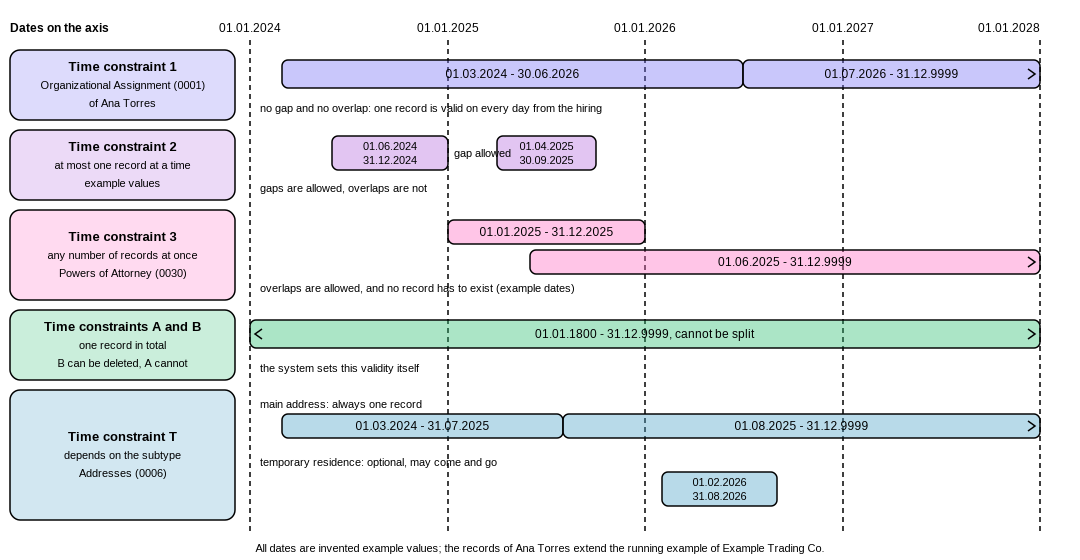
The rows of the picture, from top to bottom:
-
Time constraint 1. The bars touch and never overlap. This is Ana’s Organizational Assignment (0001): the record from 01.03.2024 to 30.06.2026 is followed by the record from 01.07.2026 to 31.12.9999.
-
Time constraint 2. The bars never overlap, but the picture may show a gap, and a record need not exist at all. The two bars are example values.
-
Time constraint 3. The bars may overlap. The picture shows two Powers of Attorney (0030) records with example dates, because SAP’s own example for this constraint is that an employee can hold several powers of attorney at once.
-
Time constraints A and B. One bar only, from 01.01.1800 to 31.12.9999. The system sets this period and it cannot be subdivided.
-
Time constraint T. The rule depends on the subtype. The picture shows two lanes of the Addresses infotype (0006) with example dates: one record at a time for the main address, which SAP says the constraint can guarantee, and an optional temporary residence.
What each constraint means in practice
Time constraint 1: always exactly one record
For the entire time that the employee works at the enterprise, exactly one valid record must exist, and the records must not overlap. SAP Help adds that the system uses the start date of a new record as the delimitation date of the old one, and that gaps are allowed only between the employee’s entry date and the start date of the first record. SAP recommends time constraint 1 for every infotype with information that must be available at all times, in particular personal data and organizational assignment data. Its example is the Organizational Assignment (0001), which the system needs for all business processes and which must be unique, so exactly one record may exist at the same time.
For Ana the entry date is 01.03.2024, the hiring date. If her first Organizational Assignment record started on 01.04.2024, the month from 01.03.2024 to 31.03.2024 would be a gap, and SAP Help allows that kind of gap, but only at the start of the history. In the example the first record starts on the entry date, so the history has no gap at all, and the two records together give a continuous history, formally without a day missing between them.
Time constraint 2: at most one record
At most one record may be valid at any time. Records must not overlap, but a record need not exist, which means that gaps are allowed. When a new record is created, the system delimits the previous record if one exists, and it issues a message when it does so. A record of an infotype with time constraint 2 is therefore optional data that is never ambiguous.
The following is an extension of the example with made-up dates, for an infotype with time constraint 2 and no named infotype. Suppose Ana had one such record from 01.01.2025 and that a new record starts on 01.06.2025. The old record may not stay valid up to 31.12.9999 because the two would overlap on the days from 01.06.2025 on, so the system delimits it to the day before the new start, 31.05.2025, and issues a message. The old record then covers 01.01.2025 to 31.05.2025, which is 31 + 28 + 31 + 30 + 31 = 151 days.
Time constraint 3: any number of records
Any number of valid records can exist at the same time and the records do not conflict with each other. A record need not exist. SAP’s example is the Powers of Attorney infotype (0030): an employee can hold several, so any number of records can exist at the same time, and since not every employee has one, a record does not have to exist.
The following extends the example with made-up dates. Suppose Ana is granted a power of attorney from 01.01.2025 to 31.12.2025 and a second one from 01.06.2025 with no planned end. The two records overlap, and with time constraint 3 that is allowed. Using the overlap rule, and are both true, and the shared period 01.06.2025 to 31.12.2025 has 30 + 31 + 31 + 30 + 31 + 30 + 31 = 214 days.
With time constraint 2 the same entry would have delimited the first record on 31.05.2025 instead, which is the reason the choice of time constraint depends on whether the data is naturally one-at-a-time or parallel.
Time constraints A and B: one record for all time
An infotype with time constraint A or B has no more than one record. The system assigns it the validity period 01.01.1800 to 31.12.9999 automatically, and this period cannot be subdivided. The two differ in one point: a record with time constraint A cannot be deleted, and a record with time constraint B can. SAP Help gives no example infotype on that page, so this page names none.
Time constraint T: the subtype decides
A record with time constraint T takes its constraint from the subtype. SAP Help explains the benefit with the Addresses infotype: because each subtype can get its own time constraint, the system can make sure that a main address always exists and still lets you enter temporary residences if necessary. The Infotypes page shows how this combines with the object identification when parallel histories are needed inside one subtype, as with several children in the Family Member/Dependents infotype (0021).
Time management is stricter in one way
Time Management has the same idea but works differently in the details. SAP Help for Time Management states that it defines rules for entering new time records and for their effect on existing records, because time records often collide. It does this with three building blocks:
-
Time constraint classes, which are assigned to the time infotypes and subtypes and define the collision rules for each.
-
Time constraint tables: each time infotype is linked to one, and it defines what collisions are allowed between the new record and every other infotype or subtype it could collide with.
-
Time constraint indicators, one per collision relationship, which decide whether the new record is admitted, whether the system issues a warning, or whether it rejects the record with an error message.
SAP Help also says that of the three main master data time constraints, Time Management fits best with time constraint 3, which allows both gaps and collisions. The master data checks work at the level of a day. Time Management needs checks at the level of an hour. Time constraint Z exists only for time management infotype records, and the constraint of a time infotype record is defined in the subtype. For the time records of Chloe Martin, who works in shifts, the collision rules of Time Management therefore apply, not the day-level rules of this page. A later page of this section treats time management.
How the system delimits records
Delimiting means setting the end date of an existing record. SAP Help describes two situations.
When you create a record in an infotype with time constraint 1 or 2, the system uses the start date of the new record to end the previous one. The following steps show it for Ana, as an extension of the example in which the new Organizational Assignment record starts on 01.07.2026. They require an SAP system; not run here.
-
An administrator opens HR master data maintenance for personnel number
00001234, chooses Organizational Assignment (0001) and creates a record, which SAP Help describes as the path Human Resources, Personnel Management, Administration, HR Master Data, Maintain, then Edit, Create. -
SAP’s note on changing records says that organizational assignment data should not be changed directly in infotype 0001, and should instead be changed during the Organizational Reassignment personnel action type. The steps here show the record level, which is what the system checks either way.
-
The new record starts on 01.07.2026. The system sets the end date of the old record to 30.06.2026, because the end date is the new start date minus one day, and the new record runs to 31.12.9999.
The outcome is the table already shown on the Infotypes page: record 1 from 01.03.2024 to 30.06.2026, delimited by the system, and record 2 from 01.07.2026 to 31.12.9999. No gap and no overlap exist on any day of the history.
The second situation is that an administrator ends a record on purpose, with no successor. For payroll-relevant records SAP Help describes the Delete function with a From date: you choose Delete for the record and enter the date from which the record should no longer be valid. The same page says that records with time constraint 1, such as Basic Pay (0008), cannot be deleted at all, because a record must exist at all times. If you still want to end one, you create a new record of the same infotype that exists only to end the old one, and its From date is the date as of which the old record is no longer valid.
Corrections, deletions and the past
A change to the past has a price in payroll. SAP Help gives an example in which a special payment stored in Recurring
Payments/Deductions (0014) should have ended on 01.03.2004, while the last payroll run had already happened on
30.04.2004. To make the end date effective, the record valid from that date is deleted through the Delete function with
01.03.2004 in the From field, and a retroactive accounting run must then be performed for the employee for the period from
01.03.2004, which is the retroactive accounting date. For Example Trading Co. the same reasoning applies to Ana’s payroll
area E1: when a record that payroll used is delimited for a period that is already paid, the payroll for those months is
recalculated. The payroll pages of this section treat retroactive accounting in detail.
Deleting is a different act from delimiting. SAP Help says that deleting a current infotype record can be recorded for later historical evaluation only if the general log system is activated, which creates a document that records the deletion. SAP’s example of deleting an incorrect record is a Family/Related Person (0021) record entered for the wrong employee. That record is deleted for the chosen subtype with Delete, confirmed a second time, which is a correction of a mistake and not the end of a validity period.
To see which records exist for a period, SAP Help describes entering a Period on the initial screen of the display or maintenance transaction and choosing Maintain overview from the Goto menu, which then lists all the records valid in that period. Whether the period of Maintain overview is carried over is a Customizing setting under Personnel Administration, Setting Up Procedures, Infotypes, Set Up Infotypes.
What older books show, and what has changed
The book SAP ERP HCM: Technical Principles and Programming, 1st edition (2013), describes the same time constraints 1, 2, 3, A, B and T from a developer’s point of view. It says that for time constraint 1 an old record is delimited automatically when a new one is created, and that deleting such a record is impossible and gives an error message because no gaps are allowed. It also explains that Organizational Management infotypes get their time constraint in a Customizing table and that three constraints, 1, 2 and 3, exist there, and that every infotype structure carries the begin date BEGDA and the end date ENDDA. Those rules are the same in the current documentation and are what this page teaches.
What has changed is the product around them. The book describes SAP ERP HCM. In SAP S/4HANA the same functions come as SAP HCM for SAP S/4HANA, which SAP says needs a separate license and which, since SAP S/4HANA 2025, can no longer run in compatibility mode. The current documentation also describes the Z constraint and the collision checks of Time Management in their own chapter, which this page only summarizes. The book’s Customizing table names and screen figures were not compared with the current release, so check them against the in-system documentation of your release before relying on them. SAP SuccessFactors, the cloud alternative, has a different data model that later pages cover.
Summary
-
Every infotype record is valid for a period from BEGDA to ENDDA, both days included, and 31.12.9999 means no planned end.
-
The time constraint of the infotype or subtype decides whether a record must exist, whether records may overlap and whether gaps are allowed. Time constraint 1 demands exactly one record all the time, 2 allows at most one and permits gaps, 3 allows any number, A and B allow one record for 01.01.1800 to 31.12.9999 that A makes undeletable, T takes the rule from the subtype and Z is for time management.
-
When a record starts, the system ends the old record on the day before, as for Ana’s Organizational Assignment: 30.06.2026 and 01.07.2026 follow each other, and the first record covers 852 days.
-
A record with time constraint 1 cannot be deleted. To end it you create a new record that only delimits the old one.
-
Changing the past can force a retroactive accounting run, and deleting a record is a different act from delimiting it.
-
Time Management uses its own collision rules with constraint classes, tables and indicators, and checks by the hour.
Try it
To do this by hand, follow the guide Model Employee Records with Validity Periods: it stores employee records with validity periods and time constraints.